Vida Ha & Holden Karau - Strata SJ 2015
Everyday I’m Shufflin
Tips for Writing Better Spark Jobs
Who are we?
Holden Karau
● Current: Software Engineer at Databricks.
● Co-author of “Learning Spark”.
● Past: Worked on search at Foursquare & Engineer @ Google.
Vida Ha
● Current: Solutions Engineer at Databricks.
● Past: Worked on scaling & distributed systems as a Software
Engineer at Square and Google.
Our assumptions
● You know what Apache Spark is.
● You have (or will) use it.
● You want to understand Spark’s internals, not
just it’s API’s, to write awesomer* Spark jobs.
*awesomer = more efficient, well-tested,
reusable, less error-prone, etc.
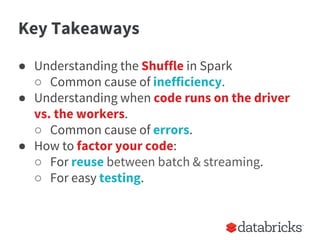
Key Takeaways
● Understanding the Shuffle in Spark
○ Common cause of inefficiency.
● Understanding when code runs on the driver
vs. the workers.
○ Common cause of errors.
● How to factor your code:
○ For reuse between batch & streaming.
○ For easy testing.
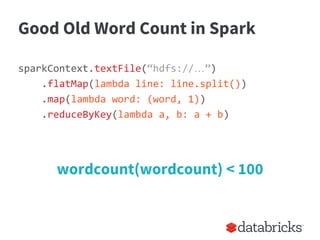
Good Old Word Count in Spark
sparkContext.textFile(“hdfs://…”)
.flatMap(lambda line: line.split())
.map(lambda word: (word, 1))
.reduceByKey(lambda a, b: a + b)
wordcount(wordcount) < 100
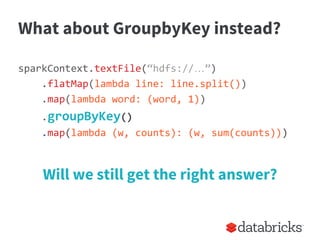
What about GroupbyKey instead?
sparkContext.textFile(“hdfs://…”)
.flatMap(lambda line: line.split())
.map(lambda word: (word, 1))
.groupByKey()
.map(lambda (w, counts): (w, sum(counts)))
Will we still get the right answer?
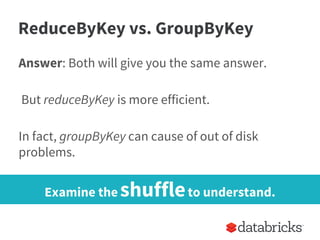
ReduceByKey vs. GroupByKey
Answer: Both will give you the same answer.
But reduceByKey is more efficient.
In fact, groupByKey can cause of out of disk
problems.
Examine the shuffleto understand.
sparkContext.textFile(“hdfs://…”)
.flatMap(lambda line: line.split())
.map(lambda word: (word, 1))
[reduceByKey or groupByKey]
...
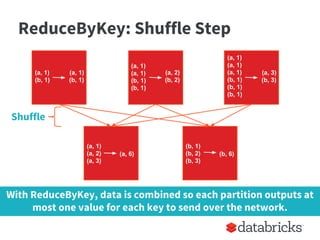
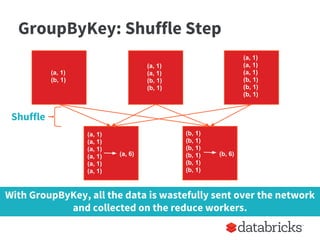
What’s Happening in Word Count
Same
Worker
Node
Triggers
a shuffle
of data
Shuffle occurs to transfer all data with the same key
to the same worker node.
(a, 1)
(a, 2)
(a, 3)
(b, 1)
(b, 2)
(b, 3)
(a, 1)
(b, 1)
(a, 1)
(a, 1)
(b, 1)
(b, 1)
(a, 1)
(a, 1)
(a, 1)
(b, 1)
(b, 1)
(b, 1)
(a, 1)
(b, 1)
(a, 2)
(b, 2)
(a, 3)
(b, 3)
(a, 6) (b, 6)
ReduceByKey: Shuffle Step
Shuffle
With ReduceByKey, data is combined so each partition outputs at
most one value for each key to send over the network.
(a, 1)
(a, 1)
(a, 1)
(a, 1)
(a, 1)
(a, 1)
(b, 1)
(b, 1)
(b, 1)
(b, 1)
(b, 1)
(b, 1)
(a, 1)
(b, 1)
(a, 1)
(a, 1)
(b, 1)
(b, 1)
(a, 1)
(a, 1)
(a, 1)
(b, 1)
(b, 1)
(b, 1)
(a, 6) (b, 6)
Shuffle
With GroupByKey, all the data is wastefully sent over the network
and collected on the reduce workers.
GroupByKey: Shuffle Step
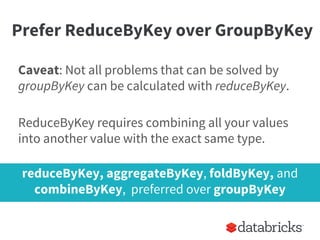
Prefer ReduceByKey over GroupByKey
Caveat: Not all problems that can be solved by
groupByKey can be calculated with reduceByKey.
ReduceByKey requires combining all your values
into another value with the exact same type.
reduceByKey, aggregateByKey, foldByKey, and
combineByKey, preferred over groupByKey
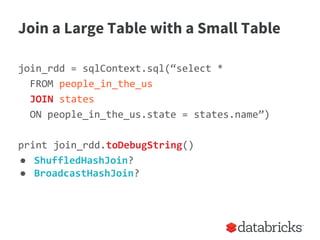
Join a Large Table with a Small Table
join_rdd = sqlContext.sql(“select *
FROM people_in_the_us
JOIN states
ON people_in_the_us.state = states.name”)
print join_rdd.toDebugString()
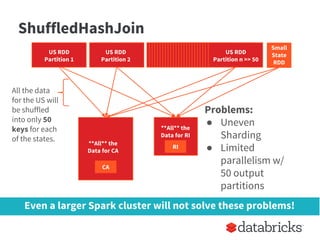
● ShuffledHashJoin?
● BroadcastHashJoin?
Even a larger Spark cluster will not solve these problems!
ShuffledHashJoin
US RDD
Partition 1
US RDD
Partition 2
US RDD
Partition n >> 50
Problems:
● Uneven
Sharding
● Limited
parallelism w/
50 output
partitions
Small
State
RDD
US RDD
Partition 2
US RDD
Partition 2
**All** the
Data for CA
**All** the
Data for RI
CA
RI
All the data
for the US will
be shuffled
into only 50
keys for each
of the states.
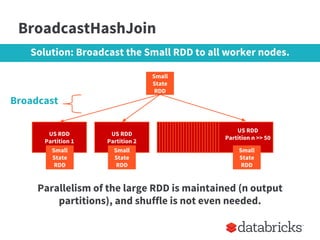
BroadcastHashJoin
Parallelism of the large RDD is maintained (n output
partitions), and shuffle is not even needed.
US RDD
Partition 1
US RDD
Partition 2
Small
State
RDD
US RDD
Partition n >> 50
Small
State
RDD
Small
State
RDD
Small
State
RDD
Solution: Broadcast the Small RDD to all worker nodes.
Broadcast
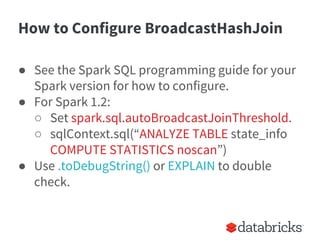
How to Configure BroadcastHashJoin
● See the Spark SQL programming guide for your
Spark version for how to configure.
● For Spark 1.2:
○ Set spark.sql.autoBroadcastJoinThreshold.
○ sqlContext.sql(“ANALYZE TABLE state_info
COMPUTE STATISTICS noscan”)
● Use .toDebugString() or EXPLAIN to double
check.
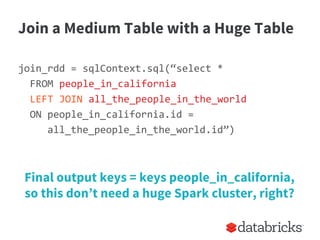
Join a Medium Table with a Huge Table
join_rdd = sqlContext.sql(“select *
FROM people_in_california
LEFT JOIN all_the_people_in_the_world
ON people_in_california.id =
all_the_people_in_the_world.id”)
Final output keys = keys people_in_california,
so this don’t need a huge Spark cluster, right?
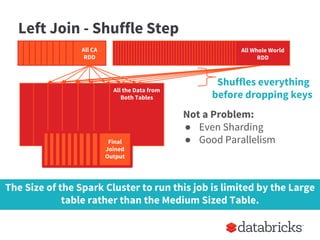
Left Join - Shuffle Step
Not a Problem:
● Even Sharding
● Good Parallelism
Whole World
RDD
All Whole World
RDD
All CA
RDD
US RDD
Partition 2
All the Data from
Both Tables
Final
Joined
Output
The Size of the Spark Cluster to run this job is limited by the Large
table rather than the Medium Sized Table.
Shuffles everything
before dropping keys
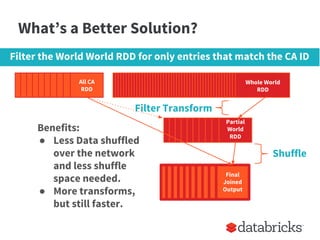
What’s a Better Solution?
Whole World
RDD
Whole World
RDD
All CA
RDD
Final
Joined
Output
Filter the World World RDD for only entries that match the CA ID
Partial
World
RDD
Filter Transform
Benefits:
● Less Data shuffled
over the network
and less shuffle
space needed.
● More transforms,
but still faster.
Shuffle
What’s the Tipping Point for Huge?
● Can’t tell you.
● There aren’t always strict rules for optimizing.
● If you were only considering two small columns
from the World RDD in Parquet format, the
filtering step may not be worth it.
You should understand your data and it’s unique properties in
order to best optimize your Spark Job.
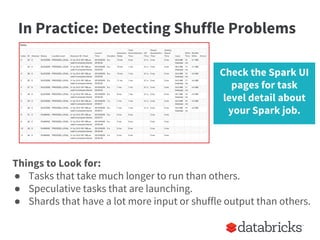
In Practice: Detecting Shuffle Problems
Things to Look for:
● Tasks that take much longer to run than others.
● Speculative tasks that are launching.
● Shards that have a lot more input or shuffle output than others.
Check the Spark UI
pages for task
level detail about
your Spark job.
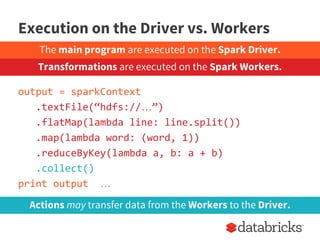
Execution on the Driver vs. Workers
output = sparkContext
.textFile(“hdfs://…”)
.flatMap(lambda line: line.split())
.map(lambda word: (word, 1))
.reduceByKey(lambda a, b: a + b)
.collect()
print output …
Actions may transfer data from the Workers to the Driver.
The main program are executed on the Spark Driver.
Transformations are executed on the Spark Workers.
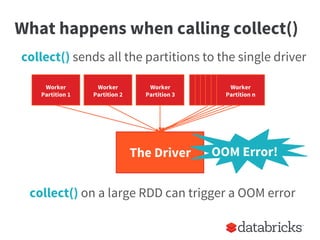
What happens when calling collect()
collect() on a large RDD can trigger a OOM error
collect() sends all the partitions to the single driver
Worker
Partition 1
Worker
Partition 2
Worker
Partition 3
Worker
Partition n
The Driver OOM Error!
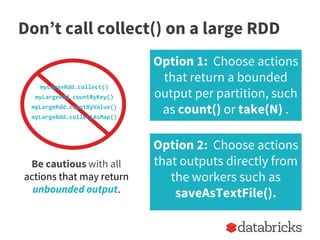
Don’t call collect() on a large RDD
myLargeRdd.collect()
myLargeRdd.countByKey()
myLargeRdd.countByValue()
myLargeRdd.collectAsMap()
Be cautious with all
actions that may return
unbounded output.
Option 1: Choose actions
that return a bounded
output per partition, such
as count() or take(N) .
Option 2: Choose actions
that outputs directly from
the workers such as
saveAsTextFile().
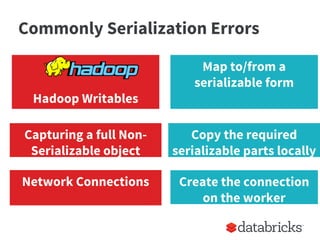
Commonly Serialization Errors
Hadoop Writables
Capturing a full Non-
Serializable object
Map to/from a
serializable form
Copy the required
serializable parts locally
Network Connections Create the connection
on the worker
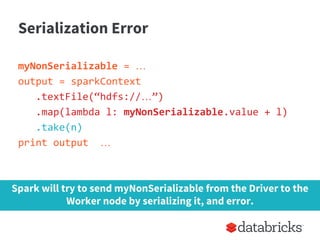
Serialization Error
myNonSerializable = …
output = sparkContext
.textFile(“hdfs://…”)
.map(lambda l: myNonSerializable.value + l)
.take(n)
print output …
Spark will try to send myNonSerializable from the Driver to the
Worker node by serializing it, and error.
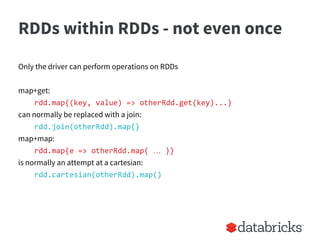
RDDs within RDDs - not even once
Only the driver can perform operations on RDDs
map+get:
rdd.map{(key, value) => otherRdd.get(key)...}
can normally be replaced with a join:
rdd.join(otherRdd).map{}
map+map:
rdd.map{e => otherRdd.map{ … }}
is normally an attempt at a cartesian:
rdd.cartesian(otherRdd).map()
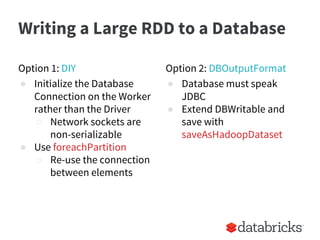
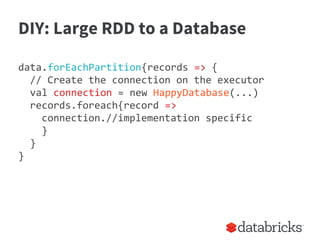
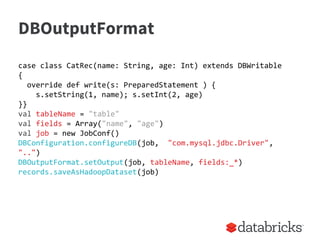
Writing a Large RDD to a Database
Option 1: DIY
● Initialize the Database
Connection on the Worker
rather than the Driver
○ Network sockets are
non-serializable
● Use foreachPartition
○ Re-use the connection
between elements
Option 2: DBOutputFormat
● Database must speak
JDBC
● Extend DBWritable and
save with
saveAsHadoopDataset
DIY: Large RDD to a Database
Cat photo from https://www.flickr.com/photos/rudiriet/140901529/
DIY: Large RDD to a Database
data.forEachPartition{records => {
// Create the connection on the executor
val connection = new HappyDatabase(...)
records.foreach{record =>
connection.//implementation specific
}
}
}
DBOutputFormat
case class CatRec(name: String, age: Int) extends DBWritable
{
override def write(s: PreparedStatement ) {
s.setString(1, name); s.setInt(2, age)
}}
val tableName = "table"
val fields = Array("name", "age")
val job = new JobConf()
DBConfiguration.configureDB(job, "com.mysql.jdbc.Driver",
"..")
DBOutputFormat.setOutput(job, tableName, fields:_*)
records.saveAsHadoopDataset(job)
Reuse Code on Batch & Streaming
val ips = logs.transform
(extractIp)
def extractIp(
logs: RDD[String]) = {
logs.map(_.split(“ “)(0))
}
val ips = extractIp(logs)
Streaming Batch
Use transform on a DStream to reuse your RDD to RDD functions
from your batch Spark jobs.
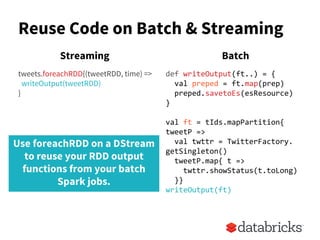
Reuse Code on Batch & Streaming
tweets.foreachRDD{(tweetRDD, time) =>
writeOutput(tweetRDD)
}
def writeOutput(ft..) = {
val preped = ft.map(prep)
preped.savetoEs(esResource)
}
val ft = tIds.mapPartition{
tweetP =>
val twttr = TwitterFactory.
getSingleton()
tweetP.map{ t =>
twttr.showStatus(t.toLong)
}}
writeOutput(ft)
Streaming Batch
Use foreachRDD on a DStream
to reuse your RDD output
functions from your batch
Spark jobs.
Testing Spark Programs
● Picture of a cat
● Unit-tests of functions
● Testing with RDDs
● Special Considerations for Streaming
Cat photo by Jason and Kris Carter
Simplest - Unit Test Functions
instead of:
val splitLines = inFile.map(line => {
val reader = new CSVReader(new StringReader(line))
reader.readNext()
})
write:
def parseLine(line: String): Array[Double] = {
val reader = new CSVReader(new StringReader(line))
reader.readNext().map(_.toDouble)
}
then we can:
test("should parse a csv line with numbers") {
MoreTestableLoadCsvExample.parseLine("1,2") should equal
(Array[Double](1.0, 2.0))
}
Testing with RDDs
trait SSC extends BeforeAndAfterAll { self: Suite =>
@transient private var _sc: SparkContext = _
def sc: SparkContext = _sc
var conf = new SparkConf(false)
override def beforeAll() {
_sc = new SparkContext("local[4]", "test", conf)
super.beforeAll()
}
override def afterAll() {
LocalSparkContext.stop(_sc)
_sc = null
super.afterAll()
}
}
Testing with RDDs
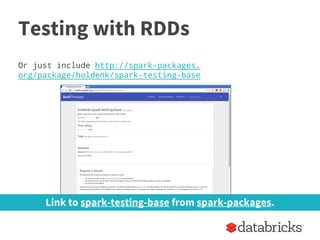
Or just include http://spark-packages.
org/package/holdenk/spark-testing-base
Link to spark-testing-base from spark-packages.
Testing with RDDs continued
test("should parse a csv line with numbers") {
val input = sc.parallelize(List("1,2"))
val result = input.map(parseCsvLine)
result.collect() should equal (Array[Double](1.0, 2.0))
}
Testing with DStreams
Some challenges:
● creating a test DStream
● collecting the data to compare against locally
○ use foreachRDD & a var
● stopping the streaming context after the input stream
is done
○ use a manual clock
■ (private class)
○ wait for a timeout
■ slow
Testing with DStreams - fun!
class SampleStreamingTest extends StreamingSuiteBase {
test("really simple transformation") {
val input = List(List("hi"), List("hi holden"),
List("bye"))
val expect = List(List("hi"),
List("hi”, “holden"),
List("bye"))
testOperation[String, String](input, tokenize _,
expect, useSet = true)
}
}
THE END
Cat picture from http://galato901.deviantart.com/art/Cat-on-Work-Break-173043455
The DAG - is it magic?
Dog photo from: Pets Adviser by http://petsadviser.com

Everyday I'm Shuffling - Tips for Writing Better Spark Programs, Strata San Jose 2015

  • 1.
    Vida Ha &Holden Karau - Strata SJ 2015 Everyday I’m Shufflin Tips for Writing Better Spark Jobs
  • 2.
    Who are we? HoldenKarau ● Current: Software Engineer at Databricks. ● Co-author of “Learning Spark”. ● Past: Worked on search at Foursquare & Engineer @ Google. Vida Ha ● Current: Solutions Engineer at Databricks. ● Past: Worked on scaling & distributed systems as a Software Engineer at Square and Google.
  • 3.
    Our assumptions ● Youknow what Apache Spark is. ● You have (or will) use it. ● You want to understand Spark’s internals, not just it’s API’s, to write awesomer* Spark jobs. *awesomer = more efficient, well-tested, reusable, less error-prone, etc.
  • 4.
    Key Takeaways ● Understandingthe Shuffle in Spark ○ Common cause of inefficiency. ● Understanding when code runs on the driver vs. the workers. ○ Common cause of errors. ● How to factor your code: ○ For reuse between batch & streaming. ○ For easy testing.
  • 5.
    Good Old WordCount in Spark sparkContext.textFile(“hdfs://…”) .flatMap(lambda line: line.split()) .map(lambda word: (word, 1)) .reduceByKey(lambda a, b: a + b) wordcount(wordcount) < 100
  • 6.
    What about GroupbyKeyinstead? sparkContext.textFile(“hdfs://…”) .flatMap(lambda line: line.split()) .map(lambda word: (word, 1)) .groupByKey() .map(lambda (w, counts): (w, sum(counts))) Will we still get the right answer?
  • 7.
    ReduceByKey vs. GroupByKey Answer:Both will give you the same answer. But reduceByKey is more efficient. In fact, groupByKey can cause of out of disk problems. Examine the shuffleto understand.
  • 8.
    sparkContext.textFile(“hdfs://…”) .flatMap(lambda line: line.split()) .map(lambdaword: (word, 1)) [reduceByKey or groupByKey] ... What’s Happening in Word Count Same Worker Node Triggers a shuffle of data Shuffle occurs to transfer all data with the same key to the same worker node.
  • 9.
    (a, 1) (a, 2) (a,3) (b, 1) (b, 2) (b, 3) (a, 1) (b, 1) (a, 1) (a, 1) (b, 1) (b, 1) (a, 1) (a, 1) (a, 1) (b, 1) (b, 1) (b, 1) (a, 1) (b, 1) (a, 2) (b, 2) (a, 3) (b, 3) (a, 6) (b, 6) ReduceByKey: Shuffle Step Shuffle With ReduceByKey, data is combined so each partition outputs at most one value for each key to send over the network.
  • 10.
    (a, 1) (a, 1) (a,1) (a, 1) (a, 1) (a, 1) (b, 1) (b, 1) (b, 1) (b, 1) (b, 1) (b, 1) (a, 1) (b, 1) (a, 1) (a, 1) (b, 1) (b, 1) (a, 1) (a, 1) (a, 1) (b, 1) (b, 1) (b, 1) (a, 6) (b, 6) Shuffle With GroupByKey, all the data is wastefully sent over the network and collected on the reduce workers. GroupByKey: Shuffle Step
  • 11.
    Prefer ReduceByKey overGroupByKey Caveat: Not all problems that can be solved by groupByKey can be calculated with reduceByKey. ReduceByKey requires combining all your values into another value with the exact same type. reduceByKey, aggregateByKey, foldByKey, and combineByKey, preferred over groupByKey
  • 12.
    Join a LargeTable with a Small Table join_rdd = sqlContext.sql(“select * FROM people_in_the_us JOIN states ON people_in_the_us.state = states.name”) print join_rdd.toDebugString() ● ShuffledHashJoin? ● BroadcastHashJoin?
  • 13.
    Even a largerSpark cluster will not solve these problems! ShuffledHashJoin US RDD Partition 1 US RDD Partition 2 US RDD Partition n >> 50 Problems: ● Uneven Sharding ● Limited parallelism w/ 50 output partitions Small State RDD US RDD Partition 2 US RDD Partition 2 **All** the Data for CA **All** the Data for RI CA RI All the data for the US will be shuffled into only 50 keys for each of the states.
  • 14.
    BroadcastHashJoin Parallelism of thelarge RDD is maintained (n output partitions), and shuffle is not even needed. US RDD Partition 1 US RDD Partition 2 Small State RDD US RDD Partition n >> 50 Small State RDD Small State RDD Small State RDD Solution: Broadcast the Small RDD to all worker nodes. Broadcast
  • 15.
    How to ConfigureBroadcastHashJoin ● See the Spark SQL programming guide for your Spark version for how to configure. ● For Spark 1.2: ○ Set spark.sql.autoBroadcastJoinThreshold. ○ sqlContext.sql(“ANALYZE TABLE state_info COMPUTE STATISTICS noscan”) ● Use .toDebugString() or EXPLAIN to double check.
  • 16.
    Join a MediumTable with a Huge Table join_rdd = sqlContext.sql(“select * FROM people_in_california LEFT JOIN all_the_people_in_the_world ON people_in_california.id = all_the_people_in_the_world.id”) Final output keys = keys people_in_california, so this don’t need a huge Spark cluster, right?
  • 17.
    Left Join -Shuffle Step Not a Problem: ● Even Sharding ● Good Parallelism Whole World RDD All Whole World RDD All CA RDD US RDD Partition 2 All the Data from Both Tables Final Joined Output The Size of the Spark Cluster to run this job is limited by the Large table rather than the Medium Sized Table. Shuffles everything before dropping keys
  • 18.
    What’s a BetterSolution? Whole World RDD Whole World RDD All CA RDD Final Joined Output Filter the World World RDD for only entries that match the CA ID Partial World RDD Filter Transform Benefits: ● Less Data shuffled over the network and less shuffle space needed. ● More transforms, but still faster. Shuffle
  • 19.
    What’s the TippingPoint for Huge? ● Can’t tell you. ● There aren’t always strict rules for optimizing. ● If you were only considering two small columns from the World RDD in Parquet format, the filtering step may not be worth it. You should understand your data and it’s unique properties in order to best optimize your Spark Job.
  • 20.
    In Practice: DetectingShuffle Problems Things to Look for: ● Tasks that take much longer to run than others. ● Speculative tasks that are launching. ● Shards that have a lot more input or shuffle output than others. Check the Spark UI pages for task level detail about your Spark job.
  • 21.
    Execution on theDriver vs. Workers output = sparkContext .textFile(“hdfs://…”) .flatMap(lambda line: line.split()) .map(lambda word: (word, 1)) .reduceByKey(lambda a, b: a + b) .collect() print output … Actions may transfer data from the Workers to the Driver. The main program are executed on the Spark Driver. Transformations are executed on the Spark Workers.
  • 22.
    What happens whencalling collect() collect() on a large RDD can trigger a OOM error collect() sends all the partitions to the single driver Worker Partition 1 Worker Partition 2 Worker Partition 3 Worker Partition n The Driver OOM Error!
  • 23.
    Don’t call collect()on a large RDD myLargeRdd.collect() myLargeRdd.countByKey() myLargeRdd.countByValue() myLargeRdd.collectAsMap() Be cautious with all actions that may return unbounded output. Option 1: Choose actions that return a bounded output per partition, such as count() or take(N) . Option 2: Choose actions that outputs directly from the workers such as saveAsTextFile().
  • 24.
    Commonly Serialization Errors HadoopWritables Capturing a full Non- Serializable object Map to/from a serializable form Copy the required serializable parts locally Network Connections Create the connection on the worker
  • 25.
    Serialization Error myNonSerializable =… output = sparkContext .textFile(“hdfs://…”) .map(lambda l: myNonSerializable.value + l) .take(n) print output … Spark will try to send myNonSerializable from the Driver to the Worker node by serializing it, and error.
  • 26.
    RDDs within RDDs- not even once Only the driver can perform operations on RDDs map+get: rdd.map{(key, value) => otherRdd.get(key)...} can normally be replaced with a join: rdd.join(otherRdd).map{} map+map: rdd.map{e => otherRdd.map{ … }} is normally an attempt at a cartesian: rdd.cartesian(otherRdd).map()
  • 27.
    Writing a LargeRDD to a Database Option 1: DIY ● Initialize the Database Connection on the Worker rather than the Driver ○ Network sockets are non-serializable ● Use foreachPartition ○ Re-use the connection between elements Option 2: DBOutputFormat ● Database must speak JDBC ● Extend DBWritable and save with saveAsHadoopDataset
  • 28.
    DIY: Large RDDto a Database Cat photo from https://www.flickr.com/photos/rudiriet/140901529/
  • 29.
    DIY: Large RDDto a Database data.forEachPartition{records => { // Create the connection on the executor val connection = new HappyDatabase(...) records.foreach{record => connection.//implementation specific } } }
  • 30.
    DBOutputFormat case class CatRec(name:String, age: Int) extends DBWritable { override def write(s: PreparedStatement ) { s.setString(1, name); s.setInt(2, age) }} val tableName = "table" val fields = Array("name", "age") val job = new JobConf() DBConfiguration.configureDB(job, "com.mysql.jdbc.Driver", "..") DBOutputFormat.setOutput(job, tableName, fields:_*) records.saveAsHadoopDataset(job)
  • 31.
    Reuse Code onBatch & Streaming val ips = logs.transform (extractIp) def extractIp( logs: RDD[String]) = { logs.map(_.split(“ “)(0)) } val ips = extractIp(logs) Streaming Batch Use transform on a DStream to reuse your RDD to RDD functions from your batch Spark jobs.
  • 32.
    Reuse Code onBatch & Streaming tweets.foreachRDD{(tweetRDD, time) => writeOutput(tweetRDD) } def writeOutput(ft..) = { val preped = ft.map(prep) preped.savetoEs(esResource) } val ft = tIds.mapPartition{ tweetP => val twttr = TwitterFactory. getSingleton() tweetP.map{ t => twttr.showStatus(t.toLong) }} writeOutput(ft) Streaming Batch Use foreachRDD on a DStream to reuse your RDD output functions from your batch Spark jobs.
  • 33.
    Testing Spark Programs ●Picture of a cat ● Unit-tests of functions ● Testing with RDDs ● Special Considerations for Streaming
  • 34.
    Cat photo byJason and Kris Carter
  • 35.
    Simplest - UnitTest Functions instead of: val splitLines = inFile.map(line => { val reader = new CSVReader(new StringReader(line)) reader.readNext() }) write: def parseLine(line: String): Array[Double] = { val reader = new CSVReader(new StringReader(line)) reader.readNext().map(_.toDouble) } then we can: test("should parse a csv line with numbers") { MoreTestableLoadCsvExample.parseLine("1,2") should equal (Array[Double](1.0, 2.0)) }
  • 36.
    Testing with RDDs traitSSC extends BeforeAndAfterAll { self: Suite => @transient private var _sc: SparkContext = _ def sc: SparkContext = _sc var conf = new SparkConf(false) override def beforeAll() { _sc = new SparkContext("local[4]", "test", conf) super.beforeAll() } override def afterAll() { LocalSparkContext.stop(_sc) _sc = null super.afterAll() } }
  • 37.
    Testing with RDDs Orjust include http://spark-packages. org/package/holdenk/spark-testing-base Link to spark-testing-base from spark-packages.
  • 38.
    Testing with RDDscontinued test("should parse a csv line with numbers") { val input = sc.parallelize(List("1,2")) val result = input.map(parseCsvLine) result.collect() should equal (Array[Double](1.0, 2.0)) }
  • 39.
    Testing with DStreams Somechallenges: ● creating a test DStream ● collecting the data to compare against locally ○ use foreachRDD & a var ● stopping the streaming context after the input stream is done ○ use a manual clock ■ (private class) ○ wait for a timeout ■ slow
  • 40.
    Testing with DStreams- fun! class SampleStreamingTest extends StreamingSuiteBase { test("really simple transformation") { val input = List(List("hi"), List("hi holden"), List("bye")) val expect = List(List("hi"), List("hi”, “holden"), List("bye")) testOperation[String, String](input, tokenize _, expect, useSet = true) } }
  • 41.
  • 43.
    Cat picture fromhttp://galato901.deviantart.com/art/Cat-on-Work-Break-173043455
  • 44.
    The DAG -is it magic? Dog photo from: Pets Adviser by http://petsadviser.com