WIFI SSID:Spark+AISummit | Password: UnifiedDataAnalytics
David Vrba, Socialbakers
Physical Plans in Spark
SQL
#UnifiedDataAnalytics #SparkAISummit
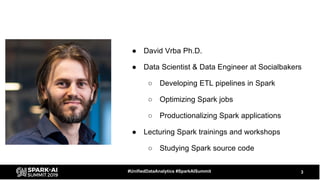
â—Ź David Vrba Ph.D.
â—Ź Data Scientist & Data Engineer at Socialbakers
â—‹ Developing ETL pipelines in Spark
â—‹ Optimizing Spark jobs
â—‹ Productionalizing Spark applications
â—Ź Lecturing Spark trainings and workshops
â—‹ Studying Spark source code
3#UnifiedDataAnalytics #SparkAISummit
Goal
â—Ź Share what we have learned by studying Spark source code and by using
Spark on daily basis
â—‹ Processing data from social networks (Facebook, Twitter, Instagram, ...)
â—‹ Regularly processing data on scales up to 10s of TBs
â—‹ Understanding the query plan is a must for efficient processing
4#UnifiedDataAnalytics #SparkAISummit
Outline
â—Ź Two part talk
â—‹ In the first part we cover some theory
â–  How query execution works
â–  Physical Plan operators
â–  Where to look for relevant information in Spark UI
â—‹ In the second part we show some examples
â–  Model queries with particular optimizations
â–  Useful tips
â—‹ Q/A
5#UnifiedDataAnalytics #SparkAISummit
Part I
â—Ź Query Execution
â—Ź Physical Plan Operators
â—Ź Spark UI
6#UnifiedDataAnalytics #SparkAISummit
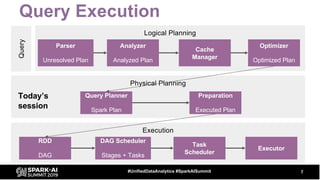
Query Execution
7#UnifiedDataAnalytics #SparkAISummit
Query
Logical Planning
Parser
Unresolved Plan
Analyzer
Analyzed Plan
Cache
Manager
Optimizer
Optimized Plan
Physical Planning
Query Planner
Spark Plan
Preparation
Executed Plan
Execution
RDD
DAG
Task
Scheduler
DAG Scheduler
Stages + Tasks
Executor
Today’s
session
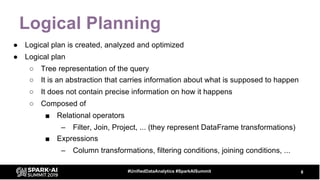
Logical Planning
â—Ź Logical plan is created, analyzed and optimized
â—Ź Logical plan
â—‹ Tree representation of the query
â—‹ It is an abstraction that carries information about what is supposed to happen
â—‹ It does not contain precise information on how it happens
â—‹ Composed of
â–  Relational operators
– Filter, Join, Project, ... (they represent DataFrame transformations)
â–  Expressions
– Column transformations, filtering conditions, joining conditions, ...
8#UnifiedDataAnalytics #SparkAISummit
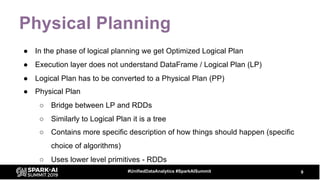
Physical Planning
â—Ź In the phase of logical planning we get Optimized Logical Plan
â—Ź Execution layer does not understand DataFrame / Logical Plan (LP)
â—Ź Logical Plan has to be converted to a Physical Plan (PP)
â—Ź Physical Plan
â—‹ Bridge between LP and RDDs
â—‹ Similarly to Logical Plan it is a tree
â—‹ Contains more specific description of how things should happen (specific
choice of algorithms)
â—‹ Uses lower level primitives - RDDs
9#UnifiedDataAnalytics #SparkAISummit
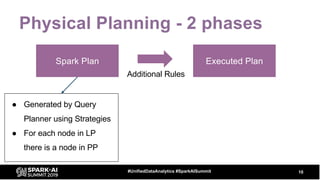
Physical Planning - 2 phases
10#UnifiedDataAnalytics #SparkAISummit
Spark Plan Executed Plan
â—Ź Generated by Query
Planner using Strategies
â—Ź For each node in LP
there is a node in PP
Additional Rules
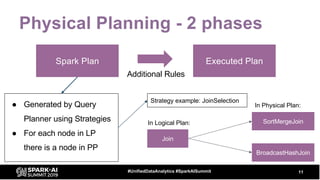
Physical Planning - 2 phases
11#UnifiedDataAnalytics #SparkAISummit
Spark Plan Executed Plan
â—Ź Generated by Query
Planner using Strategies
â—Ź For each node in LP
there is a node in PP
Additional Rules
Join
SortMergeJoin
BroadcastHashJoin
In Logical Plan:
In Physical Plan:
Strategy example: JoinSelection
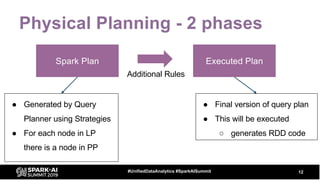
Physical Planning - 2 phases
12#UnifiedDataAnalytics #SparkAISummit
Spark Plan Executed Plan
Additional Rules
â—Ź Generated by Query
Planner using Strategies
â—Ź For each node in LP
there is a node in PP
â—Ź Final version of query plan
â—Ź This will be executed
â—‹ generates RDD code
â—Ź Generated by Query
Planner using Strategies
â—Ź For each node in LP
there is a node in PP
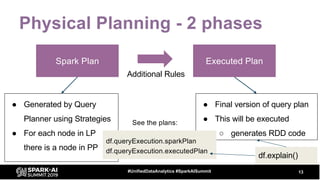
Physical Planning - 2 phases
13#UnifiedDataAnalytics #SparkAISummit
Spark Plan Executed Plan
â—Ź Final version of query plan
â—Ź This will be executed
â—‹ generates RDD code
Additional Rules
df.queryExecution.sparkPlan
df.queryExecution.executedPlan
df.explain()
See the plans:
14
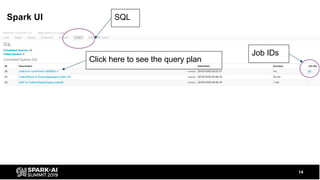
SQL
Job IDs
Click here to see the query plan
Spark UI
15
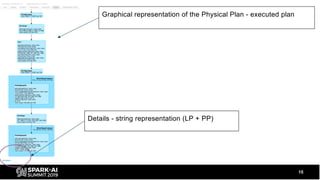
Graphical representation of the Physical Plan - executed plan
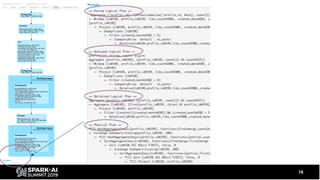
Details - string representation (LP + PP)
16
Let’s see some operators
â—Ź FileScan
â—Ź Exchange
â—Ź HashAggregate, SortAggregate, ObjectHashAggregate
â—Ź SortMergeJoin
â—Ź BroadcastHashJoin
17#UnifiedDataAnalytics #SparkAISummit
FileScan
18#UnifiedDataAnalytics #SparkAISummit
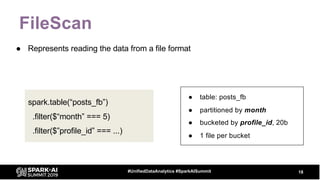
â—Ź Represents reading the data from a file format
spark.table(“posts_fb”)
.filter($“month” === 5)
.filter($”profile_id” === ...)
â—Ź table: posts_fb
â—Ź partitioned by month
â—Ź bucketed by profile_id, 20b
â—Ź 1 file per bucket
FileScan
19#UnifiedDataAnalytics #SparkAISummit
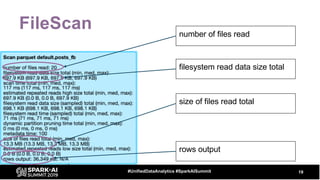
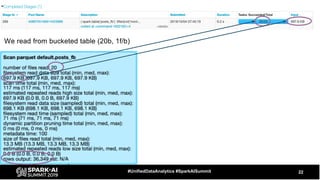
number of files read
size of files read total
rows output
filesystem read data size total
FileScan
20#UnifiedDataAnalytics #SparkAISummit
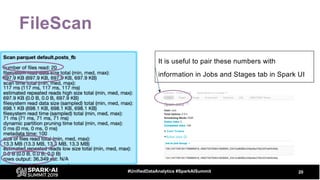
It is useful to pair these numbers with
information in Jobs and Stages tab in Spark UI
21#UnifiedDataAnalytics #SparkAISummit
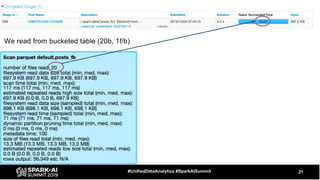
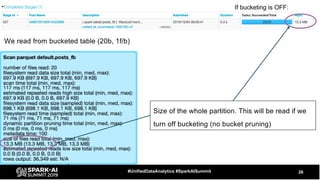
We read from bucketed table (20b, 1f/b)
22#UnifiedDataAnalytics #SparkAISummit
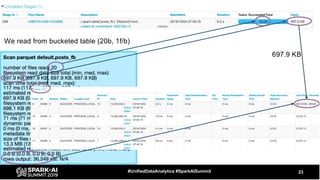
We read from bucketed table (20b, 1f/b)
23#UnifiedDataAnalytics #SparkAISummit
697.9 KB
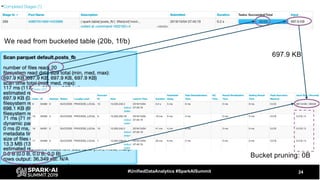
We read from bucketed table (20b, 1f/b)
24#UnifiedDataAnalytics #SparkAISummit
Bucket pruning: 0B
697.9 KB
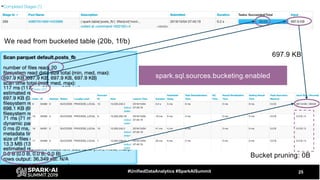
We read from bucketed table (20b, 1f/b)
25#UnifiedDataAnalytics #SparkAISummit
Bucket pruning: 0B
697.9 KB
We read from bucketed table (20b, 1f/b)
spark.sql.sources.bucketing.enabled
26#UnifiedDataAnalytics #SparkAISummit
We read from bucketed table (20b, 1f/b)
Size of the whole partition. This will be read if we
turn off bucketing (no bucket pruning)
If bucketing is OFF:
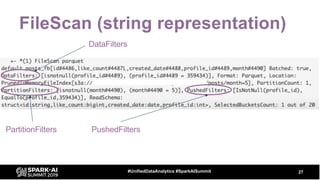
FileScan (string representation)
27#UnifiedDataAnalytics #SparkAISummit
PartitionFilters PushedFilters
DataFilters
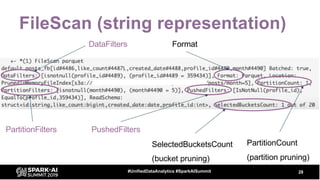
FileScan (string representation)
28#UnifiedDataAnalytics #SparkAISummit
PartitionFilters PushedFilters
PartitionCount
(partition pruning)
DataFilters Format
SelectedBucketsCount
(bucket pruning)
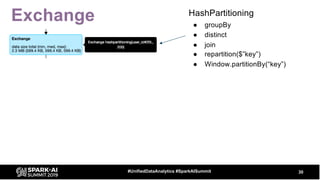
Exchange
29#UnifiedDataAnalytics #SparkAISummit
â—Ź Represents shuffle - physical data movement on the cluster
â—‹ usually quite expensive
Exchange
30#UnifiedDataAnalytics #SparkAISummit
HashPartitioning
â—Ź groupBy
â—Ź distinct
â—Ź join
● repartition($”key”)
● Window.partitionBy(“key”)
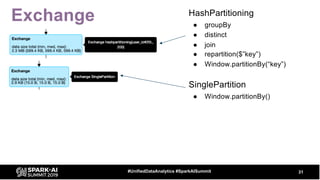
Exchange
31#UnifiedDataAnalytics #SparkAISummit
HashPartitioning
â—Ź groupBy
â—Ź distinct
â—Ź join
● repartition($”key”)
● Window.partitionBy(“key”)
SinglePartition
â—Ź Window.partitionBy()
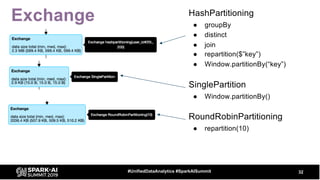
Exchange
32#UnifiedDataAnalytics #SparkAISummit
HashPartitioning
â—Ź groupBy
â—Ź distinct
â—Ź join
● repartition($”key”)
● Window.partitionBy(“key”)
SinglePartition
â—Ź Window.partitionBy()
RoundRobinPartitioning
â—Ź repartition(10)
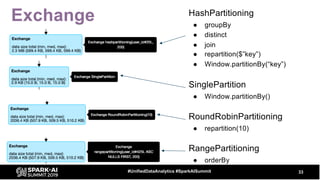
Exchange
33#UnifiedDataAnalytics #SparkAISummit
HashPartitioning
â—Ź groupBy
â—Ź distinct
â—Ź join
● repartition($”key”)
● Window.partitionBy(“key”)
SinglePartition
â—Ź Window.partitionBy()
RoundRobinPartitioning
â—Ź repartition(10)
RangePartitioning
â—Ź orderBy
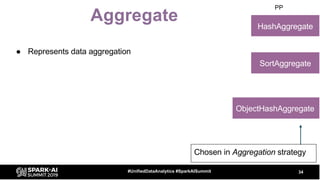
Aggregate
34#UnifiedDataAnalytics #SparkAISummit
HashAggregate
PP
SortAggregate
ObjectHashAggregate
Chosen in Aggregation strategy
â—Ź Represents data aggregation
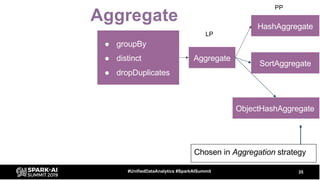
Aggregate
35#UnifiedDataAnalytics #SparkAISummit
â—Ź groupBy
â—Ź distinct
â—Ź dropDuplicates
Aggregate
HashAggregate
LP
PP
SortAggregate
ObjectHashAggregate
Chosen in Aggregation strategy
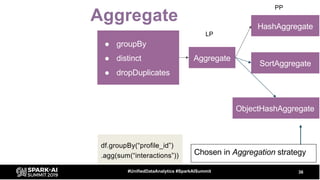
Aggregate
36#UnifiedDataAnalytics #SparkAISummit
â—Ź groupBy
â—Ź distinct
â—Ź dropDuplicates
Aggregate
HashAggregate
LP
PP
SortAggregate
ObjectHashAggregate
Chosen in Aggregation strategy
df.groupBy(“profile_id”)
.agg(sum(“interactions”))
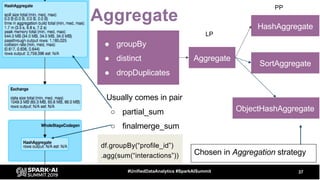
Aggregate
37#UnifiedDataAnalytics #SparkAISummit
â—Ź groupBy
â—Ź distinct
â—Ź dropDuplicates
Aggregate
HashAggregate
LP
PP
Usually comes in pair
â—‹ partial_sum
â—‹ finalmerge_sum
SortAggregate
ObjectHashAggregate
Chosen in Aggregation strategy
df.groupBy(“profile_id”)
.agg(sum(“interactions”))
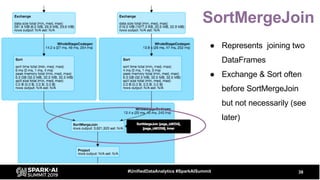
SortMergeJoin
38#UnifiedDataAnalytics #SparkAISummit
â—Ź Represents joining two
DataFrames
â—Ź Exchange & Sort often
before SortMergeJoin
but not necessarily (see
later)
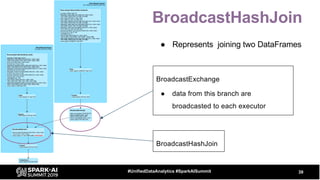
BroadcastHashJoin
39#UnifiedDataAnalytics #SparkAISummit
BroadcastExchange
â—Ź data from this branch are
broadcasted to each executor
BroadcastHashJoin
â—Ź Represents joining two DataFrames
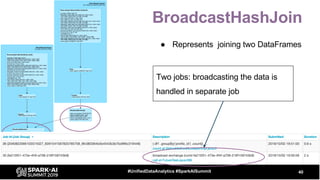
BroadcastHashJoin
40#UnifiedDataAnalytics #SparkAISummit
Two jobs: broadcasting the data is
handled in separate job
â—Ź Represents joining two DataFrames
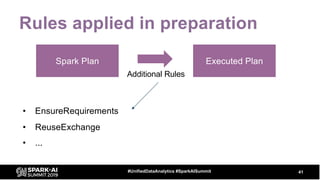
Rules applied in preparation
• EnsureRequirements
• ReuseExchange
• ...
41#UnifiedDataAnalytics #SparkAISummit
Spark Plan Executed Plan
Additional Rules
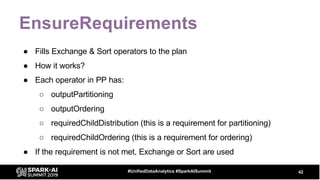
EnsureRequirements
â—Ź Fills Exchange & Sort operators to the plan
â—Ź How it works?
â—Ź Each operator in PP has:
â—‹ outputPartitioning
â—‹ outputOrdering
â—‹ requiredChildDistribution (this is a requirement for partitioning)
â—‹ requiredChildOrdering (this is a requirement for ordering)
â—Ź If the requirement is not met, Exchange or Sort are used
42#UnifiedDataAnalytics #SparkAISummit
43#UnifiedDataAnalytics #SparkAISummit
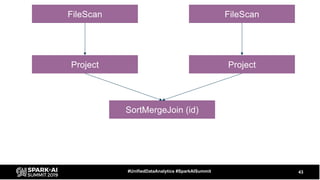
SortMergeJoin (id)
Project Project
FileScan FileScan
44#UnifiedDataAnalytics #SparkAISummit
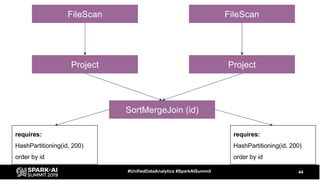
SortMergeJoin (id)
Project Project
FileScan FileScan
requires:
HashPartitioning(id, 200)
order by id
requires:
HashPartitioning(id, 200)
order by id
45#UnifiedDataAnalytics #SparkAISummit
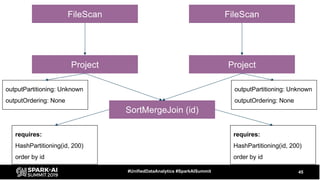
SortMergeJoin (id)
Project Project
FileScan FileScan
requires:
HashPartitioning(id, 200)
order by id
requires:
HashPartitioning(id, 200)
order by id
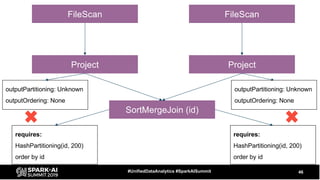
outputPartitioning: Unknown
outputOrdering: None
outputPartitioning: Unknown
outputOrdering: None
46#UnifiedDataAnalytics #SparkAISummit
SortMergeJoin (id)
Project Project
FileScan FileScan
requires:
HashPartitioning(id, 200)
order by id
requires:
HashPartitioning(id, 200)
order by id
outputPartitioning: Unknown
outputOrdering: None
outputPartitioning: Unknown
outputOrdering: None
47#UnifiedDataAnalytics #SparkAISummit
SortMergeJoin (id)
Project Project
FileScan FileScan
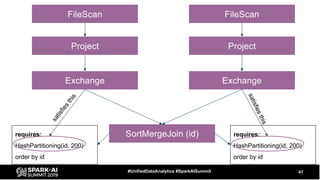
Exchange Exchange
requires:
HashPartitioning(id, 200)
order by id
requires:
HashPartitioning(id, 200)
order by id
satisfiesthis
satisfiesthis
48#UnifiedDataAnalytics #SparkAISummit
SortMergeJoin (id)
Project Project
FileScan FileScan
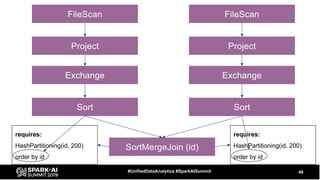
Exchange Exchange
Sort Sort
requires:
HashPartitioning(id, 200)
order by id
requires:
HashPartitioning(id, 200)
order by id
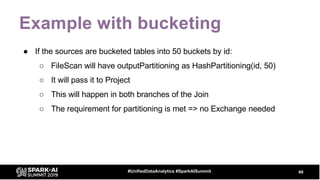
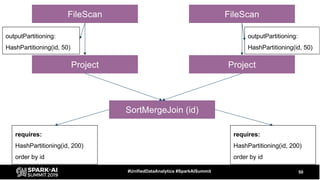
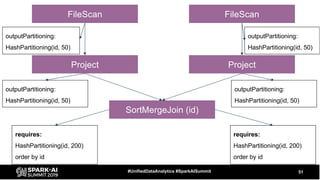
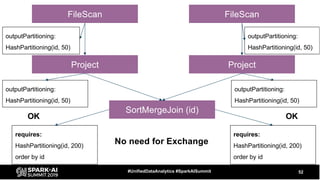
Example with bucketing
â—Ź If the sources are bucketed tables into 50 buckets by id:
â—‹ FileScan will have outputPartitioning as HashPartitioning(id, 50)
â—‹ It will pass it to Project
â—‹ This will happen in both branches of the Join
â—‹ The requirement for partitioning is met => no Exchange needed
49#UnifiedDataAnalytics #SparkAISummit
50#UnifiedDataAnalytics #SparkAISummit
SortMergeJoin (id)
Project Project
FileScan FileScan
requires:
HashPartitioning(id, 200)
order by id
requires:
HashPartitioning(id, 200)
order by id
outputPartitioning:
HashPartitioning(id, 50)
outputPartitioning:
HashPartitioning(id, 50)
51#UnifiedDataAnalytics #SparkAISummit
SortMergeJoin (id)
Project Project
FileScan FileScan
requires:
HashPartitioning(id, 200)
order by id
requires:
HashPartitioning(id, 200)
order by id
outputPartitioning:
HashPartitioning(id, 50)
outputPartitioning:
HashPartitioning(id, 50)
outputPartitioning:
HashPartitioning(id, 50)
outputPartitioning:
HashPartitioning(id, 50)
52#UnifiedDataAnalytics #SparkAISummit
SortMergeJoin (id)
Project Project
FileScan FileScan
requires:
HashPartitioning(id, 200)
order by id
requires:
HashPartitioning(id, 200)
order by id
outputPartitioning:
HashPartitioning(id, 50)
outputPartitioning:
HashPartitioning(id, 50)
outputPartitioning:
HashPartitioning(id, 50)
outputPartitioning:
HashPartitioning(id, 50)
No need for Exchange
OK OK
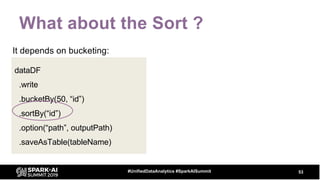
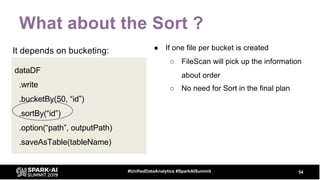
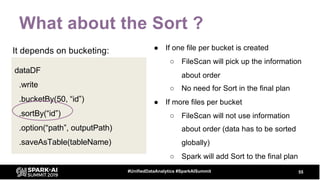
What about the Sort ?
53#UnifiedDataAnalytics #SparkAISummit
dataDF
.write
.bucketBy(50, “id”)
.sortBy(“id”)
.option(“path”, outputPath)
.saveAsTable(tableName)
It depends on bucketing:
What about the Sort ?
54#UnifiedDataAnalytics #SparkAISummit
dataDF
.write
.bucketBy(50, “id”)
.sortBy(“id”)
.option(“path”, outputPath)
.saveAsTable(tableName)
It depends on bucketing: â—Ź If one file per bucket is created
â—‹ FileScan will pick up the information
about order
â—‹ No need for Sort in the final plan
What about the Sort ?
55#UnifiedDataAnalytics #SparkAISummit
dataDF
.write
.bucketBy(50, “id”)
.sortBy(“id”)
.option(“path”, outputPath)
.saveAsTable(tableName)
It depends on bucketing: â—Ź If one file per bucket is created
â—‹ FileScan will pick up the information
about order
â—‹ No need for Sort in the final plan
â—Ź If more files per bucket
â—‹ FileScan will not use information
about order (data has to be sorted
globally)
â—‹ Spark will add Sort to the final plan
56#UnifiedDataAnalytics #SparkAISummit
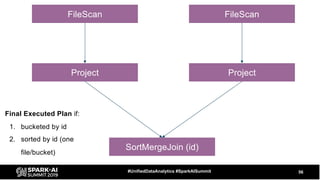
SortMergeJoin (id)
Project Project
FileScan FileScan
Final Executed Plan if:
1. bucketed by id
2. sorted by id (one
file/bucket)
57#UnifiedDataAnalytics #SparkAISummit
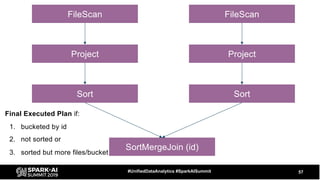
SortMergeJoin (id)
Project Project
FileScan FileScan
Sort Sort
Final Executed Plan if:
1. bucketed by id
2. not sorted or
3. sorted but more files/bucket
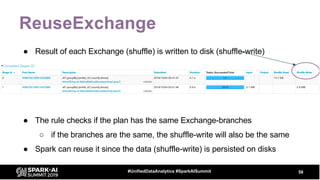
ReuseExchange
â—Ź Result of each Exchange (shuffle) is written to disk (shuffle-write)
58#UnifiedDataAnalytics #SparkAISummit
â—Ź The rule checks if the plan has the same Exchange-branches
â—‹ if the branches are the same, the shuffle-write will also be the same
â—Ź Spark can reuse it since the data (shuffle-write) is persisted on disks
59#UnifiedDataAnalytics #SparkAISummit
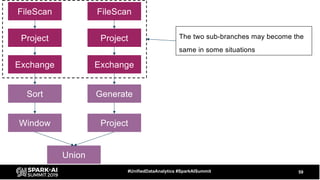
Union
Project Project
FileScan FileScan
Exchange Exchange
Sort
Window
Generate
Project
The two sub-branches may become the
same in some situations
60#UnifiedDataAnalytics #SparkAISummit
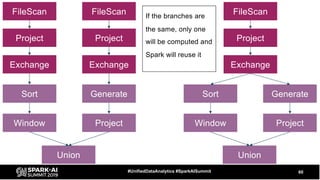
Union
Project Project
FileScan FileScan
Exchange Exchange
Sort
Window
Generate
Union
Project
FileScan
Exchange
Sort
Window
Generate
Project Project
If the branches are
the same, only one
will be computed and
Spark will reuse it
ReuseExchange
â—Ź The branches must be the same
â—Ź Only Exchange can be reused
â—Ź Can be turned off by internal configuration
â—‹ spark.sql.exchange.reuse
â—Ź Otherwise you can not control it directly but there is indirect way by
tweaking the query (see the example later)
â—Ź It reduces the I/O and network cost:
â—‹ One scan over the data
â—‹ One shuffle write
61#UnifiedDataAnalytics #SparkAISummit
Part I conclusion
â—Ź Physical Plan operators carry information about execution
â—‹ it is useful to pair information from the query plan with info about stages/tasks
â—Ź ReuseExchange allows to reduce I/O and network cost
â—‹ if Exchange sub-branches are the same Spark will compute it only once
â—Ź EnsureRequirements adds Exchange and Sort to the query plan
â—‹ it makes sure that requirements of the operators are met
62#UnifiedDataAnalytics #SparkAISummit
David Vrba, Socialbakers
Physical Plans in Spark
SQL - continues
#UnifiedDataAnalytics #SparkAISummit
Part I recap
â—Ź We covered
â—‹ Query Execution (physical planning)
â—‹ Two preparation rules:
â–  EnsureRequirements
â–  ReuseExchange
64#UnifiedDataAnalytics #SparkAISummit
Part II
â—Ź Model examples with optimizations
â—Ź Some useful tips
65#UnifiedDataAnalytics #SparkAISummit
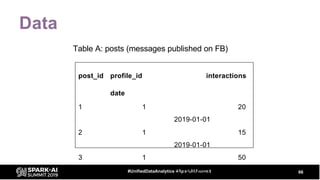
Data
66#UnifiedDataAnalytics #SparkAISummit
post_id profile_id interactions
date
1 1 20
2019-01-01
2 1 15
2019-01-01
3 1 50
2019-02-01
Table A: posts (messages published on FB)
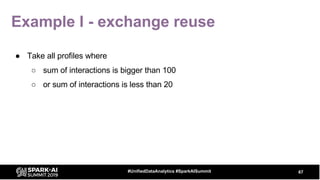
Example I - exchange reuse
67#UnifiedDataAnalytics #SparkAISummit
â—Ź Take all profiles where
â—‹ sum of interactions is bigger than 100
â—‹ or sum of interactions is less than 20
68#UnifiedDataAnalytics #SparkAISummit
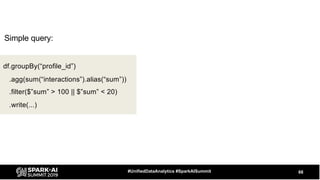
df.groupBy(“profile_id”)
.agg(sum(“interactions”).alias(“sum”))
.filter($”sum” > 100 || $”sum” < 20)
.write(...)
Simple query:
69#UnifiedDataAnalytics #SparkAISummit
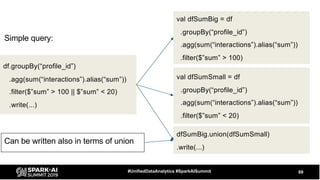
df.groupBy(“profile_id”)
.agg(sum(“interactions”).alias(“sum”))
.filter($”sum” > 100 || $”sum” < 20)
.write(...)
val dfSumBig = df
.groupBy(“profile_id”)
.agg(sum(“interactions”).alias(“sum”))
.filter($”sum” > 100)
val dfSumSmall = df
.groupBy(“profile_id”)
.agg(sum(“interactions”).alias(“sum”))
.filter($”sum” < 20)
dfSumBig.union(dfSumSmall)
.write(...)
Simple query:
Can be written also in terms of union
70#UnifiedDataAnalytics #SparkAISummit
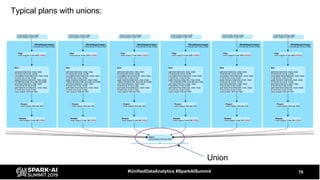
Typical plans with unions:
Union
71#UnifiedDataAnalytics #SparkAISummit
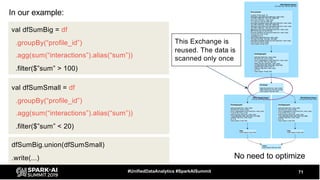
val dfSumBig = df
.groupBy(“profile_id”)
.agg(sum(“interactions”).alias(“sum”))
.filter($”sum” > 100)
No need to optimize
val dfSumSmall = df
.groupBy(“profile_id”)
.agg(sum(“interactions”).alias(“sum”))
.filter($”sum” < 20)
dfSumBig.union(dfSumSmall)
.write(...)
This Exchange is
reused. The data is
scanned only once
In our example:
72#UnifiedDataAnalytics #SparkAISummit
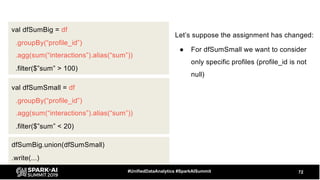
val dfSumBig = df
.groupBy(“profile_id”)
.agg(sum(“interactions”).alias(“sum”))
.filter($”sum” > 100)
val dfSumSmall = df
.groupBy(“profile_id”)
.agg(sum(“interactions”).alias(“sum”))
.filter($”sum” < 20)
dfSumBig.union(dfSumSmall)
.write(...)
Let’s suppose the assignment has changed:
â—Ź For dfSumSmall we want to consider
only specific profiles (profile_id is not
null)
73#UnifiedDataAnalytics #SparkAISummit
dfSumBig.union(dfSumSmall)
.write(...)
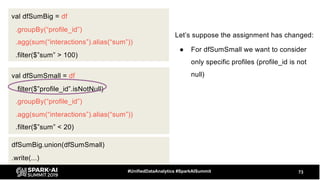
val dfSumSmall = df
.filter($”profile_id”.isNotNull)
.groupBy(“profile_id”)
.agg(sum(“interactions”).alias(“sum”))
.filter($”sum” < 20)
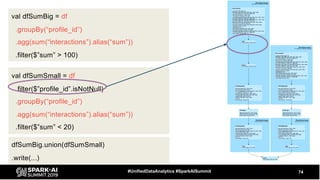
val dfSumBig = df
.groupBy(“profile_id”)
.agg(sum(“interactions”).alias(“sum”))
.filter($”sum” > 100)
Let’s suppose the assignment has changed:
â—Ź For dfSumSmall we want to consider
only specific profiles (profile_id is not
null)
74#UnifiedDataAnalytics #SparkAISummit
Now add additional filter to one DF:val dfSumBig = df
.groupBy(“profile_id”)
.agg(sum(“interactions”).alias(“sum”))
.filter($”sum” > 100)
val dfSumSmall = df
.filter($”profile_id”.isNotNull)
.groupBy(“profile_id”)
.agg(sum(“interactions”).alias(“sum”))
.filter($”sum” < 20)
dfSumBig.union(dfSumSmall)
.write(...)
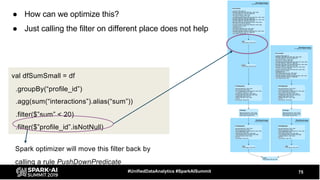
val dfSumSmall = df
.groupBy(“profile_id”)
.agg(sum(“interactions”).alias(“sum”))
.filter($”sum” < 20)
.filter($”profile_id”.isNotNull)
â—Ź How can we optimize this?
â—Ź Just calling the filter on different place does not help
75#UnifiedDataAnalytics #SparkAISummit
Spark optimizer will move this filter back by
calling a rule PushDownPredicate
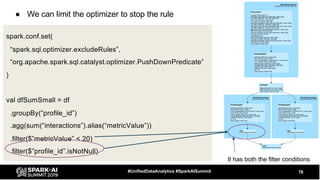
â—Ź We can limit the optimizer to stop the rule
76#UnifiedDataAnalytics #SparkAISummit
spark.conf.set(
“spark.sql.optimizer.excludeRules”,
“org.apache.spark.sql.catalyst.optimizer.PushDownPredicate”
)
val dfSumSmall = df
.groupBy(“profile_id”)
.agg(sum(“interactions”).alias(“metricValue”))
.filter($”metricValue” < 20)
.filter($”profile_id”.isNotNull)
It has both the filter conditions
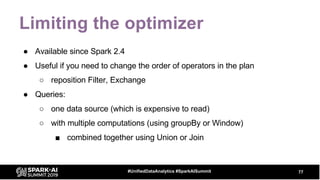
Limiting the optimizer
â—Ź Available since Spark 2.4
â—Ź Useful if you need to change the order of operators in the plan
â—‹ reposition Filter, Exchange
â—Ź Queries:
â—‹ one data source (which is expensive to read)
â—‹ with multiple computations (using groupBy or Window)
â–  combined together using Union or Join
77#UnifiedDataAnalytics #SparkAISummit
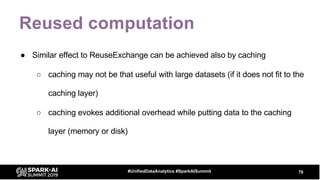
Reused computation
â—Ź Similar effect to ReuseExchange can be achieved also by caching
â—‹ caching may not be that useful with large datasets (if it does not fit to the
caching layer)
â—‹ caching evokes additional overhead while putting data to the caching
layer (memory or disk)
78#UnifiedDataAnalytics #SparkAISummit
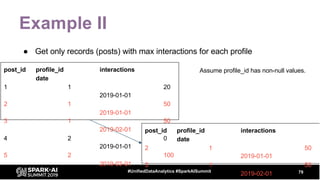
Example II
â—Ź Get only records (posts) with max interactions for each profile
79#UnifiedDataAnalytics #SparkAISummit
post_id profile_id interactions
date
1 1 20
2019-01-01
2 1 50
2019-01-01
3 1 50
2019-02-01
4 2 0
2019-01-01
5 2 100
2019-03-01
post_id profile_id interactions
date
2 1 50
2019-01-01
3 1 50
2019-02-01
Assume profile_id has non-null values.
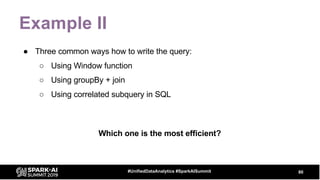
Example II
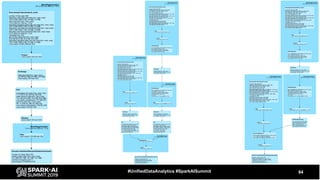
â—Ź Three common ways how to write the query:
â—‹ Using Window function
â—‹ Using groupBy + join
â—‹ Using correlated subquery in SQL
80#UnifiedDataAnalytics #SparkAISummit
Which one is the most efficient?
81#UnifiedDataAnalytics #SparkAISummit
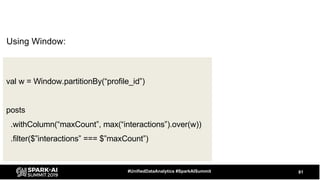
val w = Window.partitionBy(“profile_id”)
posts
.withColumn(“maxCount”, max(“interactions”).over(w))
.filter($”interactions” === $”maxCount”)
Using Window:
82#UnifiedDataAnalytics #SparkAISummit
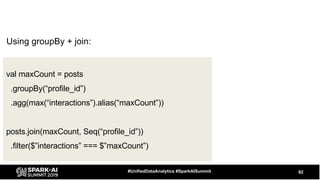
val maxCount = posts
.groupBy(“profile_id”)
.agg(max(“interactions”).alias(“maxCount”))
posts.join(maxCount, Seq(“profile_id”))
.filter($”interactions” === $”maxCount”)
Using groupBy + join:
83#UnifiedDataAnalytics #SparkAISummit
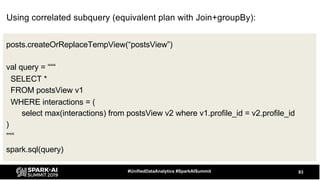
posts.createOrReplaceTempView(“postsView”)
val query = “““
SELECT *
FROM postsView v1
WHERE interactions = (
select max(interactions) from postsView v2 where v1.profile_id = v2.profile_id
)
”””
spark.sql(query)
Using correlated subquery (equivalent plan with Join+groupBy):
84#UnifiedDataAnalytics #SparkAISummit
85#UnifiedDataAnalytics #SparkAISummit
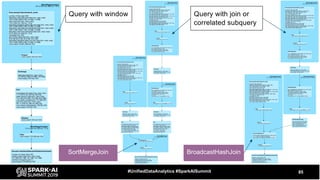
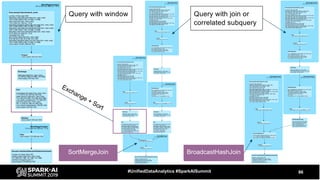
Query with window Query with join or
correlated subquery
SortMergeJoin BroadcastHashJoin
86#UnifiedDataAnalytics #SparkAISummit
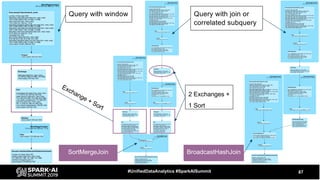
Query with window Query with join or
correlated subquery
SortMergeJoin BroadcastHashJoin
Exchange + Sort
87#UnifiedDataAnalytics #SparkAISummit
Query with window Query with join or
correlated subquery
SortMergeJoin BroadcastHashJoin
2 Exchanges +
1 Sort
Exchange + Sort
88#UnifiedDataAnalytics #SparkAISummit
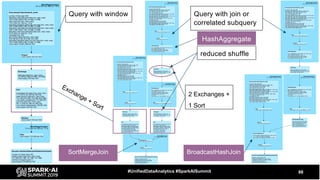
Query with window Query with join or
correlated subquery
SortMergeJoin BroadcastHashJoin
2 Exchanges +
1 Sort
Exchange + Sort
reduced shuffle
HashAggregate
89#UnifiedDataAnalytics #SparkAISummit
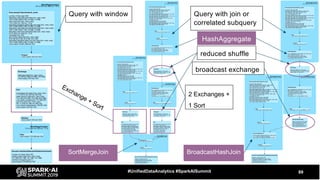
Query with window Query with join or
correlated subquery
SortMergeJoin BroadcastHashJoin
2 Exchanges +
1 Sort
Exchange + Sort
reduced shuffle
broadcast exchange
HashAggregate
Window vs join + groupBy
90#UnifiedDataAnalytics #SparkAISummit
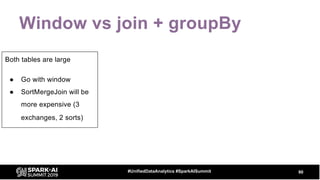
Both tables are large
â—Ź Go with window
â—Ź SortMergeJoin will be
more expensive (3
exchanges, 2 sorts)
Window vs join + groupBy
91#UnifiedDataAnalytics #SparkAISummit
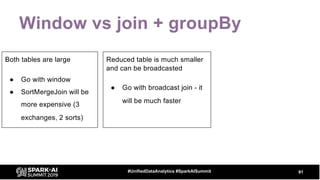
Both tables are large
â—Ź Go with window
â—Ź SortMergeJoin will be
more expensive (3
exchanges, 2 sorts)
Reduced table is much smaller
and can be broadcasted
â—Ź Go with broadcast join - it
will be much faster
Window vs join + groupBy
92#UnifiedDataAnalytics #SparkAISummit
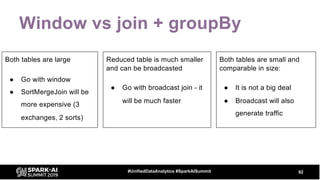
Both tables are small and
comparable in size:
â—Ź It is not a big deal
â—Ź Broadcast will also
generate traffic
Both tables are large
â—Ź Go with window
â—Ź SortMergeJoin will be
more expensive (3
exchanges, 2 sorts)
Reduced table is much smaller
and can be broadcasted
â—Ź Go with broadcast join - it
will be much faster
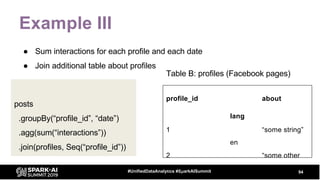
Example III
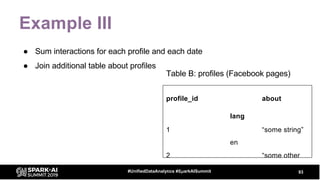
â—Ź Sum interactions for each profile and each date
â—Ź Join additional table about profiles
93#UnifiedDataAnalytics #SparkAISummit
profile_id about
lang
1 “some string”
en
2 “some other
string” en
Table B: profiles (Facebook pages)
Example III
â—Ź Sum interactions for each profile and each date
â—Ź Join additional table about profiles
94#UnifiedDataAnalytics #SparkAISummit
posts
.groupBy(“profile_id”, “date”)
.agg(sum(“interactions”))
.join(profiles, Seq(“profile_id”))
profile_id about
lang
1 “some string”
en
2 “some other
string” en
Table B: profiles (Facebook pages)
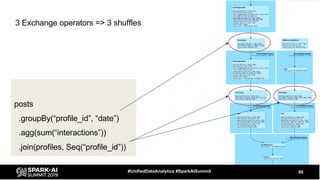
posts
.groupBy(“profile_id”, “date”)
.agg(sum(“interactions”))
.join(profiles, Seq(“profile_id”))
95#UnifiedDataAnalytics #SparkAISummit
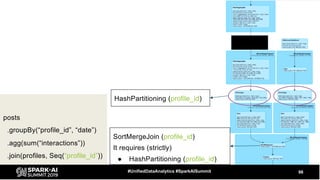
3 Exchange operators => 3 shuffles
96#UnifiedDataAnalytics #SparkAISummit
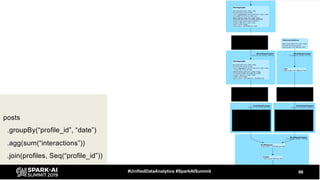
posts
.groupBy(“profile_id”, “date”)
.agg(sum(“interactions”))
.join(profiles, Seq(“profile_id”))
97#UnifiedDataAnalytics #SparkAISummit
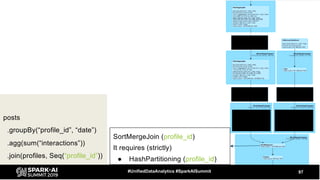
posts
.groupBy(“profile_id”, “date”)
.agg(sum(“interactions”))
.join(profiles, Seq(“profile_id”))
SortMergeJoin (profile_id)
It requires (strictly)
â—Ź HashPartitioning (profile_id)
98#UnifiedDataAnalytics #SparkAISummit
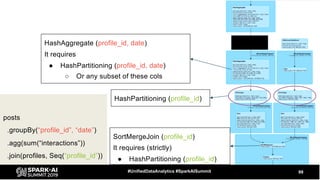
posts
.groupBy(“profile_id”, “date”)
.agg(sum(“interactions”))
.join(profiles, Seq(“profile_id”))
SortMergeJoin (profile_id)
It requires (strictly)
â—Ź HashPartitioning (profile_id)
HashPartitioning (profile_id)
99#UnifiedDataAnalytics #SparkAISummit
posts
.groupBy(“profile_id”, “date”)
.agg(sum(“interactions”))
.join(profiles, Seq(“profile_id”))
SortMergeJoin (profile_id)
It requires (strictly)
â—Ź HashPartitioning (profile_id)
HashPartitioning (profile_id)
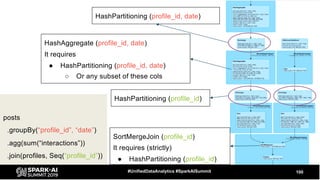
HashAggregate (profile_id, date)
It requires
â—Ź HashPartitioning (profile_id, date)
â—‹ Or any subset of these cols
100#UnifiedDataAnalytics #SparkAISummit
posts
.groupBy(“profile_id”, “date”)
.agg(sum(“interactions”))
.join(profiles, Seq(“profile_id”))
HashAggregate (profile_id, date)
It requires
â—Ź HashPartitioning (profile_id, date)
â—‹ Or any subset of these cols
HashPartitioning (profile_id, date)
SortMergeJoin (profile_id)
It requires (strictly)
â—Ź HashPartitioning (profile_id)
HashPartitioning (profile_id)
101#UnifiedDataAnalytics #SparkAISummit
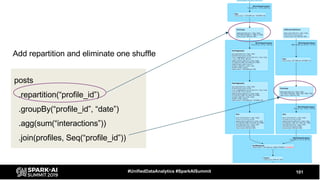
posts
.repartition(“profile_id”)
.groupBy(“profile_id”, “date”)
.agg(sum(“interactions”))
.join(profiles, Seq(“profile_id”))
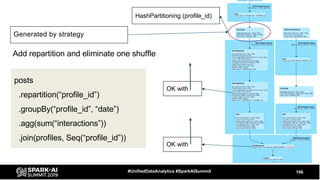
Add repartition and eliminate one shuffle
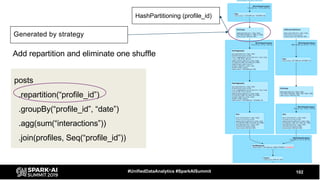
102#UnifiedDataAnalytics #SparkAISummit
posts
.repartition(“profile_id”)
.groupBy(“profile_id”, “date”)
.agg(sum(“interactions”))
.join(profiles, Seq(“profile_id”))
Add repartition and eliminate one shuffle
Generated by strategy
HashPartitioning (profile_id)
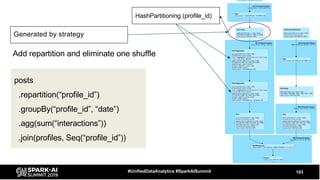
103#UnifiedDataAnalytics #SparkAISummit
Add repartition and eliminate one shuffle
HashPartitioning (profile_id)
posts
.repartition(“profile_id”)
.groupBy(“profile_id”, “date”)
.agg(sum(“interactions”))
.join(profiles, Seq(“profile_id”))
Generated by strategy
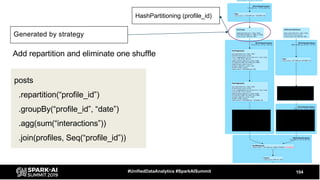
104#UnifiedDataAnalytics #SparkAISummit
Add repartition and eliminate one shuffle
HashPartitioning (profile_id)
posts
.repartition(“profile_id”)
.groupBy(“profile_id”, “date”)
.agg(sum(“interactions”))
.join(profiles, Seq(“profile_id”))
Generated by strategy
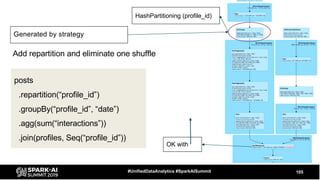
105#UnifiedDataAnalytics #SparkAISummit
Add repartition and eliminate one shuffle
HashPartitioning (profile_id)
posts
.repartition(“profile_id”)
.groupBy(“profile_id”, “date”)
.agg(sum(“interactions”))
.join(profiles, Seq(“profile_id”))
Generated by strategy
OK with
106#UnifiedDataAnalytics #SparkAISummit
Add repartition and eliminate one shuffle
HashPartitioning (profile_id)
posts
.repartition(“profile_id”)
.groupBy(“profile_id”, “date”)
.agg(sum(“interactions”))
.join(profiles, Seq(“profile_id”))
Generated by strategy
OK with
OK with
Adding repartition
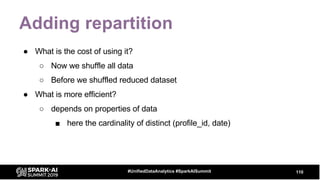
â—Ź What is the cost of using it?
â—‹ Now we shuffle all data
â—‹ Before we shuffled reduced dataset
107#UnifiedDataAnalytics #SparkAISummit
108#UnifiedDataAnalytics #SparkAISummit
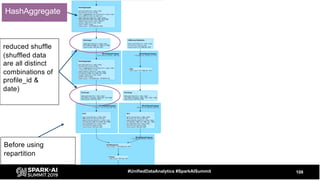
reduced shuffle
(shuffled data
are all distinct
combinations of
profile_id &
date)
Before using
repartition
HashAggregate
109#UnifiedDataAnalytics #SparkAISummit
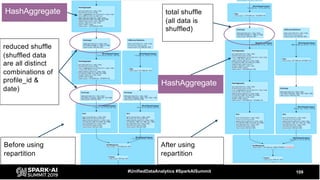
reduced shuffle
(shuffled data
are all distinct
combinations of
profile_id &
date)
total shuffle
(all data is
shuffled)
Before using
repartition
After using
repartition
HashAggregate
HashAggregate
Adding repartition
â—Ź What is the cost of using it?
â—‹ Now we shuffle all data
â—‹ Before we shuffled reduced dataset
â—Ź What is more efficient?
â—‹ depends on properties of data
â–  here the cardinality of distinct (profile_id, date)
110#UnifiedDataAnalytics #SparkAISummit
Adding repartition
111#UnifiedDataAnalytics #SparkAISummit
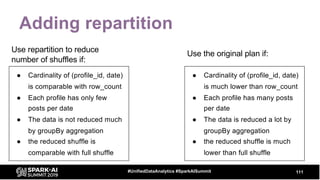
â—Ź Cardinality of (profile_id, date)
is comparable with row_count
â—Ź Each profile has only few
posts per date
â—Ź The data is not reduced much
by groupBy aggregation
â—Ź the reduced shuffle is
comparable with full shuffle
â—Ź Cardinality of (profile_id, date)
is much lower than row_count
â—Ź Each profile has many posts
per date
â—Ź The data is reduced a lot by
groupBy aggregation
â—Ź the reduced shuffle is much
lower than full shuffle
Use repartition to reduce
number of shuffles if:
Use the original plan if:
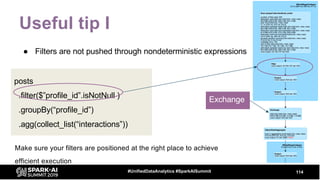
Useful tip I
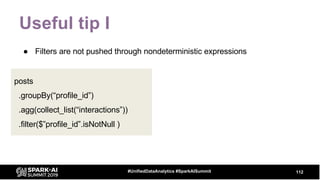
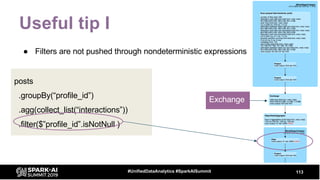
â—Ź Filters are not pushed through nondeterministic expressions
112#UnifiedDataAnalytics #SparkAISummit
posts
.groupBy(“profile_id”)
.agg(collect_list(“interactions”))
.filter($”profile_id”.isNotNull )
Useful tip I
â—Ź Filters are not pushed through nondeterministic expressions
113#UnifiedDataAnalytics #SparkAISummit
posts
.groupBy(“profile_id”)
.agg(collect_list(“interactions”))
.filter($”profile_id”.isNotNull )
Exchange
Useful tip I
â—Ź Filters are not pushed through nondeterministic expressions
114#UnifiedDataAnalytics #SparkAISummit
posts
.filter($”profile_id”.isNotNull )
.groupBy(“profile_id”)
.agg(collect_list(“interactions”))
Make sure your filters are positioned at the right place to achieve
efficient execution
Exchange
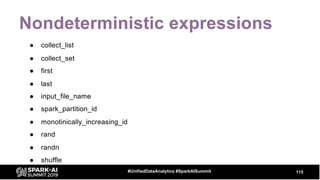
Nondeterministic expressions
115#UnifiedDataAnalytics #SparkAISummit
â—Ź collect_list
â—Ź collect_set
â—Ź first
â—Ź last
â—Ź input_file_name
â—Ź spark_partition_id
â—Ź monotinically_increasing_id
â—Ź rand
â—Ź randn
â—Ź shuffle
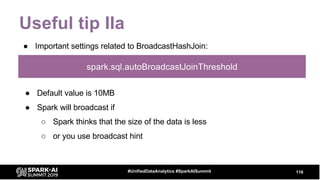
Useful tip IIa
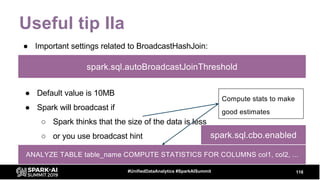
â—Ź Important settings related to BroadcastHashJoin:
116#UnifiedDataAnalytics #SparkAISummit
spark.sql.autoBroadcastJoinThreshold
â—Ź Default value is 10MB
â—Ź Spark will broadcast if
â—‹ Spark thinks that the size of the data is less
â—‹ or you use broadcast hint
Useful tip IIa
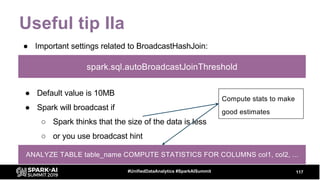
â—Ź Important settings related to BroadcastHashJoin:
117#UnifiedDataAnalytics #SparkAISummit
spark.sql.autoBroadcastJoinThreshold
â—Ź Default value is 10MB
â—Ź Spark will broadcast if
â—‹ Spark thinks that the size of the data is less
â—‹ or you use broadcast hint
Compute stats to make
good estimates
ANALYZE TABLE table_name COMPUTE STATISTICS FOR COLUMNS col1, col2, ...
Useful tip IIa
â—Ź Important settings related to BroadcastHashJoin:
118#UnifiedDataAnalytics #SparkAISummit
spark.sql.autoBroadcastJoinThreshold
â—Ź Default value is 10MB
â—Ź Spark will broadcast if
â—‹ Spark thinks that the size of the data is less
â—‹ or you use broadcast hint
Compute stats to make
good estimates
ANALYZE TABLE table_name COMPUTE STATISTICS FOR COLUMNS col1, col2, ...
spark.sql.cbo.enabled
Useful tip IIb
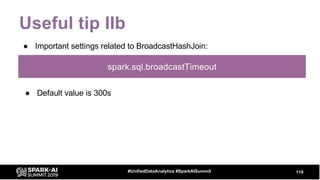
â—Ź Important settings related to BroadcastHashJoin:
119#UnifiedDataAnalytics #SparkAISummit
spark.sql.broadcastTimeout
â—Ź Default value is 300s
Useful tip IIb
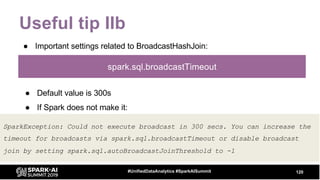
â—Ź Important settings related to BroadcastHashJoin:
120#UnifiedDataAnalytics #SparkAISummit
spark.sql.broadcastTimeout
â—Ź Default value is 300s
â—Ź If Spark does not make it:
SparkException: Could not execute broadcast in 300 secs. You can increase the
timeout for broadcasts via spark.sql.broadcastTimeout or disable broadcast
join by setting spark.sql.autoBroadcastJoinThreshold to -1
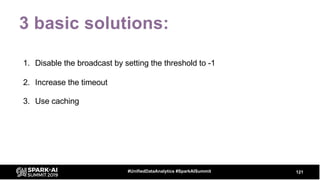
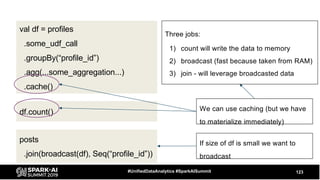
3 basic solutions:
1. Disable the broadcast by setting the threshold to -1
2. Increase the timeout
3. Use caching
121#UnifiedDataAnalytics #SparkAISummit
122#UnifiedDataAnalytics #SparkAISummit
val df = profiles
.some_udf_call
.groupBy(“profile_id”)
.agg(...some_aggregation...)
posts
.join(broadcast(df), Seq(“profile_id”))
Intense transformations:
â—Ź udf call
● aggregation, …
Computation may take longer than
5mins
If size of df is small we want to
broadcast
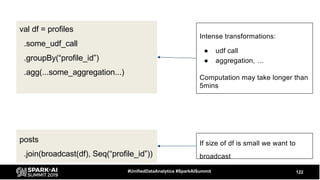
123#UnifiedDataAnalytics #SparkAISummit
val df = profiles
.some_udf_call
.groupBy(“profile_id”)
.agg(...some_aggregation...)
.cache()
posts
.join(broadcast(df), Seq(“profile_id”))
df.count()
Three jobs:
1) count will write the data to memory
2) broadcast (fast because taken from RAM)
3) join - will leverage broadcasted data
If size of df is small we want to
broadcast
We can use caching (but we have
to materialize immediately)
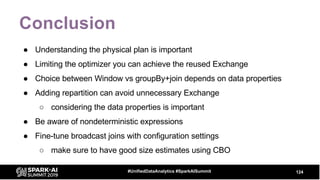
Conclusion
â—Ź Understanding the physical plan is important
â—Ź Limiting the optimizer you can achieve the reused Exchange
â—Ź Choice between Window vs groupBy+join depends on data properties
â—Ź Adding repartition can avoid unnecessary Exchange
â—‹ considering the data properties is important
â—Ź Be aware of nondeterministic expressions
â—Ź Fine-tune broadcast joins with configuration settings
â—‹ make sure to have good size estimates using CBO
124#UnifiedDataAnalytics #SparkAISummit
Questions
125#UnifiedDataAnalytics #SparkAISummit
DON’T FORGET TO RATE
AND REVIEW THE SESSIONS
SEARCH SPARK + AI SUMMIT

Physical Plans in Spark SQL

  • 1.
    WIFI SSID:Spark+AISummit |Password: UnifiedDataAnalytics
  • 2.
    David Vrba, Socialbakers PhysicalPlans in Spark SQL #UnifiedDataAnalytics #SparkAISummit
  • 3.
    â—Ź David VrbaPh.D. â—Ź Data Scientist & Data Engineer at Socialbakers â—‹ Developing ETL pipelines in Spark â—‹ Optimizing Spark jobs â—‹ Productionalizing Spark applications â—Ź Lecturing Spark trainings and workshops â—‹ Studying Spark source code 3#UnifiedDataAnalytics #SparkAISummit
  • 4.
    Goal â—Ź Share whatwe have learned by studying Spark source code and by using Spark on daily basis â—‹ Processing data from social networks (Facebook, Twitter, Instagram, ...) â—‹ Regularly processing data on scales up to 10s of TBs â—‹ Understanding the query plan is a must for efficient processing 4#UnifiedDataAnalytics #SparkAISummit
  • 5.
    Outline â—Ź Two parttalk â—‹ In the first part we cover some theory â–  How query execution works â–  Physical Plan operators â–  Where to look for relevant information in Spark UI â—‹ In the second part we show some examples â–  Model queries with particular optimizations â–  Useful tips â—‹ Q/A 5#UnifiedDataAnalytics #SparkAISummit
  • 6.
    Part I â—Ź QueryExecution â—Ź Physical Plan Operators â—Ź Spark UI 6#UnifiedDataAnalytics #SparkAISummit
  • 7.
    Query Execution 7#UnifiedDataAnalytics #SparkAISummit Query LogicalPlanning Parser Unresolved Plan Analyzer Analyzed Plan Cache Manager Optimizer Optimized Plan Physical Planning Query Planner Spark Plan Preparation Executed Plan Execution RDD DAG Task Scheduler DAG Scheduler Stages + Tasks Executor Today’s session
  • 8.
    Logical Planning ● Logicalplan is created, analyzed and optimized ● Logical plan ○ Tree representation of the query ○ It is an abstraction that carries information about what is supposed to happen ○ It does not contain precise information on how it happens ○ Composed of ■ Relational operators – Filter, Join, Project, ... (they represent DataFrame transformations) ■ Expressions – Column transformations, filtering conditions, joining conditions, ... 8#UnifiedDataAnalytics #SparkAISummit
  • 9.
    Physical Planning â—Ź Inthe phase of logical planning we get Optimized Logical Plan â—Ź Execution layer does not understand DataFrame / Logical Plan (LP) â—Ź Logical Plan has to be converted to a Physical Plan (PP) â—Ź Physical Plan â—‹ Bridge between LP and RDDs â—‹ Similarly to Logical Plan it is a tree â—‹ Contains more specific description of how things should happen (specific choice of algorithms) â—‹ Uses lower level primitives - RDDs 9#UnifiedDataAnalytics #SparkAISummit
  • 10.
    Physical Planning -2 phases 10#UnifiedDataAnalytics #SparkAISummit Spark Plan Executed Plan â—Ź Generated by Query Planner using Strategies â—Ź For each node in LP there is a node in PP Additional Rules
  • 11.
    Physical Planning -2 phases 11#UnifiedDataAnalytics #SparkAISummit Spark Plan Executed Plan â—Ź Generated by Query Planner using Strategies â—Ź For each node in LP there is a node in PP Additional Rules Join SortMergeJoin BroadcastHashJoin In Logical Plan: In Physical Plan: Strategy example: JoinSelection
  • 12.
    Physical Planning -2 phases 12#UnifiedDataAnalytics #SparkAISummit Spark Plan Executed Plan Additional Rules â—Ź Generated by Query Planner using Strategies â—Ź For each node in LP there is a node in PP â—Ź Final version of query plan â—Ź This will be executed â—‹ generates RDD code
  • 13.
    â—Ź Generated byQuery Planner using Strategies â—Ź For each node in LP there is a node in PP Physical Planning - 2 phases 13#UnifiedDataAnalytics #SparkAISummit Spark Plan Executed Plan â—Ź Final version of query plan â—Ź This will be executed â—‹ generates RDD code Additional Rules df.queryExecution.sparkPlan df.queryExecution.executedPlan df.explain() See the plans:
  • 14.
    14 SQL Job IDs Click hereto see the query plan Spark UI
  • 15.
    15 Graphical representation ofthe Physical Plan - executed plan Details - string representation (LP + PP)
  • 16.
  • 17.
    Let’s see someoperators ● FileScan ● Exchange ● HashAggregate, SortAggregate, ObjectHashAggregate ● SortMergeJoin ● BroadcastHashJoin 17#UnifiedDataAnalytics #SparkAISummit
  • 18.
    FileScan 18#UnifiedDataAnalytics #SparkAISummit ● Representsreading the data from a file format spark.table(“posts_fb”) .filter($“month” === 5) .filter($”profile_id” === ...) ● table: posts_fb ● partitioned by month ● bucketed by profile_id, 20b ● 1 file per bucket
  • 19.
    FileScan 19#UnifiedDataAnalytics #SparkAISummit number offiles read size of files read total rows output filesystem read data size total
  • 20.
    FileScan 20#UnifiedDataAnalytics #SparkAISummit It isuseful to pair these numbers with information in Jobs and Stages tab in Spark UI
  • 21.
    21#UnifiedDataAnalytics #SparkAISummit We readfrom bucketed table (20b, 1f/b)
  • 22.
    22#UnifiedDataAnalytics #SparkAISummit We readfrom bucketed table (20b, 1f/b)
  • 23.
    23#UnifiedDataAnalytics #SparkAISummit 697.9 KB Weread from bucketed table (20b, 1f/b)
  • 24.
    24#UnifiedDataAnalytics #SparkAISummit Bucket pruning:0B 697.9 KB We read from bucketed table (20b, 1f/b)
  • 25.
    25#UnifiedDataAnalytics #SparkAISummit Bucket pruning:0B 697.9 KB We read from bucketed table (20b, 1f/b) spark.sql.sources.bucketing.enabled
  • 26.
    26#UnifiedDataAnalytics #SparkAISummit We readfrom bucketed table (20b, 1f/b) Size of the whole partition. This will be read if we turn off bucketing (no bucket pruning) If bucketing is OFF:
  • 27.
    FileScan (string representation) 27#UnifiedDataAnalytics#SparkAISummit PartitionFilters PushedFilters DataFilters
  • 28.
    FileScan (string representation) 28#UnifiedDataAnalytics#SparkAISummit PartitionFilters PushedFilters PartitionCount (partition pruning) DataFilters Format SelectedBucketsCount (bucket pruning)
  • 29.
    Exchange 29#UnifiedDataAnalytics #SparkAISummit â—Ź Representsshuffle - physical data movement on the cluster â—‹ usually quite expensive
  • 30.
    Exchange 30#UnifiedDataAnalytics #SparkAISummit HashPartitioning ● groupBy ●distinct ● join ● repartition($”key”) ● Window.partitionBy(“key”)
  • 31.
    Exchange 31#UnifiedDataAnalytics #SparkAISummit HashPartitioning ● groupBy ●distinct ● join ● repartition($”key”) ● Window.partitionBy(“key”) SinglePartition ● Window.partitionBy()
  • 32.
    Exchange 32#UnifiedDataAnalytics #SparkAISummit HashPartitioning ● groupBy ●distinct ● join ● repartition($”key”) ● Window.partitionBy(“key”) SinglePartition ● Window.partitionBy() RoundRobinPartitioning ● repartition(10)
  • 33.
    Exchange 33#UnifiedDataAnalytics #SparkAISummit HashPartitioning ● groupBy ●distinct ● join ● repartition($”key”) ● Window.partitionBy(“key”) SinglePartition ● Window.partitionBy() RoundRobinPartitioning ● repartition(10) RangePartitioning ● orderBy
  • 34.
  • 35.
    Aggregate 35#UnifiedDataAnalytics #SparkAISummit â—Ź groupBy â—Źdistinct â—Ź dropDuplicates Aggregate HashAggregate LP PP SortAggregate ObjectHashAggregate Chosen in Aggregation strategy
  • 36.
    Aggregate 36#UnifiedDataAnalytics #SparkAISummit ● groupBy ●distinct ● dropDuplicates Aggregate HashAggregate LP PP SortAggregate ObjectHashAggregate Chosen in Aggregation strategy df.groupBy(“profile_id”) .agg(sum(“interactions”))
  • 37.
    Aggregate 37#UnifiedDataAnalytics #SparkAISummit ● groupBy ●distinct ● dropDuplicates Aggregate HashAggregate LP PP Usually comes in pair ○ partial_sum ○ finalmerge_sum SortAggregate ObjectHashAggregate Chosen in Aggregation strategy df.groupBy(“profile_id”) .agg(sum(“interactions”))
  • 38.
    SortMergeJoin 38#UnifiedDataAnalytics #SparkAISummit â—Ź Representsjoining two DataFrames â—Ź Exchange & Sort often before SortMergeJoin but not necessarily (see later)
  • 39.
    BroadcastHashJoin 39#UnifiedDataAnalytics #SparkAISummit BroadcastExchange â—Ź datafrom this branch are broadcasted to each executor BroadcastHashJoin â—Ź Represents joining two DataFrames
  • 40.
    BroadcastHashJoin 40#UnifiedDataAnalytics #SparkAISummit Two jobs:broadcasting the data is handled in separate job â—Ź Represents joining two DataFrames
  • 41.
    Rules applied inpreparation • EnsureRequirements • ReuseExchange • ... 41#UnifiedDataAnalytics #SparkAISummit Spark Plan Executed Plan Additional Rules
  • 42.
    EnsureRequirements â—Ź Fills Exchange& Sort operators to the plan â—Ź How it works? â—Ź Each operator in PP has: â—‹ outputPartitioning â—‹ outputOrdering â—‹ requiredChildDistribution (this is a requirement for partitioning) â—‹ requiredChildOrdering (this is a requirement for ordering) â—Ź If the requirement is not met, Exchange or Sort are used 42#UnifiedDataAnalytics #SparkAISummit
  • 43.
  • 44.
    44#UnifiedDataAnalytics #SparkAISummit SortMergeJoin (id) ProjectProject FileScan FileScan requires: HashPartitioning(id, 200) order by id requires: HashPartitioning(id, 200) order by id
  • 45.
    45#UnifiedDataAnalytics #SparkAISummit SortMergeJoin (id) ProjectProject FileScan FileScan requires: HashPartitioning(id, 200) order by id requires: HashPartitioning(id, 200) order by id outputPartitioning: Unknown outputOrdering: None outputPartitioning: Unknown outputOrdering: None
  • 46.
    46#UnifiedDataAnalytics #SparkAISummit SortMergeJoin (id) ProjectProject FileScan FileScan requires: HashPartitioning(id, 200) order by id requires: HashPartitioning(id, 200) order by id outputPartitioning: Unknown outputOrdering: None outputPartitioning: Unknown outputOrdering: None
  • 47.
    47#UnifiedDataAnalytics #SparkAISummit SortMergeJoin (id) ProjectProject FileScan FileScan Exchange Exchange requires: HashPartitioning(id, 200) order by id requires: HashPartitioning(id, 200) order by id satisfiesthis satisfiesthis
  • 48.
    48#UnifiedDataAnalytics #SparkAISummit SortMergeJoin (id) ProjectProject FileScan FileScan Exchange Exchange Sort Sort requires: HashPartitioning(id, 200) order by id requires: HashPartitioning(id, 200) order by id
  • 49.
    Example with bucketing â—ŹIf the sources are bucketed tables into 50 buckets by id: â—‹ FileScan will have outputPartitioning as HashPartitioning(id, 50) â—‹ It will pass it to Project â—‹ This will happen in both branches of the Join â—‹ The requirement for partitioning is met => no Exchange needed 49#UnifiedDataAnalytics #SparkAISummit
  • 50.
    50#UnifiedDataAnalytics #SparkAISummit SortMergeJoin (id) ProjectProject FileScan FileScan requires: HashPartitioning(id, 200) order by id requires: HashPartitioning(id, 200) order by id outputPartitioning: HashPartitioning(id, 50) outputPartitioning: HashPartitioning(id, 50)
  • 51.
    51#UnifiedDataAnalytics #SparkAISummit SortMergeJoin (id) ProjectProject FileScan FileScan requires: HashPartitioning(id, 200) order by id requires: HashPartitioning(id, 200) order by id outputPartitioning: HashPartitioning(id, 50) outputPartitioning: HashPartitioning(id, 50) outputPartitioning: HashPartitioning(id, 50) outputPartitioning: HashPartitioning(id, 50)
  • 52.
    52#UnifiedDataAnalytics #SparkAISummit SortMergeJoin (id) ProjectProject FileScan FileScan requires: HashPartitioning(id, 200) order by id requires: HashPartitioning(id, 200) order by id outputPartitioning: HashPartitioning(id, 50) outputPartitioning: HashPartitioning(id, 50) outputPartitioning: HashPartitioning(id, 50) outputPartitioning: HashPartitioning(id, 50) No need for Exchange OK OK
  • 53.
    What about theSort ? 53#UnifiedDataAnalytics #SparkAISummit dataDF .write .bucketBy(50, “id”) .sortBy(“id”) .option(“path”, outputPath) .saveAsTable(tableName) It depends on bucketing:
  • 54.
    What about theSort ? 54#UnifiedDataAnalytics #SparkAISummit dataDF .write .bucketBy(50, “id”) .sortBy(“id”) .option(“path”, outputPath) .saveAsTable(tableName) It depends on bucketing: ● If one file per bucket is created ○ FileScan will pick up the information about order ○ No need for Sort in the final plan
  • 55.
    What about theSort ? 55#UnifiedDataAnalytics #SparkAISummit dataDF .write .bucketBy(50, “id”) .sortBy(“id”) .option(“path”, outputPath) .saveAsTable(tableName) It depends on bucketing: ● If one file per bucket is created ○ FileScan will pick up the information about order ○ No need for Sort in the final plan ● If more files per bucket ○ FileScan will not use information about order (data has to be sorted globally) ○ Spark will add Sort to the final plan
  • 56.
    56#UnifiedDataAnalytics #SparkAISummit SortMergeJoin (id) ProjectProject FileScan FileScan Final Executed Plan if: 1. bucketed by id 2. sorted by id (one file/bucket)
  • 57.
    57#UnifiedDataAnalytics #SparkAISummit SortMergeJoin (id) ProjectProject FileScan FileScan Sort Sort Final Executed Plan if: 1. bucketed by id 2. not sorted or 3. sorted but more files/bucket
  • 58.
    ReuseExchange â—Ź Result ofeach Exchange (shuffle) is written to disk (shuffle-write) 58#UnifiedDataAnalytics #SparkAISummit â—Ź The rule checks if the plan has the same Exchange-branches â—‹ if the branches are the same, the shuffle-write will also be the same â—Ź Spark can reuse it since the data (shuffle-write) is persisted on disks
  • 59.
    59#UnifiedDataAnalytics #SparkAISummit Union Project Project FileScanFileScan Exchange Exchange Sort Window Generate Project The two sub-branches may become the same in some situations
  • 60.
    60#UnifiedDataAnalytics #SparkAISummit Union Project Project FileScanFileScan Exchange Exchange Sort Window Generate Union Project FileScan Exchange Sort Window Generate Project Project If the branches are the same, only one will be computed and Spark will reuse it
  • 61.
    ReuseExchange â—Ź The branchesmust be the same â—Ź Only Exchange can be reused â—Ź Can be turned off by internal configuration â—‹ spark.sql.exchange.reuse â—Ź Otherwise you can not control it directly but there is indirect way by tweaking the query (see the example later) â—Ź It reduces the I/O and network cost: â—‹ One scan over the data â—‹ One shuffle write 61#UnifiedDataAnalytics #SparkAISummit
  • 62.
    Part I conclusion â—ŹPhysical Plan operators carry information about execution â—‹ it is useful to pair information from the query plan with info about stages/tasks â—Ź ReuseExchange allows to reduce I/O and network cost â—‹ if Exchange sub-branches are the same Spark will compute it only once â—Ź EnsureRequirements adds Exchange and Sort to the query plan â—‹ it makes sure that requirements of the operators are met 62#UnifiedDataAnalytics #SparkAISummit
  • 63.
    David Vrba, Socialbakers PhysicalPlans in Spark SQL - continues #UnifiedDataAnalytics #SparkAISummit
  • 64.
    Part I recap â—ŹWe covered â—‹ Query Execution (physical planning) â—‹ Two preparation rules: â–  EnsureRequirements â–  ReuseExchange 64#UnifiedDataAnalytics #SparkAISummit
  • 65.
    Part II â—Ź Modelexamples with optimizations â—Ź Some useful tips 65#UnifiedDataAnalytics #SparkAISummit
  • 66.
    Data 66#UnifiedDataAnalytics #SparkAISummit post_id profile_idinteractions date 1 1 20 2019-01-01 2 1 15 2019-01-01 3 1 50 2019-02-01 Table A: posts (messages published on FB)
  • 67.
    Example I -exchange reuse 67#UnifiedDataAnalytics #SparkAISummit â—Ź Take all profiles where â—‹ sum of interactions is bigger than 100 â—‹ or sum of interactions is less than 20
  • 68.
  • 69.
    69#UnifiedDataAnalytics #SparkAISummit df.groupBy(“profile_id”) .agg(sum(“interactions”).alias(“sum”)) .filter($”sum” >100 || $”sum” < 20) .write(...) val dfSumBig = df .groupBy(“profile_id”) .agg(sum(“interactions”).alias(“sum”)) .filter($”sum” > 100) val dfSumSmall = df .groupBy(“profile_id”) .agg(sum(“interactions”).alias(“sum”)) .filter($”sum” < 20) dfSumBig.union(dfSumSmall) .write(...) Simple query: Can be written also in terms of union
  • 70.
  • 71.
    71#UnifiedDataAnalytics #SparkAISummit val dfSumBig= df .groupBy(“profile_id”) .agg(sum(“interactions”).alias(“sum”)) .filter($”sum” > 100) No need to optimize val dfSumSmall = df .groupBy(“profile_id”) .agg(sum(“interactions”).alias(“sum”)) .filter($”sum” < 20) dfSumBig.union(dfSumSmall) .write(...) This Exchange is reused. The data is scanned only once In our example:
  • 72.
    72#UnifiedDataAnalytics #SparkAISummit val dfSumBig= df .groupBy(“profile_id”) .agg(sum(“interactions”).alias(“sum”)) .filter($”sum” > 100) val dfSumSmall = df .groupBy(“profile_id”) .agg(sum(“interactions”).alias(“sum”)) .filter($”sum” < 20) dfSumBig.union(dfSumSmall) .write(...) Let’s suppose the assignment has changed: ● For dfSumSmall we want to consider only specific profiles (profile_id is not null)
  • 73.
    73#UnifiedDataAnalytics #SparkAISummit dfSumBig.union(dfSumSmall) .write(...) val dfSumSmall= df .filter($”profile_id”.isNotNull) .groupBy(“profile_id”) .agg(sum(“interactions”).alias(“sum”)) .filter($”sum” < 20) val dfSumBig = df .groupBy(“profile_id”) .agg(sum(“interactions”).alias(“sum”)) .filter($”sum” > 100) Let’s suppose the assignment has changed: ● For dfSumSmall we want to consider only specific profiles (profile_id is not null)
  • 74.
    74#UnifiedDataAnalytics #SparkAISummit Now addadditional filter to one DF:val dfSumBig = df .groupBy(“profile_id”) .agg(sum(“interactions”).alias(“sum”)) .filter($”sum” > 100) val dfSumSmall = df .filter($”profile_id”.isNotNull) .groupBy(“profile_id”) .agg(sum(“interactions”).alias(“sum”)) .filter($”sum” < 20) dfSumBig.union(dfSumSmall) .write(...)
  • 75.
    val dfSumSmall =df .groupBy(“profile_id”) .agg(sum(“interactions”).alias(“sum”)) .filter($”sum” < 20) .filter($”profile_id”.isNotNull) ● How can we optimize this? ● Just calling the filter on different place does not help 75#UnifiedDataAnalytics #SparkAISummit Spark optimizer will move this filter back by calling a rule PushDownPredicate
  • 76.
    ● We canlimit the optimizer to stop the rule 76#UnifiedDataAnalytics #SparkAISummit spark.conf.set( “spark.sql.optimizer.excludeRules”, “org.apache.spark.sql.catalyst.optimizer.PushDownPredicate” ) val dfSumSmall = df .groupBy(“profile_id”) .agg(sum(“interactions”).alias(“metricValue”)) .filter($”metricValue” < 20) .filter($”profile_id”.isNotNull) It has both the filter conditions
  • 77.
    Limiting the optimizer â—ŹAvailable since Spark 2.4 â—Ź Useful if you need to change the order of operators in the plan â—‹ reposition Filter, Exchange â—Ź Queries: â—‹ one data source (which is expensive to read) â—‹ with multiple computations (using groupBy or Window) â–  combined together using Union or Join 77#UnifiedDataAnalytics #SparkAISummit
  • 78.
    Reused computation â—Ź Similareffect to ReuseExchange can be achieved also by caching â—‹ caching may not be that useful with large datasets (if it does not fit to the caching layer) â—‹ caching evokes additional overhead while putting data to the caching layer (memory or disk) 78#UnifiedDataAnalytics #SparkAISummit
  • 79.
    Example II â—Ź Getonly records (posts) with max interactions for each profile 79#UnifiedDataAnalytics #SparkAISummit post_id profile_id interactions date 1 1 20 2019-01-01 2 1 50 2019-01-01 3 1 50 2019-02-01 4 2 0 2019-01-01 5 2 100 2019-03-01 post_id profile_id interactions date 2 1 50 2019-01-01 3 1 50 2019-02-01 Assume profile_id has non-null values.
  • 80.
    Example II â—Ź Threecommon ways how to write the query: â—‹ Using Window function â—‹ Using groupBy + join â—‹ Using correlated subquery in SQL 80#UnifiedDataAnalytics #SparkAISummit Which one is the most efficient?
  • 81.
    81#UnifiedDataAnalytics #SparkAISummit val w= Window.partitionBy(“profile_id”) posts .withColumn(“maxCount”, max(“interactions”).over(w)) .filter($”interactions” === $”maxCount”) Using Window:
  • 82.
    82#UnifiedDataAnalytics #SparkAISummit val maxCount= posts .groupBy(“profile_id”) .agg(max(“interactions”).alias(“maxCount”)) posts.join(maxCount, Seq(“profile_id”)) .filter($”interactions” === $”maxCount”) Using groupBy + join:
  • 83.
    83#UnifiedDataAnalytics #SparkAISummit posts.createOrReplaceTempView(“postsView”) val query= “““ SELECT * FROM postsView v1 WHERE interactions = ( select max(interactions) from postsView v2 where v1.profile_id = v2.profile_id ) ””” spark.sql(query) Using correlated subquery (equivalent plan with Join+groupBy):
  • 84.
  • 85.
    85#UnifiedDataAnalytics #SparkAISummit Query withwindow Query with join or correlated subquery SortMergeJoin BroadcastHashJoin
  • 86.
    86#UnifiedDataAnalytics #SparkAISummit Query withwindow Query with join or correlated subquery SortMergeJoin BroadcastHashJoin Exchange + Sort
  • 87.
    87#UnifiedDataAnalytics #SparkAISummit Query withwindow Query with join or correlated subquery SortMergeJoin BroadcastHashJoin 2 Exchanges + 1 Sort Exchange + Sort
  • 88.
    88#UnifiedDataAnalytics #SparkAISummit Query withwindow Query with join or correlated subquery SortMergeJoin BroadcastHashJoin 2 Exchanges + 1 Sort Exchange + Sort reduced shuffle HashAggregate
  • 89.
    89#UnifiedDataAnalytics #SparkAISummit Query withwindow Query with join or correlated subquery SortMergeJoin BroadcastHashJoin 2 Exchanges + 1 Sort Exchange + Sort reduced shuffle broadcast exchange HashAggregate
  • 90.
    Window vs join+ groupBy 90#UnifiedDataAnalytics #SparkAISummit Both tables are large â—Ź Go with window â—Ź SortMergeJoin will be more expensive (3 exchanges, 2 sorts)
  • 91.
    Window vs join+ groupBy 91#UnifiedDataAnalytics #SparkAISummit Both tables are large â—Ź Go with window â—Ź SortMergeJoin will be more expensive (3 exchanges, 2 sorts) Reduced table is much smaller and can be broadcasted â—Ź Go with broadcast join - it will be much faster
  • 92.
    Window vs join+ groupBy 92#UnifiedDataAnalytics #SparkAISummit Both tables are small and comparable in size: â—Ź It is not a big deal â—Ź Broadcast will also generate traffic Both tables are large â—Ź Go with window â—Ź SortMergeJoin will be more expensive (3 exchanges, 2 sorts) Reduced table is much smaller and can be broadcasted â—Ź Go with broadcast join - it will be much faster
  • 93.
    Example III ● Suminteractions for each profile and each date ● Join additional table about profiles 93#UnifiedDataAnalytics #SparkAISummit profile_id about lang 1 “some string” en 2 “some other string” en Table B: profiles (Facebook pages)
  • 94.
    Example III ● Suminteractions for each profile and each date ● Join additional table about profiles 94#UnifiedDataAnalytics #SparkAISummit posts .groupBy(“profile_id”, “date”) .agg(sum(“interactions”)) .join(profiles, Seq(“profile_id”)) profile_id about lang 1 “some string” en 2 “some other string” en Table B: profiles (Facebook pages)
  • 95.
  • 96.
  • 97.
    97#UnifiedDataAnalytics #SparkAISummit posts .groupBy(“profile_id”, “date”) .agg(sum(“interactions”)) .join(profiles,Seq(“profile_id”)) SortMergeJoin (profile_id) It requires (strictly) ● HashPartitioning (profile_id)
  • 98.
    98#UnifiedDataAnalytics #SparkAISummit posts .groupBy(“profile_id”, “date”) .agg(sum(“interactions”)) .join(profiles,Seq(“profile_id”)) SortMergeJoin (profile_id) It requires (strictly) ● HashPartitioning (profile_id) HashPartitioning (profile_id)
  • 99.
    99#UnifiedDataAnalytics #SparkAISummit posts .groupBy(“profile_id”, “date”) .agg(sum(“interactions”)) .join(profiles,Seq(“profile_id”)) SortMergeJoin (profile_id) It requires (strictly) ● HashPartitioning (profile_id) HashPartitioning (profile_id) HashAggregate (profile_id, date) It requires ● HashPartitioning (profile_id, date) ○ Or any subset of these cols
  • 100.
    100#UnifiedDataAnalytics #SparkAISummit posts .groupBy(“profile_id”, “date”) .agg(sum(“interactions”)) .join(profiles,Seq(“profile_id”)) HashAggregate (profile_id, date) It requires ● HashPartitioning (profile_id, date) ○ Or any subset of these cols HashPartitioning (profile_id, date) SortMergeJoin (profile_id) It requires (strictly) ● HashPartitioning (profile_id) HashPartitioning (profile_id)
  • 101.
  • 102.
  • 103.
    103#UnifiedDataAnalytics #SparkAISummit Add repartitionand eliminate one shuffle HashPartitioning (profile_id) posts .repartition(“profile_id”) .groupBy(“profile_id”, “date”) .agg(sum(“interactions”)) .join(profiles, Seq(“profile_id”)) Generated by strategy
  • 104.
    104#UnifiedDataAnalytics #SparkAISummit Add repartitionand eliminate one shuffle HashPartitioning (profile_id) posts .repartition(“profile_id”) .groupBy(“profile_id”, “date”) .agg(sum(“interactions”)) .join(profiles, Seq(“profile_id”)) Generated by strategy
  • 105.
    105#UnifiedDataAnalytics #SparkAISummit Add repartitionand eliminate one shuffle HashPartitioning (profile_id) posts .repartition(“profile_id”) .groupBy(“profile_id”, “date”) .agg(sum(“interactions”)) .join(profiles, Seq(“profile_id”)) Generated by strategy OK with
  • 106.
    106#UnifiedDataAnalytics #SparkAISummit Add repartitionand eliminate one shuffle HashPartitioning (profile_id) posts .repartition(“profile_id”) .groupBy(“profile_id”, “date”) .agg(sum(“interactions”)) .join(profiles, Seq(“profile_id”)) Generated by strategy OK with OK with
  • 107.
    Adding repartition â—Ź Whatis the cost of using it? â—‹ Now we shuffle all data â—‹ Before we shuffled reduced dataset 107#UnifiedDataAnalytics #SparkAISummit
  • 108.
    108#UnifiedDataAnalytics #SparkAISummit reduced shuffle (shuffleddata are all distinct combinations of profile_id & date) Before using repartition HashAggregate
  • 109.
    109#UnifiedDataAnalytics #SparkAISummit reduced shuffle (shuffleddata are all distinct combinations of profile_id & date) total shuffle (all data is shuffled) Before using repartition After using repartition HashAggregate HashAggregate
  • 110.
    Adding repartition â—Ź Whatis the cost of using it? â—‹ Now we shuffle all data â—‹ Before we shuffled reduced dataset â—Ź What is more efficient? â—‹ depends on properties of data â–  here the cardinality of distinct (profile_id, date) 110#UnifiedDataAnalytics #SparkAISummit
  • 111.
    Adding repartition 111#UnifiedDataAnalytics #SparkAISummit â—ŹCardinality of (profile_id, date) is comparable with row_count â—Ź Each profile has only few posts per date â—Ź The data is not reduced much by groupBy aggregation â—Ź the reduced shuffle is comparable with full shuffle â—Ź Cardinality of (profile_id, date) is much lower than row_count â—Ź Each profile has many posts per date â—Ź The data is reduced a lot by groupBy aggregation â—Ź the reduced shuffle is much lower than full shuffle Use repartition to reduce number of shuffles if: Use the original plan if:
  • 112.
    Useful tip I ●Filters are not pushed through nondeterministic expressions 112#UnifiedDataAnalytics #SparkAISummit posts .groupBy(“profile_id”) .agg(collect_list(“interactions”)) .filter($”profile_id”.isNotNull )
  • 113.
    Useful tip I ●Filters are not pushed through nondeterministic expressions 113#UnifiedDataAnalytics #SparkAISummit posts .groupBy(“profile_id”) .agg(collect_list(“interactions”)) .filter($”profile_id”.isNotNull ) Exchange
  • 114.
    Useful tip I ●Filters are not pushed through nondeterministic expressions 114#UnifiedDataAnalytics #SparkAISummit posts .filter($”profile_id”.isNotNull ) .groupBy(“profile_id”) .agg(collect_list(“interactions”)) Make sure your filters are positioned at the right place to achieve efficient execution Exchange
  • 115.
    Nondeterministic expressions 115#UnifiedDataAnalytics #SparkAISummit â—Źcollect_list â—Ź collect_set â—Ź first â—Ź last â—Ź input_file_name â—Ź spark_partition_id â—Ź monotinically_increasing_id â—Ź rand â—Ź randn â—Ź shuffle
  • 116.
    Useful tip IIa â—ŹImportant settings related to BroadcastHashJoin: 116#UnifiedDataAnalytics #SparkAISummit spark.sql.autoBroadcastJoinThreshold â—Ź Default value is 10MB â—Ź Spark will broadcast if â—‹ Spark thinks that the size of the data is less â—‹ or you use broadcast hint
  • 117.
    Useful tip IIa â—ŹImportant settings related to BroadcastHashJoin: 117#UnifiedDataAnalytics #SparkAISummit spark.sql.autoBroadcastJoinThreshold â—Ź Default value is 10MB â—Ź Spark will broadcast if â—‹ Spark thinks that the size of the data is less â—‹ or you use broadcast hint Compute stats to make good estimates ANALYZE TABLE table_name COMPUTE STATISTICS FOR COLUMNS col1, col2, ...
  • 118.
    Useful tip IIa â—ŹImportant settings related to BroadcastHashJoin: 118#UnifiedDataAnalytics #SparkAISummit spark.sql.autoBroadcastJoinThreshold â—Ź Default value is 10MB â—Ź Spark will broadcast if â—‹ Spark thinks that the size of the data is less â—‹ or you use broadcast hint Compute stats to make good estimates ANALYZE TABLE table_name COMPUTE STATISTICS FOR COLUMNS col1, col2, ... spark.sql.cbo.enabled
  • 119.
    Useful tip IIb â—ŹImportant settings related to BroadcastHashJoin: 119#UnifiedDataAnalytics #SparkAISummit spark.sql.broadcastTimeout â—Ź Default value is 300s
  • 120.
    Useful tip IIb â—ŹImportant settings related to BroadcastHashJoin: 120#UnifiedDataAnalytics #SparkAISummit spark.sql.broadcastTimeout â—Ź Default value is 300s â—Ź If Spark does not make it: SparkException: Could not execute broadcast in 300 secs. You can increase the timeout for broadcasts via spark.sql.broadcastTimeout or disable broadcast join by setting spark.sql.autoBroadcastJoinThreshold to -1
  • 121.
    3 basic solutions: 1.Disable the broadcast by setting the threshold to -1 2. Increase the timeout 3. Use caching 121#UnifiedDataAnalytics #SparkAISummit
  • 122.
    122#UnifiedDataAnalytics #SparkAISummit val df= profiles .some_udf_call .groupBy(“profile_id”) .agg(...some_aggregation...) posts .join(broadcast(df), Seq(“profile_id”)) Intense transformations: ● udf call ● aggregation, … Computation may take longer than 5mins If size of df is small we want to broadcast
  • 123.
    123#UnifiedDataAnalytics #SparkAISummit val df= profiles .some_udf_call .groupBy(“profile_id”) .agg(...some_aggregation...) .cache() posts .join(broadcast(df), Seq(“profile_id”)) df.count() Three jobs: 1) count will write the data to memory 2) broadcast (fast because taken from RAM) 3) join - will leverage broadcasted data If size of df is small we want to broadcast We can use caching (but we have to materialize immediately)
  • 124.
    Conclusion â—Ź Understanding thephysical plan is important â—Ź Limiting the optimizer you can achieve the reused Exchange â—Ź Choice between Window vs groupBy+join depends on data properties â—Ź Adding repartition can avoid unnecessary Exchange â—‹ considering the data properties is important â—Ź Be aware of nondeterministic expressions â—Ź Fine-tune broadcast joins with configuration settings â—‹ make sure to have good size estimates using CBO 124#UnifiedDataAnalytics #SparkAISummit
  • 125.
  • 126.
    DON’T FORGET TORATE AND REVIEW THE SESSIONS SEARCH SPARK + AI SUMMIT