Using Apache Spark
PRESENTER: SNEHA CHALLA
VENUE: GOOGLE, PITTSBURGH
DATE: AUGUST 25TH, 2015
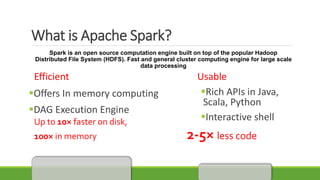
What is Apache Spark?
Spark is an open source computation engine built on top of the popular Hadoop
Distributed File System (HDFS). Fast and general cluster computing engine for large scale
data processing
Efficient Usable
Offers In memory computing
DAG Execution Engine
Up to 10× faster on disk,
100× in memory 2-5× less code
Rich APIs in Java,
Scala, Python
Interactive shell
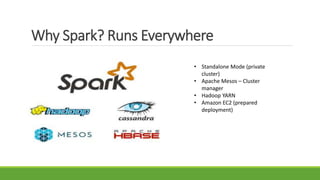
Why Spark? Runs Everywhere
• Standalone Mode (private
cluster)
• Apache Mesos – Cluster
manager
• Hadoop YARN
• Amazon EC2 (prepared
deployment)
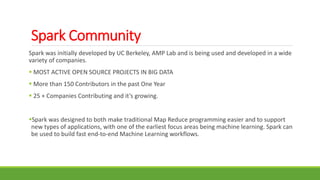
Spark Community
Spark was initially developed by UC Berkeley, AMP Lab and is being used and developed in a wide
variety of companies.
 MOST ACTIVE OPEN SOURCE PROJECTS IN BIG DATA
 More than 150 Contributors in the past One Year
 25 + Companies Contributing and it’s growing.
Spark was designed to both make traditional Map Reduce programming easier and to support
new types of applications, with one of the earliest focus areas being machine learning. Spark can
be used to build fast end-to-end Machine Learning workflows.
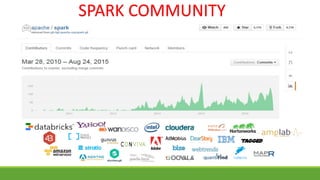
SPARK COMMUNITY
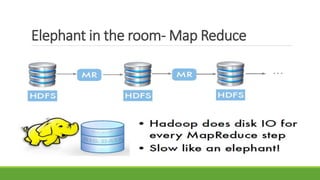
Elephant in the room- Map Reduce
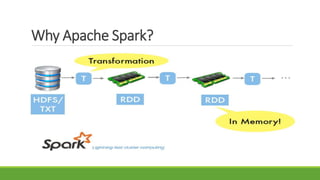
Why Apache Spark?
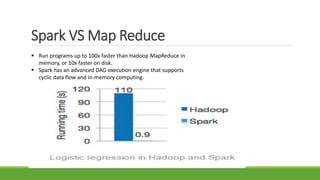
Spark VS Map Reduce
 Run programs up to 100x faster than Hadoop MapReduce in
memory, or 10x faster on disk.
 Spark has an advanced DAG execution engine that supports
cyclic data flow and in-memory computing.
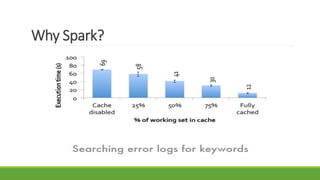
Why Spark?
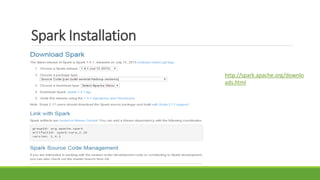
Spark Installation
http://spark.apache.org/downlo
ads.html
Spark Installation
• Extract compressed folder spark-1.3.0-binhadoop2.4
• From terminal, go to spark-1.3.0-bin-hadoop2.4/
bin
• Run pyspark
• Run rdd = sc.parallelize([0, 1, 2]);
rdd.map(lambda x: x*x).collect()
• Get result [0,1,4]
• It’s that easy!
 Windows users might need to download and
run additional winutils.exe for smooth
running of applications
 Download winutils here
http://www.srccodes.com/p/article/39/error
-util-shell-failed-locate-winutils-binary-
hadoop-binary-path.
and add to $HADOOP_HOME/bin
• Download a bigger zip (1.9GB) from
http://bit.ly/1FpZAXH
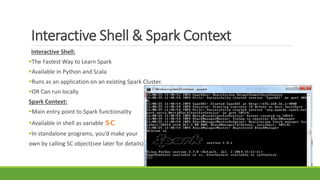
Interactive Shell & Spark Context
Interactive Shell:
The Fastest Way to Learn Spark
Available in Python and Scala
Runs as an application on an existing Spark Cluster.
OR Can run locally
Spark Context:
Main entry point to Spark functionality
Available in shell as variable sc
In standalone programs, you’d make your
own by calling SC object(see later for details)
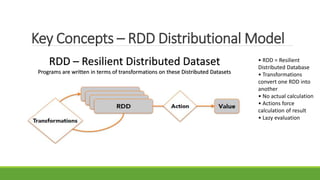
Key Concepts – RDD Distributional Model
RDD – Resilient Distributed Dataset
Programs are written in terms of transformations on these Distributed Datasets
• RDD = Resilient
Distributed Database
• Transformations
convert one RDD into
another
• No actual calculation
• Actions force
calculation of result
• Lazy evaluation
RDD’s - Motivation
RDDs are motivated by two types of applications that current data flow systems handle
inefficiently:
1) Iterative algorithms - Common in graph applications and Machine Learning
2) Interactive Data Mining Tools
To achieve fault tolerance efficiently - RDDs provide a highly restricted form of shared memory:
they are read-only datasets that can only be constructed through bulk operations on other
RDDs.
However, RDDs are expressive enough to capture a wide class of computations, including
MapReduce and specialized computations.
Spark Architecture
Basic Abstraction: RDDs
Immutability
Laziness
Transformations
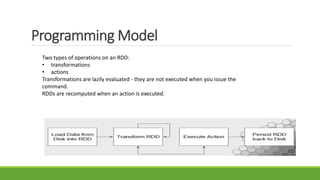
Programming Model
Two types of operations on an RDD:
• transformations
• actions
Transformations are lazily evaluated - they are not executed when you issue the
command.
RDDs are recomputed when an action is executed.
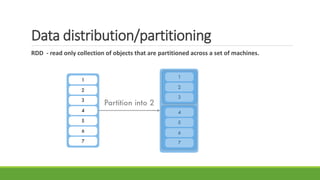
Data distribution/partitioning
RDD - read only collection of objects that are partitioned across a set of machines.
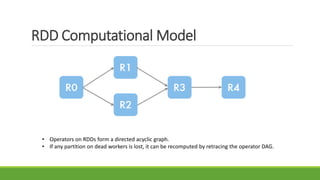
RDD Computational Model
• Operators on RDDs form a directed acyclic graph.
• If any partition on dead workers is lost, it can be recomputed by retracing the operator DAG.
FIRST STEP IN DATA ANALYSIS :
Create an RDD
Read data from a text file on local machine , S3 or HDFS into RDD.
Give life to an RDD using Spark Context
# Convert a python collection to an RDD
# Turn a Python collection into an RDD
>sc.parallelize ([7, 8, 9])
# Load text file from local FS, HDFS, or S3
>sc.textFile(“textfile.txt”)
>sc.textFile(“directory/*.txt”)
>sc.textFile(“hdfs://namenode:9000/path/file”)
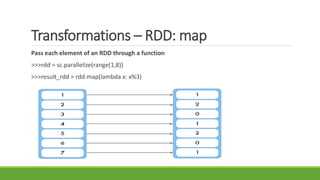
Transformations – RDD: map
Pass each element of an RDD through a function
>>>rdd = sc.parallelize(range(1,8))
>>>result_rdd = rdd.map(lambda x: x%3)
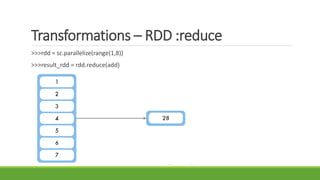
Transformations – RDD :reduce
>>>rdd = sc.parallelize(range(1,8))
>>>result_rdd = rdd.reduce(add)
RDD Transformations: Reduce By Key
>>>rdd = sc.parallelize([(‘Alice’,23), (‘Bob’,17), (‘Alice’,27)])
>>>result_rdd = rdd.reduceByKey(add)
Some more RDD Transformations
rdd.flatMap(f): Return a new RDD by first applying a function to all elements of this RDD, and
then flattening the results.
>>> rdd = sc.parallelize([2,3,4])
sorted(rdd.flatMap(lambda x: range(1,x)).collect() ?/* Collect is the action applied on
transformation
[1,1,1,2,2,3]
 rdd.filter(f) : Return a new RDD containing only the elements that satisfy a predicate.
>>> rdd = sc.parallelize([1,2,3,4,5])
rdd.filter(lambda x: x%2 ==0).collect()
[2,4]
Some more RDD Transformations
sortBy(self, keyfunc, ascending=True, numPartitions=None)
Sorts this RDD by given keyfunc
>> rdd= [(‘a’,1),(’b’, 2) , (‘1’,3), (‘d’,4),(‘2’,5) ]
rdd = sc.parallelize(rdd).sortBy(lambda x:x[0]).
 rdd.cache() : Cache RDD in memory for repeated use
countByKey(self):
rdd= sc.parallelize([ (“a”,1) , (“b”,1), (“a”,1) ])
rdd.countByKey().items()
 join(self,other, numPartitions = None): Return an RDD containing all pairs of elements with
matching keys in self and others.
Setting the level of parallelism
All the pair RDD operations take an optional second parameter for number of tasks.
> rdd.reduceByKey(lambda x, y: x + y, 5)
>rdd.groupByKey(5)
>rdd.join(pageViews, 5)
Some RDD Actions
RDD Transformations are lazily evaluated . Actions kick off computation on transformations.
Eg: Collect(), glom() etc
 rdd.collect() : Return RDD content as a list
rdd = sc.parallelize([1,2,3], 3)
rdd2 = rdd.map(lambda x: x*x)
rdd2.glom().collect(): [1, 4, 9]
 rdd.glom().collect():
rdd = sc.parallelize([0,1,2], 3)
rdd2 = rdd.map(lambda x: x*x)
rdd2.collect(): [[0], [1], [4]]
 saveAsTextFile(path): Write the elements of the dataset as a text file (or set of text files) in a
given directory in the local filesystem, HDFS or any other Hadoop-supported file system.
 take(n) :Return an array with the first n elements of the dataset.
 first() : return the first element of the dataset. Similar to take(1)
In Map Reduce you get only two operators – map and reduce.
Whereas Spark offers 80+ operations!
Automatic parallelization of workflows on SPARK. In Spark a whole series of
individual tasks is expressed as a single program flow that is lazily evaluated., so
that system has a complete picture of the execution graph.
Word Count
from pyspark import SparkContext
logFile = "hdfs://localhost:9000/user/bigdatavm/input"
sc = SparkContext("spark://bigdata-vm:7077", "WordCount")
textFile = sc.textFile(logFile)
wordCounts = textFile.flatMap(lambda line: line.split()).map(lambda word: (word, 1)).reduceByKey(lambda a, b: a+b)
wordCounts.saveAsTextFile("hdfs://localhost:9000/user/bigdatavm/output")
Fault tolerant - Persistent
RDDs track lineage information that can be used to efficiently re compute lost data
msgs = textFile.filter(lambda s: s.startsWith(“ERROR”))
.map(lambda s: s.split(“t”)[2])
Spark will persist or cache RDD slices in memory on each node during operations.
You can mark an RDD to be persisted with the cache method on an RDD along with a storage level.
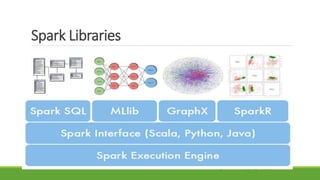
Spark Libraries
MLlib
 Spark subproject providing Machine Learning primitives. Initial contribution from AMP Lab @ UC Berkeley.
Shipped with Spark since version 0.8
35 contributors
Highlights include:
 Basic statistics - summary statistics ,correlation and stratified sampling
 hypothesis testing, random data generation
 Linear models of regression (logistic and linear regression, SVM’s)
 Naive Bayes and Decision Tree classifiers, ensemble of trees
Collaborative Filtering with ALS
 K-Means clustering and Gaussian Mixture.
 Stochastic gradient descent
 SVD (singular value decomposition) and PCA
Spark’s scalable machine
learning library consisting
of common learning
algorithms and utilities,
including classification,
regression, clustering,
collaborative filtering,
dimensionality reduction,
as well as underlying
optimization primitives.
Running a Spark Application
Command: submit-spark <python_file_path>
Let’s see the implementation of
1) K-Means
2) Logistic Regression
K-Means
# Import the required pyspark functions
from pyspark.mllib.clustering import KMeans
from numpy import array
from math import sqrt
from pyspark import SparkContext
sc =SparkContext()
data = sc.textFile("C:UserssnehachallaDownloadsspark-1.4.1-bin-hadoop2.4spark-1.4.1-bin-hadoop2.4binkmeans_data.txt")
parsedData = data.map(lambda line:array([float(x) for x in line.split(' ')])).cache()
K-Means (Cont..)
# Build the model (cluster the data)
clusters = KMeans.train(parsedData, 2, maxIterations = 10,runs = 1, initializationMode = "k-means||")
# Evaluate clustering by computing the sum of squared errors
def error(point):
center = clusters.centers[clusters.predict(point)]
return sqrt(sum([x**2 for x in (point - center)]))
cost = parsedData.map(lambda point: error(point)).reduce(lambda x, y: x + y)
print("Sum of squared error = " + str(cost))
Logistic Regression
from pyspark.mllib.classification import LogisticRegressionWithSGD
from numpy import array
# Load and parse the data
data = sc.textFile("mllib/data/sample_svm_data.txt")
parsedData = data.map(lambda line: array([float(x) for x in line.split(' ')]))
model = LogisticRegressionWithSGD.train(parsedData)
# Build the model
labelsAndPreds = parsedData.map(lambda point: (int(point.item(0)),
model.predict(point.take(range(1, point.size)))))
# Evaluating the model on training data
trainErr = labelsAndPreds.filter(lambda (v, p): v != p).count() / float(parsedData.count())
print("Training Error = " + str(trainErr)
Spark UI
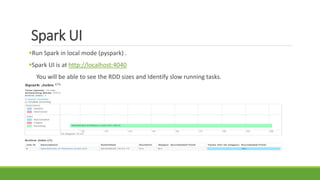
Run Spark in local mode (pyspark) .
Spark UI is at http://localhost:4040
You will be able to see the RDD sizes and Identify slow running tasks.
MOVING TO A CLUSTER – EC2
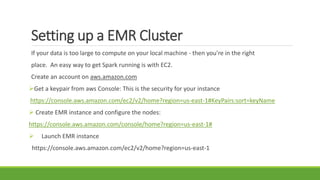
Setting up a EMR Cluster
If your data is too large to compute on your local machine - then you’re in the right
place. An easy way to get Spark running is with EC2.
Create an account on aws.amazon.com
Get a keypair from aws Console: This is the security for your instance
https://console.aws.amazon.com/ec2/v2/home?region=us-east-1#KeyPairs:sort=keyName
 Create EMR instance and configure the nodes:
https://console.aws.amazon.com/console/home?region=us-east-1#
 Launch EMR instance
https://console.aws.amazon.com/ec2/v2/home?region=us-east-1
EMR Cluster
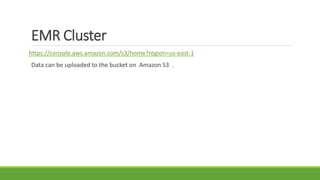
https://console.aws.amazon.com/s3/home?region=us-east-1
Data can be uploaded to the bucket on Amazon S3 .
For more info on Spark
 Website: http://spark.apache.org
Tutorials: http://ampcamp.berkeley.edu
 Spark Summit: http://spark-summit.org
Github: https://github.com/apache/spark
Mailing lists: user@spark.apache.org,dev@spark.apache.org
Python API documentation. http://spark.apache.org/docs/latest/api/python/
Questions?
THANK YOU
References
http://www.eecs.berkeley.edu/Pubs/TechRpts/2011/EECS-2011-82.pdf
http://www.andrew.cmu.edu/user/amaurya/docs/spark_talk/presentation.pdf
http://www.slideshare.net/BenjaminBengfort/fast-data-analytics-with-spark-and-python

Apache spark sneha challa- google pittsburgh-aug 25th

  • 1.
    Using Apache Spark PRESENTER:SNEHA CHALLA VENUE: GOOGLE, PITTSBURGH DATE: AUGUST 25TH, 2015
  • 2.
    What is ApacheSpark? Spark is an open source computation engine built on top of the popular Hadoop Distributed File System (HDFS). Fast and general cluster computing engine for large scale data processing Efficient Usable Offers In memory computing DAG Execution Engine Up to 10× faster on disk, 100× in memory 2-5× less code Rich APIs in Java, Scala, Python Interactive shell
  • 3.
    Why Spark? RunsEverywhere • Standalone Mode (private cluster) • Apache Mesos – Cluster manager • Hadoop YARN • Amazon EC2 (prepared deployment)
  • 4.
    Spark Community Spark wasinitially developed by UC Berkeley, AMP Lab and is being used and developed in a wide variety of companies.  MOST ACTIVE OPEN SOURCE PROJECTS IN BIG DATA  More than 150 Contributors in the past One Year  25 + Companies Contributing and it’s growing. Spark was designed to both make traditional Map Reduce programming easier and to support new types of applications, with one of the earliest focus areas being machine learning. Spark can be used to build fast end-to-end Machine Learning workflows.
  • 5.
  • 6.
    Elephant in theroom- Map Reduce
  • 7.
  • 8.
    Spark VS MapReduce  Run programs up to 100x faster than Hadoop MapReduce in memory, or 10x faster on disk.  Spark has an advanced DAG execution engine that supports cyclic data flow and in-memory computing.
  • 9.
  • 10.
  • 11.
    Spark Installation • Extractcompressed folder spark-1.3.0-binhadoop2.4 • From terminal, go to spark-1.3.0-bin-hadoop2.4/ bin • Run pyspark • Run rdd = sc.parallelize([0, 1, 2]); rdd.map(lambda x: x*x).collect() • Get result [0,1,4] • It’s that easy!  Windows users might need to download and run additional winutils.exe for smooth running of applications  Download winutils here http://www.srccodes.com/p/article/39/error -util-shell-failed-locate-winutils-binary- hadoop-binary-path. and add to $HADOOP_HOME/bin • Download a bigger zip (1.9GB) from http://bit.ly/1FpZAXH
  • 12.
    Interactive Shell &Spark Context Interactive Shell: The Fastest Way to Learn Spark Available in Python and Scala Runs as an application on an existing Spark Cluster. OR Can run locally Spark Context: Main entry point to Spark functionality Available in shell as variable sc In standalone programs, you’d make your own by calling SC object(see later for details)
  • 13.
    Key Concepts –RDD Distributional Model RDD – Resilient Distributed Dataset Programs are written in terms of transformations on these Distributed Datasets • RDD = Resilient Distributed Database • Transformations convert one RDD into another • No actual calculation • Actions force calculation of result • Lazy evaluation
  • 14.
    RDD’s - Motivation RDDsare motivated by two types of applications that current data flow systems handle inefficiently: 1) Iterative algorithms - Common in graph applications and Machine Learning 2) Interactive Data Mining Tools To achieve fault tolerance efficiently - RDDs provide a highly restricted form of shared memory: they are read-only datasets that can only be constructed through bulk operations on other RDDs. However, RDDs are expressive enough to capture a wide class of computations, including MapReduce and specialized computations.
  • 15.
    Spark Architecture Basic Abstraction:RDDs Immutability Laziness Transformations
  • 16.
    Programming Model Two typesof operations on an RDD: • transformations • actions Transformations are lazily evaluated - they are not executed when you issue the command. RDDs are recomputed when an action is executed.
  • 17.
    Data distribution/partitioning RDD -read only collection of objects that are partitioned across a set of machines.
  • 18.
    RDD Computational Model •Operators on RDDs form a directed acyclic graph. • If any partition on dead workers is lost, it can be recomputed by retracing the operator DAG.
  • 19.
    FIRST STEP INDATA ANALYSIS : Create an RDD Read data from a text file on local machine , S3 or HDFS into RDD. Give life to an RDD using Spark Context # Convert a python collection to an RDD # Turn a Python collection into an RDD >sc.parallelize ([7, 8, 9]) # Load text file from local FS, HDFS, or S3 >sc.textFile(“textfile.txt”) >sc.textFile(“directory/*.txt”) >sc.textFile(“hdfs://namenode:9000/path/file”)
  • 20.
    Transformations – RDD:map Pass each element of an RDD through a function >>>rdd = sc.parallelize(range(1,8)) >>>result_rdd = rdd.map(lambda x: x%3)
  • 21.
    Transformations – RDD:reduce >>>rdd = sc.parallelize(range(1,8)) >>>result_rdd = rdd.reduce(add)
  • 22.
    RDD Transformations: ReduceBy Key >>>rdd = sc.parallelize([(‘Alice’,23), (‘Bob’,17), (‘Alice’,27)]) >>>result_rdd = rdd.reduceByKey(add)
  • 23.
    Some more RDDTransformations rdd.flatMap(f): Return a new RDD by first applying a function to all elements of this RDD, and then flattening the results. >>> rdd = sc.parallelize([2,3,4]) sorted(rdd.flatMap(lambda x: range(1,x)).collect() ?/* Collect is the action applied on transformation [1,1,1,2,2,3]  rdd.filter(f) : Return a new RDD containing only the elements that satisfy a predicate. >>> rdd = sc.parallelize([1,2,3,4,5]) rdd.filter(lambda x: x%2 ==0).collect() [2,4]
  • 24.
    Some more RDDTransformations sortBy(self, keyfunc, ascending=True, numPartitions=None) Sorts this RDD by given keyfunc >> rdd= [(‘a’,1),(’b’, 2) , (‘1’,3), (‘d’,4),(‘2’,5) ] rdd = sc.parallelize(rdd).sortBy(lambda x:x[0]).  rdd.cache() : Cache RDD in memory for repeated use countByKey(self): rdd= sc.parallelize([ (“a”,1) , (“b”,1), (“a”,1) ]) rdd.countByKey().items()  join(self,other, numPartitions = None): Return an RDD containing all pairs of elements with matching keys in self and others.
  • 25.
    Setting the levelof parallelism All the pair RDD operations take an optional second parameter for number of tasks. > rdd.reduceByKey(lambda x, y: x + y, 5) >rdd.groupByKey(5) >rdd.join(pageViews, 5)
  • 26.
    Some RDD Actions RDDTransformations are lazily evaluated . Actions kick off computation on transformations. Eg: Collect(), glom() etc  rdd.collect() : Return RDD content as a list rdd = sc.parallelize([1,2,3], 3) rdd2 = rdd.map(lambda x: x*x) rdd2.glom().collect(): [1, 4, 9]  rdd.glom().collect(): rdd = sc.parallelize([0,1,2], 3) rdd2 = rdd.map(lambda x: x*x) rdd2.collect(): [[0], [1], [4]]  saveAsTextFile(path): Write the elements of the dataset as a text file (or set of text files) in a given directory in the local filesystem, HDFS or any other Hadoop-supported file system.  take(n) :Return an array with the first n elements of the dataset.  first() : return the first element of the dataset. Similar to take(1)
  • 27.
    In Map Reduceyou get only two operators – map and reduce. Whereas Spark offers 80+ operations! Automatic parallelization of workflows on SPARK. In Spark a whole series of individual tasks is expressed as a single program flow that is lazily evaluated., so that system has a complete picture of the execution graph.
  • 28.
    Word Count from pysparkimport SparkContext logFile = "hdfs://localhost:9000/user/bigdatavm/input" sc = SparkContext("spark://bigdata-vm:7077", "WordCount") textFile = sc.textFile(logFile) wordCounts = textFile.flatMap(lambda line: line.split()).map(lambda word: (word, 1)).reduceByKey(lambda a, b: a+b) wordCounts.saveAsTextFile("hdfs://localhost:9000/user/bigdatavm/output")
  • 29.
    Fault tolerant -Persistent RDDs track lineage information that can be used to efficiently re compute lost data msgs = textFile.filter(lambda s: s.startsWith(“ERROR”)) .map(lambda s: s.split(“t”)[2]) Spark will persist or cache RDD slices in memory on each node during operations. You can mark an RDD to be persisted with the cache method on an RDD along with a storage level.
  • 30.
  • 31.
    MLlib  Spark subprojectproviding Machine Learning primitives. Initial contribution from AMP Lab @ UC Berkeley. Shipped with Spark since version 0.8 35 contributors Highlights include:  Basic statistics - summary statistics ,correlation and stratified sampling  hypothesis testing, random data generation  Linear models of regression (logistic and linear regression, SVM’s)  Naive Bayes and Decision Tree classifiers, ensemble of trees Collaborative Filtering with ALS  K-Means clustering and Gaussian Mixture.  Stochastic gradient descent  SVD (singular value decomposition) and PCA Spark’s scalable machine learning library consisting of common learning algorithms and utilities, including classification, regression, clustering, collaborative filtering, dimensionality reduction, as well as underlying optimization primitives.
  • 32.
    Running a SparkApplication Command: submit-spark <python_file_path> Let’s see the implementation of 1) K-Means 2) Logistic Regression
  • 33.
    K-Means # Import therequired pyspark functions from pyspark.mllib.clustering import KMeans from numpy import array from math import sqrt from pyspark import SparkContext sc =SparkContext() data = sc.textFile("C:UserssnehachallaDownloadsspark-1.4.1-bin-hadoop2.4spark-1.4.1-bin-hadoop2.4binkmeans_data.txt") parsedData = data.map(lambda line:array([float(x) for x in line.split(' ')])).cache()
  • 34.
    K-Means (Cont..) # Buildthe model (cluster the data) clusters = KMeans.train(parsedData, 2, maxIterations = 10,runs = 1, initializationMode = "k-means||") # Evaluate clustering by computing the sum of squared errors def error(point): center = clusters.centers[clusters.predict(point)] return sqrt(sum([x**2 for x in (point - center)])) cost = parsedData.map(lambda point: error(point)).reduce(lambda x, y: x + y) print("Sum of squared error = " + str(cost))
  • 35.
    Logistic Regression from pyspark.mllib.classificationimport LogisticRegressionWithSGD from numpy import array # Load and parse the data data = sc.textFile("mllib/data/sample_svm_data.txt") parsedData = data.map(lambda line: array([float(x) for x in line.split(' ')])) model = LogisticRegressionWithSGD.train(parsedData) # Build the model labelsAndPreds = parsedData.map(lambda point: (int(point.item(0)), model.predict(point.take(range(1, point.size))))) # Evaluating the model on training data trainErr = labelsAndPreds.filter(lambda (v, p): v != p).count() / float(parsedData.count()) print("Training Error = " + str(trainErr)
  • 36.
    Spark UI Run Sparkin local mode (pyspark) . Spark UI is at http://localhost:4040 You will be able to see the RDD sizes and Identify slow running tasks.
  • 37.
    MOVING TO ACLUSTER – EC2
  • 38.
    Setting up aEMR Cluster If your data is too large to compute on your local machine - then you’re in the right place. An easy way to get Spark running is with EC2. Create an account on aws.amazon.com Get a keypair from aws Console: This is the security for your instance https://console.aws.amazon.com/ec2/v2/home?region=us-east-1#KeyPairs:sort=keyName  Create EMR instance and configure the nodes: https://console.aws.amazon.com/console/home?region=us-east-1#  Launch EMR instance https://console.aws.amazon.com/ec2/v2/home?region=us-east-1
  • 39.
  • 40.
    For more infoon Spark  Website: http://spark.apache.org Tutorials: http://ampcamp.berkeley.edu  Spark Summit: http://spark-summit.org Github: https://github.com/apache/spark Mailing lists: user@spark.apache.org,dev@spark.apache.org Python API documentation. http://spark.apache.org/docs/latest/api/python/
  • 41.
  • 42.

Editor's Notes

  • #7 MapReduce has been around as the major framework for distributed computing for 10 years - this is pretty old in technology time! Well known limitations include: 1. Programmability a. Requires multiple chained MR steps b. Specialized systems for applications 2. Performance a. Writes to disk between each computational step b. Expensive for apps to "reuse" data i. Iterative algorithms ii. Interactive analysis Most machine learning algorithms are iterative …
  • #8 Spark provides an efficient way for solving iterative algorithms by keeping the intermediate data in the memory. This avoids the overhead of R/W of the intermediate data from the disk as in the case of MR. Also, when running the same operation again and again, data can be cached/fetched from the memory without performing the same operation again. MR is stateless, lets say a program/application in MR has been executed 10 times, then the whole data set has to be scanned 10 times.
  • #13 Resilient Distributed Datasets: A Fault-Tolerant Abstraction for In-Memory Cluster Computing http://www.eecs.berkeley.edu/Pubs/TechRpts/2011/EECS-2011-82.pdf
  • #27 Comprehensive list of actions: http://spark.apache.org/docs/latest/programming-guide.html#actions
  • #28 When constructing a complex pipeline of MapReduce jobs, the task of correctly parallelizing the sequence of jobs is left to you. Thus, a scheduler tool such as Apache Oozie is often required to carefully construct this sequence. With Spark, a whole series of individual tasks is expressed as a single program flow that is lazily evaluated so that the system has a complete picture of the execution graph. This approach allows the core scheduler to correctly map the dependencies across different stages in the application, and automatically parallelize the flow of operators without user intervention.
  • #29 Spark allows you to access these operators in the context of a full programming language — thus, you can use control statements, functions, and classes as you would in a typical programming environment. Automatic Parallelization of Complex Flows When constructing a complex pipeline of MapReduce jobs, the task of correctly parallelizing the sequence of jobs is left to you. Thus, a scheduler tool such as Apache Oozie is often required to carefully construct this sequence. With Spark, a whole series of individual tasks is expressed as a single program flow that is lazily evaluated so that the system has a complete picture of the execution graph. This approach allows the core scheduler to correctly map the dependencies across different stages in the application, and automatically parallelize the flow of operators without user intervention. This capability also has the property of enabling certain optimizations to the engine while reducing the burden on the application developer. Win, and win again!
  • #31 Spark runs on Hadoop, Mesos, standalone, or in the cloud. It can access diverse data sources including HDFS, Cassandra, HBase, and S3. You can run Spark using its standalone cluster mode, on EC2, on Hadoop YARN, or on Apache Mesos. Access data inHDFS, Cassandra, HBase, Hive, Tachyon, and any Hadoop data source The RDD data model and cached memory computing allow Spark to quickly and easily solve similar workflows and use cases that are part of Hadoop. Spark has a series of high level tools at it’s disposal that are added as component libraries, not integrated into the general computing framework:
  • #32 Know more here: http://spark.apache.org/docs/latest/mllib-guide.html