

DEV BHOOMI GROUP OF 
INSTITUTIONS 
SAHARANPUR 
Name : Saurabh Chauhan 
Class : M.C.A. 2nd (2013-15) 
Roll no : 1358614017 
Topic : Storage Structure . 1 
Sub To : Miss Supriya Sharma 
Sub By : Saurabh Chauhan
STORAGE STUTURE 
WELCOME :
OUTLINE : 
 Introduction : 
 Types of memory : 
 Register and Cache memory : 
 Register : 
 Register V/S Cache memory : 
 Volatile memory : 
 Non volatile memory : 
 Thank you : 
3
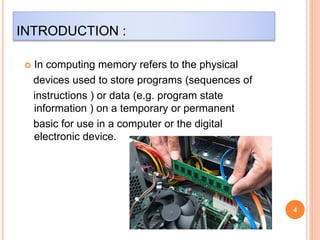
INTRODUCTION : 
 In computing memory refers to the physical 
devices used to store programs (sequences of 
instructions ) or data (e.g. program state 
information ) on a temporary or permanent 
basic for use in a computer or the digital 
electronic device. 
4
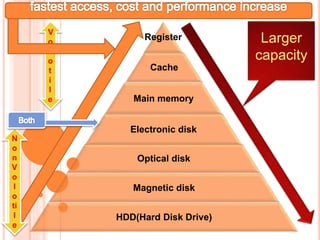
Register 
Cache 
Main memory 
Electronic disk 
Optical disk 
Magnetic disk 
HDD(Hard Disk Drive) 
Larger 
capacity 
V 
o 
l 
o 
t 
i 
l 
e 
N 
o 
n 
V 
o 
l 
o 
ti 
l 
e
REGISTER : 
6 
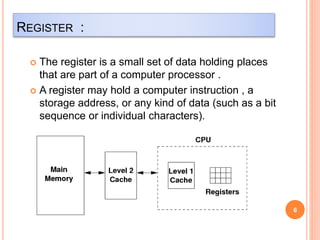
 The register is a small set of data holding places 
that are part of a computer processor . 
 A register may hold a computer instruction , a 
storage address, or any kind of data (such as a bit 
sequence or individual characters).
CACHE MEMORY : 
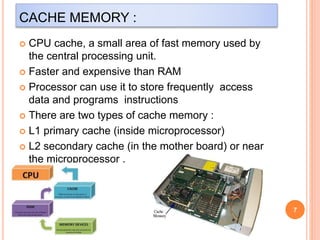
 CPU cache, a small area of fast memory used by 
the central processing unit. 
 Faster and expensive than RAM 
 Processor can use it to store frequently access 
data and programs instructions 
 There are two types of cache memory : 
 L1 primary cache (inside microprocessor) 
 L2 secondary cache (in the mother board) or near 
the microprocessor . 
7
REGISTER V/S CACHE MEMORY : 
8 
REGISTER 
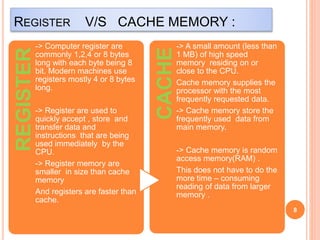
-> Computer register are 
commonly 1,2,4 or 8 bytes 
long with each byte being 8 
bit. Modern machines use 
registers mostly 4 or 8 bytes 
long. 
-> Register are used to 
quickly accept , store and 
transfer data and 
instructions that are being 
used immediately by the 
CPU. 
-> Register memory are 
smaller in size than cache 
memory 
And registers are faster than 
cache. 
CACHE 
-> A small amount (less than 
1 MB) of high speed 
memory residing on or 
close to the CPU. 
Cache memory supplies the 
processor with the most 
frequently requested data. 
-> Cache memory store the 
frequently used data from 
main memory. 
-> Cache memory is random 
access memory(RAM) . 
This does not have to do the 
more time – consuming 
reading of data from larger 
memory .
VOLOTILE MEMORY : 
9 
 Data will be erase when the power is turned off. 
 E.g. –RAM(main memory), Register ,Cache. 
 CUP directly interact. 
 It’s a temporary memory. 
 Main memory is divided into two parts : 
 Random access memory (RAM),should 
be better known as read write memory 
(RWM). 
o Read only memory (ROM). 
o Rom is a static memory.
NON VOLOTILE MEMEORY : 
10 
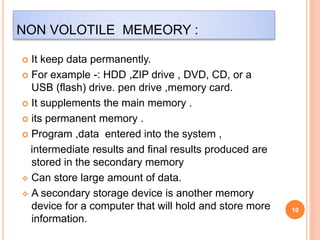
 It keep data permanently. 
 For example -: HDD ,ZIP drive , DVD, CD, or a 
USB (flash) drive. pen drive ,memory card. 
 It supplements the main memory . 
 its permanent memory . 
 Program ,data entered into the system , 
intermediate results and final results produced are 
stored in the secondary memory 
 Can store large amount of data. 
 A secondary storage device is another memory 
device for a computer that will hold and store more 
information.
THANK YOU…

Storage Structure in OS

  • 1.
    DEV BHOOMI GROUPOF INSTITUTIONS SAHARANPUR Name : Saurabh Chauhan Class : M.C.A. 2nd (2013-15) Roll no : 1358614017 Topic : Storage Structure . 1 Sub To : Miss Supriya Sharma Sub By : Saurabh Chauhan
  • 2.
  • 3.
    OUTLINE : Introduction :  Types of memory :  Register and Cache memory :  Register :  Register V/S Cache memory :  Volatile memory :  Non volatile memory :  Thank you : 3
  • 4.
    INTRODUCTION : In computing memory refers to the physical devices used to store programs (sequences of instructions ) or data (e.g. program state information ) on a temporary or permanent basic for use in a computer or the digital electronic device. 4
  • 5.
    Register Cache Mainmemory Electronic disk Optical disk Magnetic disk HDD(Hard Disk Drive) Larger capacity V o l o t i l e N o n V o l o ti l e
  • 6.
    REGISTER : 6  The register is a small set of data holding places that are part of a computer processor .  A register may hold a computer instruction , a storage address, or any kind of data (such as a bit sequence or individual characters).
  • 7.
    CACHE MEMORY :  CPU cache, a small area of fast memory used by the central processing unit.  Faster and expensive than RAM  Processor can use it to store frequently access data and programs instructions  There are two types of cache memory :  L1 primary cache (inside microprocessor)  L2 secondary cache (in the mother board) or near the microprocessor . 7
  • 8.
    REGISTER V/S CACHEMEMORY : 8 REGISTER -> Computer register are commonly 1,2,4 or 8 bytes long with each byte being 8 bit. Modern machines use registers mostly 4 or 8 bytes long. -> Register are used to quickly accept , store and transfer data and instructions that are being used immediately by the CPU. -> Register memory are smaller in size than cache memory And registers are faster than cache. CACHE -> A small amount (less than 1 MB) of high speed memory residing on or close to the CPU. Cache memory supplies the processor with the most frequently requested data. -> Cache memory store the frequently used data from main memory. -> Cache memory is random access memory(RAM) . This does not have to do the more time – consuming reading of data from larger memory .
  • 9.
    VOLOTILE MEMORY : 9  Data will be erase when the power is turned off.  E.g. –RAM(main memory), Register ,Cache.  CUP directly interact.  It’s a temporary memory.  Main memory is divided into two parts :  Random access memory (RAM),should be better known as read write memory (RWM). o Read only memory (ROM). o Rom is a static memory.
  • 10.
    NON VOLOTILE MEMEORY: 10  It keep data permanently.  For example -: HDD ,ZIP drive , DVD, CD, or a USB (flash) drive. pen drive ,memory card.  It supplements the main memory .  its permanent memory .  Program ,data entered into the system , intermediate results and final results produced are stored in the secondary memory  Can store large amount of data.  A secondary storage device is another memory device for a computer that will hold and store more information.
  • 11.