Presented by
Md.Apon Chowdhury
I.D. No. 171030101076
Department of CSE
Prime University
Today Tropic
Overview
Introduction
Computer capacity
Types of memory
Main memory
Types of main memory
Types of main memory device
Secondary memory
Types of secondary memory device
Important Secondary Storage Methods
Secondary storage devices
Hard disks
Some regular usable discs
Other types of secondary storage
References
Introduction
Memory is a device that is used to store data or programs
on a temporary or permanent basis for use in an electronic
digital computer.
The memory is needed for the following purposes:
1. To store the program and data during execution
2. To store the program for repetitive use
3. To store the data for future or periodical use
4. To store the result of execution
Computer capacity
Bit: Short for binary digit (0s and 1s), the only
data that a CPU(Central Processing Unit) can
process.
Byte: An 8-bit string of data, needed to
represent any one alphanumeric character or
simple mathematical operation.
Types of memory
There are three categories of computer memories:
Main Memory (Primary Memory) stores small amounts of
data and information that will be immediately used by the CPU
(Central Processing Unit).
Secondary Memory (Auxiliary or Backup) stores
much larger amounts of data and information (an entire
software program, for example) for extended periods of
time.
Internal Processor Memory stores temporary storage
of instruction and data used as working registers.
Main memory
Main memory is a large array of data or bytes. It provides
storage that can be access directly by the CPU.
Major activity of main memory:
1. Keep track of which part of memory currently being used
and by whom.
2. Decide which process are loaded into memory when
memory space becomes available.
3. Allocate reallocate memory space as needed.
Types of main memory
Semiconductor Memory
Semiconductor memory uses semiconductor-based
integrated circuits to store information. Both volatile
and non-volatile forms of semiconductor memory
exist.
Magnetic Memory
Magnetic storage uses different patterns of
magnetization on a magnetically coated surface to
store information. Magnetic storage is non-volatile.
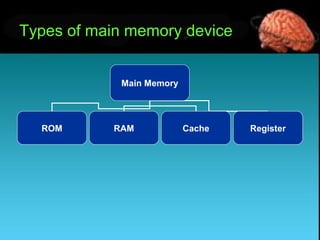
Types of main memory device
Main Memory
ROM RAM Cache Register
Random access memory (RAM): The
part of primary storage that holds a
software program and small amounts of
data when they are brought from
secondary storage. Rams are categorised
as follows:
– SRAM (Static RAM) (flip-flop gates)
– DRAM (Dynamic RAM)
Types of Main Memory Device
Read-only memory (ROM): Type of
primary storage where certain critical
instructions are safeguarded; the storage
is nonvolatile and retains the instructions
when the power to the computer is turned
off. ROMs are categorised as follows:
– PROM (programmable)
– EPROM (erasable programmable)
– EEPROM (electronically erasable
programmable)
Types of Main Memory Device
Cache memory: A type of primary storage
where the computer can temporarily store
blocks of data used more often.
Register: registers are part of the CPU with
the least capacity, storing extremely limited
amounts of instructions and data only
immediately before and after processing.
Secondary Memory
Memory capacity that can store very large
amounts of data for extended periods of
time.
– It is nonvolatile.
– It takes much more time to retrieve data
because of the electromechanical nature.
– It is cheaper than primary storage.
– It can take place on a variety of media
– It is permanent memory
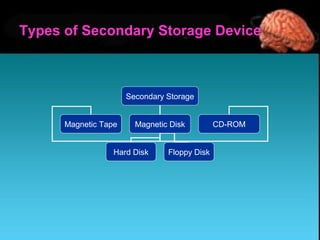
Secondary Storage
Magnetic Tape Magnetic Disk CD-ROM
Hard Disk Floppy Disk
Types of Secondary Storage Device
• Magnetic Disk Drive
• Floppy Disk Drive
• Magnetic Tape Drive
• Optical Disk Drive
Important Secondary Storage Methods
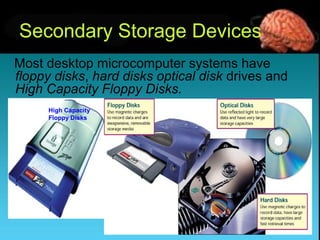
Most desktop microcomputer systems have
floppy disks, hard disks optical disk drives and
High Capacity Floppy Disks.
Secondary Storage Devices
High Capacity
Floppy Disks
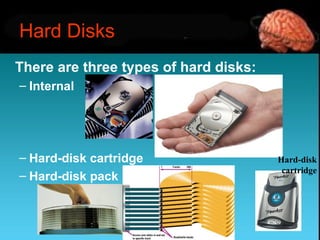
There are three types of hard disks:
– Internal
– Hard-disk cartridge
– Hard-disk pack
Hard Disks
Hard-disk
cartridge
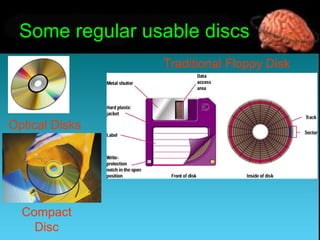
Some regular usable discs
Traditional Floppy Disk
Optical Disks
Compact
Disc
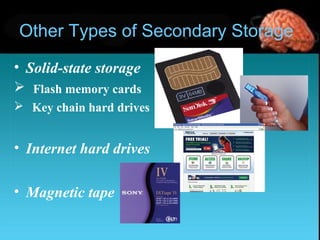
Other Types of Secondary Storage
• Solid-state storage
 Flash memory cards
 Key chain hard drives
• Internet hard drives
• Magnetic tape
References
Norton,P.(2010-2011) “Introduction to Computer”,
9th
edition, Tata McGraw-Hill
Sarker & Gupta,(2005),“Elements of Computer
Science”,2nd
edition, S.Chand & Company Ltd.
Ahmmad,R.R, Lecturer, Department of CIS,
BUBT
Memory - Wikipedia, the free encyclopedia.htm
Memory Presentation

Memory Presentation

  • 2.
    Presented by Md.Apon Chowdhury I.D.No. 171030101076 Department of CSE Prime University
  • 3.
  • 4.
    Overview Introduction Computer capacity Types ofmemory Main memory Types of main memory Types of main memory device Secondary memory Types of secondary memory device Important Secondary Storage Methods Secondary storage devices Hard disks Some regular usable discs Other types of secondary storage References
  • 5.
    Introduction Memory is adevice that is used to store data or programs on a temporary or permanent basis for use in an electronic digital computer. The memory is needed for the following purposes: 1. To store the program and data during execution 2. To store the program for repetitive use 3. To store the data for future or periodical use 4. To store the result of execution
  • 6.
    Computer capacity Bit: Shortfor binary digit (0s and 1s), the only data that a CPU(Central Processing Unit) can process. Byte: An 8-bit string of data, needed to represent any one alphanumeric character or simple mathematical operation.
  • 7.
    Types of memory Thereare three categories of computer memories: Main Memory (Primary Memory) stores small amounts of data and information that will be immediately used by the CPU (Central Processing Unit). Secondary Memory (Auxiliary or Backup) stores much larger amounts of data and information (an entire software program, for example) for extended periods of time. Internal Processor Memory stores temporary storage of instruction and data used as working registers.
  • 8.
    Main memory Main memoryis a large array of data or bytes. It provides storage that can be access directly by the CPU. Major activity of main memory: 1. Keep track of which part of memory currently being used and by whom. 2. Decide which process are loaded into memory when memory space becomes available. 3. Allocate reallocate memory space as needed.
  • 9.
    Types of mainmemory Semiconductor Memory Semiconductor memory uses semiconductor-based integrated circuits to store information. Both volatile and non-volatile forms of semiconductor memory exist. Magnetic Memory Magnetic storage uses different patterns of magnetization on a magnetically coated surface to store information. Magnetic storage is non-volatile.
  • 10.
    Types of mainmemory device Main Memory ROM RAM Cache Register
  • 11.
    Random access memory(RAM): The part of primary storage that holds a software program and small amounts of data when they are brought from secondary storage. Rams are categorised as follows: – SRAM (Static RAM) (flip-flop gates) – DRAM (Dynamic RAM) Types of Main Memory Device
  • 12.
    Read-only memory (ROM):Type of primary storage where certain critical instructions are safeguarded; the storage is nonvolatile and retains the instructions when the power to the computer is turned off. ROMs are categorised as follows: – PROM (programmable) – EPROM (erasable programmable) – EEPROM (electronically erasable programmable) Types of Main Memory Device
  • 13.
    Types of MainMemory Device Cache memory: A type of primary storage where the computer can temporarily store blocks of data used more often. Register: registers are part of the CPU with the least capacity, storing extremely limited amounts of instructions and data only immediately before and after processing.
  • 14.
    Secondary Memory Memory capacitythat can store very large amounts of data for extended periods of time. – It is nonvolatile. – It takes much more time to retrieve data because of the electromechanical nature. – It is cheaper than primary storage. – It can take place on a variety of media – It is permanent memory
  • 15.
    Secondary Storage Magnetic TapeMagnetic Disk CD-ROM Hard Disk Floppy Disk Types of Secondary Storage Device
  • 16.
    • Magnetic DiskDrive • Floppy Disk Drive • Magnetic Tape Drive • Optical Disk Drive Important Secondary Storage Methods
  • 17.
    Most desktop microcomputersystems have floppy disks, hard disks optical disk drives and High Capacity Floppy Disks. Secondary Storage Devices High Capacity Floppy Disks
  • 18.
    There are threetypes of hard disks: – Internal – Hard-disk cartridge – Hard-disk pack Hard Disks Hard-disk cartridge
  • 19.
    Some regular usablediscs Traditional Floppy Disk Optical Disks Compact Disc
  • 20.
    Other Types ofSecondary Storage • Solid-state storage  Flash memory cards  Key chain hard drives • Internet hard drives • Magnetic tape
  • 21.
    References Norton,P.(2010-2011) “Introduction toComputer”, 9th edition, Tata McGraw-Hill Sarker & Gupta,(2005),“Elements of Computer Science”,2nd edition, S.Chand & Company Ltd. Ahmmad,R.R, Lecturer, Department of CIS, BUBT Memory - Wikipedia, the free encyclopedia.htm