A memory unit is the collection of storage units or
devices together. The memory unit stores the binary
information in the form of bits. Generally,
memory/storage is classified into 2 categories:
•Volatile Memory: This loses its data, when power is
switched off.
Non-Volatile Memory: This is a permanent storage
and does not lose any data when power is switched
off.
Memory Hierarchy
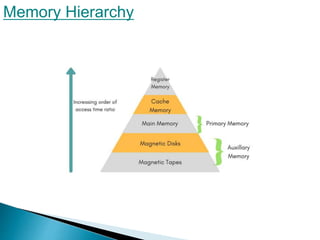
The total memory capacity of a computer can be
visualized by hierarchy of components.
The memory hierarchy system consists of all
storage devices contained in a computer system
from the slow Auxiliary Memory to fast
Main Memory and to smaller Cache memory.
Auxillary memory
access time is generally 1000 times that
of the main memory, hence
it is at the bottom of the hierarchy.
The main memory occupies the central
position because it is equipped to
communicate directly with the CPU and with
auxiliary memory devices through
Input/output processor (I/O).When the program
not residing in main memory is needed by the
CPU, they are brought in from auxiliary memory.
Programs not currently needed in main memory
are transferred into auxiliary memory to
provide space in main memory for other
programs
that are currently in use.
Memory Access Methods
Each memory type, is a collection of numerous memory
locations. To access data from any memory, first it must be
located and then the data is read from the memory location.
Following are the methods to access information from memory
locations:
1.Random Access: Main memories are random access
memories, in which each memory location has a unique
address. Using this unique address any memory location can be
reached in the same amount of time in any order.
1.Sequential Access: This methods
2. allows memory access in a sequence or
in order.
3.Direct Access: In this mode,
information is stored in tracks, with
each track having a separate read/write
head.
Main Memory
The memory unit that communicates directly
within the CPU, Auxillary memory and Cache
memory, is called main memory. It is the
central storage unit of the computer system. It
is a large and fast memory used to store data
during computer operations. Main memory is made up
of RAM and ROM, with RAM integrated circuit chips holing
the major share
.
Auxiliary Memory
Devices that provide backup storage are called auxiliary
memory. For example: Magnetic disks and tapes are
commonly used auxiliary devices. Other devices used as
auxiliary memory are magnetic drums, magnetic bubble
memory and optical disks
Cache Memory
The data or contents of the main memory that are used again and
again by CPU, are stored in the cache memory so that we can
easily access that data in shorter time.
Whenever the CPU needs to access memory, it first checks the
cache memory. If the data is not found in cache memory then the
CPU moves onto the main memory. It also transfers block of
recent data into the cache and keeps on deleting the old data in
cache to accomodate the new one.
Associative Memory
It is also known as content addressable memory (CAM). It is a
memory chip in which each bit position can be compared. In this
the content is compared in each bit cell which allows very fast
table lookup. Since the entire chip can be compared, contents are
randomly stored without considering addressing scheme. These
chips have less storage capacity than regular memory chips
virtual memory
Virtual memory is a memory management
technique where secondary memory can be used
as if it were a part of the main memory. Virtual
memory is a very common technique used in the
operating systems (OS) of computers.
Thank You

Memory Organization

  • 2.
    A memory unitis the collection of storage units or devices together. The memory unit stores the binary information in the form of bits. Generally, memory/storage is classified into 2 categories: •Volatile Memory: This loses its data, when power is switched off. Non-Volatile Memory: This is a permanent storage and does not lose any data when power is switched off.
  • 3.
  • 4.
    The total memorycapacity of a computer can be visualized by hierarchy of components. The memory hierarchy system consists of all storage devices contained in a computer system from the slow Auxiliary Memory to fast Main Memory and to smaller Cache memory.
  • 5.
    Auxillary memory access timeis generally 1000 times that of the main memory, hence it is at the bottom of the hierarchy.
  • 6.
    The main memoryoccupies the central position because it is equipped to communicate directly with the CPU and with auxiliary memory devices through Input/output processor (I/O).When the program not residing in main memory is needed by the CPU, they are brought in from auxiliary memory. Programs not currently needed in main memory
  • 7.
    are transferred intoauxiliary memory to provide space in main memory for other programs that are currently in use.
  • 8.
    Memory Access Methods Eachmemory type, is a collection of numerous memory locations. To access data from any memory, first it must be located and then the data is read from the memory location. Following are the methods to access information from memory locations: 1.Random Access: Main memories are random access memories, in which each memory location has a unique address. Using this unique address any memory location can be reached in the same amount of time in any order.
  • 9.
    1.Sequential Access: Thismethods 2. allows memory access in a sequence or in order. 3.Direct Access: In this mode, information is stored in tracks, with each track having a separate read/write head.
  • 10.
    Main Memory The memoryunit that communicates directly within the CPU, Auxillary memory and Cache memory, is called main memory. It is the central storage unit of the computer system. It is a large and fast memory used to store data during computer operations. Main memory is made up of RAM and ROM, with RAM integrated circuit chips holing the major share .
  • 11.
    Auxiliary Memory Devices thatprovide backup storage are called auxiliary memory. For example: Magnetic disks and tapes are commonly used auxiliary devices. Other devices used as auxiliary memory are magnetic drums, magnetic bubble memory and optical disks
  • 12.
    Cache Memory The dataor contents of the main memory that are used again and again by CPU, are stored in the cache memory so that we can easily access that data in shorter time. Whenever the CPU needs to access memory, it first checks the cache memory. If the data is not found in cache memory then the CPU moves onto the main memory. It also transfers block of recent data into the cache and keeps on deleting the old data in cache to accomodate the new one.
  • 13.
    Associative Memory It isalso known as content addressable memory (CAM). It is a memory chip in which each bit position can be compared. In this the content is compared in each bit cell which allows very fast table lookup. Since the entire chip can be compared, contents are randomly stored without considering addressing scheme. These chips have less storage capacity than regular memory chips
  • 14.
    virtual memory Virtual memoryis a memory management technique where secondary memory can be used as if it were a part of the main memory. Virtual memory is a very common technique used in the operating systems (OS) of computers.
  • 15.