Obj 5: Types of Secondary Storage Devices 
 Magnetic Tape- this is storage medium that 
consists of a plastic ribbon that has been 
coated with material that can be 
magnetized to represent data. It is o longer 
widely used, expects for archival purposes, 
and was it keeps a backup of important 
data. 
 Advantages 
 Provides archival or backup storage 
 They are reusable, light, compact and easy to store 
on racks 
 They are inexpensive 
 They can be used for large files or copying from disk 
files. 
 Disadvantages 
 Allows only sequential data access 
 Stored data cannot be easily updated 
 They must be stored in a suitable environment, 
vulnerable humidity and dust. 
 Floppy Disk- the diskette is a flexible 
magnetic disk on which data is recorded 
magnetically. The device is used to read 
data from a disk or record data on a disk is 
called a floppy device. 
 Advantages 
 They allow to copy files from one computer to 
another 
 They are quite cheap 
 Widely used 
 Light/ weight portable 
 Provides random data access 
 Disadvantages 
 They have a limited capacity ( graphics files often 
don’t fit on a disk 
 They are less care should be taken to prevent loss 
data 
 Vulnerable to dirt 
 Susceptible to viruses 
 Data access relatively slow 
 Data is easily damaged/corrupted 
 Hard Disk- a hard disk is non- removable, 
enclosed magnetic disk drive that reads 
data from and writes data to hard disk. The 
disks inside the hard drive are called 
platters. 
 Advantages 
 Stores and retrieves data at high speeds 
 More storage capacity than many other storage 
media 
 Storage is reliable 
 Provides random data access 
 Disadvantages 
 Very delicate 
 Not portable – cannot be easily moved from place to 
place without complications 
 Head crash can occur 
 CD-ROM- Storage disk whose data is 
imprinted by the disk manufacturer and 
cannot be altered or erased by the user. 
They are used primarily for multimedia data 
and has a storage capacity of 650 MB – 700 
MB (≈ 450 floppy disk) 
 CD – RW- this is an erasable, rewriteable 
optical disk. These allow the user to erase 
and alter the content many times. 
 Advantages 
 Widely used 
 Stored more data in less space 
 Storage is extremely reliable 
 Very durable 
 Provides random data access 
 It is entirely unaffected by magnetic fields 
 Disadvantages 
 Allows slower data access than a drive 
 It is not easy to copy on optical disk 
 Optical disk technology is expensive but prices are 
falling 
 Digital Versatile Disc (DVD)- also known as 
Digital Video Disc and even Digital Vapor 
Disc are identical in looks to a CD – ROM 
but are different in technology. DVD players 
use red laser CD – ROM uses infra – red 
laser. Marks burned on a dvd are packed 
twice as tightly as that of a CD – ROM 
 Advantages 
 They can store large amounts of data 
 They are dependable 
 Provides random data access 
 Disadvantages 
 The drives are relatively expensive 
 They are not as widely used as the other storage 
devices
Structure of a Diskette Structure of a Hard Disk 
 Track- is a circular ring on one side of the 
disk. Each track has a number. 
 Sector- is a wedge – shaped piece of a disk. 
Each sector is numbered. 
 Track Sector- is the area of intersection of a 
tack and a sector. Data is recorded along a 
track within a sector. 
 Cluster- a set of track sectors ranging from 
2 to 32 or more depending on the 
formatting scheme. 
 Cylinder- is a set of matching tracks in a 
vertical plane through a disk pack. 
 Read/ Write Head- a device that reads data 
from and writes data to a magnetic disk. For 
writing the surface of the disk is moved past 
the read/write head. 
 Access Arm- this is a mechanical arm that 
moves the read/write head across the 
surface of the disk. It is directed by the OS 
to move the read/write head to a specific 
track or the disk. 
Variations of Hard Disk 
 Fixed Disk- is a high speed, high capacity 
disk drive that is housed in their own 
cabinets. They are not removable or 
portable. They have greater capacity than 
the external disk and are more reliable. 
 External Disk- these are detachable which 
their own power supply and are not built 
into the system cabinet. They can store GB’s 
of data. 
 Fixed Head- one read/ writes head per track 
with heads mounted on fixed arm. 
 Moveable Head- one read/write head per 
side with mounted on movable arm. 
Device Interface 
 SATA, SCSII, IDE, are all devices in the 
motherboard of a computer which provide 
an interface for devices such as internal 
hard disk. Drives and mass storage devices 
to connect to the computer. 
 IDE – Intelligent Drive Electronics or 
Integrated Drive Electronics. An IDE 
interface is an interface for mass storage in 
which the controller is integrated into the 
disk or CD – ROM drive. 
 SATA – Serial Advanced Technology 
Attachment. It is a computer bus primarily 
designed for transfer of data between a 
computer and mass storage devices such as 
hard disk drives and optical drives. 
 SCSI – Small Computer System Interface. 
Obj 6: Secondary Storage 
 Storage – is defined as all various media on 
which a computer can store programs and 
information. 
 Secondary Storage – is also called Auxiliary, 
backing or mass storage. It contains data, 
instructions and information for future use. 
It is permanent and non – volatile. 
 The Criteria for rating Secondary Storage 
Devices are: 
 Storage Capacity – this is determined by 
the type of program or amount of data to 
be stored. 
 Access Speed – this refers to the average 
time taken to locate data on a sec. storage 
device. 
 Transfer Rate – this refers to the speed and 
time taken for data to be transferred from a 
sec device to main memory in order for the 
data to be executed (processed). 
 Size - this is determined by the expected 
amount of data to be stored.
 Cost – this is directly related to the other 4 
factors. E.g. ‘’ floppy disk is cheaper than CD 
which is cheaper than a memory stick.’’ 
 Secondary Storage devices may be classified 
by either its Access method or by its 
Technology. 
 Access Method - refers to the way in which 
the data is retrieved i.e. sequentially or 
directly. 
 Technology – refers to technology/ media 
used to retrieved the data i.e. magnetically 
or optically. 
Access Method 
 Sequential Access Storage - this refers to 
reading or writing data consecutively; as the 
computer has to search the storage 
medium from beginning to end in order to 
find the required data. 
 Direct Access Storage (Random) – this is 
also called Random Access which means 
data can be located immediately without 
having to search consecutively through the 
storage medium. 
Technology 
 Magnetic Media –reads data from the 
storage medium by magnetizing the iron 
particles on the medium. It is also cheap. 
Optical Media – uses high – powered laser 
beams to burn microscopic sports 
represented in a disk’s surface. It is 
expensive.
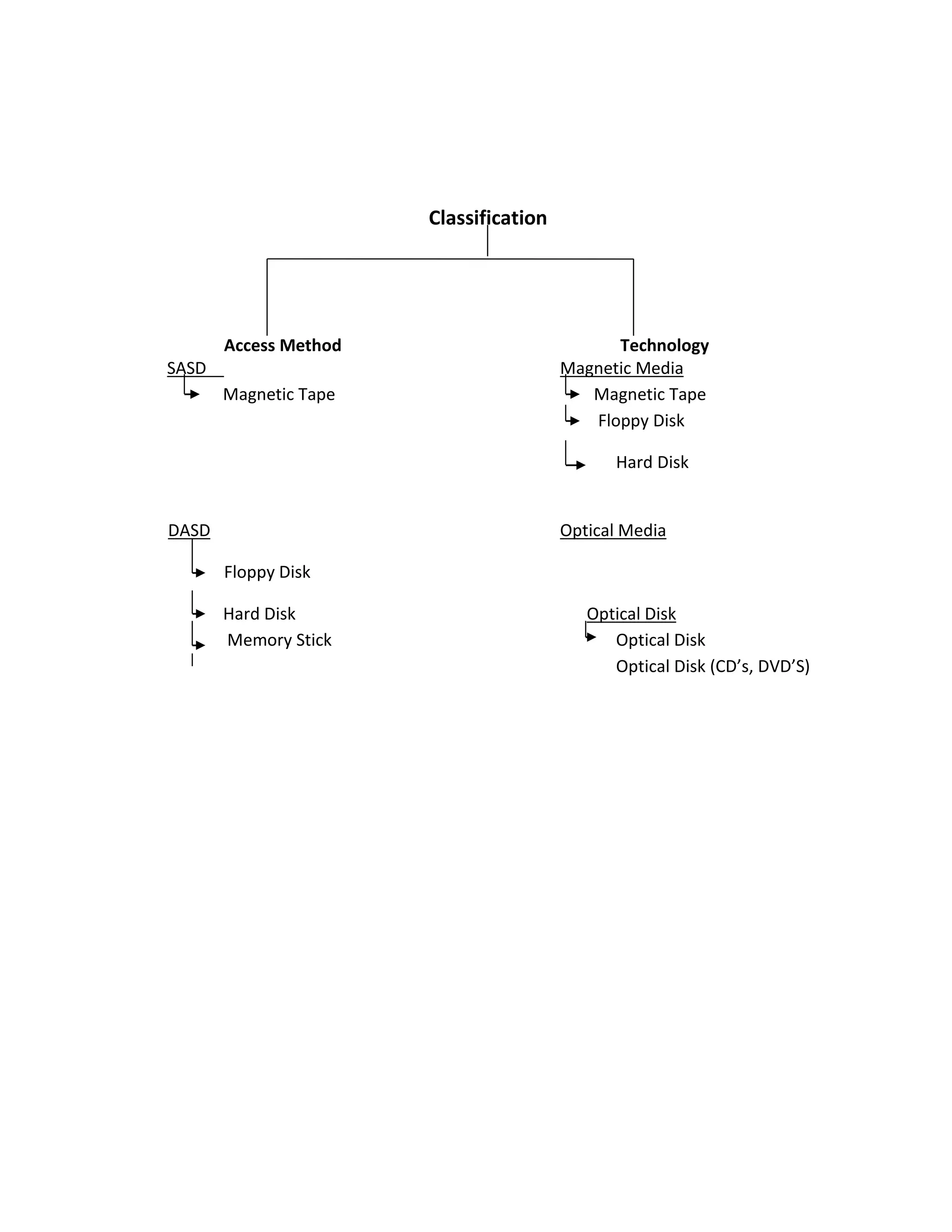
Classification 
Access Method Technology 
SASD Magnetic Media 
Magnetic Tape Magnetic Tape 
Floppy Disk 
Hard Disk 
DASD Optical Media 
Floppy Disk 
Hard Disk Optical Disk 
Memory Stick Optical Disk 
Optical Disk (CD’s, DVD’S)

Secondary storage tutorial

  • 1.
    Obj 5: Typesof Secondary Storage Devices  Magnetic Tape- this is storage medium that consists of a plastic ribbon that has been coated with material that can be magnetized to represent data. It is o longer widely used, expects for archival purposes, and was it keeps a backup of important data.  Advantages  Provides archival or backup storage  They are reusable, light, compact and easy to store on racks  They are inexpensive  They can be used for large files or copying from disk files.  Disadvantages  Allows only sequential data access  Stored data cannot be easily updated  They must be stored in a suitable environment, vulnerable humidity and dust.  Floppy Disk- the diskette is a flexible magnetic disk on which data is recorded magnetically. The device is used to read data from a disk or record data on a disk is called a floppy device.  Advantages  They allow to copy files from one computer to another  They are quite cheap  Widely used  Light/ weight portable  Provides random data access  Disadvantages  They have a limited capacity ( graphics files often don’t fit on a disk  They are less care should be taken to prevent loss data  Vulnerable to dirt  Susceptible to viruses  Data access relatively slow  Data is easily damaged/corrupted  Hard Disk- a hard disk is non- removable, enclosed magnetic disk drive that reads data from and writes data to hard disk. The disks inside the hard drive are called platters.  Advantages  Stores and retrieves data at high speeds  More storage capacity than many other storage media  Storage is reliable  Provides random data access  Disadvantages  Very delicate  Not portable – cannot be easily moved from place to place without complications  Head crash can occur  CD-ROM- Storage disk whose data is imprinted by the disk manufacturer and cannot be altered or erased by the user. They are used primarily for multimedia data and has a storage capacity of 650 MB – 700 MB (≈ 450 floppy disk)  CD – RW- this is an erasable, rewriteable optical disk. These allow the user to erase and alter the content many times.  Advantages  Widely used  Stored more data in less space  Storage is extremely reliable  Very durable  Provides random data access  It is entirely unaffected by magnetic fields  Disadvantages  Allows slower data access than a drive  It is not easy to copy on optical disk  Optical disk technology is expensive but prices are falling  Digital Versatile Disc (DVD)- also known as Digital Video Disc and even Digital Vapor Disc are identical in looks to a CD – ROM but are different in technology. DVD players use red laser CD – ROM uses infra – red laser. Marks burned on a dvd are packed twice as tightly as that of a CD – ROM  Advantages  They can store large amounts of data  They are dependable  Provides random data access  Disadvantages  The drives are relatively expensive  They are not as widely used as the other storage devices
  • 2.
    Structure of aDiskette Structure of a Hard Disk  Track- is a circular ring on one side of the disk. Each track has a number.  Sector- is a wedge – shaped piece of a disk. Each sector is numbered.  Track Sector- is the area of intersection of a tack and a sector. Data is recorded along a track within a sector.  Cluster- a set of track sectors ranging from 2 to 32 or more depending on the formatting scheme.  Cylinder- is a set of matching tracks in a vertical plane through a disk pack.  Read/ Write Head- a device that reads data from and writes data to a magnetic disk. For writing the surface of the disk is moved past the read/write head.  Access Arm- this is a mechanical arm that moves the read/write head across the surface of the disk. It is directed by the OS to move the read/write head to a specific track or the disk. Variations of Hard Disk  Fixed Disk- is a high speed, high capacity disk drive that is housed in their own cabinets. They are not removable or portable. They have greater capacity than the external disk and are more reliable.  External Disk- these are detachable which their own power supply and are not built into the system cabinet. They can store GB’s of data.  Fixed Head- one read/ writes head per track with heads mounted on fixed arm.  Moveable Head- one read/write head per side with mounted on movable arm. Device Interface  SATA, SCSII, IDE, are all devices in the motherboard of a computer which provide an interface for devices such as internal hard disk. Drives and mass storage devices to connect to the computer.  IDE – Intelligent Drive Electronics or Integrated Drive Electronics. An IDE interface is an interface for mass storage in which the controller is integrated into the disk or CD – ROM drive.  SATA – Serial Advanced Technology Attachment. It is a computer bus primarily designed for transfer of data between a computer and mass storage devices such as hard disk drives and optical drives.  SCSI – Small Computer System Interface. Obj 6: Secondary Storage  Storage – is defined as all various media on which a computer can store programs and information.  Secondary Storage – is also called Auxiliary, backing or mass storage. It contains data, instructions and information for future use. It is permanent and non – volatile.  The Criteria for rating Secondary Storage Devices are:  Storage Capacity – this is determined by the type of program or amount of data to be stored.  Access Speed – this refers to the average time taken to locate data on a sec. storage device.  Transfer Rate – this refers to the speed and time taken for data to be transferred from a sec device to main memory in order for the data to be executed (processed).  Size - this is determined by the expected amount of data to be stored.
  • 3.
     Cost –this is directly related to the other 4 factors. E.g. ‘’ floppy disk is cheaper than CD which is cheaper than a memory stick.’’  Secondary Storage devices may be classified by either its Access method or by its Technology.  Access Method - refers to the way in which the data is retrieved i.e. sequentially or directly.  Technology – refers to technology/ media used to retrieved the data i.e. magnetically or optically. Access Method  Sequential Access Storage - this refers to reading or writing data consecutively; as the computer has to search the storage medium from beginning to end in order to find the required data.  Direct Access Storage (Random) – this is also called Random Access which means data can be located immediately without having to search consecutively through the storage medium. Technology  Magnetic Media –reads data from the storage medium by magnetizing the iron particles on the medium. It is also cheap. Optical Media – uses high – powered laser beams to burn microscopic sports represented in a disk’s surface. It is expensive.
  • 4.
    Classification Access MethodTechnology SASD Magnetic Media Magnetic Tape Magnetic Tape Floppy Disk Hard Disk DASD Optical Media Floppy Disk Hard Disk Optical Disk Memory Stick Optical Disk Optical Disk (CD’s, DVD’S)