STORAGE DEVICES
Done By:
Teacher Hjh Siti Noor Mazrah bte
Awg Hj Suhut
YEAR 7
2
INTRODUCTION
• Storage devices are devices that can
store data or information.
• There are various type of storage devices.
Different devices are suitable for different
tasks.
• Data can be stored either in the ‘Internal
Memory’ or on a ‘Storage Devices’.
STORAGE CAPACITY
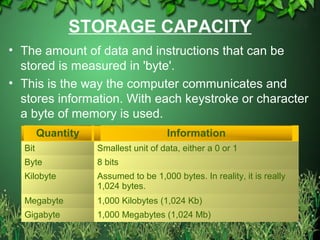
• The amount of data and instructions that can be
stored is measured in 'byte'.
• This is the way the computer communicates and
stores information. With each keystroke or character
a byte of memory is used.
3
Quantity Information
Bit Smallest unit of data, either a 0 or 1
Byte 8 bits
Kilobyte Assumed to be 1,000 bytes. In reality, it is really
1,024 bytes.
Megabyte 1,000 Kilobytes (1,024 Kb)
Gigabyte 1,000 Megabytes (1,024 Mb)
INTERNAL MEMORY
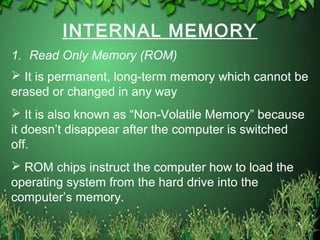
1. Read Only Memory (ROM)
4
 It is permanent, long-term memory which cannot be
erased or changed in any way
 It is also known as “Non-Volatile Memory” because
it doesn’t disappear after the computer is switched
off.
 ROM chips instruct the computer how to load the
operating system from the hard drive into the
computer’s memory.
• Don’t confuse the hard drive with ROM – the hard
drive is an internal backing store (storage device).
01/30/15 Free template from
www.brainybetty.com
5
INTERNAL MEMORY
2. Random Access Memory (RAM)
6
 Temporary, short-term working memory
 Only works when the computer is turned on
 It is also known as “Volatile Memory” because data
disappears if the power is switched off.
 Each time you start a program e.g. MS Word, it is loaded
into RAM.
 The amount of RAM influences processing power, speed
and how many programs can run at the same time.
 Many computers are now sold with 128 or 256 MB of RAM.
INTERNAL MEMORY
3. Hard Disk
7
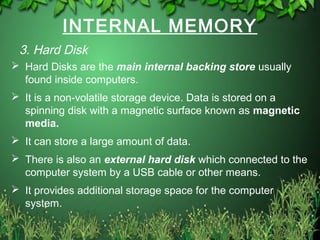
 Hard Disks are the main internal backing store usually
found inside computers.
 It is a non-volatile storage device. Data is stored on a
spinning disk with a magnetic surface known as magnetic
media.
 It can store a large amount of data.
 There is also an external hard disk which connected to the
computer system by a USB cable or other means.
 It provides additional storage space for the computer
system.
8
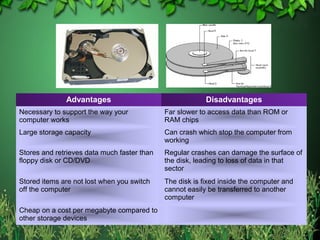
Advantages Disadvantages
Necessary to support the way your
computer works
Far slower to access data than ROM or
RAM chips
Large storage capacity Can crash which stop the computer from
working
Stores and retrieves data much faster than
floppy disk or CD/DVD
Regular crashes can damage the surface of
the disk, leading to loss of data in that
sector
Stored items are not lost when you switch
off the computer
The disk is fixed inside the computer and
cannot easily be transferred to another
computer
Cheap on a cost per megabyte compared to
other storage devices
STORAGE DEVICES
1. Floppy Disks
 One of the oldest types of portable storage
devices still in use.
 Have been around since the 1980s.
 Store up to 1.44 Mb of data which equivalent to
around 300 pages of A4 text.
 Graphics and WordArt cannot be stored
because there have larger size than the size of
floppy disk.
9
10
Advantages Disadvantages
Portable – small and
lightweight
Not very strong – easy to
damage
Inexpensive Data can be erased if the disk
comes into contact with a
magnetic field
Useful for transferring small
files between home and
school
Quite slow to access and
retrieve data when compared
to a hard disk
Security tab to stop data from
being written over
Can transport viruses from
one machine to another
Can be used many times Small storage capacity
Many new computers do not
have floppy disk drives
STORAGE DEVICES
2. Zip Disks
 Very popular as a backup medium before CD-
RWs were developed and became cheap
enough for everyone to use.
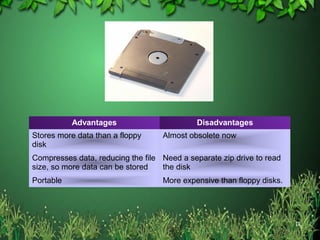
 Look similar to a floppy disk but are a little bit
thicker.
 They can store around 100Mb of data – 70
times more than floppy disk.
11
12
Advantages Disadvantages
Stores more data than a floppy
disk
Almost obsolete now
Compresses data, reducing the file
size, so more data can be stored
Need a separate zip drive to read
the disk
Portable More expensive than floppy disks.
STORAGE DEVICES
3. Magnetic Tape
 Useful for large organisations who need to back
up their systems daily to store their data.
 It works in much the same way as a video tape.
 To find a specific piece of data, you have to start
at the beginning of the tape and continue fast
forwarding until you get to the piece of data that
you need.
 Therefore it is fairly slow to find and retrieve data.
13
14
Advantages Disadvantages
Relatively cheap per megabyte of
storage
Serial access so can be quite slow
to access data
Can store large amounts of data –
over 100Gb
Need a special piece of equipment
to record and read the data on the
tape
Can be set up to do the back up
overnight or over the weekend
STORAGE DEVICES
4. Compact Disks (CD)
 Also known as Optical Storage Devices.
 Data is burned onto the surface of the disk
using a laser beam in the CD drive.
 A Laser beam is also used to read the data
stored on the disk.
 A typical CD can store around 650 Mb of data –
equivalent to 450 Floppy disks.
15
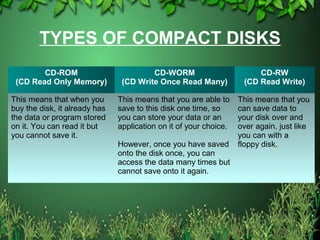
TYPES OF COMPACT DISKS
CD-ROM
(CD Read Only Memory)
CD-WORM
(CD Write Once Read Many)
CD-RW
(CD Read Write)
This means that when you
buy the disk, it already has
the data or program stored
on it. You can read it but
you cannot save it.
This means that you are able to
save to this disk one time, so
you can store your data or an
application on it of your choice.
However, once you have saved
onto the disk once, you can
access the data many times but
cannot save onto it again.
This means that you
can save data to
your disk over and
over again, just like
you can with a
floppy disk.
17
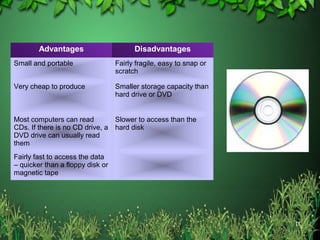
Advantages Disadvantages
Small and portable Fairly fragile, easy to snap or
scratch
Very cheap to produce Smaller storage capacity than
hard drive or DVD
Most computers can read
CDs. If there is no CD drive, a
DVD drive can usually read
them
Slower to access than the
hard disk
Fairly fast to access the data
– quicker than a floppy disk or
magnetic tape
STORAGE DEVICES
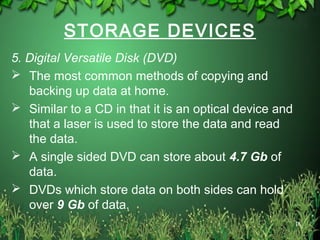
5. Digital Versatile Disk (DVD)
 The most common methods of copying and
backing up data at home.
 Similar to a CD in that it is an optical device and
that a laser is used to store the data and read
the data.
 A single sided DVD can store about 4.7 Gb of
data.
 DVDs which store data on both sides can hold
over 9 Gb of data.
18
19
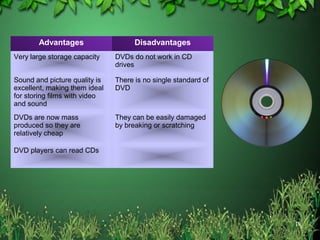
Advantages Disadvantages
Very large storage capacity DVDs do not work in CD
drives
Sound and picture quality is
excellent, making them ideal
for storing films with video
and sound
There is no single standard of
DVD
DVDs are now mass
produced so they are
relatively cheap
They can be easily damaged
by breaking or scratching
DVD players can read CDs
STORAGE DEVICES
6. Flash Memory
 Typically small, lightweight, removable and
rewritable.
 They consist of a small printed circuit board
which is encased in a plastic or metal casing.
 They usually have a removable cap which
covers and protects the part of the stick which
is inserted into a USB port.
 Are available from 1 Gb up to 6 Gb.
20
21
Advantages Disadvantages
More compact and portable than floppy disks or
CDs/DVDs
At the moment, the cost per megabyte of
storage is more expensive than floppy
disks, CDs or DVDs
Hold more data than floppy disk and nowadays
often more than a CD
They can be easily lost
More reliable than a floppy disk because they
have not moving parts
The metal part which is inserted into the
USB port can be snapped off if they are
handled roughly
They are being developed with fashionable
looking outer casings and are almost becoming
a ‘fashion accessory’ much in way of a mobile
phone.

Storage devices

  • 1.
    STORAGE DEVICES Done By: TeacherHjh Siti Noor Mazrah bte Awg Hj Suhut YEAR 7
  • 2.
    2 INTRODUCTION • Storage devicesare devices that can store data or information. • There are various type of storage devices. Different devices are suitable for different tasks. • Data can be stored either in the ‘Internal Memory’ or on a ‘Storage Devices’.
  • 3.
    STORAGE CAPACITY • Theamount of data and instructions that can be stored is measured in 'byte'. • This is the way the computer communicates and stores information. With each keystroke or character a byte of memory is used. 3 Quantity Information Bit Smallest unit of data, either a 0 or 1 Byte 8 bits Kilobyte Assumed to be 1,000 bytes. In reality, it is really 1,024 bytes. Megabyte 1,000 Kilobytes (1,024 Kb) Gigabyte 1,000 Megabytes (1,024 Mb)
  • 4.
    INTERNAL MEMORY 1. ReadOnly Memory (ROM) 4  It is permanent, long-term memory which cannot be erased or changed in any way  It is also known as “Non-Volatile Memory” because it doesn’t disappear after the computer is switched off.  ROM chips instruct the computer how to load the operating system from the hard drive into the computer’s memory.
  • 5.
    • Don’t confusethe hard drive with ROM – the hard drive is an internal backing store (storage device). 01/30/15 Free template from www.brainybetty.com 5
  • 6.
    INTERNAL MEMORY 2. RandomAccess Memory (RAM) 6  Temporary, short-term working memory  Only works when the computer is turned on  It is also known as “Volatile Memory” because data disappears if the power is switched off.  Each time you start a program e.g. MS Word, it is loaded into RAM.  The amount of RAM influences processing power, speed and how many programs can run at the same time.  Many computers are now sold with 128 or 256 MB of RAM.
  • 7.
    INTERNAL MEMORY 3. HardDisk 7  Hard Disks are the main internal backing store usually found inside computers.  It is a non-volatile storage device. Data is stored on a spinning disk with a magnetic surface known as magnetic media.  It can store a large amount of data.  There is also an external hard disk which connected to the computer system by a USB cable or other means.  It provides additional storage space for the computer system.
  • 8.
    8 Advantages Disadvantages Necessary tosupport the way your computer works Far slower to access data than ROM or RAM chips Large storage capacity Can crash which stop the computer from working Stores and retrieves data much faster than floppy disk or CD/DVD Regular crashes can damage the surface of the disk, leading to loss of data in that sector Stored items are not lost when you switch off the computer The disk is fixed inside the computer and cannot easily be transferred to another computer Cheap on a cost per megabyte compared to other storage devices
  • 9.
    STORAGE DEVICES 1. FloppyDisks  One of the oldest types of portable storage devices still in use.  Have been around since the 1980s.  Store up to 1.44 Mb of data which equivalent to around 300 pages of A4 text.  Graphics and WordArt cannot be stored because there have larger size than the size of floppy disk. 9
  • 10.
    10 Advantages Disadvantages Portable –small and lightweight Not very strong – easy to damage Inexpensive Data can be erased if the disk comes into contact with a magnetic field Useful for transferring small files between home and school Quite slow to access and retrieve data when compared to a hard disk Security tab to stop data from being written over Can transport viruses from one machine to another Can be used many times Small storage capacity Many new computers do not have floppy disk drives
  • 11.
    STORAGE DEVICES 2. ZipDisks  Very popular as a backup medium before CD- RWs were developed and became cheap enough for everyone to use.  Look similar to a floppy disk but are a little bit thicker.  They can store around 100Mb of data – 70 times more than floppy disk. 11
  • 12.
    12 Advantages Disadvantages Stores moredata than a floppy disk Almost obsolete now Compresses data, reducing the file size, so more data can be stored Need a separate zip drive to read the disk Portable More expensive than floppy disks.
  • 13.
    STORAGE DEVICES 3. MagneticTape  Useful for large organisations who need to back up their systems daily to store their data.  It works in much the same way as a video tape.  To find a specific piece of data, you have to start at the beginning of the tape and continue fast forwarding until you get to the piece of data that you need.  Therefore it is fairly slow to find and retrieve data. 13
  • 14.
    14 Advantages Disadvantages Relatively cheapper megabyte of storage Serial access so can be quite slow to access data Can store large amounts of data – over 100Gb Need a special piece of equipment to record and read the data on the tape Can be set up to do the back up overnight or over the weekend
  • 15.
    STORAGE DEVICES 4. CompactDisks (CD)  Also known as Optical Storage Devices.  Data is burned onto the surface of the disk using a laser beam in the CD drive.  A Laser beam is also used to read the data stored on the disk.  A typical CD can store around 650 Mb of data – equivalent to 450 Floppy disks. 15
  • 16.
    TYPES OF COMPACTDISKS CD-ROM (CD Read Only Memory) CD-WORM (CD Write Once Read Many) CD-RW (CD Read Write) This means that when you buy the disk, it already has the data or program stored on it. You can read it but you cannot save it. This means that you are able to save to this disk one time, so you can store your data or an application on it of your choice. However, once you have saved onto the disk once, you can access the data many times but cannot save onto it again. This means that you can save data to your disk over and over again, just like you can with a floppy disk.
  • 17.
    17 Advantages Disadvantages Small andportable Fairly fragile, easy to snap or scratch Very cheap to produce Smaller storage capacity than hard drive or DVD Most computers can read CDs. If there is no CD drive, a DVD drive can usually read them Slower to access than the hard disk Fairly fast to access the data – quicker than a floppy disk or magnetic tape
  • 18.
    STORAGE DEVICES 5. DigitalVersatile Disk (DVD)  The most common methods of copying and backing up data at home.  Similar to a CD in that it is an optical device and that a laser is used to store the data and read the data.  A single sided DVD can store about 4.7 Gb of data.  DVDs which store data on both sides can hold over 9 Gb of data. 18
  • 19.
    19 Advantages Disadvantages Very largestorage capacity DVDs do not work in CD drives Sound and picture quality is excellent, making them ideal for storing films with video and sound There is no single standard of DVD DVDs are now mass produced so they are relatively cheap They can be easily damaged by breaking or scratching DVD players can read CDs
  • 20.
    STORAGE DEVICES 6. FlashMemory  Typically small, lightweight, removable and rewritable.  They consist of a small printed circuit board which is encased in a plastic or metal casing.  They usually have a removable cap which covers and protects the part of the stick which is inserted into a USB port.  Are available from 1 Gb up to 6 Gb. 20
  • 21.
    21 Advantages Disadvantages More compactand portable than floppy disks or CDs/DVDs At the moment, the cost per megabyte of storage is more expensive than floppy disks, CDs or DVDs Hold more data than floppy disk and nowadays often more than a CD They can be easily lost More reliable than a floppy disk because they have not moving parts The metal part which is inserted into the USB port can be snapped off if they are handled roughly They are being developed with fashionable looking outer casings and are almost becoming a ‘fashion accessory’ much in way of a mobile phone.