DATA TRANSMISSION
SUNAWAR KHAN
MS(CS)
IIUI
DATA TRANSMISSION
• Data transmission is the transfer of data from point-to-point often
represented as an electromagnetic signal over a physical point-to-
point or point-to-multipoint communication channel
• A communication channel refers to the medium used to convey
information from a sender (or transmitter) to a receiver, and it can
use fully or partially the medium.
• Examples of channels: copper wires, optical fibbers or wireless
communication channels.
TAXONOMY OF TRANSMISSION MODES
TRANSMISSIONMODES
Parallel
Transmission
Serial transmission
Asynchronous
Synchronous
Isosynchronous
TAXONOMY OF TRANSMISSION MODES
• Definition: A transmission mode is the manner in which data is sent over
the underlying medium
• Transmission modes can be divided into two fundamental categories:
• Serial — one bit is sent at a time
• Parallel — multiple bits are sent at the same time
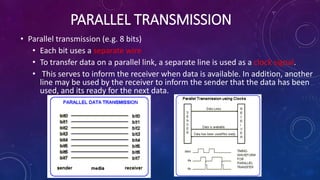
PARALLEL TRANSMISSION
• Parallel transmission (e.g. 8 bits)
• Each bit uses a separate wire
• To transfer data on a parallel link, a separate line is used as a clock signal.
• This serves to inform the receiver when data is available. In addition, another
line may be used by the receiver to inform the sender that the data has been
used, and its ready for the next data.
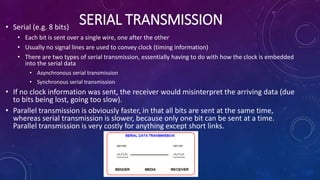
SERIAL TRANSMISSION• Serial (e.g. 8 bits)
• Each bit is sent over a single wire, one after the other
• Usually no signal lines are used to convey clock (timing information)
• There are two types of serial transmission, essentially having to do with how the clock is embedded
into the serial data
• Asynchronous serial transmission
• Synchronous serial transmission
• If no clock information was sent, the receiver would misinterpret the arriving data (due
to bits being lost, going too slow).
• Parallel transmission is obviously faster, in that all bits are sent at the same time,
whereas serial transmission is slower, because only one bit can be sent at a time.
Parallel transmission is very costly for anything except short links.
ASYNCHRONOUS TRANSMISSION
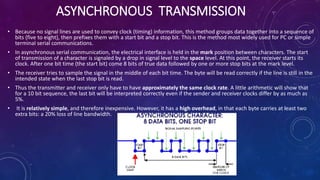
• Because no signal lines are used to convey clock (timing) information, this method groups data together into a sequence of
bits (five to eight), then prefixes them with a start bit and a stop bit. This is the method most widely used for PC or simple
terminal serial communications.
• In asynchronous serial communication, the electrical interface is held in the mark position between characters. The start
of transmission of a character is signaled by a drop in signal level to the space level. At this point, the receiver starts its
clock. After one bit time (the start bit) come 8 bits of true data followed by one or more stop bits at the mark level.
• The receiver tries to sample the signal in the middle of each bit time. The byte will be read correctly if the line is still in the
intended state when the last stop bit is read.
• Thus the transmitter and receiver only have to have approximately the same clock rate. A little arithmetic will show that
for a 10 bit sequence, the last bit will be interpreted correctly even if the sender and receiver clocks differ by as much as
5%.
• It is relatively simple, and therefore inexpensive. However, it has a high overhead, in that each byte carries at least two
extra bits: a 20% loss of line bandwidth.
SYNCHRONOUS TRANSMISSION• The PS/2 mouse and keyboard implement a bidirectional synchronous serial protocol.
• The bus is "idle" when both lines are high (open-collector). This is the only state where the
keyboard/mouse is allowed begin transmitting data. The host has ultimate control over the bus and may
inhibit communication at any time by pulling the Clock line low.
• The device (slave) always generates the clock signal. If the host wants to send data, it must first inhibit
communication from the device by pulling Clock low. The host then pulls Data low and releases
Clock. This is the "Request-to-Send" state and signals the device to start generating clock pulses.
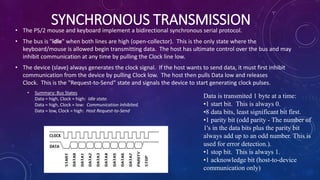
• Summary: Bus States
Data = high, Clock = high: Idle state.
Data = high, Clock = low: Communication Inhibited.
Data = low, Clock = high: Host Request-to-Send
Data is transmited 1 byte at a time:
•1 start bit. This is always 0.
•8 data bits, least significant bit first.
•1 parity bit (odd parity - The number of
1's in the data bits plus the parity bit
always add up to an odd number. This is
used for error detection.).
•1 stop bit. This is always 1.
•1 acknowledge bit (host-to-device
communication only)
DATA COMMUNICATION TERMINOLOGY
• Channel
• A channel is a portion of the communications medium allocated to the sender
and receiver for conveying information between them. The communications
medium is often subdivided into a number of separate paths, each of which is
used by a sender and receiver for communication purposes.
• Baud Rate
• Baud rate is the same as symbol rate and is a measure of the number of line
changes which occur every second. Each symbol can represent or convey one
(binary encoded signal) or several bits of data. For a binary signal of 20Hz, this
is equivalent to 20 baud (there are 20 changes per second).
• Bits Per Second
• This is an expression of the number of data bits per second. Where a binary
signal is being used, this is the same as the baud rate. When the signal is
changed to another form, it will not be equal to the baud rate, as each line
change can represent more than one bit (either two or four bits).
• Bandwidth
• Bandwidth is the frequency range of a channel, measured as the difference
between the highest and lowest frequencies that the channel supports. The
maximum transmission speed is dependant upon the available bandwidth. The
larger the bandwidth, the higher the transmission speed.
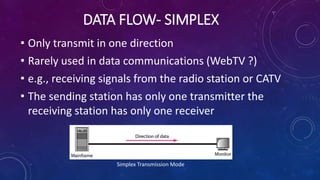
DATA FLOW- SIMPLEX
• Only transmit in one direction
• Rarely used in data communications (WebTV ?)
• e.g., receiving signals from the radio station or CATV
• The sending station has only one transmitter the
receiving station has only one receiver
Simplex Transmission Mode
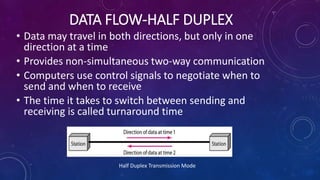
DATA FLOW-HALF DUPLEX
• Data may travel in both directions, but only in one
direction at a time
• Provides non-simultaneous two-way communication
• Computers use control signals to negotiate when to
send and when to receive
• The time it takes to switch between sending and
receiving is called turnaround time
Half Duplex Transmission Mode
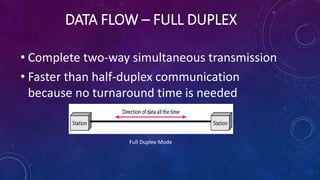
DATA FLOW – FULL DUPLEX
• Complete two-way simultaneous transmission
• Faster than half-duplex communication
because no turnaround time is needed
Full Duplex Mode

Data transmission

  • 1.
  • 2.
    DATA TRANSMISSION • Datatransmission is the transfer of data from point-to-point often represented as an electromagnetic signal over a physical point-to- point or point-to-multipoint communication channel • A communication channel refers to the medium used to convey information from a sender (or transmitter) to a receiver, and it can use fully or partially the medium. • Examples of channels: copper wires, optical fibbers or wireless communication channels.
  • 3.
    TAXONOMY OF TRANSMISSIONMODES TRANSMISSIONMODES Parallel Transmission Serial transmission Asynchronous Synchronous Isosynchronous
  • 4.
    TAXONOMY OF TRANSMISSIONMODES • Definition: A transmission mode is the manner in which data is sent over the underlying medium • Transmission modes can be divided into two fundamental categories: • Serial — one bit is sent at a time • Parallel — multiple bits are sent at the same time
  • 5.
    PARALLEL TRANSMISSION • Paralleltransmission (e.g. 8 bits) • Each bit uses a separate wire • To transfer data on a parallel link, a separate line is used as a clock signal. • This serves to inform the receiver when data is available. In addition, another line may be used by the receiver to inform the sender that the data has been used, and its ready for the next data.
  • 6.
    SERIAL TRANSMISSION• Serial(e.g. 8 bits) • Each bit is sent over a single wire, one after the other • Usually no signal lines are used to convey clock (timing information) • There are two types of serial transmission, essentially having to do with how the clock is embedded into the serial data • Asynchronous serial transmission • Synchronous serial transmission • If no clock information was sent, the receiver would misinterpret the arriving data (due to bits being lost, going too slow). • Parallel transmission is obviously faster, in that all bits are sent at the same time, whereas serial transmission is slower, because only one bit can be sent at a time. Parallel transmission is very costly for anything except short links.
  • 7.
    ASYNCHRONOUS TRANSMISSION • Becauseno signal lines are used to convey clock (timing) information, this method groups data together into a sequence of bits (five to eight), then prefixes them with a start bit and a stop bit. This is the method most widely used for PC or simple terminal serial communications. • In asynchronous serial communication, the electrical interface is held in the mark position between characters. The start of transmission of a character is signaled by a drop in signal level to the space level. At this point, the receiver starts its clock. After one bit time (the start bit) come 8 bits of true data followed by one or more stop bits at the mark level. • The receiver tries to sample the signal in the middle of each bit time. The byte will be read correctly if the line is still in the intended state when the last stop bit is read. • Thus the transmitter and receiver only have to have approximately the same clock rate. A little arithmetic will show that for a 10 bit sequence, the last bit will be interpreted correctly even if the sender and receiver clocks differ by as much as 5%. • It is relatively simple, and therefore inexpensive. However, it has a high overhead, in that each byte carries at least two extra bits: a 20% loss of line bandwidth.
  • 8.
    SYNCHRONOUS TRANSMISSION• ThePS/2 mouse and keyboard implement a bidirectional synchronous serial protocol. • The bus is "idle" when both lines are high (open-collector). This is the only state where the keyboard/mouse is allowed begin transmitting data. The host has ultimate control over the bus and may inhibit communication at any time by pulling the Clock line low. • The device (slave) always generates the clock signal. If the host wants to send data, it must first inhibit communication from the device by pulling Clock low. The host then pulls Data low and releases Clock. This is the "Request-to-Send" state and signals the device to start generating clock pulses. • Summary: Bus States Data = high, Clock = high: Idle state. Data = high, Clock = low: Communication Inhibited. Data = low, Clock = high: Host Request-to-Send Data is transmited 1 byte at a time: •1 start bit. This is always 0. •8 data bits, least significant bit first. •1 parity bit (odd parity - The number of 1's in the data bits plus the parity bit always add up to an odd number. This is used for error detection.). •1 stop bit. This is always 1. •1 acknowledge bit (host-to-device communication only)
  • 9.
    DATA COMMUNICATION TERMINOLOGY •Channel • A channel is a portion of the communications medium allocated to the sender and receiver for conveying information between them. The communications medium is often subdivided into a number of separate paths, each of which is used by a sender and receiver for communication purposes. • Baud Rate • Baud rate is the same as symbol rate and is a measure of the number of line changes which occur every second. Each symbol can represent or convey one (binary encoded signal) or several bits of data. For a binary signal of 20Hz, this is equivalent to 20 baud (there are 20 changes per second). • Bits Per Second • This is an expression of the number of data bits per second. Where a binary signal is being used, this is the same as the baud rate. When the signal is changed to another form, it will not be equal to the baud rate, as each line change can represent more than one bit (either two or four bits). • Bandwidth • Bandwidth is the frequency range of a channel, measured as the difference between the highest and lowest frequencies that the channel supports. The maximum transmission speed is dependant upon the available bandwidth. The larger the bandwidth, the higher the transmission speed.
  • 10.
    DATA FLOW- SIMPLEX •Only transmit in one direction • Rarely used in data communications (WebTV ?) • e.g., receiving signals from the radio station or CATV • The sending station has only one transmitter the receiving station has only one receiver Simplex Transmission Mode
  • 11.
    DATA FLOW-HALF DUPLEX •Data may travel in both directions, but only in one direction at a time • Provides non-simultaneous two-way communication • Computers use control signals to negotiate when to send and when to receive • The time it takes to switch between sending and receiving is called turnaround time Half Duplex Transmission Mode
  • 12.
    DATA FLOW –FULL DUPLEX • Complete two-way simultaneous transmission • Faster than half-duplex communication because no turnaround time is needed Full Duplex Mode