Evans Lampi
University of Zambia
 BIOS

stands for basic input/output system
 BIOS consists of low-level software that
controls the system hardware.
 BIOS acts as an interface between the
operating system (OS) and the hardware.
 BIOS consists of device drivers, or just
drivers
 BIOS is a link between hardware and
software in a system.
 BIOS

consists of software that interfaces the
hardware to the OS

 is

preloaded into read-only memory (or
ROM), and some is loaded into RAM from
disk.
 Motherboard

ROM

 Adapter

card ROMs (such as that found on a
video card)

 Loaded

into RAM from disk (device drivers)
 Non

volatile

 Software

 Drivers

used to be burned into ROM

were self-contained, preloaded into
memory, and accessible any time the PC was
powered on.
 ROM

chip also contained a power-on self test
(POST) program and a bootstrap loader.

 POST

initiates the loading of an OS by
checking for and loading the


boot sector from a floppy or hard disk
 Low

level routines

 Originally

all drivers were stored in the BIOS
ROM on the motherboard.

 OS

called on the drivers to interact with the
hardware
 What

happens when new hardware is added?

 ROM

is read only and therefore cannot be
changed.

 New

hardware has to come with adapter
cards that have their own BIOS ROMs

 ROM

was programmed to scan a
predetermined area of memory looking for
any adapter card ROMs
 Drivers

placed on the boot drive

 Drivers

loaded into RAM during loading of OS

 MS-DOS

startup file (IO.SYS) checked for a
configuration file (called CONFIG.SYS)

 CONFIG.SYS

specified any additional drivers
to load to support new hardware.
 Application

through the OS calls to a specific
software interrupt.

 the

interrupt vector table would then route
the call to the specific part of the BIOS
(meaning the specific driver) for the device
being called.
 portion

of the BIOS contained in ROM chips

 Found

on the motherboard and in some
adapter cards

 drivers

in nonvolatile ROM remain intact
after power is turned off
 Motherboard

BIOS only loads the basic
routines to start up the PC

 Drivers
 Drivers

are stored on the hard drive

are loaded into RAM are run from
RAM (which is faster)
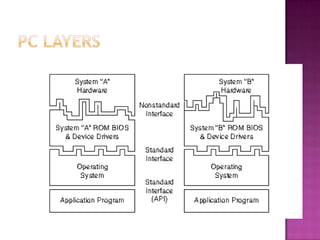
 purpose

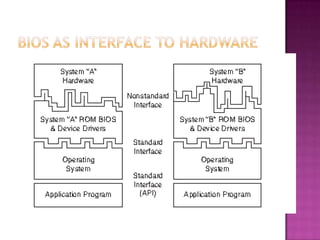
of the layered design is to enable a
given OS and applications to run on different
hardware
 application

programming interface (API)

 Consists

of the various commands and
functions the OS can perform for an
application


e.g.an application can call on the OS to load or
save a file

 Application

does not need to know the
specifics on how to drive particular
hardware.
 BIOS

is sometimes confused with CMOS

 CMOS

is a RTC/NVRAM

 CMOS

stores the configuration file

 BIOS

setup
Performs
 POST
 Setup
 Bootstrap loader
 BIOS
 tests











computer’s

Processor
Memory
Chipset
video adapter
disk controllers
disk drives
Keyboard
and other crucial components
 configuration

and setup program
 activated during POST by pressing a key (e.g.
F1)
 enables configuration of






motherboard and chipset settings
date and time
Passwords
disk drives
and other basic system settings
A

routine that reads the first physical sector
of various disk drives looking for a valid
master boot record (MBR)
 MBR ends with signature bytes 55AA
 the code is then executed
 MBR program code then reads the first
physical sector called the volume boot
record (VBR)
 loads




the first OS startup file, which is

IO.SYS (Windows 9x/Me),
ntldr (Windows XP/2000/NT),
bootmgr (Windows 7/Vista).

 The

OS is then in control and continues the
boot process.
 refers

to the collection of actual drivers that
act as a basic interface between the OS and
hardware

 When

running DOS or Windows in Safe
mode, you are running almost solely on ROMbased BIOS drivers
The four main types of ROM chips that have
been used in PCs are as follows:
 ROM—Read-only memory
 PROM—Programmable ROM
 EPROM—Erasable PROM
 EEPROM—Electrically erasable PROM, also
sometimes called a flash ROM
 ROM

onboard, including the following:
 Video cards—All have an onboard BIOS.
 RAID (Redundant Array of Independent
Disks) cards
 Network card.
 ATA/Serial ATA (SATA) or floppy upgrade
boards
 Y2K boards
 BIOS

Basics
 Motherboard ROM BIOS
 ROM Hardware

Bios

  • 1.
  • 2.
     BIOS stands forbasic input/output system  BIOS consists of low-level software that controls the system hardware.  BIOS acts as an interface between the operating system (OS) and the hardware.  BIOS consists of device drivers, or just drivers  BIOS is a link between hardware and software in a system.
  • 3.
     BIOS consists ofsoftware that interfaces the hardware to the OS  is preloaded into read-only memory (or ROM), and some is loaded into RAM from disk.
  • 5.
     Motherboard ROM  Adapter cardROMs (such as that found on a video card)  Loaded into RAM from disk (device drivers)
  • 6.
     Non volatile  Software Drivers used to be burned into ROM were self-contained, preloaded into memory, and accessible any time the PC was powered on.
  • 7.
     ROM chip alsocontained a power-on self test (POST) program and a bootstrap loader.  POST initiates the loading of an OS by checking for and loading the  boot sector from a floppy or hard disk
  • 8.
     Low level routines Originally all drivers were stored in the BIOS ROM on the motherboard.  OS called on the drivers to interact with the hardware
  • 9.
     What happens whennew hardware is added?  ROM is read only and therefore cannot be changed.  New hardware has to come with adapter cards that have their own BIOS ROMs  ROM was programmed to scan a predetermined area of memory looking for any adapter card ROMs
  • 10.
     Drivers placed onthe boot drive  Drivers loaded into RAM during loading of OS  MS-DOS startup file (IO.SYS) checked for a configuration file (called CONFIG.SYS)  CONFIG.SYS specified any additional drivers to load to support new hardware.
  • 11.
     Application through theOS calls to a specific software interrupt.  the interrupt vector table would then route the call to the specific part of the BIOS (meaning the specific driver) for the device being called.
  • 12.
     portion of theBIOS contained in ROM chips  Found on the motherboard and in some adapter cards  drivers in nonvolatile ROM remain intact after power is turned off
  • 13.
     Motherboard BIOS onlyloads the basic routines to start up the PC  Drivers  Drivers are stored on the hard drive are loaded into RAM are run from RAM (which is faster)
  • 15.
     purpose of thelayered design is to enable a given OS and applications to run on different hardware
  • 16.
     application programming interface(API)  Consists of the various commands and functions the OS can perform for an application  e.g.an application can call on the OS to load or save a file  Application does not need to know the specifics on how to drive particular hardware.
  • 17.
     BIOS is sometimesconfused with CMOS  CMOS is a RTC/NVRAM  CMOS stores the configuration file  BIOS setup
  • 18.
    Performs  POST  Setup Bootstrap loader  BIOS
  • 19.
  • 20.
     configuration and setupprogram  activated during POST by pressing a key (e.g. F1)  enables configuration of      motherboard and chipset settings date and time Passwords disk drives and other basic system settings
  • 21.
    A routine that readsthe first physical sector of various disk drives looking for a valid master boot record (MBR)  MBR ends with signature bytes 55AA  the code is then executed  MBR program code then reads the first physical sector called the volume boot record (VBR)
  • 22.
     loads    the firstOS startup file, which is IO.SYS (Windows 9x/Me), ntldr (Windows XP/2000/NT), bootmgr (Windows 7/Vista).  The OS is then in control and continues the boot process.
  • 23.
     refers to thecollection of actual drivers that act as a basic interface between the OS and hardware  When running DOS or Windows in Safe mode, you are running almost solely on ROMbased BIOS drivers
  • 24.
    The four maintypes of ROM chips that have been used in PCs are as follows:  ROM—Read-only memory  PROM—Programmable ROM  EPROM—Erasable PROM  EEPROM—Electrically erasable PROM, also sometimes called a flash ROM
  • 28.
     ROM onboard, includingthe following:  Video cards—All have an onboard BIOS.  RAID (Redundant Array of Independent Disks) cards  Network card.  ATA/Serial ATA (SATA) or floppy upgrade boards  Y2K boards
  • 29.
     BIOS Basics  MotherboardROM BIOS  ROM Hardware