Downloaded 197 times
![4
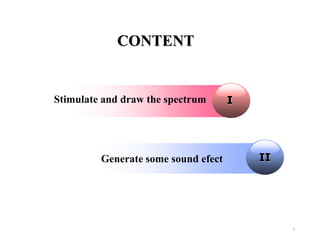
Create an analog input device object
ai = analoginput('winsound');
addchannel(ai,1);
Changing object properties
ai.SampleRate = Fs;
ai.SamplesPerTrigger = duration*Fs;
ai.TriggerType = 'Manual';
Get data
start(ai);
trigger(ai);
[data, t] = getdata(ai);
delete(ai);
clear ai;
MATLAB daq toolbox](https://image.slidesharecdn.com/presentation-140403215249-phpapp02/85/Sound-analysis-and-processing-with-MATLAB-4-320.jpg)
![11
MATLAB functions
[x,fs] = wavread(‘road.wav’) : read file name road.wav
and store the value to array x.
sound(x,fs) : play the wav file converted to x in the previous
description.
soundsc(x,Fs) : scale the sound of the wav file. Scaling a
signal means changing its frequency or amplitude.](https://image.slidesharecdn.com/presentation-140403215249-phpapp02/85/Sound-analysis-and-processing-with-MATLAB-11-320.jpg)

![13
Effects
Changing the Speed
[hootie,fs]=wavread('hootie.wav'); %loads Hootie
Soundsc(hootie,fs/1.5) % How slow can you go?
soundsc(hootie,fs*1.5) % The Chimpmonks!
Changing Volume
soundsc(m*hootie,fs)
Reverse
y=[1;2;3;4;5];
y2=flipud(y); %reverse the array y](https://image.slidesharecdn.com/presentation-140403215249-phpapp02/85/Sound-analysis-and-processing-with-MATLAB-13-320.jpg)
![14
Digital Delay Experiment
out = x; % set up a new array, same size as old
one
N=10000; % delay amount N/44100 seconds
for n=N+1:length(left)
out(n)=x(n)+x(n-N); % approximately ¼ second
echo
end
soundsc(out,fs) % new echo
Digital Tone Control ( Low Pass Filter)
[hootie,fs]=wavread('hootie.wav'); % loads Hootie
out=hootie;
for n=2:length(hootie)
out(n,:) = 0.9*out(n-1,:)+hootie(n,:);
end
soundsc(out,fs); % low pass filtered](https://image.slidesharecdn.com/presentation-140403215249-phpapp02/85/Sound-analysis-and-processing-with-MATLAB-14-320.jpg)


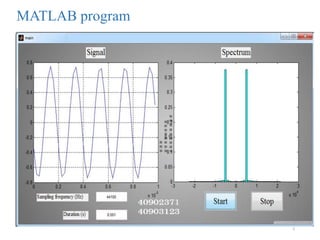
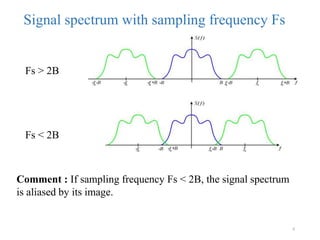
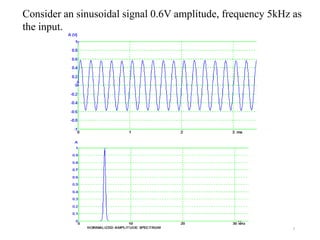
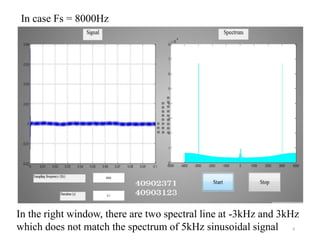
The document provides a detailed Matlab tutorial on generating and manipulating audio signals using a sound card. It explains creating analog input objects, reading and playing .wav files, and various sound effects including speed adjustment, volume control, and digital delay. Additionally, it discusses the importance of sampling frequency to avoid signal aliasing and includes several references for further study.


![Application of digital_signal_processing_in_audio_processing[1]](https://cdn.slidesharecdn.com/ss_thumbnails/applicationofdigitalsignalprocessinginaudioprocessing1-160822142127-thumbnail.jpg?width=640&height=640&fit=bounds)


