GURU NANAK INSTITUTIONS TECHNICAL CAMPUS
SCHOOL OF ENGINEERING & TECHNOLOGY
DEPARTMENT OF EEE
MAJOR PROJECT PRESENTATION
ON
HOME AUTOMATION WITH RASPBERRY PI AND GOOGLE
ASSISTANT
BY:
PEDDIREDDY PRATHIMA 15WJ1A0284
SIRIKONDA SAI KALYAN 15WJ1A02A7
VATSAL JAT 15WJ1A02C1
MUTHYALA MANASWINI 16WJ5A0219
Project Coordinator
Mr. K. Rajasekhar
M.Tech.,
Assistant Professor
Head of the Department
Dr. k. Santhi
M.E., (Ph.D)
Under the Guidance of
Mr. G. Ranga Purushotham
M.Tech, (Ph.D)
Associate Professor
Department of Electrical and Electronics Engineering 118-08-2019
Index
• Objective
• Abstract
• Introduction
• Block Diagram
• Components
• Circuit Diagram
• Working
• program
• Advantages and Disadvantages
• Applications
• Future Scope
Department of Electrical and Electronics Engineering 218-08-2019
Objective
The purpose of this proposed model is to reduce the effort put in by the user to
control the home appliances manually providing convenience to the user. This
system uses Google Assistant software development kit provided by Google, to
communicate with the Raspberry Pi and the consumers.
The consumers give voice commands through the smart phone to control the
appliances in their home, office, etc. and can change the speed of the fan or turn on
and off lights, fans, air conditioners and other appliances such as smart lights and
smart TVs, etc.
Department of Electrical and Electronics Engineering 318-08-2019
Abstract
In present days, there is a need for automation in operation daily essential needs and
luxuries to make the life of the human being very convenient by reducing the effort
and time.
Most of the existing home automation systems that are available in the
market use a chipset that is programmed to control a fixed number of appliances
inside a house, which are given the working instructions using a mobile application
or a web-based UI. The main drawback of such systems is that expansion not easy
and requires a lot of technical assistance.
This proposed model is an interactive home automation system that is unique
in its operation. This model focuses on controlling the appliances using interactive
voice-enabled control system and artificial intelligence, with the help of open
sourced API of Google Assistant developed by Google Inc.
Department of Electrical and Electronics Engineering 418-08-2019
Introduction
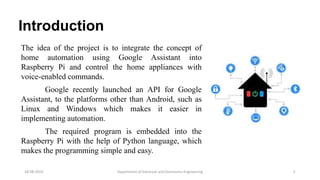
The idea of the project is to integrate the concept of
home automation using Google Assistant into
Raspberry Pi and control the home appliances with
voice-enabled commands.
Google recently launched an API for Google
Assistant, to the platforms other than Android, such as
Linux and Windows which makes it easier in
implementing automation.
The required program is embedded into the
Raspberry Pi with the help of Python language, which
makes the programming simple and easy.
Department of Electrical and Electronics Engineering 518-08-2019
Motor Driver
Block Diagram :
Fan
Department of Electrical and Electronics Engineering 6
Air
Conditioning
Raspberry Pi 3
B+ Relay
lights
Water Pump
IFTTT
CLOUD
OLP cloud
Internet
18-08-2019
Google Assistant
Components :
Raspberry Pi 3 B+
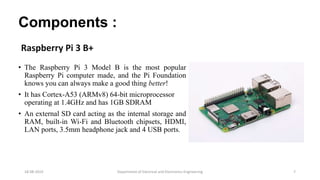
• The Raspberry Pi 3 Model B is the most popular
Raspberry Pi computer made, and the Pi Foundation
knows you can always make a good thing better!
• It has Cortex-A53 (ARMv8) 64-bit microprocessor
operating at 1.4GHz and has 1GB SDRAM
• An external SD card acting as the internal storage and
RAM, built-in Wi-Fi and Bluetooth chipsets, HDMI,
LAN ports, 3.5mm headphone jack and 4 USB ports.
Department of Electrical and Electronics Engineering 718-08-2019
Google Assistant
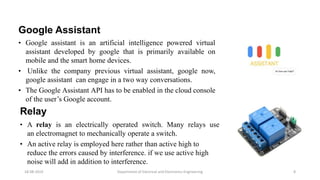
• Google assistant is an artificial intelligence powered virtual
assistant developed by google that is primarily available on
mobile and the smart home devices.
• Unlike the company previous virtual assistant, google now,
google assistant can engage in a two way conversations.
• The Google Assistant API has to be enabled in the cloud console
of the user’s Google account.
Department of Electrical and Electronics Engineering 8
Relay
• A relay is an electrically operated switch. Many relays use
an electromagnet to mechanically operate a switch.
• An active relay is employed here rather than active high to
reduce the errors caused by interference. if we use active high
noise will add in addition to interference.
18-08-2019
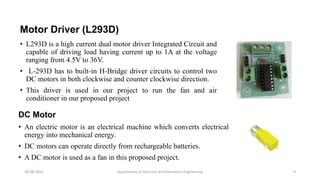
Motor Driver (L293D)
• L293D is a high current dual motor driver Integrated Circuit and
capable of driving load having current up to 1A at the voltage
ranging from 4.5V to 36V.
• L-293D has to built-in H-Bridge driver circuits to control two
DC motors in both clockwise and counter clockwise direction.
• This driver is used in our project to run the fan and air
conditioner in our proposed project
Department of Electrical and Electronics Engineering 9
DC Motor
• An electric motor is an electrical machine which converts electrical
energy into mechanical energy.
• DC motors can operate directly from rechargeable batteries.
• A DC motor is used as a fan in this proposed project.
18-08-2019
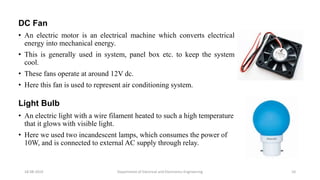
DC Fan
• An electric motor is an electrical machine which converts electrical
energy into mechanical energy.
• This is generally used in system, panel box etc. to keep the system
cool.
• These fans operate at around 12V dc.
• Here this fan is used to represent air conditioning system.
Light Bulb
• An electric light with a wire filament heated to such a high temperature
that it glows with visible light.
• Here we used two incandescent lamps, which consumes the power of
10W, and is connected to external AC supply through relay.
Department of Electrical and Electronics Engineering 1018-08-2019
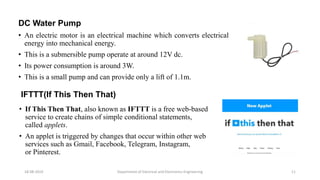
DC Water Pump
• An electric motor is an electrical machine which converts electrical
energy into mechanical energy.
• This is a submersible pump operate at around 12V dc.
• Its power consumption is around 3W.
• This is a small pump and can provide only a lift of 1.1m.
Department of Electrical and Electronics Engineering 1118-08-2019
IFTTT(If This Then That)
• If This Then That, also known as IFTTT is a free web-based
service to create chains of simple conditional statements,
called applets.
• An applet is triggered by changes that occur within other web
services such as Gmail, Facebook, Telegram, Instagram,
or Pinterest.
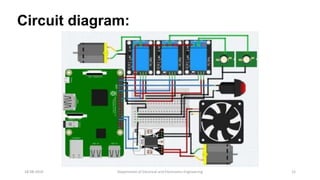
Circuit diagram:
18-08-2019 Department of Electrical and Electronics Engineering 12
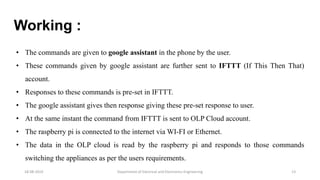
Working :
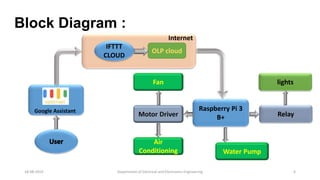
• The commands are given to google assistant in the phone by the user.
• These commands given by google assistant are further sent to IFTTT (If This Then That)
account.
• Responses to these commands is pre-set in IFTTT.
• The google assistant gives then response giving these pre-set response to user.
• At the same instant the command from IFTTT is sent to OLP Cloud account.
• The raspberry pi is connected to the internet via WI-FI or Ethernet.
• The data in the OLP cloud is read by the raspberry pi and responds to those commands
switching the appliances as per the users requirements.
Department of Electrical and Electronics Engineering 1318-08-2019
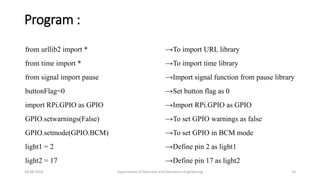
Program :
from urllib2 import *
from time import *
from signal import pause
buttonFlag=0
import RPi.GPIO as GPIO
GPIO.setwarnings(False)
GPIO.setmode(GPIO.BCM)
light1 = 2
light2 = 17
18-08-2019 Department of Electrical and Electronics Engineering 14
→To import URL library
→To import time library
→Import signal function from pause library
→Set button flag as 0
→Import RPi.GPIO as GPIO
→To set GPIO warnings as false
→To set GPIO in BCM mode
→Define pin 2 as light1
→Define pin 17 as light2
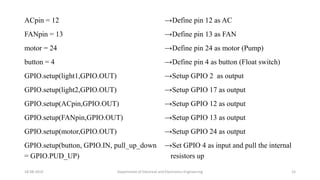
ACpin = 12
FANpin = 13
motor = 24
button = 4
GPIO.setup(light1,GPIO.OUT)
GPIO.setup(light2,GPIO.OUT)
GPIO.setup(ACpin,GPIO.OUT)
GPIO.setup(FANpin,GPIO.OUT)
GPIO.setup(motor,GPIO.OUT)
GPIO.setup(button, GPIO.IN, pull_up_down
= GPIO.PUD_UP)
18-08-2019 Department of Electrical and Electronics Engineering 15
→Define pin 12 as AC
→Define pin 13 as FAN
→Define pin 24 as motor (Pump)
→Define pin 4 as button (Float switch)
→Setup GPIO 2 as output
→Setup GPIO 17 as output
→Setup GPIO 12 as output
→Setup GPIO 13 as output
→Setup GPIO 24 as output
→Set GPIO 4 as input and pull the internal
resistors up
pi_pwm = GPIO.PWM(FANpin,100)
pi_pwm.start(100)
GPIO.output(light1,GPIO.HIGH)
GPIO.output(light2,GPIO.HIGH)
GPIO.output(ACpin,GPIO.LOW)
GPIO.output(motor, GPIO.HIGH)
pi_pwm.ChangeDutyCycle(0)
while True :
a = urlopen
('http://olp.madmaker.space/olp/device_pull?
device_api_key=6dcc78313853af00391f9f3d
603431a2').read().split(': ')[3].split('<')[0]
18-08-2019 Department of Electrical and Electronics Engineering 16
→Create a PWM with frequency of 100
→Set initial PWM duty cycle at 100%
→Turn off light1
→Turn off light2
→Turn off ac
→Turnoff pump
→Set initial PWM duty cycle at 0%
→Defining a = the pull URL
print(a)
if(a!='0'):
while True:
urlopen('http://olp.madmaker.space/olp/devic
e_push?device_api_key=6dcc78313853af003
91f9f3d603431a2&device_status=0')
k=urlopen('http://olp.madmaker.space/olp/de
vice_pull?device_api_key=6dcc78313853af0
0391f9f3d603431a2').read().split('<br/>')[0].s
plit(' ')[-1]
if(k=='0'):
break
18-08-2019 Department of Electrical and Electronics Engineering 17
→Print the status present in a
}
to execute the command just once
}
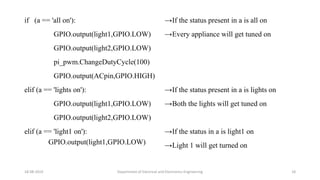
if (a == 'all on'):
GPIO.output(light1,GPIO.LOW)
GPIO.output(light2,GPIO.LOW)
pi_pwm.ChangeDutyCycle(100)
GPIO.output(ACpin,GPIO.HIGH)
elif (a == 'lights on'):
GPIO.output(light1,GPIO.LOW)
GPIO.output(light2,GPIO.LOW)
elif (a == 'light1 on'):
GPIO.output(light1,GPIO.LOW)
18-08-2019 Department of Electrical and Electronics Engineering 18
→If the status present in a is all on
→Every appliance will get tuned on
→If the status present in a is lights on
→Both the lights will get tuned on
→If the status in a is light1 on
→Light 1 will get turned on
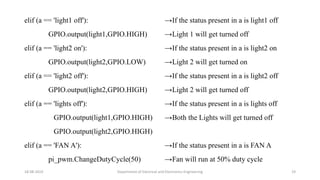
elif (a == 'light1 off'):
GPIO.output(light1,GPIO.HIGH)
elif (a == 'light2 on'):
GPIO.output(light2,GPIO.LOW)
elif (a == 'light2 off'):
GPIO.output(light2,GPIO.HIGH)
elif (a == 'lights off'):
GPIO.output(light1,GPIO.HIGH)
GPIO.output(light2,GPIO.HIGH)
elif (a == 'FAN A'):
pi_pwm.ChangeDutyCycle(50)
18-08-2019 Department of Electrical and Electronics Engineering 19
→If the status present in a is light1 off
→Light 1 will get turned off
→If the status present in a is light2 on
→Light 2 will get turned on
→If the status present in a is light2 off
→Light 2 will get turned off
→If the status present in a is lights off
→Both the Lights will get turned off
→If the status present in a is FAN A
→Fan will run at 50% duty cycle
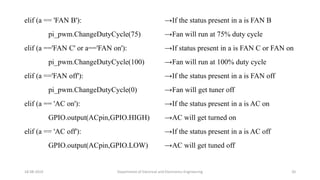
elif (a == 'FAN B'):
pi_pwm.ChangeDutyCycle(75)
elif (a =='FAN C' or a=='FAN on'):
pi_pwm.ChangeDutyCycle(100)
elif (a =='FAN off'):
pi_pwm.ChangeDutyCycle(0)
elif (a == 'AC on'):
GPIO.output(ACpin,GPIO.HIGH)
elif (a == 'AC off'):
GPIO.output(ACpin,GPIO.LOW)
18-08-2019 Department of Electrical and Electronics Engineering 20
→If the status present in a is FAN B
→Fan will run at 75% duty cycle
→If status present in a is FAN C or FAN on
→Fan will run at 100% duty cycle
→If the status present in a is FAN off
→Fan will get tuner off
→If the status present in a is AC on
→AC will get turned on
→If the status present in a is AC off
→AC will get tuned off
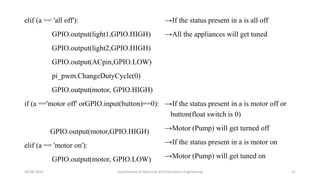
elif (a == 'all off'):
GPIO.output(light1,GPIO.HIGH)
GPIO.output(light2,GPIO.HIGH)
GPIO.output(ACpin,GPIO.LOW)
pi_pwm.ChangeDutyCycle(0)
GPIO.output(motor, GPIO.HIGH)
if (a =='motor off' orGPIO.input(button)==0):
GPIO.output(motor,GPIO.HIGH)
elif (a == 'motor on'):
GPIO.output(motor, GPIO.LOW)
18-08-2019 Department of Electrical and Electronics Engineering 21
→If the status present in a is all off
→All the appliances will get tuned
→If the status present in a is motor off or
button(float switch is 0)
→Motor (Pump) will get turned off
→If the status present in a is motor on
→Motor (Pump) will get tuned on
Department of Electrical and Electronics Engineering 22
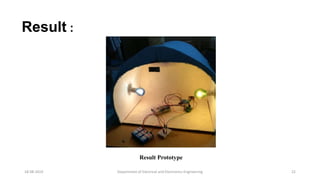
Result :
Result Prototype
18-08-2019
Advantages
• Convenience
Using the voice-enabled control system gives convenience to operate any appliance
and ease the burden of your daily routines, Such as having an air-conditioning on when
you enter your house on a hot day will bring you relief.
• Customization
Further customization can be done to this proposed model by interfacing commercially
available smart home products such as smart lights and thermostats etc.
• Security
With a smart house system, a consumer control his/her home/office on their fingertips
no matter where the user is. This is secure as it does not involve any third party
application having control over your device(mobile).
Department of Electrical and Electronics Engineering 2318-08-2019
Disadvantages
• Learning Curve
An automated home comes with a few drawbacks. For a start, owing a smart house means
having to learn how to use it. you will have to adapt to new technology, whether you are
comfortable with it or not. once you do, you get access to every device at your fingertips.
• Reliability
Technology can create disasters if it falls into wrong hands. Hackers can break into your
home once they obtain the password to your lock. Further, you may encounter privacy
issues if your camera captures unwanted footage of your neighbor.
• Internet connectivity
Internet connectivity is the main drawback of this model. Any interruption in the internet
connectivity will prevent the commands to get executed.
Department of Electrical and Electronics Engineering 2418-08-2019
Applications
• Lights
Using Create elegant lighting scenes that set the mood of the room Adjust the lighting
scenes yourself without calling the integrator for help.
• Heating And Cooling
Make your life more comfortable and save energy Create multiple heating and cooling
zones to get the ideal temperature in each room.
• Security
All the devices in the home can be controlled using single device. Further adding a
surveillance system to this model will enhance the security.
• Doors
All the doors can be locked or unlocked without any effort .
Department of Electrical and Electronics Engineering 2518-08-2019
Future scope
• Home automation with Google Assistant is a fast-emerging technology. Currently, most of the
smartphone market is leading in Android which comes with Google Assistant technology.
Even iPhones can be installed with Google Assistant from the App Store.
• The constant updates coming from the Google Assistant SDK helps the device to be further
developed with ease in controlling various appliances in industrial or commercial, domestic
purpose, making it much easier to register more and more devices in the cloud console
without any effort.
Department of Electrical and Electronics Engineering 2618-08-2019
Thank you!
Department of Electrical and Electronics Engineering 2718-08-2019

home automation using raspberry pi

  • 1.
    GURU NANAK INSTITUTIONSTECHNICAL CAMPUS SCHOOL OF ENGINEERING & TECHNOLOGY DEPARTMENT OF EEE MAJOR PROJECT PRESENTATION ON HOME AUTOMATION WITH RASPBERRY PI AND GOOGLE ASSISTANT BY: PEDDIREDDY PRATHIMA 15WJ1A0284 SIRIKONDA SAI KALYAN 15WJ1A02A7 VATSAL JAT 15WJ1A02C1 MUTHYALA MANASWINI 16WJ5A0219 Project Coordinator Mr. K. Rajasekhar M.Tech., Assistant Professor Head of the Department Dr. k. Santhi M.E., (Ph.D) Under the Guidance of Mr. G. Ranga Purushotham M.Tech, (Ph.D) Associate Professor Department of Electrical and Electronics Engineering 118-08-2019
  • 2.
    Index • Objective • Abstract •Introduction • Block Diagram • Components • Circuit Diagram • Working • program • Advantages and Disadvantages • Applications • Future Scope Department of Electrical and Electronics Engineering 218-08-2019
  • 3.
    Objective The purpose ofthis proposed model is to reduce the effort put in by the user to control the home appliances manually providing convenience to the user. This system uses Google Assistant software development kit provided by Google, to communicate with the Raspberry Pi and the consumers. The consumers give voice commands through the smart phone to control the appliances in their home, office, etc. and can change the speed of the fan or turn on and off lights, fans, air conditioners and other appliances such as smart lights and smart TVs, etc. Department of Electrical and Electronics Engineering 318-08-2019
  • 4.
    Abstract In present days,there is a need for automation in operation daily essential needs and luxuries to make the life of the human being very convenient by reducing the effort and time. Most of the existing home automation systems that are available in the market use a chipset that is programmed to control a fixed number of appliances inside a house, which are given the working instructions using a mobile application or a web-based UI. The main drawback of such systems is that expansion not easy and requires a lot of technical assistance. This proposed model is an interactive home automation system that is unique in its operation. This model focuses on controlling the appliances using interactive voice-enabled control system and artificial intelligence, with the help of open sourced API of Google Assistant developed by Google Inc. Department of Electrical and Electronics Engineering 418-08-2019
  • 5.
    Introduction The idea ofthe project is to integrate the concept of home automation using Google Assistant into Raspberry Pi and control the home appliances with voice-enabled commands. Google recently launched an API for Google Assistant, to the platforms other than Android, such as Linux and Windows which makes it easier in implementing automation. The required program is embedded into the Raspberry Pi with the help of Python language, which makes the programming simple and easy. Department of Electrical and Electronics Engineering 518-08-2019
  • 6.
    Motor Driver Block Diagram: Fan Department of Electrical and Electronics Engineering 6 Air Conditioning Raspberry Pi 3 B+ Relay lights Water Pump IFTTT CLOUD OLP cloud Internet 18-08-2019 Google Assistant
  • 7.
    Components : Raspberry Pi3 B+ • The Raspberry Pi 3 Model B is the most popular Raspberry Pi computer made, and the Pi Foundation knows you can always make a good thing better! • It has Cortex-A53 (ARMv8) 64-bit microprocessor operating at 1.4GHz and has 1GB SDRAM • An external SD card acting as the internal storage and RAM, built-in Wi-Fi and Bluetooth chipsets, HDMI, LAN ports, 3.5mm headphone jack and 4 USB ports. Department of Electrical and Electronics Engineering 718-08-2019
  • 8.
    Google Assistant • Googleassistant is an artificial intelligence powered virtual assistant developed by google that is primarily available on mobile and the smart home devices. • Unlike the company previous virtual assistant, google now, google assistant can engage in a two way conversations. • The Google Assistant API has to be enabled in the cloud console of the user’s Google account. Department of Electrical and Electronics Engineering 8 Relay • A relay is an electrically operated switch. Many relays use an electromagnet to mechanically operate a switch. • An active relay is employed here rather than active high to reduce the errors caused by interference. if we use active high noise will add in addition to interference. 18-08-2019
  • 9.
    Motor Driver (L293D) •L293D is a high current dual motor driver Integrated Circuit and capable of driving load having current up to 1A at the voltage ranging from 4.5V to 36V. • L-293D has to built-in H-Bridge driver circuits to control two DC motors in both clockwise and counter clockwise direction. • This driver is used in our project to run the fan and air conditioner in our proposed project Department of Electrical and Electronics Engineering 9 DC Motor • An electric motor is an electrical machine which converts electrical energy into mechanical energy. • DC motors can operate directly from rechargeable batteries. • A DC motor is used as a fan in this proposed project. 18-08-2019
  • 10.
    DC Fan • Anelectric motor is an electrical machine which converts electrical energy into mechanical energy. • This is generally used in system, panel box etc. to keep the system cool. • These fans operate at around 12V dc. • Here this fan is used to represent air conditioning system. Light Bulb • An electric light with a wire filament heated to such a high temperature that it glows with visible light. • Here we used two incandescent lamps, which consumes the power of 10W, and is connected to external AC supply through relay. Department of Electrical and Electronics Engineering 1018-08-2019
  • 11.
    DC Water Pump •An electric motor is an electrical machine which converts electrical energy into mechanical energy. • This is a submersible pump operate at around 12V dc. • Its power consumption is around 3W. • This is a small pump and can provide only a lift of 1.1m. Department of Electrical and Electronics Engineering 1118-08-2019 IFTTT(If This Then That) • If This Then That, also known as IFTTT is a free web-based service to create chains of simple conditional statements, called applets. • An applet is triggered by changes that occur within other web services such as Gmail, Facebook, Telegram, Instagram, or Pinterest.
  • 12.
    Circuit diagram: 18-08-2019 Departmentof Electrical and Electronics Engineering 12
  • 13.
    Working : • Thecommands are given to google assistant in the phone by the user. • These commands given by google assistant are further sent to IFTTT (If This Then That) account. • Responses to these commands is pre-set in IFTTT. • The google assistant gives then response giving these pre-set response to user. • At the same instant the command from IFTTT is sent to OLP Cloud account. • The raspberry pi is connected to the internet via WI-FI or Ethernet. • The data in the OLP cloud is read by the raspberry pi and responds to those commands switching the appliances as per the users requirements. Department of Electrical and Electronics Engineering 1318-08-2019
  • 14.
    Program : from urllib2import * from time import * from signal import pause buttonFlag=0 import RPi.GPIO as GPIO GPIO.setwarnings(False) GPIO.setmode(GPIO.BCM) light1 = 2 light2 = 17 18-08-2019 Department of Electrical and Electronics Engineering 14 →To import URL library →To import time library →Import signal function from pause library →Set button flag as 0 →Import RPi.GPIO as GPIO →To set GPIO warnings as false →To set GPIO in BCM mode →Define pin 2 as light1 →Define pin 17 as light2
  • 15.
    ACpin = 12 FANpin= 13 motor = 24 button = 4 GPIO.setup(light1,GPIO.OUT) GPIO.setup(light2,GPIO.OUT) GPIO.setup(ACpin,GPIO.OUT) GPIO.setup(FANpin,GPIO.OUT) GPIO.setup(motor,GPIO.OUT) GPIO.setup(button, GPIO.IN, pull_up_down = GPIO.PUD_UP) 18-08-2019 Department of Electrical and Electronics Engineering 15 →Define pin 12 as AC →Define pin 13 as FAN →Define pin 24 as motor (Pump) →Define pin 4 as button (Float switch) →Setup GPIO 2 as output →Setup GPIO 17 as output →Setup GPIO 12 as output →Setup GPIO 13 as output →Setup GPIO 24 as output →Set GPIO 4 as input and pull the internal resistors up
  • 16.
    pi_pwm = GPIO.PWM(FANpin,100) pi_pwm.start(100) GPIO.output(light1,GPIO.HIGH) GPIO.output(light2,GPIO.HIGH) GPIO.output(ACpin,GPIO.LOW) GPIO.output(motor,GPIO.HIGH) pi_pwm.ChangeDutyCycle(0) while True : a = urlopen ('http://olp.madmaker.space/olp/device_pull? device_api_key=6dcc78313853af00391f9f3d 603431a2').read().split(': ')[3].split('<')[0] 18-08-2019 Department of Electrical and Electronics Engineering 16 →Create a PWM with frequency of 100 →Set initial PWM duty cycle at 100% →Turn off light1 →Turn off light2 →Turn off ac →Turnoff pump →Set initial PWM duty cycle at 0% →Defining a = the pull URL
  • 17.
  • 18.
    if (a =='all on'): GPIO.output(light1,GPIO.LOW) GPIO.output(light2,GPIO.LOW) pi_pwm.ChangeDutyCycle(100) GPIO.output(ACpin,GPIO.HIGH) elif (a == 'lights on'): GPIO.output(light1,GPIO.LOW) GPIO.output(light2,GPIO.LOW) elif (a == 'light1 on'): GPIO.output(light1,GPIO.LOW) 18-08-2019 Department of Electrical and Electronics Engineering 18 →If the status present in a is all on →Every appliance will get tuned on →If the status present in a is lights on →Both the lights will get tuned on →If the status in a is light1 on →Light 1 will get turned on
  • 19.
    elif (a =='light1 off'): GPIO.output(light1,GPIO.HIGH) elif (a == 'light2 on'): GPIO.output(light2,GPIO.LOW) elif (a == 'light2 off'): GPIO.output(light2,GPIO.HIGH) elif (a == 'lights off'): GPIO.output(light1,GPIO.HIGH) GPIO.output(light2,GPIO.HIGH) elif (a == 'FAN A'): pi_pwm.ChangeDutyCycle(50) 18-08-2019 Department of Electrical and Electronics Engineering 19 →If the status present in a is light1 off →Light 1 will get turned off →If the status present in a is light2 on →Light 2 will get turned on →If the status present in a is light2 off →Light 2 will get turned off →If the status present in a is lights off →Both the Lights will get turned off →If the status present in a is FAN A →Fan will run at 50% duty cycle
  • 20.
    elif (a =='FAN B'): pi_pwm.ChangeDutyCycle(75) elif (a =='FAN C' or a=='FAN on'): pi_pwm.ChangeDutyCycle(100) elif (a =='FAN off'): pi_pwm.ChangeDutyCycle(0) elif (a == 'AC on'): GPIO.output(ACpin,GPIO.HIGH) elif (a == 'AC off'): GPIO.output(ACpin,GPIO.LOW) 18-08-2019 Department of Electrical and Electronics Engineering 20 →If the status present in a is FAN B →Fan will run at 75% duty cycle →If status present in a is FAN C or FAN on →Fan will run at 100% duty cycle →If the status present in a is FAN off →Fan will get tuner off →If the status present in a is AC on →AC will get turned on →If the status present in a is AC off →AC will get tuned off
  • 21.
    elif (a =='all off'): GPIO.output(light1,GPIO.HIGH) GPIO.output(light2,GPIO.HIGH) GPIO.output(ACpin,GPIO.LOW) pi_pwm.ChangeDutyCycle(0) GPIO.output(motor, GPIO.HIGH) if (a =='motor off' orGPIO.input(button)==0): GPIO.output(motor,GPIO.HIGH) elif (a == 'motor on'): GPIO.output(motor, GPIO.LOW) 18-08-2019 Department of Electrical and Electronics Engineering 21 →If the status present in a is all off →All the appliances will get tuned →If the status present in a is motor off or button(float switch is 0) →Motor (Pump) will get turned off →If the status present in a is motor on →Motor (Pump) will get tuned on
  • 22.
    Department of Electricaland Electronics Engineering 22 Result : Result Prototype 18-08-2019
  • 23.
    Advantages • Convenience Using thevoice-enabled control system gives convenience to operate any appliance and ease the burden of your daily routines, Such as having an air-conditioning on when you enter your house on a hot day will bring you relief. • Customization Further customization can be done to this proposed model by interfacing commercially available smart home products such as smart lights and thermostats etc. • Security With a smart house system, a consumer control his/her home/office on their fingertips no matter where the user is. This is secure as it does not involve any third party application having control over your device(mobile). Department of Electrical and Electronics Engineering 2318-08-2019
  • 24.
    Disadvantages • Learning Curve Anautomated home comes with a few drawbacks. For a start, owing a smart house means having to learn how to use it. you will have to adapt to new technology, whether you are comfortable with it or not. once you do, you get access to every device at your fingertips. • Reliability Technology can create disasters if it falls into wrong hands. Hackers can break into your home once they obtain the password to your lock. Further, you may encounter privacy issues if your camera captures unwanted footage of your neighbor. • Internet connectivity Internet connectivity is the main drawback of this model. Any interruption in the internet connectivity will prevent the commands to get executed. Department of Electrical and Electronics Engineering 2418-08-2019
  • 25.
    Applications • Lights Using Createelegant lighting scenes that set the mood of the room Adjust the lighting scenes yourself without calling the integrator for help. • Heating And Cooling Make your life more comfortable and save energy Create multiple heating and cooling zones to get the ideal temperature in each room. • Security All the devices in the home can be controlled using single device. Further adding a surveillance system to this model will enhance the security. • Doors All the doors can be locked or unlocked without any effort . Department of Electrical and Electronics Engineering 2518-08-2019
  • 26.
    Future scope • Homeautomation with Google Assistant is a fast-emerging technology. Currently, most of the smartphone market is leading in Android which comes with Google Assistant technology. Even iPhones can be installed with Google Assistant from the App Store. • The constant updates coming from the Google Assistant SDK helps the device to be further developed with ease in controlling various appliances in industrial or commercial, domestic purpose, making it much easier to register more and more devices in the cloud console without any effort. Department of Electrical and Electronics Engineering 2618-08-2019
  • 27.
    Thank you! Department ofElectrical and Electronics Engineering 2718-08-2019