University of Quebec–Trois-Rivières
Department of Electrical and Computer Engineering
Course GEI-1064: VLSI Design
Tutorial on FPGA implementation of a FIR filter with application to
audio signal processing
Prepared by: Hocine MERABTI, F. NOUGAROU and D. MASSICOTTE
Fall 2015 1
Skills learned in the course
 Hardware modeling using VHDL
 Design verification using behavioral simulation
 Synthesis, place & route and resource utilization report generation
 Design verification using post-route simulation
 Bitstream generation and FPGA programming (Spartan 6)
2
Atlys Spartan-6 overview
Figure 1: Atlys Spartan-6 XC6SLX45 [1]
Atlys Spartan-6 overview
FPGA features
Resources Size
Slices (6-input LUT and 8 flip-flops) 6822
Block RAM 2.1 Mbits
Clock management tiles (2 DCM and 1 PLL) 4
DSP slices 58
Clock speeds 500Mhz+
Table 1: Spartan-6 (XC6SLX45) features [1]
4
Atlys Spartan-6 overview
Audio circuit features (LM4550)
Figure 2: LM4550-FPGA interface [1]
Parameter Value
Codec AC-97
Headphone out Stereo
Line out Stereo
Line in Stereo
Mic in Mono
Sampling frequency 48 Khz
Word-length 18 bits
Table 2: LM4550 features [1]
5
Filtering system architecture
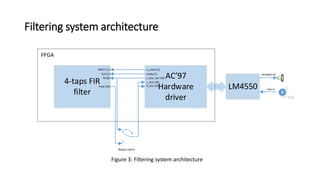
Figure 3: Filtering system architecture
4-taps FIR
filter
AC’97
Hardware
driver
LM4550
Headphone
Line in
L_bus_out (18)Yb (8)
ready (1)CLK (1)
n_reset (1)RESET (1)
L_bus (18)
R_bus (18)Yout (16)
Bypass switch
FPGA
AC’97 driver: https://eewiki.net/display/LOGIC/AC'97+Codec+Hardware+Driver+Example
Filtering system architecture
FIR filter design
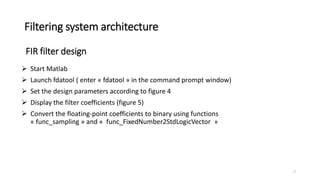
 Start Matlab
 Launch fdatool ( enter « fdatool » in the command prompt window)
 Set the design parameters according to figure 4
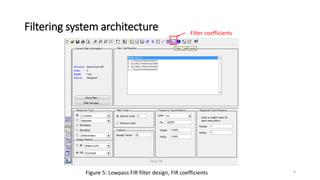
 Display the filter coefficients (figure 5)
 Convert the floating-point coefficients to binary using functions
« func_sampling » and « func_FixedNumber2StdLogicVector »
7
Filtering system architecture
Figure 4: Lowpass FIR filter design, frequency response
Filtering system architecture
Figure 5: Lowpass FIR filter design, FIR coefficients
Filter coefficients
9
Filtering system architecture
Filter integration in the project (Main.vhd)
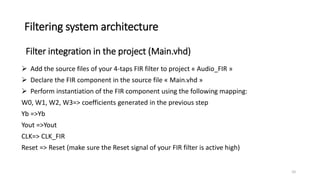
 Add the source files of your 4-taps FIR filter to project « Audio_FIR » (after performing
ModelSim-Matlab design verification)
 Declare the FIR component in the source file « Main.vhd »
 Perform instantiation of the FIR component using the following mapping:
W0, W1, W2, W3=> coefficients generated in the previous step
Yb =>Yb
Yout =>Yout
CLK=> CLK_FIR
Reset => Reset (make sure the Reset signal of your FIR filter is active high)
10
Filtering system architecture
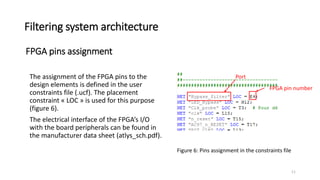
FPGA pins assignment
The assignment of the FPGA pins to the
design elements is defined in the user
constraints file (.ucf). The placement
constraint « LOC » is used for this purpose
(figure 6).
The electrical interface of the FPGA’s I/O
with the board peripherals can be found in
the manufacturer data sheet (atlys_sch.pdf).
Figure 6: Pins assignment in the constraints file
Port
FPGA pin number
11
FPGA design implementation
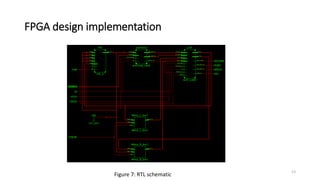
 Run « Synthesize ». Make sure that all the design signals are interconnected correctly by
visualising the RTL schematic (figure 7)
 Run « Implement Design » and « Generate Programming File »
 Power-up and connect the Atlys board to your PC (using USB PROG interface)
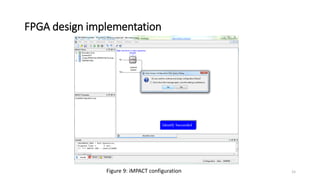
 Run iMPACT (Configure Target Device)
1) Create a new project: File>New Project (figure 8)
2) Choose « Yes » to assign the configuration file « main.bit » (figure 9)
3) Choose « No » for the PROM programming
4) Program the FPGA: Menu>Operations>Program
12
FPGA design implementation
Figure 7: RTL schematic
13
FPGA design implementation
Figure 8: iMPACT configuration 14
FPGA design implementation
Figure 9: iMPACT configuration 15
FPGA design implementation
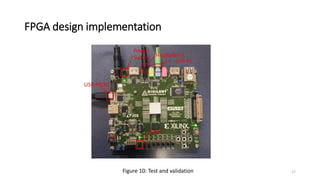
 Bypass the filter using switch « SW7 » (LED7 "off")
 Play the provided soundtrack « Corrupt_Electric_Bass.wav » (Bass music
corrupted by a 15KHz sinusoid)
 Disable bypass using switch « SW7 » (LED7 "on")
 Play the soundtrack again« Corrupt_Electric_Bass.wav »
 What do you notice?
Design validation (figure 10)
16
FPGA design implementation
Figure 10: Test and validation
Line in
Headphone
Power
Switch
USB PROG
SW7
17
References
[1] https://reference.digilentinc.com/_media/atlys:atlys:atlys_rm.pdf
[2] https://reference.digilentinc.com/_media/atlys:atlys:atlys_sch.pdf
[3] https://eewiki.net/display/LOGIC/AC'97+Codec+Hardware+Driver+Example
18

FPGA FIR filter implementation (Audio signal processing)

  • 1.
    University of Quebec–Trois-Rivières Departmentof Electrical and Computer Engineering Course GEI-1064: VLSI Design Tutorial on FPGA implementation of a FIR filter with application to audio signal processing Prepared by: Hocine MERABTI, F. NOUGAROU and D. MASSICOTTE Fall 2015 1
  • 2.
    Skills learned inthe course  Hardware modeling using VHDL  Design verification using behavioral simulation  Synthesis, place & route and resource utilization report generation  Design verification using post-route simulation  Bitstream generation and FPGA programming (Spartan 6) 2
  • 3.
    Atlys Spartan-6 overview Figure1: Atlys Spartan-6 XC6SLX45 [1]
  • 4.
    Atlys Spartan-6 overview FPGAfeatures Resources Size Slices (6-input LUT and 8 flip-flops) 6822 Block RAM 2.1 Mbits Clock management tiles (2 DCM and 1 PLL) 4 DSP slices 58 Clock speeds 500Mhz+ Table 1: Spartan-6 (XC6SLX45) features [1] 4
  • 5.
    Atlys Spartan-6 overview Audiocircuit features (LM4550) Figure 2: LM4550-FPGA interface [1] Parameter Value Codec AC-97 Headphone out Stereo Line out Stereo Line in Stereo Mic in Mono Sampling frequency 48 Khz Word-length 18 bits Table 2: LM4550 features [1] 5
  • 6.
    Filtering system architecture Figure3: Filtering system architecture 4-taps FIR filter AC’97 Hardware driver LM4550 Headphone Line in L_bus_out (18)Yb (8) ready (1)CLK (1) n_reset (1)RESET (1) L_bus (18) R_bus (18)Yout (16) Bypass switch FPGA AC’97 driver: https://eewiki.net/display/LOGIC/AC'97+Codec+Hardware+Driver+Example
  • 7.
    Filtering system architecture FIRfilter design  Start Matlab  Launch fdatool ( enter « fdatool » in the command prompt window)  Set the design parameters according to figure 4  Display the filter coefficients (figure 5)  Convert the floating-point coefficients to binary using functions « func_sampling » and « func_FixedNumber2StdLogicVector » 7
  • 8.
    Filtering system architecture Figure4: Lowpass FIR filter design, frequency response
  • 9.
    Filtering system architecture Figure5: Lowpass FIR filter design, FIR coefficients Filter coefficients 9
  • 10.
    Filtering system architecture Filterintegration in the project (Main.vhd)  Add the source files of your 4-taps FIR filter to project « Audio_FIR » (after performing ModelSim-Matlab design verification)  Declare the FIR component in the source file « Main.vhd »  Perform instantiation of the FIR component using the following mapping: W0, W1, W2, W3=> coefficients generated in the previous step Yb =>Yb Yout =>Yout CLK=> CLK_FIR Reset => Reset (make sure the Reset signal of your FIR filter is active high) 10
  • 11.
    Filtering system architecture FPGApins assignment The assignment of the FPGA pins to the design elements is defined in the user constraints file (.ucf). The placement constraint « LOC » is used for this purpose (figure 6). The electrical interface of the FPGA’s I/O with the board peripherals can be found in the manufacturer data sheet (atlys_sch.pdf). Figure 6: Pins assignment in the constraints file Port FPGA pin number 11
  • 12.
    FPGA design implementation Run « Synthesize ». Make sure that all the design signals are interconnected correctly by visualising the RTL schematic (figure 7)  Run « Implement Design » and « Generate Programming File »  Power-up and connect the Atlys board to your PC (using USB PROG interface)  Run iMPACT (Configure Target Device) 1) Create a new project: File>New Project (figure 8) 2) Choose « Yes » to assign the configuration file « main.bit » (figure 9) 3) Choose « No » for the PROM programming 4) Program the FPGA: Menu>Operations>Program 12
  • 13.
  • 14.
    FPGA design implementation Figure8: iMPACT configuration 14
  • 15.
    FPGA design implementation Figure9: iMPACT configuration 15
  • 16.
    FPGA design implementation Bypass the filter using switch « SW7 » (LED7 "off")  Play the provided soundtrack « Corrupt_Electric_Bass.wav » (Bass music corrupted by a 15KHz sinusoid)  Disable bypass using switch « SW7 » (LED7 "on")  Play the soundtrack again« Corrupt_Electric_Bass.wav »  What do you notice? Design validation (figure 10) 16
  • 17.
    FPGA design implementation Figure10: Test and validation Line in Headphone Power Switch USB PROG SW7 17
  • 18.