Introduction to Audio Signal Processing 
Human-Computer Interaction 
Angelo Antonio Salatino 
aasalatino@gmail.com 
http://infernusweb.altervista.org
License 
This work is licensed under the Creative Commons Attribution-Noncommercial-Share Alike 4.0 Unported License. To view a copy of this license, visit http://creativecommons.org/licenses/by-nc-sa/4.0/ or send a letter to Creative Commons, 171 Second Street, Suite 300, San Francisco, California, 94105, USA.
Overview 
•Audio Signal Processing; 
•Waveform Audio File Format; 
•FFmpeg; 
•Audio Processing with Matlab; 
•Doing phonetics with Praat; 
•Last but not least: Homework.
Audio Signal Processing 
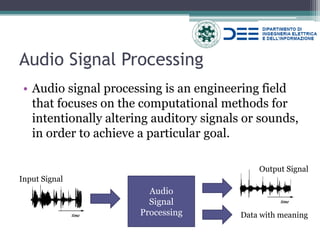
•Audio signal processing is an engineering field that focuses on the computational methods for intentionally altering auditory signals or sounds, in order to achieve a particular goal. 
Audio 
Signal 
Processing 
Input Signal 
Output Signal 
Data with meaning
Audio Processing in HCI 
Some HCI applications involving audio signal processing are: 
•Speech Emotion Recognition 
•Speaker Recognition 
▫Speaker Verification 
▫Speaker Identification 
•Voice Commands 
•Speech to Text 
•Etc.
Audio Signals 
You can find audio signals represented in either digital or analog format. 
•Digital – the pressure wave-form is a sequence of symbols, usually binary numbers. 
•Analog – is a smooth wave of energy represented by a continuous stream of data.
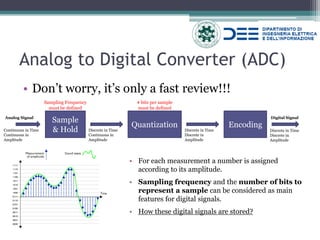
Analog to Digital Converter (ADC) 
•Don’t worry, it’s only a fast review!!! 
Sample & Hold 
Quantization 
Encoding 
Continuous in Time Continuous in Amplitude 
Discrete in Time 
Continuous in Amplitude 
Discrete in Time Discrete in Amplitude 
Discrete in Time 
Discrete in Amplitude 
Analog Signal 
Digital Signal 
•For each measurement a number is assigned according to its amplitude. 
•Sampling frequency and the number of bits to represent a sample can be considered as main features for digital signals. 
•How these digital signals are stored? 
Sampling Frequency must be defined 
# bits per sample must be defined
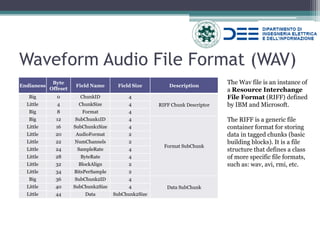
Waveform Audio File Format (WAV) 
Endianess 
Byte Offeset 
Field Name 
Field Size 
Description 
Big 
0 
ChunkID 
4 
RIFF Chunk Descriptor 
Little 
4 
ChunkSize 
4 
Big 
8 
Format 
4 
Big 
12 
SubChunk1ID 
4 
Format SubChunk 
Little 
16 
SubChunk1Size 
4 
Little 
20 
AudioFormat 
2 
Little 
22 
NumChannels 
2 
Little 
24 
SampleRate 
4 
Little 
28 
ByteRate 
4 
Little 
32 
BlockAlign 
2 
Little 
34 
BitsPerSample 
2 
Big 
36 
SubChunk2ID 
4 
Data SubChunk 
Little 
40 
SubChunk2Size 
4 
Little 
44 
Data 
SubChunk2Size 
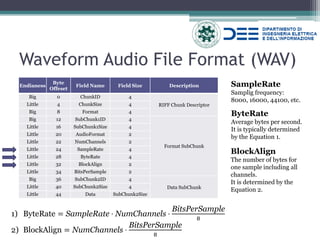
The Wav file is an instance of a Resource Interchange File Format (RIFF) defined by IBM and Microsoft. The RIFF is a generic file container format for storing data in tagged chunks (basic building blocks). It is a file structure that defines a class of more specific file formats, such as: wav, avi, rmi, etc.
Waveform Audio File Format (WAV) 
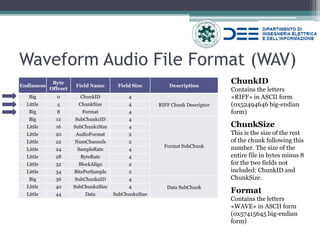
ChunkID 
Contains the letters «RIFF» in ASCII form 
(0x52494646 big-endian form) 
Endianess 
Byte Offeset 
Field Name 
Field Size 
Description 
Big 
0 
ChunkID 
4 
RIFF Chunk Descriptor 
Little 
4 
ChunkSize 
4 
Big 
8 
Format 
4 
Big 
12 
SubChunk1ID 
4 
Format SubChunk 
Little 
16 
SubChunk1Size 
4 
Little 
20 
AudioFormat 
2 
Little 
22 
NumChannels 
2 
Little 
24 
SampleRate 
4 
Little 
28 
ByteRate 
4 
Little 
32 
BlockAlign 
2 
Little 
34 
BitsPerSample 
2 
Big 
36 
SubChunk2ID 
4 
Data SubChunk 
Little 
40 
SubChunk2Size 
4 
Little 
44 
Data 
SubChunk2Size 
ChunkSize This is the size of the rest of the chunk following this number. The size of the entire file in bytes minus 8 for the two fields not included: ChunkID and ChunkSize. 
Format 
Contains the letters «WAVE» in ASCII form 
(0x57415645 big-endian form)
Waveform Audio File Format (WAV) 
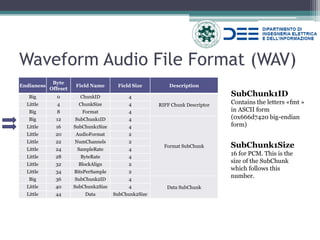
SubChunk1ID 
Contains the letters «fmt » in ASCII form 
(0x666d7420 big-endian form) 
Endianess 
Byte Offeset 
Field Name 
Field Size 
Description 
Big 
0 
ChunkID 
4 
RIFF Chunk Descriptor 
Little 
4 
ChunkSize 
4 
Big 
8 
Format 
4 
Big 
12 
SubChunk1ID 
4 
Format SubChunk 
Little 
16 
SubChunk1Size 
4 
Little 
20 
AudioFormat 
2 
Little 
22 
NumChannels 
2 
Little 
24 
SampleRate 
4 
Little 
28 
ByteRate 
4 
Little 
32 
BlockAlign 
2 
Little 
34 
BitsPerSample 
2 
Big 
36 
SubChunk2ID 
4 
Data SubChunk 
Little 
40 
SubChunk2Size 
4 
Little 
44 
Data 
SubChunk2Size 
SubChunk1Size 
16 for PCM. This is the size of the SubChunk which follows this number.
Waveform Audio File Format (WAV) 
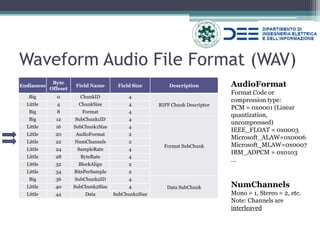
AudioFormat Format Code or compression type: PCM = 0x0001 (Linear quantization, uncompressed) IEEE_FLOAT = 0x0003 Microsoft_ALAW=0x0006 Microsoft_MLAW=0x0007 IBM_ADPCM = 0x0103 … 
Endianess 
Byte Offeset 
Field Name 
Field Size 
Description 
Big 
0 
ChunkID 
4 
RIFF Chunk Descriptor 
Little 
4 
ChunkSize 
4 
Big 
8 
Format 
4 
Big 
12 
SubChunk1ID 
4 
Format SubChunk 
Little 
16 
SubChunk1Size 
4 
Little 
20 
AudioFormat 
2 
Little 
22 
NumChannels 
2 
Little 
24 
SampleRate 
4 
Little 
28 
ByteRate 
4 
Little 
32 
BlockAlign 
2 
Little 
34 
BitsPerSample 
2 
Big 
36 
SubChunk2ID 
4 
Data SubChunk 
Little 
40 
SubChunk2Size 
4 
Little 
44 
Data 
SubChunk2Size 
NumChannels 
Mono = 1, Stereo = 2, etc. 
Note: Channels are interleaved
Waveform Audio File Format (WAV) 
SampleRate Samplig frequency: 8000, 16000, 44100, etc. 
Endianess 
Byte Offeset 
Field Name 
Field Size 
Description 
Big 
0 
ChunkID 
4 
RIFF Chunk Descriptor 
Little 
4 
ChunkSize 
4 
Big 
8 
Format 
4 
Big 
12 
SubChunk1ID 
4 
Format SubChunk 
Little 
16 
SubChunk1Size 
4 
Little 
20 
AudioFormat 
2 
Little 
22 
NumChannels 
2 
Little 
24 
SampleRate 
4 
Little 
28 
ByteRate 
4 
Little 
32 
BlockAlign 
2 
Little 
34 
BitsPerSample 
2 
Big 
36 
SubChunk2ID 
4 
Data SubChunk 
Little 
40 
SubChunk2Size 
4 
Little 
44 
Data 
SubChunk2Size 
ByteRate 
Average bytes per second. 
It is typically determined by the Equation 1. 
1)ByteRate=SampleRate⋅NumChannels⋅ BitsPerSample8 
2)BlockAlign=NumChannels⋅ BitsPerSample8 
BlockAlign 
The number of bytes for one sample including all channels. 
It is determined by the Equation 2.
Waveform Audio File Format (WAV) 
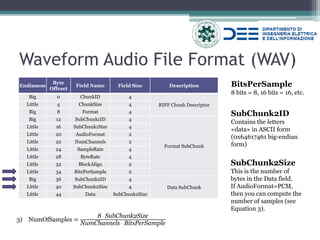
BitsPerSample 8 bits = 8, 16 bits = 16, etc. 
Endianess 
Byte Offeset 
Field Name 
Field Size 
Description 
Big 
0 
ChunkID 
4 
RIFF Chunk Descriptor 
Little 
4 
ChunkSize 
4 
Big 
8 
Format 
4 
Big 
12 
SubChunk1ID 
4 
Format SubChunk 
Little 
16 
SubChunk1Size 
4 
Little 
20 
AudioFormat 
2 
Little 
22 
NumChannels 
2 
Little 
24 
SampleRate 
4 
Little 
28 
ByteRate 
4 
Little 
32 
BlockAlign 
2 
Little 
34 
BitsPerSample 
2 
Big 
36 
SubChunk2ID 
4 
Data SubChunk 
Little 
40 
SubChunk2Size 
4 
Little 
44 
Data 
SubChunk2Size 
SubChunk2ID 
Contains the letters «data» in ASCII form (0x64617461 big-endian form) 
SubChunk2Size This is the number of bytes in the Data field. If AudioFormat=PCM, then you can compute the number of samples (see Equation 3). 
3)NumOfSamples= 8 ⋅ SubChunk2SizeNumChannels ⋅ BitsPerSample
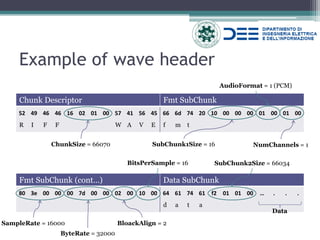
Example of wave header 
Chunk Descriptor 
Fmt SubChunk 
52 
49 
46 
46 
16 
02 
01 
00 
57 
41 
56 
45 
66 
6d 
74 
20 
10 
00 
00 
00 
01 
00 
01 
00 
R 
I 
F 
F 
W 
A 
V 
E 
f 
m 
t 
Fmt SubChunk (cont…) 
Data SubChunk 
80 
3e 
00 
00 
00 
7d 
00 
00 
02 
00 
10 
00 
64 
61 
74 
61 
f2 
01 
01 
00 
… 
. 
. 
. 
d 
a 
t 
a 
SampleRate = 16000 
ChunkSize = 66070 
ByteRate = 32000 
BloackAlign = 2 
BitsPerSample = 16 
NumChannels = 1 
AudioFormat = 1 (PCM) 
SubChunk1Size = 16 
SubChunk2Size = 66034 
Data
Exercise 
For the next 15 min, write a C/C++ program that takes a wav file as input and prints the following values on standard output: 
•Header size; 
•Sample rate; 
•Bits per sample; 
•Number of channels; 
•Number of samples. 
Good work!
Solution 
typedef struct header_file 
{ 
char chunk_id[4]; 
int chunk_size; 
char format[4]; 
char subchunk1_id[4]; 
int subchunk1_size; 
short int audio_format; 
short int num_channels; 
int sample_rate; 
int byte_rate; 
short int block_align; 
short int bits_per_sample; 
char subchunk2_id[4]; 
int subchunk2_size; 
} header; 
/************** Inside Main() **************/ 
header* meta = new header; 
ifstream infile; 
infile.exceptions (ifstream::eofbit | ifstream::failbit | ifstream::badbit); 
infile.open("foo.wav", ios::in|ios::binary); 
infile.read ((char*)meta, sizeof(header)); 
cout << " Header size: "<<sizeof(*meta)<<" bytes" << endl; 
cout << " Sample Rate "<< meta->sample_rate <<" Hz" << endl; 
cout << " Bits per samples: " << meta->bits_per_sample << " bit" <<endl; 
cout << " Number of channels: " << meta->num_channels << endl; 
long numOfSample = (meta->subchunk2_size/meta->num_channels)/(meta->bits_per_sample/8); 
cout << " Number of samples: " << numOfSample << endl; 
However, this solution contains an error. Can you spot it?
What about reading samples? 
short int* pU = NULL; 
unsigned char* pC = NULL; 
gWavDataIn = new double*[meta->num_channels]; //data structure storing the samples 
for (int i = 0; i < meta->num_channels; i++) gWavDataIn[i] = new double[numOfSample]; 
wBuffer = new char[meta->subchunk2_size]; //data structure storing the bytes 
/* data conversion: from byte to samples */ 
if(meta->bits_per_sample == 16) 
{ 
pU = (short*) wBuffer; 
for( int i = 0; i < numOfSample; i++) 
for (int j = 0; j < meta->num_channels; j++) 
gWavDataIn[j][i] = (double) (pU[i]); 
} 
else if(meta->bits_per_sample == 8) 
{ 
pC = (unsigned char*) wBuffer; 
for( int i = 0; i < numOfSample; i++) 
for (int j = 0; j < meta->num_channels; j++) 
gWavDataIn[j][i] = (double) (pC[i]); 
} 
else 
{ 
printERR("Unhandled case"); 
} 
This solution is available at: https://github.com/angelosalatino/AudioSignalProcessing
A better solution: FFmpeg 
What FFmpeg says about itself: 
•FFmpeg is the leading multimedia framework, able to decode, encode, transcode, mux, demux, stream, filter and play pretty much anything that humans and machines have created. It supports the most obscure ancient formats up to the cutting edge. No matter if they were designed by some standards committee, the community or a corporation.
Why FFmpeg is better? 
•Off-the-shelf; 
•Open Source; 
•We can read samples from different kind of formats: wav, mp3, aac, flac and so on; 
•The code is always the same for all these audio formats; 
•It can also decode video formats.
A little bit of code … 
Step 1 
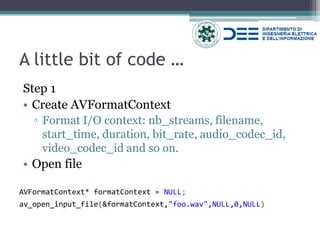
•Create AVFormatContext 
▫Format I/O context: nb_streams, filename, start_time, duration, bit_rate, audio_codec_id, video_codec_id and so on. 
•Open file 
AVFormatContext* formatContext = NULL; 
av_open_input_file(&formatContext,"foo.wav",NULL,0,NULL)
A little bit of code … 
Step 2 
•Create AVStream 
▫Stream structure; It contains: nb_frames, codec_context, duration and so on; 
•Association between audio stream inside the context and the new one. 
// Find the audio stream (some container files can have multiple streams in them) AVStream* audioStream = NULL; for (unsigned int i = 0; i < formatContext->nb_streams; ++i) if (formatContext->streams[i]->codec->codec_type == AVMEDIA_TYPE_AUDIO) { audioStream = formatContext->streams[i]; break; }
A little bit of code … 
Step 3 
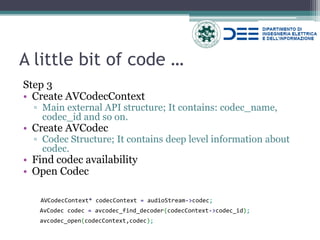
•Create AVCodecContext 
▫Main external API structure; It contains: codec_name, codec_id and so on. 
•Create AVCodec 
▫Codec Structure; It contains deep level information about codec. 
•Find codec availability 
•Open Codec 
AVCodecContext* codecContext = audioStream->codec; 
AvCodec codec = avcodec_find_decoder(codecContext->codec_id); 
avcodec_open(codecContext,codec);
A little bit of code … 
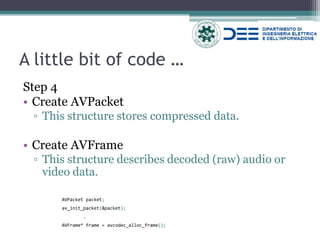
Step 4 
•Create AVPacket 
▫This structure stores compressed data. 
•Create AVFrame 
▫This structure describes decoded (raw) audio or video data. 
AVPacket packet; 
av_init_packet(&packet); 
… 
AVFrame* frame = avcodec_alloc_frame();
A little bit of code … 
Step 5 
•Read packets 
▫Packets are read from AVContextFormat 
•Decode packets 
▫Frame are decodec with CodecContext 
// Read the packets in a loop 
while (av_read_frame(formatContext, &packet) == 0) 
{ 
… 
avcodec_decode_audio4(codecContext, frame, &frameFinished, &packet); 
… 
src_data = frame->data[0]; 
}
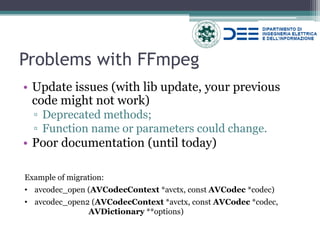
Problems with FFmpeg 
•Update issues (with lib update, your previous code might not work) 
▫Deprecated methods; 
▫Function name or parameters could change. 
•Poor documentation (until today) 
Example of migration: 
•avcodec_open (AVCodecContext *avctx, const AVCodec *codec) 
•avcodec_open2 (AVCodecContext *avctx, const AVCodec *codec, AVDictionary **options)
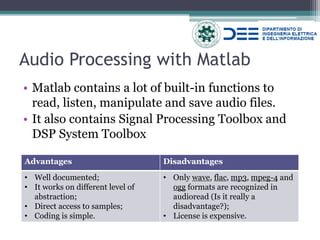
Audio Processing with Matlab 
•Matlab contains a lot of built-in functions to read, listen, manipulate and save audio files. 
•It also contains Signal Processing Toolbox and DSP System Toolbox 
Advantages 
Disadvantages 
•Well documented; 
•It works on different level of abstraction; 
•Direct access to samples; 
•Coding is simple. 
•Only wave, flac, mp3, mpeg-4 and ogg formats are recognized in audioread (Is it really a disadvantage?); 
•License is expensive.
Let’s code: Opening files 
%% Reading file 
% Section ID = 1 
filename = './test.wav'; 
[data,fs] = wavread(filename); % reads only wav file 
% data = sample collection, fs = sampling frequency 
% or ---> [data,fs] = audioread(filename); 
% write an audio file 
audiowrite('./testCopy.wav',data,fs) 
Recognized formats by audioread()
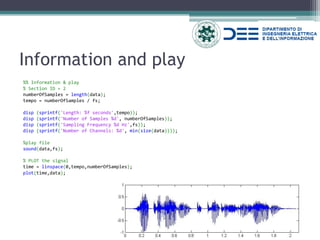
Information and play 
%% Information & play 
% Section ID = 2 
numberOfSamples = length(data); 
tempo = numberOfSamples / fs; 
disp (sprintf('Length: %f seconds',tempo)); 
disp (sprintf('Number of Samples %d', numberOfSamples)); 
disp (sprintf('Sampling Frequency %d Hz',fs)); 
disp (sprintf('Number of Channels: %d', min(size(data)))); 
%play file 
sound(data,fs); 
% PLOT the signal 
time = linspace(0,tempo,numberOfSamples); 
plot(time,data);
Framing 
%% Framing 
% Section ID = 4 
timeWindow = 0.04; % Frame length in term of seconds. Default: timeWindow = 40ms 
timeStep = 0.01; % seconds between two frames. Default: timeStep = 10ms (in case of OVERLAPPING) 
overlap = 1; % 1 in case of overlap, 0 no overlap 
sampleForWindow = timeWindow * fs; 
if overlap == 0; 
Y = buffer(data,sampleForWindow); 
else 
sampleToJump = sampleForWindow - timeStep * fs; 
Y = buffer(data,sampleForWindow,ceil(sampleToJump)); 
end 
[m,n]=size(Y); % m corresponds to sampleForWindow 
numFrames = n; 
disp(sprintf('Number of Frames: %d',numFrames)); 
푠(푡)=푥(푡)⋅푟푒푐푡 푡−휏 #푠푎푚푝푙푒
Windowing 
%% Windowing 
% Section ID = 5 
num_points = sampleForWindow; 
% some windows USE help window 
w_gauss = gausswin(num_points); 
w_hamming = hamming(num_points); 
w_hann = hann(num_points); 
plot(1:num_points,[w_gauss,w_hamming, w_hann]); axis([1 num_points 0 2]); 
legend('Gaussian','Hamming','Hann'); 
old_Y = Y; 
for i=1:numFrames 
Y(:,i)=Y(:,i).*w_hann; 
end 
%see the difference 
index_to_plot = 88; 
figure 
plot (old_Y(:,index_to_plot)) 
hold on 
plot (Y(:,index_to_plot), 'green') 
hold off 
clear num_points w_gauss w_hamming w_hann 
푤퐺퐴푈푆푆(푛)=푒 − 12 푛−(푁−1)2 휎(푁−1)2 2,휎≤ 0.5 
푤퐻퐴푀푀퐼푁퐺(푛)=0.54+0.46 cos2휋푛 푁−1 
푤퐻퐴푁푁(푛)=0.5 1+cos2휋푛 푁−1
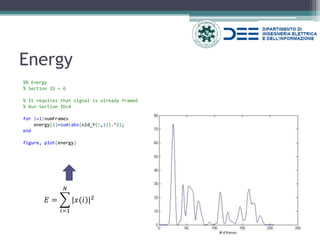
Energy 
%% Energy 
% Section ID = 6 
% It requires that signal is already framed 
% Run Section ID=4 
for i=1:numFrames 
energy(i)=sum(abs(old_Y(:,i)).^2); 
end 
figure, plot(energy) 
퐸= |푥(푖)|2 푁 푖=1
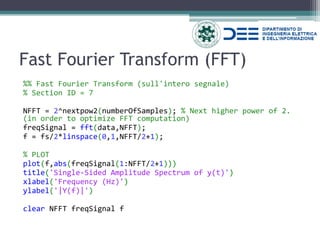
Fast Fourier Transform (FFT) 
%% Fast Fourier Transform (sull'intero segnale) 
% Section ID = 7 
NFFT = 2^nextpow2(numberOfSamples); % Next higher power of 2. (in order to optimize FFT computation) 
freqSignal = fft(data,NFFT); 
f = fs/2*linspace(0,1,NFFT/2+1); 
% PLOT 
plot(f,abs(freqSignal(1:NFFT/2+1))) 
title('Single-Sided Amplitude Spectrum of y(t)') 
xlabel('Frequency (Hz)') 
ylabel('|Y(f)|') 
clear NFFT freqSignal f
Short Term Fourier Transform (STFT) 
%% Short Term Fourier Transform 
% Section ID = 8 
% It requires that signal is already framed. Run Section ID=4 
NFFT = 2^nextpow2(sampleForWindow); 
STFT = ones(NFFT,numFrames); 
for i=1:numFrames 
STFT(:,i)=fft(Y(:,i),NFFT); 
end 
indexToPlot = 80; %frame index to plot 
if indexToPlot < numFrames 
f = fs/2*linspace(0,1,NFFT/2+1); 
plot(f,2*abs(STFT(1:NFFT/2+1,indexToPlot))) % PLOT 
title(sprintf('FFT del frame %d', indexToPlot)); 
xlabel('Frequency (Hz)') 
ylabel(sprintf('|STFT_{%d}(f)|',indexToPlot)) 
else 
disp('Unable to create plot'); 
End 
% ********************************************* 
specgram(data,sampleForWindow,fs) % SPECTROGRAM 
title('Spectrogram [dB]')
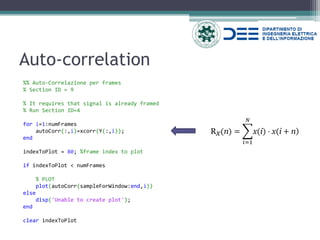
Auto-correlation 
%% Auto-Correlazione per frames 
% Section ID = 9 
% It requires that signal is already framed 
% Run Section ID=4 
for i=1:numFrames 
autoCorr(:,i)=xcorr(Y(:,i)); 
end 
indexToPlot = 80; %frame index to plot 
if indexToPlot < numFrames 
% PLOT 
plot(autoCorr(sampleForWindow:end,i)) 
else 
disp('Unable to create plot'); 
end 
clear indexToPlot 
Rx(n)= x(i)⋅x(i+n) 푁 푖=1
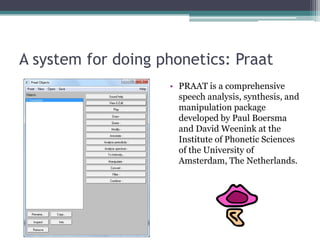
A system for doing phonetics: Praat 
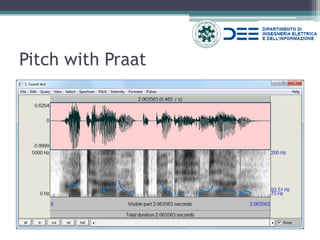
•PRAAT is a comprehensive speech analysis, synthesis, and manipulation package developed by Paul Boersma and David Weenink at the Institute of Phonetic Sciences of the University of Amsterdam, The Netherlands.
Pitch with Praat
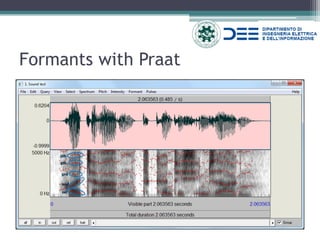
Formants with Praat 
5th 
4th 
3rd 
2nd 
1st
Other features with Praat 
•Intensity 
•Mel-Frequency Cepstrum Coefficients (MFCC); 
•Linear Predictive Coefficients (LPC); 
•Harmonic-to-Noise Ratio (HNR); 
•and many others.
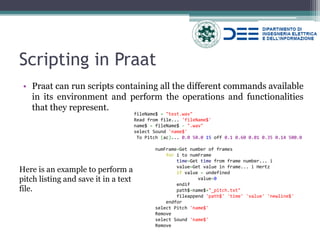
Scripting in Praat 
•Praat can run scripts containing all the different commands available in its environment and perform the operations and functionalities that they represent. 
fileName$ = "test.wav" 
Read from file... 'fileName$' 
name$ = fileName$ - ".wav" 
select Sound 'name$' 
To Pitch (ac)... 0.0 50.0 15 off 0.1 0.60 0.01 0.35 0.14 500.0 
numFrame=Get number of frames 
for i to numFrame 
time=Get time from frame number... i 
value=Get value in frame... i Hertz 
if value = undefined 
value=0 
endif 
path$=name$+"_pitch.txt" 
fileappend 'path$' 'time' 'value' 'newline$' 
endfor 
select Pitch 'name$' 
Remove 
select Sound 'name$' 
Remove 
Here is an example to perform a pitch listing and save it in a text file.
Homework 
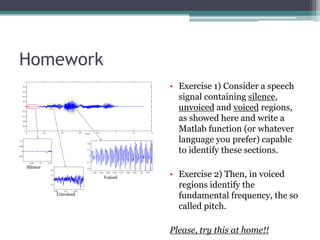
•Exercise 1) Consider a speech signal containing silence, unvoiced and voiced regions, as showed here and write a Matlab function (or whatever language you prefer) capable to identify these sections. 
•Exercise 2) Then, in voiced regions identify the fundamental frequency, the so called pitch. 
Please, try this at home!! 
Voiced 
Unvoiced 
Silence
•Signal Processing 
▫http://deecom19.poliba.it/dsp/Teoria_dei_Segnali.pdf (Italian) 
•WAV 
▫https://ccrma.stanford.edu/courses/422/projects/WaveFormat/ 
▫http://www.onicos.com/staff/iz/formats/wav.html 
•MATLAB 
▫http://www.mathworks.com/products/signal/ 
▫http://www.mathworks.com/products/dsp-system/ 
▫http://homepages.udayton.edu/~hardierc/ece203/sound.htm 
▫http://www.utdallas.edu/~assmann/hcs7367/classnotes.html 
References and further reading
References and further reading 
•FFmpeg 
▫https://www.ffmpeg.org/ 
▫https://trac.ffmpeg.org/wiki/CompilationGuide/Ubuntu 
•Praat 
▫http://www.fon.hum.uva.nl/praat/ 
▫http://www.fon.hum.uva.nl/david/sspbook/sspbook. pdf 
▫http://www.fon.hum.uva.nl/praat/manual/Scripting. html 
•Source code 
▫https://github.com/angelosalatino/AudioSignalProcessing

Introductory Lecture to Audio Signal Processing

  • 1.
    Introduction to AudioSignal Processing Human-Computer Interaction Angelo Antonio Salatino aasalatino@gmail.com http://infernusweb.altervista.org
  • 2.
    License This workis licensed under the Creative Commons Attribution-Noncommercial-Share Alike 4.0 Unported License. To view a copy of this license, visit http://creativecommons.org/licenses/by-nc-sa/4.0/ or send a letter to Creative Commons, 171 Second Street, Suite 300, San Francisco, California, 94105, USA.
  • 3.
    Overview •Audio SignalProcessing; •Waveform Audio File Format; •FFmpeg; •Audio Processing with Matlab; •Doing phonetics with Praat; •Last but not least: Homework.
  • 4.
    Audio Signal Processing •Audio signal processing is an engineering field that focuses on the computational methods for intentionally altering auditory signals or sounds, in order to achieve a particular goal. Audio Signal Processing Input Signal Output Signal Data with meaning
  • 5.
    Audio Processing inHCI Some HCI applications involving audio signal processing are: •Speech Emotion Recognition •Speaker Recognition ▫Speaker Verification ▫Speaker Identification •Voice Commands •Speech to Text •Etc.
  • 6.
    Audio Signals Youcan find audio signals represented in either digital or analog format. •Digital – the pressure wave-form is a sequence of symbols, usually binary numbers. •Analog – is a smooth wave of energy represented by a continuous stream of data.
  • 7.
    Analog to DigitalConverter (ADC) •Don’t worry, it’s only a fast review!!! Sample & Hold Quantization Encoding Continuous in Time Continuous in Amplitude Discrete in Time Continuous in Amplitude Discrete in Time Discrete in Amplitude Discrete in Time Discrete in Amplitude Analog Signal Digital Signal •For each measurement a number is assigned according to its amplitude. •Sampling frequency and the number of bits to represent a sample can be considered as main features for digital signals. •How these digital signals are stored? Sampling Frequency must be defined # bits per sample must be defined
  • 8.
    Waveform Audio FileFormat (WAV) Endianess Byte Offeset Field Name Field Size Description Big 0 ChunkID 4 RIFF Chunk Descriptor Little 4 ChunkSize 4 Big 8 Format 4 Big 12 SubChunk1ID 4 Format SubChunk Little 16 SubChunk1Size 4 Little 20 AudioFormat 2 Little 22 NumChannels 2 Little 24 SampleRate 4 Little 28 ByteRate 4 Little 32 BlockAlign 2 Little 34 BitsPerSample 2 Big 36 SubChunk2ID 4 Data SubChunk Little 40 SubChunk2Size 4 Little 44 Data SubChunk2Size The Wav file is an instance of a Resource Interchange File Format (RIFF) defined by IBM and Microsoft. The RIFF is a generic file container format for storing data in tagged chunks (basic building blocks). It is a file structure that defines a class of more specific file formats, such as: wav, avi, rmi, etc.
  • 9.
    Waveform Audio FileFormat (WAV) ChunkID Contains the letters «RIFF» in ASCII form (0x52494646 big-endian form) Endianess Byte Offeset Field Name Field Size Description Big 0 ChunkID 4 RIFF Chunk Descriptor Little 4 ChunkSize 4 Big 8 Format 4 Big 12 SubChunk1ID 4 Format SubChunk Little 16 SubChunk1Size 4 Little 20 AudioFormat 2 Little 22 NumChannels 2 Little 24 SampleRate 4 Little 28 ByteRate 4 Little 32 BlockAlign 2 Little 34 BitsPerSample 2 Big 36 SubChunk2ID 4 Data SubChunk Little 40 SubChunk2Size 4 Little 44 Data SubChunk2Size ChunkSize This is the size of the rest of the chunk following this number. The size of the entire file in bytes minus 8 for the two fields not included: ChunkID and ChunkSize. Format Contains the letters «WAVE» in ASCII form (0x57415645 big-endian form)
  • 10.
    Waveform Audio FileFormat (WAV) SubChunk1ID Contains the letters «fmt » in ASCII form (0x666d7420 big-endian form) Endianess Byte Offeset Field Name Field Size Description Big 0 ChunkID 4 RIFF Chunk Descriptor Little 4 ChunkSize 4 Big 8 Format 4 Big 12 SubChunk1ID 4 Format SubChunk Little 16 SubChunk1Size 4 Little 20 AudioFormat 2 Little 22 NumChannels 2 Little 24 SampleRate 4 Little 28 ByteRate 4 Little 32 BlockAlign 2 Little 34 BitsPerSample 2 Big 36 SubChunk2ID 4 Data SubChunk Little 40 SubChunk2Size 4 Little 44 Data SubChunk2Size SubChunk1Size 16 for PCM. This is the size of the SubChunk which follows this number.
  • 11.
    Waveform Audio FileFormat (WAV) AudioFormat Format Code or compression type: PCM = 0x0001 (Linear quantization, uncompressed) IEEE_FLOAT = 0x0003 Microsoft_ALAW=0x0006 Microsoft_MLAW=0x0007 IBM_ADPCM = 0x0103 … Endianess Byte Offeset Field Name Field Size Description Big 0 ChunkID 4 RIFF Chunk Descriptor Little 4 ChunkSize 4 Big 8 Format 4 Big 12 SubChunk1ID 4 Format SubChunk Little 16 SubChunk1Size 4 Little 20 AudioFormat 2 Little 22 NumChannels 2 Little 24 SampleRate 4 Little 28 ByteRate 4 Little 32 BlockAlign 2 Little 34 BitsPerSample 2 Big 36 SubChunk2ID 4 Data SubChunk Little 40 SubChunk2Size 4 Little 44 Data SubChunk2Size NumChannels Mono = 1, Stereo = 2, etc. Note: Channels are interleaved
  • 12.
    Waveform Audio FileFormat (WAV) SampleRate Samplig frequency: 8000, 16000, 44100, etc. Endianess Byte Offeset Field Name Field Size Description Big 0 ChunkID 4 RIFF Chunk Descriptor Little 4 ChunkSize 4 Big 8 Format 4 Big 12 SubChunk1ID 4 Format SubChunk Little 16 SubChunk1Size 4 Little 20 AudioFormat 2 Little 22 NumChannels 2 Little 24 SampleRate 4 Little 28 ByteRate 4 Little 32 BlockAlign 2 Little 34 BitsPerSample 2 Big 36 SubChunk2ID 4 Data SubChunk Little 40 SubChunk2Size 4 Little 44 Data SubChunk2Size ByteRate Average bytes per second. It is typically determined by the Equation 1. 1)ByteRate=SampleRate⋅NumChannels⋅ BitsPerSample8 2)BlockAlign=NumChannels⋅ BitsPerSample8 BlockAlign The number of bytes for one sample including all channels. It is determined by the Equation 2.
  • 13.
    Waveform Audio FileFormat (WAV) BitsPerSample 8 bits = 8, 16 bits = 16, etc. Endianess Byte Offeset Field Name Field Size Description Big 0 ChunkID 4 RIFF Chunk Descriptor Little 4 ChunkSize 4 Big 8 Format 4 Big 12 SubChunk1ID 4 Format SubChunk Little 16 SubChunk1Size 4 Little 20 AudioFormat 2 Little 22 NumChannels 2 Little 24 SampleRate 4 Little 28 ByteRate 4 Little 32 BlockAlign 2 Little 34 BitsPerSample 2 Big 36 SubChunk2ID 4 Data SubChunk Little 40 SubChunk2Size 4 Little 44 Data SubChunk2Size SubChunk2ID Contains the letters «data» in ASCII form (0x64617461 big-endian form) SubChunk2Size This is the number of bytes in the Data field. If AudioFormat=PCM, then you can compute the number of samples (see Equation 3). 3)NumOfSamples= 8 ⋅ SubChunk2SizeNumChannels ⋅ BitsPerSample
  • 14.
    Example of waveheader Chunk Descriptor Fmt SubChunk 52 49 46 46 16 02 01 00 57 41 56 45 66 6d 74 20 10 00 00 00 01 00 01 00 R I F F W A V E f m t Fmt SubChunk (cont…) Data SubChunk 80 3e 00 00 00 7d 00 00 02 00 10 00 64 61 74 61 f2 01 01 00 … . . . d a t a SampleRate = 16000 ChunkSize = 66070 ByteRate = 32000 BloackAlign = 2 BitsPerSample = 16 NumChannels = 1 AudioFormat = 1 (PCM) SubChunk1Size = 16 SubChunk2Size = 66034 Data
  • 15.
    Exercise For thenext 15 min, write a C/C++ program that takes a wav file as input and prints the following values on standard output: •Header size; •Sample rate; •Bits per sample; •Number of channels; •Number of samples. Good work!
  • 16.
    Solution typedef structheader_file { char chunk_id[4]; int chunk_size; char format[4]; char subchunk1_id[4]; int subchunk1_size; short int audio_format; short int num_channels; int sample_rate; int byte_rate; short int block_align; short int bits_per_sample; char subchunk2_id[4]; int subchunk2_size; } header; /************** Inside Main() **************/ header* meta = new header; ifstream infile; infile.exceptions (ifstream::eofbit | ifstream::failbit | ifstream::badbit); infile.open("foo.wav", ios::in|ios::binary); infile.read ((char*)meta, sizeof(header)); cout << " Header size: "<<sizeof(*meta)<<" bytes" << endl; cout << " Sample Rate "<< meta->sample_rate <<" Hz" << endl; cout << " Bits per samples: " << meta->bits_per_sample << " bit" <<endl; cout << " Number of channels: " << meta->num_channels << endl; long numOfSample = (meta->subchunk2_size/meta->num_channels)/(meta->bits_per_sample/8); cout << " Number of samples: " << numOfSample << endl; However, this solution contains an error. Can you spot it?
  • 17.
    What about readingsamples? short int* pU = NULL; unsigned char* pC = NULL; gWavDataIn = new double*[meta->num_channels]; //data structure storing the samples for (int i = 0; i < meta->num_channels; i++) gWavDataIn[i] = new double[numOfSample]; wBuffer = new char[meta->subchunk2_size]; //data structure storing the bytes /* data conversion: from byte to samples */ if(meta->bits_per_sample == 16) { pU = (short*) wBuffer; for( int i = 0; i < numOfSample; i++) for (int j = 0; j < meta->num_channels; j++) gWavDataIn[j][i] = (double) (pU[i]); } else if(meta->bits_per_sample == 8) { pC = (unsigned char*) wBuffer; for( int i = 0; i < numOfSample; i++) for (int j = 0; j < meta->num_channels; j++) gWavDataIn[j][i] = (double) (pC[i]); } else { printERR("Unhandled case"); } This solution is available at: https://github.com/angelosalatino/AudioSignalProcessing
  • 18.
    A better solution:FFmpeg What FFmpeg says about itself: •FFmpeg is the leading multimedia framework, able to decode, encode, transcode, mux, demux, stream, filter and play pretty much anything that humans and machines have created. It supports the most obscure ancient formats up to the cutting edge. No matter if they were designed by some standards committee, the community or a corporation.
  • 19.
    Why FFmpeg isbetter? •Off-the-shelf; •Open Source; •We can read samples from different kind of formats: wav, mp3, aac, flac and so on; •The code is always the same for all these audio formats; •It can also decode video formats.
  • 20.
    A little bitof code … Step 1 •Create AVFormatContext ▫Format I/O context: nb_streams, filename, start_time, duration, bit_rate, audio_codec_id, video_codec_id and so on. •Open file AVFormatContext* formatContext = NULL; av_open_input_file(&formatContext,"foo.wav",NULL,0,NULL)
  • 21.
    A little bitof code … Step 2 •Create AVStream ▫Stream structure; It contains: nb_frames, codec_context, duration and so on; •Association between audio stream inside the context and the new one. // Find the audio stream (some container files can have multiple streams in them) AVStream* audioStream = NULL; for (unsigned int i = 0; i < formatContext->nb_streams; ++i) if (formatContext->streams[i]->codec->codec_type == AVMEDIA_TYPE_AUDIO) { audioStream = formatContext->streams[i]; break; }
  • 22.
    A little bitof code … Step 3 •Create AVCodecContext ▫Main external API structure; It contains: codec_name, codec_id and so on. •Create AVCodec ▫Codec Structure; It contains deep level information about codec. •Find codec availability •Open Codec AVCodecContext* codecContext = audioStream->codec; AvCodec codec = avcodec_find_decoder(codecContext->codec_id); avcodec_open(codecContext,codec);
  • 23.
    A little bitof code … Step 4 •Create AVPacket ▫This structure stores compressed data. •Create AVFrame ▫This structure describes decoded (raw) audio or video data. AVPacket packet; av_init_packet(&packet); … AVFrame* frame = avcodec_alloc_frame();
  • 24.
    A little bitof code … Step 5 •Read packets ▫Packets are read from AVContextFormat •Decode packets ▫Frame are decodec with CodecContext // Read the packets in a loop while (av_read_frame(formatContext, &packet) == 0) { … avcodec_decode_audio4(codecContext, frame, &frameFinished, &packet); … src_data = frame->data[0]; }
  • 25.
    Problems with FFmpeg •Update issues (with lib update, your previous code might not work) ▫Deprecated methods; ▫Function name or parameters could change. •Poor documentation (until today) Example of migration: •avcodec_open (AVCodecContext *avctx, const AVCodec *codec) •avcodec_open2 (AVCodecContext *avctx, const AVCodec *codec, AVDictionary **options)
  • 26.
    Audio Processing withMatlab •Matlab contains a lot of built-in functions to read, listen, manipulate and save audio files. •It also contains Signal Processing Toolbox and DSP System Toolbox Advantages Disadvantages •Well documented; •It works on different level of abstraction; •Direct access to samples; •Coding is simple. •Only wave, flac, mp3, mpeg-4 and ogg formats are recognized in audioread (Is it really a disadvantage?); •License is expensive.
  • 27.
    Let’s code: Openingfiles %% Reading file % Section ID = 1 filename = './test.wav'; [data,fs] = wavread(filename); % reads only wav file % data = sample collection, fs = sampling frequency % or ---> [data,fs] = audioread(filename); % write an audio file audiowrite('./testCopy.wav',data,fs) Recognized formats by audioread()
  • 28.
    Information and play %% Information & play % Section ID = 2 numberOfSamples = length(data); tempo = numberOfSamples / fs; disp (sprintf('Length: %f seconds',tempo)); disp (sprintf('Number of Samples %d', numberOfSamples)); disp (sprintf('Sampling Frequency %d Hz',fs)); disp (sprintf('Number of Channels: %d', min(size(data)))); %play file sound(data,fs); % PLOT the signal time = linspace(0,tempo,numberOfSamples); plot(time,data);
  • 29.
    Framing %% Framing % Section ID = 4 timeWindow = 0.04; % Frame length in term of seconds. Default: timeWindow = 40ms timeStep = 0.01; % seconds between two frames. Default: timeStep = 10ms (in case of OVERLAPPING) overlap = 1; % 1 in case of overlap, 0 no overlap sampleForWindow = timeWindow * fs; if overlap == 0; Y = buffer(data,sampleForWindow); else sampleToJump = sampleForWindow - timeStep * fs; Y = buffer(data,sampleForWindow,ceil(sampleToJump)); end [m,n]=size(Y); % m corresponds to sampleForWindow numFrames = n; disp(sprintf('Number of Frames: %d',numFrames)); 푠(푡)=푥(푡)⋅푟푒푐푡 푡−휏 #푠푎푚푝푙푒
  • 30.
    Windowing %% Windowing % Section ID = 5 num_points = sampleForWindow; % some windows USE help window w_gauss = gausswin(num_points); w_hamming = hamming(num_points); w_hann = hann(num_points); plot(1:num_points,[w_gauss,w_hamming, w_hann]); axis([1 num_points 0 2]); legend('Gaussian','Hamming','Hann'); old_Y = Y; for i=1:numFrames Y(:,i)=Y(:,i).*w_hann; end %see the difference index_to_plot = 88; figure plot (old_Y(:,index_to_plot)) hold on plot (Y(:,index_to_plot), 'green') hold off clear num_points w_gauss w_hamming w_hann 푤퐺퐴푈푆푆(푛)=푒 − 12 푛−(푁−1)2 휎(푁−1)2 2,휎≤ 0.5 푤퐻퐴푀푀퐼푁퐺(푛)=0.54+0.46 cos2휋푛 푁−1 푤퐻퐴푁푁(푛)=0.5 1+cos2휋푛 푁−1
  • 31.
    Energy %% Energy % Section ID = 6 % It requires that signal is already framed % Run Section ID=4 for i=1:numFrames energy(i)=sum(abs(old_Y(:,i)).^2); end figure, plot(energy) 퐸= |푥(푖)|2 푁 푖=1
  • 32.
    Fast Fourier Transform(FFT) %% Fast Fourier Transform (sull'intero segnale) % Section ID = 7 NFFT = 2^nextpow2(numberOfSamples); % Next higher power of 2. (in order to optimize FFT computation) freqSignal = fft(data,NFFT); f = fs/2*linspace(0,1,NFFT/2+1); % PLOT plot(f,abs(freqSignal(1:NFFT/2+1))) title('Single-Sided Amplitude Spectrum of y(t)') xlabel('Frequency (Hz)') ylabel('|Y(f)|') clear NFFT freqSignal f
  • 33.
    Short Term FourierTransform (STFT) %% Short Term Fourier Transform % Section ID = 8 % It requires that signal is already framed. Run Section ID=4 NFFT = 2^nextpow2(sampleForWindow); STFT = ones(NFFT,numFrames); for i=1:numFrames STFT(:,i)=fft(Y(:,i),NFFT); end indexToPlot = 80; %frame index to plot if indexToPlot < numFrames f = fs/2*linspace(0,1,NFFT/2+1); plot(f,2*abs(STFT(1:NFFT/2+1,indexToPlot))) % PLOT title(sprintf('FFT del frame %d', indexToPlot)); xlabel('Frequency (Hz)') ylabel(sprintf('|STFT_{%d}(f)|',indexToPlot)) else disp('Unable to create plot'); End % ********************************************* specgram(data,sampleForWindow,fs) % SPECTROGRAM title('Spectrogram [dB]')
  • 34.
    Auto-correlation %% Auto-Correlazioneper frames % Section ID = 9 % It requires that signal is already framed % Run Section ID=4 for i=1:numFrames autoCorr(:,i)=xcorr(Y(:,i)); end indexToPlot = 80; %frame index to plot if indexToPlot < numFrames % PLOT plot(autoCorr(sampleForWindow:end,i)) else disp('Unable to create plot'); end clear indexToPlot Rx(n)= x(i)⋅x(i+n) 푁 푖=1
  • 35.
    A system fordoing phonetics: Praat •PRAAT is a comprehensive speech analysis, synthesis, and manipulation package developed by Paul Boersma and David Weenink at the Institute of Phonetic Sciences of the University of Amsterdam, The Netherlands.
  • 36.
  • 37.
    Formants with Praat 5th 4th 3rd 2nd 1st
  • 38.
    Other features withPraat •Intensity •Mel-Frequency Cepstrum Coefficients (MFCC); •Linear Predictive Coefficients (LPC); •Harmonic-to-Noise Ratio (HNR); •and many others.
  • 39.
    Scripting in Praat •Praat can run scripts containing all the different commands available in its environment and perform the operations and functionalities that they represent. fileName$ = "test.wav" Read from file... 'fileName$' name$ = fileName$ - ".wav" select Sound 'name$' To Pitch (ac)... 0.0 50.0 15 off 0.1 0.60 0.01 0.35 0.14 500.0 numFrame=Get number of frames for i to numFrame time=Get time from frame number... i value=Get value in frame... i Hertz if value = undefined value=0 endif path$=name$+"_pitch.txt" fileappend 'path$' 'time' 'value' 'newline$' endfor select Pitch 'name$' Remove select Sound 'name$' Remove Here is an example to perform a pitch listing and save it in a text file.
  • 40.
    Homework •Exercise 1)Consider a speech signal containing silence, unvoiced and voiced regions, as showed here and write a Matlab function (or whatever language you prefer) capable to identify these sections. •Exercise 2) Then, in voiced regions identify the fundamental frequency, the so called pitch. Please, try this at home!! Voiced Unvoiced Silence
  • 41.
    •Signal Processing ▫http://deecom19.poliba.it/dsp/Teoria_dei_Segnali.pdf(Italian) •WAV ▫https://ccrma.stanford.edu/courses/422/projects/WaveFormat/ ▫http://www.onicos.com/staff/iz/formats/wav.html •MATLAB ▫http://www.mathworks.com/products/signal/ ▫http://www.mathworks.com/products/dsp-system/ ▫http://homepages.udayton.edu/~hardierc/ece203/sound.htm ▫http://www.utdallas.edu/~assmann/hcs7367/classnotes.html References and further reading
  • 42.
    References and furtherreading •FFmpeg ▫https://www.ffmpeg.org/ ▫https://trac.ffmpeg.org/wiki/CompilationGuide/Ubuntu •Praat ▫http://www.fon.hum.uva.nl/praat/ ▫http://www.fon.hum.uva.nl/david/sspbook/sspbook. pdf ▫http://www.fon.hum.uva.nl/praat/manual/Scripting. html •Source code ▫https://github.com/angelosalatino/AudioSignalProcessing