Unit 3
Audio Signal Processing Basics, mirtoolbox contains many
useful audio processing library functions,
VOICEBOX: Speech Processing Toolbox for MATLAB,
Audio processing in Matlab.
Audio Signal Processing Basics
What is audio data?
• Audio data represents analog sounds in a digital form, preserving the main
properties of the original. As we know from school lessons in physics, a
sound is a wave of vibrations traveling through a medium like air or water
and finally reaching our ears.
• It has three key characteristics to be considered when analyzing audio data
— time period, amplitude, and frequency.
• Time period is how long a certain sound lasts or, in other words, how many
seconds it takes to complete one cycle of vibrations
Audio Signal Processing Basics
• Amplitude is the sound intensity measured in decibels (dB) which we
perceive as loudness.
• Frequency measured in Hertz (Hz) indicates how many sound vibrations
happen per second. People interpret frequency as low or high pitch.
• While frequency is an objective parameter, the pitch is subjective.
• The human hearing range lies between 20 and 20,000 Hz. Scientists claim
that most people perceive as low pitch all sounds below 500 Hz — like the
plane engine roar. In turn, high pitch for us is everything beyond 2,000 Hz
(for example, a whistle.)
Audio Signal Processing Basics
Audio data file formats
• Similar to texts and images, audio is unstructured data meaning that it’s not
arranged in tables with connected rows and columns. Instead, you can store audio
in various file formats like
• WAV or WAVE (Waveform Audio File Format) developed by Microsoft and IBM.
It’s a lossless or raw file format meaning that it doesn’t compress the original sound
recording;
• AIFF (Audio Interchange File Format) developed by Apple. Like WAV, it works with
uncompressed audio;
• FLAC (Free Lossless Audio Codec) developed by Xiph.Org Foundation that offers
free multimedia formats and software tools. FLAC files are compressed without
losing sound quality.
Audio Signal Processing Basics
• MP3 (mpeg (Moving Picture Experts Group )-1 audio layer 3) developed by
the Fraunhofer Society in Germany and supported globally. It’s the most
common file format since it makes music easy to store on portable devices
and send back and forth via the Internet. Though mp3 compresses audio, it
still offers an acceptable sound quality.
• We recommend using AIFF and WAV files for analysis as they don’t miss
any information present in analog sounds. At the same time, keep in mind
that neither of those and other audio files can be fed directly to machine
learning models. To make audio understandable for computers, data must
undergo a transformation.
Audio Signal Processing Basics
What are audio signals?
• Audio signals are signals that vibrate in the audible frequency range. When
someone talks, it generates air pressure signals; the ear takes in these air
pressure differences and communicates with the brain.
• That's how the brain helps a person recognize that the signal is speech and
understand what someone is saying.
• There are a lot of MATLAB tools to perform audio processing, but not as
many exist in Python.
• Before we get into some of the tools that can be used to process audio signals
in Python, let's examine some of the features of audio that apply to audio
processing and machine learning.
Audio Signal Processing Basics
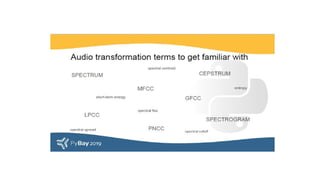
• Some data features and transformations that are important in speech and
audio processing are Mel-frequency cepstral coefficients (MFCCs),
Gammatone-frequency cepstral coefficients (GFCCs), Linear-prediction
cepstral coefficients (LFCCs), Bark-frequency cepstral coefficients (BFCCs),
Power-normalized cepstral coefficients (PNCCs), spectrum, cepstrum,
spectrogram, and more.
• We can use some of these features directly and extract features from some
others, like spectrum, to train a machine learning model.
Audio Signal Processing Basics
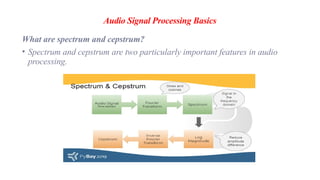
What are spectrum and cepstrum?
• Spectrum and cepstrum are two particularly important features in audio
processing.
Audio Signal Processing Basics
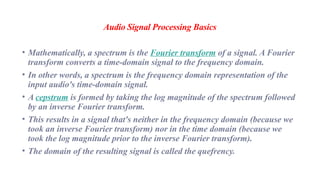
• Mathematically, a spectrum is the Fourier transform of a signal. A Fourier
transform converts a time-domain signal to the frequency domain.
• In other words, a spectrum is the frequency domain representation of the
input audio's time-domain signal.
• A cepstrum is formed by taking the log magnitude of the spectrum followed
by an inverse Fourier transform.
• This results in a signal that's neither in the frequency domain (because we
took an inverse Fourier transform) nor in the time domain (because we
took the log magnitude prior to the inverse Fourier transform).
• The domain of the resulting signal is called the quefrency.
Audio Signal Processing Basics
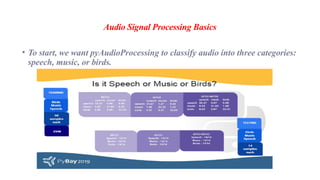
• To start, we want pyAudioProcessing to classify audio into three categories:
speech, music, or birds.
Audio Signal Processing Basics
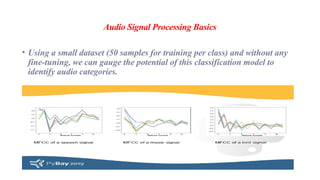
• Using a small dataset (50 samples for training per class) and without any
fine-tuning, we can gauge the potential of this classification model to
identify audio categories.
Audio Signal Processing Basics
What is audio analysis?
• Audio analysis is a process of transforming, exploring, and interpreting audio
signals recorded by digital devices.
• Aiming at understanding sound data, it applies a range of technologies,
including state-of-the-art deep learning algorithms.
• Audio analysis has already gained broad adoption in various industries, from
entertainment to healthcare to manufacturing.
Audio Signal Processing Basics
Speech recognition
• Speech recognition is about the ability of computers to distinguish spoken
words with natural language processing techniques.
• It allows us to control PCs, smartphones, and other devices via voice
commands and dictate texts to machines instead of manual entering.
• Siri by Apple, Alexa by Amazon, Google Assistant, and Cortana by
Microsoft are popular examples of how deeply the technology has
penetrated into our daily lives.
Audio Signal Processing Basics
Voice recognition
• Voice recognition is meant to identify people by the unique characteristics
of their voices rather than to isolate separate words.
• The approach finds applications in security systems for user authentication.
• For instance, Nuance Gatekeeper biometric engine verifies employees and
customers by their voices in the banking sector.
Audio Signal Processing Basics
Music recognition
• Music recognition is a popular feature of such apps as Shazam that helps
you identify unknown songs from a short sample.
• Another application of musical audio analysis is genre classification: Say,
Spotify runs its proprietary algorithm to group tracks into categories (their
database holds more than 5,000 genres)
Audio Signal Processing Basics
Environmental sound recognition
• Environmental sound recognition focuses on the identification of noises
around us, promising a bunch of advantages to automotive and
manufacturing industries. It’s vital for understanding surroundings in IoT
applications.
• Systems like Audio Analytic ‘listen’ to the events inside and outside your
car, enabling the vehicle to make adjustments in order to increase a driver’s
safety. Another example is SoundSee technology by Bosch that can analyze
machine noises and facilitate predictive maintenance to monitor equipment
health and prevent costly failures.
Audio Signal Processing Basics
• Healthcare is another field where environmental sound recognition comes
in handy.
• It offers a non-invasive type of remote patient monitoring to detect events
like falling.
• Besides that, analysis of coughing, sneezing, snoring, and other sounds can
facilitate pre-screening, identifying a patient’s status, assessing the
infection level in public spaces, and so on.
Audio Signal Processing Basics
• A real-life use case of such analysis is Sleep.ai which detects teeth grinding
and snoring sounds during sleep.
• The solution created by AltexSoft for a Dutch healthcare startup helps
dentists identify and monitor bruxism to eventually understand the causes
of this abnormality and treat it.
• No matter what type of sounds you analyze, it all starts with an
understanding of audio data and its specific characteristics.
Audio Signal Processing Basics
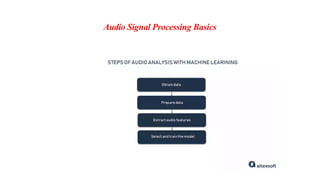
Audio data analysis steps
• Obtain project-specific audio data stored in standard file formats.
• Prepare data for your machine learning project, using software tools
• Extract audio features from visual representations of sound data.
• Select the machine learning model and train it on audio features.
Audio Signal Processing Basics
Audio analysis software
Audacity is a free and open-source audio editor to split recordings, remove
noise, transform waveforms to spectrograms, and label them. Audacity doesn’t
require coding skills.
Tensorflow-io package for preparation and augmentation of audio data lets you
perform a wide range of operations — noise removal, converting waveforms to
spectrograms, frequency, and time masking to make the sound clearly audible,
and more.
Librosa is an open-source Python library that has almost everything you need
for audio and music analysis.
Audio Signal Processing Basics
• Audio Toolbox by MathWorks offers numerous instruments for audio data
processing and analysis, from labeling to estimating signal metrics to
extracting certain features.
MIRtoolbox
What is MIRtoolbox?
• Mirtoolbox. MIRtoolbox offers an integrated set of functions written in
Matlab, dedicated to the extraction from audio files of musical features
such as tonality, rhythm, structures, etc.
• The objective is to offer an overview of computational approaches in the area
of Music Information Retrieval.
MIRtoolbox
What features does Mir toolbox have?
• In short, the MIR toolbox allows us to extract data about musical features
dealing with waveform and spectral analysis, tonality, pitch, dynamics,
rhythm, tempo, timbre, and other high-level audio features
MIRtoolbox
What is MATLAB tool?
• MATLAB®
is a programming platform designed specifically for engineers
and scientists to analyze and design systems and products that transform
our world. The heart of MATLAB is the MATLAB language, a matrix-based
language allowing the most natural expression of computational
mathematics.
MIRtoolbox
How many toolboxes are there in MATLAB?
• Access MATLAB Add-On Toolboxes
• Statistics and Machine Learning Toolbox™ (Statistics and Machine Learning
Toolbox)
• Curve Fitting Toolbox™ (Curve Fitting Toolbox)
• Control System Toolbox™ (Control System Toolbox)
• Signal Processing Toolbox™ (Signal Processing Toolbox)
• Mapping Toolbox™ (Mapping Toolbox)
MIRtoolbox
The toolbox is available free of charge under the GNU General Public License.
• This distribution actually includes, besides MIRtoolbox itself, three other
toolboxes:
• the Auditory toolbox, version 2, by Malcolm Slaney,
• the Netlab toolbox, version 3.3, by Ian Nabney,
• the SOM toolbox, version 2.0, by Esa Alhoniemi, Johan Himberg, Jukka
Parviainen and Juha Vesanto.
• MIRtoolbox requires Matlab version 7 and Mathworks' Signal Processing
toolbox.
MIRtoolbox
Why use MATLAB for Audio Processing?
• MATLAB consists of toolboxes used in different domains like Deep Learning,
Machine Learning, Image Processing, etc. Such an example of a toolbox is
the Audio Toolbox.
• The audio toolbox hosts many tweaking for audio files, such as speech
analysis, acoustic measurement, etc. It has a set of predefined algorithms
used for audio Processing, such as equalization and extracting the audio
pitch.
MIRtoolbox
Why use MATLAB for Audio Processing?
• The audio toolbox can be used to import, label, analyze and experiment on
datasets, and these can also be used for training models for machine learning
and deep learning.
• So overall, a host of features can be done using the Audio Toolbox in
MATLAB, which very few software provide.
MIRtoolbox
What are library functions?
A library function is accessed by simply writing the function name, followed
by a list of arguments, which represent the information being passed to the
function. The arguments must be enclosed in parentheses, and separated by
commas: they can be constants, variables, or more complex expressions.
MIRtoolbox
What is library function in MATLAB?
• A shared library is a collection of functions dynamically loaded by an
application at run time. The MATLAB interface supports libraries containing
functions defined in C header files. To call functions in C++ libraries, use the
interface described in Call C++ from MATLAB
MIRToolbox -Library Functions
Blocks
• Subsystem - Group blocks to create model hierarchy
Functions
• Libinfo - Get information about library blocks referenced by model
• gcb - Get path name of current block
• gcbh -Get handle of current block Tools
• Library Browser - Find and add blocks to model
Objects
• LibraryBrowser.LBStandalone - Display, hide, size, and position Simulink
Library Browser
MIRToolbox
Create Custom Library
1. From the Simulink start page, select Blank Library and click Create Library
2. (Optional) Define data types to be used on block interfaces in a Simulink data
dictionary
3. Add blocks to the new library
4. Add annotations or images
5. If you plan to add the library to the Library Browser, you can order the blocks
and annotations in your library
6. If you want the library to appear in the Library Browser, enable the
EnableLBRepository library property before you save the library.
7. Save the library
MIRtoolbox
Create a Sublibrary
If your library contains many blocks, you can group the blocks into subsystems or
separate sublibraries. To create a sublibrary, you create a library of the sublibrary
blocks and reference the library from a Subsystem block in the parent library.
1.In the library you want to add a sublibrary to, add a Subsystem block.
2.Inside the Subsystem block, delete the default input and output ports.
3.If you want, create a mask for the subsystem that displays text or an image that
conveys the sublibrary purpose.
4.In the subsystem block properties, set the OpenFcn callback to the name of the
library you want to reference.
VOICEBOX: Speech Processing Toolbox for MATLAB, Audio processing in
Matlab.
What is voice recognition in MATLAB?
• Voice Recognition system is a method of analyzing the input voice of the
person with the help of its features.
• It then compares it with the features saved in the database for prerecorded
signals.
• It displays an output that tells if any other audio of the same person is present
in the database or not.
VOICEBOX: Speech Processing Toolbox for MATLAB, Audio processing in
Matlab.
What is a voice processing system?
• The computerized handling of voice, which includes voice
store and forward, voice response, voice recognition and text
to speech technologies.
VOICEBOX: Speech Processing Toolbox for MATLAB, Audio processing in
Matlab.
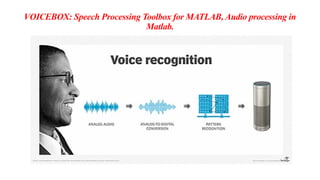
How does voice processing work?
• Voice recognition software on computers requires analog audio to be
converted into digital signals, known as analog-to-digital (A/D) conversion.
• For a computer to decipher a signal, it must have a digital database of words
or syllables as well as a quick process for comparing this data to signals.
• The speech patterns are stored on the hard drive and loaded into memory
when the program is running.
• A comparator checks these stored patterns against the output of the A/D
converter -- an action called pattern recognition.
VOICEBOX: Speech Processing Toolbox for MATLAB, Audio processing in
Matlab.
VOICEBOX: Speech Processing Toolbox for MATLAB, Audio
processing in Matlab.
• Audio also must be processed for clarity, so some devices may filter out
background noise. In some voice recognition systems, certain frequencies in
the audio are emphasized so the device can recognize a voice better.
• Voice recognition systems analyze speech through one of two models: the
hidden Markov model and neural networks.
• The hidden Markov model breaks down spoken words into their phonemes
(characters), while recurrent neural networks use the output from previous
steps to influence the input to the current step.
VOICEBOX: Speech Processing Toolbox for MATLAB, Audio
processing in Matlab.
• As uses for voice recognition technology grow and more users
interact with it, the organizations implementing voice recognition
software will have more data and information to feed into
neural networks for voice recognition systems.
• This improves the capabilities and accuracy of voice recognition
products.
VOICEBOX: Speech Processing Toolbox for MATLAB, Audio processing in
Matlab.
Voice recognition uses
• The uses for voice recognition have grown quickly as AI, machine learning
and consumer acceptance have matured.
Examples of how voice recognition is used include the following:
• Virtual assistants. Siri, Alexa and Google virtual assistants all implement
voice recognition software to interact with users. The way consumers use
voice recognition technology varies depending on the product. But they can
use it to transcribe voice to text, set up reminders, search the internet and
respond to simple questions and requests, such as play music or share
weather or traffic information.
VOICEBOX: Speech Processing Toolbox for MATLAB, Audio
processing in Matlab.
• Smart devices. Users can control their smart homes – including smart
thermostats and smart speakers -- using voice recognition software.
• Automated phone systems. Organizations use voice recognition with their
phone systems to direct callers to a corresponding department by saying a
specific number.
• Conferencing. Voice recognition is used in live captioning a speaker so others
can follow what is said in real time as text.
VOICEBOX: Speech Processing Toolbox for MATLAB, Audio
processing in Matlab.
• Bluetooth. Bluetooth systems in modern cars support voice recognition to
help drivers keep their eyes on the road. Drivers can use voice recognition to
perform commands such as "call my office."
• Dictation and voice recognition software. These tools can help users dictate
and transcribe documents without having to enter text using a physical
keyboard or mouse.
• Government. The National Security Agency has used voice recognition
systems dating back to 2006 to identify terrorists and spies or to verify the
audio of anyone speaking.
VOICEBOX: Speech Processing Toolbox for MATLAB, Audio
processing in Matlab.
Voice recognition advantages and disadvantages
Voice recognition offers numerous benefits:
• Consumers can multitask by speaking directly to their voice assistant or other voice
recognition technology.
• Users who have trouble with sight can still interact with their devices.
• Machine learning and sophisticated algorithms help voice recognition technology
quickly turn spoken words into written text.
• This technology can capture speech faster than some users can type. This makes
tasks like taking notes or setting reminders faster and more convenient.
VOICEBOX: Speech Processing Toolbox for MATLAB, Audio processing in
Matlab.
Disadvantages of the technology include the following:
• Background noise can produce false input.
• While accuracy rates are improving, all voice recognition systems and
programs make errors.
• There's a problem with words that sound alike but are spelled differently and
have different meanings -- for example, hear and here. This issue might be
largely overcome using stored contextual information. However, this requires
more RAM and faster processors.
VOICEBOX: Speech Processing Toolbox for MATLAB, Audio
processing in Matlab.
What are 3 uses for voice recognition software?
• Voice recognition can be used to control a smart home, instruct a smart
speaker, and command phones and tablets.
• In addition, we can set reminders and interact hands-free with personal
technologies.
• The most significant use is for the entry of text without using an on-screen or
physical keyboard.
VOICEBOX: Speech Processing Toolbox for MATLAB, Audio
processing in Matlab.
• VOICEBOX is a speech processing toolbox consisting of MATLAB routines
that are maintained by and mostly written by Mike Brookes, Speech and
Audio Processing Lab, CSP Group, EEE Dept, Imperial College London.
• The routines are available as a GitHub repository or a zip archive and are
made available under the terms of the GNU Public License.
• To avoid conflicts, all routine names begin with a "v_" prefix. For
compatibility with legacy code, aliased versions without the prefix are
included but these are likely to be removed in the future (the routine
v_voicebox_update.m is included to update legacy code to the new names)
VOICEBOX: Speech Processing Toolbox for MATLAB, Audio processing in
Matlab.
• Audio Toolbox™ enables real-time audio signal processing and analysis in
MATLAB®
and Simulink®(Graphical Programming language). It provides
low-latency(delay) connectivity for streaming audio from and to sound cards
via the following driver standards:
• Windows: DirectSound, WASAPI, ASIO™
• Apple Mac OS X: Core Audio
• Linux®
: ALSA
VOICEBOX: Speech Processing Toolbox for MATLAB, Audio
processing in Matlab.
• All audio device interfaces in both MATLAB and Simulink support C code
generation for acceleration and desktop prototyping. For example, you can
generate libraries or standalone applications that process audio in real-time on
the desktop.
• Audio Toolbox also enables you to tune algorithm parameters interactively
during simulations using external MIDI controls.

Audio Signal Processing Basics, mirtoolbox contains many useful audio processing library functions

  • 1.
    Unit 3 Audio SignalProcessing Basics, mirtoolbox contains many useful audio processing library functions, VOICEBOX: Speech Processing Toolbox for MATLAB, Audio processing in Matlab.
  • 2.
    Audio Signal ProcessingBasics What is audio data? • Audio data represents analog sounds in a digital form, preserving the main properties of the original. As we know from school lessons in physics, a sound is a wave of vibrations traveling through a medium like air or water and finally reaching our ears. • It has three key characteristics to be considered when analyzing audio data — time period, amplitude, and frequency. • Time period is how long a certain sound lasts or, in other words, how many seconds it takes to complete one cycle of vibrations
  • 3.
    Audio Signal ProcessingBasics • Amplitude is the sound intensity measured in decibels (dB) which we perceive as loudness. • Frequency measured in Hertz (Hz) indicates how many sound vibrations happen per second. People interpret frequency as low or high pitch. • While frequency is an objective parameter, the pitch is subjective. • The human hearing range lies between 20 and 20,000 Hz. Scientists claim that most people perceive as low pitch all sounds below 500 Hz — like the plane engine roar. In turn, high pitch for us is everything beyond 2,000 Hz (for example, a whistle.)
  • 4.
    Audio Signal ProcessingBasics Audio data file formats • Similar to texts and images, audio is unstructured data meaning that it’s not arranged in tables with connected rows and columns. Instead, you can store audio in various file formats like • WAV or WAVE (Waveform Audio File Format) developed by Microsoft and IBM. It’s a lossless or raw file format meaning that it doesn’t compress the original sound recording; • AIFF (Audio Interchange File Format) developed by Apple. Like WAV, it works with uncompressed audio; • FLAC (Free Lossless Audio Codec) developed by Xiph.Org Foundation that offers free multimedia formats and software tools. FLAC files are compressed without losing sound quality.
  • 5.
    Audio Signal ProcessingBasics • MP3 (mpeg (Moving Picture Experts Group )-1 audio layer 3) developed by the Fraunhofer Society in Germany and supported globally. It’s the most common file format since it makes music easy to store on portable devices and send back and forth via the Internet. Though mp3 compresses audio, it still offers an acceptable sound quality. • We recommend using AIFF and WAV files for analysis as they don’t miss any information present in analog sounds. At the same time, keep in mind that neither of those and other audio files can be fed directly to machine learning models. To make audio understandable for computers, data must undergo a transformation.
  • 6.
    Audio Signal ProcessingBasics What are audio signals? • Audio signals are signals that vibrate in the audible frequency range. When someone talks, it generates air pressure signals; the ear takes in these air pressure differences and communicates with the brain. • That's how the brain helps a person recognize that the signal is speech and understand what someone is saying. • There are a lot of MATLAB tools to perform audio processing, but not as many exist in Python. • Before we get into some of the tools that can be used to process audio signals in Python, let's examine some of the features of audio that apply to audio processing and machine learning.
  • 8.
    Audio Signal ProcessingBasics • Some data features and transformations that are important in speech and audio processing are Mel-frequency cepstral coefficients (MFCCs), Gammatone-frequency cepstral coefficients (GFCCs), Linear-prediction cepstral coefficients (LFCCs), Bark-frequency cepstral coefficients (BFCCs), Power-normalized cepstral coefficients (PNCCs), spectrum, cepstrum, spectrogram, and more. • We can use some of these features directly and extract features from some others, like spectrum, to train a machine learning model.
  • 9.
    Audio Signal ProcessingBasics What are spectrum and cepstrum? • Spectrum and cepstrum are two particularly important features in audio processing.
  • 10.
    Audio Signal ProcessingBasics • Mathematically, a spectrum is the Fourier transform of a signal. A Fourier transform converts a time-domain signal to the frequency domain. • In other words, a spectrum is the frequency domain representation of the input audio's time-domain signal. • A cepstrum is formed by taking the log magnitude of the spectrum followed by an inverse Fourier transform. • This results in a signal that's neither in the frequency domain (because we took an inverse Fourier transform) nor in the time domain (because we took the log magnitude prior to the inverse Fourier transform). • The domain of the resulting signal is called the quefrency.
  • 11.
    Audio Signal ProcessingBasics • To start, we want pyAudioProcessing to classify audio into three categories: speech, music, or birds.
  • 12.
    Audio Signal ProcessingBasics • Using a small dataset (50 samples for training per class) and without any fine-tuning, we can gauge the potential of this classification model to identify audio categories.
  • 13.
    Audio Signal ProcessingBasics What is audio analysis? • Audio analysis is a process of transforming, exploring, and interpreting audio signals recorded by digital devices. • Aiming at understanding sound data, it applies a range of technologies, including state-of-the-art deep learning algorithms. • Audio analysis has already gained broad adoption in various industries, from entertainment to healthcare to manufacturing.
  • 14.
    Audio Signal ProcessingBasics Speech recognition • Speech recognition is about the ability of computers to distinguish spoken words with natural language processing techniques. • It allows us to control PCs, smartphones, and other devices via voice commands and dictate texts to machines instead of manual entering. • Siri by Apple, Alexa by Amazon, Google Assistant, and Cortana by Microsoft are popular examples of how deeply the technology has penetrated into our daily lives.
  • 15.
    Audio Signal ProcessingBasics Voice recognition • Voice recognition is meant to identify people by the unique characteristics of their voices rather than to isolate separate words. • The approach finds applications in security systems for user authentication. • For instance, Nuance Gatekeeper biometric engine verifies employees and customers by their voices in the banking sector.
  • 16.
    Audio Signal ProcessingBasics Music recognition • Music recognition is a popular feature of such apps as Shazam that helps you identify unknown songs from a short sample. • Another application of musical audio analysis is genre classification: Say, Spotify runs its proprietary algorithm to group tracks into categories (their database holds more than 5,000 genres)
  • 17.
    Audio Signal ProcessingBasics Environmental sound recognition • Environmental sound recognition focuses on the identification of noises around us, promising a bunch of advantages to automotive and manufacturing industries. It’s vital for understanding surroundings in IoT applications. • Systems like Audio Analytic ‘listen’ to the events inside and outside your car, enabling the vehicle to make adjustments in order to increase a driver’s safety. Another example is SoundSee technology by Bosch that can analyze machine noises and facilitate predictive maintenance to monitor equipment health and prevent costly failures.
  • 18.
    Audio Signal ProcessingBasics • Healthcare is another field where environmental sound recognition comes in handy. • It offers a non-invasive type of remote patient monitoring to detect events like falling. • Besides that, analysis of coughing, sneezing, snoring, and other sounds can facilitate pre-screening, identifying a patient’s status, assessing the infection level in public spaces, and so on.
  • 19.
    Audio Signal ProcessingBasics • A real-life use case of such analysis is Sleep.ai which detects teeth grinding and snoring sounds during sleep. • The solution created by AltexSoft for a Dutch healthcare startup helps dentists identify and monitor bruxism to eventually understand the causes of this abnormality and treat it. • No matter what type of sounds you analyze, it all starts with an understanding of audio data and its specific characteristics.
  • 20.
    Audio Signal ProcessingBasics Audio data analysis steps • Obtain project-specific audio data stored in standard file formats. • Prepare data for your machine learning project, using software tools • Extract audio features from visual representations of sound data. • Select the machine learning model and train it on audio features.
  • 21.
  • 22.
    Audio Signal ProcessingBasics Audio analysis software Audacity is a free and open-source audio editor to split recordings, remove noise, transform waveforms to spectrograms, and label them. Audacity doesn’t require coding skills. Tensorflow-io package for preparation and augmentation of audio data lets you perform a wide range of operations — noise removal, converting waveforms to spectrograms, frequency, and time masking to make the sound clearly audible, and more. Librosa is an open-source Python library that has almost everything you need for audio and music analysis.
  • 23.
    Audio Signal ProcessingBasics • Audio Toolbox by MathWorks offers numerous instruments for audio data processing and analysis, from labeling to estimating signal metrics to extracting certain features.
  • 24.
    MIRtoolbox What is MIRtoolbox? •Mirtoolbox. MIRtoolbox offers an integrated set of functions written in Matlab, dedicated to the extraction from audio files of musical features such as tonality, rhythm, structures, etc. • The objective is to offer an overview of computational approaches in the area of Music Information Retrieval.
  • 25.
    MIRtoolbox What features doesMir toolbox have? • In short, the MIR toolbox allows us to extract data about musical features dealing with waveform and spectral analysis, tonality, pitch, dynamics, rhythm, tempo, timbre, and other high-level audio features
  • 26.
    MIRtoolbox What is MATLABtool? • MATLAB® is a programming platform designed specifically for engineers and scientists to analyze and design systems and products that transform our world. The heart of MATLAB is the MATLAB language, a matrix-based language allowing the most natural expression of computational mathematics.
  • 27.
    MIRtoolbox How many toolboxesare there in MATLAB? • Access MATLAB Add-On Toolboxes • Statistics and Machine Learning Toolbox™ (Statistics and Machine Learning Toolbox) • Curve Fitting Toolbox™ (Curve Fitting Toolbox) • Control System Toolbox™ (Control System Toolbox) • Signal Processing Toolbox™ (Signal Processing Toolbox) • Mapping Toolbox™ (Mapping Toolbox)
  • 28.
    MIRtoolbox The toolbox isavailable free of charge under the GNU General Public License. • This distribution actually includes, besides MIRtoolbox itself, three other toolboxes: • the Auditory toolbox, version 2, by Malcolm Slaney, • the Netlab toolbox, version 3.3, by Ian Nabney, • the SOM toolbox, version 2.0, by Esa Alhoniemi, Johan Himberg, Jukka Parviainen and Juha Vesanto. • MIRtoolbox requires Matlab version 7 and Mathworks' Signal Processing toolbox.
  • 29.
    MIRtoolbox Why use MATLABfor Audio Processing? • MATLAB consists of toolboxes used in different domains like Deep Learning, Machine Learning, Image Processing, etc. Such an example of a toolbox is the Audio Toolbox. • The audio toolbox hosts many tweaking for audio files, such as speech analysis, acoustic measurement, etc. It has a set of predefined algorithms used for audio Processing, such as equalization and extracting the audio pitch.
  • 30.
    MIRtoolbox Why use MATLABfor Audio Processing? • The audio toolbox can be used to import, label, analyze and experiment on datasets, and these can also be used for training models for machine learning and deep learning. • So overall, a host of features can be done using the Audio Toolbox in MATLAB, which very few software provide.
  • 31.
    MIRtoolbox What are libraryfunctions? A library function is accessed by simply writing the function name, followed by a list of arguments, which represent the information being passed to the function. The arguments must be enclosed in parentheses, and separated by commas: they can be constants, variables, or more complex expressions.
  • 32.
    MIRtoolbox What is libraryfunction in MATLAB? • A shared library is a collection of functions dynamically loaded by an application at run time. The MATLAB interface supports libraries containing functions defined in C header files. To call functions in C++ libraries, use the interface described in Call C++ from MATLAB
  • 33.
    MIRToolbox -Library Functions Blocks •Subsystem - Group blocks to create model hierarchy Functions • Libinfo - Get information about library blocks referenced by model • gcb - Get path name of current block • gcbh -Get handle of current block Tools • Library Browser - Find and add blocks to model Objects • LibraryBrowser.LBStandalone - Display, hide, size, and position Simulink Library Browser
  • 34.
    MIRToolbox Create Custom Library 1.From the Simulink start page, select Blank Library and click Create Library 2. (Optional) Define data types to be used on block interfaces in a Simulink data dictionary 3. Add blocks to the new library 4. Add annotations or images 5. If you plan to add the library to the Library Browser, you can order the blocks and annotations in your library 6. If you want the library to appear in the Library Browser, enable the EnableLBRepository library property before you save the library. 7. Save the library
  • 35.
    MIRtoolbox Create a Sublibrary Ifyour library contains many blocks, you can group the blocks into subsystems or separate sublibraries. To create a sublibrary, you create a library of the sublibrary blocks and reference the library from a Subsystem block in the parent library. 1.In the library you want to add a sublibrary to, add a Subsystem block. 2.Inside the Subsystem block, delete the default input and output ports. 3.If you want, create a mask for the subsystem that displays text or an image that conveys the sublibrary purpose. 4.In the subsystem block properties, set the OpenFcn callback to the name of the library you want to reference.
  • 36.
    VOICEBOX: Speech ProcessingToolbox for MATLAB, Audio processing in Matlab. What is voice recognition in MATLAB? • Voice Recognition system is a method of analyzing the input voice of the person with the help of its features. • It then compares it with the features saved in the database for prerecorded signals. • It displays an output that tells if any other audio of the same person is present in the database or not.
  • 37.
    VOICEBOX: Speech ProcessingToolbox for MATLAB, Audio processing in Matlab. What is a voice processing system? • The computerized handling of voice, which includes voice store and forward, voice response, voice recognition and text to speech technologies.
  • 38.
    VOICEBOX: Speech ProcessingToolbox for MATLAB, Audio processing in Matlab. How does voice processing work? • Voice recognition software on computers requires analog audio to be converted into digital signals, known as analog-to-digital (A/D) conversion. • For a computer to decipher a signal, it must have a digital database of words or syllables as well as a quick process for comparing this data to signals. • The speech patterns are stored on the hard drive and loaded into memory when the program is running. • A comparator checks these stored patterns against the output of the A/D converter -- an action called pattern recognition.
  • 39.
    VOICEBOX: Speech ProcessingToolbox for MATLAB, Audio processing in Matlab.
  • 40.
    VOICEBOX: Speech ProcessingToolbox for MATLAB, Audio processing in Matlab. • Audio also must be processed for clarity, so some devices may filter out background noise. In some voice recognition systems, certain frequencies in the audio are emphasized so the device can recognize a voice better. • Voice recognition systems analyze speech through one of two models: the hidden Markov model and neural networks. • The hidden Markov model breaks down spoken words into their phonemes (characters), while recurrent neural networks use the output from previous steps to influence the input to the current step.
  • 41.
    VOICEBOX: Speech ProcessingToolbox for MATLAB, Audio processing in Matlab. • As uses for voice recognition technology grow and more users interact with it, the organizations implementing voice recognition software will have more data and information to feed into neural networks for voice recognition systems. • This improves the capabilities and accuracy of voice recognition products.
  • 42.
    VOICEBOX: Speech ProcessingToolbox for MATLAB, Audio processing in Matlab. Voice recognition uses • The uses for voice recognition have grown quickly as AI, machine learning and consumer acceptance have matured. Examples of how voice recognition is used include the following: • Virtual assistants. Siri, Alexa and Google virtual assistants all implement voice recognition software to interact with users. The way consumers use voice recognition technology varies depending on the product. But they can use it to transcribe voice to text, set up reminders, search the internet and respond to simple questions and requests, such as play music or share weather or traffic information.
  • 43.
    VOICEBOX: Speech ProcessingToolbox for MATLAB, Audio processing in Matlab. • Smart devices. Users can control their smart homes – including smart thermostats and smart speakers -- using voice recognition software. • Automated phone systems. Organizations use voice recognition with their phone systems to direct callers to a corresponding department by saying a specific number. • Conferencing. Voice recognition is used in live captioning a speaker so others can follow what is said in real time as text.
  • 44.
    VOICEBOX: Speech ProcessingToolbox for MATLAB, Audio processing in Matlab. • Bluetooth. Bluetooth systems in modern cars support voice recognition to help drivers keep their eyes on the road. Drivers can use voice recognition to perform commands such as "call my office." • Dictation and voice recognition software. These tools can help users dictate and transcribe documents without having to enter text using a physical keyboard or mouse. • Government. The National Security Agency has used voice recognition systems dating back to 2006 to identify terrorists and spies or to verify the audio of anyone speaking.
  • 45.
    VOICEBOX: Speech ProcessingToolbox for MATLAB, Audio processing in Matlab. Voice recognition advantages and disadvantages Voice recognition offers numerous benefits: • Consumers can multitask by speaking directly to their voice assistant or other voice recognition technology. • Users who have trouble with sight can still interact with their devices. • Machine learning and sophisticated algorithms help voice recognition technology quickly turn spoken words into written text. • This technology can capture speech faster than some users can type. This makes tasks like taking notes or setting reminders faster and more convenient.
  • 46.
    VOICEBOX: Speech ProcessingToolbox for MATLAB, Audio processing in Matlab. Disadvantages of the technology include the following: • Background noise can produce false input. • While accuracy rates are improving, all voice recognition systems and programs make errors. • There's a problem with words that sound alike but are spelled differently and have different meanings -- for example, hear and here. This issue might be largely overcome using stored contextual information. However, this requires more RAM and faster processors.
  • 47.
    VOICEBOX: Speech ProcessingToolbox for MATLAB, Audio processing in Matlab. What are 3 uses for voice recognition software? • Voice recognition can be used to control a smart home, instruct a smart speaker, and command phones and tablets. • In addition, we can set reminders and interact hands-free with personal technologies. • The most significant use is for the entry of text without using an on-screen or physical keyboard.
  • 48.
    VOICEBOX: Speech ProcessingToolbox for MATLAB, Audio processing in Matlab. • VOICEBOX is a speech processing toolbox consisting of MATLAB routines that are maintained by and mostly written by Mike Brookes, Speech and Audio Processing Lab, CSP Group, EEE Dept, Imperial College London. • The routines are available as a GitHub repository or a zip archive and are made available under the terms of the GNU Public License. • To avoid conflicts, all routine names begin with a "v_" prefix. For compatibility with legacy code, aliased versions without the prefix are included but these are likely to be removed in the future (the routine v_voicebox_update.m is included to update legacy code to the new names)
  • 49.
    VOICEBOX: Speech ProcessingToolbox for MATLAB, Audio processing in Matlab. • Audio Toolbox™ enables real-time audio signal processing and analysis in MATLAB® and Simulink®(Graphical Programming language). It provides low-latency(delay) connectivity for streaming audio from and to sound cards via the following driver standards: • Windows: DirectSound, WASAPI, ASIO™ • Apple Mac OS X: Core Audio • Linux® : ALSA
  • 50.
    VOICEBOX: Speech ProcessingToolbox for MATLAB, Audio processing in Matlab. • All audio device interfaces in both MATLAB and Simulink support C code generation for acceleration and desktop prototyping. For example, you can generate libraries or standalone applications that process audio in real-time on the desktop. • Audio Toolbox also enables you to tune algorithm parameters interactively during simulations using external MIDI controls.