Shared Channels in Microsoft
Teams: an overview
Juan Carlos Gonzalez | Microsoft 365 Apps & Services MVP
@jcgm1978
jcgonzalezmartin1978@hotmail.com
https://nl.linkedin.com/in/juagon
https://jcgonzalezmartin.wordpress.com/
https://www.youtube.com/@jcgonzalezmartin
Agenda
• Buckle up, here's what we're going to cover today:
 Channels in Microsoft Teams: Basic concepts and channel types
 Shared channels specifics
 Shared channels: Looking under the hood!
 Shared channels FAQs
 Summary
Channels in Microsoft Teams: Basic concepts &
channel types
• Shared Channels: Collaborate
seamlessly across team & organization
boundaries:
 No tenant switching
 Avoid over sharing on different places
 Reduce team proliferation
 Inherit team membership
• As happens with Private Channels, a
Shared Channel comes with its own
SharePoint Online Site Collection
• External users can be added to Shared
Channels without being guests in the
host tenant
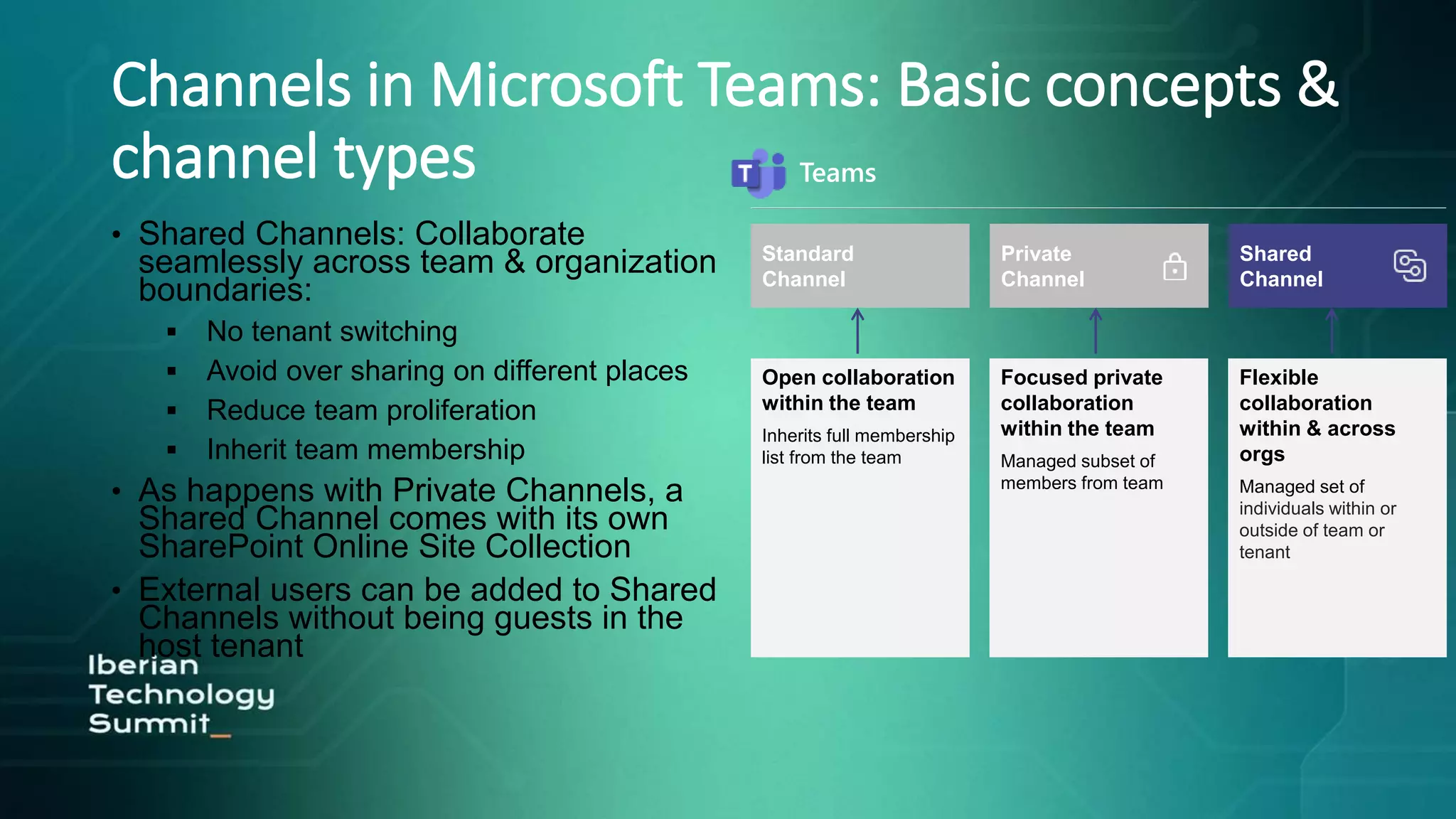
Teams
Standard
Channel
Open collaboration
within the team
Inherits full membership
list from the team
Private
Channel
Focused private
collaboration
within the team
Managed subset of
members from team
Shared
Channel
Flexible
collaboration
within & across
orgs
Managed set of
individuals within or
outside of team or
tenant
Channels in Microsoft Teams: Basic concepts &
channel types
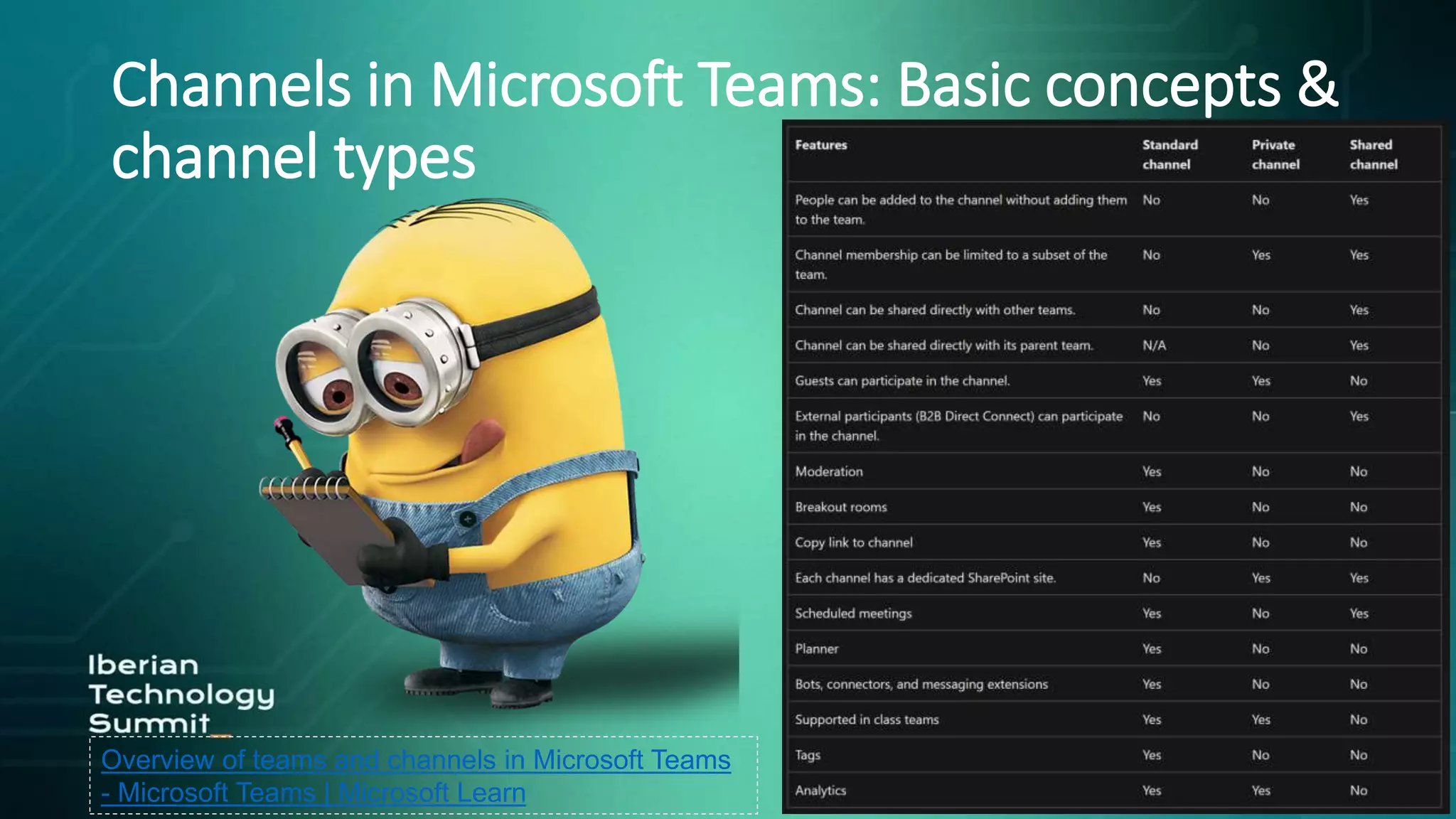
Overview of teams and channels in Microsoft Teams
- Microsoft Teams | Microsoft Learn
Channels in Microsoft Teams: Basic concepts &
channel types
Channels in Microsoft Teams: Basic concepts &
channel types
Channels in Microsoft Teams: Basic concepts &
channel types
Shared Channel specifics: Shared Channels and
Teams Owners
• Only team owners can create shared
channels
• Team owners can see the name and
description of all shared channels in a team
without being a member
• Team owners can delete shared channels
without being a member
• Only team owners can accept Share with
team invites
• Team owners can terminate sharing
relationship with shared channels from
other teams
• Shared channels inherit labels from the
team on creation
Shared Channel specifics: Shared Channels and
Teams Owners
• Channels owners manage
the membership and life cycle
• Last owner of a shared channel
cannot be removed from the team
• If a shared channel becomes
ownerless
(user leaves company), an existing
in-tenant member is auto-promoted
• Shared channels inherit settings
from the team on creation
• Settings can be changed at channel
level
Shared Channel specifics: Sharing a Shared
Channel
• Share with people:
 In-tenant members
 External tenant members
• Share with team:
 Host team
 In-tenant teams
 External tenant teams
Shared Channel specifics: Limits for Shared
Channels
Limits and specifications for Microsoft Teams -
Microsoft Teams | Microsoft Learn
Demo #1: A first look to a
Shared Channel in Microsoft
Teams
Shared Channel Under the hood: Teams Admin
Center settings
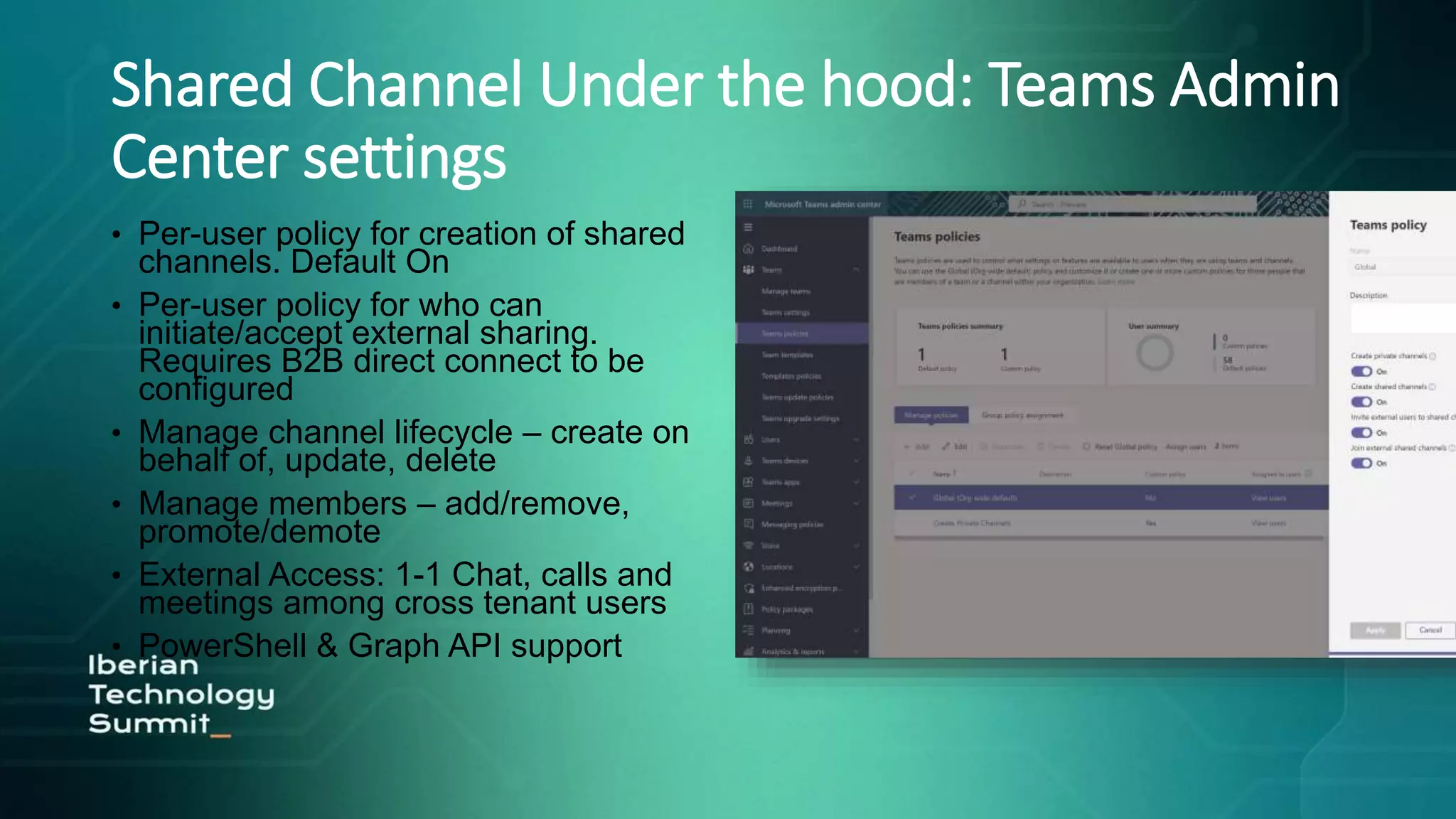
• Per-user policy for creation of shared
channels. Default On
• Per-user policy for who can
initiate/accept external sharing.
Requires B2B direct connect to be
configured
• Manage channel lifecycle – create on
behalf of, update, delete
• Manage members – add/remove,
promote/demote
• External Access: 1-1 Chat, calls and
meetings among cross tenant users
• PowerShell & Graph API support
Shared Channel Under the hood: Azure AD
B2B Connect
• It enables to set up a mutual trust
relationship between Azure AD
organizations
• When enabled, users in two
organizations can collaborate in
Teams without having to be
added to each other’s
organization as guest
• + Info: B2B direct connect Azure
AD overview - Microsoft Entra |
Microsoft Learn
Shared Channel Under the hood: Azure AD
B2B Connect
New way to collaborate with people from other Azure AD orgs
Search for people from other Azure AD orgs (via email address)
Share Apps and other resources
Empowers Teams to share channels without switching tenants or
having another account
External annotation
Shared Channel Under the hood: Azure AD
B2B Connect
• B2B direct connect is default off
• Inbound Access - Applies to users from
external tenants signing into your tenant
• Outbound Access- Applies to users in
your tenant signing into external tenants
• Granular control for allowing/blocking
access at tenant, user/group and app
level
• Controls that allow you to trust claims
from external tenants, for e.g. trust
MFA, trust compliant devices claims
Shared Channel Under the hood: SharePoint
integration
• Each shared channel is backed
by a dedicated SharePoint site
collection
• Custom template ID
TEAMCHANNEL#1
• No default channel folder in the
document library
• Host tenant users can share with
any member user within your
tenant
• External users can seamlessly
access Shared Channel site via
B2B direct connect
Shared Channel Under the hood: SharePoint
integration
• External users can share the
file with members of the
channel
• Users cannot be added directly
to the Shared Channel Site:
Membership is always
managed through Teams
• Channel sites can be managed
from the modern SPO Admin
Center
Shared Channel Under the hood: Compliance
• Host compliance policies apply when a channel is shared with other tenants
• Team continues to be the unit of management. Channel inherits team sensitivity
label & geo
• eDiscovery – channel messages in dedicated mailbox, team eDiscovery search
includes all associated SharePoint sites for channels in team
• Legal Hold – Only host tenant members can be put on legal hold
• Information Barriers – Applies to host tenant members
• Monitoring & Auditing – Teams audit logs & AAD sign-in logs available
• Retention & DLP – Policy applied on the team will apply to all shared channels in
the team
• Communication compliance – Supported on shared channels
Demo #2: Shared Channels
under the hood
Shared Channel FAQs
• It’s not possible to convert existing channels into shared channels. The
other way around is also true: A shared channel cannot be converted into
a standard or private one
• Channel members will not, by default, added as a meeting participants in
meetings scheduled in a Shared channel
• Removing a member from a Team does not remove him/her from the
Shared Channels in that Team
• Guests users in Azure AD cannot be added to a Shared Channel
• Apps must be installed in the team before they can be used in a shared
channel
• Certain Microsoft 365 group connected apps such as Planner coming later
Summary
• Shared channels are designed to enable seamless collaboration with
internal an external partners
• Shared channels are flexible: no guest accounts are required for
external collaboration
• Shared channels are governed at two levels: Teams Admin Center
vs. Azure AD Admin Center
• Shared channels collaboration model is built on top of Azure AD
Direct Connect. By default, Azure AD B2B Direct Connect is blocked
and the recommendation is to enable external collaboration on a per
tenant basics
• Host tenant and team policies apply to all channel members
Bonus: Quick References & Roadmap
• Overview of teams and channels in Microsoft Teams:
 https://learn.microsoft.com/en-us/microsoftteams/teams-channels-
overview?WT.mc_id=M365-MVP-4015732
• Shared channels in Microsoft Teams:
 https://learn.microsoft.com/en-us/microsoftteams/shared-
channels?WT.mc_id=M365-MVP-4015732
Bonus: Quick References & Roadmap
Office 365 for IT Pros
• $10 Discount:
• https://o365itpros.gumroad.com/l/O365IT/F
riendsOfTheBook
Office 365 for IT Pros
• 20 % Discount:
 Discount code: 4q8kso9
 https://gumroad.com/l/DgSSr
 https://guitaca.com
Questions?
Contact details
@jcgm1978
jcgonzalezmartin1978@hotmail.com
https://nl.linkedin.com/in/juagon
https://jcgonzalezmartin.wordpress.com/
https://www.youtube.com/@jcgonzalezmartin
Shared channels in Microsoft Teams, an overview

Shared channels in Microsoft Teams, an overview

  • 2.
    Shared Channels inMicrosoft Teams: an overview Juan Carlos Gonzalez | Microsoft 365 Apps & Services MVP
  • 4.
  • 5.
    Agenda • Buckle up,here's what we're going to cover today:  Channels in Microsoft Teams: Basic concepts and channel types  Shared channels specifics  Shared channels: Looking under the hood!  Shared channels FAQs  Summary
  • 6.
    Channels in MicrosoftTeams: Basic concepts & channel types • Shared Channels: Collaborate seamlessly across team & organization boundaries:  No tenant switching  Avoid over sharing on different places  Reduce team proliferation  Inherit team membership • As happens with Private Channels, a Shared Channel comes with its own SharePoint Online Site Collection • External users can be added to Shared Channels without being guests in the host tenant Teams Standard Channel Open collaboration within the team Inherits full membership list from the team Private Channel Focused private collaboration within the team Managed subset of members from team Shared Channel Flexible collaboration within & across orgs Managed set of individuals within or outside of team or tenant
  • 7.
    Channels in MicrosoftTeams: Basic concepts & channel types Overview of teams and channels in Microsoft Teams - Microsoft Teams | Microsoft Learn
  • 8.
    Channels in MicrosoftTeams: Basic concepts & channel types
  • 9.
    Channels in MicrosoftTeams: Basic concepts & channel types
  • 10.
    Channels in MicrosoftTeams: Basic concepts & channel types
  • 11.
    Shared Channel specifics:Shared Channels and Teams Owners • Only team owners can create shared channels • Team owners can see the name and description of all shared channels in a team without being a member • Team owners can delete shared channels without being a member • Only team owners can accept Share with team invites • Team owners can terminate sharing relationship with shared channels from other teams • Shared channels inherit labels from the team on creation
  • 12.
    Shared Channel specifics:Shared Channels and Teams Owners • Channels owners manage the membership and life cycle • Last owner of a shared channel cannot be removed from the team • If a shared channel becomes ownerless (user leaves company), an existing in-tenant member is auto-promoted • Shared channels inherit settings from the team on creation • Settings can be changed at channel level
  • 13.
    Shared Channel specifics:Sharing a Shared Channel • Share with people:  In-tenant members  External tenant members • Share with team:  Host team  In-tenant teams  External tenant teams
  • 14.
    Shared Channel specifics:Limits for Shared Channels Limits and specifications for Microsoft Teams - Microsoft Teams | Microsoft Learn
  • 15.
    Demo #1: Afirst look to a Shared Channel in Microsoft Teams
  • 16.
    Shared Channel Underthe hood: Teams Admin Center settings • Per-user policy for creation of shared channels. Default On • Per-user policy for who can initiate/accept external sharing. Requires B2B direct connect to be configured • Manage channel lifecycle – create on behalf of, update, delete • Manage members – add/remove, promote/demote • External Access: 1-1 Chat, calls and meetings among cross tenant users • PowerShell & Graph API support
  • 17.
    Shared Channel Underthe hood: Azure AD B2B Connect • It enables to set up a mutual trust relationship between Azure AD organizations • When enabled, users in two organizations can collaborate in Teams without having to be added to each other’s organization as guest • + Info: B2B direct connect Azure AD overview - Microsoft Entra | Microsoft Learn
  • 18.
    Shared Channel Underthe hood: Azure AD B2B Connect New way to collaborate with people from other Azure AD orgs Search for people from other Azure AD orgs (via email address) Share Apps and other resources Empowers Teams to share channels without switching tenants or having another account External annotation
  • 19.
    Shared Channel Underthe hood: Azure AD B2B Connect • B2B direct connect is default off • Inbound Access - Applies to users from external tenants signing into your tenant • Outbound Access- Applies to users in your tenant signing into external tenants • Granular control for allowing/blocking access at tenant, user/group and app level • Controls that allow you to trust claims from external tenants, for e.g. trust MFA, trust compliant devices claims
  • 20.
    Shared Channel Underthe hood: SharePoint integration • Each shared channel is backed by a dedicated SharePoint site collection • Custom template ID TEAMCHANNEL#1 • No default channel folder in the document library • Host tenant users can share with any member user within your tenant • External users can seamlessly access Shared Channel site via B2B direct connect
  • 21.
    Shared Channel Underthe hood: SharePoint integration • External users can share the file with members of the channel • Users cannot be added directly to the Shared Channel Site: Membership is always managed through Teams • Channel sites can be managed from the modern SPO Admin Center
  • 22.
    Shared Channel Underthe hood: Compliance • Host compliance policies apply when a channel is shared with other tenants • Team continues to be the unit of management. Channel inherits team sensitivity label & geo • eDiscovery – channel messages in dedicated mailbox, team eDiscovery search includes all associated SharePoint sites for channels in team • Legal Hold – Only host tenant members can be put on legal hold • Information Barriers – Applies to host tenant members • Monitoring & Auditing – Teams audit logs & AAD sign-in logs available • Retention & DLP – Policy applied on the team will apply to all shared channels in the team • Communication compliance – Supported on shared channels
  • 23.
    Demo #2: SharedChannels under the hood
  • 24.
    Shared Channel FAQs •It’s not possible to convert existing channels into shared channels. The other way around is also true: A shared channel cannot be converted into a standard or private one • Channel members will not, by default, added as a meeting participants in meetings scheduled in a Shared channel • Removing a member from a Team does not remove him/her from the Shared Channels in that Team • Guests users in Azure AD cannot be added to a Shared Channel • Apps must be installed in the team before they can be used in a shared channel • Certain Microsoft 365 group connected apps such as Planner coming later
  • 25.
    Summary • Shared channelsare designed to enable seamless collaboration with internal an external partners • Shared channels are flexible: no guest accounts are required for external collaboration • Shared channels are governed at two levels: Teams Admin Center vs. Azure AD Admin Center • Shared channels collaboration model is built on top of Azure AD Direct Connect. By default, Azure AD B2B Direct Connect is blocked and the recommendation is to enable external collaboration on a per tenant basics • Host tenant and team policies apply to all channel members
  • 26.
    Bonus: Quick References& Roadmap • Overview of teams and channels in Microsoft Teams:  https://learn.microsoft.com/en-us/microsoftteams/teams-channels- overview?WT.mc_id=M365-MVP-4015732 • Shared channels in Microsoft Teams:  https://learn.microsoft.com/en-us/microsoftteams/shared- channels?WT.mc_id=M365-MVP-4015732
  • 27.
  • 28.
    Office 365 forIT Pros • $10 Discount: • https://o365itpros.gumroad.com/l/O365IT/F riendsOfTheBook
  • 29.
    Office 365 forIT Pros • 20 % Discount:  Discount code: 4q8kso9  https://gumroad.com/l/DgSSr  https://guitaca.com
  • 30.
  • 31.

Editor's Notes

  • #19 Azure Active Directory (Azure AD) B2B direct connect is a feature of External Identities that lets you set up a mutual trust relationship with another Azure AD organization for seamless collaboration. This feature currently works with Microsoft Teams shared channels. With B2B direct connect, users from both organizations can work together using their home credentials and a shared channel in Teams, without having to be added to each other’s organizations as guests. Use B2B direct connect to share resources with external Azure AD organizations. Or use it to share resources across multiple Azure AD tenants within your own organization.
  • #20 Azure Active Directory (Azure AD) B2B direct connect is a feature of External Identities that lets you set up a mutual trust relationship with another Azure AD organization for seamless collaboration. This feature currently works with Microsoft Teams shared channels. With B2B direct connect, users from both organizations can work together using their home credentials and a shared channel in Teams, without having to be added to each other’s organizations as guests. Use B2B direct connect to share resources with external Azure AD organizations. Or use it to share resources across multiple Azure AD tenants within your own organization.
  • #21 Azure Active Directory (Azure AD) B2B direct connect is a feature of External Identities that lets you set up a mutual trust relationship with another Azure AD organization for seamless collaboration. This feature currently works with Microsoft Teams shared channels. With B2B direct connect, users from both organizations can work together using their home credentials and a shared channel in Teams, without having to be added to each other’s organizations as guests. Use B2B direct connect to share resources with external Azure AD organizations. Or use it to share resources across multiple Azure AD tenants within your own organization.
  • #22 Azure Active Directory (Azure AD) B2B direct connect is a feature of External Identities that lets you set up a mutual trust relationship with another Azure AD organization for seamless collaboration. This feature currently works with Microsoft Teams shared channels. With B2B direct connect, users from both organizations can work together using their home credentials and a shared channel in Teams, without having to be added to each other’s organizations as guests. Use B2B direct connect to share resources with external Azure AD organizations. Or use it to share resources across multiple Azure AD tenants within your own organization.
  • #23 Azure Active Directory (Azure AD) B2B direct connect is a feature of External Identities that lets you set up a mutual trust relationship with another Azure AD organization for seamless collaboration. This feature currently works with Microsoft Teams shared channels. With B2B direct connect, users from both organizations can work together using their home credentials and a shared channel in Teams, without having to be added to each other’s organizations as guests. Use B2B direct connect to share resources with external Azure AD organizations. Or use it to share resources across multiple Azure AD tenants within your own organization.