Downloaded 40 times



![RESTRICT TEAMS CREATION
Azure Active Directory versie 2 PowerShell module required
Connect-AzureAD
Get-AzureADDirectorySetting
$Policy = Get-AzureADDirectorySettingTemplate –Id 62375ab9-6b52-
47ed-826b-58e47e0e304b
$Setting = $Policy.CreateDirectorySetting()
$Setting[“EnableGroupCreation”] = “false”
$Setting[“GroupCreationAllowedGroupId”] = “your group ID”
New-AzureADDirectorySetting -DirectorySetting $Setting
https://docs.microsoft.com/en-
us/powershell/azure/overview?view=azureadps-2.0](https://image.slidesharecdn.com/w34-microsoftteamsarchitecturedeepdive-maarteneekels-191204144842/85/ESPC19-Microsoft-Teams-Architecture-Deep-Dive-13-320.jpg)
![EXTERNAL GUEST ACCESS
• Default setting: Off for tenants / On for individual Teams
• Disabling or enabling external guest user access for individual Teams is only
possible through PowerShell
$template = Get-AzureADDirectorySettingTemplate | ? {$_.displayname -eq
"group.unified.guest"}
$settings = $template.CreateDirectorySetting()
$settings["AllowToAddGuests"]=$False
$groupID = (Get-AzureADGroup -SearchString “<your group name").ObjectId
Get-AzureADObjectSetting -TargetObjectId $groupID -TargetType Groups | fl Values
New-AzureADObjectSetting -TargetObjectId $groupID -TargetType Groups
-DirectorySetting $settings
Get-AzureADObjectSetting -TargetObjectId $groupId -TargetType Groups |
Set-AzureADObjectSetting -TargetObjectId $groupId -TargetType Groups
-DirectorySetting $settings](https://image.slidesharecdn.com/w34-microsoftteamsarchitecturedeepdive-maarteneekels-191204144842/85/ESPC19-Microsoft-Teams-Architecture-Deep-Dive-14-320.jpg)

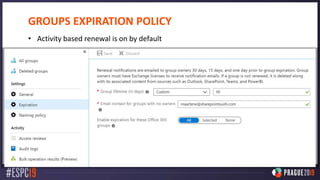
![NAMING CONVENTIONS
Get-AzureADDirectorySetting
$directorySetting = Get-AzureADDirectorySetting
-Id 92efeacc-89c6-4c16-b1cf-107aaf87f7dc
$directorySetting.Values
$directorySetting["PrefixSuffixNamingRequirement"] =
"Grp_[Department]_[GroupName]"
$directorySetting["CustomBlockedWordsList"]="Payroll,CEO,HR"
Set-AzureADDirectorySetting -Id (Get-AzureADDirectorySetting | where
-Property DisplayName -Value "Group.Unified" -EQ).id
-DirectorySetting $directorySetting](https://image.slidesharecdn.com/w34-microsoftteamsarchitecturedeepdive-maarteneekels-191204144842/85/ESPC19-Microsoft-Teams-Architecture-Deep-Dive-17-320.jpg)
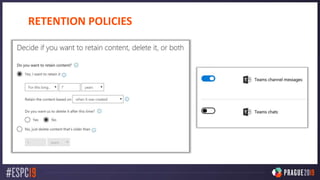
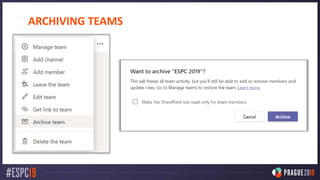
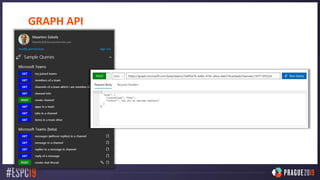





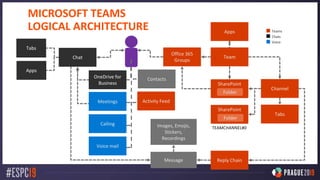
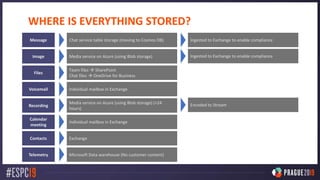
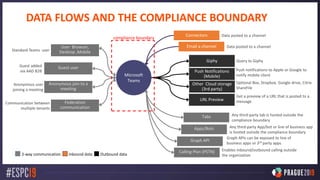
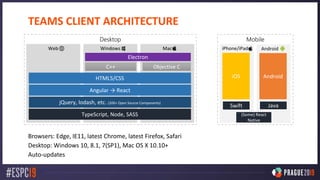
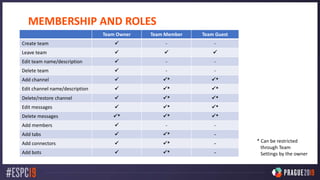
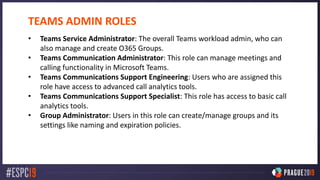
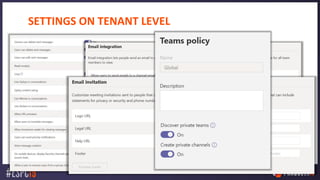
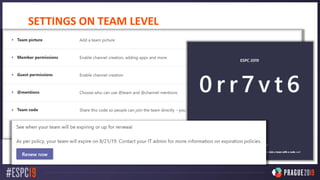
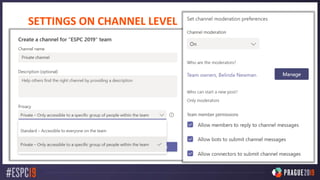
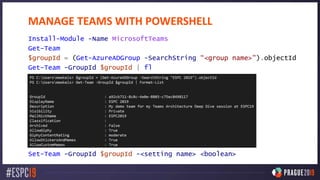
This document provides an in-depth overview of the Microsoft Teams architecture including: - The logical architecture showing how messages, files, tabs, apps, and other components are stored and connected. - A deeper look at the various Microsoft services that power Teams like Exchange, SharePoint, and Azure. - Details on where different types of Teams data like messages, files, voicemails are stored. - The compliance boundary and how third-party services and data interact with Teams. - An overview of the Teams client architecture across different platforms and technologies used. - Settings and admin roles for managing Teams at the tenant, team, and channel level including with PowerShell.


