

06.04.2019
#
2019
#
Microsoft Teams
Architecture Deep Dive
Maarten Eekels - @maarteneekels
06.04.2019
#
Sponsors and Partners
06.04.2019
#
About me
Contact
@maarteneekels
meekels@portiva.nl
www.eekels.net
06.04.2019
#
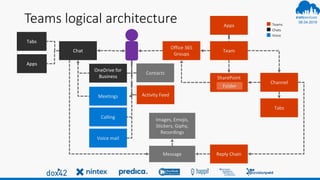
Teams logical architecture
Team
Office 365
Groups
Chat
Channel
SharePoint
Reply ChainMessage
Images, Emojis,
Stickers, Giphy,
Recordings
OneDrive for
Business
Tabs
Folder
Tabs
Activity FeedMeetings
Calling
Apps
Apps
Contacts
Teams
Chats
Voice
Voice mail
06.04.2019
#
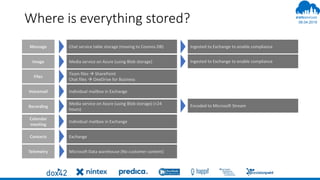
Where is everything stored?
Image
Files
Voicemail
Message
Recording
Calendar
meeting
Contacts
Media service on Azure (using Blob storage)
Team files  SharePoint
Chat files  OneDrive for Business
Individual mailbox in Exchange
Chat service table storage (moving to Cosmos DB)
Media service on Azure (using Blob storage) (<24
hours)
Individual mailbox in Exchange
Exchange
Ingested to Exchange to enable compliance
Encoded to Microsoft Stream
Telemetry Microsoft Data warehouse (No customer content)
06.04.2019
#
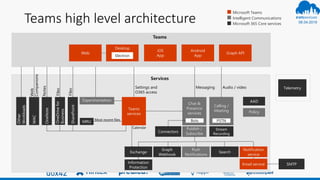
Teams high level architecture
Microsoft Teams
Intelligent Communications
Microsoft 365 Core services
Most recent files
Telemetry
Files
Files
Web
Companions
Notes
Calendar
AAD
MessagingSettings and
O365 access
OneNote
OneDrivefor
Business
WAC
Other
Workloads
Connectors
Audio / video
Search
Notification
service
SMTP
SharePoint
Publish /
Subscribe
Push
Notifications
Experimentation
MRU
Calling /
Meeting
PSTN
Desktop
iOS
App
Android
AppElectron
Web
Chat &
Presence
services
Exchange
Information
Protection
Graph
Webhook
Stream
Recording
Bots
Graph API
Email service
Policy
Teams
services
06.04.2019
#
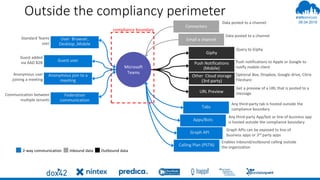
Outside the compliancy perimeter
User Browser,
Desktop ,Mobile
compliance boundary
Microsoft
Teams
Guest user
Anonymous join to a
meeting
Federation
communication
Email a channel
Connectors
Apps/Bots
Tabs
Calling Plan (PSTN)
Push Notifications
(Mobile)
Other Cloud storage
(3rd party)
Graph API
Giphy
2-way communication Inbound data Outbound data
Data posted to a channel
Query to Giphy
Push notifications to Apple or Google to
notify mobile client
Optional Box, Dropbox, Google drive, Citrix
Fileshare
Any third-party tab is hosted outside the
compliance boundary
Any third-party App/bot or line of business app
is hosted outside the compliance boundary
Graph APIs can be exposed to line of
business apps or 3rd party apps
Enables inbound/outbound calling outside
the organization
Standard Teams
user
Guest added
via AAD B2B
Anonymous user
joining a meeting
Communication between
multiple tenants
URL Preview
Get a preview of a URL that is posted to a
message
06.04.2019
#
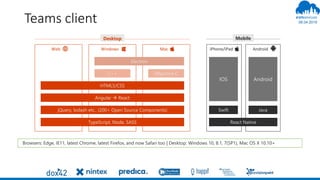
Teams client
Browsers: Edge, IE11, latest Chrome, latest Firefox, and now Safari too | Desktop: Windows 10, 8.1, 7(SP1), Mac OS X 10.10+
IOS Android
Swift Java
Angular  React
jQuery, lodash etc.. (200+ Open Source Components)
TypeScript, Node, SASS
HTML5/CSS
C++ Objective C
Windows MacWeb AndroidiPhone/iPad
Desktop Mobile
Electron
React Native
06.04.2019
#
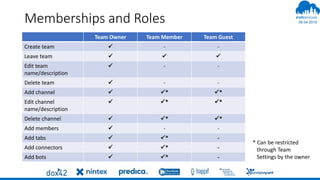
Memberships and Roles
Team Owner Team Member Team Guest
Create team  - -
Leave team   
Edit team
name/description
 - -
Delete team  - -
Add channel  * *
Edit channel
name/description
 * *
Delete channel  * *
Add members  - -
Add tabs  * -
Add connectors  * -
Add bots  * -
* Can be restricted
through Team
Settings by the owner
06.04.2019
#
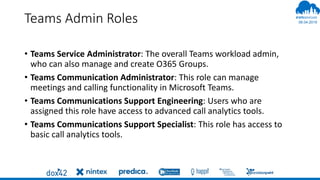
Teams Admin Roles
• Teams Service Administrator: The overall Teams workload admin,
who can also manage and create O365 Groups.
• Teams Communication Administrator: This role can manage
meetings and calling functionality in Microsoft Teams.
• Teams Communications Support Engineering: Users who are
assigned this role have access to advanced call analytics tools.
• Teams Communications Support Specialist: This role has access to
basic call analytics tools.
06.04.2019
#
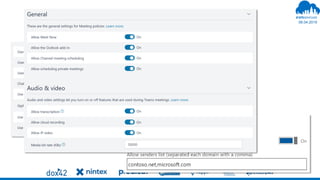
Teams Settings on Tenant Level
06.04.2019
#
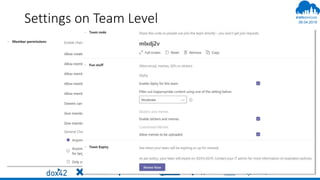
Settings on Team Level
06.04.2019
#
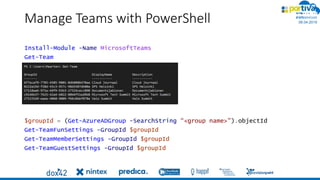
Manage Teams with PowerShell
Install-Module -Name MicrosoftTeams
Get-Team
$groupId = (Get-AzureADGroup -SearchString “<group name>").objectId
Get-TeamFunSettings -GroupId $groupId
Get-TeamMemberSettings -GroupId $groupId
Get-TeamGuestSettings -GroupId $groupId
06.04.2019
#
Allow only specific people to create Teams
Azure Active Directory versie 2 PowerShell module required
Connect-AzureAD
Get-AzureADDirectorySetting
$Policy = Get-AzureADDirectorySettingTemplate –Id 62375ab9-6b52-
47ed-826b-58e47e0e304b
$Setting = $Policy.CreateDirectorySetting()
$Setting[“EnableGroupCreation”] = “false”
$Setting[“GroupCreationAllowedGroupId”] = “your group ID”
New-AzureADDirectorySetting -DirectorySetting $Setting
https://docs.microsoft.com/en-
us/powershell/azure/overview?view=azureadps-2.0
06.04.2019
#
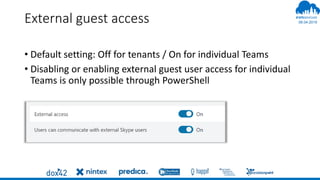
External guest access
• Default setting: Off for tenants / On for individual Teams
• Disabling or enabling external guest user access for individual
Teams is only possible through PowerShell
06.04.2019
#
External sharing per Team
Disabling or enabling external guest user access is only possible through
PowerShell
$template = Get-AzureADDirectorySettingTemplate | ? {$_.displayname -eq
"group.unified.guest"}
$settings = $template.CreateDirectorySetting()
$settings["AllowToAddGuests"]=$False
$groupID = (Get-AzureADGroup -SearchString “<your group name").ObjectId
Get-AzureADObjectSetting -TargetObjectId $groupID -TargetType Groups | fl
Values
New-AzureADObjectSetting -TargetObjectId $groupID -TargetType Groups
-DirectorySetting $settings
Get-AzureADObjectSetting -TargetObjectId $groupId -TargetType Groups | Set-
AzureADObjectSetting -TargetObjectId $groupId -TargetType Groups -
DirectorySetting $settings
06.04.2019
#
06.04.2019
#
DEMO
06.04.2019
#
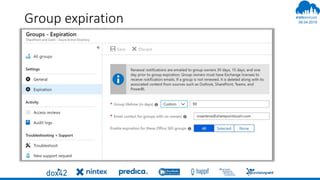
Group expiration
06.04.2019
#
Naming conventions
Get-AzureADDirectorySetting
$directorySetting = Get-AzureADDirectorySetting -Id 92efeacc-
89c6-4c16-b1cf-107aaf87f7dc
$directorySetting.Values
$directorySetting["PrefixSuffixNamingRequirement"] =
"Grp_[Department]_[GroupName]"
$directorySetting["CustomBlockedWordsList"]="Payroll,CEO,HR"
Set-AzureADDirectorySetting -Id (Get-AzureADDirectorySetting
| where -Property DisplayName -Value "Group.Unified" -EQ).id
-DirectorySetting $directorySetting
06.04.2019
#
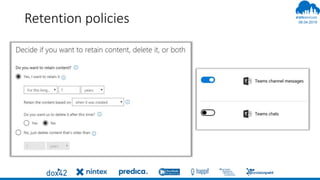
Retention policies
06.04.2019
#
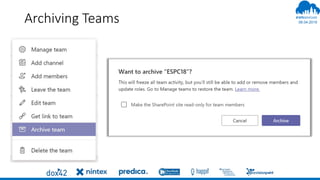
Archiving Teams
06.04.2019
#
06.04.2019
#
DEMO
06.04.2019
#
06.04.2019
#
THANK YOU
@maarteneekels

SPSWarsaw - Teams Architecture Deep Dive

  • 1.
    06.04.2019 # 2019 # Microsoft Teams Architecture DeepDive Maarten Eekels - @maarteneekels
  • 2.
  • 3.
  • 4.
    06.04.2019 # Teams logical architecture Team Office365 Groups Chat Channel SharePoint Reply ChainMessage Images, Emojis, Stickers, Giphy, Recordings OneDrive for Business Tabs Folder Tabs Activity FeedMeetings Calling Apps Apps Contacts Teams Chats Voice Voice mail
  • 5.
    06.04.2019 # Where is everythingstored? Image Files Voicemail Message Recording Calendar meeting Contacts Media service on Azure (using Blob storage) Team files  SharePoint Chat files  OneDrive for Business Individual mailbox in Exchange Chat service table storage (moving to Cosmos DB) Media service on Azure (using Blob storage) (<24 hours) Individual mailbox in Exchange Exchange Ingested to Exchange to enable compliance Ingested to Exchange to enable compliance Encoded to Microsoft Stream Telemetry Microsoft Data warehouse (No customer content)
  • 6.
    06.04.2019 # Teams high levelarchitecture Microsoft Teams Intelligent Communications Microsoft 365 Core services Most recent files Telemetry Files Files Web Companions Notes Calendar AAD MessagingSettings and O365 access OneNote OneDrivefor Business WAC Other Workloads Connectors Audio / video Search Notification service SMTP SharePoint Publish / Subscribe Push Notifications Experimentation MRU Calling / Meeting PSTN Desktop iOS App Android AppElectron Web Chat & Presence services Exchange Information Protection Graph Webhook Stream Recording Bots Graph API Email service Policy Teams services
  • 7.
    06.04.2019 # Outside the compliancyperimeter User Browser, Desktop ,Mobile compliance boundary Microsoft Teams Guest user Anonymous join to a meeting Federation communication Email a channel Connectors Apps/Bots Tabs Calling Plan (PSTN) Push Notifications (Mobile) Other Cloud storage (3rd party) Graph API Giphy 2-way communication Inbound data Outbound data Data posted to a channel Data posted to a channel Query to Giphy Push notifications to Apple or Google to notify mobile client Optional Box, Dropbox, Google drive, Citrix Fileshare Any third-party tab is hosted outside the compliance boundary Any third-party App/bot or line of business app is hosted outside the compliance boundary Graph APIs can be exposed to line of business apps or 3rd party apps Enables inbound/outbound calling outside the organization Standard Teams user Guest added via AAD B2B Anonymous user joining a meeting Communication between multiple tenants URL Preview Get a preview of a URL that is posted to a message
  • 8.
    06.04.2019 # Teams client Browsers: Edge,IE11, latest Chrome, latest Firefox, and now Safari too | Desktop: Windows 10, 8.1, 7(SP1), Mac OS X 10.10+ IOS Android Swift Java Angular  React jQuery, lodash etc.. (200+ Open Source Components) TypeScript, Node, SASS HTML5/CSS C++ Objective C Windows MacWeb AndroidiPhone/iPad Desktop Mobile Electron React Native
  • 9.
    06.04.2019 # Memberships and Roles TeamOwner Team Member Team Guest Create team  - - Leave team    Edit team name/description  - - Delete team  - - Add channel  * * Edit channel name/description  * * Delete channel  * * Add members  - - Add tabs  * - Add connectors  * - Add bots  * - * Can be restricted through Team Settings by the owner
  • 10.
    06.04.2019 # Teams Admin Roles •Teams Service Administrator: The overall Teams workload admin, who can also manage and create O365 Groups. • Teams Communication Administrator: This role can manage meetings and calling functionality in Microsoft Teams. • Teams Communications Support Engineering: Users who are assigned this role have access to advanced call analytics tools. • Teams Communications Support Specialist: This role has access to basic call analytics tools.
  • 11.
  • 12.
  • 13.
    06.04.2019 # Manage Teams withPowerShell Install-Module -Name MicrosoftTeams Get-Team $groupId = (Get-AzureADGroup -SearchString “<group name>").objectId Get-TeamFunSettings -GroupId $groupId Get-TeamMemberSettings -GroupId $groupId Get-TeamGuestSettings -GroupId $groupId
  • 14.
    06.04.2019 # Allow only specificpeople to create Teams Azure Active Directory versie 2 PowerShell module required Connect-AzureAD Get-AzureADDirectorySetting $Policy = Get-AzureADDirectorySettingTemplate –Id 62375ab9-6b52- 47ed-826b-58e47e0e304b $Setting = $Policy.CreateDirectorySetting() $Setting[“EnableGroupCreation”] = “false” $Setting[“GroupCreationAllowedGroupId”] = “your group ID” New-AzureADDirectorySetting -DirectorySetting $Setting https://docs.microsoft.com/en- us/powershell/azure/overview?view=azureadps-2.0
  • 15.
    06.04.2019 # External guest access •Default setting: Off for tenants / On for individual Teams • Disabling or enabling external guest user access for individual Teams is only possible through PowerShell
  • 16.
    06.04.2019 # External sharing perTeam Disabling or enabling external guest user access is only possible through PowerShell $template = Get-AzureADDirectorySettingTemplate | ? {$_.displayname -eq "group.unified.guest"} $settings = $template.CreateDirectorySetting() $settings["AllowToAddGuests"]=$False $groupID = (Get-AzureADGroup -SearchString “<your group name").ObjectId Get-AzureADObjectSetting -TargetObjectId $groupID -TargetType Groups | fl Values New-AzureADObjectSetting -TargetObjectId $groupID -TargetType Groups -DirectorySetting $settings Get-AzureADObjectSetting -TargetObjectId $groupId -TargetType Groups | Set- AzureADObjectSetting -TargetObjectId $groupId -TargetType Groups - DirectorySetting $settings
  • 17.
  • 18.
  • 19.
    06.04.2019 # Naming conventions Get-AzureADDirectorySetting $directorySetting =Get-AzureADDirectorySetting -Id 92efeacc- 89c6-4c16-b1cf-107aaf87f7dc $directorySetting.Values $directorySetting["PrefixSuffixNamingRequirement"] = "Grp_[Department]_[GroupName]" $directorySetting["CustomBlockedWordsList"]="Payroll,CEO,HR" Set-AzureADDirectorySetting -Id (Get-AzureADDirectorySetting | where -Property DisplayName -Value "Group.Unified" -EQ).id -DirectorySetting $directorySetting
  • 20.
  • 21.
  • 22.
  • 23.