Team me up Scotty!
Kristiansand
Office365 usergroup agder
13 september 2017
Thorbjørn Værp @vaerpn
#o365uga
Thanks to the Sponsors!
About me
Thorbjørn Værp
Principal Consultant & Regional Manager
Agenda
• Introduction
• Architecture
• Microsoft Teams Client
• Network Planning
• DEMOTIME
Q&A
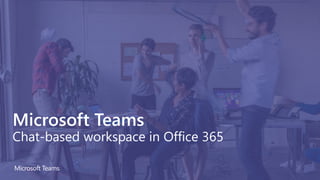
Microsoft Teams
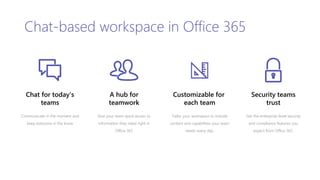
Chat-based workspace in Office 365
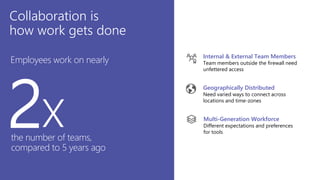
Collaboration is
how work gets done
Geographically Distributed
Need varied ways to connect across
locations and time-zones
Internal & External Team Members
Team members outside the firewall need
unfettered access
Multi-Generation Workforce
Different expectations and preferences
for tools
Employees work on nearly
2xthe number of teams,
compared to 5 years ago
Geographically Distributed
Need varied ways to connect across
locations and time-zones
Internal & External Team Members
Team members outside the firewall need
unfettered access
Multi-Generation Workforce
Different expectations and preferences
for tools
Chat for today’s
teams
Communicate in the moment and
keep everyone in the know
Customizable for
each team
Tailor your workspace to include
content and capabilities your team
needs every day.
A hub for
teamwork
Give your team quick access to
information they need right in
Office 365
Chat-based workspace in Office 365
Security teams
trust
Get the enterprise-level security
and compliance features you
expect from Office 365.
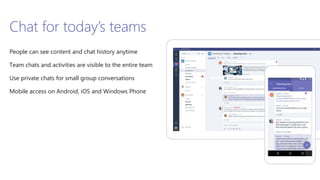
Chat for today’s teams
People can see content and chat history anytime
Team chats and activities are visible to the entire team
Use private chats for small group conversations
Mobile access on Android, iOS and Windows Phone
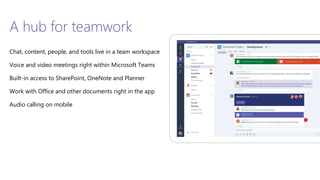
A hub for teamwork
Chat, content, people, and tools live in a team workspace
Voice and video meetings right within Microsoft Teams
Built-in access to SharePoint, OneNote and Planner
Work with Office and other documents right in the app
Audio calling on mobile
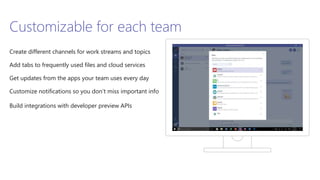
Customizable for each team
Create different channels for work streams and topics
Add tabs to frequently used files and cloud services
Get updates from the apps your team uses every day
Customize notifications so you don’t miss important info
Build integrations with developer preview APIs
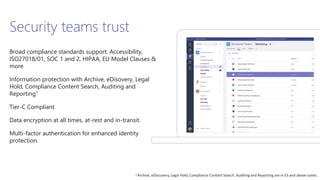
Security teams trust
Broad compliance standards support: Accessibility,
ISO27018/01, SOC 1 and 2, HIPAA, EU Model Clauses &
more
Information protection with Archive, eDisovery, Legal
Hold, Compliance Content Search, Auditing and
Reporting1
Tier-C Compliant
Data encryption at all times, at-rest and in-transit.
Multi-factor authentication for enhanced identity
protection.
1 Archive, eDiscovery, Legal Hold, Compliance Content Search, Auditing and Reporting are in E3 and above suites.
Agenda
• Introduction
• Architecture
• Microsoft Teams Client
• Network Planning
• DEMOTIME
Q&A
Architecture
• Microsoft Teams is built on existing Microsoft technologies woven
together by Office 365 Groups.
• Powered by Microsoft’s cloud, organizations can expect excellent
performance and reliability when leveraging Microsoft Teams as
part of their collaboration story.
Security - Authentication
• Microsoft Teams leverages common Office 365 authentication schemes
• Cloud Identity
• Synchronized Identity
• Federated
• Modern authentication including multi-factor authentication (MFA)
URLs and Media Stack
• Microsoft Teams also provides a calling and meetings experience
built on the next generation cloud based infrastructure
• These technology investments include Azure-based cloud services
for media processing and signaling, H.264 video codec, SILK and
Opus audio codec, network resiliency, telemetry and quality
diagnostics.
Memberships and Roles
Team owners are able to invite anyone in the organization they work
Two roles in Team:
• Owner: person who creates the team or assigned the role.
Responsible for managing team-wide settings and membership,
including invitations
• Team member: the people that have been invited to join the team
Team Management
• Managing teams should be handled through the Microsoft Teams client
• Any user that has the permissions to create an Office 365 Group, and is
enabled for Microsoft Teams, will be able to create a new team and will
be assigned owner permissions for that team
• By default, all users with a mailbox in Exchange Online have the ability to
create Office 365 Groups
Service Administration
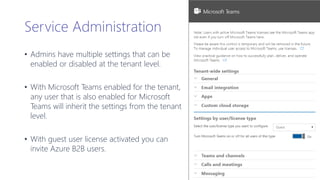
• Admins have multiple settings that can be
enabled or disabled at the tenant level.
• With Microsoft Teams enabled for the tenant,
any user that is also enabled for Microsoft
Teams will inherit the settings from the tenant
level.
• With guest user license activated you can
invite Azure B2B users.
Service Administration
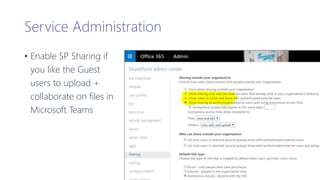
• Enable SP Sharing if
you like the Guest
users to upload +
collaborate on files in
Microsoft Teams
Teams and Channels Administration
Customization
• Change picture
Member permissions
• Channel actions: Create and update channels
• Channel actions: Delete channels
• Channel actions: Create, update, and remove tabs
• Channel actions: Create, update, and delete connectors
• Channel actions: Add and remove bots
Feature settings
• @Team and @channel mentions: Allow @team or @[team
name] mentions. This will notify everyone in the team.
• @Team and @channel mentions: Allow @channel or
@[channel name] mentions. This will notify members
who’ve favorited that channel
Giphy, stickers, and memes
• Giphy: Enable Giphy for this team
• Giphy: Set the content rating for Giphy
• Stickers and memes: Enable stickers and memes
• Memes: Allow memes to be uploaded
Note: Features available to all members in a team and channels must be configured at the team-level
Agenda
• Introduction
• Architecture
• Microsoft Teams Clients
• Network Planning
• DEMOTIME
Q&A
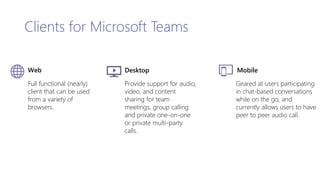
Full functional (nearly)
client that can be used
from a variety of
browsers.
Desktop
Provide support for audio,
video, and content
sharing for team
meetings, group calling
and private one-on-one
or private multi-party
calls.
Mobile
Geared at users participating
in chat-based conversations
while on the go, and
currently allows users to have
peer to peer audio call.
Clients for Microsoft Teams
Web
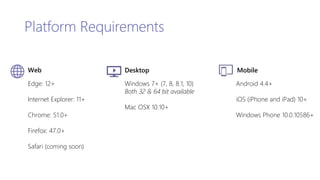
Platform Requirements
Web
Edge: 12+
Internet Explorer: 11+
Chrome: 51.0+
Firefox: 47.0+
Safari (coming soon)
Desktop
Windows 7+ (7, 8, 8.1, 10)
Both 32 & 64 bit available
Mac OSX 10.10+
Mobile
Android 4.4+
iOS (iPhone and iPad) 10+
Windows Phone 10.0.10586+
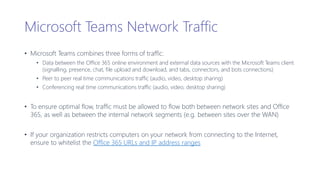
Microsoft Teams Network Traffic
• Microsoft Teams combines three forms of traffic:
• Data between the Office 365 online environment and external data sources with the Microsoft Teams client
(signalling, presence, chat, file upload and download, and tabs, connectors, and bots connections)
• Peer to peer real time communications traffic (audio, video, desktop sharing)
• Conferencing real time communications traffic (audio, video, desktop sharing)
• To ensure optimal flow, traffic must be allowed to flow both between network sites and Office
365, as well as between the internal network segments (e.g. between sites over the WAN)
• If your organization restricts computers on your network from connecting to the Internet,
ensure to whitelist the Office 365 URLs and IP address ranges
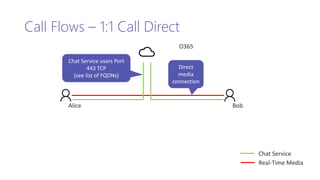
Call Flows – 1:1 Call Direct
BobAlice
O365
Chat Service users Port
443 TCP
(see list of FQDNs)
Direct
media
connection
Chat Service
Real-Time Media
Bob
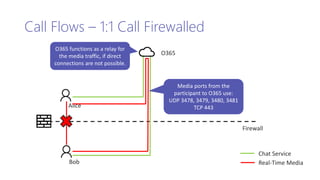
Call Flows – 1:1 Call Firewalled
Firewall
Alice
Chat Service
Real-Time Media
O365
Media ports from the
participant to O365 use:
UDP 3478, 3479, 3480, 3481
TCP 443
O365 functions as a relay for
the media traffic, if direct
connections are not possible.
Microsoft Teams Bandwidth Calculator
• Microsoft has created a dedicated site for calculating the potential
impact of Microsoft Teams traffic on your LAN, WAN and Internet
segments.
• Please see http://aka.ms/bwcalc for more details
Network Assessment
• Ensure all required URLs and IP addresses are allowed, and the network
performance metrics are meeting the requirements for real time media
• Conduct network assessment on each site using Skype for Business
Network Assessment Tool
• Additional documentation on Network Assessment can be referenced
from Network Readiness Assessment
Team me up! 
Turn on Microsoft Teams for your company
Identify a team to begin pilot
Plan company roll out
1
2
3
Meet Microsoft Teams
Team me up Scotty!

Team me up Scotty!

  • 1.
    Team me upScotty! Kristiansand Office365 usergroup agder 13 september 2017 Thorbjørn Værp @vaerpn #o365uga
  • 2.
    Thanks to theSponsors!
  • 3.
    About me Thorbjørn Værp PrincipalConsultant & Regional Manager
  • 4.
    Agenda • Introduction • Architecture •Microsoft Teams Client • Network Planning • DEMOTIME Q&A
  • 5.
  • 6.
    Collaboration is how workgets done Geographically Distributed Need varied ways to connect across locations and time-zones Internal & External Team Members Team members outside the firewall need unfettered access Multi-Generation Workforce Different expectations and preferences for tools Employees work on nearly 2xthe number of teams, compared to 5 years ago Geographically Distributed Need varied ways to connect across locations and time-zones Internal & External Team Members Team members outside the firewall need unfettered access Multi-Generation Workforce Different expectations and preferences for tools
  • 7.
    Chat for today’s teams Communicatein the moment and keep everyone in the know Customizable for each team Tailor your workspace to include content and capabilities your team needs every day. A hub for teamwork Give your team quick access to information they need right in Office 365 Chat-based workspace in Office 365 Security teams trust Get the enterprise-level security and compliance features you expect from Office 365.
  • 8.
    Chat for today’steams People can see content and chat history anytime Team chats and activities are visible to the entire team Use private chats for small group conversations Mobile access on Android, iOS and Windows Phone
  • 9.
    A hub forteamwork Chat, content, people, and tools live in a team workspace Voice and video meetings right within Microsoft Teams Built-in access to SharePoint, OneNote and Planner Work with Office and other documents right in the app Audio calling on mobile
  • 10.
    Customizable for eachteam Create different channels for work streams and topics Add tabs to frequently used files and cloud services Get updates from the apps your team uses every day Customize notifications so you don’t miss important info Build integrations with developer preview APIs
  • 11.
    Security teams trust Broadcompliance standards support: Accessibility, ISO27018/01, SOC 1 and 2, HIPAA, EU Model Clauses & more Information protection with Archive, eDisovery, Legal Hold, Compliance Content Search, Auditing and Reporting1 Tier-C Compliant Data encryption at all times, at-rest and in-transit. Multi-factor authentication for enhanced identity protection. 1 Archive, eDiscovery, Legal Hold, Compliance Content Search, Auditing and Reporting are in E3 and above suites.
  • 12.
    Agenda • Introduction • Architecture •Microsoft Teams Client • Network Planning • DEMOTIME Q&A
  • 14.
    Architecture • Microsoft Teamsis built on existing Microsoft technologies woven together by Office 365 Groups. • Powered by Microsoft’s cloud, organizations can expect excellent performance and reliability when leveraging Microsoft Teams as part of their collaboration story.
  • 15.
    Security - Authentication •Microsoft Teams leverages common Office 365 authentication schemes • Cloud Identity • Synchronized Identity • Federated • Modern authentication including multi-factor authentication (MFA)
  • 16.
    URLs and MediaStack • Microsoft Teams also provides a calling and meetings experience built on the next generation cloud based infrastructure • These technology investments include Azure-based cloud services for media processing and signaling, H.264 video codec, SILK and Opus audio codec, network resiliency, telemetry and quality diagnostics.
  • 17.
    Memberships and Roles Teamowners are able to invite anyone in the organization they work Two roles in Team: • Owner: person who creates the team or assigned the role. Responsible for managing team-wide settings and membership, including invitations • Team member: the people that have been invited to join the team
  • 18.
    Team Management • Managingteams should be handled through the Microsoft Teams client • Any user that has the permissions to create an Office 365 Group, and is enabled for Microsoft Teams, will be able to create a new team and will be assigned owner permissions for that team • By default, all users with a mailbox in Exchange Online have the ability to create Office 365 Groups
  • 19.
    Service Administration • Adminshave multiple settings that can be enabled or disabled at the tenant level. • With Microsoft Teams enabled for the tenant, any user that is also enabled for Microsoft Teams will inherit the settings from the tenant level. • With guest user license activated you can invite Azure B2B users.
  • 20.
    Service Administration • EnableSP Sharing if you like the Guest users to upload + collaborate on files in Microsoft Teams
  • 21.
    Teams and ChannelsAdministration Customization • Change picture Member permissions • Channel actions: Create and update channels • Channel actions: Delete channels • Channel actions: Create, update, and remove tabs • Channel actions: Create, update, and delete connectors • Channel actions: Add and remove bots Feature settings • @Team and @channel mentions: Allow @team or @[team name] mentions. This will notify everyone in the team. • @Team and @channel mentions: Allow @channel or @[channel name] mentions. This will notify members who’ve favorited that channel Giphy, stickers, and memes • Giphy: Enable Giphy for this team • Giphy: Set the content rating for Giphy • Stickers and memes: Enable stickers and memes • Memes: Allow memes to be uploaded Note: Features available to all members in a team and channels must be configured at the team-level
  • 22.
    Agenda • Introduction • Architecture •Microsoft Teams Clients • Network Planning • DEMOTIME Q&A
  • 24.
    Full functional (nearly) clientthat can be used from a variety of browsers. Desktop Provide support for audio, video, and content sharing for team meetings, group calling and private one-on-one or private multi-party calls. Mobile Geared at users participating in chat-based conversations while on the go, and currently allows users to have peer to peer audio call. Clients for Microsoft Teams Web
  • 25.
    Platform Requirements Web Edge: 12+ InternetExplorer: 11+ Chrome: 51.0+ Firefox: 47.0+ Safari (coming soon) Desktop Windows 7+ (7, 8, 8.1, 10) Both 32 & 64 bit available Mac OSX 10.10+ Mobile Android 4.4+ iOS (iPhone and iPad) 10+ Windows Phone 10.0.10586+
  • 27.
    Microsoft Teams NetworkTraffic • Microsoft Teams combines three forms of traffic: • Data between the Office 365 online environment and external data sources with the Microsoft Teams client (signalling, presence, chat, file upload and download, and tabs, connectors, and bots connections) • Peer to peer real time communications traffic (audio, video, desktop sharing) • Conferencing real time communications traffic (audio, video, desktop sharing) • To ensure optimal flow, traffic must be allowed to flow both between network sites and Office 365, as well as between the internal network segments (e.g. between sites over the WAN) • If your organization restricts computers on your network from connecting to the Internet, ensure to whitelist the Office 365 URLs and IP address ranges
  • 28.
    Call Flows –1:1 Call Direct BobAlice O365 Chat Service users Port 443 TCP (see list of FQDNs) Direct media connection Chat Service Real-Time Media
  • 29.
    Bob Call Flows –1:1 Call Firewalled Firewall Alice Chat Service Real-Time Media O365 Media ports from the participant to O365 use: UDP 3478, 3479, 3480, 3481 TCP 443 O365 functions as a relay for the media traffic, if direct connections are not possible.
  • 30.
    Microsoft Teams BandwidthCalculator • Microsoft has created a dedicated site for calculating the potential impact of Microsoft Teams traffic on your LAN, WAN and Internet segments. • Please see http://aka.ms/bwcalc for more details
  • 31.
    Network Assessment • Ensureall required URLs and IP addresses are allowed, and the network performance metrics are meeting the requirements for real time media • Conduct network assessment on each site using Skype for Business Network Assessment Tool • Additional documentation on Network Assessment can be referenced from Network Readiness Assessment
  • 33.
    Team me up! Turn on Microsoft Teams for your company Identify a team to begin pilot Plan company roll out 1 2 3
  • 34.

Editor's Notes

  • #2 Microsoft Teams -the New Social Workspace!!  See how MS Teams can replace Slack, Yammer, Newsfeed and many other Apps. I integrate SharePoint, PowerBI, and add Apps to totally support you'r business needs. An effective boost for every organization with an Office365 tenant. This is the future, be there or be square :)
  • #7  Over the past few years, there’s been a dramatic increase in the amount of collaboration. Employees are on 2x as many teams as 5 years ago The amount of time employees spend engaged in “collaborative” work – in meetings, on phone calls or answering emails – has increased by about 50%. Perhaps even more significantly, this kind of work now takes up 80% or more of employees’ time.   In addition to an increase in the amount of collaboration, there are other characteristics that are different about how we’re working together today. People on teams are a mix of employees and outside vendors. For example, already in the US, 40% of the workforce is contingent worker. Teams have remote members, either remote from home, or because on the road or because located in different geography. For the first time, 4 generations are working alongside each other and have different expectations about the tools they use to communicate and collaborate.
  • #8 Microsoft Teams fits in the Office 365 collaboration portfolio by giving teams easy access to the information they need in a dedicated hub for teamwork. Here, people find their team chat, content, people and tools living together in Office 365. There are four key attributes of Microsoft Teams that help close-knit teams to perform at their best: First, it’s modern day chat that keeps everyone in the know with chat history, whether across the team or in a private chat. It is a dedicated hub for teamwork where people have easy access to the everyday apps such as Word, Excel, PowerPoint, websites, and OneNote, which teams rely on daily for getting work done. Microsoft Teams is customizable for the way different teams work, including publicly available APIs and bot frameworks Lastly, Microsoft Teams is designed to provide a great collaboration experience while upholding our commitments to safeguard customer and user data, to protect their right to make decisions about that data, and to be transparent about what happens to that data.
  • #9 Microsoft Teams allows team to communicate in real time and keep everyone in the know at the same time. All team members can see and contribute to the team chat, seeing chat history at any time to recall past discussions and decisions. You have the flexibility to create private chats for small group conversations with one or many people for when a conversation needs to be taken offline. You stay on top of all of the activity with notifications which alert you to when you’ve been @mentioned or when someone’s replied to a conversation you’re a part of. You can also receive Skype for Business chat messages on Microsoft Teams so that you have one place for your team communications. And of course, you can use Microsoft Teams across all your devices as we support Microsoft Teams on Windows, Mac, iOS, Android, Windows Phone and on web
  • #10 Not only is Microsoft Teams the place for your team chat communications, it’s also a hub for your team’s collaboration. You find in a single place the chat conversations with your team, files, team members, and everyday tools. When you need to talk face to face, you can start a video call from a team chat or private chat. Turn off video if you just want an audio call. You can also join scheduled meetings from Microsoft Teams to meet within a channel or privately outside of one. Because Microsoft Teams is integrated with Office 365, teams have quick access to the information they need whether they are files shared through SharePoint, notes in OneNote or tasks in Planner. Excel, PowerPoint, Word, PDFs and other documents can be shared and opened right in the app. If you can’t immediately find what you need you can search in Microsoft Teams for people, files, chats and links. You can move easily between multiple Microsoft Teams so it’s easy to see what’s going on across teams, across channels, across chats. It’s also easy to set up and manage, whether you’re IT or an end user. Because it’s part of Office 365, all of your team members are instantly there
  • #11 Microsoft Teams gives you the flexibility to create a workspace that fits your teams’ needs. Create different channels for the team based on work streams or topics. Add new tabs to a channel for quick access to frequently used documents and cloud services like PowerPoint and Planner. Teams also includes integrations from partners like Zendesk, Asana, and Hootsuite. Tabs are used to surface content in its native format, allowing for rich collaboration in the right context. Explore data and take quick actions with bots like T-bot. or 3rd party bots like Polly, Meekan and many others. With more than 70 Office 365 Connectors from services like Twitter, Dynamics CRM Online, VSTS or GitHub, available now, you can send rich notifications right into a channel. These are great for notifying a team about required actions, completed transactions, breaking news, and other real-time updates. You can stay on top of all of the activity with notifications which alert you to when you’ve been @mentioned or when someone’s replied to a conversation you’re a part of.
  • #12 Office 365 has strong commitments around security, compliance, privacy and transparency. Microsoft Teams was built using these same principles to deliver an enterprise grade platform. From the start, Microsoft Teams was architected with compliance, authentication and privacy in mind. Microsoft Teams will have compliance built-in, with support for industry standards including grade b accessibility, ISO 27001 and 27018, SOC 1 and SOC 2, HIPAA, EU Model Clauses and more. We’ve recently added information features that you’ve come to expect from Office 365 apps and services– Archive, eDiscovery, Legal Hold, Compliance Content Search, Auditing and Reporting. These features help you control sensitive information if your business has specific security requirements for content security and data use. Microsoft Teams protects team data securely using strong security measures including two factor authentication, hard passwords and access policies. Your data is always encrypted, whether it is chat, notes or files. It’s your data, you own it, you control it. Microsoft does not mine customer data for advertising purposes and we safeguard customer data with strong contractual commitments. In keeping with our commitment to provide customers the utmost transparency, customers can see uptime, the location of their data, and detailed reports of how Office 365 controls map to the security, privacy, compliance and risk management controls defined in the Cloud Security Alliance Cloud Control Matrix (CSA CCM). Microsoft Teams is enterprise grade, with support in 18 languages across 181 markets and 6 data centers worldwide, a 99.9% financially backed SLA and 24/7 support.
  • #15  From an IT Pro perspective, there is no infrastructure to manage for Microsoft Teams.
  • #16 Microsoft Teams is built on Office 365 and leverages the rich authentication options offered by the platform including aligning with existing Office 365 Azure Active Directory authentication policies. 3 authentication schemes are available. Those being, Cloud Identity, Synchronized Identity and Federated Identify. Cloud Identity represents users being homed in Azure Active Directory. Synchronized Identity is on-premises accounts sync’d to the cloud via Azure Active Directory Sync with Password sync. Authentication still occurs in the cloud. Federated Identity represents having an ADFS deployment where access to Office 365 services will redirect to the ADFS deployment for on-premises authentication and authorization. Additionally, MFA, smart card, and certificate-based authentication are supported via Active Directory Authentication Language (ADAL) integration. Depending on the Authentication scheme selection, there are different MFA features available. Cloud Only Phone Call Text Messages Mobile App Notification Mobile App Verification Code Hybrid Setup MFA for Office 365 Azure MFA module (ADFS integrated) Physical or virtual smart card (ADFS integrated)
  • #17 To complement Microsoft Teams capability as a persistent chat board where informal, real-time, conversations around very focused topics or specific sub-groups within the group take place, Microsoft Teams also supports real time conversations. Given that Skype (Consumer), Skype for Business and Microsoft Teams are all being built to leverage the next generation calling infrastructure, you may see Microsoft Teams connecting to what appear to be Skype (Consumer) based URLs or IP addresses. The reality is that Microsoft Teams, Skype (Consumer) and Skype for Business are all leveraging new technology built to appropriately support each service.
  • #18 *Microsoft Teams does not currently support the ability for users outside of your organization to join teams.
  • #19 Speaker Notes: Be very clear that while management of O365 Group members and owners can technically still be performed via the O365 Groups area of the Admin portal, that is not the recommended approach. Once a team exists, all management of that team should be performed via a Microsoft Teams client.
  • #22 Unless business requirements dictate the limitation of certain features and functionality, it is highly recommended to leave those capabilities enabled and at the discretion of team owners.
  • #25 Microsoft Teams has clients available for web, desktop, and mobile Web: Browser must also be configured to allow third party cookies. Desktop: Both 32-bit & 64-bit available for Windows – will match the architecture of the OS. This is agnostic of the Office version Admin rights are not required on Windows, but is required on a Mac Desktop clients can be downloaded and installed by end users directly from https://teams.microsoft.com/downloads Admins can also download the installer and distribute it through client distribution tools such as System Center Configuration Manager (Windows) or Casper Suite (MacOS). Note: this is only for the initial install, updates will still be done over the air automatically Mobile: Mobile apps are distributed and updated through the respective mobile platform’s app store only, and are not available to be distributed directly through MDM (mobile device management) solutions or side-loaded.
  • #26 The Web client will perform browser version detection upon connecting to https://teams.microsoft.com. Unsupported version of browsers will be blocked and will recommend user to download the desktop client or mobile app.
  • #28  Explain the preference of UDP traffic and why that is preferred for real time media over TCP. If needed, the 3 upcoming slides show the call flow data for different scenarios.
  • #29 Here we have the one on one private chat call flow. We have Alice and Bob, both are signed in into their Teams clients. You can see that the client will always send chat content via Chat Service in Office 365. Since this is text, pictures and files, we can tolerate some network latency. Here each client uses port 443 to send information to the Chat Service. For the audio, video and desktop sharing however, we want all traffic to be as direct as possible. We leverage a protocol called ICE to find the most optimal media path. In this case a direct connection is possible. This means that both clients can directly communicate to each other. For example two clients can talk directly to each other, if they both have public IPs or they are both in the same internal network. This is great because latency will be as minimal as possible and within your internal network media traffic does not need to go to the internet. For those who are interested ICE STUN and TURN are the protocols we are using here
  • #30 In this example Alice and Bob are still trying to have a private chat conversation, but they are on different networks. The chat content still directly goes to the Chat Service. This way they can exchange private chats and also contribute to the same channels. As you see the firewall between Alice and Bob is not a problem. However if Alice and Bob want to add any real-time workload to their chat, they’ll run into a problem. As you can see the direct connections are blocked. This could be a company firewall or a firewall at the specific location where Bob or Alice are currently. This is where we will use Office 365 as a media relay. Alice will establish a connection to Office 365 and Bob will establish a connection to Office 365 for this particular media session. The media relay (actually called transport relay) will proxy the real-time media and relay it to the other user. The preferred protocol is UDP on ports 3478, 3479, 3480, 3481, but can fall back to TCP 443 if they have to. We’ll talk in a later slide to why we prefer UDP. Alice and Bob can now still have a real-time session, even if there is no direct connection between the users. This path is less optimal as all traffic needs to travel first to relay and then to the other user. This will impact latency and network path – but usually these delay should not exceed a few milliseconds. The important point is that Alice and Bob will still be able to talk to each other.
  • #31  If needed, leverage the next set of hidden slides to dive into the bandwidth requirements.
  • #32 To test both network segments (Client to Microsoft Edge and Customer Edge to Microsoft Edge) the Microsoft Network Assessment Tool can be used (source: https://www.microsoft.com/en-us/download/details.aspx?id=53885). This tool can be deployed on both the client PC directly, as well as a PC/laptop connected to the Customer Network Edge. The tool includes limited documentation, but a deeper documentation around the usage of the tool can be found here: Network Readiness Assessment. By running this Network Readiness Assessment, you can validate your networks readiness to run real time media applications, such as Microsoft Teams. Note: this is the same Network Readiness Assessment that is recommended to be run for customers who are looking to successfully deploy Skype for Business.
  • #35 Speaker Notes: