Nitin Sethi
Azure Boards
aka.ms/azureboards
@AzureDevOps
Azure Boards
#AzureBoards
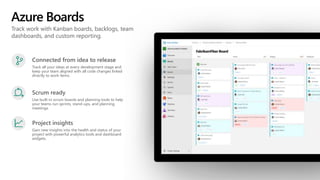
Track work with Kanban boards, backlogs, team
dashboards, and custom reporting.
Azure Boards
Connected from idea to release
Track all your ideas at every development stage and
keep your team aligned with all code changes linked
directly to work items.
Scrum ready
Use built-in scrum boards and planning tools to help
your teams run sprints, stand-ups, and planning
meetings.
Project insights
Gain new insights into the health and status of your
project with powerful analytics tools and dashboard
widgets.
Work Items Hub
Use work items to find and focus on work you care
about.
Find work items assigned to you
Track work items that you’re following or have viewed
or modified recently.
Rich filtering
Filter work items on types, assignment, states, area,
and tags.
Query and Search work items
Query work items within your project or across
projects.
Azure Boards
Azure Boards
Work Items Hub
Boards Hub
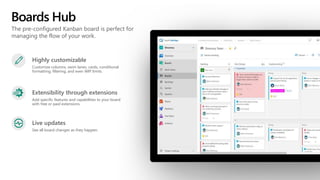
The pre-configured Kanban board is perfect for
managing the flow of your work.
Highly customizable
Customize columns, swim lanes, cards, conditional
formatting, filtering, and even WIP limits.
Extensibility through extensions
Add specific features and capabilities to your board
with free or paid extensions.
Live updates
See all board changes as they happen.
Azure Boards
Azure Boards
Boards Hub
Backlogs Hub
Use your product backlog to quickly plan and
prioritize your work.
Prioritize work items
Drag and drop items to adjust the order to help keep
things in order of priority.
Manage relationships with hierarchy
After you’ve added features or epics to your portfolio
backlog, you can map backlog items to them.
Plan sprints
Use the Plan Sprints pane to quickly assign work to
an upcoming sprint.
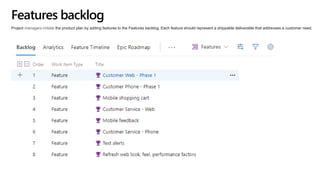
Features backlog
Project managers initiate the product plan by adding features to the Features backlog. Each feature should represent a shippable deliverable that addresses a customer need.
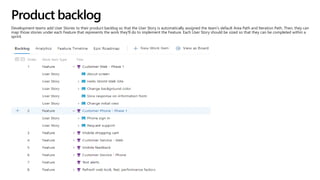
Product backlog
Development teams add User Stories to their product backlog so that the User Story is automatically assigned the team's default Area Path and Iteration Path. Then, they can
map those stories under each Feature that represents the work they'll do to implement the Feature. Each User Story should be sized so that they can be completed within a
sprint.
Groom each backlog
Periodically review each backlog to perform these tasks:
• Define work to be performed
• Reorder work items using drag-and-drop so that they appear in priority order
• Open work items and add details
• Assign work to team members or to sprints
• Capture technical debt and non-feature work required to support a healthy ecosystem of delivery
• Map unparented work to the Feature they belong to
• (Optional) Estimate size of requirements to help determine team velocity and support forecasting
Azure Boards
Azure Boards
Backlogs Hub
Sprints Hub
Sprints give you the ability to create increments of
work for your team to accomplish together.
Taskboard
Use the taskboard in daily Scrum meetings to view
progress made to backlog items and tasks.
Capacity Planning
Assign work hours to team members to help you and
your team deliver your work on time.
Burndown Chart
Throughout your sprint, you can monitor the sprint
burndown chart to determine if your team is on track
to complete its sprint plan.
Azure Boards
Azure Boards
Sprints Hub
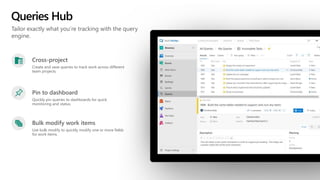
Queries Hub
Tailor exactly what you’re tracking with the query
engine.
Cross-project
Create and save queries to track work across different
team projects.
Pin to dashboard
Quickly pin queries to dashboards for quick
monitoring and status.
Bulk modify work items
Use bulk modify to quickly modify one or more fields
for work items.
Azure Boards
Azure Boards
Queries Hub
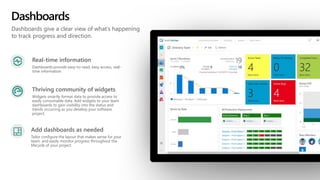
Dashboards
Dashboards give a clear view of what’s happening
to track progress and direction.
Real-time information
Dashboards provide easy-to-read, easy access, real-
time information
Thriving community of widgets
Widgets smartly format data to provide access to
easily consumable data. Add widgets to your team
dashboards to gain visibility into the status and
trends occurring as you develop your software
project.
Add dashboards as needed
Tailor configure the layout that makes sense for your
team, and easily monitor progress throughout the
lifecycle of your project.
Azure Boards
Azure Boards
Dashboards
Azure Boards
Azure Repos
Azure Pipelines
Azure Test Plans
Azure Artifacts
© Microsoft Corporation
https://azure.com/devops

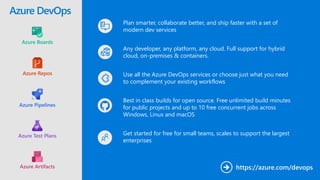
Plan smarter, collaborate better, and ship faster with a set of
modern dev services
Any developer, any platform, any cloud. Full support for hybrid
cloud, on-premises & containers.
Use all the Azure DevOps services or choose just what you need
to complement your existing workflows
Best in class builds for open source. Free unlimited build minutes
for public projects and up to 10 free concurrent jobs across
Windows, Linux and macOS
Get started for free for small teams, scales to support the largest
enterprises
Azure DevOps
Azure Boards
Azure Repos
Azure Pipelines
Azure Test Plans
Azure Artifacts
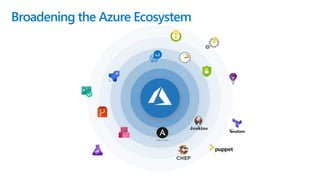
Broadening the Azure Ecosystem
© Microsoft Corporation
Thank You

Azure Boards.pptx

  • 1.
  • 2.
  • 3.
    Track work withKanban boards, backlogs, team dashboards, and custom reporting. Azure Boards Connected from idea to release Track all your ideas at every development stage and keep your team aligned with all code changes linked directly to work items. Scrum ready Use built-in scrum boards and planning tools to help your teams run sprints, stand-ups, and planning meetings. Project insights Gain new insights into the health and status of your project with powerful analytics tools and dashboard widgets.
  • 4.
    Work Items Hub Usework items to find and focus on work you care about. Find work items assigned to you Track work items that you’re following or have viewed or modified recently. Rich filtering Filter work items on types, assignment, states, area, and tags. Query and Search work items Query work items within your project or across projects.
  • 5.
  • 6.
    Boards Hub The pre-configuredKanban board is perfect for managing the flow of your work. Highly customizable Customize columns, swim lanes, cards, conditional formatting, filtering, and even WIP limits. Extensibility through extensions Add specific features and capabilities to your board with free or paid extensions. Live updates See all board changes as they happen.
  • 7.
  • 8.
    Backlogs Hub Use yourproduct backlog to quickly plan and prioritize your work. Prioritize work items Drag and drop items to adjust the order to help keep things in order of priority. Manage relationships with hierarchy After you’ve added features or epics to your portfolio backlog, you can map backlog items to them. Plan sprints Use the Plan Sprints pane to quickly assign work to an upcoming sprint.
  • 9.
    Features backlog Project managersinitiate the product plan by adding features to the Features backlog. Each feature should represent a shippable deliverable that addresses a customer need.
  • 10.
    Product backlog Development teamsadd User Stories to their product backlog so that the User Story is automatically assigned the team's default Area Path and Iteration Path. Then, they can map those stories under each Feature that represents the work they'll do to implement the Feature. Each User Story should be sized so that they can be completed within a sprint.
  • 11.
    Groom each backlog Periodicallyreview each backlog to perform these tasks: • Define work to be performed • Reorder work items using drag-and-drop so that they appear in priority order • Open work items and add details • Assign work to team members or to sprints • Capture technical debt and non-feature work required to support a healthy ecosystem of delivery • Map unparented work to the Feature they belong to • (Optional) Estimate size of requirements to help determine team velocity and support forecasting
  • 12.
  • 13.
    Sprints Hub Sprints giveyou the ability to create increments of work for your team to accomplish together. Taskboard Use the taskboard in daily Scrum meetings to view progress made to backlog items and tasks. Capacity Planning Assign work hours to team members to help you and your team deliver your work on time. Burndown Chart Throughout your sprint, you can monitor the sprint burndown chart to determine if your team is on track to complete its sprint plan.
  • 14.
  • 15.
    Queries Hub Tailor exactlywhat you’re tracking with the query engine. Cross-project Create and save queries to track work across different team projects. Pin to dashboard Quickly pin queries to dashboards for quick monitoring and status. Bulk modify work items Use bulk modify to quickly modify one or more fields for work items.
  • 16.
  • 17.
    Dashboards Dashboards give aclear view of what’s happening to track progress and direction. Real-time information Dashboards provide easy-to-read, easy access, real- time information Thriving community of widgets Widgets smartly format data to provide access to easily consumable data. Add widgets to your team dashboards to gain visibility into the status and trends occurring as you develop your software project. Add dashboards as needed Tailor configure the layout that makes sense for your team, and easily monitor progress throughout the lifecycle of your project.
  • 18.
  • 19.
    Azure Boards Azure Repos AzurePipelines Azure Test Plans Azure Artifacts
  • 20.
    © Microsoft Corporation https://azure.com/devops  Plansmarter, collaborate better, and ship faster with a set of modern dev services Any developer, any platform, any cloud. Full support for hybrid cloud, on-premises & containers. Use all the Azure DevOps services or choose just what you need to complement your existing workflows Best in class builds for open source. Free unlimited build minutes for public projects and up to 10 free concurrent jobs across Windows, Linux and macOS Get started for free for small teams, scales to support the largest enterprises Azure DevOps Azure Boards Azure Repos Azure Pipelines Azure Test Plans Azure Artifacts
  • 21.
  • 22.

Editor's Notes

  • #3 Join the conversation. Potentially replace for speaker contact details / intro.
  • #4 Combine Kanban boards and drag-and-drop sprint planning with comprehensive 
traceability and reporting for the perfect home for all your ideas–big and small.
  • #5 Mention how queries can also be used to generate charts. Charts provide a preview of what can be pinned to the dashboard. VSTS Open in Excel for bulk editing of work items https://marketplace.visualstudio.com/items?itemName=blueprint.vsts-open-work-items-in-excel
  • #22 So does TFS