Creating Threads using Runnable interface


                                            1
Objectives


On completion of this period, you would be
able to learn
• Creating threads using Runnable interface
• Creating multiple threads


                                              2
Recap

In the previous class we learnt that there are two
  ways to create a thread
  1. Extending Thread class
  2. Implementing Runnable interface
• We have created threads using Thread class


                                                     3
Implementing Runnable Interface
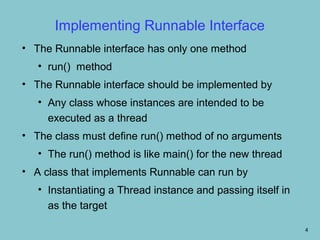
• The Runnable interface has only one method
   • run() method
• The Runnable interface should be implemented by
   • Any class whose instances are intended to be
     executed as a thread
• The class must define run() method of no arguments
   • The run() method is like main() for the new thread
• A class that implements Runnable can run by
   • Instantiating a Thread instance and passing itself in
     as the target

                                                             4
Implementing Runnable Interface contd..
• Two Ways of Starting a Thread For a class that
  implements Runnable
• The first approach:
   • Caller thread creates Thread object and starts
     it explicitly after an object instance of the
     class that implements Runnable interface is
     created
       • The start() method of the Thread object
         needs to be explicitly invoked after object
         instance is created

                                                       5
Implementing Runnable Interface contd..


• The second approach
   • The Thread object is created and started
     within the constructor method of the class that
     implements Runnable interface
      • The caller thread just needs to create
        object instances of the Runnable class


                                                       6
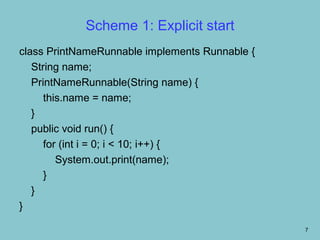
Scheme 1: Explicit start
class PrintNameRunnable implements Runnable {
   String name;
   PrintNameRunnable(String name) {
      this.name = name;
   }
   public void run() {
      for (int i = 0; i < 10; i++) {
         System.out.print(name);
      }
   }
}

                                                7
Scheme 1: Explicit start
Public class RunnableThreadTest1 {
  public static void main(String args[]) {
     PrintNameRunnable pnt1 = new
  PrintNameRunnable("A");
     Thread t1 = new Thread(pnt1);
     t1.start();
  }
}


                                             8
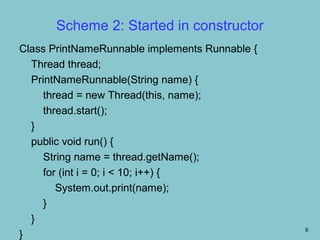
Scheme 2: Started in constructor
Class PrintNameRunnable implements Runnable {
  Thread thread;
  PrintNameRunnable(String name) {
     thread = new Thread(this, name);
     thread.start();
  }
  public void run() {
     String name = thread.getName();
     for (int i = 0; i < 10; i++) {
        System.out.print(name);
     }
  }
                                                9
}
Scheme 2: Started in constructor contd..
public class RunnableThreadTest2 {
  public static void main (String args []) {
     new Print Name Runnable ("A");
     new Print Name Runnable ("B");
     new Print Name Runnable ("C");
  }
}


                                               10
Thread vs. Runnable
• Choosing between these two is a matter of taste
• Implementing the Runnable interface
   • May take more work since we still
• Declare a Thread object
• Call the Thread methods on this object
   • Your class can still extend other class
• Extending the Thread class
   • Easier to implement
   • Your class can no longer extend any other
     class
                                                    11
Example Program

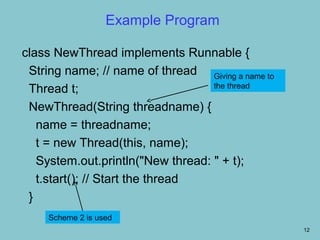
class NewThread implements Runnable {
 String name; // name of thread Giving a name to
                                   the thread
 Thread t;
 NewThread(String threadname) {
   name = threadname;
   t = new Thread(this, name);
   System.out.println("New thread: " + t);
   t.start(); // Start the thread
 }
     Scheme 2 is used
                                                   12
Example Program              contd..
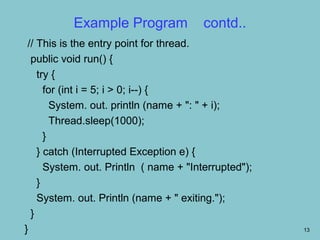
 // This is the entry point for thread.
  public void run() {
    try {
      for (int i = 5; i > 0; i--) {
        System. out. println (name + ": " + i);
        Thread.sleep(1000);
      }
    } catch (Interrupted Exception e) {
      System. out. Println ( name + "Interrupted");
    }
    System. out. Println (name + " exiting.");
  }
}                                                     13
Example Program contd..
class RunnableThread {
  public static void main(String args[]) {
    new NewThread("Child Thread"); // create a new thread
    try {
      for(int i = 5; i > 0; i--) {
        System.out.println("Main Thread: " + i);
        Thread.sleep(500);
      }
    } catch (InterruptedException e) {
      System.out.println("Main thread interrupted.");
    }
    System.out.println("Main thread exiting.");
  }
                                                            14
}
Example Program
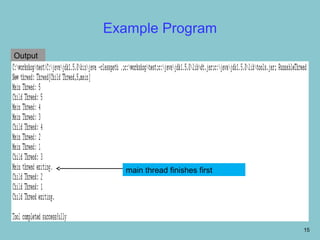
Output


            main thread finishes first


                                         15
Example Program
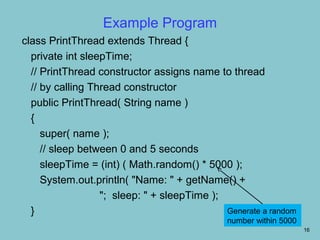
class PrintThread extends Thread {
  private int sleepTime;
  // PrintThread constructor assigns name to thread
  // by calling Thread constructor
  public PrintThread( String name )
  {
     super( name );
     // sleep between 0 and 5 seconds
     sleepTime = (int) ( Math.random() * 5000 );
     System.out.println( "Name: " + getName() +
                  "; sleep: " + sleepTime );
  }                                          Generate a random
                                              number within 5000
                                                                   16
Example Program             contd..
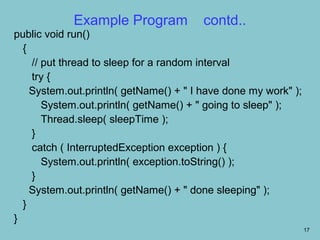
public void run()
  {
    // put thread to sleep for a random interval
    try {
    System.out.println( getName() + " I have done my work" );
       System.out.println( getName() + " going to sleep" );
       Thread.sleep( sleepTime );
    }
    catch ( InterruptedException exception ) {
       System.out.println( exception.toString() );
    }
    System.out.println( getName() + " done sleeping" );
  }
}
                                                                17
Example Program              contd..
public class ThreadTester {
  public static void main( String args[] )
  {
    PrintThread thread1, thread2, thread3, thread4;
    thread1 = new PrintThread( "thread1" );
    thread2 = new PrintThread( "thread2" );
    thread3 = new PrintThread( "thread3" );
    thread4 = new PrintThread( "thread4" );

   System.out.println( "nStarting threads" );


                                                      18
Example Program          contd…
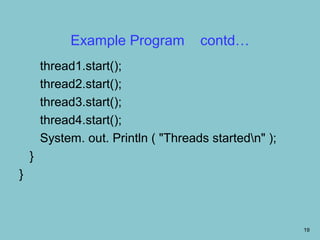
        thread1.start();
        thread2.start();
        thread3.start();
        thread4.start();
        System. out. Println ( "Threads startedn" );
    }
}


                                                        19
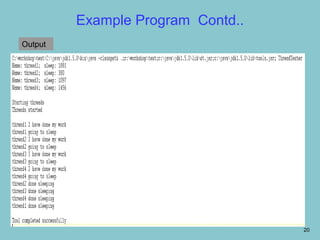
Example Program Contd..
Output


                                   20
Summary
• In this class you have learnt
   • The second way of creating threads i.e., by
     implementing Runnable interface
   • The two schemes for the above approach
   • Creating multiple threads


                                                   21
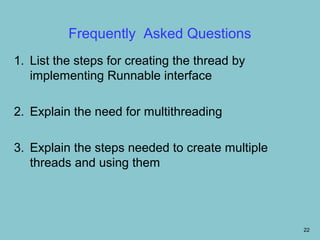
Frequently Asked Questions
1. List the steps for creating the thread by
   implementing Runnable interface

2. Explain the need for multithreading

3. Explain the steps needed to create multiple
   threads and using them


                                                 22
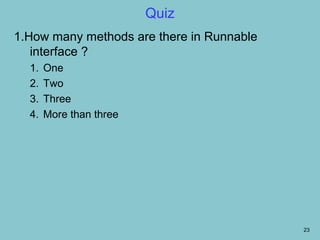
Quiz
1.How many methods are there in Runnable
   interface ?
  1.   One
  2.   Two
  3.   Three
  4.   More than three


                                           23
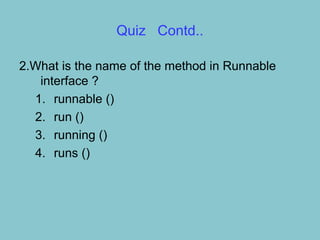
Quiz Contd..

2.What is the name of the method in Runnable
   interface ?
  1. runnable ()
  2. run ()
  3. running ()
  4. runs ()
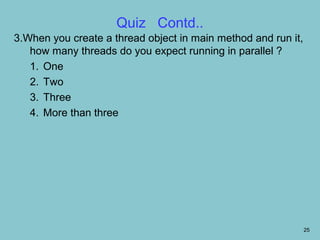
Quiz Contd..
3.When you create a thread object in main method and run it,
   how many threads do you expect running in parallel ?
   1. One
   2. Two
   3. Three
   4. More than three


                                                               25
Quiz    Contd..

4.When we implement the Runnable interface, we
   must define the method
  1. start()
  2. stop()
  3. run()
  4. main()
Assignments
• Write a Java thread that prints even numbers up
  to 20
• Write a Java thread that prints odd numbers up to
  20
• Write a Java thread that prints prime numbers up
  to 100
   • In all the above programs, put the delay of one
     second after every print
• Write a Java program to create multiple threads
  using the above three threads

                                                       27

Runnable interface.34

  • 1.
    Creating Threads usingRunnable interface 1
  • 2.
    Objectives On completion ofthis period, you would be able to learn • Creating threads using Runnable interface • Creating multiple threads 2
  • 3.
    Recap In the previousclass we learnt that there are two ways to create a thread 1. Extending Thread class 2. Implementing Runnable interface • We have created threads using Thread class 3
  • 4.
    Implementing Runnable Interface •The Runnable interface has only one method • run() method • The Runnable interface should be implemented by • Any class whose instances are intended to be executed as a thread • The class must define run() method of no arguments • The run() method is like main() for the new thread • A class that implements Runnable can run by • Instantiating a Thread instance and passing itself in as the target 4
  • 5.
    Implementing Runnable Interfacecontd.. • Two Ways of Starting a Thread For a class that implements Runnable • The first approach: • Caller thread creates Thread object and starts it explicitly after an object instance of the class that implements Runnable interface is created • The start() method of the Thread object needs to be explicitly invoked after object instance is created 5
  • 6.
    Implementing Runnable Interfacecontd.. • The second approach • The Thread object is created and started within the constructor method of the class that implements Runnable interface • The caller thread just needs to create object instances of the Runnable class 6
  • 7.
    Scheme 1: Explicitstart class PrintNameRunnable implements Runnable { String name; PrintNameRunnable(String name) { this.name = name; } public void run() { for (int i = 0; i < 10; i++) { System.out.print(name); } } } 7
  • 8.
    Scheme 1: Explicitstart Public class RunnableThreadTest1 { public static void main(String args[]) { PrintNameRunnable pnt1 = new PrintNameRunnable("A"); Thread t1 = new Thread(pnt1); t1.start(); } } 8
  • 9.
    Scheme 2: Startedin constructor Class PrintNameRunnable implements Runnable { Thread thread; PrintNameRunnable(String name) { thread = new Thread(this, name); thread.start(); } public void run() { String name = thread.getName(); for (int i = 0; i < 10; i++) { System.out.print(name); } } 9 }
  • 10.
    Scheme 2: Startedin constructor contd.. public class RunnableThreadTest2 { public static void main (String args []) { new Print Name Runnable ("A"); new Print Name Runnable ("B"); new Print Name Runnable ("C"); } } 10
  • 11.
    Thread vs. Runnable •Choosing between these two is a matter of taste • Implementing the Runnable interface • May take more work since we still • Declare a Thread object • Call the Thread methods on this object • Your class can still extend other class • Extending the Thread class • Easier to implement • Your class can no longer extend any other class 11
  • 12.
    Example Program class NewThreadimplements Runnable { String name; // name of thread Giving a name to the thread Thread t; NewThread(String threadname) { name = threadname; t = new Thread(this, name); System.out.println("New thread: " + t); t.start(); // Start the thread } Scheme 2 is used 12
  • 13.
    Example Program contd.. // This is the entry point for thread. public void run() { try { for (int i = 5; i > 0; i--) { System. out. println (name + ": " + i); Thread.sleep(1000); } } catch (Interrupted Exception e) { System. out. Println ( name + "Interrupted"); } System. out. Println (name + " exiting."); } } 13
  • 14.
    Example Program contd.. classRunnableThread { public static void main(String args[]) { new NewThread("Child Thread"); // create a new thread try { for(int i = 5; i > 0; i--) { System.out.println("Main Thread: " + i); Thread.sleep(500); } } catch (InterruptedException e) { System.out.println("Main thread interrupted."); } System.out.println("Main thread exiting."); } 14 }
  • 15.
    Example Program Output main thread finishes first 15
  • 16.
    Example Program class PrintThreadextends Thread { private int sleepTime; // PrintThread constructor assigns name to thread // by calling Thread constructor public PrintThread( String name ) { super( name ); // sleep between 0 and 5 seconds sleepTime = (int) ( Math.random() * 5000 ); System.out.println( "Name: " + getName() + "; sleep: " + sleepTime ); } Generate a random number within 5000 16
  • 17.
    Example Program contd.. public void run() { // put thread to sleep for a random interval try { System.out.println( getName() + " I have done my work" ); System.out.println( getName() + " going to sleep" ); Thread.sleep( sleepTime ); } catch ( InterruptedException exception ) { System.out.println( exception.toString() ); } System.out.println( getName() + " done sleeping" ); } } 17
  • 18.
    Example Program contd.. public class ThreadTester { public static void main( String args[] ) { PrintThread thread1, thread2, thread3, thread4; thread1 = new PrintThread( "thread1" ); thread2 = new PrintThread( "thread2" ); thread3 = new PrintThread( "thread3" ); thread4 = new PrintThread( "thread4" ); System.out.println( "nStarting threads" ); 18
  • 19.
    Example Program contd… thread1.start(); thread2.start(); thread3.start(); thread4.start(); System. out. Println ( "Threads startedn" ); } } 19
  • 20.
  • 21.
    Summary • In thisclass you have learnt • The second way of creating threads i.e., by implementing Runnable interface • The two schemes for the above approach • Creating multiple threads 21
  • 22.
    Frequently Asked Questions 1.List the steps for creating the thread by implementing Runnable interface 2. Explain the need for multithreading 3. Explain the steps needed to create multiple threads and using them 22
  • 23.
    Quiz 1.How many methodsare there in Runnable interface ? 1. One 2. Two 3. Three 4. More than three 23
  • 24.
    Quiz Contd.. 2.What isthe name of the method in Runnable interface ? 1. runnable () 2. run () 3. running () 4. runs ()
  • 25.
    Quiz Contd.. 3.When youcreate a thread object in main method and run it, how many threads do you expect running in parallel ? 1. One 2. Two 3. Three 4. More than three 25
  • 26.
    Quiz Contd.. 4.When we implement the Runnable interface, we must define the method 1. start() 2. stop() 3. run() 4. main()
  • 27.
    Assignments • Write aJava thread that prints even numbers up to 20 • Write a Java thread that prints odd numbers up to 20 • Write a Java thread that prints prime numbers up to 100 • In all the above programs, put the delay of one second after every print • Write a Java program to create multiple threads using the above three threads 27