1
Java ThreadsJava Threads
2
Topics
● What is a thread?
● Thread states
● Thread priorities
● Thread class
● Two ways of creating Java threads
– Extending Thread class
– Implementing Runnable interface
● ThreadGroup
● Synchronization
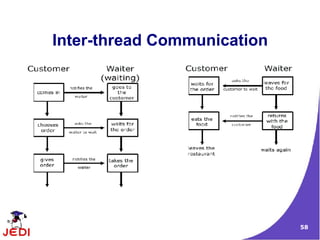
● Inter-thread communication
● Scheduling a task via Timer and TimerTask
3
What is a Thread?What is a Thread?
4
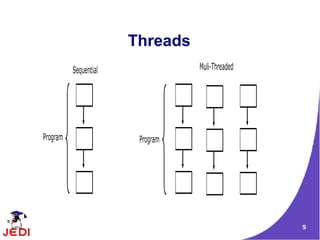
Threads
● Why threads?
– Need to handle concurrent processes
● Definition
– Single sequential flow of control within a program
– For simplicity, think of threads as processes executed by
a program
– Example:
● Operating System
● HotJava web browser
5
Threads
6
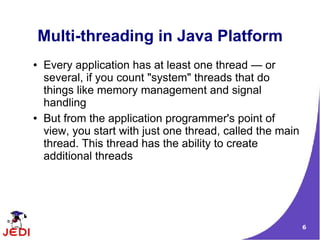
Multi-threading in Java Platform
● Every application has at least one thread — or
several, if you count "system" threads that do
things like memory management and signal
handling
● But from the application programmer's point of
view, you start with just one thread, called the main
thread. This thread has the ability to create
additional threads
7
Thread StatesThread States
8
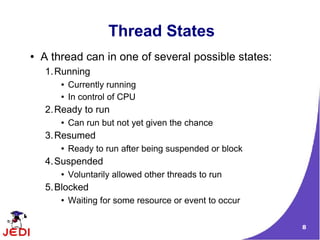
Thread States
● A thread can in one of several possible states:
1.Running
● Currently running
● In control of CPU
2.Ready to run
● Can run but not yet given the chance
3.Resumed
● Ready to run after being suspended or block
4.Suspended
● Voluntarily allowed other threads to run
5.Blocked
● Waiting for some resource or event to occur
9
Thread PrioritiesThread Priorities
10
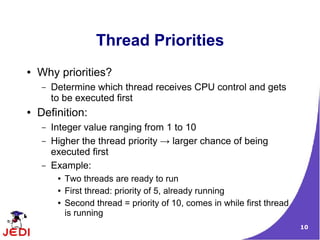
Thread Priorities
● Why priorities?
– Determine which thread receives CPU control and gets
to be executed first
● Definition:
– Integer value ranging from 1 to 10
– Higher the thread priority → larger chance of being
executed first
– Example:
● Two threads are ready to run
● First thread: priority of 5, already running
● Second thread = priority of 10, comes in while first thread
is running
11
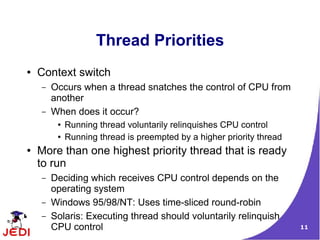
Thread Priorities
● Context switch
– Occurs when a thread snatches the control of CPU from
another
– When does it occur?
● Running thread voluntarily relinquishes CPU control
● Running thread is preempted by a higher priority thread
● More than one highest priority thread that is ready
to run
– Deciding which receives CPU control depends on the
operating system
– Windows 95/98/NT: Uses time-sliced round-robin
– Solaris: Executing thread should voluntarily relinquish
CPU control
12
Thread ClassThread Class
13
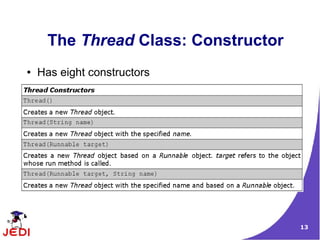
The Thread Class: Constructor
● Has eight constructors
14
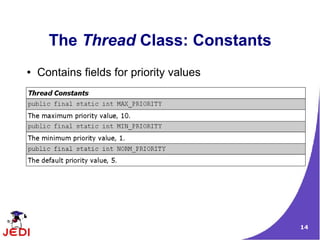
The Thread Class: Constants
● Contains fields for priority values
15
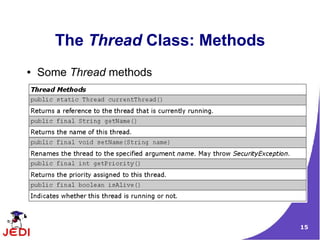
The Thread Class: Methods
● Some Thread methods
16
Two Ways of CreatingTwo Ways of Creating
Java ThreadsJava Threads
17
Two Ways of Creating and Starting
a Thread
1.Extending the Thread class
2.Implementing the Runnable interface
18
Extending ThreadExtending Thread
ClassClass
19
Extending Thread Class
● The subclass extends Thread class
– The subclass overrides the run() method of Thread class
● An object instance of the subclass can then be
created
● Calling the start() method of the object instance
starts the execution of the thread
– Java runtime starts the execution of the thread by
calling run() method of object instance
20
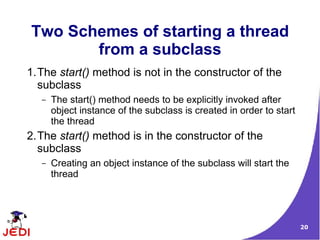
Two Schemes of starting a thread
from a subclass
1.The start() method is not in the constructor of the
subclass
– The start() method needs to be explicitly invoked after
object instance of the subclass is created in order to start
the thread
2.The start() method is in the constructor of the
subclass
– Creating an object instance of the subclass will start the
thread
21
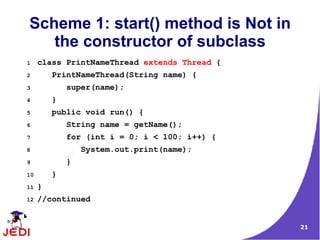
Scheme 1: start() method is Not in
the constructor of subclass
1 class PrintNameThread extends Thread {
2 PrintNameThread(String name) {
3 super(name);
4 }
5 public void run() {
6 String name = getName();
7 for (int i = 0; i < 100; i++) {
8 System.out.print(name);
9 }
10 }
11 }
12 //continued
22
Scheme 1: start() method needs to
be called explicitly
14 class ExtendThreadClassTest1 {
15 public static void main(String args[]) {
16 PrintNameThread pnt1 =
17 new PrintNameThread("A");
18 pnt1.start(); // Start the first thread
19 PrintNameThread pnt2 =
20 new PrintNameThread("B");
21 pnt2.start(); // Start the second thread
22
23 }
24 }
23
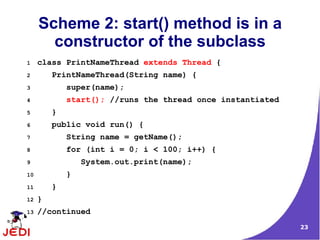
Scheme 2: start() method is in a
constructor of the subclass
1 class PrintNameThread extends Thread {
2 PrintNameThread(String name) {
3 super(name);
4 start(); //runs the thread once instantiated
5 }
6 public void run() {
7 String name = getName();
8 for (int i = 0; i < 100; i++) {
9 System.out.print(name);
10 }
11 }
12 }
13 //continued
24
Scheme 2: Just creating an object
instance starts a thread
14 class ExtendThreadClassTest2 {
15 public static void main(String args[]) {
16 PrintNameThread pnt1 =
17 new PrintNameThread("A");
18 PrintNameThread pnt2 =
19 new PrintNameThread("B");
20
21 }
22 }
25
Scheme 2: Just creating an object
instance starts a thread
● Can modify main method as follows:
14 class ExtendThreadClassTest3 {
15 public static void main(String args[]) {
16 new PrintNameThread("A");
17 new PrintNameThread("B");
18 }
19 }
26
ImplementingImplementing
Runnable InterfaceRunnable Interface
27
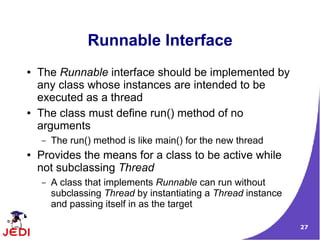
Runnable Interface
● The Runnable interface should be implemented by
any class whose instances are intended to be
executed as a thread
● The class must define run() method of no
arguments
– The run() method is like main() for the new thread
● Provides the means for a class to be active while
not subclassing Thread
– A class that implements Runnable can run without
subclassing Thread by instantiating a Thread instance
and passing itself in as the target
28
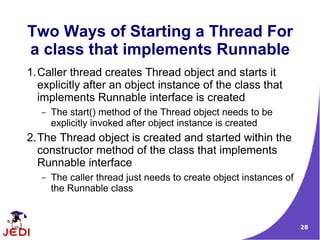
Two Ways of Starting a Thread For
a class that implements Runnable
1.Caller thread creates Thread object and starts it
explicitly after an object instance of the class that
implements Runnable interface is created
– The start() method of the Thread object needs to be
explicitly invoked after object instance is created
2.The Thread object is created and started within the
constructor method of the class that implements
Runnable interface
– The caller thread just needs to create object instances of
the Runnable class
29
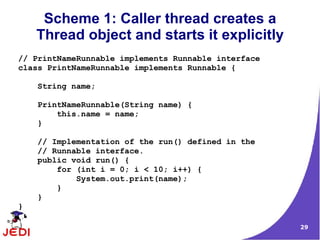
Scheme 1: Caller thread creates a
Thread object and starts it explicitly
// PrintNameRunnable implements Runnable interface
class PrintNameRunnable implements Runnable {
String name;
PrintNameRunnable(String name) {
this.name = name;
}
// Implementation of the run() defined in the
// Runnable interface.
public void run() {
for (int i = 0; i < 10; i++) {
System.out.print(name);
}
}
}
30
Scheme 1: Caller thread creates a
Thread object and starts it explicitly
public class RunnableThreadTest1 {
public static void main(String args[]) {
PrintNameRunnable pnt1 = new PrintNameRunnable("A");
Thread t1 = new Thread(pnt1);
t1.start();
}
}
31
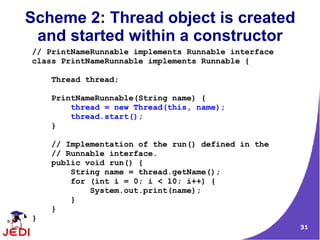
Scheme 2: Thread object is created
and started within a constructor
// PrintNameRunnable implements Runnable interface
class PrintNameRunnable implements Runnable {
Thread thread;
PrintNameRunnable(String name) {
thread = new Thread(this, name);
thread.start();
}
// Implementation of the run() defined in the
// Runnable interface.
public void run() {
String name = thread.getName();
for (int i = 0; i < 10; i++) {
System.out.print(name);
}
}
}
32
Scheme 2: Thread object is created
and started within a constructor
public class RunnableThreadTest2 {
public static void main(String args[]) {
// Since the constructor of the PrintNameRunnable
// object creates a Thread object and starts it,
// there is no need to do it here.
new PrintNameRunnable("A");
new PrintNameRunnable("B");
new PrintNameRunnable("C");
}
}
33
Extending Thread ClassExtending Thread Class
vs. Implementingvs. Implementing
Runnable InterfaceRunnable Interface
34
Extending Thread vs. Implementing
Runnable Interface
● Choosing between these two is a matter of taste
● Implementing the Runnable interface
– May take more work since we still
● Declare a Thread object
● Call the Thread methods on this object
– Your class can still extend other class
● Extending the Thread class
– Easier to implement
– Your class can no longer extend any other class
35
ThreadGroupThreadGroup
36
ThreadGroup Class
● A thread group represents a set of threads
● In addition, a thread group can also include other
thread groups
– The thread groups form a tree in which every thread
group except the initial thread group has a parent
● A thread is allowed to access information about its
own thread group, but not to access information
about its thread group's parent thread group or any
other thread groups.
37
Example: ThreadGroup
1 // Start three threads
2 new SimpleThread("Jamaica").start();
3 new SimpleThread("Fiji").start();
4 new SimpleThread("Bora Bora").start();
5
6 ThreadGroup group
7 = Thread.currentThread().getThreadGroup();
8
9 Thread[] tarray = new Thread[10];
10 int actualSize = group.enumerate(tarray);
11 for (int i=0; i<actualSize;i++){
12 System.out.println("Thread " +
13 tarray[i].getName() + " in thread group "
14 + group.getName());
15 }
38
SynchronizationSynchronization
39
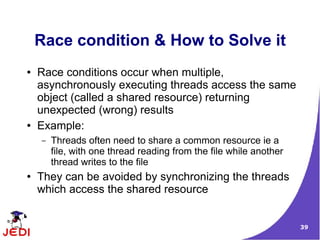
Race condition & How to Solve it
● Race conditions occur when multiple,
asynchronously executing threads access the same
object (called a shared resource) returning
unexpected (wrong) results
● Example:
– Threads often need to share a common resource ie a
file, with one thread reading from the file while another
thread writes to the file
● They can be avoided by synchronizing the threads
which access the shared resource
40
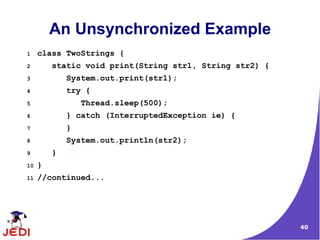
An Unsynchronized Example
1 class TwoStrings {
2 static void print(String str1, String str2) {
3 System.out.print(str1);
4 try {
5 Thread.sleep(500);
6 } catch (InterruptedException ie) {
7 }
8 System.out.println(str2);
9 }
10 }
11 //continued...
41
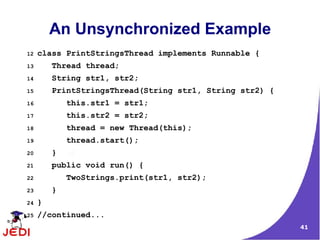
An Unsynchronized Example
12 class PrintStringsThread implements Runnable {
13 Thread thread;
14 String str1, str2;
15 PrintStringsThread(String str1, String str2) {
16 this.str1 = str1;
17 this.str2 = str2;
18 thread = new Thread(this);
19 thread.start();
20 }
21 public void run() {
22 TwoStrings.print(str1, str2);
23 }
24 }
25 //continued...
42
An Unsynchronized Example
26 class TestThread {
27 public static void main(String args[]) {
28 new PrintStringsThread("Hello ", "there.");
29 new PrintStringsThread("How are ", "you?");
30 new PrintStringsThread("Thank you ",
31 "very much!");
32 }
33 }
43
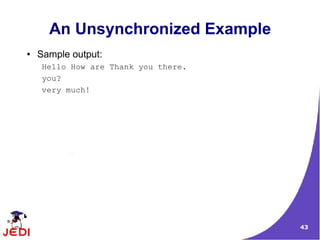
An Unsynchronized Example
● Sample output:
Hello How are Thank you there.
you?
very much!
44
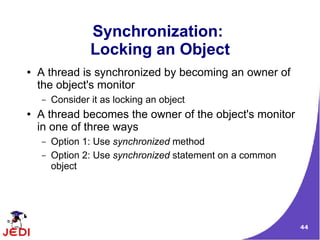
Synchronization:
Locking an Object
● A thread is synchronized by becoming an owner of
the object's monitor
– Consider it as locking an object
● A thread becomes the owner of the object's monitor
in one of three ways
– Option 1: Use synchronized method
– Option 2: Use synchronized statement on a common
object
45
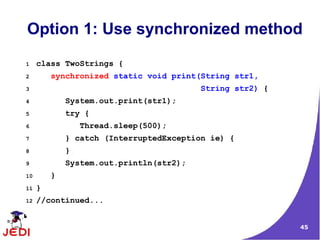
Option 1: Use synchronized method
1 class TwoStrings {
2 synchronized static void print(String str1,
3 String str2) {
4 System.out.print(str1);
5 try {
6 Thread.sleep(500);
7 } catch (InterruptedException ie) {
8 }
9 System.out.println(str2);
10 }
11 }
12 //continued...
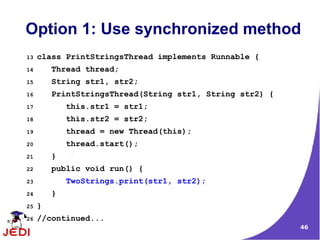
46
Option 1: Use synchronized method
13 class PrintStringsThread implements Runnable {
14 Thread thread;
15 String str1, str2;
16 PrintStringsThread(String str1, String str2) {
17 this.str1 = str1;
18 this.str2 = str2;
19 thread = new Thread(this);
20 thread.start();
21 }
22 public void run() {
23 TwoStrings.print(str1, str2);
24 }
25 }
26 //continued...
47
Option 1: Use synchronized method
27 class TestThread {
28 public static void main(String args[]) {
29 new PrintStringsThread("Hello ", "there.");
30 new PrintStringsThread("How are ", "you?");
31 new PrintStringsThread("Thank you ",
32 "very much!");
33 }
34 }
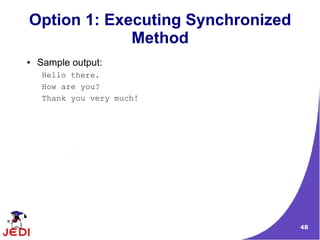
48
Option 1: Executing Synchronized
Method
● Sample output:
Hello there.
How are you?
Thank you very much!
49
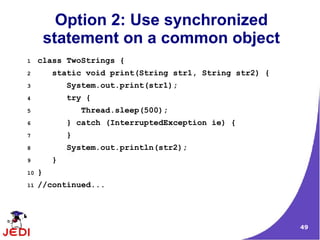
Option 2: Use synchronized
statement on a common object
1 class TwoStrings {
2 static void print(String str1, String str2) {
3 System.out.print(str1);
4 try {
5 Thread.sleep(500);
6 } catch (InterruptedException ie) {
7 }
8 System.out.println(str2);
9 }
10 }
11 //continued...
50
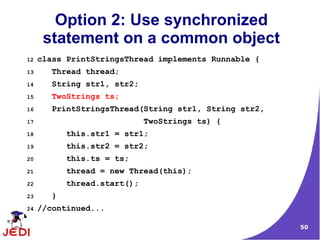
Option 2: Use synchronized
statement on a common object
12 class PrintStringsThread implements Runnable {
13 Thread thread;
14 String str1, str2;
15 TwoStrings ts;
16 PrintStringsThread(String str1, String str2,
17 TwoStrings ts) {
18 this.str1 = str1;
19 this.str2 = str2;
20 this.ts = ts;
21 thread = new Thread(this);
22 thread.start();
23 }
24 //continued...
51
Option 2: Use synchronized
statement on a common object
25 public void run() {
26 synchronized (ts) {
27 ts.print(str1, str2);
28 }
29 }
30 }
31 class TestThread {
32 public static void main(String args[]) {
33 TwoStrings ts = new TwoStrings();
34 new PrintStringsThread("Hello ", "there.", ts);
35 new PrintStringsThread("How are ", "you?", ts);
36 new PrintStringsThread("Thank you ",
37 "very much!", ts);
38 }}
52
Inter-threadInter-thread
SynchronizationSynchronization
53
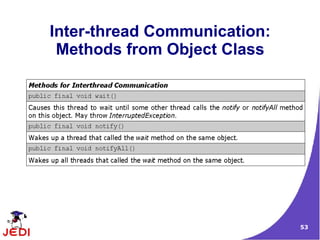
Inter-thread Communication:
Methods from Object Class
54
wait() method of Object Class
● wait() method causes a thread to release the lock it
is holding on an object; allowing another thread to
run
● wait() method is defined in the Object class
● wait() can only be invoked from within synchronized
code
● it should always be wrapped in a try block as it
throws IOExceptions
● wait() can only invoked by the thread that own's the
lock on the object
55
wait() method of Object Class
● When wait() is called, the thread becomes disabled for
scheduling and lies dormant until one of four things
occur:
– another thread invokes the notify() method for this object
and the scheduler arbitrarily chooses to run the thread
– another thread invokes the notifyAll() method for this
object
– another thread interrupts this thread
– the specified wait() time elapses
● When one of the above occurs, the thread becomes re-
available to the Thread scheduler and competes for a
lock on the object
● Once it regains the lock on the object, everything
resumes as if no suspension had occurred
56
notify() method
● Wakes up a single thread that is waiting on this
object's monitor
– If any threads are waiting on this object, one of them is
chosen to be awakened
– The choice is arbitrary and occurs at the discretion of the
implementation
● Can only be used within synchronized code
● The awakened thread will not be able to proceed
until the current thread relinquishes the lock on this
object
57
Inter-threadInter-thread
Communication:Communication:
Producer-ConsumerProducer-Consumer
ExampleExample
58
Inter-thread Communication
59
Producer-Consumer
● Imagine a scenario in which there exists two
distinct threads both operating on a single shared
data area
● One thread, the Producer inserts information into
the data area whilst the other thread, the
Consumer, removes information from that same
area
● In order for the Producer to insert information into
the data area, there must be enough space
– The Producer's sole function is to insert data into the
data-area, it is not allowed to remove any data from the
area.
60
Producer-Consumer
● For the Consumer to be able to remove information
from the data area, there must be information there
in the first place
– The sole function of the Consumer is to remove data
from the data area
● The solution of the Producer-Consumer problem
lies with devising a suitable communication protocol
through which the two processes may exchange
information.
● The definition of such a protocol is the main factor
that makes the Producer-Consumer problem
interesting in terms of concurrent systems
61
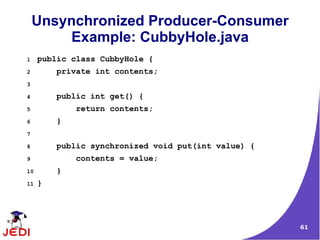
Unsynchronized Producer-Consumer
Example: CubbyHole.java
1 public class CubbyHole {
2 private int contents;
3
4 public int get() {
5 return contents;
6 }
7
8 public synchronized void put(int value) {
9 contents = value;
10 }
11 }
62
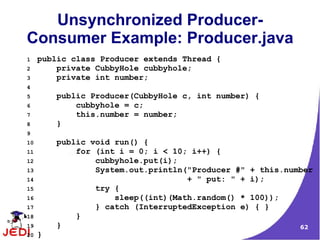
Unsynchronized Producer-
Consumer Example: Producer.java
1 public class Producer extends Thread {
2 private CubbyHole cubbyhole;
3 private int number;
4
5 public Producer(CubbyHole c, int number) {
6 cubbyhole = c;
7 this.number = number;
8 }
9
10 public void run() {
11 for (int i = 0; i < 10; i++) {
12 cubbyhole.put(i);
13 System.out.println("Producer #" + this.number
14 + " put: " + i);
15 try {
16 sleep((int)(Math.random() * 100));
17 } catch (InterruptedException e) { }
18 }
19 }
20 }
63
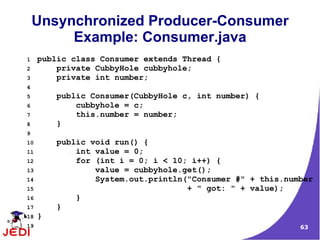
Unsynchronized Producer-Consumer
Example: Consumer.java
1 public class Consumer extends Thread {
2 private CubbyHole cubbyhole;
3 private int number;
4
5 public Consumer(CubbyHole c, int number) {
6 cubbyhole = c;
7 this.number = number;
8 }
9
10 public void run() {
11 int value = 0;
12 for (int i = 0; i < 10; i++) {
13 value = cubbyhole.get();
14 System.out.println("Consumer #" + this.number
15 + " got: " + value);
16 }
17 }
18 }
19
64
Unsynchronized Producer-
Consumer Example: Main program
1 public class ProducerConsumerUnsynchronized {
2
3 public static void main(String[] args) {
4
5 CubbyHole c = new CubbyHole();
6
7 Producer p1 = new Producer(c, 1);
8 Consumer c1 = new Consumer(c, 1);
9
10 p1.start();
11 c1.start();
12 }
13 }
65
Result of Unsynchronized
Producer-Consumer
● Results are unpredictable
– A number may be read before a number has been
produced
– Multiple numbers may be produced with only one or two
being read
66
Result of Unsynchronized
Producer-Consumer
Consumer #1 got: 0
Producer #1 put: 0
Consumer #1 got: 0
Consumer #1 got: 0
Consumer #1 got: 0
Consumer #1 got: 0
Consumer #1 got: 0
Consumer #1 got: 0
Consumer #1 got: 0
Consumer #1 got: 0
Consumer #1 got: 0
Producer #1 put: 1
Producer #1 put: 2
Producer #1 put: 3
Producer #1 put: 4
Producer #1 put: 5
Producer #1 put: 6
Producer #1 put: 7
Producer #1 put: 8
Producer #1 put: 9
67
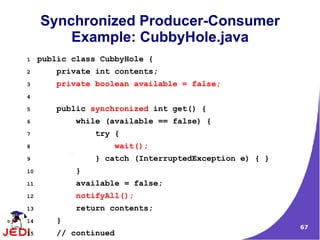
Synchronized Producer-Consumer
Example: CubbyHole.java
1 public class CubbyHole {
2 private int contents;
3 private boolean available = false;
4
5 public synchronized int get() {
6 while (available == false) {
7 try {
8 wait();
9 } catch (InterruptedException e) { }
10 }
11 available = false;
12 notifyAll();
13 return contents;
14 }
15 // continued
68
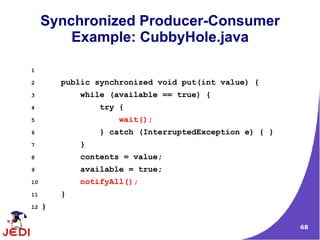
Synchronized Producer-Consumer
Example: CubbyHole.java
1
2 public synchronized void put(int value) {
3 while (available == true) {
4 try {
5 wait();
6 } catch (InterruptedException e) { }
7 }
8 contents = value;
9 available = true;
10 notifyAll();
11 }
12 }
69
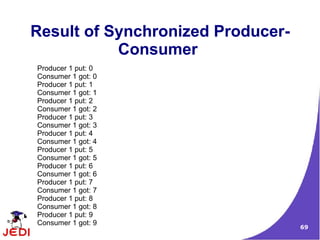
Result of Synchronized Producer-
Consumer
Producer 1 put: 0
Consumer 1 got: 0
Producer 1 put: 1
Consumer 1 got: 1
Producer 1 put: 2
Consumer 1 got: 2
Producer 1 put: 3
Consumer 1 got: 3
Producer 1 put: 4
Consumer 1 got: 4
Producer 1 put: 5
Consumer 1 got: 5
Producer 1 put: 6
Consumer 1 got: 6
Producer 1 put: 7
Consumer 1 got: 7
Producer 1 put: 8
Consumer 1 got: 8
Producer 1 put: 9
Consumer 1 got: 9
70
Scheduling a taskScheduling a task
via Timer &via Timer &
TimerTask ClassesTimerTask Classes
71
Timer Class
● Provides a facility for threads to schedule tasks for
future execution in a background thread
● Tasks may be scheduled for one-time execution, or
for repeated execution at regular intervals.
● Corresponding to each Timer object is a single
background thread that is used to execute all of the
timer's tasks, sequentially
● Timer tasks should complete quickly
– If a timer task takes excessive time to complete, it "hogs"
the timer's task execution thread. This can, in turn, delay
the execution of subsequent tasks, which may "bunch
up" and execute in rapid succession when (and if) the
offending task finally completes.
72
TimerTask Class
● Abstract class with an abstract method called run()
● Concrete class must implement the run() abstract
method
73
Example: Timer Class
public class TimerReminder {
Timer timer;
public TimerReminder(int seconds) {
timer = new Timer();
timer.schedule(new RemindTask(), seconds*1000);
}
class RemindTask extends TimerTask {
public void run() {
System.out.format("Time's up!%n");
timer.cancel(); //Terminate the timer thread
}
}
public static void main(String args[]) {
System.out.format("About to schedule task.%n");
new TimerReminder(5);
System.out.format("Task scheduled.%n");
}
}
74
Thank You!Thank You!

java-thread

  • 1.
  • 2.
    2 Topics ● What isa thread? ● Thread states ● Thread priorities ● Thread class ● Two ways of creating Java threads – Extending Thread class – Implementing Runnable interface ● ThreadGroup ● Synchronization ● Inter-thread communication ● Scheduling a task via Timer and TimerTask
  • 3.
    3 What is aThread?What is a Thread?
  • 4.
    4 Threads ● Why threads? –Need to handle concurrent processes ● Definition – Single sequential flow of control within a program – For simplicity, think of threads as processes executed by a program – Example: ● Operating System ● HotJava web browser
  • 5.
  • 6.
    6 Multi-threading in JavaPlatform ● Every application has at least one thread — or several, if you count "system" threads that do things like memory management and signal handling ● But from the application programmer's point of view, you start with just one thread, called the main thread. This thread has the ability to create additional threads
  • 7.
  • 8.
    8 Thread States ● Athread can in one of several possible states: 1.Running ● Currently running ● In control of CPU 2.Ready to run ● Can run but not yet given the chance 3.Resumed ● Ready to run after being suspended or block 4.Suspended ● Voluntarily allowed other threads to run 5.Blocked ● Waiting for some resource or event to occur
  • 9.
  • 10.
    10 Thread Priorities ● Whypriorities? – Determine which thread receives CPU control and gets to be executed first ● Definition: – Integer value ranging from 1 to 10 – Higher the thread priority → larger chance of being executed first – Example: ● Two threads are ready to run ● First thread: priority of 5, already running ● Second thread = priority of 10, comes in while first thread is running
  • 11.
    11 Thread Priorities ● Contextswitch – Occurs when a thread snatches the control of CPU from another – When does it occur? ● Running thread voluntarily relinquishes CPU control ● Running thread is preempted by a higher priority thread ● More than one highest priority thread that is ready to run – Deciding which receives CPU control depends on the operating system – Windows 95/98/NT: Uses time-sliced round-robin – Solaris: Executing thread should voluntarily relinquish CPU control
  • 12.
  • 13.
    13 The Thread Class:Constructor ● Has eight constructors
  • 14.
    14 The Thread Class:Constants ● Contains fields for priority values
  • 15.
    15 The Thread Class:Methods ● Some Thread methods
  • 16.
    16 Two Ways ofCreatingTwo Ways of Creating Java ThreadsJava Threads
  • 17.
    17 Two Ways ofCreating and Starting a Thread 1.Extending the Thread class 2.Implementing the Runnable interface
  • 18.
  • 19.
    19 Extending Thread Class ●The subclass extends Thread class – The subclass overrides the run() method of Thread class ● An object instance of the subclass can then be created ● Calling the start() method of the object instance starts the execution of the thread – Java runtime starts the execution of the thread by calling run() method of object instance
  • 20.
    20 Two Schemes ofstarting a thread from a subclass 1.The start() method is not in the constructor of the subclass – The start() method needs to be explicitly invoked after object instance of the subclass is created in order to start the thread 2.The start() method is in the constructor of the subclass – Creating an object instance of the subclass will start the thread
  • 21.
    21 Scheme 1: start()method is Not in the constructor of subclass 1 class PrintNameThread extends Thread { 2 PrintNameThread(String name) { 3 super(name); 4 } 5 public void run() { 6 String name = getName(); 7 for (int i = 0; i < 100; i++) { 8 System.out.print(name); 9 } 10 } 11 } 12 //continued
  • 22.
    22 Scheme 1: start()method needs to be called explicitly 14 class ExtendThreadClassTest1 { 15 public static void main(String args[]) { 16 PrintNameThread pnt1 = 17 new PrintNameThread("A"); 18 pnt1.start(); // Start the first thread 19 PrintNameThread pnt2 = 20 new PrintNameThread("B"); 21 pnt2.start(); // Start the second thread 22 23 } 24 }
  • 23.
    23 Scheme 2: start()method is in a constructor of the subclass 1 class PrintNameThread extends Thread { 2 PrintNameThread(String name) { 3 super(name); 4 start(); //runs the thread once instantiated 5 } 6 public void run() { 7 String name = getName(); 8 for (int i = 0; i < 100; i++) { 9 System.out.print(name); 10 } 11 } 12 } 13 //continued
  • 24.
    24 Scheme 2: Justcreating an object instance starts a thread 14 class ExtendThreadClassTest2 { 15 public static void main(String args[]) { 16 PrintNameThread pnt1 = 17 new PrintNameThread("A"); 18 PrintNameThread pnt2 = 19 new PrintNameThread("B"); 20 21 } 22 }
  • 25.
    25 Scheme 2: Justcreating an object instance starts a thread ● Can modify main method as follows: 14 class ExtendThreadClassTest3 { 15 public static void main(String args[]) { 16 new PrintNameThread("A"); 17 new PrintNameThread("B"); 18 } 19 }
  • 26.
  • 27.
    27 Runnable Interface ● TheRunnable interface should be implemented by any class whose instances are intended to be executed as a thread ● The class must define run() method of no arguments – The run() method is like main() for the new thread ● Provides the means for a class to be active while not subclassing Thread – A class that implements Runnable can run without subclassing Thread by instantiating a Thread instance and passing itself in as the target
  • 28.
    28 Two Ways ofStarting a Thread For a class that implements Runnable 1.Caller thread creates Thread object and starts it explicitly after an object instance of the class that implements Runnable interface is created – The start() method of the Thread object needs to be explicitly invoked after object instance is created 2.The Thread object is created and started within the constructor method of the class that implements Runnable interface – The caller thread just needs to create object instances of the Runnable class
  • 29.
    29 Scheme 1: Callerthread creates a Thread object and starts it explicitly // PrintNameRunnable implements Runnable interface class PrintNameRunnable implements Runnable { String name; PrintNameRunnable(String name) { this.name = name; } // Implementation of the run() defined in the // Runnable interface. public void run() { for (int i = 0; i < 10; i++) { System.out.print(name); } } }
  • 30.
    30 Scheme 1: Callerthread creates a Thread object and starts it explicitly public class RunnableThreadTest1 { public static void main(String args[]) { PrintNameRunnable pnt1 = new PrintNameRunnable("A"); Thread t1 = new Thread(pnt1); t1.start(); } }
  • 31.
    31 Scheme 2: Threadobject is created and started within a constructor // PrintNameRunnable implements Runnable interface class PrintNameRunnable implements Runnable { Thread thread; PrintNameRunnable(String name) { thread = new Thread(this, name); thread.start(); } // Implementation of the run() defined in the // Runnable interface. public void run() { String name = thread.getName(); for (int i = 0; i < 10; i++) { System.out.print(name); } } }
  • 32.
    32 Scheme 2: Threadobject is created and started within a constructor public class RunnableThreadTest2 { public static void main(String args[]) { // Since the constructor of the PrintNameRunnable // object creates a Thread object and starts it, // there is no need to do it here. new PrintNameRunnable("A"); new PrintNameRunnable("B"); new PrintNameRunnable("C"); } }
  • 33.
    33 Extending Thread ClassExtendingThread Class vs. Implementingvs. Implementing Runnable InterfaceRunnable Interface
  • 34.
    34 Extending Thread vs.Implementing Runnable Interface ● Choosing between these two is a matter of taste ● Implementing the Runnable interface – May take more work since we still ● Declare a Thread object ● Call the Thread methods on this object – Your class can still extend other class ● Extending the Thread class – Easier to implement – Your class can no longer extend any other class
  • 35.
  • 36.
    36 ThreadGroup Class ● Athread group represents a set of threads ● In addition, a thread group can also include other thread groups – The thread groups form a tree in which every thread group except the initial thread group has a parent ● A thread is allowed to access information about its own thread group, but not to access information about its thread group's parent thread group or any other thread groups.
  • 37.
    37 Example: ThreadGroup 1 //Start three threads 2 new SimpleThread("Jamaica").start(); 3 new SimpleThread("Fiji").start(); 4 new SimpleThread("Bora Bora").start(); 5 6 ThreadGroup group 7 = Thread.currentThread().getThreadGroup(); 8 9 Thread[] tarray = new Thread[10]; 10 int actualSize = group.enumerate(tarray); 11 for (int i=0; i<actualSize;i++){ 12 System.out.println("Thread " + 13 tarray[i].getName() + " in thread group " 14 + group.getName()); 15 }
  • 38.
  • 39.
    39 Race condition &How to Solve it ● Race conditions occur when multiple, asynchronously executing threads access the same object (called a shared resource) returning unexpected (wrong) results ● Example: – Threads often need to share a common resource ie a file, with one thread reading from the file while another thread writes to the file ● They can be avoided by synchronizing the threads which access the shared resource
  • 40.
    40 An Unsynchronized Example 1class TwoStrings { 2 static void print(String str1, String str2) { 3 System.out.print(str1); 4 try { 5 Thread.sleep(500); 6 } catch (InterruptedException ie) { 7 } 8 System.out.println(str2); 9 } 10 } 11 //continued...
  • 41.
    41 An Unsynchronized Example 12class PrintStringsThread implements Runnable { 13 Thread thread; 14 String str1, str2; 15 PrintStringsThread(String str1, String str2) { 16 this.str1 = str1; 17 this.str2 = str2; 18 thread = new Thread(this); 19 thread.start(); 20 } 21 public void run() { 22 TwoStrings.print(str1, str2); 23 } 24 } 25 //continued...
  • 42.
    42 An Unsynchronized Example 26class TestThread { 27 public static void main(String args[]) { 28 new PrintStringsThread("Hello ", "there."); 29 new PrintStringsThread("How are ", "you?"); 30 new PrintStringsThread("Thank you ", 31 "very much!"); 32 } 33 }
  • 43.
    43 An Unsynchronized Example ●Sample output: Hello How are Thank you there. you? very much!
  • 44.
    44 Synchronization: Locking an Object ●A thread is synchronized by becoming an owner of the object's monitor – Consider it as locking an object ● A thread becomes the owner of the object's monitor in one of three ways – Option 1: Use synchronized method – Option 2: Use synchronized statement on a common object
  • 45.
    45 Option 1: Usesynchronized method 1 class TwoStrings { 2 synchronized static void print(String str1, 3 String str2) { 4 System.out.print(str1); 5 try { 6 Thread.sleep(500); 7 } catch (InterruptedException ie) { 8 } 9 System.out.println(str2); 10 } 11 } 12 //continued...
  • 46.
    46 Option 1: Usesynchronized method 13 class PrintStringsThread implements Runnable { 14 Thread thread; 15 String str1, str2; 16 PrintStringsThread(String str1, String str2) { 17 this.str1 = str1; 18 this.str2 = str2; 19 thread = new Thread(this); 20 thread.start(); 21 } 22 public void run() { 23 TwoStrings.print(str1, str2); 24 } 25 } 26 //continued...
  • 47.
    47 Option 1: Usesynchronized method 27 class TestThread { 28 public static void main(String args[]) { 29 new PrintStringsThread("Hello ", "there."); 30 new PrintStringsThread("How are ", "you?"); 31 new PrintStringsThread("Thank you ", 32 "very much!"); 33 } 34 }
  • 48.
    48 Option 1: ExecutingSynchronized Method ● Sample output: Hello there. How are you? Thank you very much!
  • 49.
    49 Option 2: Usesynchronized statement on a common object 1 class TwoStrings { 2 static void print(String str1, String str2) { 3 System.out.print(str1); 4 try { 5 Thread.sleep(500); 6 } catch (InterruptedException ie) { 7 } 8 System.out.println(str2); 9 } 10 } 11 //continued...
  • 50.
    50 Option 2: Usesynchronized statement on a common object 12 class PrintStringsThread implements Runnable { 13 Thread thread; 14 String str1, str2; 15 TwoStrings ts; 16 PrintStringsThread(String str1, String str2, 17 TwoStrings ts) { 18 this.str1 = str1; 19 this.str2 = str2; 20 this.ts = ts; 21 thread = new Thread(this); 22 thread.start(); 23 } 24 //continued...
  • 51.
    51 Option 2: Usesynchronized statement on a common object 25 public void run() { 26 synchronized (ts) { 27 ts.print(str1, str2); 28 } 29 } 30 } 31 class TestThread { 32 public static void main(String args[]) { 33 TwoStrings ts = new TwoStrings(); 34 new PrintStringsThread("Hello ", "there.", ts); 35 new PrintStringsThread("How are ", "you?", ts); 36 new PrintStringsThread("Thank you ", 37 "very much!", ts); 38 }}
  • 52.
  • 53.
  • 54.
    54 wait() method ofObject Class ● wait() method causes a thread to release the lock it is holding on an object; allowing another thread to run ● wait() method is defined in the Object class ● wait() can only be invoked from within synchronized code ● it should always be wrapped in a try block as it throws IOExceptions ● wait() can only invoked by the thread that own's the lock on the object
  • 55.
    55 wait() method ofObject Class ● When wait() is called, the thread becomes disabled for scheduling and lies dormant until one of four things occur: – another thread invokes the notify() method for this object and the scheduler arbitrarily chooses to run the thread – another thread invokes the notifyAll() method for this object – another thread interrupts this thread – the specified wait() time elapses ● When one of the above occurs, the thread becomes re- available to the Thread scheduler and competes for a lock on the object ● Once it regains the lock on the object, everything resumes as if no suspension had occurred
  • 56.
    56 notify() method ● Wakesup a single thread that is waiting on this object's monitor – If any threads are waiting on this object, one of them is chosen to be awakened – The choice is arbitrary and occurs at the discretion of the implementation ● Can only be used within synchronized code ● The awakened thread will not be able to proceed until the current thread relinquishes the lock on this object
  • 57.
  • 58.
  • 59.
    59 Producer-Consumer ● Imagine ascenario in which there exists two distinct threads both operating on a single shared data area ● One thread, the Producer inserts information into the data area whilst the other thread, the Consumer, removes information from that same area ● In order for the Producer to insert information into the data area, there must be enough space – The Producer's sole function is to insert data into the data-area, it is not allowed to remove any data from the area.
  • 60.
    60 Producer-Consumer ● For theConsumer to be able to remove information from the data area, there must be information there in the first place – The sole function of the Consumer is to remove data from the data area ● The solution of the Producer-Consumer problem lies with devising a suitable communication protocol through which the two processes may exchange information. ● The definition of such a protocol is the main factor that makes the Producer-Consumer problem interesting in terms of concurrent systems
  • 61.
    61 Unsynchronized Producer-Consumer Example: CubbyHole.java 1public class CubbyHole { 2 private int contents; 3 4 public int get() { 5 return contents; 6 } 7 8 public synchronized void put(int value) { 9 contents = value; 10 } 11 }
  • 62.
    62 Unsynchronized Producer- Consumer Example:Producer.java 1 public class Producer extends Thread { 2 private CubbyHole cubbyhole; 3 private int number; 4 5 public Producer(CubbyHole c, int number) { 6 cubbyhole = c; 7 this.number = number; 8 } 9 10 public void run() { 11 for (int i = 0; i < 10; i++) { 12 cubbyhole.put(i); 13 System.out.println("Producer #" + this.number 14 + " put: " + i); 15 try { 16 sleep((int)(Math.random() * 100)); 17 } catch (InterruptedException e) { } 18 } 19 } 20 }
  • 63.
    63 Unsynchronized Producer-Consumer Example: Consumer.java 1public class Consumer extends Thread { 2 private CubbyHole cubbyhole; 3 private int number; 4 5 public Consumer(CubbyHole c, int number) { 6 cubbyhole = c; 7 this.number = number; 8 } 9 10 public void run() { 11 int value = 0; 12 for (int i = 0; i < 10; i++) { 13 value = cubbyhole.get(); 14 System.out.println("Consumer #" + this.number 15 + " got: " + value); 16 } 17 } 18 } 19
  • 64.
    64 Unsynchronized Producer- Consumer Example:Main program 1 public class ProducerConsumerUnsynchronized { 2 3 public static void main(String[] args) { 4 5 CubbyHole c = new CubbyHole(); 6 7 Producer p1 = new Producer(c, 1); 8 Consumer c1 = new Consumer(c, 1); 9 10 p1.start(); 11 c1.start(); 12 } 13 }
  • 65.
    65 Result of Unsynchronized Producer-Consumer ●Results are unpredictable – A number may be read before a number has been produced – Multiple numbers may be produced with only one or two being read
  • 66.
    66 Result of Unsynchronized Producer-Consumer Consumer#1 got: 0 Producer #1 put: 0 Consumer #1 got: 0 Consumer #1 got: 0 Consumer #1 got: 0 Consumer #1 got: 0 Consumer #1 got: 0 Consumer #1 got: 0 Consumer #1 got: 0 Consumer #1 got: 0 Consumer #1 got: 0 Producer #1 put: 1 Producer #1 put: 2 Producer #1 put: 3 Producer #1 put: 4 Producer #1 put: 5 Producer #1 put: 6 Producer #1 put: 7 Producer #1 put: 8 Producer #1 put: 9
  • 67.
    67 Synchronized Producer-Consumer Example: CubbyHole.java 1public class CubbyHole { 2 private int contents; 3 private boolean available = false; 4 5 public synchronized int get() { 6 while (available == false) { 7 try { 8 wait(); 9 } catch (InterruptedException e) { } 10 } 11 available = false; 12 notifyAll(); 13 return contents; 14 } 15 // continued
  • 68.
    68 Synchronized Producer-Consumer Example: CubbyHole.java 1 2public synchronized void put(int value) { 3 while (available == true) { 4 try { 5 wait(); 6 } catch (InterruptedException e) { } 7 } 8 contents = value; 9 available = true; 10 notifyAll(); 11 } 12 }
  • 69.
    69 Result of SynchronizedProducer- Consumer Producer 1 put: 0 Consumer 1 got: 0 Producer 1 put: 1 Consumer 1 got: 1 Producer 1 put: 2 Consumer 1 got: 2 Producer 1 put: 3 Consumer 1 got: 3 Producer 1 put: 4 Consumer 1 got: 4 Producer 1 put: 5 Consumer 1 got: 5 Producer 1 put: 6 Consumer 1 got: 6 Producer 1 put: 7 Consumer 1 got: 7 Producer 1 put: 8 Consumer 1 got: 8 Producer 1 put: 9 Consumer 1 got: 9
  • 70.
    70 Scheduling a taskSchedulinga task via Timer &via Timer & TimerTask ClassesTimerTask Classes
  • 71.
    71 Timer Class ● Providesa facility for threads to schedule tasks for future execution in a background thread ● Tasks may be scheduled for one-time execution, or for repeated execution at regular intervals. ● Corresponding to each Timer object is a single background thread that is used to execute all of the timer's tasks, sequentially ● Timer tasks should complete quickly – If a timer task takes excessive time to complete, it "hogs" the timer's task execution thread. This can, in turn, delay the execution of subsequent tasks, which may "bunch up" and execute in rapid succession when (and if) the offending task finally completes.
  • 72.
    72 TimerTask Class ● Abstractclass with an abstract method called run() ● Concrete class must implement the run() abstract method
  • 73.
    73 Example: Timer Class publicclass TimerReminder { Timer timer; public TimerReminder(int seconds) { timer = new Timer(); timer.schedule(new RemindTask(), seconds*1000); } class RemindTask extends TimerTask { public void run() { System.out.format("Time's up!%n"); timer.cancel(); //Terminate the timer thread } } public static void main(String args[]) { System.out.format("About to schedule task.%n"); new TimerReminder(5); System.out.format("Task scheduled.%n"); } }
  • 74.