What is Multithreading?
Multithreading in Java is a process of executing multiple threads simultaneously.
A thread is a lightweight sub-process, the smallest unit of processing.
Multiprocessing and multithreading, both are used to achieve multitasking.
Threads use a shared memory area. They don't allocate separate memory area so
saves memory, and context-switching between the threads takes less time than
process.
A thread goes through various stages in its life cycle. For example, a thread is
born, started, runs, and then dies.
Lets see the life cycle of the thread.
4.
Life cycle ofa Thread
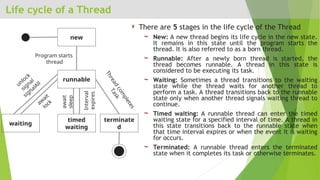
There are 5 stages in the life cycle of the Thread
New: A new thread begins its life cycle in the new state.
It remains in this state until the program starts the
thread. It is also referred to as a born thread.
Runnable: After a newly born thread is started, the
thread becomes runnable. A thread in this state is
considered to be executing its task.
Waiting: Sometimes a thread transitions to the waiting
state while the thread waits for another thread to
perform a task. A thread transitions back to the runnable
state only when another thread signals waiting thread to
continue.
Timed waiting: A runnable thread can enter the timed
waiting state for a specified interval of time. A thread in
this state transitions back to the runnable state when
that time interval expires or when the event it is waiting
for occurs.
Terminated: A runnable thread enters the terminated
state when it completes its task or otherwise terminates.
new
runnable
timed
waiting
waiting
terminate
d
Program starts
thread
unlock
signal
signalAll
aw
ait
lock
await
sleep
Interval
expires
T
h
r
e
a
d
c
o
m
p
l
e
t
e
s
T
a
s
k
5.
Creating a Threadin Java
There are two ways to create a Thread
1. extending the Thread class
2. implementing the Runnable interface
6.
1) Extending ThreadClass
One way to create a thread is to create a new class that extends Thread, and then
to create an instance of that class.
The extending class must override the run( ) method, which is the entry point
for the new thread.
It must also call start( ) to begin execution of the new thread.
class NewThread extends Thread {
NewThread() {
super("Demo Thread");
System.out.println("Child thread: " + this);
start(); // Start the thread
}
public void run() {
try {
for (int i = 5; i > 0; i--) {
System.out.println("Child Thread: " +
i);
Thread.sleep(500);
}
} catch (InterruptedException e) {
System.out.println("Child interrupted.");
}
System.out.println("Exiting child thread.");
}}
class ExtendThread {
public static void main(String args[]) {
new NewThread(); // create a new thread
try {
for (int i = 5; i > 0; i--) {
System.out.println("Main Thread: " +
i);
Thread.sleep(1000);
}
} catch (InterruptedException e) {
System.out.println("Main thread
interrupted.");
}
System.out.println("Main thread exiting.");
}
}
7.
2) Implementing RunnableInterface
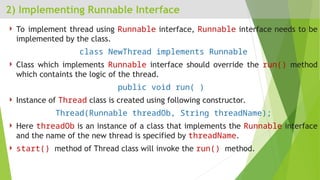
To implement thread using Runnable interface, Runnable interface needs to be
implemented by the class.
class NewThread implements Runnable
Class which implements Runnable interface should override the run() method
which containts the logic of the thread.
public void run( )
Instance of Thread class is created using following constructor.
Thread(Runnable threadOb, String threadName);
Here threadOb is an instance of a class that implements the Runnable interface
and the name of the new thread is specified by threadName.
start() method of Thread class will invoke the run() method.
Thread Synchronization
Whenwe start two or more threads within a program, there may be a situation
when multiple threads try to access the same resource and finally they can produce
unforeseen result due to concurrency issues.
For example, if multiple threads try to write within a same file then they may
corrupt the data because one of the threads can override data or while one thread
is opening the same file at the same time another thread might be closing the
same file.
So there is a need to synchronize the action of multiple threads and make sure that
only one thread can access the resource at a given point in time.
Java programming language provides a very handy way of creating threads and
synchronizing their task by using synchronized methods & synchronized blocks.
10.
Problem without synchronization(Example)
class Table {
void printTable(int n) {
for (int i = 1; i <= 5; i++) {
System.out.print(n * i + " ");
try {
Thread.sleep(400);
} catch (Exception e) {
System.out.println(e);
}
}
}
}
class MyThread1 extends
Thread {
Table t;
MyThread1(Table t) {
this.t = t;
}
public void run() {
t.printTable(5);
}
}
class MyThread2 extends
Thread {
Table t;
MyThread2(Table t) {
this.t = t;
}
public void run() {
t.printTable(100);
}
}
public class TestSynchronization {
public static void main(String
args[]){
Table obj = new Table();
MyThread1 t1 = new MyThread1(obj);
MyThread2 t2 = new MyThread2(obj);
t1.start();
t2.start();
}
}
11.
Solution with synchronizedmethod
class Table {
synchronized void printTable(int n) {
for (int i = 1; i <= 5; i++) {
System.out.print(n * i + " ");
try {
Thread.sleep(400);
} catch (Exception e) {
System.out.println(e);
}
}
}
}
class MyThread1 extends
Thread {
Table t;
MyThread1(Table t) {
this.t = t;
}
public void run() {
t.printTable(5);
}
}
class MyThread2 extends
Thread {
Table t;
MyThread2(Table t) {
this.t = t;
}
public void run() {
t.printTable(100);
}
}
public class TestSynchronization {
public static void main(String
args[]){
Table obj = new Table();
MyThread1 t1 = new MyThread1(obj);
MyThread2 t2 = new MyThread2(obj);
t1.start();
t2.start();
}
}
12.
Solution with synchronizedblocks
class Table {
void printTable(int n) {
for (int i = 1; i <= 5; i++) {
System.out.print(n * i + " ");
try {
Thread.sleep(400);
} catch (Exception e) {
System.out.println(e);
}
}
}
}
class MyThread1 extends
Thread {
Table t;
MyThread1(Table t) {
this.t = t;
}
public void run() {
synchronized (t) {
t.printTable(5);
}
}
}
class MyThread2 extends
Thread {
Table t;
MyThread1(Table t) {
this.t = t;
}
public void run() {
synchronized (t) {
t.printTable(100);
}
}
}
public class TestSynchronization {
public static void main(String
args[]){
Table obj = new Table();
MyThread1 t1 = new MyThread1(obj);
MyThread2 t2 = new MyThread2(obj);
t1.start();
t2.start();
}
}


![1) Extending Thread Class
One way to create a thread is to create a new class that extends Thread, and then
to create an instance of that class.
The extending class must override the run( ) method, which is the entry point
for the new thread.
It must also call start( ) to begin execution of the new thread.
class NewThread extends Thread {
NewThread() {
super("Demo Thread");
System.out.println("Child thread: " + this);
start(); // Start the thread
}
public void run() {
try {
for (int i = 5; i > 0; i--) {
System.out.println("Child Thread: " +
i);
Thread.sleep(500);
}
} catch (InterruptedException e) {
System.out.println("Child interrupted.");
}
System.out.println("Exiting child thread.");
}}
class ExtendThread {
public static void main(String args[]) {
new NewThread(); // create a new thread
try {
for (int i = 5; i > 0; i--) {
System.out.println("Main Thread: " +
i);
Thread.sleep(1000);
}
} catch (InterruptedException e) {
System.out.println("Main thread
interrupted.");
}
System.out.println("Main thread exiting.");
}
}](https://image.slidesharecdn.com/multithreading-250217101055-d08fbf64/85/this-power-point-presentation-is-about-concurrency-and-multithreading-6-320.jpg)

![Problem without synchronization (Example)
class Table {
void printTable(int n) {
for (int i = 1; i <= 5; i++) {
System.out.print(n * i + " ");
try {
Thread.sleep(400);
} catch (Exception e) {
System.out.println(e);
}
}
}
}
class MyThread1 extends
Thread {
Table t;
MyThread1(Table t) {
this.t = t;
}
public void run() {
t.printTable(5);
}
}
class MyThread2 extends
Thread {
Table t;
MyThread2(Table t) {
this.t = t;
}
public void run() {
t.printTable(100);
}
}
public class TestSynchronization {
public static void main(String
args[]){
Table obj = new Table();
MyThread1 t1 = new MyThread1(obj);
MyThread2 t2 = new MyThread2(obj);
t1.start();
t2.start();
}
}](https://image.slidesharecdn.com/multithreading-250217101055-d08fbf64/85/this-power-point-presentation-is-about-concurrency-and-multithreading-10-320.jpg)
![Solution with synchronized method
class Table {
synchronized void printTable(int n) {
for (int i = 1; i <= 5; i++) {
System.out.print(n * i + " ");
try {
Thread.sleep(400);
} catch (Exception e) {
System.out.println(e);
}
}
}
}
class MyThread1 extends
Thread {
Table t;
MyThread1(Table t) {
this.t = t;
}
public void run() {
t.printTable(5);
}
}
class MyThread2 extends
Thread {
Table t;
MyThread2(Table t) {
this.t = t;
}
public void run() {
t.printTable(100);
}
}
public class TestSynchronization {
public static void main(String
args[]){
Table obj = new Table();
MyThread1 t1 = new MyThread1(obj);
MyThread2 t2 = new MyThread2(obj);
t1.start();
t2.start();
}
}](https://image.slidesharecdn.com/multithreading-250217101055-d08fbf64/85/this-power-point-presentation-is-about-concurrency-and-multithreading-11-320.jpg)
![Solution with synchronized blocks
class Table {
void printTable(int n) {
for (int i = 1; i <= 5; i++) {
System.out.print(n * i + " ");
try {
Thread.sleep(400);
} catch (Exception e) {
System.out.println(e);
}
}
}
}
class MyThread1 extends
Thread {
Table t;
MyThread1(Table t) {
this.t = t;
}
public void run() {
synchronized (t) {
t.printTable(5);
}
}
}
class MyThread2 extends
Thread {
Table t;
MyThread1(Table t) {
this.t = t;
}
public void run() {
synchronized (t) {
t.printTable(100);
}
}
}
public class TestSynchronization {
public static void main(String
args[]){
Table obj = new Table();
MyThread1 t1 = new MyThread1(obj);
MyThread2 t2 = new MyThread2(obj);
t1.start();
t2.start();
}
}](https://image.slidesharecdn.com/multithreading-250217101055-d08fbf64/85/this-power-point-presentation-is-about-concurrency-and-multithreading-12-320.jpg)


