SNS COLLEGE OF TECHNOLOGY
(An Autonomous Institutions)
19CST102 - OBJECT ORIENTED PROGRAMMING
I YEAR / II SEMESTER
UNIT IV – MULTITHREADING IN JAVA
TOPIC : INTER THREAD COMMUNICATION
Presented by:
Vishnnu K.S
(713522CS176)
Vilashini.V
(713522CS172)
Guided by :
Mr.Selvakumar. N
AP/CSE
Java Threads
• Threads allows a program to operate more efficiently by doing
multiple things at the same time.
• Threads can be used to perform complicated tasks in the
background without interrupting the main program.
Inter-thread Communication in Java
• Inter thread communication is all about allowing threads to
communicate with each other.
• It is implemented by following methods of Object class:
• Wait()
• Notify()
• NotifyAll()
Wait() method
• The wait() method causes current thread to release the lock and
wait until either another thread invokes the notify() method or the
notifyAll() method for this object,or a specified amount of time
has elapsed.
• The current thread must own this objects monitor,so it must be
called from the synchronized method only otherwise it will throw
exception.
Notify() method
• The notify() method wakes up a single thread that is waiting on this
object’s monitor.
• If any threads are waiting on this object,one of them is choosen to be
awakened.
Syntax:
Public final void notify()
NotifyAll() method
• Wakes up all threads that are waiting on this object’s
monitor.
Syntax:
Public final void notifyAll()
Understanding the process of inter-thread communication
• The point to point explanation of the above diagram is as follows:
• Threads enter to acquire lock.
• Lock is acquired by on thread.
• Now thread goes to waiting state if you call wait() method on the object.
Otherwise it releases the lock and exits.
• If you call notify() or notify All() method, thread moves to the notified state
(runnable state).
• Now thread is available to acquire lock.
• After completion of the task, thread releases the lock and exits the monitor
state of the object.
Understanding the process of inter-thread
communication
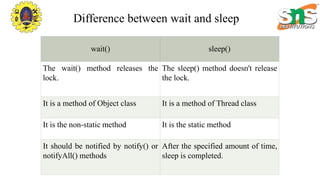
Difference between wait and sleep
wait() sleep()
The wait() method releases the
lock.
The sleep() method doesn't release
the lock.
It is a method of Object class It is a method of Thread class
It is the non-static method It is the static method
It should be notified by notify() or
notifyAll() methods
After the specified amount of time,
sleep is completed.
Program
Class Customer
{
Int amount=10000;
Synchronized void withdraw(int amount){
System.out.println(“going to withdraw….”);
If(this.amount<amount){
System.out.println(“less balance;Waiting for
deposit….”);
}
This.amount-=amount;
System.out.println(“withdraw completed….”);
}
Synchronized void deposit(int amount){
System.out.println(“going to deposit….”);
This.amount+=amount;
System.out.println(“deposit completed…”);
Notify();
}
}
Class Test{
Public staic void main(String args[]){
New Thread(){
Public void run(){c.withdraw(15000);}
}.start();
New Thread(){
Public void run(){c.deposit(10000);}
}.start();
}}
OUTPUT
going to withdraw….
less balance;waiting for deposit…..
going to deposit…..
deposit completed….
withdraw completed
Thank you

Inter Thread Communicationn.pptx

  • 1.
    SNS COLLEGE OFTECHNOLOGY (An Autonomous Institutions) 19CST102 - OBJECT ORIENTED PROGRAMMING I YEAR / II SEMESTER UNIT IV – MULTITHREADING IN JAVA TOPIC : INTER THREAD COMMUNICATION Presented by: Vishnnu K.S (713522CS176) Vilashini.V (713522CS172) Guided by : Mr.Selvakumar. N AP/CSE
  • 2.
    Java Threads • Threadsallows a program to operate more efficiently by doing multiple things at the same time. • Threads can be used to perform complicated tasks in the background without interrupting the main program.
  • 3.
    Inter-thread Communication inJava • Inter thread communication is all about allowing threads to communicate with each other. • It is implemented by following methods of Object class: • Wait() • Notify() • NotifyAll()
  • 4.
    Wait() method • Thewait() method causes current thread to release the lock and wait until either another thread invokes the notify() method or the notifyAll() method for this object,or a specified amount of time has elapsed. • The current thread must own this objects monitor,so it must be called from the synchronized method only otherwise it will throw exception.
  • 5.
    Notify() method • Thenotify() method wakes up a single thread that is waiting on this object’s monitor. • If any threads are waiting on this object,one of them is choosen to be awakened. Syntax: Public final void notify()
  • 6.
    NotifyAll() method • Wakesup all threads that are waiting on this object’s monitor. Syntax: Public final void notifyAll()
  • 7.
    Understanding the processof inter-thread communication
  • 8.
    • The pointto point explanation of the above diagram is as follows: • Threads enter to acquire lock. • Lock is acquired by on thread. • Now thread goes to waiting state if you call wait() method on the object. Otherwise it releases the lock and exits. • If you call notify() or notify All() method, thread moves to the notified state (runnable state). • Now thread is available to acquire lock. • After completion of the task, thread releases the lock and exits the monitor state of the object. Understanding the process of inter-thread communication
  • 9.
    Difference between waitand sleep wait() sleep() The wait() method releases the lock. The sleep() method doesn't release the lock. It is a method of Object class It is a method of Thread class It is the non-static method It is the static method It should be notified by notify() or notifyAll() methods After the specified amount of time, sleep is completed.
  • 10.
    Program Class Customer { Int amount=10000; Synchronizedvoid withdraw(int amount){ System.out.println(“going to withdraw….”); If(this.amount<amount){ System.out.println(“less balance;Waiting for deposit….”); } This.amount-=amount; System.out.println(“withdraw completed….”); } Synchronized void deposit(int amount){ System.out.println(“going to deposit….”); This.amount+=amount; System.out.println(“deposit completed…”); Notify(); } } Class Test{ Public staic void main(String args[]){ New Thread(){ Public void run(){c.withdraw(15000);} }.start(); New Thread(){ Public void run(){c.deposit(10000);} }.start(); }}
  • 11.
    OUTPUT going to withdraw…. lessbalance;waiting for deposit….. going to deposit….. deposit completed…. withdraw completed
  • 12.