Exception
Exceptions An  exception  occurs when our code asks the JVM to perform the technically impossible and unanticipated (by the compiler)! Under these circumstances, the JVM generates an exception. If we don’t catch the exception, the program crashes!
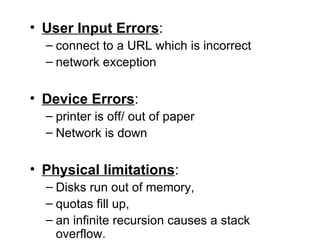
User Input Errors :  connect to a URL which is incorrect  network exception Device Errors :  printer is off/ out of paper Network is down Physical limitations :  Disks run out of memory,  quotas fill up,  an infinite recursion causes a stack overflow.
Code errors :  divide by zero,  array out of bound,  integer overflow,  access a null pointer. Programs only crash if an exception goes  untrapped , i.e. is not handled by the program.
When an exception occurs, Java allows a method to  terminate abnormally It  throws  an object that encapsulates error information It does not return a value It exits immediately Execution does not resume at the point of method call JVM searches for an  exception handler If none is found, the program crashes.
Exception Handling All exception handling has the same goals: Anticipate the error by the user/system Return the program to a safe state that enables the user to execute other commands Inform the user of the error’s cause Allow the user to save work and terminate the program gracefully.
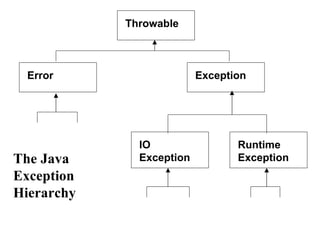
Throwable Error Exception Runtime Exception IO Exception The Java Exception  Hierarchy
Error  hierarchy describes internal errors and resource exhaustion.  Don’t throw an object of this type! Notify the user and try to terminate gracefully Relatively rare Mostly beyond programmers control
IOException   Trying to read past the end of file Trying to open a malformed URL Trying to find a class object for a string that does not denote an existing class Methods tell Java their return type, but also what can go wrong Public String readLine() throws IOException
RuntimeException  caused by programming error “ If it’s a  RuntimeException  it’s your fault!” Bad cast Out-of-bounds array access Null pointer access Can all be protected against by code tests.
4 Ways to throw an Exception Calling a method that throws a  checked exception , e.g.  readLine Code detects an error and generates  checked exception  with  throw  statement Programming error e.g. a[-1] =0; generates an  unchecked exception   ArrayIndexOutOfBoundsException 4. JVM or runtime library internal error
How to Throw an Exception Suppose we are writing a file reader … Header promises 1024 bytes … But ... end of file after 600 bytes! Decide what kind of exception to throw Look up Java exception hierarchy Subclass of IOException seems natural Settle on EOFException
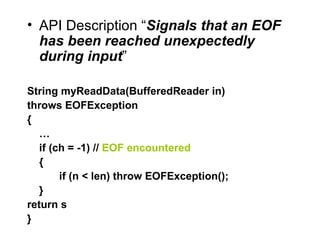
API Description “ Signals that an EOF has been reached unexpectedly during input ” String myReadData(BufferedReader in) throws EOFException { … if (ch = -1) //  EOF encountered {  if (n < len) throw EOFException(); } return s }
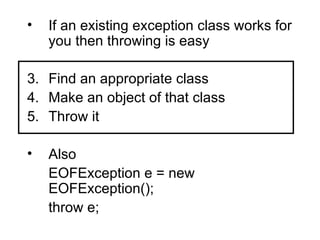
If an existing exception class works for you then throwing is easy Find an appropriate class Make an object of that class Throw it Also EOFException e = new EOFException(); throw e;
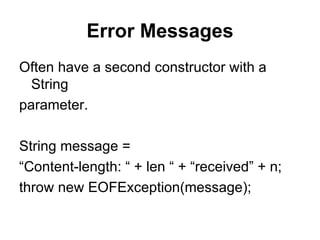
Error Messages Often have a second constructor with a String parameter. String message =  “ Content-length: “ + len “ + “received” + n; throw new EOFException(message);
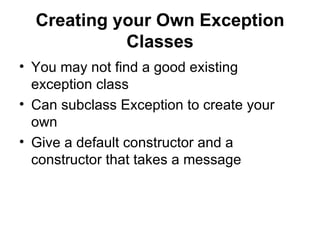
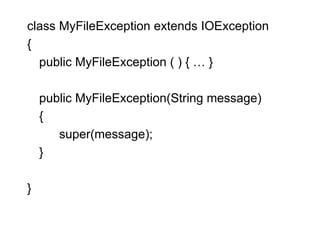
Creating your Own Exception Classes You may not find a good existing exception class Can subclass Exception to create your own Give a default constructor and a constructor that takes a message
class MyFileException extends IOException { public MyFileException ( ) { … } public MyFileException(String message) { super(message); } }
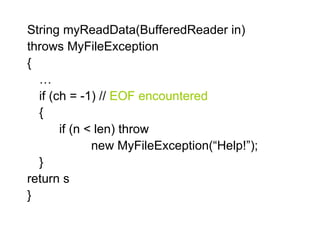
String myReadData(BufferedReader in) throws MyFileException { … if (ch = -1) //  EOF encountered {  if (n < len) throw  new MyFileException(“Help!”); } return s }
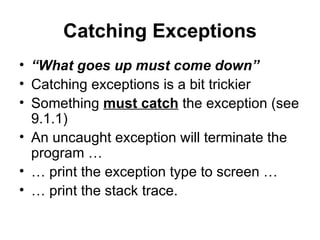
Catching Exceptions “ What goes up must come down” Catching exceptions is a bit trickier Something  must catch  the exception (see 9.1.1) An uncaught exception will terminate the program … … print the exception type to screen … … print the stack trace.
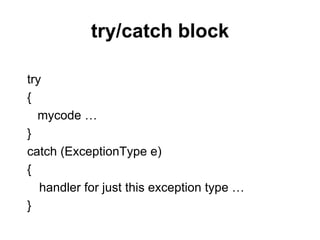
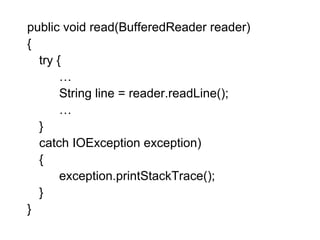
try/catch block try { mycode … } catch (ExceptionType e) { handler for just this exception type … }
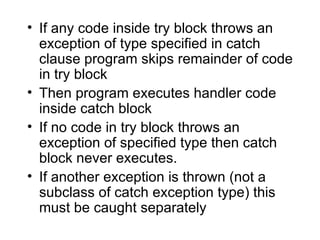
If any code inside try block throws an exception of type specified in catch clause program skips remainder of code in try block Then program executes handler code inside catch block If no code in try block throws an exception of specified type then catch block never executes. If another exception is thrown (not a subclass of catch exception type) this must be caught separately
public void read(BufferedReader reader) { try { … String line = reader.readLine(); … } catch IOException exception) { exception.printStackTrace(); } }
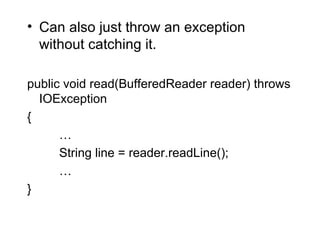
Can also just throw an exception without catching it. public void read(BufferedReader reader) throws IOException { … String line = reader.readLine(); … }
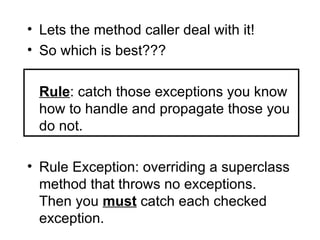
Lets the method caller deal with it! So which is best??? Rule : catch those exceptions you know how to handle and propagate those you do not. Rule Exception: overriding a superclass method that throws no exceptions. Then you  must  catch each checked exception.
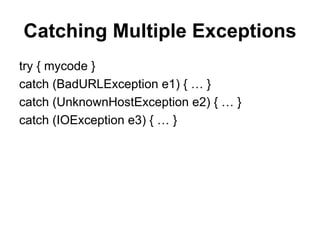
Catching Multiple Exceptions try { mycode } catch (BadURLException e1) { … } catch (UnknownHostException e2) { … } catch (IOException e3) { … }
Exception Information Exception object may contain error information e3.getMessage() e3.getClass.getName() //returns type Own defined exception types can place more information inside constructors.
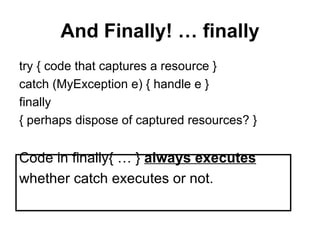
And Finally! … finally try { code that captures a resource } catch (MyException e) { handle e } finally  { perhaps dispose of captured resources? } Code in finally{ … }  always executes whether catch executes or not.
Learning About Exceptions Exceptions Unexpected or error condition Not usual occurrences Causes Call to file that does not exist Try to write to full disk User enters invalid data Program attempts to divide value by 0
Learning About Exceptions (continued) Exception handling Object-oriented techniques used to manage  Exception  errors Exceptions  Objects Descend from  Throwable  class
Learning About Exceptions (continued) Error  class Represents serious errors from which program usually cannot recover Error  condition Program runs out of memory Program cannot locate required class
Learning About Exceptions (continued) Exception  class Less serious errors Unusual conditions Program can   recover Exception  class errors Invalid array subscript Performing illegal arithmetic operations
Learning About Exceptions (continued) Throwable  object  Error  or  Exception Examine message after error occurs Exception  message Error preventable by using specific code within  program Error  message Program terminates No program code can prevent
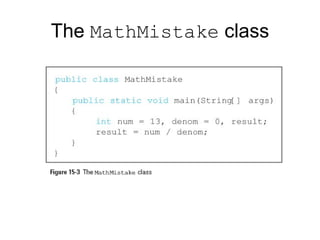
The  MathMistake  class
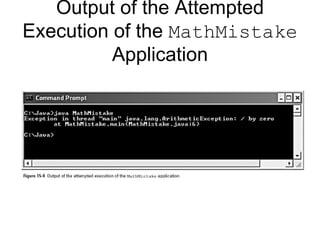
Output of the Attempted Execution of the  MathMistake  Application
Understanding the Limitations of Traditional Error Handling System.exit()  method Return 1 if error is causing program termination Or 0 if program ending normally Circumvents displaying error message Fault-tolerant Designed to continue to operate when some part of system fails Robustness Represents degree to which system is resilient to stress
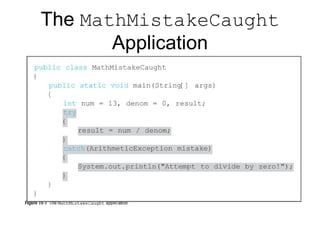
Trying Code and Catching  Exceptions try  block Segment of code in which something might go wrong Attempts to execute  Acknowledging exception might occur try  block includes: Keyword  try Opening and closing curly brace Executable statements Which might cause exception
Trying Code and Catching  Exceptions  (continued) catch  block Segment of code  Immediately follows  try  block Handles exception thrown by  try  block preceding it Can “catch”  Object of type  Exception Or  Exception  child class throw  statement Sends  Exception  out of method It can be handled elsewhere
Trying Code and Catching  Exceptions  (continued) catch  block includes: Keyword  catch Opening and closing parentheses Exception  type Opening and closing curly braces Statements to handle error condition
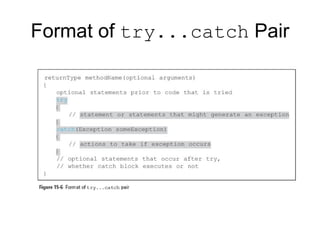
Format of  try...catch  Pair
Trying Code and Catching  Exceptions  (continued) Don’t confuse  catch  block and  catch()  method catch()  method Returns some type of  Exception catch  block Has no return type Can’t call it directly
The  MathMistakeCaught  Application
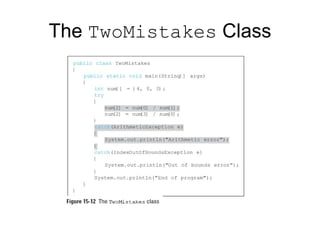
Throwing and Catching Multiple Exceptions Can place multiple statements within  try  block Only first error-generating statement throws  Exception Catch multiple  Exceptions Examined in sequence  Until match found for  Exception  type Matching  catch  block executes Each remaining  catch  block bypassed
The  TwoMistakes  Class
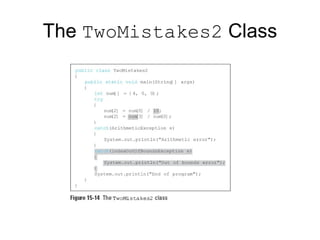
The  TwoMistakes2  Class
Throwing and Catching Multiple  Exceptions  (continued) “Catch-all” block Accepts more generic  Exception  argument type catch(Exception e) Unreachable code   Program statements that can never execute under any circumstances Poor style for method to throw more than three or four types
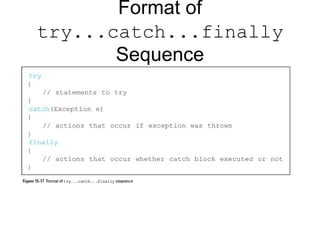
Using the  finally  Block finally   block Use for actions you must perform at end of  try...catch   sequence Use  finally  block to perform cleanup tasks Executes regardless of whether preceding  try  block identifies an  Exception
Format of  try...catch...finally  Sequence
Using the  finally  Block (continued) When  try  code fails Throws  Exception Exception  caught catch  block executes Control passes to statements at end of method
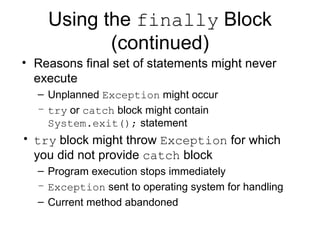
Using the  finally  Block (continued) Reasons final set of statements might never execute Unplanned  Exception  might occur try  or  catch  block might contain  System.exit();  statement try  block might throw  Exception  for which you did not provide  catch  block Program execution stops immediately Exception  sent to operating system for handling Current method abandoned
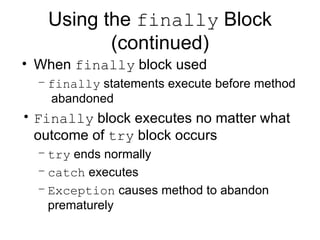
Using the  finally  Block (continued) When  finally  block used finally  statements execute before method  abandoned Finally  block executes no matter what outcome of  try  block occurs try  ends normally catch  executes Exception  causes method to abandon prematurely
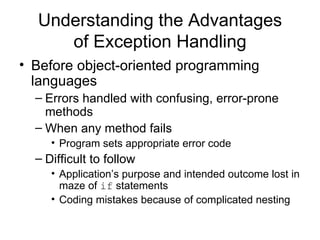
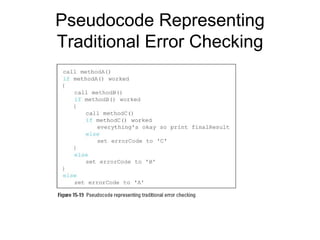
Understanding the Advantages of Exception Handling Before object-oriented programming languages Errors handled with confusing, error-prone methods When any method fails Program sets appropriate error code Difficult to follow Application’s purpose and intended outcome lost in maze of  if  statements Coding mistakes because of complicated nesting
Pseudocode Representing Traditional Error Checking
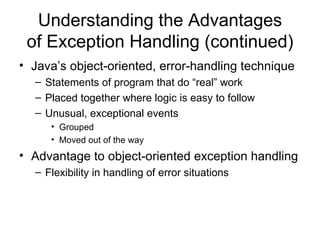
Understanding the Advantages of Exception Handling (continued) Java’s object-oriented, error-handling technique Statements of program that do “real” work Placed together where logic is easy to follow Unusual, exceptional events Grouped Moved out of the way Advantage to object-oriented exception handling Flexibility in handling of error situations
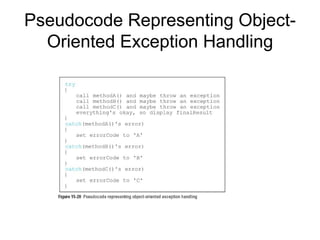
Pseudocode Representing Object-Oriented Exception Handling
Understanding the Advantages of Exception Handling (continued) Appropriately deal with  Exceptions  as you decide how to handle them If method throws  Exception Must also use keyword  throws  followed by  Exception  type in method header
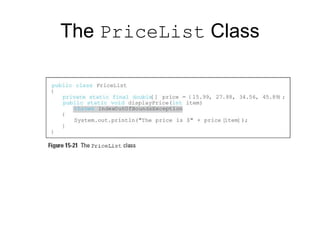
The  PriceList  Class
Specifying the  Exceptions a Method Can Throw Every Java method has potential to throw an  Exception For most Java methods, do not use  throws  clause Let Java handle any  Exception  by shutting down  program Most exceptions never have to be explicitly thrown or caught
Specifying the  Exceptions a Method Can Throw (continued) Checked exceptions Programmers should anticipate  Programs should be able to recover Unchecked exceptions Errors External to program Runtime exceptions Internal to program Logic errors
Specifying the  Exceptions a Method Can Throw (continued) Throw checked exception Catch it Or declare exception in method header’s  throws  clause RuntimeException  class Represent unplanned exceptions that occur during program’s execution Can occur anywhere in program Can be numerous in typical program
Specifying the  Exceptions a Method Can Throw (continued) Must know to use method to full potential Method’s name Method’s return type Type and number of arguments method requires Type and number of  Exceptions  method throws
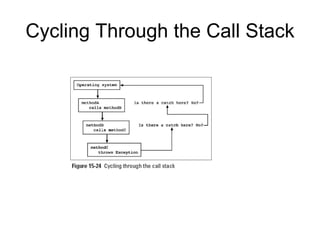
Tracing  Exceptions  Through the Call Stack Call stack Memory location where computer stores list of method locations to which system must return When method throws  Exception  Exception  thrown to next method up call stack Allows methods to handle  Exceptions  wherever programmer has decided it is most appropriate Including allowing operating system to handle error
Cycling Through the Call Stack
Tracing  Exceptions  Through the Call Stack (continued) printStackTrace()  method Display list of methods in call stack Determine location of  Exception Do not place in finished program Most useful for diagnosing problems
Creating Your Own  Exceptions Java provides over 40 categories of  Exceptions Java allows you to create your own  Exceptions Extend a subclass of  Throwable Exception  class constructors Exception() Exception(String message) Exception(String message, Throwable cause) Exception(Throwable cause)
Classifying Java Exceptions Unchecked Exceptions It is not required that these types of exceptions be caught or declared on a method. Runtime exceptions  can be generated by methods or by the JVM itself. Errors  are generated from deep within the JVM, and often indicate a truly fatal state. Runtime exceptions are a source of major controversy! Checked Exceptions Must either be caught by a method or declared in its signature. Placing exceptions in the method signature harkens back to a major concern for Goodenough. This requirement is viewed with derision in the hardcore C++ community. A common technique for simplifying checked exceptions is subsumption.
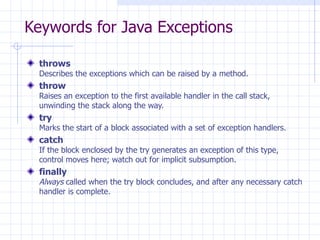
Keywords for Java Exceptions throws Describes the exceptions which can be raised by a method. throw Raises an exception to the first available handler in the call stack, unwinding the stack along the way. try Marks the start of a block associated with a set of exception handlers. catch If the block enclosed by the try generates an exception of this type, control moves here; watch out for implicit subsumption. finally Always  called when the try block concludes, and after any necessary catch handler is complete.
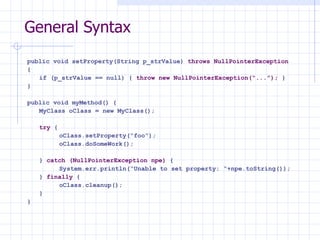
General Syntax public void setProperty(String p_strValue)  throws NullPointerException {  if (p_strValue == null) {  throw new NullPointerException(“...”);  } } public void myMethod() { MyClass oClass = new MyClass(); try  { oClass.setProperty(“foo”); oClass.doSomeWork(); }  catch (NullPointerException npe)  { System.err.println(“Unable to set property: “+npe.toString()); }  finally  { oClass.cleanup(); } }
Canonical Example public void foo() { try { /*  marks the start of a try-catch block  */ int a[] = new int[2]; a[4] = 1;  /*  causes a runtime exception due to the index  */ } catch (ArrayIndexOutOfBoundsException e) { System.out.println(&quot;exception: &quot; + e.getMessage()); e.printStackTrace(); } } /*  This code also compiles, but throws an exception at runtime! It *  is both less obvious and more common (an off-by-one-error ). */ public int[] bar() { int a[] = new int[2]; for (int x = 0;  x <= 2 ; x++) { a[x] = 0; } return a; }
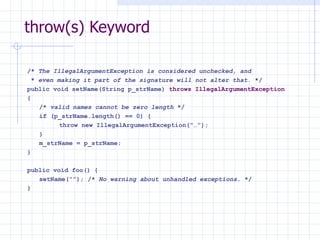
throw(s) Keyword /*  The IllegalArgumentException is considered unchecked, and *  even making it part of the signature will not alter that.  */ public void setName(String p_strName)  throws IllegalArgumentException { /*  valid names cannot be zero length  */ if (p_strName.length() == 0) { throw new IllegalArgumentException(“…”); } m_strName = p_strName; } public void foo() { setName(“”); /*  No warning about unhandled exceptions.  */ }
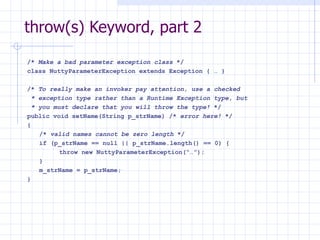
throw(s) Keyword, part 2 /*  Make a bad parameter exception class  */ class NuttyParameterException extends Exception { … } /*  To really make an invoker pay attention, use a checked * exception type rather than a Runtime Exception type, but * you must declare that you will throw the type!  */ public void setName(String p_strName) /*  error here!  */ { /*  valid names cannot be zero length  */ if (p_strName == null || p_strName.length() == 0) { throw new NuttyParameterException(“…”); } m_strName = p_strName; }
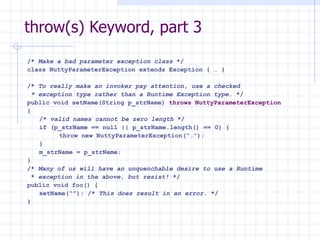
throw(s) Keyword, part 3 /*  Make a bad parameter exception class  */ class NuttyParameterException extends Exception { … } /*  To really make an invoker pay attention, use a checked * exception type rather than a Runtime Exception type.  */ public void setName(String p_strName)  throws NuttyParameterException   { /*  valid names cannot be zero length  */ if (p_strName == null || p_strName.length() == 0) { throw new NuttyParameterException(“…”); } m_strName = p_strName; } /*  Many of us will have an unquenchable desire to use a Runtime *  exception in the above, but resist!  */ public void foo() { setName(“”); /*  This does result in an error.  */ }
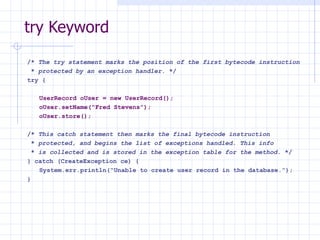
try Keyword /*  The try statement marks the position of the first bytecode instruction *  protected by an exception handler.  */ try { UserRecord oUser = new UserRecord(); oUser.setName(“Fred Stevens”); oUser.store(); /*  This catch statement then marks the final bytecode instruction *  protected, and begins the list of exceptions handled. This info *  is collected and is stored in the exception table for the method.  */ } catch (CreateException ce) { System.err.println(“Unable to create user record in the database.”); }
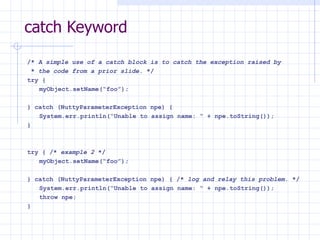
catch Keyword /*  A simple use of a catch block is to catch the exception raised by *  the code from a prior slide.  */ try { myObject.setName(“foo”); } catch (NuttyParameterException npe) { System.err.println(“Unable to assign name: “ + npe.toString()); } try { /*  example 2  */ myObject.setName(“foo”); } catch (NuttyParameterException npe) { /*  log and relay this problem.  */ System.err.println(“Unable to assign name: “ + npe.toString()); throw npe; }
catch Keyword, part 2 /*  Several catch blocks of differing types can be concatenated.  */ try { URL myURL = new URL(&quot;http://www.mainejug.org&quot;); InputStream oStream = myURL.openStream(); byte[] myBuffer = new byte[512]; int nCount = 0; while ((nCount = oStream.read(myBuffer)) != -1) { System.out.println(new String(myBuffer, 0, nCount)); } oStream.close(); } catch (MalformedURLException mue) { System.err.println(&quot;MUE: &quot; + mue.toString()); } catch (IOException ioe) { System.err.println(&quot;IOE: &quot; + ioe.toString()); }
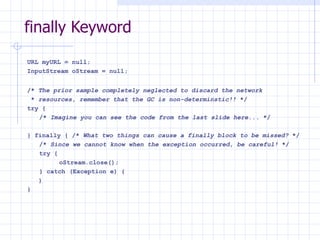
finally Keyword URL myURL = null; InputStream oStream = null; /*  The prior sample completely neglected to discard the network *  resources, remember that the GC is non-determinstic!!  */ try { /*  Imagine you can see the code from the last slide here...  */ } finally { /*  What two things can cause a finally block to be missed?  */ /*  Since we cannot know when the exception occurred, be careful!  */ try { oStream.close(); } catch (Exception e) { } }
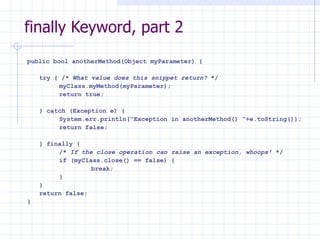
finally Keyword, part 2 public bool anotherMethod(Object myParameter) { try { /*  What value does this snippet return?  */ myClass.myMethod(myParameter); return true; } catch (Exception e) { System.err.println(“Exception in anotherMethod() “+e.toString()); return false; } finally { /*  If the close operation can raise an exception, whoops!  */ if (myClass.close() == false) { break; } } return false; }
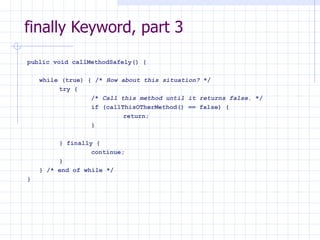
finally Keyword, part 3 public void callMethodSafely() { while (true) { /*  How about this situation?  */ try { /*  Call this method until it returns false.  */ if (callThisOTherMethod() == false) { return; } } finally { continue; } } /* end of while */ }
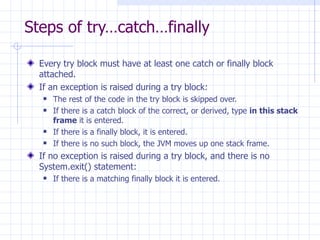
Steps of try…catch…finally Every try block must have at least one catch or finally block attached. If an exception is raised during a try block: The rest of the code in the try block is skipped over. If there is a catch block of the correct, or derived, type  in this stack frame  it is entered. If there is a finally block, it is entered. If there is no such block, the JVM moves up one stack frame. If no exception is raised during a try block, and there is no System.exit() statement: If there is a matching finally block it is entered.

Java: Exception

  • 1.
  • 2.
    Exceptions An exception occurs when our code asks the JVM to perform the technically impossible and unanticipated (by the compiler)! Under these circumstances, the JVM generates an exception. If we don’t catch the exception, the program crashes!
  • 3.
    User Input Errors: connect to a URL which is incorrect network exception Device Errors : printer is off/ out of paper Network is down Physical limitations : Disks run out of memory, quotas fill up, an infinite recursion causes a stack overflow.
  • 4.
    Code errors : divide by zero, array out of bound, integer overflow, access a null pointer. Programs only crash if an exception goes untrapped , i.e. is not handled by the program.
  • 5.
    When an exceptionoccurs, Java allows a method to terminate abnormally It throws an object that encapsulates error information It does not return a value It exits immediately Execution does not resume at the point of method call JVM searches for an exception handler If none is found, the program crashes.
  • 6.
    Exception Handling Allexception handling has the same goals: Anticipate the error by the user/system Return the program to a safe state that enables the user to execute other commands Inform the user of the error’s cause Allow the user to save work and terminate the program gracefully.
  • 7.
    Throwable Error ExceptionRuntime Exception IO Exception The Java Exception Hierarchy
  • 8.
    Error hierarchydescribes internal errors and resource exhaustion. Don’t throw an object of this type! Notify the user and try to terminate gracefully Relatively rare Mostly beyond programmers control
  • 9.
    IOException Trying to read past the end of file Trying to open a malformed URL Trying to find a class object for a string that does not denote an existing class Methods tell Java their return type, but also what can go wrong Public String readLine() throws IOException
  • 10.
    RuntimeException causedby programming error “ If it’s a RuntimeException it’s your fault!” Bad cast Out-of-bounds array access Null pointer access Can all be protected against by code tests.
  • 11.
    4 Ways tothrow an Exception Calling a method that throws a checked exception , e.g. readLine Code detects an error and generates checked exception with throw statement Programming error e.g. a[-1] =0; generates an unchecked exception ArrayIndexOutOfBoundsException 4. JVM or runtime library internal error
  • 12.
    How to Throwan Exception Suppose we are writing a file reader … Header promises 1024 bytes … But ... end of file after 600 bytes! Decide what kind of exception to throw Look up Java exception hierarchy Subclass of IOException seems natural Settle on EOFException
  • 13.
    API Description “Signals that an EOF has been reached unexpectedly during input ” String myReadData(BufferedReader in) throws EOFException { … if (ch = -1) // EOF encountered { if (n < len) throw EOFException(); } return s }
  • 14.
    If an existingexception class works for you then throwing is easy Find an appropriate class Make an object of that class Throw it Also EOFException e = new EOFException(); throw e;
  • 15.
    Error Messages Oftenhave a second constructor with a String parameter. String message = “ Content-length: “ + len “ + “received” + n; throw new EOFException(message);
  • 16.
    Creating your OwnException Classes You may not find a good existing exception class Can subclass Exception to create your own Give a default constructor and a constructor that takes a message
  • 17.
    class MyFileException extendsIOException { public MyFileException ( ) { … } public MyFileException(String message) { super(message); } }
  • 18.
    String myReadData(BufferedReader in)throws MyFileException { … if (ch = -1) // EOF encountered { if (n < len) throw new MyFileException(“Help!”); } return s }
  • 19.
    Catching Exceptions “What goes up must come down” Catching exceptions is a bit trickier Something must catch the exception (see 9.1.1) An uncaught exception will terminate the program … … print the exception type to screen … … print the stack trace.
  • 20.
    try/catch block try{ mycode … } catch (ExceptionType e) { handler for just this exception type … }
  • 21.
    If any codeinside try block throws an exception of type specified in catch clause program skips remainder of code in try block Then program executes handler code inside catch block If no code in try block throws an exception of specified type then catch block never executes. If another exception is thrown (not a subclass of catch exception type) this must be caught separately
  • 22.
    public void read(BufferedReaderreader) { try { … String line = reader.readLine(); … } catch IOException exception) { exception.printStackTrace(); } }
  • 23.
    Can also justthrow an exception without catching it. public void read(BufferedReader reader) throws IOException { … String line = reader.readLine(); … }
  • 24.
    Lets the methodcaller deal with it! So which is best??? Rule : catch those exceptions you know how to handle and propagate those you do not. Rule Exception: overriding a superclass method that throws no exceptions. Then you must catch each checked exception.
  • 25.
    Catching Multiple Exceptionstry { mycode } catch (BadURLException e1) { … } catch (UnknownHostException e2) { … } catch (IOException e3) { … }
  • 26.
    Exception Information Exceptionobject may contain error information e3.getMessage() e3.getClass.getName() //returns type Own defined exception types can place more information inside constructors.
  • 27.
    And Finally! …finally try { code that captures a resource } catch (MyException e) { handle e } finally { perhaps dispose of captured resources? } Code in finally{ … } always executes whether catch executes or not.
  • 28.
    Learning About ExceptionsExceptions Unexpected or error condition Not usual occurrences Causes Call to file that does not exist Try to write to full disk User enters invalid data Program attempts to divide value by 0
  • 29.
    Learning About Exceptions(continued) Exception handling Object-oriented techniques used to manage Exception errors Exceptions Objects Descend from Throwable class
  • 30.
    Learning About Exceptions(continued) Error class Represents serious errors from which program usually cannot recover Error condition Program runs out of memory Program cannot locate required class
  • 31.
    Learning About Exceptions(continued) Exception class Less serious errors Unusual conditions Program can recover Exception class errors Invalid array subscript Performing illegal arithmetic operations
  • 32.
    Learning About Exceptions(continued) Throwable object Error or Exception Examine message after error occurs Exception message Error preventable by using specific code within program Error message Program terminates No program code can prevent
  • 33.
  • 34.
    Output of theAttempted Execution of the MathMistake Application
  • 35.
    Understanding the Limitationsof Traditional Error Handling System.exit() method Return 1 if error is causing program termination Or 0 if program ending normally Circumvents displaying error message Fault-tolerant Designed to continue to operate when some part of system fails Robustness Represents degree to which system is resilient to stress
  • 36.
    Trying Code andCatching Exceptions try block Segment of code in which something might go wrong Attempts to execute Acknowledging exception might occur try block includes: Keyword try Opening and closing curly brace Executable statements Which might cause exception
  • 37.
    Trying Code andCatching Exceptions (continued) catch block Segment of code Immediately follows try block Handles exception thrown by try block preceding it Can “catch” Object of type Exception Or Exception child class throw statement Sends Exception out of method It can be handled elsewhere
  • 38.
    Trying Code andCatching Exceptions (continued) catch block includes: Keyword catch Opening and closing parentheses Exception type Opening and closing curly braces Statements to handle error condition
  • 39.
    Format of try...catch Pair
  • 40.
    Trying Code andCatching Exceptions (continued) Don’t confuse catch block and catch() method catch() method Returns some type of Exception catch block Has no return type Can’t call it directly
  • 41.
  • 42.
    Throwing and CatchingMultiple Exceptions Can place multiple statements within try block Only first error-generating statement throws Exception Catch multiple Exceptions Examined in sequence Until match found for Exception type Matching catch block executes Each remaining catch block bypassed
  • 43.
  • 44.
  • 45.
    Throwing and CatchingMultiple Exceptions (continued) “Catch-all” block Accepts more generic Exception argument type catch(Exception e) Unreachable code Program statements that can never execute under any circumstances Poor style for method to throw more than three or four types
  • 46.
    Using the finally Block finally block Use for actions you must perform at end of try...catch sequence Use finally block to perform cleanup tasks Executes regardless of whether preceding try block identifies an Exception
  • 47.
    Format of try...catch...finally Sequence
  • 48.
    Using the finally Block (continued) When try code fails Throws Exception Exception caught catch block executes Control passes to statements at end of method
  • 49.
    Using the finally Block (continued) Reasons final set of statements might never execute Unplanned Exception might occur try or catch block might contain System.exit(); statement try block might throw Exception for which you did not provide catch block Program execution stops immediately Exception sent to operating system for handling Current method abandoned
  • 50.
    Using the finally Block (continued) When finally block used finally statements execute before method abandoned Finally block executes no matter what outcome of try block occurs try ends normally catch executes Exception causes method to abandon prematurely
  • 51.
    Understanding the Advantagesof Exception Handling Before object-oriented programming languages Errors handled with confusing, error-prone methods When any method fails Program sets appropriate error code Difficult to follow Application’s purpose and intended outcome lost in maze of if statements Coding mistakes because of complicated nesting
  • 52.
  • 53.
    Understanding the Advantagesof Exception Handling (continued) Java’s object-oriented, error-handling technique Statements of program that do “real” work Placed together where logic is easy to follow Unusual, exceptional events Grouped Moved out of the way Advantage to object-oriented exception handling Flexibility in handling of error situations
  • 54.
  • 55.
    Understanding the Advantagesof Exception Handling (continued) Appropriately deal with Exceptions as you decide how to handle them If method throws Exception Must also use keyword throws followed by Exception type in method header
  • 56.
  • 57.
    Specifying the Exceptions a Method Can Throw Every Java method has potential to throw an Exception For most Java methods, do not use throws clause Let Java handle any Exception by shutting down program Most exceptions never have to be explicitly thrown or caught
  • 58.
    Specifying the Exceptions a Method Can Throw (continued) Checked exceptions Programmers should anticipate Programs should be able to recover Unchecked exceptions Errors External to program Runtime exceptions Internal to program Logic errors
  • 59.
    Specifying the Exceptions a Method Can Throw (continued) Throw checked exception Catch it Or declare exception in method header’s throws clause RuntimeException class Represent unplanned exceptions that occur during program’s execution Can occur anywhere in program Can be numerous in typical program
  • 60.
    Specifying the Exceptions a Method Can Throw (continued) Must know to use method to full potential Method’s name Method’s return type Type and number of arguments method requires Type and number of Exceptions method throws
  • 61.
    Tracing Exceptions Through the Call Stack Call stack Memory location where computer stores list of method locations to which system must return When method throws Exception Exception thrown to next method up call stack Allows methods to handle Exceptions wherever programmer has decided it is most appropriate Including allowing operating system to handle error
  • 62.
  • 63.
    Tracing Exceptions Through the Call Stack (continued) printStackTrace() method Display list of methods in call stack Determine location of Exception Do not place in finished program Most useful for diagnosing problems
  • 64.
    Creating Your Own Exceptions Java provides over 40 categories of Exceptions Java allows you to create your own Exceptions Extend a subclass of Throwable Exception class constructors Exception() Exception(String message) Exception(String message, Throwable cause) Exception(Throwable cause)
  • 65.
    Classifying Java ExceptionsUnchecked Exceptions It is not required that these types of exceptions be caught or declared on a method. Runtime exceptions can be generated by methods or by the JVM itself. Errors are generated from deep within the JVM, and often indicate a truly fatal state. Runtime exceptions are a source of major controversy! Checked Exceptions Must either be caught by a method or declared in its signature. Placing exceptions in the method signature harkens back to a major concern for Goodenough. This requirement is viewed with derision in the hardcore C++ community. A common technique for simplifying checked exceptions is subsumption.
  • 66.
    Keywords for JavaExceptions throws Describes the exceptions which can be raised by a method. throw Raises an exception to the first available handler in the call stack, unwinding the stack along the way. try Marks the start of a block associated with a set of exception handlers. catch If the block enclosed by the try generates an exception of this type, control moves here; watch out for implicit subsumption. finally Always called when the try block concludes, and after any necessary catch handler is complete.
  • 67.
    General Syntax publicvoid setProperty(String p_strValue) throws NullPointerException { if (p_strValue == null) { throw new NullPointerException(“...”); } } public void myMethod() { MyClass oClass = new MyClass(); try { oClass.setProperty(“foo”); oClass.doSomeWork(); } catch (NullPointerException npe) { System.err.println(“Unable to set property: “+npe.toString()); } finally { oClass.cleanup(); } }
  • 68.
    Canonical Example publicvoid foo() { try { /* marks the start of a try-catch block */ int a[] = new int[2]; a[4] = 1; /* causes a runtime exception due to the index */ } catch (ArrayIndexOutOfBoundsException e) { System.out.println(&quot;exception: &quot; + e.getMessage()); e.printStackTrace(); } } /* This code also compiles, but throws an exception at runtime! It * is both less obvious and more common (an off-by-one-error ). */ public int[] bar() { int a[] = new int[2]; for (int x = 0; x <= 2 ; x++) { a[x] = 0; } return a; }
  • 69.
    throw(s) Keyword /* The IllegalArgumentException is considered unchecked, and * even making it part of the signature will not alter that. */ public void setName(String p_strName) throws IllegalArgumentException { /* valid names cannot be zero length */ if (p_strName.length() == 0) { throw new IllegalArgumentException(“…”); } m_strName = p_strName; } public void foo() { setName(“”); /* No warning about unhandled exceptions. */ }
  • 70.
    throw(s) Keyword, part2 /* Make a bad parameter exception class */ class NuttyParameterException extends Exception { … } /* To really make an invoker pay attention, use a checked * exception type rather than a Runtime Exception type, but * you must declare that you will throw the type! */ public void setName(String p_strName) /* error here! */ { /* valid names cannot be zero length */ if (p_strName == null || p_strName.length() == 0) { throw new NuttyParameterException(“…”); } m_strName = p_strName; }
  • 71.
    throw(s) Keyword, part3 /* Make a bad parameter exception class */ class NuttyParameterException extends Exception { … } /* To really make an invoker pay attention, use a checked * exception type rather than a Runtime Exception type. */ public void setName(String p_strName) throws NuttyParameterException { /* valid names cannot be zero length */ if (p_strName == null || p_strName.length() == 0) { throw new NuttyParameterException(“…”); } m_strName = p_strName; } /* Many of us will have an unquenchable desire to use a Runtime * exception in the above, but resist! */ public void foo() { setName(“”); /* This does result in an error. */ }
  • 72.
    try Keyword /* The try statement marks the position of the first bytecode instruction * protected by an exception handler. */ try { UserRecord oUser = new UserRecord(); oUser.setName(“Fred Stevens”); oUser.store(); /* This catch statement then marks the final bytecode instruction * protected, and begins the list of exceptions handled. This info * is collected and is stored in the exception table for the method. */ } catch (CreateException ce) { System.err.println(“Unable to create user record in the database.”); }
  • 73.
    catch Keyword /* A simple use of a catch block is to catch the exception raised by * the code from a prior slide. */ try { myObject.setName(“foo”); } catch (NuttyParameterException npe) { System.err.println(“Unable to assign name: “ + npe.toString()); } try { /* example 2 */ myObject.setName(“foo”); } catch (NuttyParameterException npe) { /* log and relay this problem. */ System.err.println(“Unable to assign name: “ + npe.toString()); throw npe; }
  • 74.
    catch Keyword, part2 /* Several catch blocks of differing types can be concatenated. */ try { URL myURL = new URL(&quot;http://www.mainejug.org&quot;); InputStream oStream = myURL.openStream(); byte[] myBuffer = new byte[512]; int nCount = 0; while ((nCount = oStream.read(myBuffer)) != -1) { System.out.println(new String(myBuffer, 0, nCount)); } oStream.close(); } catch (MalformedURLException mue) { System.err.println(&quot;MUE: &quot; + mue.toString()); } catch (IOException ioe) { System.err.println(&quot;IOE: &quot; + ioe.toString()); }
  • 75.
    finally Keyword URLmyURL = null; InputStream oStream = null; /* The prior sample completely neglected to discard the network * resources, remember that the GC is non-determinstic!! */ try { /* Imagine you can see the code from the last slide here... */ } finally { /* What two things can cause a finally block to be missed? */ /* Since we cannot know when the exception occurred, be careful! */ try { oStream.close(); } catch (Exception e) { } }
  • 76.
    finally Keyword, part2 public bool anotherMethod(Object myParameter) { try { /* What value does this snippet return? */ myClass.myMethod(myParameter); return true; } catch (Exception e) { System.err.println(“Exception in anotherMethod() “+e.toString()); return false; } finally { /* If the close operation can raise an exception, whoops! */ if (myClass.close() == false) { break; } } return false; }
  • 77.
    finally Keyword, part3 public void callMethodSafely() { while (true) { /* How about this situation? */ try { /* Call this method until it returns false. */ if (callThisOTherMethod() == false) { return; } } finally { continue; } } /* end of while */ }
  • 78.
    Steps of try…catch…finallyEvery try block must have at least one catch or finally block attached. If an exception is raised during a try block: The rest of the code in the try block is skipped over. If there is a catch block of the correct, or derived, type in this stack frame it is entered. If there is a finally block, it is entered. If there is no such block, the JVM moves up one stack frame. If no exception is raised during a try block, and there is no System.exit() statement: If there is a matching finally block it is entered.

Editor's Notes

  • #66 Runtime exceptions make it impossible to know what exceptions can be emitted by a method. They also result in incosistent throws decls among developers. Describe subsumption to people: subsumption is often how IOException derivatives are dealt with (subsumption is casting to the base class). The most vituperative debate is between those who believe unchecked exceptions make mechanical testing nearly impossible, and those who believe that checked exceptions impinge on polymorphism by making the exception list part of the method signature (and thereby inheritable).
  • #69 The top example comes from the JDK documentation.
  • #72 This is a perfect demonstration of why there are unchecked exceptions. It is likely that 99% of the time this method is called, there will be no problem. However, because the exception is checked, it must always be handled!
  • #76 The following resources must be managed explicitly: graphics contexts, file handles, sockets ,Windows, Image, and jdbc resources.
  • #77 be careful about the close() method raising an exception.
  • #78 The ‘end of while’ statement is never reached. finally blocks can alter the return value, even if a return was what caused the finally block to be invoked. finally blocks can manage all transfers of control…
  • #79 From the Java Language Spec.