1
THREADS
A Process is a program in execution.
 Two or more processes are running
concurrently in a computer is called
multitasking.
 Java provides support for multithreading.
 Multithreading threading environment , tasks
are known as threads.
 Threads share the same address space and
cooperatively share the same heavy weight
process.
2
THREADS
A Process is a program in execution.
 Two or more processes are running
concurrently in a computer is called
multitasking.
 Java provides support for multithreading.
 Multithreading threading environment , tasks
are known as threads.
 Threads share the same address space and
cooperatively share the same heavy weight
process.
3
Definition:
 A thread is a line of execution. It is the
smallest unit of code that is dispatched by
the scheduler. Thus a process can contain
multiple threads to execute its different
sections. This is called multithreading.
 Single threaded process: A process is made
up of one thread is known as single threaded
process.
 Multithreaded Process: A process that
creates two or more threads is called a
multithreaded process.
4
 A multithreaded program contains two or
more parts that can run concurrently.
 Each part of such a program is called a
thread, and each thread defines a separate
path of execution.
 Multithreading is a specialized form of
multitasking.
 Many problems solved concurrently.
5
 Improved performance
 Minimized system resource usage
 Simultaneous access to multiple applications
 Program structure simplification
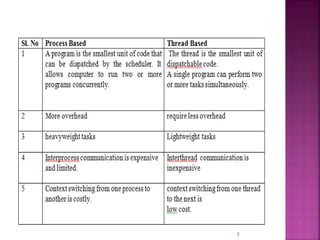
Types of multitasking:
 Multitasking is the ability to execute
more than one task at the same. It can
be divided into two categories:
 process-based
 thread-based
6
7
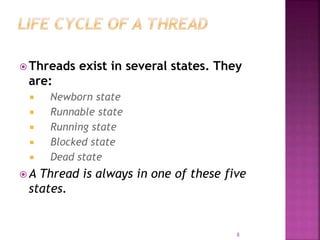
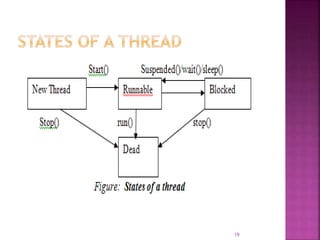
 Threads exist in several states. They
are:
 Newborn state
 Runnable state
 Running state
 Blocked state
 Dead state
 A Thread is always in one of these five
states.
8
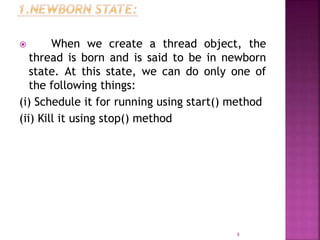
 When we create a thread object, the
thread is born and is said to be in newborn
state. At this state, we can do only one of
the following things:
(i) Schedule it for running using start() method
(ii) Kill it using stop() method
9
10
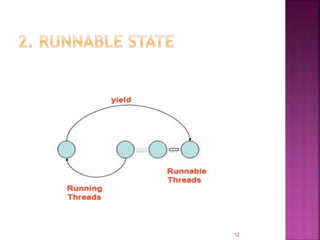
 It means the thread is ready for
execution and is waiting for the availability
of the processor.
 The thread has joined the queue of
threads that are waiting for execution.
 If all threads have equal priority, then
they are given time slots for execution in
round robin fashion.
 The thread that relinquishes control
(yield) joins the queue at the end and again
waits for its turn. This process of assigning
time to threads is known as time-slicing.
11
12
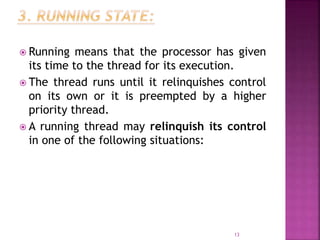
 Running means that the processor has given
its time to the thread for its execution.
 The thread runs until it relinquishes control
on its own or it is preempted by a higher
priority thread.
 A running thread may relinquish its control
in one of the following situations:
13
14
 A thread is said to be blocked when it is
prevented from entering into the runnable
state and subsequently the running state.
 This happens when the thread is
suspended, sleeping, or waiting in order to
satisfy certain requirements.
15
 A running thread ends its life when it has
completed executing its run() method or we
can kill it by sending the stop message.
16
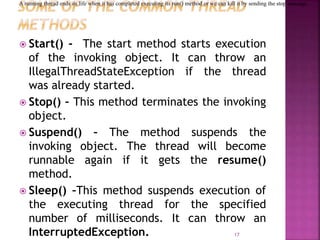
 Start() - The start method starts execution
of the invoking object. It can throw an
IllegalThreadStateException if the thread
was already started.
 Stop() – This method terminates the invoking
object.
 Suspend() – The method suspends the
invoking object. The thread will become
runnable again if it gets the resume()
method.
 Sleep() –This method suspends execution of
the executing thread for the specified
number of milliseconds. It can throw an
InterruptedException. 17
A running thread ends its life when it has completed executing its run() method or we can kill it by sending the stop message.
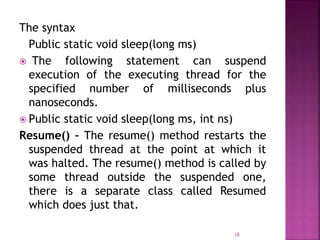
The syntax
Public static void sleep(long ms)
 The following statement can suspend
execution of the executing thread for the
specified number of milliseconds plus
nanoseconds.
 Public static void sleep(long ms, int ns)
Resume() – The resume() method restarts the
suspended thread at the point at which it
was halted. The resume() method is called by
some thread outside the suspended one,
there is a separate class called Resumed
which does just that.
18
19
 When a Java program starts up, one thread
begins running immediately called the main
thread of the program.
 It can be controlled through a Thread object,
currentThread( ), which is a public static
member of Thread. Its general form is :
static Thread currentThread( )
 It returns a reference to the thread in which it
is called.
20
class CurrentThreadDemo {
public static void main(String args[ ])
{
Thread t = Thread.currentThread();
System.out.println("Current thread: " + t);
// change the name of the thread
t.setName("My Thread");
System.out.println("After name change: " + t);
21
try {
for(int n = 5; n > 0; n--) {
System.out.println(n);
Thread.sleep(1000);
}
}
catch (InterruptedException e)
{
System.out.println("Main thread interrupted");
}
} }
22
Current thread: Thread[main,5,main]
After name change:
Thread[My Thread,5,main]
5
4
3
2
1
23
 It is used as an argument to println(). This
displays, in order:
 the name of the thread,
 its priority, and
 the name of its group.
 By default, the name of the main thread
is main. Its priority is 5, which is the
default value, and main is also the name
of the group of threads to which this
thread belongs.
24
1. sleep( ) :
 It causes the thread from which it is called
to suspend execution for the specified period
of milliseconds and also in nanoseconds.
 static void sleep(long milliseconds) throws
InterruptedException
 static void sleep(long milliseconds, int
nanoseconds) throws InterruptedException
2. setName( ):
 To set the name of a thread.
 final void setName(String threadName)
25
3. getName( ):
 To obtain the name of a thread
final String getName( )
 threadName specifies the name of the
thread.
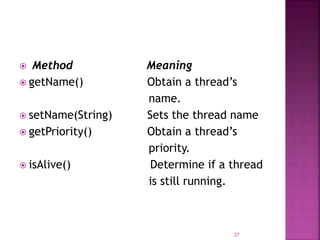
 The Thread class defines several methods
that help manage threads.
26
 Method Meaning
 getName() Obtain a thread’s
name.
 setName(String) Sets the thread name
 getPriority() Obtain a thread’s
priority.
 isAlive() Determine if a thread
is still running.
27
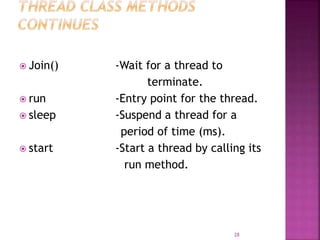
 Join() -Wait for a thread to
terminate.
 run -Entry point for the thread.
 sleep -Suspend a thread for a
period of time (ms).
 start -Start a thread by calling its
run method.
28
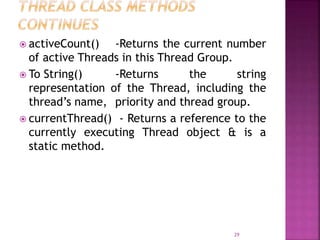
 activeCount() -Returns the current number
of active Threads in this Thread Group.
 To String() -Returns the string
representation of the Thread, including the
thread’s name, priority and thread group.
 currentThread() - Returns a reference to the
currently executing Thread object & is a
static method.
29
 A thread can be created in two ways;
 Runnable interface.
 Extend the Thread class, itself.
30
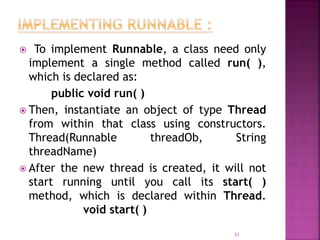
 To implement Runnable, a class need only
implement a single method called run( ),
which is declared as:
public void run( )
 Then, instantiate an object of type Thread
from within that class using constructors.
Thread(Runnable threadOb, String
threadName)
 After the new thread is created, it will not
start running until you call its start( )
method, which is declared within Thread.
void start( )
31
class CreateThreadDemo
{
public static void main(String args[ ])
{
new NewThread(); // create a new thread
try
{
for(int k = 10; k > 6; k--){
System.out.println("Parent Thread: " + k);
Thread.sleep(1000);
}
}
32
catch (InterruptedException e)
{
System.out.println("Parent
Interrupted.");
}
System.out.println("Exiting Parent.");
}
}
33
class NewThread implements Runnable
{
Thread T;
NewThread() //a new, second thread
{
T = new Thread(this, "Creating Thread");
System.out.println("Thread of child: " +
T);
T.start(); // Start the thread
}
34
public void run() // Point of entry for the
second thread.
{
try
{
for(int j = 10; j > 6; j--) {
System.out.println("Child Thread: " + j);
Thread.sleep(500);}
}
catch (InterruptedException e){
System.out.println("Child interrupted.");
}
System.out.println("Exiting Child.");
} }
35
Thread of child: Thread [Creating
Thread,5,main]
Parent Thread: 10
Child Thread: 10
Child Thread: 9
Parent Thread: 9
Child Thread: 8
Child Thread: 7
Parent Thread: 8
Exiting Child.
Parent Thread: 7
Exiting Parent.
36
class CreateThreadDemo
{
public static void main(String args[ ]){
new NewThread(); // create a new
thread
try
{
for(int k = 10; k > 6; k--) {
System.out.println("Parent Thread: " +k);
Thread.sleep(1000);
} }
37
catch (InterruptedException e)
{
System.out.println("Parent
Interrupted.");
}
System.out.println("Exiting Parent.");
}
}
38
class NewThread extends Thread
{
NewThread() //a new, second thread
{
super(“Demo Thread”);
System.out.println("Thread of child: “+this);
start(); // Start the thread
}
39
public void run() // Point of entry for the
second thread.
{
try
{
for(int j = 10; j > 6; j--)
{
System.out.println("Child Thread: " + j);
Thread.sleep(500);
}
}
40
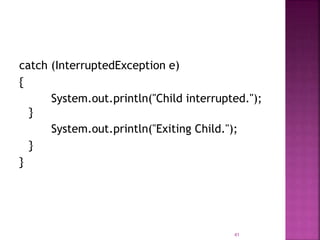
catch (InterruptedException e)
{
System.out.println("Child interrupted.");
}
System.out.println("Exiting Child.");
}
}
41
 To determine whether a thread has finished.
final boolean isAlive( )
 It returns true if the thread upon which it is
called is still running, otherwise returns
false.
 The method used to wait for a thread to
finish is called join( ),
final void join( ) throws
InterruptedException
 This method waits until the thread on which
it is called terminates.
42
class NewThread implements Runnable
{
String name; // name of thread
Thread t;
NewThread(String threadname)
{
name = threadname;
t = new Thread(this, name);
System.out.println("New thread: " + t);
t.start(); // Start the thread
}
43
public void run()
{
try {
for(int i = 3; i > 0; i--)
{
System.out.println(name + ": " + i)
Thread.sleep(1000);
}
}
44
catch (InterruptedException e)
{
System.out.println(name +
"Interrupted"); }
System.out.println(name + "exiting.");
}
}
class MultiThreadDemojoin {
public static void main(String args[])
{
NewThread ob1=new NewThread("One");
NewThread ob2=new NewThread("Two");
NewThread ob3=new NewThread("Three");
45
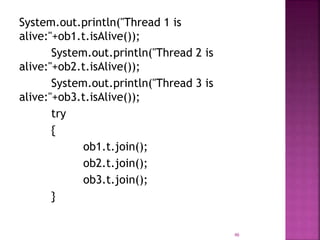
System.out.println("Thread 1 is
alive:"+ob1.t.isAlive());
System.out.println("Thread 2 is
alive:"+ob2.t.isAlive());
System.out.println("Thread 3 is
alive:"+ob3.t.isAlive());
try
{
ob1.t.join();
ob2.t.join();
ob3.t.join();
}
46
catch (InterruptedException e)
{
System.out.println("Main thread
Interrupted"); }
System.out.println("Thread 1 is
alive:"+ob1.t.isAlive());
System.out.println("Thread 2 is
alive:"+ob2.t.isAlive());
System.out.println("Thread 3 is
alive:"+ob3.t.isAlive());
System.out.println("Main thread
Exiting");
}
}
 47
New thread: Thread[One,5,main]
New thread: Thread[Two,5,main]
New thread: Thread[Three,5,main]
One: 3
Two: 3
Thread 1 is alive:true
Thread 2 is alive:true
Thread 3 is alive:true
Three: 3
One: 2
Two: 2
Three: 2 48
Three: 1
One: 1
Two: 1
Three exiting.
One exiting.
Two exiting.
Thread 1 is alive: false
Thread 2 is alive: false
Thread 3 is alive: false
Main thread Exiting
49
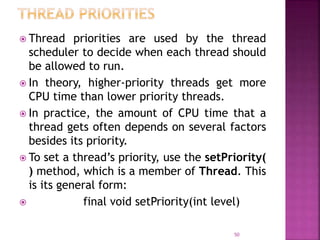
 Thread priorities are used by the thread
scheduler to decide when each thread should
be allowed to run.
 In theory, higher-priority threads get more
CPU time than lower priority threads.
 In practice, the amount of CPU time that a
thread gets often depends on several factors
besides its priority.
 To set a thread’s priority, use the setPriority(
) method, which is a member of Thread. This
is its general form:
 final void setPriority(int level)
50
 Here, level specifies the new priority setting
for the calling thread.
 The value of level must be within the range
MIN_PRIORITY and MAX_PRIORITY.
• MIN_PRIORITY =1
• MAX_PRIORITY = 10
• NORM_PRIORITY = 5 (default priority)
51
class Counter implements Runnable
{
Thread thread;
int counter = 0;
volatile boolean goflag; // volatile – its value
can be changed by another thread
public Counter(int p)
{
thread = new Thread(this);
thread.setPriority(p);
}
52
public void start()
{ goflag = true;
thread.start();
}
public void run()
{ while (goflag)
counter++;
}
public void end()
{ goflag = false;
}
}
53
class PriorityDemo {
public static void main(String args[])
{
Counter thread1= new Counter
(Thread.NORM_PRIORITY + 2);
Counter thread2 = new Counter
(Thread.NORM_PRIORITY + 1);
Counter thread3 = new Counter
(Thread.NORM_PRIORITY - 1);
Counter thread4 = new Counter
(Thread.NORM_PRIORITY - 2);
54
thread1.start();
thread2.start();
thread3.start();
thread4.start();
try { Thread.sleep(5000); }
catch (InterruptedException e) {}
thread1.end();
thread2.end();
thread3.end();
thread4.end();
55
System.out.println("Thread 1 counted: " +
thread1.counter);
System.out.println("Thread 2 counted: " +
thread2.counter);
System.out.println("Thread 3 counted: " +
thread3.counter);
System.out.println("Thread 4 counted: " +
thread4.counter);
} }
Output:
Thread 1 counted: 145565315
Thread 2 counted: 123477095
Thread 3 counted: 6936384
Thread 4 counted: 6057269
56
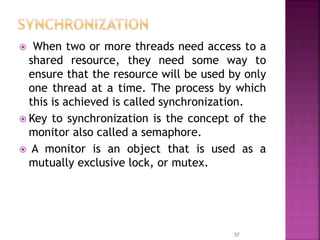
 When two or more threads need access to a
shared resource, they need some way to
ensure that the resource will be used by only
one thread at a time. The process by which
this is achieved is called synchronization.
 Key to synchronization is the concept of the
monitor also called a semaphore.
 A monitor is an object that is used as a
mutually exclusive lock, or mutex.
57
 Only one thread can own a monitor at a
given time.
 When a thread acquires a lock, it is said to
have entered the monitor.
 All other threads attempting to enter the
locked monitor will be suspended until the
first thread exits the monitor. These other
threads are said to be waiting for the
monitor.
58
class SynchronizeDemo1
{
public static void main(String args[ ])
{
Shared shared = new Shared();
CustomThread thread1 = new
CustomThread(shared, "one");
CustomThread thread2 = new
CustomThread(shared, "two");
CustomThread thread3 = new
CustomThread(shared, "three");
CustomThread thread4 = new
CustomThread(shared, "four");
59
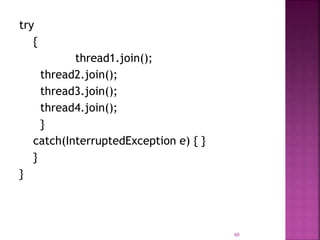
try
{
thread1.join();
thread2.join();
thread3.join();
thread4.join();
}
catch(InterruptedException e) { }
}
}
60
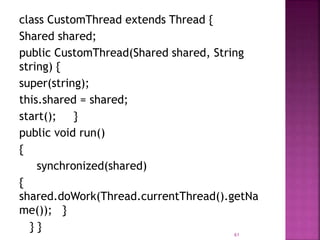
class CustomThread extends Thread {
Shared shared;
public CustomThread(Shared shared, String
string) {
super(string);
this.shared = shared;
start(); }
public void run()
{
synchronized(shared)
{
shared.doWork(Thread.currentThread().getNa
me()); }
} }
61
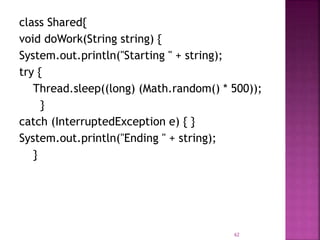
class Shared{
void doWork(String string) {
System.out.println("Starting " + string);
try {
Thread.sleep((long) (Math.random() * 500));
}
catch (InterruptedException e) { }
System.out.println("Ending " + string);
}
62
Starting one
Ending one
Starting two
Ending two
Starting three
Ending three
Starting four
Ending four deprecate
63

Thread model in java

  • 1.
  • 2.
    THREADS A Process isa program in execution.  Two or more processes are running concurrently in a computer is called multitasking.  Java provides support for multithreading.  Multithreading threading environment , tasks are known as threads.  Threads share the same address space and cooperatively share the same heavy weight process. 2
  • 3.
    THREADS A Process isa program in execution.  Two or more processes are running concurrently in a computer is called multitasking.  Java provides support for multithreading.  Multithreading threading environment , tasks are known as threads.  Threads share the same address space and cooperatively share the same heavy weight process. 3
  • 4.
    Definition:  A threadis a line of execution. It is the smallest unit of code that is dispatched by the scheduler. Thus a process can contain multiple threads to execute its different sections. This is called multithreading.  Single threaded process: A process is made up of one thread is known as single threaded process.  Multithreaded Process: A process that creates two or more threads is called a multithreaded process. 4
  • 5.
     A multithreadedprogram contains two or more parts that can run concurrently.  Each part of such a program is called a thread, and each thread defines a separate path of execution.  Multithreading is a specialized form of multitasking.  Many problems solved concurrently. 5
  • 6.
     Improved performance Minimized system resource usage  Simultaneous access to multiple applications  Program structure simplification Types of multitasking:  Multitasking is the ability to execute more than one task at the same. It can be divided into two categories:  process-based  thread-based 6
  • 7.
  • 8.
     Threads existin several states. They are:  Newborn state  Runnable state  Running state  Blocked state  Dead state  A Thread is always in one of these five states. 8
  • 9.
     When wecreate a thread object, the thread is born and is said to be in newborn state. At this state, we can do only one of the following things: (i) Schedule it for running using start() method (ii) Kill it using stop() method 9
  • 10.
  • 11.
     It meansthe thread is ready for execution and is waiting for the availability of the processor.  The thread has joined the queue of threads that are waiting for execution.  If all threads have equal priority, then they are given time slots for execution in round robin fashion.  The thread that relinquishes control (yield) joins the queue at the end and again waits for its turn. This process of assigning time to threads is known as time-slicing. 11
  • 12.
  • 13.
     Running meansthat the processor has given its time to the thread for its execution.  The thread runs until it relinquishes control on its own or it is preempted by a higher priority thread.  A running thread may relinquish its control in one of the following situations: 13
  • 14.
  • 15.
     A threadis said to be blocked when it is prevented from entering into the runnable state and subsequently the running state.  This happens when the thread is suspended, sleeping, or waiting in order to satisfy certain requirements. 15
  • 16.
     A runningthread ends its life when it has completed executing its run() method or we can kill it by sending the stop message. 16
  • 17.
     Start() -The start method starts execution of the invoking object. It can throw an IllegalThreadStateException if the thread was already started.  Stop() – This method terminates the invoking object.  Suspend() – The method suspends the invoking object. The thread will become runnable again if it gets the resume() method.  Sleep() –This method suspends execution of the executing thread for the specified number of milliseconds. It can throw an InterruptedException. 17 A running thread ends its life when it has completed executing its run() method or we can kill it by sending the stop message.
  • 18.
    The syntax Public staticvoid sleep(long ms)  The following statement can suspend execution of the executing thread for the specified number of milliseconds plus nanoseconds.  Public static void sleep(long ms, int ns) Resume() – The resume() method restarts the suspended thread at the point at which it was halted. The resume() method is called by some thread outside the suspended one, there is a separate class called Resumed which does just that. 18
  • 19.
  • 20.
     When aJava program starts up, one thread begins running immediately called the main thread of the program.  It can be controlled through a Thread object, currentThread( ), which is a public static member of Thread. Its general form is : static Thread currentThread( )  It returns a reference to the thread in which it is called. 20
  • 21.
    class CurrentThreadDemo { publicstatic void main(String args[ ]) { Thread t = Thread.currentThread(); System.out.println("Current thread: " + t); // change the name of the thread t.setName("My Thread"); System.out.println("After name change: " + t); 21
  • 22.
    try { for(int n= 5; n > 0; n--) { System.out.println(n); Thread.sleep(1000); } } catch (InterruptedException e) { System.out.println("Main thread interrupted"); } } } 22
  • 23.
    Current thread: Thread[main,5,main] Aftername change: Thread[My Thread,5,main] 5 4 3 2 1 23
  • 24.
     It isused as an argument to println(). This displays, in order:  the name of the thread,  its priority, and  the name of its group.  By default, the name of the main thread is main. Its priority is 5, which is the default value, and main is also the name of the group of threads to which this thread belongs. 24
  • 25.
    1. sleep( ):  It causes the thread from which it is called to suspend execution for the specified period of milliseconds and also in nanoseconds.  static void sleep(long milliseconds) throws InterruptedException  static void sleep(long milliseconds, int nanoseconds) throws InterruptedException 2. setName( ):  To set the name of a thread.  final void setName(String threadName) 25
  • 26.
    3. getName( ): To obtain the name of a thread final String getName( )  threadName specifies the name of the thread.  The Thread class defines several methods that help manage threads. 26
  • 27.
     Method Meaning getName() Obtain a thread’s name.  setName(String) Sets the thread name  getPriority() Obtain a thread’s priority.  isAlive() Determine if a thread is still running. 27
  • 28.
     Join() -Waitfor a thread to terminate.  run -Entry point for the thread.  sleep -Suspend a thread for a period of time (ms).  start -Start a thread by calling its run method. 28
  • 29.
     activeCount() -Returnsthe current number of active Threads in this Thread Group.  To String() -Returns the string representation of the Thread, including the thread’s name, priority and thread group.  currentThread() - Returns a reference to the currently executing Thread object & is a static method. 29
  • 30.
     A threadcan be created in two ways;  Runnable interface.  Extend the Thread class, itself. 30
  • 31.
     To implementRunnable, a class need only implement a single method called run( ), which is declared as: public void run( )  Then, instantiate an object of type Thread from within that class using constructors. Thread(Runnable threadOb, String threadName)  After the new thread is created, it will not start running until you call its start( ) method, which is declared within Thread. void start( ) 31
  • 32.
    class CreateThreadDemo { public staticvoid main(String args[ ]) { new NewThread(); // create a new thread try { for(int k = 10; k > 6; k--){ System.out.println("Parent Thread: " + k); Thread.sleep(1000); } } 32
  • 33.
  • 34.
    class NewThread implementsRunnable { Thread T; NewThread() //a new, second thread { T = new Thread(this, "Creating Thread"); System.out.println("Thread of child: " + T); T.start(); // Start the thread } 34
  • 35.
    public void run()// Point of entry for the second thread. { try { for(int j = 10; j > 6; j--) { System.out.println("Child Thread: " + j); Thread.sleep(500);} } catch (InterruptedException e){ System.out.println("Child interrupted."); } System.out.println("Exiting Child."); } } 35
  • 36.
    Thread of child:Thread [Creating Thread,5,main] Parent Thread: 10 Child Thread: 10 Child Thread: 9 Parent Thread: 9 Child Thread: 8 Child Thread: 7 Parent Thread: 8 Exiting Child. Parent Thread: 7 Exiting Parent. 36
  • 37.
    class CreateThreadDemo { public staticvoid main(String args[ ]){ new NewThread(); // create a new thread try { for(int k = 10; k > 6; k--) { System.out.println("Parent Thread: " +k); Thread.sleep(1000); } } 37
  • 38.
  • 39.
    class NewThread extendsThread { NewThread() //a new, second thread { super(“Demo Thread”); System.out.println("Thread of child: “+this); start(); // Start the thread } 39
  • 40.
    public void run()// Point of entry for the second thread. { try { for(int j = 10; j > 6; j--) { System.out.println("Child Thread: " + j); Thread.sleep(500); } } 40
  • 41.
    catch (InterruptedException e) { System.out.println("Childinterrupted."); } System.out.println("Exiting Child."); } } 41
  • 42.
     To determinewhether a thread has finished. final boolean isAlive( )  It returns true if the thread upon which it is called is still running, otherwise returns false.  The method used to wait for a thread to finish is called join( ), final void join( ) throws InterruptedException  This method waits until the thread on which it is called terminates. 42
  • 43.
    class NewThread implementsRunnable { String name; // name of thread Thread t; NewThread(String threadname) { name = threadname; t = new Thread(this, name); System.out.println("New thread: " + t); t.start(); // Start the thread } 43
  • 44.
    public void run() { try{ for(int i = 3; i > 0; i--) { System.out.println(name + ": " + i) Thread.sleep(1000); } } 44
  • 45.
    catch (InterruptedException e) { System.out.println(name+ "Interrupted"); } System.out.println(name + "exiting."); } } class MultiThreadDemojoin { public static void main(String args[]) { NewThread ob1=new NewThread("One"); NewThread ob2=new NewThread("Two"); NewThread ob3=new NewThread("Three"); 45
  • 46.
    System.out.println("Thread 1 is alive:"+ob1.t.isAlive()); System.out.println("Thread2 is alive:"+ob2.t.isAlive()); System.out.println("Thread 3 is alive:"+ob3.t.isAlive()); try { ob1.t.join(); ob2.t.join(); ob3.t.join(); } 46
  • 47.
    catch (InterruptedException e) { System.out.println("Mainthread Interrupted"); } System.out.println("Thread 1 is alive:"+ob1.t.isAlive()); System.out.println("Thread 2 is alive:"+ob2.t.isAlive()); System.out.println("Thread 3 is alive:"+ob3.t.isAlive()); System.out.println("Main thread Exiting"); } }  47
  • 48.
    New thread: Thread[One,5,main] Newthread: Thread[Two,5,main] New thread: Thread[Three,5,main] One: 3 Two: 3 Thread 1 is alive:true Thread 2 is alive:true Thread 3 is alive:true Three: 3 One: 2 Two: 2 Three: 2 48
  • 49.
    Three: 1 One: 1 Two:1 Three exiting. One exiting. Two exiting. Thread 1 is alive: false Thread 2 is alive: false Thread 3 is alive: false Main thread Exiting 49
  • 50.
     Thread prioritiesare used by the thread scheduler to decide when each thread should be allowed to run.  In theory, higher-priority threads get more CPU time than lower priority threads.  In practice, the amount of CPU time that a thread gets often depends on several factors besides its priority.  To set a thread’s priority, use the setPriority( ) method, which is a member of Thread. This is its general form:  final void setPriority(int level) 50
  • 51.
     Here, levelspecifies the new priority setting for the calling thread.  The value of level must be within the range MIN_PRIORITY and MAX_PRIORITY. • MIN_PRIORITY =1 • MAX_PRIORITY = 10 • NORM_PRIORITY = 5 (default priority) 51
  • 52.
    class Counter implementsRunnable { Thread thread; int counter = 0; volatile boolean goflag; // volatile – its value can be changed by another thread public Counter(int p) { thread = new Thread(this); thread.setPriority(p); } 52
  • 53.
    public void start() {goflag = true; thread.start(); } public void run() { while (goflag) counter++; } public void end() { goflag = false; } } 53
  • 54.
    class PriorityDemo { publicstatic void main(String args[]) { Counter thread1= new Counter (Thread.NORM_PRIORITY + 2); Counter thread2 = new Counter (Thread.NORM_PRIORITY + 1); Counter thread3 = new Counter (Thread.NORM_PRIORITY - 1); Counter thread4 = new Counter (Thread.NORM_PRIORITY - 2); 54
  • 55.
    thread1.start(); thread2.start(); thread3.start(); thread4.start(); try { Thread.sleep(5000);} catch (InterruptedException e) {} thread1.end(); thread2.end(); thread3.end(); thread4.end(); 55
  • 56.
    System.out.println("Thread 1 counted:" + thread1.counter); System.out.println("Thread 2 counted: " + thread2.counter); System.out.println("Thread 3 counted: " + thread3.counter); System.out.println("Thread 4 counted: " + thread4.counter); } } Output: Thread 1 counted: 145565315 Thread 2 counted: 123477095 Thread 3 counted: 6936384 Thread 4 counted: 6057269 56
  • 57.
     When twoor more threads need access to a shared resource, they need some way to ensure that the resource will be used by only one thread at a time. The process by which this is achieved is called synchronization.  Key to synchronization is the concept of the monitor also called a semaphore.  A monitor is an object that is used as a mutually exclusive lock, or mutex. 57
  • 58.
     Only onethread can own a monitor at a given time.  When a thread acquires a lock, it is said to have entered the monitor.  All other threads attempting to enter the locked monitor will be suspended until the first thread exits the monitor. These other threads are said to be waiting for the monitor. 58
  • 59.
    class SynchronizeDemo1 { public staticvoid main(String args[ ]) { Shared shared = new Shared(); CustomThread thread1 = new CustomThread(shared, "one"); CustomThread thread2 = new CustomThread(shared, "two"); CustomThread thread3 = new CustomThread(shared, "three"); CustomThread thread4 = new CustomThread(shared, "four"); 59
  • 60.
  • 61.
    class CustomThread extendsThread { Shared shared; public CustomThread(Shared shared, String string) { super(string); this.shared = shared; start(); } public void run() { synchronized(shared) { shared.doWork(Thread.currentThread().getNa me()); } } } 61
  • 62.
    class Shared{ void doWork(Stringstring) { System.out.println("Starting " + string); try { Thread.sleep((long) (Math.random() * 500)); } catch (InterruptedException e) { } System.out.println("Ending " + string); } 62
  • 63.
    Starting one Ending one Startingtwo Ending two Starting three Ending three Starting four Ending four deprecate 63