MULTITHREADING
2.1 Understand the concept of Threading
Learning Outcomes
At the end of this presentation, you will be able to
• Define Thread and its uses of Thread in Java programs
• Explain the different types of Thread
• Differentiate between multi-tasking and multi-threading
• List the method involved in life cycle of a Thread
Thread Definition
• As a human , we can do more than one action at a time.
• In java this concept is called Thread (java.lang.Thread
class).
• A thread (urutan) is the flow of execution, from the
beginning to end, of a task in a program - processes
executed by a program
• Uses in Java program
 Web server – database
 Animation – game
Types of Thread
• Two types of Thread
– Single Thread
– Multiple Thread (multithreaded)
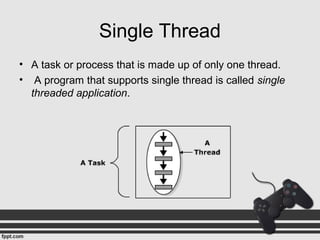
Single Thread
• A task or process that is made up of only one thread.
• A program that supports single thread is called single
threaded application.
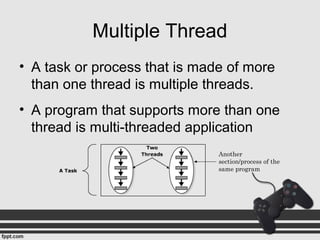
Multiple Thread
• A task or process that is made of more
than one thread is multiple threads.
• A program that supports more than one
thread is multi-threaded application
Another
section/process of the
same program
Multitasking vs Multithreading
Multitasking Multithreading
Is the ability of an
operating system to
execute more than
one program
simultaneously
Is the capability of
running multiple tasks
concurrently within a
program
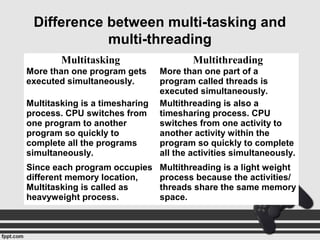
Difference between multi-tasking and
multi-threading
Multitasking Multithreading
More than one program gets
executed simultaneously.
More than one part of a
program called threads is
executed simultaneously.
Multitasking is a timesharing
process. CPU switches from
one program to another
program so quickly to
complete all the programs
simultaneously.
Multithreading is also a
timesharing process. CPU
switches from one activity to
another activity within the
program so quickly to complete
all the activities simultaneously.
Since each program occupies
different memory location,
Multitasking is called as
heavyweight process.
Multithreading is a light weight
process because the activities/
threads share the same memory
space.
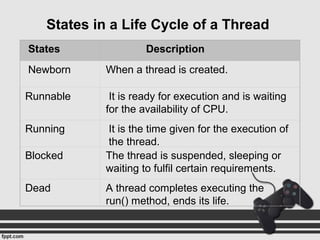
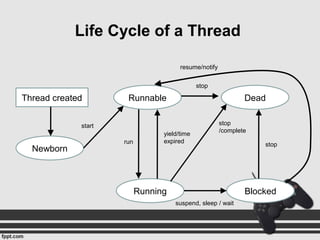
States Description
Newborn When a thread is created.
Runnable It is ready for execution and is waiting
for the availability of CPU.
Running It is the time given for the execution of
the thread.
Blocked The thread is suspended, sleeping or
waiting to fulfil certain requirements.
Dead A thread completes executing the
run() method, ends its life.
States in a Life Cycle of a Thread
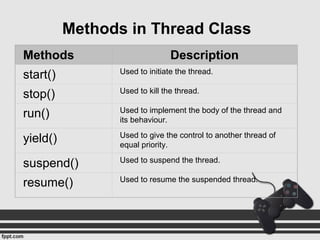
Methods Description
start() Used to initiate the thread.
stop() Used to kill the thread.
run() Used to implement the body of the thread and
its behaviour.
yield() Used to give the control to another thread of
equal priority.
suspend() Used to suspend the thread.
resume() Used to resume the suspended thread.
Methods in Thread Class
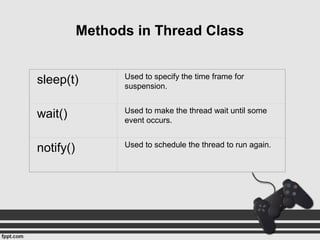
sleep(t) Used to specify the time frame for
suspension.
wait() Used to make the thread wait until some
event occurs.
notify() Used to schedule the thread to run again.
Methods in Thread Class
Thread created
Newborn
Running
Runnable
Blocked
Dead
start
run
stop
yield/time
expired
suspend, sleep / wait
stop
stop
/complete
resume/notify
Life Cycle of a Thread
 There are two ways to create a java thread:
 By extending the Thread class
(java.lang.Thread)
 By implementing the Runnable interface
(java.lang.Runnable)
Creating Threads
class FirstThread extends Thread
{
public void run()
{
int a = 8,b = 4,sum;
sum = a + b;
System.out.println("Sum is "+sum);
}
}
class ThreadDemo2{
public static void main(String args[]){
FirstThread obj1 = new FirstThread();
obj1.start();
}
}
extends Thread class
override the run() method
Use start() method to start the thread
class FirstThread implements Runnable {
public void run()
{
int a = 8,b = 4,sum;
sum = a + b;
System.out.println("Sum is "+sum);
}
}
class ThreadDemo2{
public static void main(String args[]){
FirstThread obj1 = new FirstThread();
Thread t = new Thread(obj1);
t.start();
}
}
Implements Runnable
interface
override the run() method
Use start() method to start the thread
Extending Thread vs. Implementing
Runnable Interface
• Choosing between these two is a matter of taste
• Implementing the Runnable interface
– May take more work since we still
• Declare a Thread object
• Call the Thread methods on this object
• Extending the Thread class
– Easier to implement
– Your class can no longer extend any other class
EXERCISE
• Based on the situations below, identify and state the
appropriate methods.
i. Thread will suspend according to the time
frame.
ii. This method is used to schedule the thread to run
again.
iii. Thread will wait until some event occurs.
iv. This method will resume the suspended thread.
v. Thread will stop.
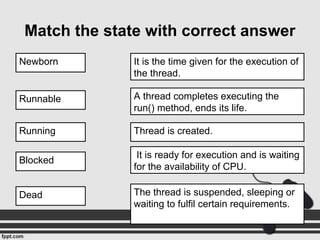
Match the state with correct answer
Newborn
Thread is created.
Runnable
It is ready for execution and is waiting
for the availability of CPU.
Running
It is the time given for the execution of
the thread.
Blocked
The thread is suspended, sleeping or
waiting to fulfil certain requirements.
Dead
A thread completes executing the
run() method, ends its life.
In this presentation, you learnt the following
• Threads can be defined as single, sequential
flow of control within a program.
• The two types of threads are single and
multiple threads
• A process that is made of only one thread is
called single threaded application.
Summary
• A program that supports more than one thread
is multi-threaded application.
• The lifetime of a thread includes the Newborn,
Runnable, Running, Blocked and Dead states.

Chap2 2 1

  • 1.
  • 2.
    Learning Outcomes At theend of this presentation, you will be able to • Define Thread and its uses of Thread in Java programs • Explain the different types of Thread • Differentiate between multi-tasking and multi-threading • List the method involved in life cycle of a Thread
  • 3.
    Thread Definition • Asa human , we can do more than one action at a time. • In java this concept is called Thread (java.lang.Thread class). • A thread (urutan) is the flow of execution, from the beginning to end, of a task in a program - processes executed by a program • Uses in Java program  Web server – database  Animation – game
  • 4.
    Types of Thread •Two types of Thread – Single Thread – Multiple Thread (multithreaded)
  • 5.
    Single Thread • Atask or process that is made up of only one thread. • A program that supports single thread is called single threaded application.
  • 6.
    Multiple Thread • Atask or process that is made of more than one thread is multiple threads. • A program that supports more than one thread is multi-threaded application Another section/process of the same program
  • 7.
    Multitasking vs Multithreading MultitaskingMultithreading Is the ability of an operating system to execute more than one program simultaneously Is the capability of running multiple tasks concurrently within a program
  • 8.
    Difference between multi-taskingand multi-threading Multitasking Multithreading More than one program gets executed simultaneously. More than one part of a program called threads is executed simultaneously. Multitasking is a timesharing process. CPU switches from one program to another program so quickly to complete all the programs simultaneously. Multithreading is also a timesharing process. CPU switches from one activity to another activity within the program so quickly to complete all the activities simultaneously. Since each program occupies different memory location, Multitasking is called as heavyweight process. Multithreading is a light weight process because the activities/ threads share the same memory space.
  • 9.
    States Description Newborn Whena thread is created. Runnable It is ready for execution and is waiting for the availability of CPU. Running It is the time given for the execution of the thread. Blocked The thread is suspended, sleeping or waiting to fulfil certain requirements. Dead A thread completes executing the run() method, ends its life. States in a Life Cycle of a Thread
  • 10.
    Methods Description start() Usedto initiate the thread. stop() Used to kill the thread. run() Used to implement the body of the thread and its behaviour. yield() Used to give the control to another thread of equal priority. suspend() Used to suspend the thread. resume() Used to resume the suspended thread. Methods in Thread Class
  • 11.
    sleep(t) Used tospecify the time frame for suspension. wait() Used to make the thread wait until some event occurs. notify() Used to schedule the thread to run again. Methods in Thread Class
  • 12.
  • 13.
     There aretwo ways to create a java thread:  By extending the Thread class (java.lang.Thread)  By implementing the Runnable interface (java.lang.Runnable) Creating Threads
  • 14.
    class FirstThread extendsThread { public void run() { int a = 8,b = 4,sum; sum = a + b; System.out.println("Sum is "+sum); } } class ThreadDemo2{ public static void main(String args[]){ FirstThread obj1 = new FirstThread(); obj1.start(); } } extends Thread class override the run() method Use start() method to start the thread
  • 15.
    class FirstThread implementsRunnable { public void run() { int a = 8,b = 4,sum; sum = a + b; System.out.println("Sum is "+sum); } } class ThreadDemo2{ public static void main(String args[]){ FirstThread obj1 = new FirstThread(); Thread t = new Thread(obj1); t.start(); } } Implements Runnable interface override the run() method Use start() method to start the thread
  • 16.
    Extending Thread vs.Implementing Runnable Interface • Choosing between these two is a matter of taste • Implementing the Runnable interface – May take more work since we still • Declare a Thread object • Call the Thread methods on this object • Extending the Thread class – Easier to implement – Your class can no longer extend any other class
  • 17.
    EXERCISE • Based onthe situations below, identify and state the appropriate methods. i. Thread will suspend according to the time frame. ii. This method is used to schedule the thread to run again. iii. Thread will wait until some event occurs. iv. This method will resume the suspended thread. v. Thread will stop.
  • 18.
    Match the statewith correct answer Newborn Thread is created. Runnable It is ready for execution and is waiting for the availability of CPU. Running It is the time given for the execution of the thread. Blocked The thread is suspended, sleeping or waiting to fulfil certain requirements. Dead A thread completes executing the run() method, ends its life.
  • 19.
    In this presentation,you learnt the following • Threads can be defined as single, sequential flow of control within a program. • The two types of threads are single and multiple threads • A process that is made of only one thread is called single threaded application. Summary
  • 20.
    • A programthat supports more than one thread is multi-threaded application. • The lifetime of a thread includes the Newborn, Runnable, Running, Blocked and Dead states.

Editor's Notes

  • #8 multitasking: Word processor lets you print or save a file while you are typing Web browser, allow you to download a file while you are searching an information
  • #11 Initiate = begin Kill = destroy Suspend = delay the executing of the thread Resume = start again the executing
  • #13 Newborn = new state Runnable = ready state A ready thread is runnable but may not be running yet. The os has to allocate CPU time to it Complete = completes the execution of run() method