Quantitative Analysis Using Alaa Sadik, Ph.D. Curricula & Instruction, Faculty of Education South Valley University, Qena 11183, Egypt e-mail: alaasadik@hotmail.com http://www.freewebs.com/alaasadik جامعة جنوب الوادي مركز تنمية قدرات أعضاء هيئة التدريس
Quantitative Analysis Using SPSS Manipulation of Data Data Analysis
Manipulation and Transformation  of Data
Manipulation and Transformation of Data Recode Compute Replace missing values Select cases Sort cases Merge files Aggregate data
Methods for transforming data Computing a new variable Recode  into same variable different variable Select subset of cases Random sample Replace missing values
Compute a new variable You can calculate different variables from the existing variables. For this you need to know the way to compute your target variable from the existing variables. You can perform operations like addition, subtraction, division and multiplication of variables to create a new variable.
Recode into same variable Using SPSS you can recode a variable into the same variable?
Recode into different variable You can Recode existing variable into a different variable. Recode into Different Variables reassigns the values of existing variables or collapses ranges of existing values into new values for a new variable.  For example, you could collapse salaries into a new variable containing salary-range categories.
Select subset of cases You can select subset of cases for your analysis using SPSS. For example, you can use select procedure if you want to do analysis of the relation between education of females and their income from the data set that has information of both males and females.
Replace missing values Missing observations can be problematic in analysis, and some time series measures cannot be computed if there are missing values in the series. Replace Missing Values creates new time series variables from existing ones, replacing missing values with estimates computed with one of several methods.
Aggregate data Aggregate Data combines groups of cases into single summary cases and creates a new aggregated data file. Cases are aggregated based on the value of one or more grouping variables.  The new data file contains one case for each group.
Create time series Create Time Series creates new variables based on functions of existing numeric time series variables.  These transformed values are useful in many time series analysis procedures. Available functions for creating time series variables include differences, moving averages.
Sort cases You can sort cases of the data file based on the values of one or more sorting variables. You can sort cases in ascending or descending order. If you select multiple sort variables, cases are sorted by each variable within categories of the prior variable on the Sort list.
Merge files There are two types of merging: Adding new cases for the same variables. Adding new variables for the same cases. Depending on what you want to add you select this option.
Add cases Add Cases merges the working data file with a second data file that contains the same variables but different cases.  For example, you might record the same information for customers in two different sales regions and maintain the data for each region in separate files.  Variables from the working data file are identified with an asterisk (*). Variables from the external data file are identified with a plus sign (+).
Add variables Add Variables merges the working data file with an external data file that contains the same cases but different variables. For example, you might want to merge a data file that contains pre-test results with one that contains post-test results. You can save this new file with a new name after merging.
Before merging… Cases must be sorted in the same order in both data files. If one or more key variables are used to match cases, the two data files must be sorted by ascending order of the key variable(s). Variable names in the second data file that duplicate variable names in the working data file are excluded by default because Add Variables assumes that these variables contain duplicate information.
Analysis Data
Types of Variables Nominal  example : nationality, race, gender…   based on a  concept  (two categories variable called “dichotomous nominal”) Ordinal example:  knowledge, skill... (more than, equal, less than) rank-ordered  in terms of a criterion from highest to lowest Interval/Ratio  example:  age, income, speed...   based on  arithmetic qualities  and have a fixed zero point
Types of Analysis Univariate Analysis Descriptive Statistics (Summarising Data) Frequency Distributions Frequency tables Histograms
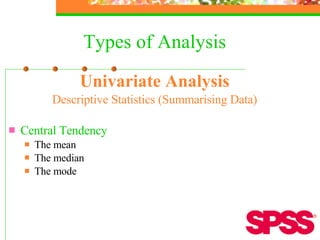
Types of Analysis Univariate Analysis Descriptive Statistics (Summarising Data) Central Tendency The mean The median The mode
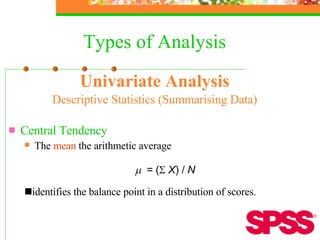
Types of Analysis Univariate Analysis Descriptive Statistics (Summarising Data) Central Tendency The  mean  the arithmetic average   identifies the balance point in a distribution of scores.    = (    X ) /  N
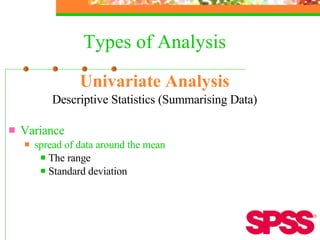
Types of Analysis Univariate Analysis Descriptive Statistics (Summarising Data) Variance  spread of data around the mean The range Standard deviation
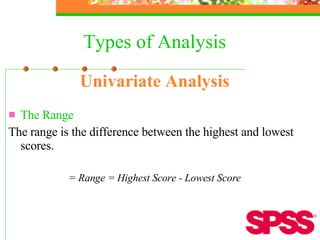
Types of Analysis Univariate Analysis The Range The range is the difference between the highest and lowest scores. = Range = Highest Score - Lowest Score
Types of Analysis Univariate Analysis Standard Deviation  The standard deviation is the average amount of deviation from the mean within a group of scores. The greater the spread of scores, the greater the standard deviation.
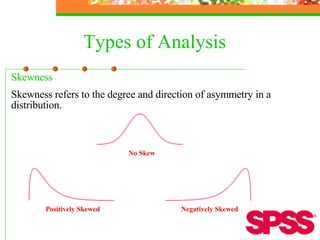
Types of Analysis Skewness  Skewness refers to the degree and direction of asymmetry in a distribution. No Skew Positively Skewed Negatively Skewed
Types of Analysis Bivariate Analysis Exploring  differences   relationships   between two variables
Types of Analysis Bivariate Analysis Exploring  differences  between two variables Criteria for selecting bivariate tests of differences Type of data  (nominal/ordinal/interval) Purpose of investigation  (means/varience) Relationship between groups  (independent/dependent) Number of groups  (two/more)
Types of Analysis Bivariate Analysis Exploring  differences  between two variables Parametric  vs  non-parametric tests The scale of measurment is of equal interval . The distribution is normal . The variences of both variables are homogenous .
Types of Analysis Bivariate Analysis Exploring  differences  between two variables 1. Non-parametric tests  Categorical variables  Non-categorical variables 2. Parametric tests  Non-categorical variables
Types of Analysis Bivariate Analysis Exploring  differences  between two variables Non-parametric tests - Categorical variables - Binomial test:   to compare frequencies, two categories, one sample Example: Ratio of male to female in specific industry compared to industry in general. - Chi-square test:   to compare frequencies, more than two categories, one sample Example: Number of workers from four different ethnic groups
Types of Analysis Bivariate Analysis Exploring  differences  between two variables Non-parametric tests - Categorical variables - Crosstabulation :  two or more categories, unrelated samples Example: The proportion of  male  to  female  workers in both  white  and  black  workers. - Q  test:   three or more categories, related samples Example: The number of people who didn’t attend the three meetings.
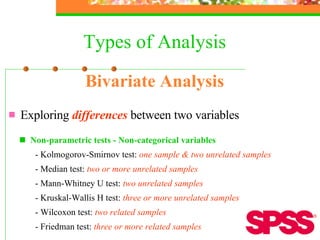
Types of Analysis Bivariate Analysis Exploring  differences  between two variables Non-parametric tests - Non-categorical variables - Kolmogorov-Smirnov test:  one sample & two unrelated samples - Median test:  two or more unrelated samples - Mann-Whitney U test:  two unrelated samples - Kruskal-Wallis H test:  three or more unrelated samples - Wilcoxon test:  two related samples - Friedman test:  three or more related samples
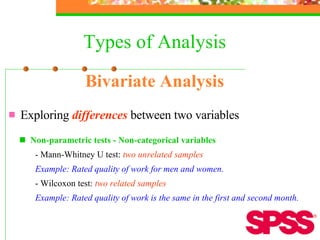
Types of Analysis Bivariate Analysis Exploring  differences  between two variables Non-parametric tests - Non-categorical variables - Mann-Whitney U test:  two unrelated samples Example: Rated quality of work for men and women. - Wilcoxon test:  two related samples Example: Rated quality of work is the same in the first and second month.
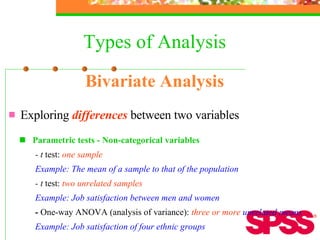
Types of Analysis Bivariate Analysis Exploring  differences  between two variables Parametric tests - Non-categorical variables - t  test:  one sample  Example: The mean of a sample to that of the population - t  test:  two unrelated samples Example: Job satisfaction between men and women -  One-way ANOVA (analysis of variance):  three or more  unrelated means Example: Job satisfaction of four ethnic groups
Types of Analysis Bivariate Analysis Exploring  differences  between two variables Parametric tests - Non-categorical variables - Levene’s test:  three or more unrelated variances Example: The variances of job satisfaction across four ethnic groups  - t  test:  two related means Example: Means of the same subject s in two conditions
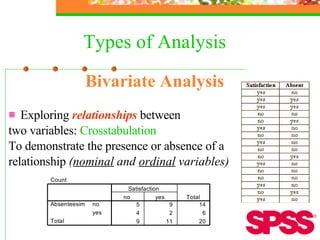
Types of Analysis Bivariate Analysis Exploring  relationships  between  two variables:  Crosstabulation To demonstrate the presence or absence of a  relationship  ( nominal  and  ordinal  variables)
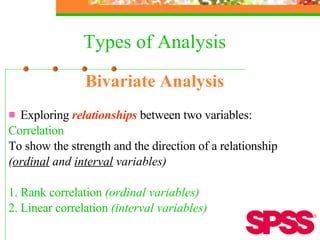
Types of Analysis Bivariate Analysis Exploring  relationships  between two variables:  Correlation  To show the strength and the direction of a relationship  ( ordinal  and  interval  variables) 1. Rank correlation  (ordinal variables) 2. Linear correlation  (interval variables)
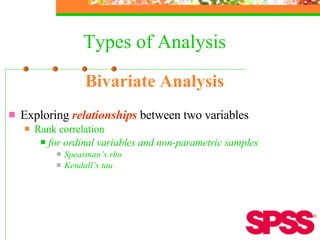
Types of Analysis Bivariate Analysis Exploring  relationships  between two variables  Rank correlation  for ordinal variables and non-parametric samples Spearman’s rho Kendall’s tau
Types of Analysis Bivariate Analysis Exploring  relationships  between two variables  Linear correlation  for interval variables and parametric samples Pearson’s r  Regression (for making predications of likely values of the dependent variable)
www.spss.com
Thank U Quantitative Analysis Using SPSS by Alaa Sadik  For more examples and information about this presentation visit my site below www.freewebs.com/alaasadik

Quantitative analysis using SPSS

  • 1.
    Quantitative Analysis UsingAlaa Sadik, Ph.D. Curricula & Instruction, Faculty of Education South Valley University, Qena 11183, Egypt e-mail: alaasadik@hotmail.com http://www.freewebs.com/alaasadik جامعة جنوب الوادي مركز تنمية قدرات أعضاء هيئة التدريس
  • 2.
    Quantitative Analysis UsingSPSS Manipulation of Data Data Analysis
  • 3.
  • 4.
    Manipulation and Transformationof Data Recode Compute Replace missing values Select cases Sort cases Merge files Aggregate data
  • 5.
    Methods for transformingdata Computing a new variable Recode into same variable different variable Select subset of cases Random sample Replace missing values
  • 6.
    Compute a newvariable You can calculate different variables from the existing variables. For this you need to know the way to compute your target variable from the existing variables. You can perform operations like addition, subtraction, division and multiplication of variables to create a new variable.
  • 7.
    Recode into samevariable Using SPSS you can recode a variable into the same variable?
  • 8.
    Recode into differentvariable You can Recode existing variable into a different variable. Recode into Different Variables reassigns the values of existing variables or collapses ranges of existing values into new values for a new variable. For example, you could collapse salaries into a new variable containing salary-range categories.
  • 9.
    Select subset ofcases You can select subset of cases for your analysis using SPSS. For example, you can use select procedure if you want to do analysis of the relation between education of females and their income from the data set that has information of both males and females.
  • 10.
    Replace missing valuesMissing observations can be problematic in analysis, and some time series measures cannot be computed if there are missing values in the series. Replace Missing Values creates new time series variables from existing ones, replacing missing values with estimates computed with one of several methods.
  • 11.
    Aggregate data AggregateData combines groups of cases into single summary cases and creates a new aggregated data file. Cases are aggregated based on the value of one or more grouping variables. The new data file contains one case for each group.
  • 12.
    Create time seriesCreate Time Series creates new variables based on functions of existing numeric time series variables. These transformed values are useful in many time series analysis procedures. Available functions for creating time series variables include differences, moving averages.
  • 13.
    Sort cases Youcan sort cases of the data file based on the values of one or more sorting variables. You can sort cases in ascending or descending order. If you select multiple sort variables, cases are sorted by each variable within categories of the prior variable on the Sort list.
  • 14.
    Merge files Thereare two types of merging: Adding new cases for the same variables. Adding new variables for the same cases. Depending on what you want to add you select this option.
  • 15.
    Add cases AddCases merges the working data file with a second data file that contains the same variables but different cases. For example, you might record the same information for customers in two different sales regions and maintain the data for each region in separate files. Variables from the working data file are identified with an asterisk (*). Variables from the external data file are identified with a plus sign (+).
  • 16.
    Add variables AddVariables merges the working data file with an external data file that contains the same cases but different variables. For example, you might want to merge a data file that contains pre-test results with one that contains post-test results. You can save this new file with a new name after merging.
  • 17.
    Before merging… Casesmust be sorted in the same order in both data files. If one or more key variables are used to match cases, the two data files must be sorted by ascending order of the key variable(s). Variable names in the second data file that duplicate variable names in the working data file are excluded by default because Add Variables assumes that these variables contain duplicate information.
  • 18.
  • 19.
    Types of VariablesNominal example : nationality, race, gender… based on a concept (two categories variable called “dichotomous nominal”) Ordinal example: knowledge, skill... (more than, equal, less than) rank-ordered in terms of a criterion from highest to lowest Interval/Ratio example: age, income, speed... based on arithmetic qualities and have a fixed zero point
  • 20.
    Types of AnalysisUnivariate Analysis Descriptive Statistics (Summarising Data) Frequency Distributions Frequency tables Histograms
  • 21.
    Types of AnalysisUnivariate Analysis Descriptive Statistics (Summarising Data) Central Tendency The mean The median The mode
  • 22.
    Types of AnalysisUnivariate Analysis Descriptive Statistics (Summarising Data) Central Tendency The mean the arithmetic average identifies the balance point in a distribution of scores.  = (  X ) / N
  • 23.
    Types of AnalysisUnivariate Analysis Descriptive Statistics (Summarising Data) Variance spread of data around the mean The range Standard deviation
  • 24.
    Types of AnalysisUnivariate Analysis The Range The range is the difference between the highest and lowest scores. = Range = Highest Score - Lowest Score
  • 25.
    Types of AnalysisUnivariate Analysis Standard Deviation The standard deviation is the average amount of deviation from the mean within a group of scores. The greater the spread of scores, the greater the standard deviation.
  • 26.
    Types of AnalysisSkewness Skewness refers to the degree and direction of asymmetry in a distribution. No Skew Positively Skewed Negatively Skewed
  • 27.
    Types of AnalysisBivariate Analysis Exploring differences relationships between two variables
  • 28.
    Types of AnalysisBivariate Analysis Exploring differences between two variables Criteria for selecting bivariate tests of differences Type of data (nominal/ordinal/interval) Purpose of investigation (means/varience) Relationship between groups (independent/dependent) Number of groups (two/more)
  • 29.
    Types of AnalysisBivariate Analysis Exploring differences between two variables Parametric vs non-parametric tests The scale of measurment is of equal interval . The distribution is normal . The variences of both variables are homogenous .
  • 30.
    Types of AnalysisBivariate Analysis Exploring differences between two variables 1. Non-parametric tests Categorical variables Non-categorical variables 2. Parametric tests Non-categorical variables
  • 31.
    Types of AnalysisBivariate Analysis Exploring differences between two variables Non-parametric tests - Categorical variables - Binomial test: to compare frequencies, two categories, one sample Example: Ratio of male to female in specific industry compared to industry in general. - Chi-square test: to compare frequencies, more than two categories, one sample Example: Number of workers from four different ethnic groups
  • 32.
    Types of AnalysisBivariate Analysis Exploring differences between two variables Non-parametric tests - Categorical variables - Crosstabulation : two or more categories, unrelated samples Example: The proportion of male to female workers in both white and black workers. - Q test: three or more categories, related samples Example: The number of people who didn’t attend the three meetings.
  • 33.
    Types of AnalysisBivariate Analysis Exploring differences between two variables Non-parametric tests - Non-categorical variables - Kolmogorov-Smirnov test: one sample & two unrelated samples - Median test: two or more unrelated samples - Mann-Whitney U test: two unrelated samples - Kruskal-Wallis H test: three or more unrelated samples - Wilcoxon test: two related samples - Friedman test: three or more related samples
  • 34.
    Types of AnalysisBivariate Analysis Exploring differences between two variables Non-parametric tests - Non-categorical variables - Mann-Whitney U test: two unrelated samples Example: Rated quality of work for men and women. - Wilcoxon test: two related samples Example: Rated quality of work is the same in the first and second month.
  • 35.
    Types of AnalysisBivariate Analysis Exploring differences between two variables Parametric tests - Non-categorical variables - t test: one sample Example: The mean of a sample to that of the population - t test: two unrelated samples Example: Job satisfaction between men and women - One-way ANOVA (analysis of variance): three or more unrelated means Example: Job satisfaction of four ethnic groups
  • 36.
    Types of AnalysisBivariate Analysis Exploring differences between two variables Parametric tests - Non-categorical variables - Levene’s test: three or more unrelated variances Example: The variances of job satisfaction across four ethnic groups - t test: two related means Example: Means of the same subject s in two conditions
  • 37.
    Types of AnalysisBivariate Analysis Exploring relationships between two variables: Crosstabulation To demonstrate the presence or absence of a relationship ( nominal and ordinal variables)
  • 38.
    Types of AnalysisBivariate Analysis Exploring relationships between two variables: Correlation To show the strength and the direction of a relationship ( ordinal and interval variables) 1. Rank correlation (ordinal variables) 2. Linear correlation (interval variables)
  • 39.
    Types of AnalysisBivariate Analysis Exploring relationships between two variables Rank correlation for ordinal variables and non-parametric samples Spearman’s rho Kendall’s tau
  • 40.
    Types of AnalysisBivariate Analysis Exploring relationships between two variables Linear correlation for interval variables and parametric samples Pearson’s r Regression (for making predications of likely values of the dependent variable)
  • 41.
  • 42.
    Thank U QuantitativeAnalysis Using SPSS by Alaa Sadik For more examples and information about this presentation visit my site below www.freewebs.com/alaasadik