A Dual-Channel Tool for Synchronizing Slides and Presenter's Audio-Video Guidance in Blended Learning EnvironmentsOngoing Project…Alaa Sadik, Ph.D.SQU, Omanalaasadik@gmail.comwww.alaasadik.net
RationaleMS PowerPoint® is the leading presentation software used in face-to-face education for more than 20 years. It has become the dominant presentation tool in our classes, with the intention of creating audio-visual presentations.
RationaleThe ease of use of PowerPoint can save time and encourage teachers, resulting in billions of PowerPoint files made each year.
The ProblemAlthough billions of PowerPoint documents are available and can support blended learning effectively, they are no substitute for the in-depth information and guidance a presenter should deliver.
The ProblemIf students are not seeing or listening to the teacher, then reading the slides in isolation will be less valuable.
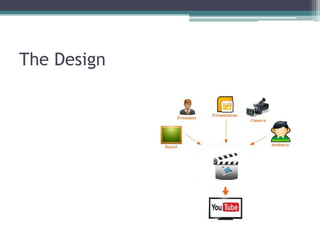
The SolutionAn easy-to-use software to synchronize and record slides and presenter's actual presence and audio-visual guidance (narration).So, teachers can easily make lectures or tutorialsavailable via the Internet (e.g., YouTube).
The DesignThe software should be designed to:help teachers apply principles for the design of multimedia materials and human cognitive processing. take advantage of the dual-channel structure of the human information processing system by means of text, pictures and audio.
The DesignThe software should be designed to:give learners a sense of interacting with the teacher while watching the lecture (social presence).reduce students’ cognitive load by helping them select, organize & integrate what’s important.
The Design
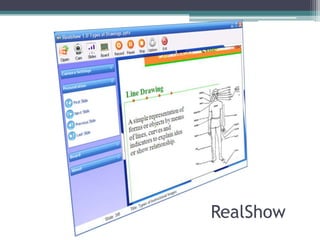
RealShow

RealShow 1.0

  • 1.
    A Dual-Channel Toolfor Synchronizing Slides and Presenter's Audio-Video Guidance in Blended Learning EnvironmentsOngoing Project…Alaa Sadik, Ph.D.SQU, Omanalaasadik@gmail.comwww.alaasadik.net
  • 2.
    RationaleMS PowerPoint® isthe leading presentation software used in face-to-face education for more than 20 years. It has become the dominant presentation tool in our classes, with the intention of creating audio-visual presentations.
  • 3.
    RationaleThe ease ofuse of PowerPoint can save time and encourage teachers, resulting in billions of PowerPoint files made each year.
  • 4.
    The ProblemAlthough billionsof PowerPoint documents are available and can support blended learning effectively, they are no substitute for the in-depth information and guidance a presenter should deliver.
  • 5.
    The ProblemIf studentsare not seeing or listening to the teacher, then reading the slides in isolation will be less valuable.
  • 6.
    The SolutionAn easy-to-usesoftware to synchronize and record slides and presenter's actual presence and audio-visual guidance (narration).So, teachers can easily make lectures or tutorialsavailable via the Internet (e.g., YouTube).
  • 7.
    The DesignThe softwareshould be designed to:help teachers apply principles for the design of multimedia materials and human cognitive processing. take advantage of the dual-channel structure of the human information processing system by means of text, pictures and audio.
  • 8.
    The DesignThe softwareshould be designed to:give learners a sense of interacting with the teacher while watching the lecture (social presence).reduce students’ cognitive load by helping them select, organize & integrate what’s important.
  • 9.
  • 10.