INPUT PROCESS/CPU
PRIMARY
STORAGE
STORAGE
OUTPUT
SECONDARY
STORAGE
TYPE OF INPUT
DEVICES TYPE OF OUTPUT
DEVICES
MOTHERBOARD
CPUALU
CU
Is the main circuit board of
system unit
- Expansion slot
- PCI
- ISA
- Expansion cards
- RAM
- Port
- Connector
Input devices are any electronic device connected
to the comp
IP for texts -keyboard,
optical readers
IP for graphics- scanner ,
digital camera
IP for audio - microphone,
Midi keyboard
IP for video- - CCTV,
WEBCAM, digital video
camera
Pointing devices – mouse,
trackball, touch screen
Input is any data/instruction that
we enter into the comp.system
for processing
o/p is data that has been processed
into information
is hardware that is capable of delivering
or showing information to one or more
user
LCD.DLP (mirror).
Fax machine,
monitor, printer,
speakers, headphone
Functions of CPU
-Control the whole
computer system
-Retrieve instruction from
component I/O
- Interprets and carries out
the instruction by
processing data
- Performs calculations on
the data in the memory
Is a location which
data, instruction and
information are held
for future use.
- ALU performs
arithmetic & logical
operation on the data in
the memory- the
information is stored in
the memory and than
sent to an o/p device or
storage device.
-CU exracts instructions
from memory and
interprets them in the
memory.
- CU manages a four
steps operation which
called a machine cycle or
processing cycle
1. Fetching – the
process of obtaining
a program
instructions or data
item from memory
2. Decoding – the
process of
translating a
program
instruction into
signals that the
computer can
execute
3. Storing- the
process of writing
the result to the
storage or memory
4. Executing –
the process of
implementing the
instruction in a
program
-Is the main
memory of a comp
which ic internal
memory and can be
accessed directly by
the processor.
- is the temporarily
memory during the
process and will be
lost when the comp
power off
RAM ROM
- is the alternative storage
which is external storage
and useful to store program
and data for future use.
- is the permanently storage
and the data will be in the
comp until it is deleted.
- Stores data and program during
and after processing
-Stores information temporarily
- Processing time very fast but uses
a lot of power
- Volatile which means the
programs and data in RAM are lost
when the computer is powered off.
- Stored data and program by
manufacturer
- Stores instructions ( information )
permanently.
- Processing time is fast but uses very
little power
- Non-volatile which holds the
programs and data when the computer
is powered off.
Types of secondary
storage
- Magnetic medium –
floopy disks
- Optical medium –
CD-ROMs
- Flash memory – pen
drive, memory card,
memory stick
INPUT
PEMPROSES / UNIT
PEMPROSESAN
PUSAT
STORAN
PRIMER
STORAN
OUTPUT
STORAN
SEKUNDER
JENIS PERANTI
INPUT JENIS PERANTI
OUTPUT
PAPAN INDUK
CPUALU
CU
Adakah papan litar utama dalam
sistem unit
- Slot tambahan
- PCI
- ISA
- kad tambahan
- RAM
- Port
- Penghubung
Peranti input adalah mana-mana peranti
elektronik yang berhubung dengan
komputer
Input untuk teks -keyboard,
optical readers
Input untuk graphics-
scanner , digital camera
Input untuk audio -
microphone,
Midi keyboard
Input untuk video- - CCTV,
WEBCAM, digital video
camera
Pointing devices – mouse,
trackball, touch screen
Input adalah data/arahan yang
dimasukkan ke sistem komputer
untuk diproses
Output adalah data yang telah
diproses menjadi maklumat
Adalah perkakasan yang berkebolehan
menghantar atau menunjukkan
maklumat kepada ssatu atau lebih
pengguna
LCD.DLP (mirror).
Fax machine,
monitor, printer,
speakers, headphone
Fungsi CPU
-Control sistem komputer
secara keseluruhan
-Ambil Arahan dari
komponen I / O
- Menafsirkan dan
melaksanakan Arahan
pemprosesan data
- Melakukan perhitungan
pada data di dalam memori
Adalah lokasi di
mana data, arahan
dan maklumat
disimpan untuk
masa depan
- ALU(unit aritmetik
logik) menjalankan
operasi aritmetik dan
logik ke atas data dalam
memori- maklumat
disimpan dalam memori
dan dihantar ke peranti
atau storan.
-CU (unit kawalan)
ekstrak Arahan dari
memori dan menafsirkan
mereka dalam ingatan.
- CU menguruskan
operasi empat langkah
yang disebut kitaran
mesin atau kitaran
1. Fetching – proses
mendapatkan arahan
program atau item
data dari memori
2. Decoding –
proses
menterjemah
arahan program
menjadi isyarat-
isyarat agar
komputer dapat
melaksanakan
3. Storing- proses
penulisan hasil
untuk simpanan atau
memori
4. Executing –
proses
pelaksanaan
arahan di dalam
sebuah program
Adalah memori
utama dari sebuah
komputer dan boleh
diakses langsung
oleh prosesor.
- Adalah memori
sementara semasa
proses dan akan
hilang ketika kuasa
komputer
dimatikan.
RAM ROM
- Adalah simpanan luaran
alternatif dan berguna untuk
menyimpan program dan
data untuk kegunaan masa
depan.
- Adalah simpanan data
kekal di komputer sehingga
dihapuskan.
- Menyimpan data dan program
semasa dan selepas pemprosesan
-Menyimpan maklumat sementara
- Waktu proses sangat cepat namun
menggunakan banyak kuasa
- Volatile yang bererti program dan
data dalam RAM akan hilang
apabila komputer dimatikan.
- data dan program telah sedia dibuat
oleh pengeluar
- Maklumt / data adalah kekal.
- Waktu pemprosesan yang cepat
namun menggunakan kuasa yang
sangat sedikit
- Non-volatile bermakna memegang
program dan data walaupun ketika
komputer dimatikan.
Jenis Storan
Sekunder
- Medium magnetik –
floopy disks
- Optical medium –
CD-ROMs
- Flash memory – pen
drive, memory card,
memory stick

Processor

  • 1.
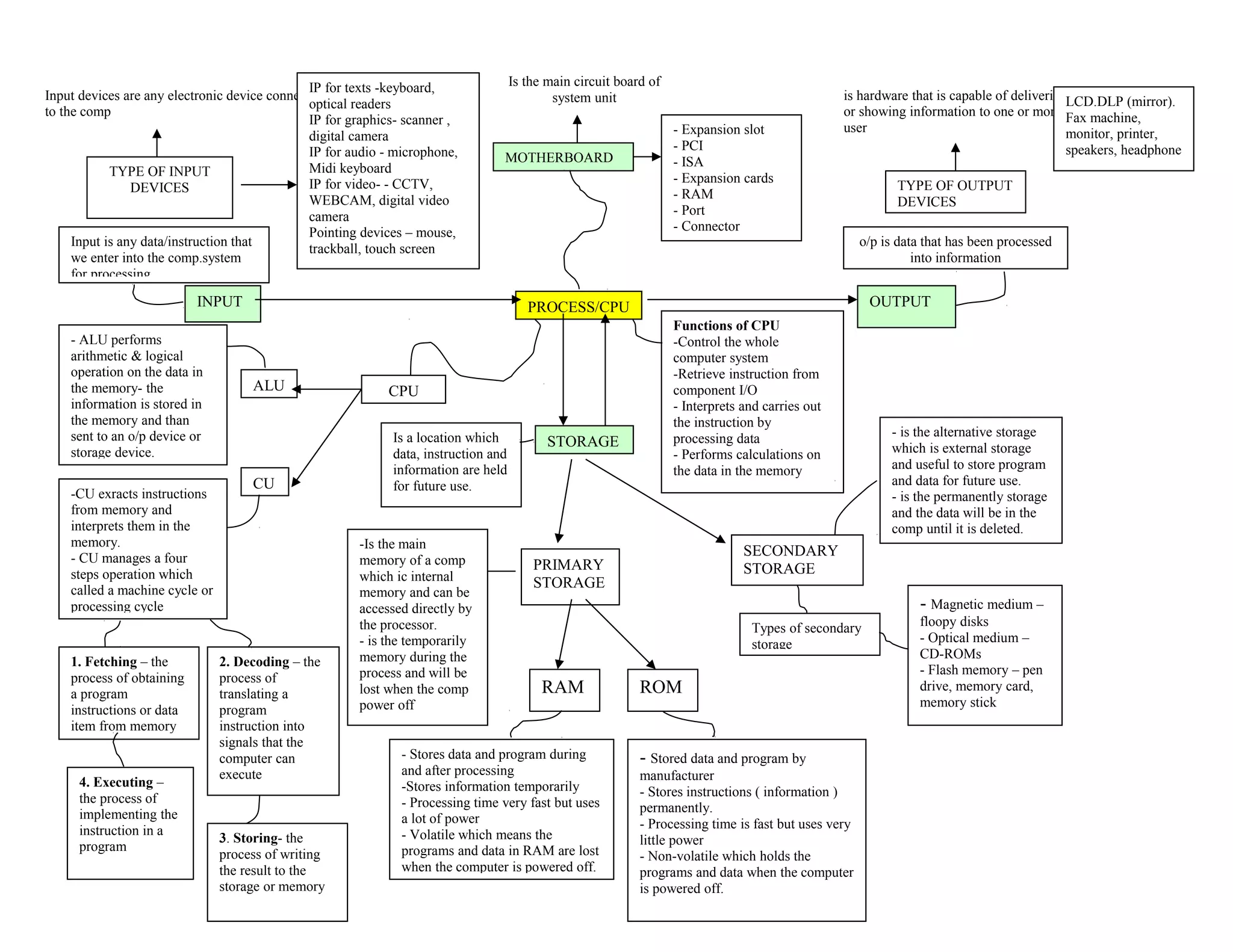
    INPUT PROCESS/CPU PRIMARY STORAGE STORAGE OUTPUT SECONDARY STORAGE TYPE OFINPUT DEVICES TYPE OF OUTPUT DEVICES MOTHERBOARD CPUALU CU Is the main circuit board of system unit - Expansion slot - PCI - ISA - Expansion cards - RAM - Port - Connector Input devices are any electronic device connected to the comp IP for texts -keyboard, optical readers IP for graphics- scanner , digital camera IP for audio - microphone, Midi keyboard IP for video- - CCTV, WEBCAM, digital video camera Pointing devices – mouse, trackball, touch screen Input is any data/instruction that we enter into the comp.system for processing o/p is data that has been processed into information is hardware that is capable of delivering or showing information to one or more user LCD.DLP (mirror). Fax machine, monitor, printer, speakers, headphone Functions of CPU -Control the whole computer system -Retrieve instruction from component I/O - Interprets and carries out the instruction by processing data - Performs calculations on the data in the memory Is a location which data, instruction and information are held for future use. - ALU performs arithmetic & logical operation on the data in the memory- the information is stored in the memory and than sent to an o/p device or storage device. -CU exracts instructions from memory and interprets them in the memory. - CU manages a four steps operation which called a machine cycle or processing cycle 1. Fetching – the process of obtaining a program instructions or data item from memory 2. Decoding – the process of translating a program instruction into signals that the computer can execute 3. Storing- the process of writing the result to the storage or memory 4. Executing – the process of implementing the instruction in a program -Is the main memory of a comp which ic internal memory and can be accessed directly by the processor. - is the temporarily memory during the process and will be lost when the comp power off RAM ROM - is the alternative storage which is external storage and useful to store program and data for future use. - is the permanently storage and the data will be in the comp until it is deleted. - Stores data and program during and after processing -Stores information temporarily - Processing time very fast but uses a lot of power - Volatile which means the programs and data in RAM are lost when the computer is powered off. - Stored data and program by manufacturer - Stores instructions ( information ) permanently. - Processing time is fast but uses very little power - Non-volatile which holds the programs and data when the computer is powered off. Types of secondary storage - Magnetic medium – floopy disks - Optical medium – CD-ROMs - Flash memory – pen drive, memory card, memory stick
  • 2.
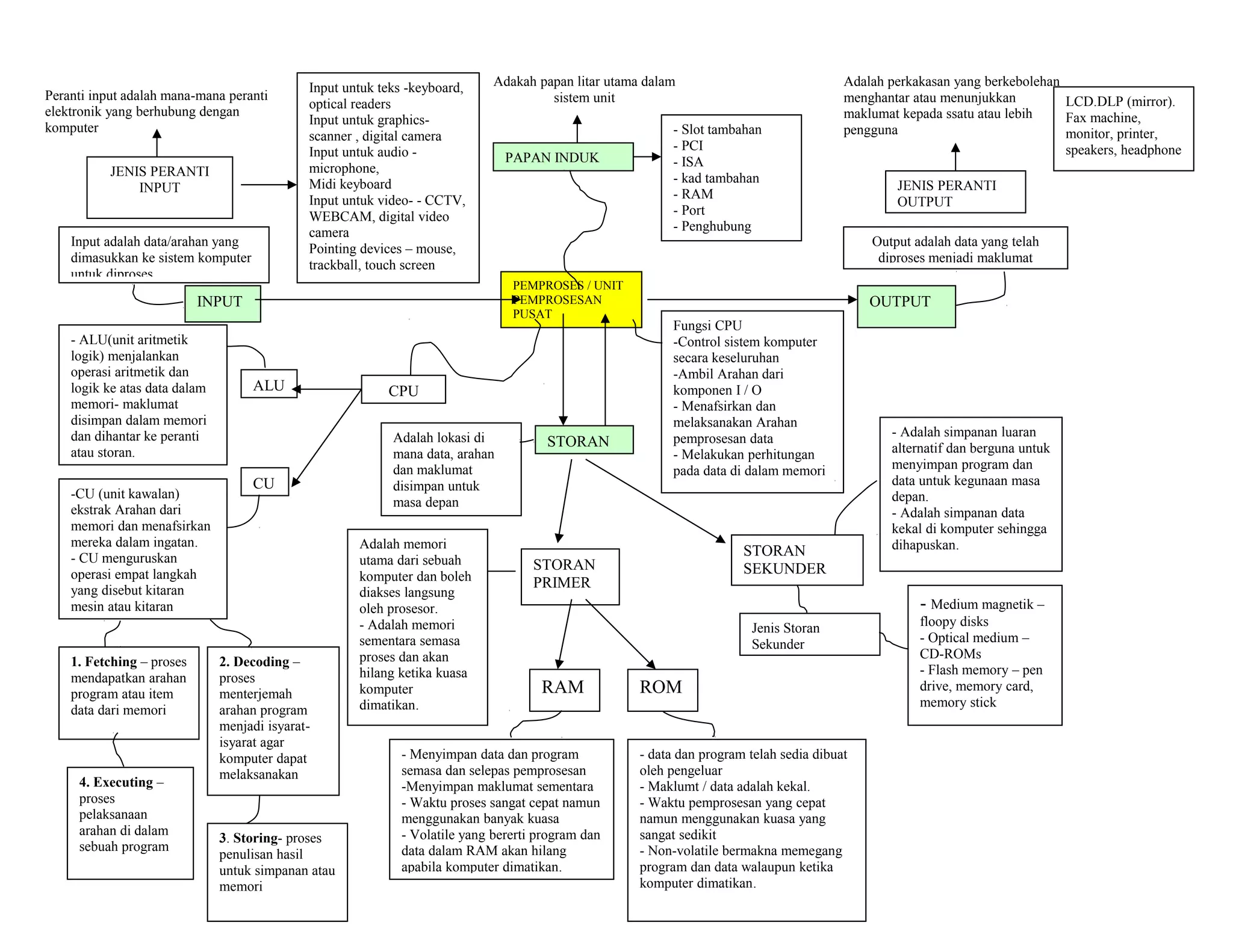
    INPUT PEMPROSES / UNIT PEMPROSESAN PUSAT STORAN PRIMER STORAN OUTPUT STORAN SEKUNDER JENISPERANTI INPUT JENIS PERANTI OUTPUT PAPAN INDUK CPUALU CU Adakah papan litar utama dalam sistem unit - Slot tambahan - PCI - ISA - kad tambahan - RAM - Port - Penghubung Peranti input adalah mana-mana peranti elektronik yang berhubung dengan komputer Input untuk teks -keyboard, optical readers Input untuk graphics- scanner , digital camera Input untuk audio - microphone, Midi keyboard Input untuk video- - CCTV, WEBCAM, digital video camera Pointing devices – mouse, trackball, touch screen Input adalah data/arahan yang dimasukkan ke sistem komputer untuk diproses Output adalah data yang telah diproses menjadi maklumat Adalah perkakasan yang berkebolehan menghantar atau menunjukkan maklumat kepada ssatu atau lebih pengguna LCD.DLP (mirror). Fax machine, monitor, printer, speakers, headphone Fungsi CPU -Control sistem komputer secara keseluruhan -Ambil Arahan dari komponen I / O - Menafsirkan dan melaksanakan Arahan pemprosesan data - Melakukan perhitungan pada data di dalam memori Adalah lokasi di mana data, arahan dan maklumat disimpan untuk masa depan - ALU(unit aritmetik logik) menjalankan operasi aritmetik dan logik ke atas data dalam memori- maklumat disimpan dalam memori dan dihantar ke peranti atau storan. -CU (unit kawalan) ekstrak Arahan dari memori dan menafsirkan mereka dalam ingatan. - CU menguruskan operasi empat langkah yang disebut kitaran mesin atau kitaran 1. Fetching – proses mendapatkan arahan program atau item data dari memori 2. Decoding – proses menterjemah arahan program menjadi isyarat- isyarat agar komputer dapat melaksanakan 3. Storing- proses penulisan hasil untuk simpanan atau memori 4. Executing – proses pelaksanaan arahan di dalam sebuah program Adalah memori utama dari sebuah komputer dan boleh diakses langsung oleh prosesor. - Adalah memori sementara semasa proses dan akan hilang ketika kuasa komputer dimatikan. RAM ROM - Adalah simpanan luaran alternatif dan berguna untuk menyimpan program dan data untuk kegunaan masa depan. - Adalah simpanan data kekal di komputer sehingga dihapuskan. - Menyimpan data dan program semasa dan selepas pemprosesan -Menyimpan maklumat sementara - Waktu proses sangat cepat namun menggunakan banyak kuasa - Volatile yang bererti program dan data dalam RAM akan hilang apabila komputer dimatikan. - data dan program telah sedia dibuat oleh pengeluar - Maklumt / data adalah kekal. - Waktu pemprosesan yang cepat namun menggunakan kuasa yang sangat sedikit - Non-volatile bermakna memegang program dan data walaupun ketika komputer dimatikan. Jenis Storan Sekunder - Medium magnetik – floopy disks - Optical medium – CD-ROMs - Flash memory – pen drive, memory card, memory stick