The Computer System Hardware
Apart From Computer Software
Er. Sharad Kafle
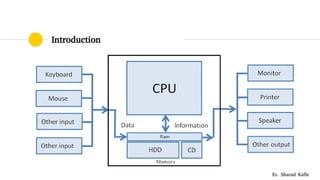
Introduction
Er. Sharad Kafle
Central Processing Unit
Er. Sharad Kafle
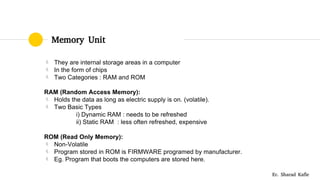
Memory Unit
 They are internal storage areas in a computer
 In the form of chips
 Two Categories : RAM and ROM
RAM (Random Access Memory):
 Holds the data as long as electric supply is on. (volatile).
 Two Basic Types
i) Dynamic RAM : needs to be refreshed
ii) Static RAM : less often refreshed, expensive
ROM (Read Only Memory):
 Non-Volatile
 Program stored in ROM is FIRMWARE programed by manufacturer.
 Eg. Program that boots the computers are stored here.
Er. Sharad Kafle
Instruction Format
 An Instruction is normally made up of a combination if an operation
code and some way of specifying an operand, most commonly by its
location or address in memory.
Er. Sharad Kafle
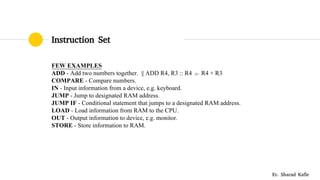
Instruction Set
FEW EXAMPLES
ADD - Add two numbers together. || ADD R4, R3 :: R4  R4 + R3
COMPARE - Compare numbers.
IN - Input information from a device, e.g. keyboard.
JUMP - Jump to designated RAM address.
JUMP IF - Conditional statement that jumps to a designated RAM address.
LOAD - Load information from RAM to the CPU.
OUT - Output information to device, e.g. monitor.
STORE - Store information to RAM.
Er. Sharad Kafle
Instruction Cycle
 Sometimes called fetch decode cycle.
 It is basic operational process of computer in which a computer retrieves
a program instruction from its memory that determines what actions the
instruction indicates and carries out those action.
 FETCH  DECODE  EXECUTE
Er. Sharad Kafle
Instruction Cycle
Er. Sharad Kafle
Microprocessor
 Incorporates the functions of a computer’s Central Processing Unit
(CPU) on a single Integrated Circuit (IC).
 Intel, atmel, hp, ARM, NVIDIA,
 Illustration of Example from TextBook.
Er. Sharad Kafle
Interconnection : Buses
Er. Sharad Kafle
Interconnection : Buses
 BUS is a set of electronic signal pathway that allows information and
signals to travel between components inside or outside of a computer.
 The different components of computer i.e. CPU, I/O and MU are
connected each other by a bus.
 The data, instructions and the signals are carried between the different
components via a bus.
 The command to access the memory or the I/O is carried by a control
bus.
 The address of I/O device or memory is carried by a address bus.
 The data to be transferred is carried by the data bus.
Er. Sharad Kafle
Inside a Computer Cabinet
 Modern Computer Consist of three basic section:
 A Processor
 Some Memory
 I/O (Peripheral) Devices
Er. Sharad Kafle
Before RISC Vs CISC
Speeding Up
 Memory Mapped I/O
 I/O Processors
 Memory Cache
Er. Sharad Kafle
RISC Vs CISC
RISC – Reduced Instruction Set Computer
 Less Space and Shorter design cycle.
 Use of pipelining for immense processing power.
Advantages:
 Speed : Due to simplified instruction
 Simpler Hardware : Less Chip space
 Shorter Design Cycle : Short Machine Cycle.
Er. Sharad Kafle
RISC Vs CISC
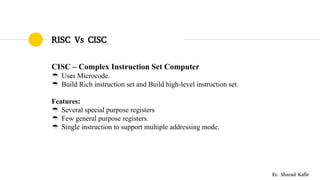
CISC – Complex Instruction Set Computer
 Uses Microcode.
 Build Rich instruction set and Build high-level instruction set.
Features:
 Several special purpose registers
 Few general purpose registers.
 Single instruction to support multiple addressing mode.
Er. Sharad Kafle
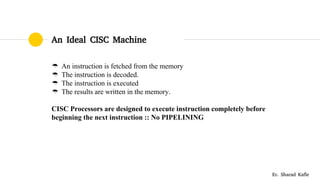
An Ideal CISC Machine
 An instruction is fetched from the memory
 The instruction is decoded.
 The instruction is executed
 The results are written in the memory.
CISC Processors are designed to execute instruction completely before
beginning the next instruction :: No PIPELINING
Er. Sharad Kafle
Instruction Pipelining
Er. Sharad Kafle
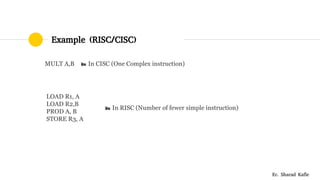
Example (RISC/CISC)
 LOAD R1, A         
 LOAD R2,B         
 PROD A, B          
 STORE R3, A     
MULT A,B     In CISC (One Complex instruction)
 In RISC (Number of fewer simple instruction)
Er. Sharad Kafle
Thanks!
Er. Sharad Kafle
Institute of Engineering, Tribhuwan University
Web : www.skafle.com.np
FB : www.facebook.com/kaflesharad
Email : kaflesharad@hotmail.com
kaflesharad@rocketmail.com

Computer system Hardware and Instruction

  • 1.
    The Computer SystemHardware Apart From Computer Software Er. Sharad Kafle
  • 2.
  • 3.
  • 4.
    Memory Unit  Theyare internal storage areas in a computer  In the form of chips  Two Categories : RAM and ROM RAM (Random Access Memory):  Holds the data as long as electric supply is on. (volatile).  Two Basic Types i) Dynamic RAM : needs to be refreshed ii) Static RAM : less often refreshed, expensive ROM (Read Only Memory):  Non-Volatile  Program stored in ROM is FIRMWARE programed by manufacturer.  Eg. Program that boots the computers are stored here. Er. Sharad Kafle
  • 5.
    Instruction Format  AnInstruction is normally made up of a combination if an operation code and some way of specifying an operand, most commonly by its location or address in memory. Er. Sharad Kafle
  • 6.
    Instruction Set FEW EXAMPLES ADD- Add two numbers together. || ADD R4, R3 :: R4  R4 + R3 COMPARE - Compare numbers. IN - Input information from a device, e.g. keyboard. JUMP - Jump to designated RAM address. JUMP IF - Conditional statement that jumps to a designated RAM address. LOAD - Load information from RAM to the CPU. OUT - Output information to device, e.g. monitor. STORE - Store information to RAM. Er. Sharad Kafle
  • 7.
    Instruction Cycle  Sometimescalled fetch decode cycle.  It is basic operational process of computer in which a computer retrieves a program instruction from its memory that determines what actions the instruction indicates and carries out those action.  FETCH  DECODE  EXECUTE Er. Sharad Kafle
  • 8.
  • 9.
    Microprocessor  Incorporates thefunctions of a computer’s Central Processing Unit (CPU) on a single Integrated Circuit (IC).  Intel, atmel, hp, ARM, NVIDIA,  Illustration of Example from TextBook. Er. Sharad Kafle
  • 10.
  • 11.
    Interconnection : Buses BUS is a set of electronic signal pathway that allows information and signals to travel between components inside or outside of a computer.  The different components of computer i.e. CPU, I/O and MU are connected each other by a bus.  The data, instructions and the signals are carried between the different components via a bus.  The command to access the memory or the I/O is carried by a control bus.  The address of I/O device or memory is carried by a address bus.  The data to be transferred is carried by the data bus. Er. Sharad Kafle
  • 12.
    Inside a ComputerCabinet  Modern Computer Consist of three basic section:  A Processor  Some Memory  I/O (Peripheral) Devices Er. Sharad Kafle
  • 13.
    Before RISC VsCISC Speeding Up  Memory Mapped I/O  I/O Processors  Memory Cache Er. Sharad Kafle
  • 14.
    RISC Vs CISC RISC– Reduced Instruction Set Computer  Less Space and Shorter design cycle.  Use of pipelining for immense processing power. Advantages:  Speed : Due to simplified instruction  Simpler Hardware : Less Chip space  Shorter Design Cycle : Short Machine Cycle. Er. Sharad Kafle
  • 15.
    RISC Vs CISC CISC– Complex Instruction Set Computer  Uses Microcode.  Build Rich instruction set and Build high-level instruction set. Features:  Several special purpose registers  Few general purpose registers.  Single instruction to support multiple addressing mode. Er. Sharad Kafle
  • 16.
    An Ideal CISCMachine  An instruction is fetched from the memory  The instruction is decoded.  The instruction is executed  The results are written in the memory. CISC Processors are designed to execute instruction completely before beginning the next instruction :: No PIPELINING Er. Sharad Kafle
  • 17.
  • 18.
  • 19.
    Thanks! Er. Sharad Kafle Instituteof Engineering, Tribhuwan University Web : www.skafle.com.np FB : www.facebook.com/kaflesharad Email : kaflesharad@hotmail.com kaflesharad@rocketmail.com