COMPUTER HARDWARE &
SOFTWARE
INTRODUCTION TO LIBRARY & INFORMATION SCIENCES (5501)
WORKSHOP SPRING 2013
By: Huma Malik
Librarian, Preston University, Islamabad
Contents
What Is Computer?
Components of Computer
Hardware
‒ Input Devices
‒ Output Devices
‒ Central Processing Unit (CPU)
‒ Primary Storage (Memory )
‒ Secondary Storage (Mass Storage)
Software
‒ Types of Software
Conclusion
What is COMPUTER?
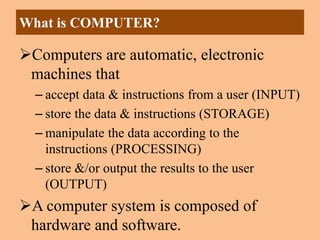
Computers are automatic, electronic
machines that
– accept data & instructions from a user (INPUT)
– store the data & instructions (STORAGE)
– manipulate the data according to the
instructions (PROCESSING)
– store &/or output the results to the user
(OUTPUT)
A computer system is composed of
hardware and software.
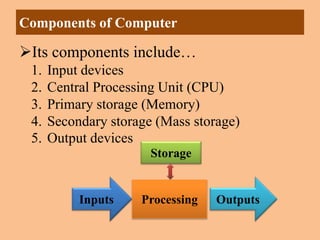
Its components include…
1. Input devices
2. Central Processing Unit (CPU)
3. Primary storage (Memory)
4. Secondary storage (Mass storage)
5. Output devices
Components of Computer
Inputs OutputsProcessing
Storage
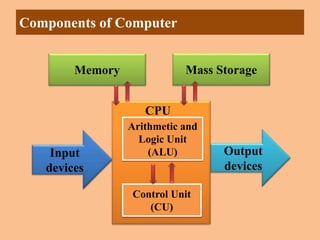
Components of Computer
Mass Storage
Input
devices
Output
devices
Control Unit
(CU)
Arithmetic and
Logic Unit
(ALU)
CPU
Memory
HARDWARE
 Mechanical, electrical, electronic, or
other physical equipment and machinery
associated with a computer system or
necessary for the playback or projection
of nonprintmedia.
 Basic microcomputer hardware includes
a central processing unit (CPU),
keyboard, and monitor.
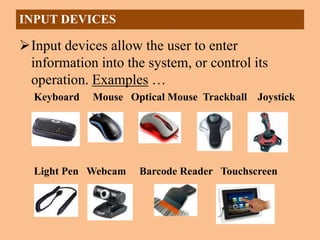
Input devices allow the user to enter
information into the system, or control its
operation. Examples …
Keyboard Mouse Optical Mouse Trackball Joystick
Light Pen Webcam Barcode Reader Touchscreen
INPUT DEVICES
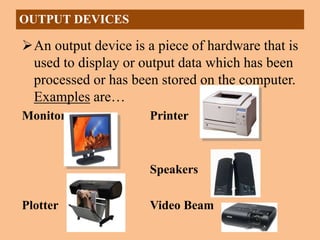
An output device is a piece of hardware that is
used to display or output data which has been
processed or has been stored on the computer.
Examples are…
Monitor Printer
Speakers
Plotter Video Beam
OUTPUT DEVICES
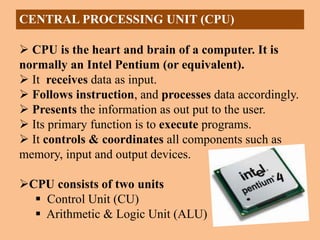
CENTRAL PROCESSING UNIT (CPU)
 CPU is the heart and brain of a computer. It is
normally an Intel Pentium (or equivalent).
 It receives data as input.
 Follows instruction, and processes data accordingly.
 Presents the information as out put to the user.
 Its primary function is to execute programs.
 It controls & coordinates all components such as
memory, input and output devices.
CPU consists of two units
 Control Unit (CU)
 Arithmetic & Logic Unit (ALU)
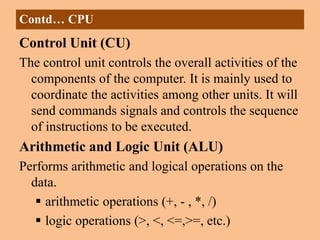
Control Unit (CU)
The control unit controls the overall activities of the
components of the computer. It is mainly used to
coordinate the activities among other units. It will
send commands signals and controls the sequence
of instructions to be executed.
Arithmetic and Logic Unit (ALU)
Performs arithmetic and logical operations on the
data.
 arithmetic operations (+, - , *, /)
 logic operations (>, <, <=,>=, etc.)
Contd… CPU
 Primary Storage also called Main Memory
– On board memory (located on the motherboard)
– Very fast, but expensive
– Two types
• RAM – Random Access Memory
• ROM – Read Only Memory
 RAM - Random Access Memory
– Read/write capability
– Contents lost when computer is turned off (volatile)
– A program must be in RAM for it to execute
– Its types are Static & Dynamic RAM
PRIMARY STORAGE (MEMORY )
ROM - Read Only Memory
– Read but not write capability
– Permanent (non volatile)
– Stores the preliminary instructions to be
executed when the computer is turned on, e.g.
• To check RAM
• To check communications with peripheral
devices
• Bootstrap loader program
– Its types are ROM, PROM, EPROM &
EEPROM
PRIMARY STORAGE (MEMORY )
Secondary Storage also called Mass
Storage
–External devices (not on the
motherboard); either inside or outside
the computer
–Store programs and data permanently
–Slower, but cheaper
SECONDARY STORAGE (MASS STORAGE)
–Different sizes/styles
•Floppy Disk - 1.4MB (portable)
•Zip Drive - 100-750MB (portable)
•CD - 650MB (portable)
•Hard Disk Drive >=20GB (not
portable)
•Tape - 50GB (portable, very slow)
•Flash drives (portable)
SECONDARY STORAGE (MASS STORAGE)
SOFTWARE
 Programs written in a special language with a
series of instructions to a computer or its
peripherals that cause the computer to solve a
problem or perform a task to achieve a
specific set of results.
 Simply a set of instruction necessary for a
computer to accomplish required tasks.
A computer program is a series of instructions
– each instruction is expressed in a format
consistent with a predefined set of rules
– a computer processes data under the direction
of the instructions in a program
– there are instructions to input, process, store
and output data
– the user of a program (as distinct from its
creator) has no need to be aware of the details
of its construction
– the user is only interested in the services that
the program is able to provide
SOFTWARE
Operating System
– controls all machine activities
– provides the user interface to the computer
– manages resources such as the CPU and memory
– DOS, Windows XP, Unix, Linux, Mac OS
Application program
– generic term for any other kind of software
(custom made)
– MS Word, MS Excel, Games,….. Library
softwares e.g, Koha, WINISIS, LIMS, LAMP….
TYPES OF SOFTWARE
Conclusion
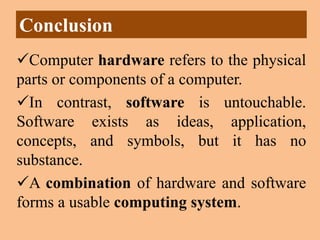
Computer hardware refers to the physical
parts or components of a computer.
In contrast, software is untouchable.
Software exists as ideas, application,
concepts, and symbols, but it has no
substance.
A combination of hardware and software
forms a usable computing system.
THANK YOU
By: Huma Malik
Librarian, Preston University, Islamabad
MLIS-AIOU SPRING 2013 WORKSHOP

COMPUTER HARDWARE AND SOFTWARE

  • 1.
    COMPUTER HARDWARE & SOFTWARE INTRODUCTIONTO LIBRARY & INFORMATION SCIENCES (5501) WORKSHOP SPRING 2013 By: Huma Malik Librarian, Preston University, Islamabad
  • 2.
    Contents What Is Computer? Componentsof Computer Hardware ‒ Input Devices ‒ Output Devices ‒ Central Processing Unit (CPU) ‒ Primary Storage (Memory ) ‒ Secondary Storage (Mass Storage) Software ‒ Types of Software Conclusion
  • 3.
    What is COMPUTER? Computersare automatic, electronic machines that – accept data & instructions from a user (INPUT) – store the data & instructions (STORAGE) – manipulate the data according to the instructions (PROCESSING) – store &/or output the results to the user (OUTPUT) A computer system is composed of hardware and software.
  • 4.
    Its components include… 1.Input devices 2. Central Processing Unit (CPU) 3. Primary storage (Memory) 4. Secondary storage (Mass storage) 5. Output devices Components of Computer Inputs OutputsProcessing Storage
  • 5.
    Components of Computer MassStorage Input devices Output devices Control Unit (CU) Arithmetic and Logic Unit (ALU) CPU Memory
  • 6.
    HARDWARE  Mechanical, electrical,electronic, or other physical equipment and machinery associated with a computer system or necessary for the playback or projection of nonprintmedia.  Basic microcomputer hardware includes a central processing unit (CPU), keyboard, and monitor.
  • 7.
    Input devices allowthe user to enter information into the system, or control its operation. Examples … Keyboard Mouse Optical Mouse Trackball Joystick Light Pen Webcam Barcode Reader Touchscreen INPUT DEVICES
  • 8.
    An output deviceis a piece of hardware that is used to display or output data which has been processed or has been stored on the computer. Examples are… Monitor Printer Speakers Plotter Video Beam OUTPUT DEVICES
  • 9.
    CENTRAL PROCESSING UNIT(CPU)  CPU is the heart and brain of a computer. It is normally an Intel Pentium (or equivalent).  It receives data as input.  Follows instruction, and processes data accordingly.  Presents the information as out put to the user.  Its primary function is to execute programs.  It controls & coordinates all components such as memory, input and output devices. CPU consists of two units  Control Unit (CU)  Arithmetic & Logic Unit (ALU)
  • 10.
    Control Unit (CU) Thecontrol unit controls the overall activities of the components of the computer. It is mainly used to coordinate the activities among other units. It will send commands signals and controls the sequence of instructions to be executed. Arithmetic and Logic Unit (ALU) Performs arithmetic and logical operations on the data.  arithmetic operations (+, - , *, /)  logic operations (>, <, <=,>=, etc.) Contd… CPU
  • 11.
     Primary Storagealso called Main Memory – On board memory (located on the motherboard) – Very fast, but expensive – Two types • RAM – Random Access Memory • ROM – Read Only Memory  RAM - Random Access Memory – Read/write capability – Contents lost when computer is turned off (volatile) – A program must be in RAM for it to execute – Its types are Static & Dynamic RAM PRIMARY STORAGE (MEMORY )
  • 12.
    ROM - ReadOnly Memory – Read but not write capability – Permanent (non volatile) – Stores the preliminary instructions to be executed when the computer is turned on, e.g. • To check RAM • To check communications with peripheral devices • Bootstrap loader program – Its types are ROM, PROM, EPROM & EEPROM PRIMARY STORAGE (MEMORY )
  • 13.
    Secondary Storage alsocalled Mass Storage –External devices (not on the motherboard); either inside or outside the computer –Store programs and data permanently –Slower, but cheaper SECONDARY STORAGE (MASS STORAGE)
  • 14.
    –Different sizes/styles •Floppy Disk- 1.4MB (portable) •Zip Drive - 100-750MB (portable) •CD - 650MB (portable) •Hard Disk Drive >=20GB (not portable) •Tape - 50GB (portable, very slow) •Flash drives (portable) SECONDARY STORAGE (MASS STORAGE)
  • 15.
    SOFTWARE  Programs writtenin a special language with a series of instructions to a computer or its peripherals that cause the computer to solve a problem or perform a task to achieve a specific set of results.  Simply a set of instruction necessary for a computer to accomplish required tasks.
  • 16.
    A computer programis a series of instructions – each instruction is expressed in a format consistent with a predefined set of rules – a computer processes data under the direction of the instructions in a program – there are instructions to input, process, store and output data – the user of a program (as distinct from its creator) has no need to be aware of the details of its construction – the user is only interested in the services that the program is able to provide SOFTWARE
  • 17.
    Operating System – controlsall machine activities – provides the user interface to the computer – manages resources such as the CPU and memory – DOS, Windows XP, Unix, Linux, Mac OS Application program – generic term for any other kind of software (custom made) – MS Word, MS Excel, Games,….. Library softwares e.g, Koha, WINISIS, LIMS, LAMP…. TYPES OF SOFTWARE
  • 18.
    Conclusion Computer hardware refersto the physical parts or components of a computer. In contrast, software is untouchable. Software exists as ideas, application, concepts, and symbols, but it has no substance. A combination of hardware and software forms a usable computing system.
  • 19.
    THANK YOU By: HumaMalik Librarian, Preston University, Islamabad MLIS-AIOU SPRING 2013 WORKSHOP