1
Introduction to computers:
Definition: The term computer is derived from the word “compute”. A
computer is an electronic device that takes data and instructions as an
input from the user, processes data, and provides useful information
known as output.
A computer consists of various components that function as an integrated
system to perform computational tasks. These components include the
following:
Central processing Unit (CPU): It is the brain of the computer that is
responsible for controlling and executing program instructions.
Monitor: It is a display screen, which shows information in visual form.
Keyboard and Mouse: These are the peripheral devices used by the
computer for receiving inputs from the user.
2
Characteristics of the computer:
Speed: The computer is a fast electronic device that can solve large
and complex problems in few seconds. The speed of a computer
generally depends upon its hardware configuration.
Storage capacity: A computer can store huge amounts of data in many
different formats. The storage area of a computer system is generally
divided into two categories, main memory and secondary storage.
Accuracy: A computer carries out calculations with great accuracy. The
accuracy achieved by a computer depends upon its hardware
configuration and the specified instructions.
Reliability: A computer produces results with no error. Most of the
computer generated errors are actuality human errors that are
instigated by the user itself. Therefore, computers are regarded as
quite trustworthy machines.
Versatility: Computers are versatile machines. They can perform
varied tasks and can be used for many different purposes.
Diligence: Computers can perform repetitive calculations any number
of times with the same level of accuracy.
3
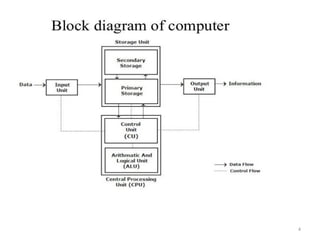
COMPONENTS OF A COMPUTER HARDWARE
OR
BLOCK DIAGRAM OF COMPUTER
A computer device is made up of various elements which help in its effective
functioning and processing. Components of a computer system are the
primary elements which make the functioning of an electronic device
smooth and faster.
There are five basic components of the computer which help in making this
processing of data easier and convenient.
There are five basic components which include:
1. Input Unit
2. Output Unit
3. Memory Unit
4. Control Unit
5. Arithmetical and Logical Unit
4
5
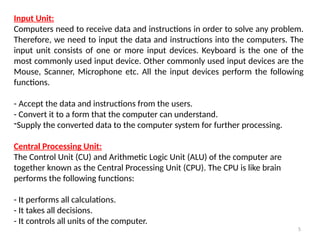
Input Unit:
Computers need to receive data and instructions in order to solve any problem.
Therefore, we need to input the data and instructions into the computers. The
input unit consists of one or more input devices. Keyboard is the one of the
most commonly used input device. Other commonly used input devices are the
Mouse, Scanner, Microphone etc. All the input devices perform the following
functions.
- Accept the data and instructions from the users.
- Convert it to a form that the computer can understand.
-Supply the converted data to the computer system for further processing.
Central Processing Unit:
The Control Unit (CU) and Arithmetic Logic Unit (ALU) of the computer are
together known as the Central Processing Unit (CPU). The CPU is like brain
performs the following functions:
- It performs all calculations.
- It takes all decisions.
- It controls all units of the computer.
6
Arithmetic Logical Unit (ALU):
All calculations are performed in the Arithmetic Logic Unit (ALU) of the
computer. It also does comparison and takes decision. The ALU can perform
basic operations such as addition, subtraction, multiplication, division, etc and
does logic operations such as AND, OR, NOT, and XOR.
Whenever calculations are required, the control unit transfers the data from
storage unit to ALU once the computations are done, the results are
transferred to the storage unit by the control unit and then it is send to the
output unit for displaying results.
Control Unit(CU):
It controls all other units in the computer. The control unit instructs the input
unit, where to store the data after receiving it from the user. It controls the
flow of data and instructions from the storage unit to ALU. It also controls the
flow of results from the ALU to the storage unit. The control unit is generally
referred as the central nervous system of the computer that control and
synchronizes its working.
7
Storage Unit:
The storage unit of the computer holds data and instructions that are entered
through the input unit, before they are processed. It preserves the intermediate
and final results before these are sent to the output devices. It also saves the
data for the later use. The various storage devices of a computer system are
divided into two categories.
1. Primary Storage: Stores and provides very fast. This memory is generally used
to hold the program being currently executed in the computer, the data being
received from the input unit, the intermediate and final results of the program.
The primary memory is temporary in nature. The data is lost, when the computer
is switched off. In order to store the data permanently, the data has to be
transferred to the secondary memory. The cost of the primary storage is more
compared to the secondary storage. Therefore, most computers have limited
primary storage capacity.
8
2. Secondary Storage: Secondary storage is used like an archive. It stores several
programs, documents, data bases etc. The programs that you run on the
computer are first transferred to the primary memory before it is actually run.
Whenever the results are saved, again they get stored in the secondary memory.
The secondary memory is slower and cheaper than the primary memory. Some
of the commonly used secondary memory devices are Hard disk, CD, etc.,
9
INPUT AND OUTPUT DEVICES
Input Devices:
An input device is a computer device that allows computer users to enter data
into a system and send instructions to the system to execute tasks accordingly.
It is the first or primary step in the processing of computer data that is done at
the Central Processing Unit (CPU). The delivered signals are received by the
CPU which processes them.
Output Devices:
An output device is a computer device that displays the result of the inserted
input data after getting processed from the CPU. CPU of a computer converts
received information from machine language to a human-friendly language
and then sends these signals to output devices to execute the tasks as per
entered data.
When the data entered by the input devices is processed by the CPU of the
computer then the output devices take care of the result. The output devices
display the visual contents on the monitor screen while sound contents are
delivered to the speaker connected to a computer.
10
Input Devices:
1. Keyboard
2. Mouse
3. Joy Stick
4. Light pen
5. Track Ball
6. Scanner
7. Digitizer
8. Microphone
9. Magnetic Ink Card Reader(MICR)
10. Optical Character Reader(OCR)
11. Bar Code Reader
12. Optical Mark Reader or Recognition (OMR)
11
Output Devices:
1. Monitors
2. Printers
3. Speakers
4. Projector
5. Plotter
6. Television
7. Headphones
8. Video card
Both Input & Output Devices:
USB Device
CD/DVD Drives
Headset
12
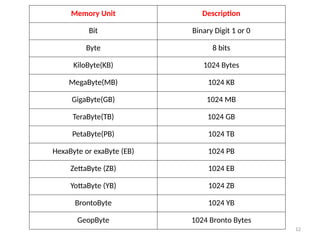
Memory Unit Description
Bit Binary Digit 1 or 0
Byte 8 bits
KiloByte(KB) 1024 Bytes
MegaByte(MB) 1024 KB
GigaByte(GB) 1024 MB
TeraByte(TB) 1024 GB
PetaByte(PB) 1024 TB
HexaByte or exaByte (EB) 1024 PB
ZettaByte (ZB) 1024 EB
YottaByte (YB) 1024 ZB
BrontoByte 1024 YB
GeopByte 1024 Bronto Bytes
13
MEMORIES:
The Memory unit of a computer is used to store data, instructions
for processing data, intermediate results of processing and the
final processed information.
The memory units of a computer are classified as Primary Memory
and Secondary Memory.
Primary Memory:
The Primary Memory is available in the computer as a built in unit
of the computer. The Primary Memory is represented as a set of
locations which each location occupying 8 bits. Each bit in the
memory is identified by unique address. The data is stored in the
machine understandable binary form in these memory locations.
14
Primary Memories are;
ROM: ROM represents Read only Memory that stores data and
instructions, even when the computer is turned off. It is
permanent memory of the computer where the contents cannot
be modified by an end user. ROM is a chip that is inserted into
the motherboard. It is generally used to store the Basic
Input/Output System(BIOS), which performs the Power On Self
Test(POST).
RAM: RAM is the read/write memory unit in which the
information is retained only as long as there is regular power
supply. When the power supply is interrupted or Switched off
the information stored in the RAM is lost. RAM is a volatile
memory that temporarily stores data and applications as long as
they are in use. When the use of data or the application is over
the content in RAM is erased.
15
Cache Memory: Cache Memory is used to store the data and the
related applications that was last processed by the CPU. When
the processor performs processing, it first searches the cache
memory and then the RAM, for an instruction. The Cache
Memory is always placed between CPU and the main memory of
the computer system.
Secondary Memory:
Secondary Memory represents the external storage devices that
are connected to the computer. A storage device is either located
in the CPU casing of the computer or its connected to the
computer.
16
Secondary Storage devices are;
Magnetic Storage Devices: The Magnetic Storage Devices stores
information that can be read, erased and rewritten number of
times. These include floppy disks, hard disk and Magnetic tapes.
Optical Storage Device: The Optical Storage Devices are secondary
storage devices that use laser beams to read the stored data.
These include CD-ROM, rewritable compact disk(CD-RW) and
digital video disks with read only memory(DVD-ROM).
Magneto-optical storage device: These are generally used to store
information, such as large programs files and backup data. The
end user can modify the information stored in Magneto-optical
storage device multiple times. These devices provide higher
storage capacity as they use laser beams and magnets for reading
and writing data to the device. Eg: Sony Minidisc.
17
Universal Serial bus (USB) drive: Commonly Known as Pendrive is
a removable storage devices that is interfaced on the USB port of
a computer system.
RAM ROM
It is a read write memory It is a read only memory
It is volatile storage device It is a permanent storage device
Data is erased as soon as power supply
is turned off.
Data remains stored even after power
supply has been turned off.
It is used in the main memory of a
computer system
It is used to store Basic input output
system(BIOS)
It is a faster and expensive memory. It is a slower and less expensive
memory.
Difference between RAM & ROM:
18
There are two types of RAM:
1. SRAM
2. DRAM
DRAM: DRAM (Dynamic Random-Access Memory) is a type of RAM that is
used for the dynamic storage of data in RAM. In DRAM, each cell carries one-bit
information. The cell is made up of two parts: a capacitor and a transistor. The
size of the capacitor and the transistor is so small, requiring millions of them to
store on a single chip. Hence, a DRAM chip can hold more data than an SRAM
chip of the same size. However, the capacitor needs to be continuously
refreshed to retain information because DRAM is volatile. If the power is
switched off, the data store in memory is lost.
SRAM: SRAM (Static Random-Access Memory) is a type of RAM used to store
static data in the memory. It means to store data in SRAM remains active as
long as the computer system has a power supply. However, data is lost in SRAM
when power failures have occurred.
19
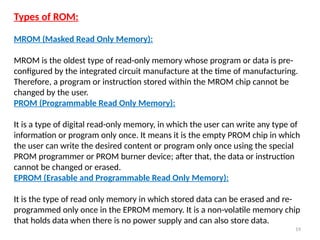
Types of ROM:
MROM (Masked Read Only Memory):
MROM is the oldest type of read-only memory whose program or data is pre-
configured by the integrated circuit manufacture at the time of manufacturing.
Therefore, a program or instruction stored within the MROM chip cannot be
changed by the user.
PROM (Programmable Read Only Memory):
It is a type of digital read-only memory, in which the user can write any type of
information or program only once. It means it is the empty PROM chip in which
the user can write the desired content or program only once using the special
PROM programmer or PROM burner device; after that, the data or instruction
cannot be changed or erased.
EPROM (Erasable and Programmable Read Only Memory):
It is the type of read only memory in which stored data can be erased and re-
programmed only once in the EPROM memory. It is a non-volatile memory chip
that holds data when there is no power supply and can also store data.
20
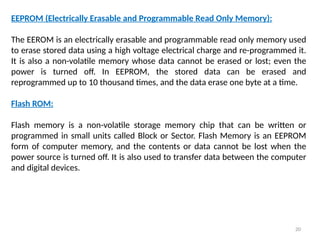
EEPROM (Electrically Erasable and Programmable Read Only Memory):
The EEROM is an electrically erasable and programmable read only memory used
to erase stored data using a high voltage electrical charge and re-programmed it.
It is also a non-volatile memory whose data cannot be erased or lost; even the
power is turned off. In EEPROM, the stored data can be erased and
reprogrammed up to 10 thousand times, and the data erase one byte at a time.
Flash ROM:
Flash memory is a non-volatile storage memory chip that can be written or
programmed in small units called Block or Sector. Flash Memory is an EEPROM
form of computer memory, and the contents or data cannot be lost when the
power source is turned off. It is also used to transfer data between the computer
and digital devices.
21
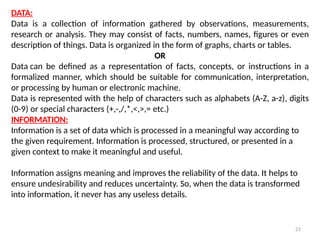
DATA:
Data is a collection of information gathered by observations, measurements,
research or analysis. They may consist of facts, numbers, names, figures or even
description of things. Data is organized in the form of graphs, charts or tables.
OR
Data can be defined as a representation of facts, concepts, or instructions in a
formalized manner, which should be suitable for communication, interpretation,
or processing by human or electronic machine.
Data is represented with the help of characters such as alphabets (A-Z, a-z), digits
(0-9) or special characters (+,-,/,*,<,>,= etc.)
INFORMATION:
Information is a set of data which is processed in a meaningful way according to
the given requirement. Information is processed, structured, or presented in a
given context to make it meaningful and useful.
Information assigns meaning and improves the reliability of the data. It helps to
ensure undesirability and reduces uncertainty. So, when the data is transformed
into information, it never has any useless details.
22
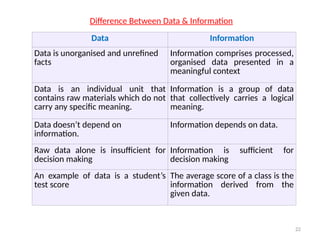
Data Information
Data is unorganised and unrefined
facts
Information comprises processed,
organised data presented in a
meaningful context
Data is an individual unit that
contains raw materials which do not
carry any specific meaning.
Information is a group of data
that collectively carries a logical
meaning.
Data doesn’t depend on
information.
Information depends on data.
Raw data alone is insufficient for
decision making
Information is sufficient for
decision making
An example of data is a student’s
test score
The average score of a class is the
information derived from the
given data.
Difference Between Data & Information

DAY- 1.pptx,.............................

  • 1.
    1 Introduction to computers: Definition:The term computer is derived from the word “compute”. A computer is an electronic device that takes data and instructions as an input from the user, processes data, and provides useful information known as output. A computer consists of various components that function as an integrated system to perform computational tasks. These components include the following: Central processing Unit (CPU): It is the brain of the computer that is responsible for controlling and executing program instructions. Monitor: It is a display screen, which shows information in visual form. Keyboard and Mouse: These are the peripheral devices used by the computer for receiving inputs from the user.
  • 2.
    2 Characteristics of thecomputer: Speed: The computer is a fast electronic device that can solve large and complex problems in few seconds. The speed of a computer generally depends upon its hardware configuration. Storage capacity: A computer can store huge amounts of data in many different formats. The storage area of a computer system is generally divided into two categories, main memory and secondary storage. Accuracy: A computer carries out calculations with great accuracy. The accuracy achieved by a computer depends upon its hardware configuration and the specified instructions. Reliability: A computer produces results with no error. Most of the computer generated errors are actuality human errors that are instigated by the user itself. Therefore, computers are regarded as quite trustworthy machines. Versatility: Computers are versatile machines. They can perform varied tasks and can be used for many different purposes. Diligence: Computers can perform repetitive calculations any number of times with the same level of accuracy.
  • 3.
    3 COMPONENTS OF ACOMPUTER HARDWARE OR BLOCK DIAGRAM OF COMPUTER A computer device is made up of various elements which help in its effective functioning and processing. Components of a computer system are the primary elements which make the functioning of an electronic device smooth and faster. There are five basic components of the computer which help in making this processing of data easier and convenient. There are five basic components which include: 1. Input Unit 2. Output Unit 3. Memory Unit 4. Control Unit 5. Arithmetical and Logical Unit
  • 4.
  • 5.
    5 Input Unit: Computers needto receive data and instructions in order to solve any problem. Therefore, we need to input the data and instructions into the computers. The input unit consists of one or more input devices. Keyboard is the one of the most commonly used input device. Other commonly used input devices are the Mouse, Scanner, Microphone etc. All the input devices perform the following functions. - Accept the data and instructions from the users. - Convert it to a form that the computer can understand. -Supply the converted data to the computer system for further processing. Central Processing Unit: The Control Unit (CU) and Arithmetic Logic Unit (ALU) of the computer are together known as the Central Processing Unit (CPU). The CPU is like brain performs the following functions: - It performs all calculations. - It takes all decisions. - It controls all units of the computer.
  • 6.
    6 Arithmetic Logical Unit(ALU): All calculations are performed in the Arithmetic Logic Unit (ALU) of the computer. It also does comparison and takes decision. The ALU can perform basic operations such as addition, subtraction, multiplication, division, etc and does logic operations such as AND, OR, NOT, and XOR. Whenever calculations are required, the control unit transfers the data from storage unit to ALU once the computations are done, the results are transferred to the storage unit by the control unit and then it is send to the output unit for displaying results. Control Unit(CU): It controls all other units in the computer. The control unit instructs the input unit, where to store the data after receiving it from the user. It controls the flow of data and instructions from the storage unit to ALU. It also controls the flow of results from the ALU to the storage unit. The control unit is generally referred as the central nervous system of the computer that control and synchronizes its working.
  • 7.
    7 Storage Unit: The storageunit of the computer holds data and instructions that are entered through the input unit, before they are processed. It preserves the intermediate and final results before these are sent to the output devices. It also saves the data for the later use. The various storage devices of a computer system are divided into two categories. 1. Primary Storage: Stores and provides very fast. This memory is generally used to hold the program being currently executed in the computer, the data being received from the input unit, the intermediate and final results of the program. The primary memory is temporary in nature. The data is lost, when the computer is switched off. In order to store the data permanently, the data has to be transferred to the secondary memory. The cost of the primary storage is more compared to the secondary storage. Therefore, most computers have limited primary storage capacity.
  • 8.
    8 2. Secondary Storage:Secondary storage is used like an archive. It stores several programs, documents, data bases etc. The programs that you run on the computer are first transferred to the primary memory before it is actually run. Whenever the results are saved, again they get stored in the secondary memory. The secondary memory is slower and cheaper than the primary memory. Some of the commonly used secondary memory devices are Hard disk, CD, etc.,
  • 9.
    9 INPUT AND OUTPUTDEVICES Input Devices: An input device is a computer device that allows computer users to enter data into a system and send instructions to the system to execute tasks accordingly. It is the first or primary step in the processing of computer data that is done at the Central Processing Unit (CPU). The delivered signals are received by the CPU which processes them. Output Devices: An output device is a computer device that displays the result of the inserted input data after getting processed from the CPU. CPU of a computer converts received information from machine language to a human-friendly language and then sends these signals to output devices to execute the tasks as per entered data. When the data entered by the input devices is processed by the CPU of the computer then the output devices take care of the result. The output devices display the visual contents on the monitor screen while sound contents are delivered to the speaker connected to a computer.
  • 10.
    10 Input Devices: 1. Keyboard 2.Mouse 3. Joy Stick 4. Light pen 5. Track Ball 6. Scanner 7. Digitizer 8. Microphone 9. Magnetic Ink Card Reader(MICR) 10. Optical Character Reader(OCR) 11. Bar Code Reader 12. Optical Mark Reader or Recognition (OMR)
  • 11.
    11 Output Devices: 1. Monitors 2.Printers 3. Speakers 4. Projector 5. Plotter 6. Television 7. Headphones 8. Video card Both Input & Output Devices: USB Device CD/DVD Drives Headset
  • 12.
    12 Memory Unit Description BitBinary Digit 1 or 0 Byte 8 bits KiloByte(KB) 1024 Bytes MegaByte(MB) 1024 KB GigaByte(GB) 1024 MB TeraByte(TB) 1024 GB PetaByte(PB) 1024 TB HexaByte or exaByte (EB) 1024 PB ZettaByte (ZB) 1024 EB YottaByte (YB) 1024 ZB BrontoByte 1024 YB GeopByte 1024 Bronto Bytes
  • 13.
    13 MEMORIES: The Memory unitof a computer is used to store data, instructions for processing data, intermediate results of processing and the final processed information. The memory units of a computer are classified as Primary Memory and Secondary Memory. Primary Memory: The Primary Memory is available in the computer as a built in unit of the computer. The Primary Memory is represented as a set of locations which each location occupying 8 bits. Each bit in the memory is identified by unique address. The data is stored in the machine understandable binary form in these memory locations.
  • 14.
    14 Primary Memories are; ROM:ROM represents Read only Memory that stores data and instructions, even when the computer is turned off. It is permanent memory of the computer where the contents cannot be modified by an end user. ROM is a chip that is inserted into the motherboard. It is generally used to store the Basic Input/Output System(BIOS), which performs the Power On Self Test(POST). RAM: RAM is the read/write memory unit in which the information is retained only as long as there is regular power supply. When the power supply is interrupted or Switched off the information stored in the RAM is lost. RAM is a volatile memory that temporarily stores data and applications as long as they are in use. When the use of data or the application is over the content in RAM is erased.
  • 15.
    15 Cache Memory: CacheMemory is used to store the data and the related applications that was last processed by the CPU. When the processor performs processing, it first searches the cache memory and then the RAM, for an instruction. The Cache Memory is always placed between CPU and the main memory of the computer system. Secondary Memory: Secondary Memory represents the external storage devices that are connected to the computer. A storage device is either located in the CPU casing of the computer or its connected to the computer.
  • 16.
    16 Secondary Storage devicesare; Magnetic Storage Devices: The Magnetic Storage Devices stores information that can be read, erased and rewritten number of times. These include floppy disks, hard disk and Magnetic tapes. Optical Storage Device: The Optical Storage Devices are secondary storage devices that use laser beams to read the stored data. These include CD-ROM, rewritable compact disk(CD-RW) and digital video disks with read only memory(DVD-ROM). Magneto-optical storage device: These are generally used to store information, such as large programs files and backup data. The end user can modify the information stored in Magneto-optical storage device multiple times. These devices provide higher storage capacity as they use laser beams and magnets for reading and writing data to the device. Eg: Sony Minidisc.
  • 17.
    17 Universal Serial bus(USB) drive: Commonly Known as Pendrive is a removable storage devices that is interfaced on the USB port of a computer system. RAM ROM It is a read write memory It is a read only memory It is volatile storage device It is a permanent storage device Data is erased as soon as power supply is turned off. Data remains stored even after power supply has been turned off. It is used in the main memory of a computer system It is used to store Basic input output system(BIOS) It is a faster and expensive memory. It is a slower and less expensive memory. Difference between RAM & ROM:
  • 18.
    18 There are twotypes of RAM: 1. SRAM 2. DRAM DRAM: DRAM (Dynamic Random-Access Memory) is a type of RAM that is used for the dynamic storage of data in RAM. In DRAM, each cell carries one-bit information. The cell is made up of two parts: a capacitor and a transistor. The size of the capacitor and the transistor is so small, requiring millions of them to store on a single chip. Hence, a DRAM chip can hold more data than an SRAM chip of the same size. However, the capacitor needs to be continuously refreshed to retain information because DRAM is volatile. If the power is switched off, the data store in memory is lost. SRAM: SRAM (Static Random-Access Memory) is a type of RAM used to store static data in the memory. It means to store data in SRAM remains active as long as the computer system has a power supply. However, data is lost in SRAM when power failures have occurred.
  • 19.
    19 Types of ROM: MROM(Masked Read Only Memory): MROM is the oldest type of read-only memory whose program or data is pre- configured by the integrated circuit manufacture at the time of manufacturing. Therefore, a program or instruction stored within the MROM chip cannot be changed by the user. PROM (Programmable Read Only Memory): It is a type of digital read-only memory, in which the user can write any type of information or program only once. It means it is the empty PROM chip in which the user can write the desired content or program only once using the special PROM programmer or PROM burner device; after that, the data or instruction cannot be changed or erased. EPROM (Erasable and Programmable Read Only Memory): It is the type of read only memory in which stored data can be erased and re- programmed only once in the EPROM memory. It is a non-volatile memory chip that holds data when there is no power supply and can also store data.
  • 20.
    20 EEPROM (Electrically Erasableand Programmable Read Only Memory): The EEROM is an electrically erasable and programmable read only memory used to erase stored data using a high voltage electrical charge and re-programmed it. It is also a non-volatile memory whose data cannot be erased or lost; even the power is turned off. In EEPROM, the stored data can be erased and reprogrammed up to 10 thousand times, and the data erase one byte at a time. Flash ROM: Flash memory is a non-volatile storage memory chip that can be written or programmed in small units called Block or Sector. Flash Memory is an EEPROM form of computer memory, and the contents or data cannot be lost when the power source is turned off. It is also used to transfer data between the computer and digital devices.
  • 21.
    21 DATA: Data is acollection of information gathered by observations, measurements, research or analysis. They may consist of facts, numbers, names, figures or even description of things. Data is organized in the form of graphs, charts or tables. OR Data can be defined as a representation of facts, concepts, or instructions in a formalized manner, which should be suitable for communication, interpretation, or processing by human or electronic machine. Data is represented with the help of characters such as alphabets (A-Z, a-z), digits (0-9) or special characters (+,-,/,*,<,>,= etc.) INFORMATION: Information is a set of data which is processed in a meaningful way according to the given requirement. Information is processed, structured, or presented in a given context to make it meaningful and useful. Information assigns meaning and improves the reliability of the data. It helps to ensure undesirability and reduces uncertainty. So, when the data is transformed into information, it never has any useless details.
  • 22.
    22 Data Information Data isunorganised and unrefined facts Information comprises processed, organised data presented in a meaningful context Data is an individual unit that contains raw materials which do not carry any specific meaning. Information is a group of data that collectively carries a logical meaning. Data doesn’t depend on information. Information depends on data. Raw data alone is insufficient for decision making Information is sufficient for decision making An example of data is a student’s test score The average score of a class is the information derived from the given data. Difference Between Data & Information