ENTRANCE
Mr. Ashan Tharuka
lbashantharuka001@yahoo.com
0785320044
Sri lanka.
Introduction Hardware
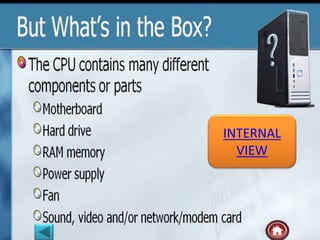
Internal
view
What is the
Computer
History
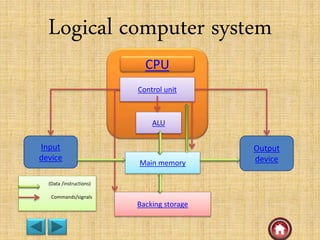
Logical
computer
system
Identify the
computer
• A computer is an electronic device , operating under the control of
introductions stored in its own memory unit.
• A computer is a machine or collection of electronic devices. It
perform various tasks based on the instruction given by human.
• Computer, machine that performs tasks, such as calculations or
electronic communication, under the control of a set of
instructions called a program. Programs usually reside within the
computer and are retrieved and processed by the computer’s
electronics. The program results are stored or routed to output
devices, such as video display monitors or printers. Computers
perform a wide variety of activities reliably, accurately, and
quickly.
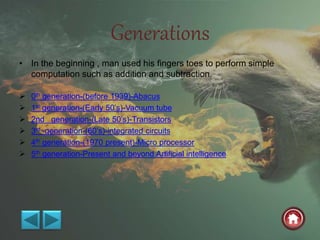
Generations
• In the beginning , man used his fingers toes to perform simple
computation such as addition and subtraction.
 0th generation-(before 1939)-Abacus
 1st generation-(Early 50’s)-Vacuum tube
 2nd generation-(Late 50’s)-Transistors
 3rd generation-(60’s)-integrated circuits
 4th generation-(1970 present)-Micro processor
 5th generation-Present and beyond Artificial intelligence
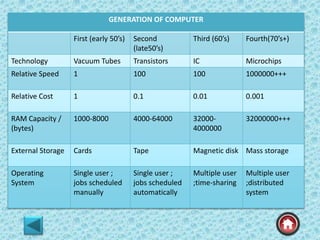
GENERATION OF COMPUTER
First (early 50’s) Second
(late50’s)
Third (60’s) Fourth(70’s+)
Technology Vacuum Tubes Transistors IC Microchips
Relative Speed 1 100 100 1000000+++
Relative Cost 1 0.1 0.01 0.001
RAM Capacity /
(bytes)
1000-8000 4000-64000 32000-
4000000
32000000+++
External Storage Cards Tape Magnetic disk Mass storage
Operating
System
Single user ;
jobs scheduled
manually
Single user ;
jobs scheduled
automatically
Multiple user
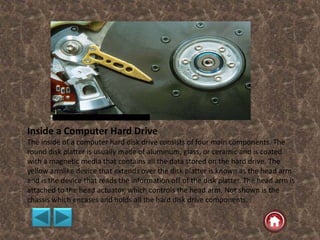
;time-sharing
Multiple user
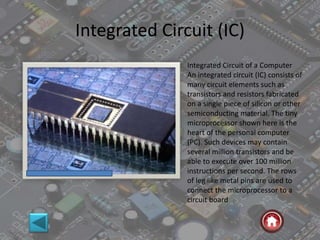
;distributed
system
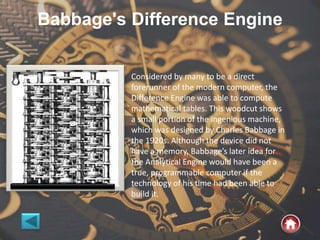
Babbage's Difference Engine
Considered by many to be a direct
forerunner of the modern computer, the
Difference Engine was able to compute
mathematical tables. This woodcut shows
a small portion of the ingenious machine,
which was designed by Charles Babbage in
the 1920s. Although the device did not
have a memory, Babbage’s later idea for
the Analytical Engine would have been a
true, programmable computer if the
technology of his time had been able to
build it.
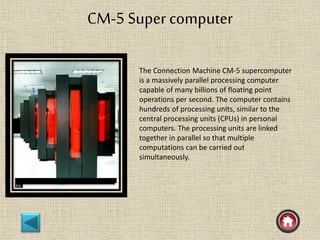
CM-5 Super computer
The Connection Machine CM-5 supercomputer
is a massively parallel processing computer
capable of many billions of floating point
operations per second. The computer contains
hundreds of processing units, similar to the
central processing units (CPUs) in personal
computers. The processing units are linked
together in parallel so that multiple
computations can be carried out
simultaneously.
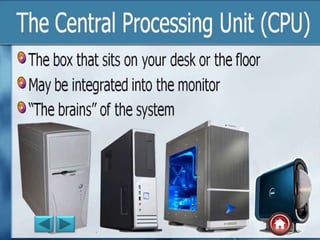
CPU
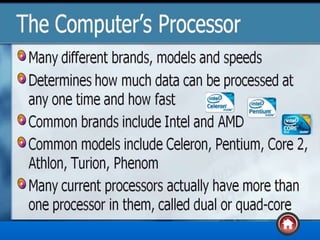
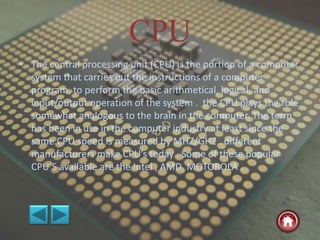
• The central processing unit (CPU) is the portion of a computer
system that carries out the instructions of a computer
program, to perform the basic arithmetical, logical, and
input/output operation of the system . the CPU plays the role
somewhat analogous to the brain in the computer. The term
has been in use in the computer industry at least since the
same.CPU speed is measured by MHZ/GHZ . different
manufacturers make CPU’s today . Some of these popular
CPU’S available are the Intel , AMD, MOTOROLA .
The CPU consist two path
• Control unit(CU)
control and directs the operation of the entire computer.
• Arithmetic and logic unit (ALU)
the ALU of a computer is the place where the actual
execution of a instructions take place during the processing
operations.
memory components such as register files , caches.
it is the memory provided in the CPU to store the programs
and data in current usage.
RAM
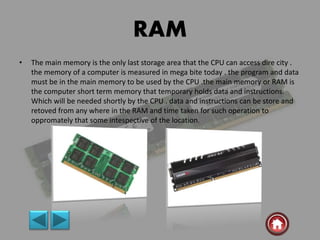
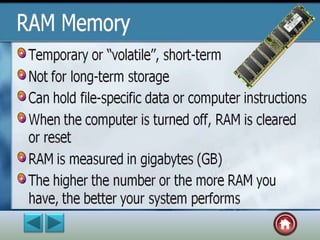
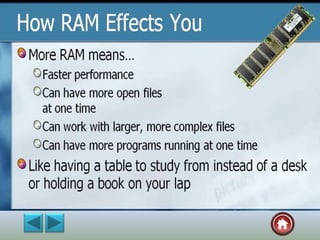
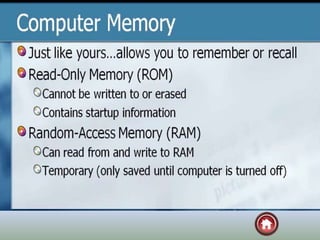
• The main memory is the only last storage area that the CPU can access dire city .
the memory of a computer is measured in mega bite today . the program and data
must be in the main memory to be used by the CPU .the main memory or RAM is
the computer short term memory that temporary holds data and instructions.
Which will be needed shortly by the CPU . data and instructions can be store and
retoved from any where in the RAM and time taken for such operation to
oppromately that some intespective of the location.
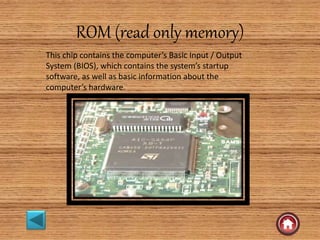
ROM (read only memory)
This chip contains the computer’s Basic Input / Output
System (BIOS), which contains the system’s startup
software, as well as basic information about the
computer’s hardware.
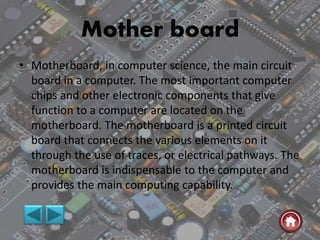
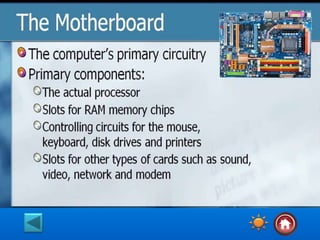
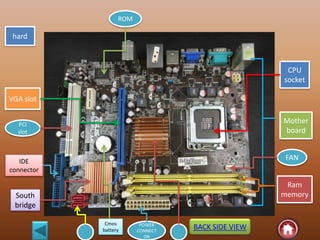
Mother board
• Motherboard, in computer science, the main circuit
board in a computer. The most important computer
chips and other electronic components that give
function to a computer are located on the
motherboard. The motherboard is a printed circuit
board that connects the various elements on it
through the use of traces, or electrical pathways. The
motherboard is indispensable to the computer and
provides the main computing capability.
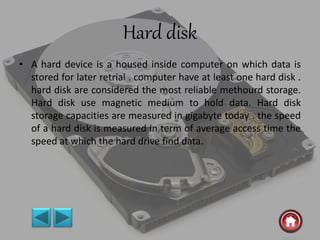
Hard disk
• A hard device is a housed inside computer on which data is
stored for later retrial . computer have at least one hard disk .
hard disk are considered the most reliable methourd storage.
Hard disk use magnetic medium to hold data. Hard disk
storage capacities are measured in gigabyte today . the speed
of a hard disk is measured in term of average access time the
speed at which the hard drive find data.
Computer memory
• In computer memory refers to the physical devices used to
store program (sequences of instructions ) or data (e.g.
program state information temporary or permanent basis for
use in a computer or other digital electronic device. The term
primary memory is used for the information in physical
system are fast (i.e. ram) ,as a distinction from secondary
memory, which are physical device for program and data
storage which are slow to access but offer higher memory
capacity. Primary memory stored on secondary memory is
called “virtual memory”.
Logical computer system
CPU
Control unit
ALU
Main memory
Backing storage
Input
device
Output
device
(Data /instructions)
Commands/signals
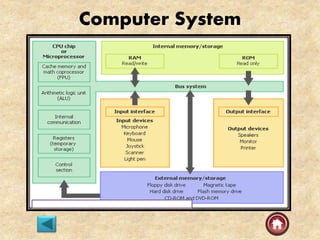
Computer System
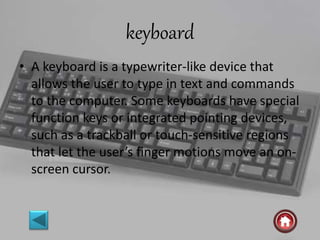
keyboard
• A keyboard is a typewriter-like device that
allows the user to type in text and commands
to the computer. Some keyboards have special
function keys or integrated pointing devices,
such as a trackball or touch-sensitive regions
that let the user’s finger motions move an on-
screen cursor.
INTERNAL
VIEW
CPU
socket
hard
Ram
memory
Mother
board
VGA slot
PCI
slot
POWER
CONNECT
OR
ROM
FAN
BACK SIDE VIEW
South
bridge
IDE
connector
Cmos
battery
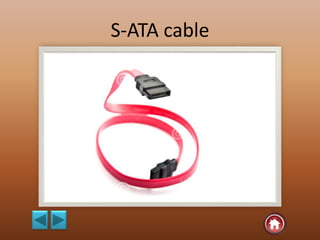
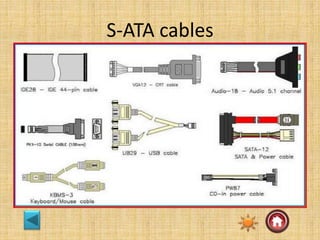
S-ATA cable
S-ATA cables
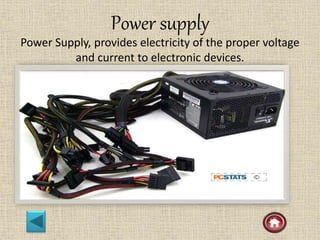
Power supply
Power Supply, provides electricity of the proper voltage
and current to electronic devices.
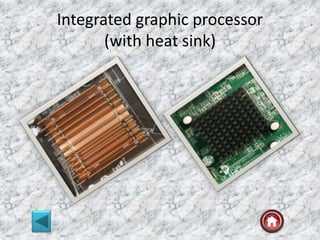
Integrated graphic processor
(with heat sink)
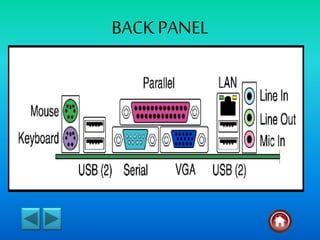
BACK PANEL
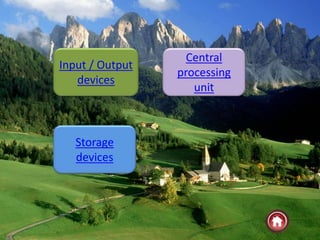
Central
processing
unit
Storage
devices
Input / Output
devices
Input / Output Device, in computer science, a piece of
hardware that is used for both providing information to the
computer and receiving information from it. An
input/output device thus transfers information in one of
two directions depending on the current situation. A disk
drive is an example of an input/output device. Some
devices, called input devices, can be used only for input—
for example, a keyboard, a mouse, a light pen, and a
joystick. Other devices, called output devices, can be used
only for output—for example, a printer and a monitor.
Storage devices
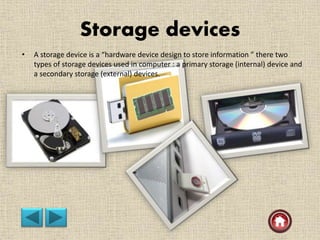
• A storage device is a “hardware device design to store information ” there two
types of storage devices used in computer : a primary storage (internal) device and
a secondary storage (external) devices.
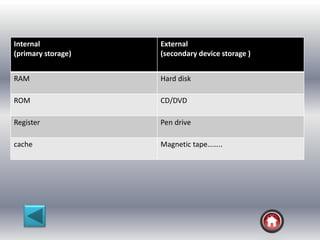
Internal
(primary storage)
External
(secondary device storage )
RAM Hard disk
ROM CD/DVD
Register Pen drive
cache Magnetic tape……..
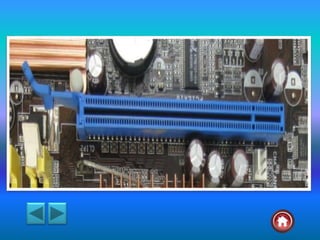
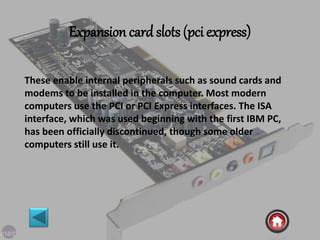
Expansion card slots (pci express)
These enable internal peripherals such as sound cards and
modems to be installed in the computer. Most modern
computers use the PCI or PCI Express interfaces. The ISA
interface, which was used beginning with the first IBM PC,
has been officially discontinued, though some older
computers still use it.
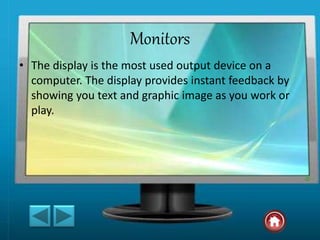
Monitors
• The display is the most used output device on a
computer. The display provides instant feedback by
showing you text and graphic image as you work or
play.
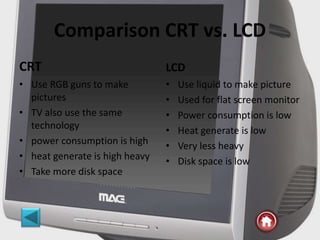
Comparison CRT vs. LCD
CRT
• Use RGB guns to make
pictures
• TV also use the same
technology
• power consumption is high
• heat generate is high heavy
• Take more disk space
LCD
• Use liquid to make picture
• Used for flat screen monitor
• Power consumption is low
• Heat generate is low
• Very less heavy
• Disk space is low
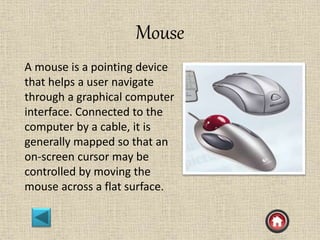
Mouse
A mouse is a pointing device
that helps a user navigate
through a graphical computer
interface. Connected to the
computer by a cable, it is
generally mapped so that an
on-screen cursor may be
controlled by moving the
mouse across a flat surface.
Outputdevice
Once the CPU has executed the program instruction,
the program may request that the information be
communicated to an output device, such as a video
display monitor or a flat liquid crystal display. Other
output devices are printers, overhead projectors,
videocassette recorders (VCRs), and speakers.
0th generation (before 1939)
• 3000 BC- the first man made computing
device is the “Abacus”. In the abacus, small
beads are arranged on a series on vertical rods
in a manner that by manipulating them, it is
possible with some skill and practice, to made
rapid calculation.
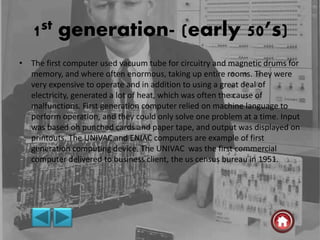
1st generation- (early 50’s)
• The first computer used vacuum tube for circuitry and magnetic drums for
memory, and where often enormous, taking up entire rooms. They were
very expensive to operate and in addition to using a great deal of
electricity, generated a lot of heat, which was often the cause of
malfunctions. First generation computer relied on machine language to
perform operation, and they could only solve one problem at a time. Input
was based oh punched cards and paper tape, and output was displayed on
printouts. The UNIVAC and ENIAC computers are example of first
generation computing device. The UNIVAC was the first commercial
computer delivered to business client, the us census bureau in 1951.
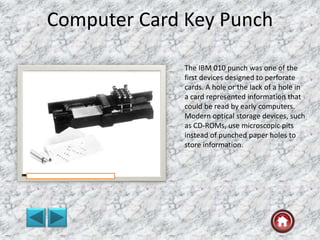
Computer Card Key Punch
The IBM 010 punch was one of the
first devices designed to perforate
cards. A hole or the lack of a hole in
a card represented information that
could be read by early computers.
Modern optical storage devices, such
as CD-ROMs, use microscopic pits
instead of punched paper holes to
store information.
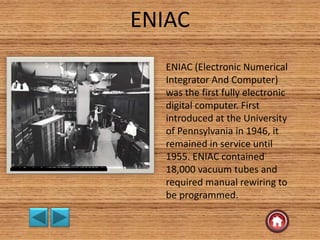
ENIAC
ENIAC (Electronic Numerical
Integrator And Computer)
was the first fully electronic
digital computer. First
introduced at the University
of Pennsylvania in 1946, it
remained in service until
1955. ENIAC contained
18,000 vacuum tubes and
required manual rewiring to
be programmed.
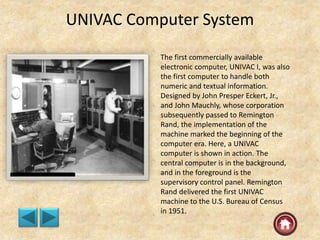
UNIVAC Computer System
The first commercially available
electronic computer, UNIVAC I, was also
the first computer to handle both
numeric and textual information.
Designed by John Presper Eckert, Jr.,
and John Mauchly, whose corporation
subsequently passed to Remington
Rand, the implementation of the
machine marked the beginning of the
computer era. Here, a UNIVAC
computer is shown in action. The
central computer is in the background,
and in the foreground is the
supervisory control panel. Remington
Rand delivered the first UNIVAC
machine to the U.S. Bureau of Census
in 1951.
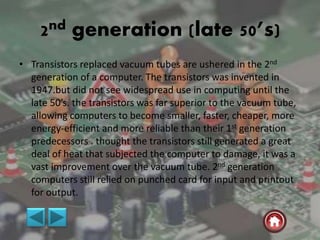
2nd generation (late 50’s)
• Transistors replaced vacuum tubes are ushered in the 2nd
generation of a computer. The transistors was invented in
1947.but did not see widespread use in computing until the
late 50’s. the transistors was far superior to the vacuum tube,
allowing computers to become smaller, faster, cheaper, more
energy-efficient and more reliable than their 1st generation
predecessors . thought the transistors still generated a great
deal of heat that subjected the computer to damage, it was a
vast improvement over the vacuum tube. 2nd generation
computers still relied on punched card for input and printout
for output.
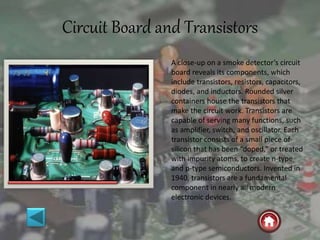
Circuit Board and Transistors
A close-up on a smoke detector’s circuit
board reveals its components, which
include transistors, resistors, capacitors,
diodes, and inductors. Rounded silver
containers house the transistors that
make the circuit work. Transistors are
capable of serving many functions, such
as amplifier, switch, and oscillator. Each
transistor consists of a small piece of
silicon that has been “doped,” or treated
with impurity atoms, to create n-type
and p-type semiconductors. Invented in
1940, transistors are a fundamental
component in nearly all modern
electronic devices.
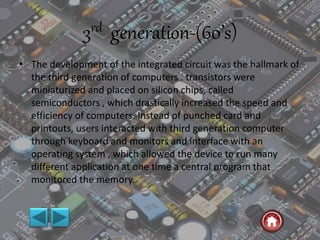
3rd generation-(60’s)
• The development of the integrated circuit was the hallmark of
the third generation of computers . transistors were
miniaturized and placed on silicon chips, called
semiconductors , which drastically increased the speed and
efficiency of computers. Instead of punched card and
printouts, users interacted with third generation computer
through keyboard and monitors and interface with an
operating system , which allowed the device to run many
different application at one time a central program that
monitored the memory.
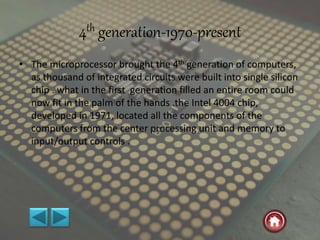
4th generation-1970-present
• The microprocessor brought the 4th generation of computers,
as thousand of integrated circuits were built into single silicon
chip . what in the first generation filled an entire room could
now fit in the palm of the hands .the Intel 4004 chip,
developed in 1971, located all the components of the
computers from the center processing unit and memory to
input/output controls .
5th generation –(present and beyond)
• 5th generation computing devices, based on artificial
intelligence, are still in development, though there some
application, such as voice recognition, that arc being used
today. Quantum computation and molecular and
nanotechnology will radically change the face of computers in
years to come. The goal of 5th generation computing is to
develop devices that respond to natural language input and
are capable of learning and self organization.
Inside a Computer Hard Drive
The inside of a computer hard disk drive consists of four main components. The
round disk platter is usually made of aluminum, glass, or ceramic and is coated
with a magnetic media that contains all the data stored on the hard drive. The
yellow armlike device that extends over the disk platter is known as the head arm
and is the device that reads the information off of the disk platter. The head arm is
attached to the head actuator, which controls the head arm. Not shown is the
chassis which encases and holds all the hard disk drive components.
Integrated Circuit (IC)
Integrated Circuit of a Computer
An integrated circuit (IC) consists of
many circuit elements such as
transistors and resistors fabricated
on a single piece of silicon or other
semiconducting material. The tiny
microprocessor shown here is the
heart of the personal computer
(PC). Such devices may contain
several million transistors and be
able to execute over 100 million
instructions per second. The rows
of leg like metal pins are used to
connect the microprocessor to a
circuit board
MY COMPUTER

MY COMPUTER

  • 1.
  • 2.
  • 3.
  • 5.
    • A computeris an electronic device , operating under the control of introductions stored in its own memory unit. • A computer is a machine or collection of electronic devices. It perform various tasks based on the instruction given by human. • Computer, machine that performs tasks, such as calculations or electronic communication, under the control of a set of instructions called a program. Programs usually reside within the computer and are retrieved and processed by the computer’s electronics. The program results are stored or routed to output devices, such as video display monitors or printers. Computers perform a wide variety of activities reliably, accurately, and quickly.
  • 6.
    Generations • In thebeginning , man used his fingers toes to perform simple computation such as addition and subtraction.  0th generation-(before 1939)-Abacus  1st generation-(Early 50’s)-Vacuum tube  2nd generation-(Late 50’s)-Transistors  3rd generation-(60’s)-integrated circuits  4th generation-(1970 present)-Micro processor  5th generation-Present and beyond Artificial intelligence
  • 7.
    GENERATION OF COMPUTER First(early 50’s) Second (late50’s) Third (60’s) Fourth(70’s+) Technology Vacuum Tubes Transistors IC Microchips Relative Speed 1 100 100 1000000+++ Relative Cost 1 0.1 0.01 0.001 RAM Capacity / (bytes) 1000-8000 4000-64000 32000- 4000000 32000000+++ External Storage Cards Tape Magnetic disk Mass storage Operating System Single user ; jobs scheduled manually Single user ; jobs scheduled automatically Multiple user ;time-sharing Multiple user ;distributed system
  • 8.
    Babbage's Difference Engine Consideredby many to be a direct forerunner of the modern computer, the Difference Engine was able to compute mathematical tables. This woodcut shows a small portion of the ingenious machine, which was designed by Charles Babbage in the 1920s. Although the device did not have a memory, Babbage’s later idea for the Analytical Engine would have been a true, programmable computer if the technology of his time had been able to build it.
  • 9.
    CM-5 Super computer TheConnection Machine CM-5 supercomputer is a massively parallel processing computer capable of many billions of floating point operations per second. The computer contains hundreds of processing units, similar to the central processing units (CPUs) in personal computers. The processing units are linked together in parallel so that multiple computations can be carried out simultaneously.
  • 11.
    CPU • The centralprocessing unit (CPU) is the portion of a computer system that carries out the instructions of a computer program, to perform the basic arithmetical, logical, and input/output operation of the system . the CPU plays the role somewhat analogous to the brain in the computer. The term has been in use in the computer industry at least since the same.CPU speed is measured by MHZ/GHZ . different manufacturers make CPU’s today . Some of these popular CPU’S available are the Intel , AMD, MOTOROLA .
  • 12.
    The CPU consisttwo path • Control unit(CU) control and directs the operation of the entire computer. • Arithmetic and logic unit (ALU) the ALU of a computer is the place where the actual execution of a instructions take place during the processing operations. memory components such as register files , caches. it is the memory provided in the CPU to store the programs and data in current usage.
  • 14.
    RAM • The mainmemory is the only last storage area that the CPU can access dire city . the memory of a computer is measured in mega bite today . the program and data must be in the main memory to be used by the CPU .the main memory or RAM is the computer short term memory that temporary holds data and instructions. Which will be needed shortly by the CPU . data and instructions can be store and retoved from any where in the RAM and time taken for such operation to oppromately that some intespective of the location.
  • 18.
    ROM (read onlymemory) This chip contains the computer’s Basic Input / Output System (BIOS), which contains the system’s startup software, as well as basic information about the computer’s hardware.
  • 19.
    Mother board • Motherboard,in computer science, the main circuit board in a computer. The most important computer chips and other electronic components that give function to a computer are located on the motherboard. The motherboard is a printed circuit board that connects the various elements on it through the use of traces, or electrical pathways. The motherboard is indispensable to the computer and provides the main computing capability.
  • 21.
    Hard disk • Ahard device is a housed inside computer on which data is stored for later retrial . computer have at least one hard disk . hard disk are considered the most reliable methourd storage. Hard disk use magnetic medium to hold data. Hard disk storage capacities are measured in gigabyte today . the speed of a hard disk is measured in term of average access time the speed at which the hard drive find data.
  • 22.
    Computer memory • Incomputer memory refers to the physical devices used to store program (sequences of instructions ) or data (e.g. program state information temporary or permanent basis for use in a computer or other digital electronic device. The term primary memory is used for the information in physical system are fast (i.e. ram) ,as a distinction from secondary memory, which are physical device for program and data storage which are slow to access but offer higher memory capacity. Primary memory stored on secondary memory is called “virtual memory”.
  • 23.
    Logical computer system CPU Controlunit ALU Main memory Backing storage Input device Output device (Data /instructions) Commands/signals
  • 24.
  • 26.
    keyboard • A keyboardis a typewriter-like device that allows the user to type in text and commands to the computer. Some keyboards have special function keys or integrated pointing devices, such as a trackball or touch-sensitive regions that let the user’s finger motions move an on- screen cursor.
  • 28.
  • 29.
  • 30.
  • 31.
  • 32.
    Power supply Power Supply,provides electricity of the proper voltage and current to electronic devices.
  • 33.
  • 36.
  • 40.
  • 41.
    Input / OutputDevice, in computer science, a piece of hardware that is used for both providing information to the computer and receiving information from it. An input/output device thus transfers information in one of two directions depending on the current situation. A disk drive is an example of an input/output device. Some devices, called input devices, can be used only for input— for example, a keyboard, a mouse, a light pen, and a joystick. Other devices, called output devices, can be used only for output—for example, a printer and a monitor.
  • 42.
    Storage devices • Astorage device is a “hardware device design to store information ” there two types of storage devices used in computer : a primary storage (internal) device and a secondary storage (external) devices.
  • 43.
    Internal (primary storage) External (secondary devicestorage ) RAM Hard disk ROM CD/DVD Register Pen drive cache Magnetic tape……..
  • 44.
    Expansion card slots(pci express) These enable internal peripherals such as sound cards and modems to be installed in the computer. Most modern computers use the PCI or PCI Express interfaces. The ISA interface, which was used beginning with the first IBM PC, has been officially discontinued, though some older computers still use it.
  • 45.
    Monitors • The displayis the most used output device on a computer. The display provides instant feedback by showing you text and graphic image as you work or play.
  • 46.
    Comparison CRT vs.LCD CRT • Use RGB guns to make pictures • TV also use the same technology • power consumption is high • heat generate is high heavy • Take more disk space LCD • Use liquid to make picture • Used for flat screen monitor • Power consumption is low • Heat generate is low • Very less heavy • Disk space is low
  • 47.
    Mouse A mouse isa pointing device that helps a user navigate through a graphical computer interface. Connected to the computer by a cable, it is generally mapped so that an on-screen cursor may be controlled by moving the mouse across a flat surface.
  • 48.
    Outputdevice Once the CPUhas executed the program instruction, the program may request that the information be communicated to an output device, such as a video display monitor or a flat liquid crystal display. Other output devices are printers, overhead projectors, videocassette recorders (VCRs), and speakers.
  • 49.
    0th generation (before1939) • 3000 BC- the first man made computing device is the “Abacus”. In the abacus, small beads are arranged on a series on vertical rods in a manner that by manipulating them, it is possible with some skill and practice, to made rapid calculation.
  • 50.
    1st generation- (early50’s) • The first computer used vacuum tube for circuitry and magnetic drums for memory, and where often enormous, taking up entire rooms. They were very expensive to operate and in addition to using a great deal of electricity, generated a lot of heat, which was often the cause of malfunctions. First generation computer relied on machine language to perform operation, and they could only solve one problem at a time. Input was based oh punched cards and paper tape, and output was displayed on printouts. The UNIVAC and ENIAC computers are example of first generation computing device. The UNIVAC was the first commercial computer delivered to business client, the us census bureau in 1951.
  • 51.
    Computer Card KeyPunch The IBM 010 punch was one of the first devices designed to perforate cards. A hole or the lack of a hole in a card represented information that could be read by early computers. Modern optical storage devices, such as CD-ROMs, use microscopic pits instead of punched paper holes to store information.
  • 52.
    ENIAC ENIAC (Electronic Numerical IntegratorAnd Computer) was the first fully electronic digital computer. First introduced at the University of Pennsylvania in 1946, it remained in service until 1955. ENIAC contained 18,000 vacuum tubes and required manual rewiring to be programmed.
  • 53.
    UNIVAC Computer System Thefirst commercially available electronic computer, UNIVAC I, was also the first computer to handle both numeric and textual information. Designed by John Presper Eckert, Jr., and John Mauchly, whose corporation subsequently passed to Remington Rand, the implementation of the machine marked the beginning of the computer era. Here, a UNIVAC computer is shown in action. The central computer is in the background, and in the foreground is the supervisory control panel. Remington Rand delivered the first UNIVAC machine to the U.S. Bureau of Census in 1951.
  • 54.
    2nd generation (late50’s) • Transistors replaced vacuum tubes are ushered in the 2nd generation of a computer. The transistors was invented in 1947.but did not see widespread use in computing until the late 50’s. the transistors was far superior to the vacuum tube, allowing computers to become smaller, faster, cheaper, more energy-efficient and more reliable than their 1st generation predecessors . thought the transistors still generated a great deal of heat that subjected the computer to damage, it was a vast improvement over the vacuum tube. 2nd generation computers still relied on punched card for input and printout for output.
  • 55.
    Circuit Board andTransistors A close-up on a smoke detector’s circuit board reveals its components, which include transistors, resistors, capacitors, diodes, and inductors. Rounded silver containers house the transistors that make the circuit work. Transistors are capable of serving many functions, such as amplifier, switch, and oscillator. Each transistor consists of a small piece of silicon that has been “doped,” or treated with impurity atoms, to create n-type and p-type semiconductors. Invented in 1940, transistors are a fundamental component in nearly all modern electronic devices.
  • 56.
    3rd generation-(60’s) • Thedevelopment of the integrated circuit was the hallmark of the third generation of computers . transistors were miniaturized and placed on silicon chips, called semiconductors , which drastically increased the speed and efficiency of computers. Instead of punched card and printouts, users interacted with third generation computer through keyboard and monitors and interface with an operating system , which allowed the device to run many different application at one time a central program that monitored the memory.
  • 57.
    4th generation-1970-present • Themicroprocessor brought the 4th generation of computers, as thousand of integrated circuits were built into single silicon chip . what in the first generation filled an entire room could now fit in the palm of the hands .the Intel 4004 chip, developed in 1971, located all the components of the computers from the center processing unit and memory to input/output controls .
  • 58.
    5th generation –(presentand beyond) • 5th generation computing devices, based on artificial intelligence, are still in development, though there some application, such as voice recognition, that arc being used today. Quantum computation and molecular and nanotechnology will radically change the face of computers in years to come. The goal of 5th generation computing is to develop devices that respond to natural language input and are capable of learning and self organization.
  • 59.
    Inside a ComputerHard Drive The inside of a computer hard disk drive consists of four main components. The round disk platter is usually made of aluminum, glass, or ceramic and is coated with a magnetic media that contains all the data stored on the hard drive. The yellow armlike device that extends over the disk platter is known as the head arm and is the device that reads the information off of the disk platter. The head arm is attached to the head actuator, which controls the head arm. Not shown is the chassis which encases and holds all the hard disk drive components.
  • 61.
    Integrated Circuit (IC) IntegratedCircuit of a Computer An integrated circuit (IC) consists of many circuit elements such as transistors and resistors fabricated on a single piece of silicon or other semiconducting material. The tiny microprocessor shown here is the heart of the personal computer (PC). Such devices may contain several million transistors and be able to execute over 100 million instructions per second. The rows of leg like metal pins are used to connect the microprocessor to a circuit board