BIT
Computer Systems
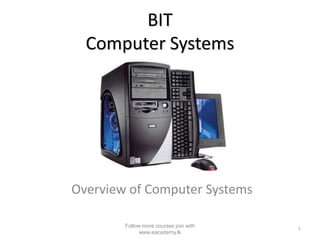
Overview of Computer Systems
1
Follow more courses join with
www.eacademy.lk
What is a Computer…?
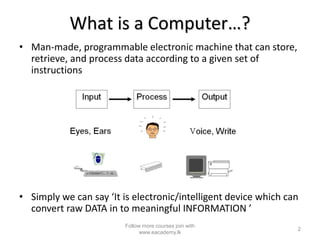
• Man-made, programmable electronic machine that can store,
retrieve, and process data according to a given set of
instructions
• Simply we can say ‘It is electronic/intelligent device which can
convert raw DATA in to meaningful INFORMATION ’
2
Follow more courses join with
www.eacademy.lk
DATA
• Data can be defined as ‘Raw facts’, ’Meaning less
things’ or ‘Un-processed things’
• Normally data can be input to a system.
• E.g.- In an organization: employee’s name, number of
hours of work, employee address, and employment
commenced date, etc
3
Follow more courses join with
www.eacademy.lk
INFORMATION
• Processed data and which has a meaning
unlike data.
• Normally Information are output from a
system.
• E.g.-In an organization: monthly salary of an
employee, total sales in a particular month,
etc
4
Follow more courses join with
www.eacademy.lk
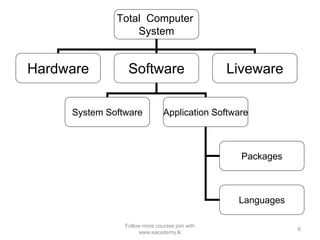
Total Computer System
• A system is a collection of elements that work together to
achieve a common objective.
Total
Computer
System
Hardware Software Liveware
5
Follow more courses join with
www.eacademy.lk
Total Computer
System
Hardware Software Liveware
System Software Application Software
Packages
Languages
6
Follow more courses join with
www.eacademy.lk
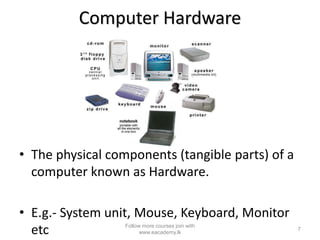
Computer Hardware
• The physical components (tangible parts) of a
computer known as Hardware.
• E.g.- System unit, Mouse, Keyboard, Monitor
etc 7
Follow more courses join with
www.eacademy.lk
Software
• Collection of programs or applications, which
contain the instructions that makes the
computer work.
• E.g.-
Windows XP, Ms-Word, Java, AVG, Virus,
8
Follow more courses join with
www.eacademy.lk
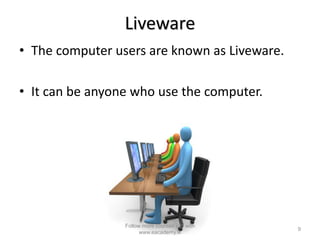
Liveware
• The computer users are known as Liveware.
• It can be anyone who use the computer.
9
Follow more courses join with
www.eacademy.lk
Hardware categorization
• Mainly computer Hardware can be
categorized as follows,
– Processor/CPU
– Memory & integrating devices
– Input devices
– Output devices
– Storage devices
– Communication devices
10
Follow more courses join with
www.eacademy.lk
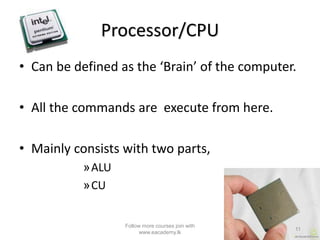
Processor/CPU
• Can be defined as the ‘Brain’ of the computer.
• All the commands are execute from here.
• Mainly consists with two parts,
»ALU
»CU
11
Follow more courses join with
www.eacademy.lk
ALU-Arithmetic & Logic Unit
• Responsible for performing Arithmetic
functions such as,
– Addition (+)
– Subtraction (-)
– Division(/)
– Multiplication(*)
• And Logical functions like,
– Is Greater than (>)
– Is Less than(<)
12
Follow more courses join with
www.eacademy.lk
CU-Control Unit
• Responsible for controlling all the Hardware of
the computer and all the Software of the
computer.
• All tasks of the computer has been runs under
the direct co-ordinations of CU.
13
Follow more courses join with
www.eacademy.lk
Memory
• There are two types of memories within
computer,
– RAM (Random Access Memory)
– ROM (Read Only Memory)
14
Follow more courses join with
www.eacademy.lk
RAM
• Random Access Memory.
• The currently processing data are held within
the RAM.
• Measures as a capacity. (MB,GB)
• Temporary, Volatile.
15
Follow more courses join with
www.eacademy.lk
ROM
• Read Only Memory.
• If Compare with the RAM has low capacity.
(Measures with KBs)
• Contain a special software called ‘Firmware’, which
use to turn on the computer (booting) properly by
recognizing the Hardware devices at the system
start-up.
• Firmware also known as ‘BIOS’, Start-up program,
‘CMOS’ setup.
• Non-volatile, Permanent memory type
16
Follow more courses join with
www.eacademy.lk
Storage Devices
• The memory locations where use to store
Data/Information permanently.
• E.g.
– HDD (Hard Disk Drive)
– CD-ROM
– DVD-ROM
– Tape Drive
• Much large in capacities. (Measures by using
MBs or GBs)
17
Follow more courses join with
www.eacademy.lk
Communication Devices
• Hardware devices use for the communication
purposes.
• E.g.
– MODEM
– Router
– Switch/Hub
– Repeater
18
Follow more courses join with
www.eacademy.lk
Study more courses
www.eacademy.lk
19
Follow more courses join with
www.eacademy.lk

Computer hardware course

  • 1.
    BIT Computer Systems Overview ofComputer Systems 1 Follow more courses join with www.eacademy.lk
  • 2.
    What is aComputer…? • Man-made, programmable electronic machine that can store, retrieve, and process data according to a given set of instructions • Simply we can say ‘It is electronic/intelligent device which can convert raw DATA in to meaningful INFORMATION ’ 2 Follow more courses join with www.eacademy.lk
  • 3.
    DATA • Data canbe defined as ‘Raw facts’, ’Meaning less things’ or ‘Un-processed things’ • Normally data can be input to a system. • E.g.- In an organization: employee’s name, number of hours of work, employee address, and employment commenced date, etc 3 Follow more courses join with www.eacademy.lk
  • 4.
    INFORMATION • Processed dataand which has a meaning unlike data. • Normally Information are output from a system. • E.g.-In an organization: monthly salary of an employee, total sales in a particular month, etc 4 Follow more courses join with www.eacademy.lk
  • 5.
    Total Computer System •A system is a collection of elements that work together to achieve a common objective. Total Computer System Hardware Software Liveware 5 Follow more courses join with www.eacademy.lk
  • 6.
    Total Computer System Hardware SoftwareLiveware System Software Application Software Packages Languages 6 Follow more courses join with www.eacademy.lk
  • 7.
    Computer Hardware • Thephysical components (tangible parts) of a computer known as Hardware. • E.g.- System unit, Mouse, Keyboard, Monitor etc 7 Follow more courses join with www.eacademy.lk
  • 8.
    Software • Collection ofprograms or applications, which contain the instructions that makes the computer work. • E.g.- Windows XP, Ms-Word, Java, AVG, Virus, 8 Follow more courses join with www.eacademy.lk
  • 9.
    Liveware • The computerusers are known as Liveware. • It can be anyone who use the computer. 9 Follow more courses join with www.eacademy.lk
  • 10.
    Hardware categorization • Mainlycomputer Hardware can be categorized as follows, – Processor/CPU – Memory & integrating devices – Input devices – Output devices – Storage devices – Communication devices 10 Follow more courses join with www.eacademy.lk
  • 11.
    Processor/CPU • Can bedefined as the ‘Brain’ of the computer. • All the commands are execute from here. • Mainly consists with two parts, »ALU »CU 11 Follow more courses join with www.eacademy.lk
  • 12.
    ALU-Arithmetic & LogicUnit • Responsible for performing Arithmetic functions such as, – Addition (+) – Subtraction (-) – Division(/) – Multiplication(*) • And Logical functions like, – Is Greater than (>) – Is Less than(<) 12 Follow more courses join with www.eacademy.lk
  • 13.
    CU-Control Unit • Responsiblefor controlling all the Hardware of the computer and all the Software of the computer. • All tasks of the computer has been runs under the direct co-ordinations of CU. 13 Follow more courses join with www.eacademy.lk
  • 14.
    Memory • There aretwo types of memories within computer, – RAM (Random Access Memory) – ROM (Read Only Memory) 14 Follow more courses join with www.eacademy.lk
  • 15.
    RAM • Random AccessMemory. • The currently processing data are held within the RAM. • Measures as a capacity. (MB,GB) • Temporary, Volatile. 15 Follow more courses join with www.eacademy.lk
  • 16.
    ROM • Read OnlyMemory. • If Compare with the RAM has low capacity. (Measures with KBs) • Contain a special software called ‘Firmware’, which use to turn on the computer (booting) properly by recognizing the Hardware devices at the system start-up. • Firmware also known as ‘BIOS’, Start-up program, ‘CMOS’ setup. • Non-volatile, Permanent memory type 16 Follow more courses join with www.eacademy.lk
  • 17.
    Storage Devices • Thememory locations where use to store Data/Information permanently. • E.g. – HDD (Hard Disk Drive) – CD-ROM – DVD-ROM – Tape Drive • Much large in capacities. (Measures by using MBs or GBs) 17 Follow more courses join with www.eacademy.lk
  • 18.
    Communication Devices • Hardwaredevices use for the communication purposes. • E.g. – MODEM – Router – Switch/Hub – Repeater 18 Follow more courses join with www.eacademy.lk
  • 19.
    Study more courses www.eacademy.lk 19 Followmore courses join with www.eacademy.lk