
INFORMATION & COMMUNICATION TECHNOLOGY LEARNING OUTCOMES :  Describe the information processing cycle which includes input, process, output and storage.  COMPUTER SYSTEM Prepared by : Norhasimah Mohamed – Head of Information & Communication Technology Panel, SMK Sungai Pusu, Gombak  2007 Monday : 02072007
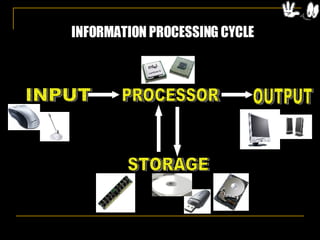
INFORMATION PROCESSING CYCLE INPUT  PROCESSOR OUTPUT STORAGE
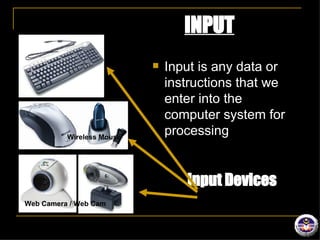
INPUT Input is any data or instructions that we enter into the computer system for processing Wireless Mouse Web Camera / Web Cam Input Devices
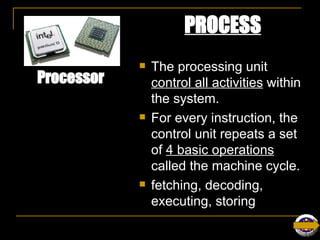
PROCESS The processing unit  control all activities  within the system.  For every instruction, the control unit repeats a set of  4 basic operations  called the machine cycle. fetching, decoding, executing, storing Web Camera / Web Cam Processor
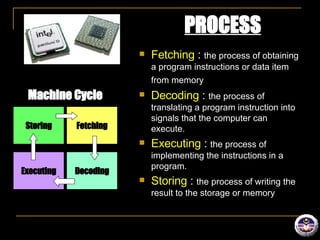
PROCESS Fetching  :  the process of obtaining a program instructions or data item from memory   Decoding  :  the process of translating a program instruction into signals that the computer can execute. Executing  :  the process of implementing the instructions in a program. Storing  :  the process of writing the result to the storage or memory Machine Cycle Storing Fetching Decoding Executing
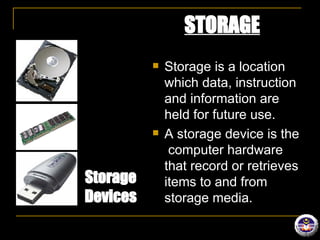
STORAGE Storage is a location which data, instruction and information are held for future use. A storage device is the  computer hardware that record or retrieves items to and from storage media. Web Camera / Web Cam Storage Devices
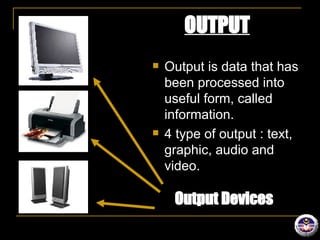
OUTPUT Output is data that has been processed into useful form, called information. 4 type of output : text, graphic, audio and video. Web Camera / Web Cam Output Devices
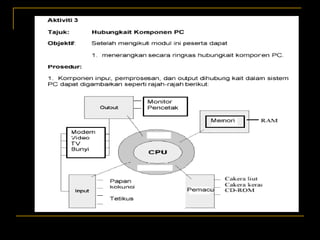
CPU – Central Processing Unit Control all activities within the system. 2 main part:  Control unit Arithmetic-logic unit (ALU)
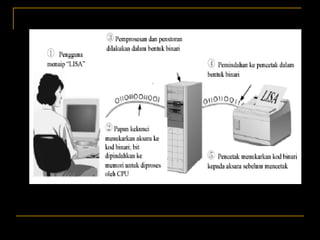
Relationship of data representation: bit, byte and character.   Relationship between component in set of computer using binary code. (number 1 and 0) example : 0010
DATA REPRESENTATION Binary Digit   Only two discrete states : ‘on’ and ‘off’ Represent by two digits, 0 and 1 Each 0 and 1 is called a  bit  in binary system ‘ on’ and ‘off’, true and false, yes and no.
DATA REPRESENTATION Bit  Smallest unit of data that the computer can process. Represented by the number 1 and 0 Byte Unit of information buit from bits. 1 bytes = 8 bits (example : 01000110) Character One byte represents one character such as A, 7, 9 and +.  Example : capital letter F is represented by binary code 01000110 that can be understood by the computer system. (01000110= F) A byte represents a single character in the computer.
 
 
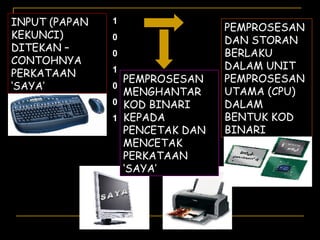
INPUT (PAPAN KEKUNCI) DITEKAN – CONTOHNYA PERKATAAN ‘SAYA’ 1 0 0 1 0 0 1 PEMPROSESAN DAN STORAN BERLAKU DALAM UNIT PEMPROSESAN UTAMA (CPU) DALAM BENTUK KOD BINARI SAYA PEMPROSESAN MENGHANTAR KOD BINARI KEPADA PENCETAK DAN MENCETAK PERKATAAN ‘SAYA’
Ok… Lets continue Our lesson for today.

L A2 Cpu

  • 1.
    INFORMATION & COMMUNICATIONTECHNOLOGY LEARNING OUTCOMES : Describe the information processing cycle which includes input, process, output and storage. COMPUTER SYSTEM Prepared by : Norhasimah Mohamed – Head of Information & Communication Technology Panel, SMK Sungai Pusu, Gombak 2007 Monday : 02072007
  • 2.
    INFORMATION PROCESSING CYCLEINPUT PROCESSOR OUTPUT STORAGE
  • 3.
    INPUT Input isany data or instructions that we enter into the computer system for processing Wireless Mouse Web Camera / Web Cam Input Devices
  • 4.
    PROCESS The processingunit control all activities within the system. For every instruction, the control unit repeats a set of 4 basic operations called the machine cycle. fetching, decoding, executing, storing Web Camera / Web Cam Processor
  • 5.
    PROCESS Fetching : the process of obtaining a program instructions or data item from memory Decoding : the process of translating a program instruction into signals that the computer can execute. Executing : the process of implementing the instructions in a program. Storing : the process of writing the result to the storage or memory Machine Cycle Storing Fetching Decoding Executing
  • 6.
    STORAGE Storage isa location which data, instruction and information are held for future use. A storage device is the computer hardware that record or retrieves items to and from storage media. Web Camera / Web Cam Storage Devices
  • 7.
    OUTPUT Output isdata that has been processed into useful form, called information. 4 type of output : text, graphic, audio and video. Web Camera / Web Cam Output Devices
  • 8.
    CPU – CentralProcessing Unit Control all activities within the system. 2 main part: Control unit Arithmetic-logic unit (ALU)
  • 9.
    Relationship of datarepresentation: bit, byte and character. Relationship between component in set of computer using binary code. (number 1 and 0) example : 0010
  • 10.
    DATA REPRESENTATION BinaryDigit Only two discrete states : ‘on’ and ‘off’ Represent by two digits, 0 and 1 Each 0 and 1 is called a bit in binary system ‘ on’ and ‘off’, true and false, yes and no.
  • 11.
    DATA REPRESENTATION Bit Smallest unit of data that the computer can process. Represented by the number 1 and 0 Byte Unit of information buit from bits. 1 bytes = 8 bits (example : 01000110) Character One byte represents one character such as A, 7, 9 and +. Example : capital letter F is represented by binary code 01000110 that can be understood by the computer system. (01000110= F) A byte represents a single character in the computer.
  • 12.
  • 13.
  • 14.
    INPUT (PAPAN KEKUNCI)DITEKAN – CONTOHNYA PERKATAAN ‘SAYA’ 1 0 0 1 0 0 1 PEMPROSESAN DAN STORAN BERLAKU DALAM UNIT PEMPROSESAN UTAMA (CPU) DALAM BENTUK KOD BINARI SAYA PEMPROSESAN MENGHANTAR KOD BINARI KEPADA PENCETAK DAN MENCETAK PERKATAAN ‘SAYA’
  • 15.
    Ok… Lets continueOur lesson for today.