WELCOME TO THE
PRESENTATION SESSION
Computer in Business
GROUP 2
CHAPTER 2
Name Id Topic
Components of computer system
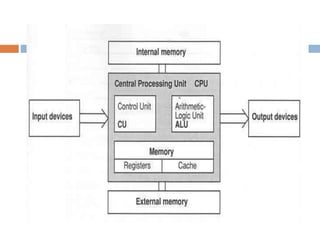
CPU-Control unit
CPU-Arithmetic logic unit
Operation perfomed by CPU
Input devices
Output devices
Memory & storage devices(RAM)
Memory&storage devices(ROM,EPROM,
Flash memory, hard disk drives)
Processing devices(micro processors)
Advantages of computer in personal life &
business
RAYHAN IBN ALI
ID -13037425
Components of computer
system
 The processor :
 Motherboard
 Bus
 Cards
 Ports
 Memory
 Hard disk drive
 Floppy disk drive
 Power supply unit
 The Memory:
 Primary memory
 Secondary memory
 Input Devices:
 Key board
 Mouse
 Floppy disk
 Scanner
 Micro-phone
 Code reader
 Output Devices
 Monitor
 V ideo display
 Printer
 Projector
 Plotter
 Disk Storage :
 Hard disk
 ROM
 Floppy disk
 Pen drive
 Compacted disk
 Programme :
 System programme
 Application programme
Id-13087430
TOPIC: CPU- CONTROL UNIT
A component of a computer's central
processing unit
Control unit
 Implementing the instruction set of the CPU.
 Performing the tasks of fetching,
 Decoding,
 Managing execution
 Storing results.
 Transferring data to ALU.
&
Finally, carry out instructions in the software and
to direct the flow of data through the computer
Functions of the control unit
NAME:MD.RUBEL HOSSEN
ROLL:13087440
COURSE NAME:COMPUTER IN
BUSINESS
COURSE NO:203
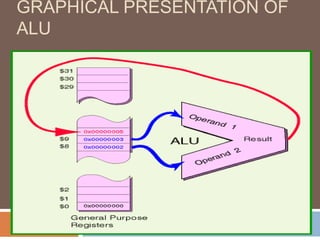
ARITHMETIC LOGIC UNIT IS THE PART
OF COMPUTER PROCESSOR(CPU)
THAT CARRIES OUT ARITHMETIC AND
LOGIC OPERATION ON THE OPERANDS
IN COMPUTER INSTRUCTION WORDS
GRAPHICAL PRESENTATION OF
ALU
10
MACHINE INSTRUCTIONS
THAT USE THE ALU
SPECIFY FOUR THINGS:
The operation to perform.
The the first operand (often in a register).
The second operand (often in a register).
The register that receives the result.
Md.Mukter Hossain
ID. No-13047447
Dept. of Marketing
University of Rajshahi
TOPIC
Operation perform by CPU / Function
of CPU
CPU
 The CPU is said to be the brains of any computer system.
It provides all the timing and control signals necessary to
transfer data from one point to another in the system
 .
 the transfer of data between itself and the memory section
 manipulation of data in the memory section or stored
internally
 the transfer of data between itself and input/output devices
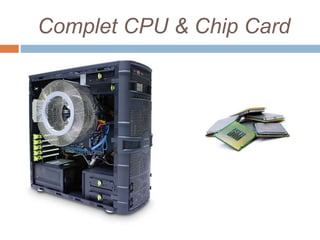
Complet CPU & Chip Card
Functional unit of CPU
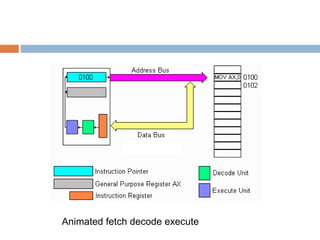
CPU has to implement 4 basic
functions during instruction cycle
1. fetch
2. decode
3. execute
4. store
Operation perform by CPU
CPU function
Fetch Cycle
Decode Cycle
Execute Cycle
Fetch/Decode/Execute/Store
Animated fetch decode execute
Sabbir Hossain
I.D No: 13087455
B.B.A 2nd Year 1st Semester
Department Of Marketing
University Of Rajshahi
Topic
 Input Devices
WHAT IS INPUT?
 Any data or instruction entered into the computer is known
as INPUT.
 An input device helps you to communicate with the
computer.
 To enter information and issue commands, you use input
devices.
 Examples of input devices:
 Keyboard
 Mouse
 Scanner
 Microphone
 Digital Camera and Web Camera
 Joystick
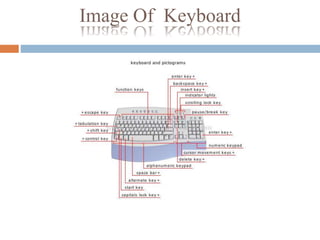
Keyboard
 The keyboard is the most common and widely used input device.
 It is made up of buttons called 'keys'. The keys are arranged into
sections:
• Alphabet keys
• Function or F keys (F1, F2, F3)
• Numeric keys (one set above the alphabet keys and
a numeric keypad on the right)
• Arrow keys
•Command keys (insert, delete, home, end, page up/down)
Image Of Keyboard
Mouse
 A mouse is an input devices that fits
comfortably under the palm of your hand.
 A mouse is a pointing device.
 We use mouse to control the movement of
the mouse pointer on the screen and to
make selections from the screen.
 The bottom of a mouse is flat and contains a
mechanism that detects the movement of a
mouse.
Types Of Mouse
 Optical mouse
 Mouse in which the ball is replaced by an optical system
(light-emitting diode and sensor); it has no movable parts.
 Wheel mouse
 Mechanical or optical mouse that contains a scroll wheel.
 Cordless mouse
 Mechanical or optical mouse connected to the computer by
infrared or radio signals.
Image of Mouse
Scanner
 A scanner is a light-sensing input device that
reads printed text and graphics and then
translates the results into a form the
computer can use.
 The image or text can be saved or changed
on the computer.
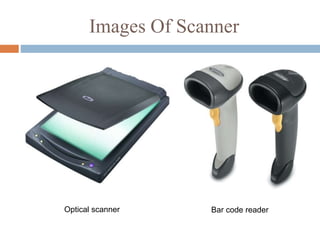
Types Of Scanner
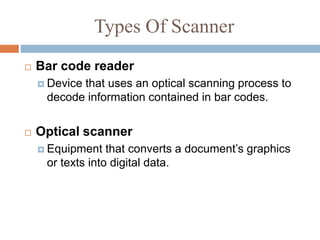
 Bar code reader
 Device that uses an optical scanning process to
decode information contained in bar codes.
 Optical scanner
 Equipment that converts a document’s graphics
or texts into digital data.
Images Of Scanner
Optical scanner Bar code reader
Microphone
 Microphone
 Device that converts electric pulses into broadcast
or recorded sounds.
 A microphone allows you to record your voice
to the computer.
 It also lets you speak to other people using
computers or even on the telephone.
 A microphone is also called a mic.
Picture Of A microphone
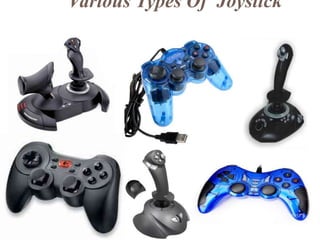
Joystick
 A joystick is a pointing device that works on the principle of trackball
 To make the movement of the spherical ball easier, it is placed in a
socket with a stick mounted on it
 On most joysticks, a button on the top is provided to select the
option currently pointed to by the cursor
 Commonly used for controlling player movements in video or
computer games
Various Types Of Joystick
Digital Camera, camcodor
And Web Camera
 Web camera
 Miniature digital camera used to transmit video images
in real time or for videoconferencing over the Internet.
 Digital camcorder
 Portable video camera in which the recording tape is
replaced by a processor, which records and stores
sounds and images in digital format.
 Digital camera
 Camera that contains a sensor and a microprocessor
rather than film; it records and stores images in digital
form, which can then be viewed on a screen.
Picture Of Digital Camera, Camcodor And
Web Camera
NAME :MD. SAIFUL ISLAM
ID: 13067472
 An output device is any piece of computer
hardware equipment used to communicate the
results of data processing carried out by an
information processing system (such as a
computer) to the outside world.
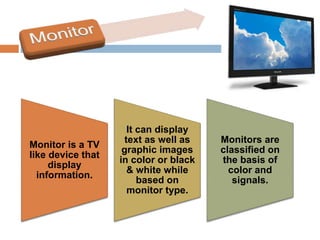
Monitor is a TV
like device that
display
information.
It can display
text as well as
graphic images
in color or black
& white while
based on
monitor type.
Monitors are
classified on
the basis of
color and
signals.
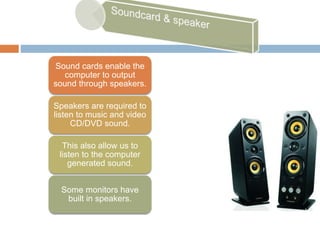
Sound cards enable the
computer to output
sound through speakers.
Speakers are required to
listen to music and video
CD/DVD sound.
This also allow us to
listen to the computer
generated sound.
Some monitors have
built in speakers.
Headphones give
sound output from the
computer.
They are similar to
speakers, except they are
worn on the ears so only
one person can hear the
output at a time.
Printer
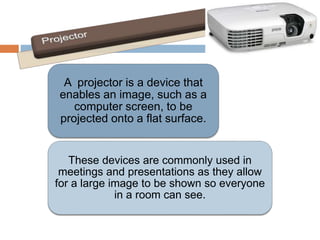
A projector is a device that
enables an image, such as a
computer screen, to be
projected onto a flat surface.
These devices are commonly used in
meetings and presentations as they allow
for a large image to be shown so everyone
in a room can see.
 This is Zubayear Hosen
 ID No is 13107489
Definition of RAM….
 RAM stands for Random Access Memory . It is
the middleman of CPU and Hard drives . It
makes a relationship between CPU and hard
drives.
 In other words, RAM is the part of computer
memory that is used while computer is doing
something. It is the short term memory and it’s
data storage capacity is volatile because when
the electricity is cut off ,then the storage in this
memory will be gone.
R
A
M
Function of RAM…
 01. It helps to increase the speed of CPU ,so the
higher RAM is the higher speed of computer is.
 02. It is the temporary memory computer uses to
store anything temporarily.
 03. It acts as the intermediary between the hard
drive and CPU.
 04. The data incoming and leaving the CPU passes
through the RAM easily
 05. It holds all currently running information of
computer.
 06. To run the application , firstly, it is loaded here
and then it works.
Types of RAM..
 There are mainly two types of RAM.
01.SRAM
02.DRAM
(SRAM) Static RAM is consisted of flip-flop which contains
binary bits(0,1). In this RAM the data which is stored is
contained as far as the electricity is provided ,other it will be
vanished.
Features:
01.High speed
02. Costly
03.Does not require any refreshment.
04.Use for cache
DRAM..
 Dynamic RAM is a RAM where binary bits(0,1)
are contained in capacitor as electronic charge.
In DRAM chip ,capacitor is created by MOS
transistor .
 There are two types of DRAM.
01.SDRAM(synchronous dynamic
RAM)
02.ADRAM(Asynchronous dynamic
RAM)
Features:
01.Relatively low speed.
02.Low cost.
03. Requires refreshing periodically.
MD. RASEL ISLAM
Roll-13107497
Topics:
 Rom
 Types of Rom
 Flash Memory
 Hard Disk
Rom(Read only memory):
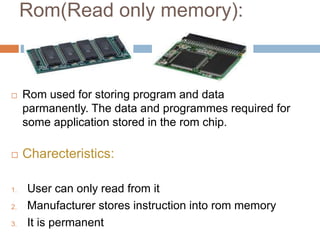
 Rom used for storing program and data
parmanently. The data and programmes required for
some application stored in the rom chip.
 Charecteristics:
1. User can only read from it
2. Manufacturer stores instruction into rom memory
3. It is permanent
Types of Rom:
 PROM(programmable read only memory)
 EPROM(Erasable programmable read only
memory)
 EEPROM(Electronically Erasable and
programmable read only memory)
Flash Memory:
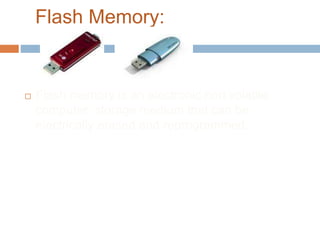
 Flash memory is an electronic non volatile
computer storage medium that can be
electrically erased and reprogrammed.
Hard Disk:
 Hard disk drives is the main and usually largest
data storage device in a computer.The operating
software tytle and most other files are stored in
hard disk drive
WELCOME TO
PRESENTATION
ON
Computer in Business
Soumen Chakrabarti
Class i.d 13117504
What is microprocessor?
A microprocessor incorporates in function of a computers central
processing unit [cpu] on a single integrated circuit [ic]. Microprocessor is
a multipurpose programmable device that accepts digital data as input,
process it according to instruction stored in its memory and provides
results as output. It is an example of sequential digital logic.
History of microprocessor:
At this modern age we get computers at lower cost. General purposes of
microprocessor in personal computers are used for computation, tax editing,
multimedia display etc. Intel 4004 is the first commercial microprocessor. It
introduced in the market in November 1971. It is very important invention of
the 20th century
Structure of microprocessor:
The microprocessor is also known as the central processing unit[cpu]. IT is the
brain of the computers.
Work of microprocessor:
Now the computer I use to read this page using a microprocessor to this
work. The microprocessor is the heart of any normal computer whether it is
desktop machine, a server or a laptop. A microprocessor is a computer
processor on a micro chip. The work of microprocessor is given below:
1. For computation
2. Tax editing
3. Communication through internet.
4. Multimedia display.
MD. JUEL RANA
Id : 13067508
Advantage of computer in our
business life
 Organization
 Self-Sufficiency
 Speed
 Sales
 Accounting & Finance
 Communication
 Documents/ Presentation
 Research

Components of computer system and input-output devices and storage devices

  • 1.
    WELCOME TO THE PRESENTATIONSESSION Computer in Business
  • 2.
  • 3.
    Name Id Topic Componentsof computer system CPU-Control unit CPU-Arithmetic logic unit Operation perfomed by CPU Input devices Output devices Memory & storage devices(RAM) Memory&storage devices(ROM,EPROM, Flash memory, hard disk drives) Processing devices(micro processors) Advantages of computer in personal life & business
  • 4.
  • 5.
    Components of computer system The processor :  Motherboard  Bus  Cards  Ports  Memory  Hard disk drive  Floppy disk drive  Power supply unit
  • 6.
     The Memory: Primary memory  Secondary memory  Input Devices:  Key board  Mouse  Floppy disk  Scanner  Micro-phone  Code reader  Output Devices  Monitor  V ideo display  Printer  Projector  Plotter
  • 7.
     Disk Storage:  Hard disk  ROM  Floppy disk  Pen drive  Compacted disk  Programme :  System programme  Application programme
  • 8.
  • 9.
  • 10.
    A component ofa computer's central processing unit Control unit
  • 12.
     Implementing theinstruction set of the CPU.  Performing the tasks of fetching,  Decoding,  Managing execution  Storing results.  Transferring data to ALU. & Finally, carry out instructions in the software and to direct the flow of data through the computer Functions of the control unit
  • 13.
  • 14.
    ARITHMETIC LOGIC UNITIS THE PART OF COMPUTER PROCESSOR(CPU) THAT CARRIES OUT ARITHMETIC AND LOGIC OPERATION ON THE OPERANDS IN COMPUTER INSTRUCTION WORDS
  • 15.
  • 16.
  • 17.
    MACHINE INSTRUCTIONS THAT USETHE ALU SPECIFY FOUR THINGS: The operation to perform. The the first operand (often in a register). The second operand (often in a register). The register that receives the result.
  • 18.
    Md.Mukter Hossain ID. No-13047447 Dept.of Marketing University of Rajshahi
  • 19.
    TOPIC Operation perform byCPU / Function of CPU
  • 20.
    CPU  The CPUis said to be the brains of any computer system. It provides all the timing and control signals necessary to transfer data from one point to another in the system  .  the transfer of data between itself and the memory section  manipulation of data in the memory section or stored internally  the transfer of data between itself and input/output devices
  • 21.
    Complet CPU &Chip Card
  • 22.
  • 24.
    CPU has toimplement 4 basic functions during instruction cycle 1. fetch 2. decode 3. execute 4. store Operation perform by CPU
  • 25.
  • 26.
  • 27.
  • 28.
  • 29.
  • 30.
    Sabbir Hossain I.D No:13087455 B.B.A 2nd Year 1st Semester Department Of Marketing University Of Rajshahi
  • 31.
  • 32.
    WHAT IS INPUT? Any data or instruction entered into the computer is known as INPUT.  An input device helps you to communicate with the computer.  To enter information and issue commands, you use input devices.  Examples of input devices:  Keyboard  Mouse  Scanner  Microphone  Digital Camera and Web Camera  Joystick
  • 33.
    Keyboard  The keyboardis the most common and widely used input device.  It is made up of buttons called 'keys'. The keys are arranged into sections: • Alphabet keys • Function or F keys (F1, F2, F3) • Numeric keys (one set above the alphabet keys and a numeric keypad on the right) • Arrow keys •Command keys (insert, delete, home, end, page up/down)
  • 34.
  • 35.
    Mouse  A mouseis an input devices that fits comfortably under the palm of your hand.  A mouse is a pointing device.  We use mouse to control the movement of the mouse pointer on the screen and to make selections from the screen.  The bottom of a mouse is flat and contains a mechanism that detects the movement of a mouse.
  • 36.
    Types Of Mouse Optical mouse  Mouse in which the ball is replaced by an optical system (light-emitting diode and sensor); it has no movable parts.  Wheel mouse  Mechanical or optical mouse that contains a scroll wheel.  Cordless mouse  Mechanical or optical mouse connected to the computer by infrared or radio signals.
  • 37.
  • 38.
    Scanner  A scanneris a light-sensing input device that reads printed text and graphics and then translates the results into a form the computer can use.  The image or text can be saved or changed on the computer.
  • 39.
    Types Of Scanner Bar code reader  Device that uses an optical scanning process to decode information contained in bar codes.  Optical scanner  Equipment that converts a document’s graphics or texts into digital data.
  • 40.
    Images Of Scanner Opticalscanner Bar code reader
  • 41.
    Microphone  Microphone  Devicethat converts electric pulses into broadcast or recorded sounds.  A microphone allows you to record your voice to the computer.  It also lets you speak to other people using computers or even on the telephone.  A microphone is also called a mic.
  • 42.
    Picture Of Amicrophone
  • 43.
    Joystick  A joystickis a pointing device that works on the principle of trackball  To make the movement of the spherical ball easier, it is placed in a socket with a stick mounted on it  On most joysticks, a button on the top is provided to select the option currently pointed to by the cursor  Commonly used for controlling player movements in video or computer games
  • 44.
  • 45.
    Digital Camera, camcodor AndWeb Camera  Web camera  Miniature digital camera used to transmit video images in real time or for videoconferencing over the Internet.  Digital camcorder  Portable video camera in which the recording tape is replaced by a processor, which records and stores sounds and images in digital format.  Digital camera  Camera that contains a sensor and a microprocessor rather than film; it records and stores images in digital form, which can then be viewed on a screen.
  • 46.
    Picture Of DigitalCamera, Camcodor And Web Camera
  • 47.
    NAME :MD. SAIFULISLAM ID: 13067472
  • 48.
     An outputdevice is any piece of computer hardware equipment used to communicate the results of data processing carried out by an information processing system (such as a computer) to the outside world.
  • 50.
    Monitor is aTV like device that display information. It can display text as well as graphic images in color or black & white while based on monitor type. Monitors are classified on the basis of color and signals.
  • 51.
    Sound cards enablethe computer to output sound through speakers. Speakers are required to listen to music and video CD/DVD sound. This also allow us to listen to the computer generated sound. Some monitors have built in speakers.
  • 52.
    Headphones give sound outputfrom the computer. They are similar to speakers, except they are worn on the ears so only one person can hear the output at a time.
  • 53.
  • 55.
    A projector isa device that enables an image, such as a computer screen, to be projected onto a flat surface. These devices are commonly used in meetings and presentations as they allow for a large image to be shown so everyone in a room can see.
  • 57.
     This isZubayear Hosen  ID No is 13107489
  • 58.
    Definition of RAM…. RAM stands for Random Access Memory . It is the middleman of CPU and Hard drives . It makes a relationship between CPU and hard drives.  In other words, RAM is the part of computer memory that is used while computer is doing something. It is the short term memory and it’s data storage capacity is volatile because when the electricity is cut off ,then the storage in this memory will be gone. R A M
  • 59.
    Function of RAM… 01. It helps to increase the speed of CPU ,so the higher RAM is the higher speed of computer is.  02. It is the temporary memory computer uses to store anything temporarily.  03. It acts as the intermediary between the hard drive and CPU.  04. The data incoming and leaving the CPU passes through the RAM easily  05. It holds all currently running information of computer.  06. To run the application , firstly, it is loaded here and then it works.
  • 60.
    Types of RAM.. There are mainly two types of RAM. 01.SRAM 02.DRAM (SRAM) Static RAM is consisted of flip-flop which contains binary bits(0,1). In this RAM the data which is stored is contained as far as the electricity is provided ,other it will be vanished. Features: 01.High speed 02. Costly 03.Does not require any refreshment. 04.Use for cache
  • 61.
    DRAM..  Dynamic RAMis a RAM where binary bits(0,1) are contained in capacitor as electronic charge. In DRAM chip ,capacitor is created by MOS transistor .  There are two types of DRAM. 01.SDRAM(synchronous dynamic RAM) 02.ADRAM(Asynchronous dynamic RAM) Features: 01.Relatively low speed. 02.Low cost. 03. Requires refreshing periodically.
  • 62.
  • 63.
    Topics:  Rom  Typesof Rom  Flash Memory  Hard Disk
  • 64.
    Rom(Read only memory): Rom used for storing program and data parmanently. The data and programmes required for some application stored in the rom chip.  Charecteristics: 1. User can only read from it 2. Manufacturer stores instruction into rom memory 3. It is permanent
  • 65.
    Types of Rom: PROM(programmable read only memory)  EPROM(Erasable programmable read only memory)  EEPROM(Electronically Erasable and programmable read only memory)
  • 66.
    Flash Memory:  Flashmemory is an electronic non volatile computer storage medium that can be electrically erased and reprogrammed.
  • 67.
    Hard Disk:  Harddisk drives is the main and usually largest data storage device in a computer.The operating software tytle and most other files are stored in hard disk drive
  • 68.
    WELCOME TO PRESENTATION ON Computer inBusiness Soumen Chakrabarti Class i.d 13117504
  • 69.
    What is microprocessor? Amicroprocessor incorporates in function of a computers central processing unit [cpu] on a single integrated circuit [ic]. Microprocessor is a multipurpose programmable device that accepts digital data as input, process it according to instruction stored in its memory and provides results as output. It is an example of sequential digital logic.
  • 70.
    History of microprocessor: Atthis modern age we get computers at lower cost. General purposes of microprocessor in personal computers are used for computation, tax editing, multimedia display etc. Intel 4004 is the first commercial microprocessor. It introduced in the market in November 1971. It is very important invention of the 20th century
  • 71.
    Structure of microprocessor: Themicroprocessor is also known as the central processing unit[cpu]. IT is the brain of the computers.
  • 72.
    Work of microprocessor: Nowthe computer I use to read this page using a microprocessor to this work. The microprocessor is the heart of any normal computer whether it is desktop machine, a server or a laptop. A microprocessor is a computer processor on a micro chip. The work of microprocessor is given below: 1. For computation 2. Tax editing 3. Communication through internet. 4. Multimedia display.
  • 73.
    MD. JUEL RANA Id: 13067508
  • 74.
    Advantage of computerin our business life  Organization  Self-Sufficiency  Speed  Sales  Accounting & Finance  Communication  Documents/ Presentation  Research