Pre-Production
Imogen Minto
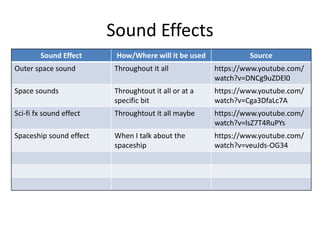
Sound Effects
Sound Effect How/Where will it be used Source
Outer space sound Throughout it all https://www.youtube.com/
watch?v=DNCg9uZDEl0
Space sounds Throughtout it all or at a
specific bit
https://www.youtube.com/
watch?v=Cga3DfaLc7A
Sci-fi fx sound effect Throughtout it all maybe https://www.youtube.com/
watch?v=lsZ7T4RuPYs
Spaceship sound effect When I talk about the
spaceship
https://www.youtube.com/
watch?v=veuJds-OG34
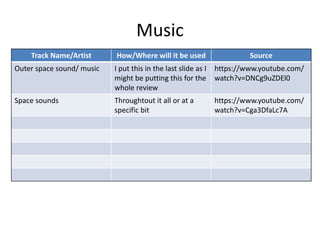
Music
Track Name/Artist How/Where will it be used Source
Outer space sound/ music I put this in the last slide as I
might be putting this for the
whole review
https://www.youtube.com/
watch?v=DNCg9uZDEl0
Space sounds Throughtout it all or at a
specific bit
https://www.youtube.com/
watch?v=Cga3DfaLc7A
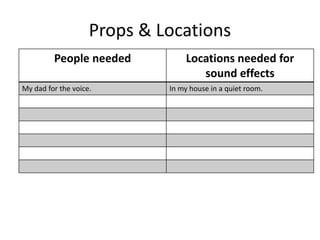
Props & Locations
People needed Locations needed for
sound effects
My dad for the voice. In my house in a quiet room.
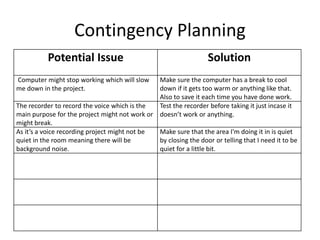
Contingency Planning
Potential Issue Solution
Computer might stop working which will slow
me down in the project.
Make sure the computer has a break to cool
down if it gets too warm or anything like that.
Also to save it each time you have done work.
The recorder to record the voice which is the
main purpose for the project might not work or
might break.
Test the recorder before taking it just incase it
doesn’t work or anything.
As it’s a voice recording project might not be
quiet in the room meaning there will be
background noise.
Make sure that the area I'm doing it in is quiet
by closing the door or telling that I need it to be
quiet for a little bit.
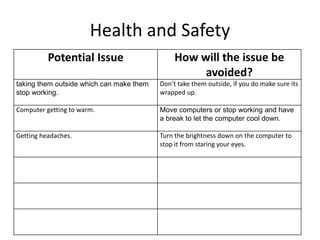
Health and Safety
Potential Issue How will the issue be
avoided?
taking them outside which can make them
stop working.
Don’t take them outside, if you do make sure its
wrapped up.
Computer getting to warm. Move computers or stop working and have
a break to let the computer cool down.
Getting headaches. Turn the brightness down on the computer to
stop it from staring your eyes.
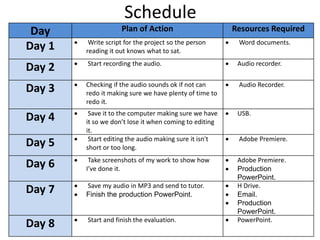
Schedule
Day Plan of Action Resources Required
Day 1  Write script for the project so the person
reading it out knows what to sat.
 Word documents.
Day 2  Start recording the audio.  Audio recorder.
Day 3  Checking if the audio sounds ok if not can
redo it making sure we have plenty of time to
redo it.
 Audio Recorder.
Day 4  Save it to the computer making sure we have
it so we don’t lose it when coming to editing
it.
 USB.
Day 5  Start editing the audio making sure it isn't
short or too long.
 Adobe Premiere.
Day 6  Take screenshots of my work to show how
I’ve done it.
 Adobe Premiere.
 Production
PowerPoint.
Day 7  Save my audio in MP3 and send to tutor.
 Finish the production PowerPoint.
 H Drive.
 Email.
 Production
PowerPoint.
Day 8  Start and finish the evaluation.  PowerPoint.

Pre Production

  • 1.
  • 2.
    Sound Effects Sound EffectHow/Where will it be used Source Outer space sound Throughout it all https://www.youtube.com/ watch?v=DNCg9uZDEl0 Space sounds Throughtout it all or at a specific bit https://www.youtube.com/ watch?v=Cga3DfaLc7A Sci-fi fx sound effect Throughtout it all maybe https://www.youtube.com/ watch?v=lsZ7T4RuPYs Spaceship sound effect When I talk about the spaceship https://www.youtube.com/ watch?v=veuJds-OG34
  • 3.
    Music Track Name/Artist How/Wherewill it be used Source Outer space sound/ music I put this in the last slide as I might be putting this for the whole review https://www.youtube.com/ watch?v=DNCg9uZDEl0 Space sounds Throughtout it all or at a specific bit https://www.youtube.com/ watch?v=Cga3DfaLc7A
  • 4.
    Props & Locations Peopleneeded Locations needed for sound effects My dad for the voice. In my house in a quiet room.
  • 5.
    Contingency Planning Potential IssueSolution Computer might stop working which will slow me down in the project. Make sure the computer has a break to cool down if it gets too warm or anything like that. Also to save it each time you have done work. The recorder to record the voice which is the main purpose for the project might not work or might break. Test the recorder before taking it just incase it doesn’t work or anything. As it’s a voice recording project might not be quiet in the room meaning there will be background noise. Make sure that the area I'm doing it in is quiet by closing the door or telling that I need it to be quiet for a little bit.
  • 6.
    Health and Safety PotentialIssue How will the issue be avoided? taking them outside which can make them stop working. Don’t take them outside, if you do make sure its wrapped up. Computer getting to warm. Move computers or stop working and have a break to let the computer cool down. Getting headaches. Turn the brightness down on the computer to stop it from staring your eyes.
  • 7.
    Schedule Day Plan ofAction Resources Required Day 1  Write script for the project so the person reading it out knows what to sat.  Word documents. Day 2  Start recording the audio.  Audio recorder. Day 3  Checking if the audio sounds ok if not can redo it making sure we have plenty of time to redo it.  Audio Recorder. Day 4  Save it to the computer making sure we have it so we don’t lose it when coming to editing it.  USB. Day 5  Start editing the audio making sure it isn't short or too long.  Adobe Premiere. Day 6  Take screenshots of my work to show how I’ve done it.  Adobe Premiere.  Production PowerPoint. Day 7  Save my audio in MP3 and send to tutor.  Finish the production PowerPoint.  H Drive.  Email.  Production PowerPoint. Day 8  Start and finish the evaluation.  PowerPoint.