Pre-Production
Alexander Sullivan-Cree
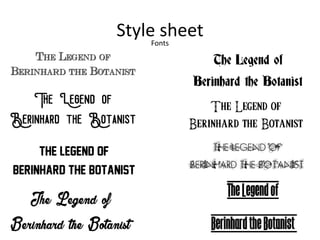
Style sheetFonts
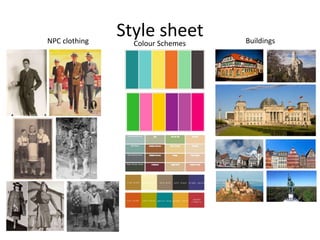
Style sheetNPC clothing Colour Schemes Buildings
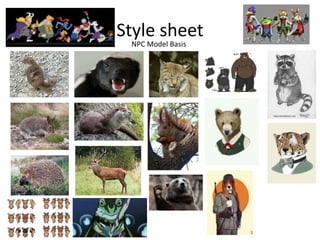
Style sheet
NPC Model Basis
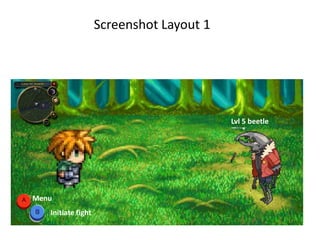
Screenshot Layout 1
Lvl 5 beetle
Initiate fight
Menu
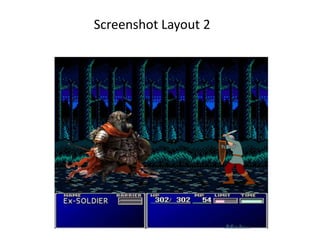
Screenshot Layout 2
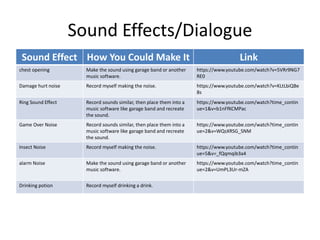
Sound Effects/Dialogue
Sound Effect How You Could Make It Link
chest opening Make the sound using garage band or another
music software.
https://www.youtube.com/watch?v=5VRr9NG7
RE0
Damage hurt noise Record myself making the noise. https://www.youtube.com/watch?v=KLtLbiQBe
8s
Ring Sound Effect Record sounds similar, then place them into a
music software like garage band and recreate
the sound.
https://www.youtube.com/watch?time_contin
ue=1&v=b1nFfKCMPac
Game Over Noise Record sounds similar, then place them into a
music software like garage band and recreate
the sound.
https://www.youtube.com/watch?time_contin
ue=2&v=WQsXRSG_SNM
Insect Noise Record myself making the noise. https://www.youtube.com/watch?time_contin
ue=5&v=_fQqmqib3a4
alarm Noise Make the sound using garage band or another
music software.
https://www.youtube.com/watch?time_contin
ue=2&v=UmPL3Ur-mZA
Drinking potion Record myself drinking a drink.
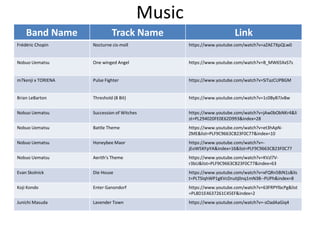
Music
Band Name Track Name Link
Frédéric Chopin Nocturne cis-moll https://www.youtube.com/watch?v=aZAE7XpQLw0
Nobuo Uematsu One winged Angel https://www.youtube.com/watch?v=B_MW65XxS7s
m7kenji x TORIENA Pulse Fighter https://www.youtube.com/watch?v=SiTazCUPBGM
Brian LeBarton Threshold (8 Bit) https://www.youtube.com/watch?v=1c0ByB7Jv8w
Nobuo Uematsu Succession of Witches https://www.youtube.com/watch?v=jAw0bObNKr4&li
st=PL294020FE0E62D993&index=28
Nobuo Uematsu Battle Theme https://www.youtube.com/watch?v=et3hApN-
ZME&list=PLF9C9663CB23F0C77&index=10
Nobuo Uematsu Honeybee Maor https://www.youtube.com/watch?v=-
jEoW5KFpYA&index=16&list=PLF9C9663CB23F0C77
Nobuo Uematsu Aerith's Theme https://www.youtube.com/watch?v=KVzl7V-
r3bU&list=PLF9C9663CB23F0C77&index=63
Evan Skolnick Die House https://www.youtube.com/watch?v=xFQRn5BiN1s&lis
t=PLTSIqhWP1gKVcDruitj0nq1mN3B--PUPh&index=8
Koji Kondo Enter Ganondorf https://www.youtube.com/watch?v=63FRPYlbcPg&list
=PL8D1E4637261C45EF&index=2
Junichi Masuda Lavender Town https://www.youtube.com/watch?v=-sOadAaGiq4
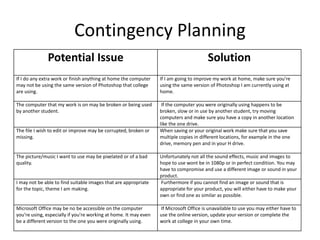
Contingency Planning
Potential Issue Solution
If I do any extra work or finish anything at home the computer
may not be using the same version of Photoshop that college
are using.
If I am going to improve my work at home, make sure you’re
using the same version of Photoshop I am currently using at
home.
The computer that my work is on may be broken or being used
by another student.
If the computer you were originally using happens to be
broken, slow or in use by another student, try moving
computers and make sure you have a copy in another location
like the one drive.
The file I wish to edit or improve may be corrupted, broken or
missing.
When saving or your original work make sure that you save
multiple copies in different locations, for example in the one
drive, memory pen and in your H drive.
The picture/music I want to use may be pixelated or of a bad
quality.
Unfortunately not all the sound effects, music and images to
hope to use wont be in 1080p or in perfect condition. You may
have to compromise and use a different image or sound in your
product.
I may not be able to find suitable images that are appropriate
for the topic, theme I am making.
Furthermore if you cannot find an image or sound that is
appropriate for your product, you will either have to make your
own or find one as similar as possible.
Microsoft Office may be no be accessible on the computer
you’re using, especially if you’re working at home. It may even
be a different version to the one you were originally using.
If Microsoft Office is unavailable to use you may either have to
use the online version, update your version or complete the
work at college in your own time.
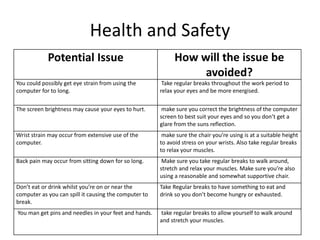
Health and Safety
Potential Issue How will the issue be
avoided?
You could possibly get eye strain from using the
computer for to long.
Take regular breaks throughout the work period to
relax your eyes and be more energised.
The screen brightness may cause your eyes to hurt. make sure you correct the brightness of the computer
screen to best suit your eyes and so you don’t get a
glare from the suns reflection.
Wrist strain may occur from extensive use of the
computer.
make sure the chair you’re using is at a suitable height
to avoid stress on your wrists. Also take regular breaks
to relax your muscles.
Back pain may occur from sitting down for so long. Make sure you take regular breaks to walk around,
stretch and relax your muscles. Make sure you’re also
using a reasonable and somewhat supportive chair.
Don’t eat or drink whilst you’re on or near the
computer as you can spill it causing the computer to
break.
Take Regular breaks to have something to eat and
drink so you don’t become hungry or exhausted.
You man get pins and needles in your feet and hands. take regular breaks to allow yourself to walk around
and stretch your muscles.

Pre Production

  • 1.
  • 2.
  • 3.
    Style sheetNPC clothingColour Schemes Buildings
  • 4.
  • 5.
    Screenshot Layout 1 Lvl5 beetle Initiate fight Menu
  • 6.
  • 7.
    Sound Effects/Dialogue Sound EffectHow You Could Make It Link chest opening Make the sound using garage band or another music software. https://www.youtube.com/watch?v=5VRr9NG7 RE0 Damage hurt noise Record myself making the noise. https://www.youtube.com/watch?v=KLtLbiQBe 8s Ring Sound Effect Record sounds similar, then place them into a music software like garage band and recreate the sound. https://www.youtube.com/watch?time_contin ue=1&v=b1nFfKCMPac Game Over Noise Record sounds similar, then place them into a music software like garage band and recreate the sound. https://www.youtube.com/watch?time_contin ue=2&v=WQsXRSG_SNM Insect Noise Record myself making the noise. https://www.youtube.com/watch?time_contin ue=5&v=_fQqmqib3a4 alarm Noise Make the sound using garage band or another music software. https://www.youtube.com/watch?time_contin ue=2&v=UmPL3Ur-mZA Drinking potion Record myself drinking a drink.
  • 8.
    Music Band Name TrackName Link Frédéric Chopin Nocturne cis-moll https://www.youtube.com/watch?v=aZAE7XpQLw0 Nobuo Uematsu One winged Angel https://www.youtube.com/watch?v=B_MW65XxS7s m7kenji x TORIENA Pulse Fighter https://www.youtube.com/watch?v=SiTazCUPBGM Brian LeBarton Threshold (8 Bit) https://www.youtube.com/watch?v=1c0ByB7Jv8w Nobuo Uematsu Succession of Witches https://www.youtube.com/watch?v=jAw0bObNKr4&li st=PL294020FE0E62D993&index=28 Nobuo Uematsu Battle Theme https://www.youtube.com/watch?v=et3hApN- ZME&list=PLF9C9663CB23F0C77&index=10 Nobuo Uematsu Honeybee Maor https://www.youtube.com/watch?v=- jEoW5KFpYA&index=16&list=PLF9C9663CB23F0C77 Nobuo Uematsu Aerith's Theme https://www.youtube.com/watch?v=KVzl7V- r3bU&list=PLF9C9663CB23F0C77&index=63 Evan Skolnick Die House https://www.youtube.com/watch?v=xFQRn5BiN1s&lis t=PLTSIqhWP1gKVcDruitj0nq1mN3B--PUPh&index=8 Koji Kondo Enter Ganondorf https://www.youtube.com/watch?v=63FRPYlbcPg&list =PL8D1E4637261C45EF&index=2 Junichi Masuda Lavender Town https://www.youtube.com/watch?v=-sOadAaGiq4
  • 9.
    Contingency Planning Potential IssueSolution If I do any extra work or finish anything at home the computer may not be using the same version of Photoshop that college are using. If I am going to improve my work at home, make sure you’re using the same version of Photoshop I am currently using at home. The computer that my work is on may be broken or being used by another student. If the computer you were originally using happens to be broken, slow or in use by another student, try moving computers and make sure you have a copy in another location like the one drive. The file I wish to edit or improve may be corrupted, broken or missing. When saving or your original work make sure that you save multiple copies in different locations, for example in the one drive, memory pen and in your H drive. The picture/music I want to use may be pixelated or of a bad quality. Unfortunately not all the sound effects, music and images to hope to use wont be in 1080p or in perfect condition. You may have to compromise and use a different image or sound in your product. I may not be able to find suitable images that are appropriate for the topic, theme I am making. Furthermore if you cannot find an image or sound that is appropriate for your product, you will either have to make your own or find one as similar as possible. Microsoft Office may be no be accessible on the computer you’re using, especially if you’re working at home. It may even be a different version to the one you were originally using. If Microsoft Office is unavailable to use you may either have to use the online version, update your version or complete the work at college in your own time.
  • 10.
    Health and Safety PotentialIssue How will the issue be avoided? You could possibly get eye strain from using the computer for to long. Take regular breaks throughout the work period to relax your eyes and be more energised. The screen brightness may cause your eyes to hurt. make sure you correct the brightness of the computer screen to best suit your eyes and so you don’t get a glare from the suns reflection. Wrist strain may occur from extensive use of the computer. make sure the chair you’re using is at a suitable height to avoid stress on your wrists. Also take regular breaks to relax your muscles. Back pain may occur from sitting down for so long. Make sure you take regular breaks to walk around, stretch and relax your muscles. Make sure you’re also using a reasonable and somewhat supportive chair. Don’t eat or drink whilst you’re on or near the computer as you can spill it causing the computer to break. Take Regular breaks to have something to eat and drink so you don’t become hungry or exhausted. You man get pins and needles in your feet and hands. take regular breaks to allow yourself to walk around and stretch your muscles.

Editor's Notes

  • #3 Explore colours and pixel art styles similar to what you want to produce. Discuss these elements in relation to why you chose them and where you may use them in your project. Go over as many pages as you need to.
  • #4 Explore colours and pixel art styles similar to what you want to produce. Discuss these elements in relation to why you chose them and where you may use them in your project. Go over as many pages as you need to.
  • #5 Explore colours and pixel art styles similar to what you want to produce. Discuss these elements in relation to why you chose them and where you may use them in your project. Go over as many pages as you need to.
  • #6 Mock up of a potential design using the colours and sourced images. Alter this slide to make it appropriate for your planned product types. Use the content established in your style sheet to do this.
  • #7 Mock up of a potential design using the colours and sourced images. Alter this slide to make it appropriate for your planned product types. Use the content established in your style sheet to do this.
  • #8 What sound effects might you need for your animated screenshot? How could you make them?
  • #9 What music could you use?