Peripheral Devices
The Peripherals
• Peripherals connect to the computer input/output (I/O) ports
• They provide input or receiving its output
• They are not considered part of the computer:
– They are only specialized gadgets that encode or decode
information between the computer and the physical world
The Peripherals
The peripherals handle the physical part of the operation e.g:
 The keyboard encodes our keystrokes into binary form for the
computer
 The monitor decodes information from the computer’s memory and
displays it on a screen
A Device Driver for Every Peripheral
• Most peripheral devices are “dumb”
– They provide only basic physical translation to or from binary signals.
• Additional information from the computer is needed to make it operate
“intelligently”
A Device Driver for Every Peripheral
• Added processing by software called a device driver gives the peripheral
its standard meaning and behavior
• Every device needs a device driver
Device Drivers
 A program to tell the system software how to work with that piece of
hardware
 Some common device drivers are built in the system software (Operating
System) e.g. keyboard and mouse drives
Plug-n-Play Devices
 Devices designed such that Windows can detect them, install and
configure the device driver automatically
 For non plug-n-play devices, we have to install and configure the
device driver manually.
Types of Peripheral Devices
 Input Devices
 Output Devices
 Storage Devices
 Other Devices
– Network Devices
– Communication Devices
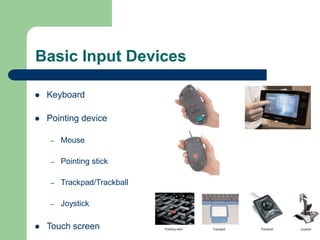
Basic Input Devices
 Keyboard
 Pointing device
– Mouse
– Pointing stick
– Trackpad/Trackball
– Joystick
 Touch screen
Input Devices (1)
 Keyboard
– P/S2 keyboard
– USB keyboard
– Wireless keyboard
Input Devices (2)
 Pointing Devices
– Mouse, trackball, touch pad,
– light pen
– Touch screen
Input Devices (3)
 Scanning devices
– Image scanner
– Fax machine – scan image to bitmap
– Bar code scanner – scan Universal Product Code (UPC)
– Magnetic ink character scanner (MICR)
– Optical character scanner (OCR)
Input Devices (4)
 Voice Input Device
– Microphone – to receive the sound signal
– Sound card – to convert the sound signal to digital form
– Use speech recognition software to recognize human speech
Input Devices (5)
 Handwriting Recognition Device
– Need handwriting recognition software
– Called natural input
– Slow inputting speed
Output Device
Output Devices (1)
 Visual Display Unit (VDU)
– Commonly called monitor
 3 common types of monitor
– CRT (Cathode Ray Tube) monitor
 High radiation and bulky
– LCD (Liquid Crystal Display) monitor
– LED (Light-Emitting Diodes
 No radiation and slim
17
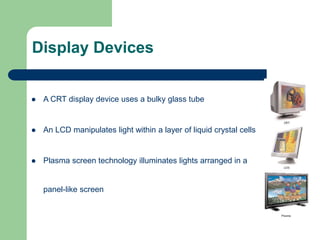
Display Devices
 A CRT display device uses a bulky glass tube
 An LCD manipulates light within a layer of liquid crystal cells
 Plasma screen technology illuminates lights arranged in a
panel-like screen
Output Devices (2)
 Printer – to produce hard copy
 Laser printer
– to produce high quality output
– resolution up to 2400 dpi (dot per inch)
– use carbon toner, usually for black and white printout, colour is very
expensive
Output Devices (3)
 Inkjet printer
– produce good quality colour output
– resolution up to 1440 dpi
– use ink droplets to compose the image
– The printer is much cheaper than laser printer but the ink is very expensive
Output Devices (4)
 Dot matrix printer
– Use impact principle
– Can print multiple (carbon) copies at a time, usually use in printing invoices
– The ink ribbon is cheap
– Poor quality of printout
Output Devices (5)
 Plotter
– Drawing high quality image, use colour pens, can draw smooth curves
– Can print on large paper size, use roll of paper
– To draw posters and maps
– Use in CAD (Computer Aided Design)
Output Device (6)
 Voice output devices
– Sound card, to convert computer signals to sound
– Speakers, to amplify the sound output
Storage Device
Portable Memory & Hard Drives
• Some peripherals are used by computers for both input and output:
– USB memory
– Hard disks/drives
• They are storage devices
• The hard disk is the alpha-peripheral, being the most tightly linked device
to the computer
Hard Disk
 Hard disk is essential
 Programs and their data must reside in the computer’s memory when
programs run
 The hard disk can be seen as an extension of the computer’s memory
 Typically it is a hundred times larger and several thousand times slower
Storage Devices (1)
 Floppy Disk (Diskette)
– A flexible plastic circular disc
– Packed in a plastic square jacket
– Formatted to 1.44MB
– Slow accessing speed
Storage Device (3)
 Optical disk
– CDROM, DVDROM, CDRW, DVDRW
– Use optical technology, laser reflection on pits
– ‘1’ will reflect the laser beam while ‘0’ does not
– High storage capacity, 700 MB for a CDROM, 17GB for a DVDROM
– High access speed
Storage Device (4)
 Tape
– Cheap
– Sequential access
– Use magnetic technology
– High storage capacity
– Slow access speed
– Group of records are stored in a block
– Inter-block gaps are needed for stopping and starting the read/write head.
Storage Device (5)
 Other Storage devices – can be read/write
 Removable disks -Zip disk(100/250MB), superdisk(120MB), Jazz
disk(1GB)
 USB (upto 32GB or even more
 Flash memory cards – compact flash, smart media and memory stick,
commonly used in digital camera
Other Peripheral Devices
 Network Devices
 Communication Devices
Network Devices (1)
 Network Interface Card (NIC) (LAN card)
– Connection between the network and the computer bus
– Have built-in transceiver, for data transmitting and receiving
– Can store in 1 GB/s
 Wireless LAN card
– Storage Capacity is in GB/s
– Work within the distance range, and no blocking in between.
Network Devices (2)
Connectors
 RJ-45 telephone jack connector
– For connecting twisted pairs LAN cable
 BNC connector
– For connecting coaxial cables
 Terminators
– Use in bus network, to prevent signal rebounce and echo at the ends of bus
Network Device (4)
 Hub
– To connect the workstations within a room on same floor
 Switch
– To connect the workstations for different floors in a building, it is faster and more
efficient than a Hub.
Network Device (5)
 Router
– To connect different LANs together to form a Wide Area Network (WAN)
 Repeater
– When a network spans a long distance, the signal weaken, repeater is used to
reproduce the signal.
Communication Device
 Modem - Modulator-demodulator
– It transforms digital signals of computer to analog signals to be transmitted through
telephone lines. (Modulation)
– It also transforms analog signals back to digital signals for the computer that
receives the signals. (Demodulation)

Peripheral Devies.ppt

  • 1.
  • 2.
    The Peripherals • Peripheralsconnect to the computer input/output (I/O) ports • They provide input or receiving its output • They are not considered part of the computer: – They are only specialized gadgets that encode or decode information between the computer and the physical world
  • 3.
    The Peripherals The peripheralshandle the physical part of the operation e.g:  The keyboard encodes our keystrokes into binary form for the computer  The monitor decodes information from the computer’s memory and displays it on a screen
  • 4.
    A Device Driverfor Every Peripheral • Most peripheral devices are “dumb” – They provide only basic physical translation to or from binary signals. • Additional information from the computer is needed to make it operate “intelligently”
  • 5.
    A Device Driverfor Every Peripheral • Added processing by software called a device driver gives the peripheral its standard meaning and behavior • Every device needs a device driver
  • 6.
    Device Drivers  Aprogram to tell the system software how to work with that piece of hardware  Some common device drivers are built in the system software (Operating System) e.g. keyboard and mouse drives
  • 7.
    Plug-n-Play Devices  Devicesdesigned such that Windows can detect them, install and configure the device driver automatically  For non plug-n-play devices, we have to install and configure the device driver manually.
  • 8.
    Types of PeripheralDevices  Input Devices  Output Devices  Storage Devices  Other Devices – Network Devices – Communication Devices
  • 9.
    Basic Input Devices Keyboard  Pointing device – Mouse – Pointing stick – Trackpad/Trackball – Joystick  Touch screen
  • 10.
    Input Devices (1) Keyboard – P/S2 keyboard – USB keyboard – Wireless keyboard
  • 11.
    Input Devices (2) Pointing Devices – Mouse, trackball, touch pad, – light pen – Touch screen
  • 12.
    Input Devices (3) Scanning devices – Image scanner – Fax machine – scan image to bitmap – Bar code scanner – scan Universal Product Code (UPC) – Magnetic ink character scanner (MICR) – Optical character scanner (OCR)
  • 13.
    Input Devices (4) Voice Input Device – Microphone – to receive the sound signal – Sound card – to convert the sound signal to digital form – Use speech recognition software to recognize human speech
  • 14.
    Input Devices (5) Handwriting Recognition Device – Need handwriting recognition software – Called natural input – Slow inputting speed
  • 15.
  • 16.
    Output Devices (1) Visual Display Unit (VDU) – Commonly called monitor  3 common types of monitor – CRT (Cathode Ray Tube) monitor  High radiation and bulky – LCD (Liquid Crystal Display) monitor – LED (Light-Emitting Diodes  No radiation and slim
  • 17.
    17 Display Devices  ACRT display device uses a bulky glass tube  An LCD manipulates light within a layer of liquid crystal cells  Plasma screen technology illuminates lights arranged in a panel-like screen
  • 18.
    Output Devices (2) Printer – to produce hard copy  Laser printer – to produce high quality output – resolution up to 2400 dpi (dot per inch) – use carbon toner, usually for black and white printout, colour is very expensive
  • 19.
    Output Devices (3) Inkjet printer – produce good quality colour output – resolution up to 1440 dpi – use ink droplets to compose the image – The printer is much cheaper than laser printer but the ink is very expensive
  • 20.
    Output Devices (4) Dot matrix printer – Use impact principle – Can print multiple (carbon) copies at a time, usually use in printing invoices – The ink ribbon is cheap – Poor quality of printout
  • 21.
    Output Devices (5) Plotter – Drawing high quality image, use colour pens, can draw smooth curves – Can print on large paper size, use roll of paper – To draw posters and maps – Use in CAD (Computer Aided Design)
  • 22.
    Output Device (6) Voice output devices – Sound card, to convert computer signals to sound – Speakers, to amplify the sound output
  • 23.
  • 24.
    Portable Memory &Hard Drives • Some peripherals are used by computers for both input and output: – USB memory – Hard disks/drives • They are storage devices • The hard disk is the alpha-peripheral, being the most tightly linked device to the computer
  • 25.
    Hard Disk  Harddisk is essential  Programs and their data must reside in the computer’s memory when programs run  The hard disk can be seen as an extension of the computer’s memory  Typically it is a hundred times larger and several thousand times slower
  • 26.
    Storage Devices (1) Floppy Disk (Diskette) – A flexible plastic circular disc – Packed in a plastic square jacket – Formatted to 1.44MB – Slow accessing speed
  • 27.
    Storage Device (3) Optical disk – CDROM, DVDROM, CDRW, DVDRW – Use optical technology, laser reflection on pits – ‘1’ will reflect the laser beam while ‘0’ does not – High storage capacity, 700 MB for a CDROM, 17GB for a DVDROM – High access speed
  • 28.
    Storage Device (4) Tape – Cheap – Sequential access – Use magnetic technology – High storage capacity – Slow access speed – Group of records are stored in a block – Inter-block gaps are needed for stopping and starting the read/write head.
  • 29.
    Storage Device (5) Other Storage devices – can be read/write  Removable disks -Zip disk(100/250MB), superdisk(120MB), Jazz disk(1GB)  USB (upto 32GB or even more  Flash memory cards – compact flash, smart media and memory stick, commonly used in digital camera
  • 30.
    Other Peripheral Devices Network Devices  Communication Devices
  • 31.
    Network Devices (1) Network Interface Card (NIC) (LAN card) – Connection between the network and the computer bus – Have built-in transceiver, for data transmitting and receiving – Can store in 1 GB/s  Wireless LAN card – Storage Capacity is in GB/s – Work within the distance range, and no blocking in between.
  • 32.
    Network Devices (2) Connectors RJ-45 telephone jack connector – For connecting twisted pairs LAN cable  BNC connector – For connecting coaxial cables  Terminators – Use in bus network, to prevent signal rebounce and echo at the ends of bus
  • 33.
    Network Device (4) Hub – To connect the workstations within a room on same floor  Switch – To connect the workstations for different floors in a building, it is faster and more efficient than a Hub.
  • 34.
    Network Device (5) Router – To connect different LANs together to form a Wide Area Network (WAN)  Repeater – When a network spans a long distance, the signal weaken, repeater is used to reproduce the signal.
  • 35.
    Communication Device  Modem- Modulator-demodulator – It transforms digital signals of computer to analog signals to be transmitted through telephone lines. (Modulation) – It also transforms analog signals back to digital signals for the computer that receives the signals. (Demodulation)