INPUT – OUTPUTDEVICES
An input device is any hardware component that
allows you to enter data and instructions onto a
computer.
An output device is any hardware component that
conveys information to one or more people.
2.
INPUT
Input is anydata entered into the computer’s memory.
Types of input include:
Data – Unorganized information (words, numbers,
images, or sounds) that the computer converts to
meaningful information
Software – Programs transferred from storage devices
to the computer’s memory
Commands – Instructions that tell the computer what
to do
7
Types of
Keyboards
Enhanced /Extended Keyboard Ergonomic Keyboard
Enhanced or Extended keyboard – Typically 101 keys laid out in
the QWERTY fashion; connected to the computer by a cable
Cordless keyboard – Uses infrared or radio wave signals
Ergonomic keyboard – Designed to help prevent cumulative
trauma disorder (CTD) or damage to nerve tissues in the wrist
and hand due to repeated motion
11
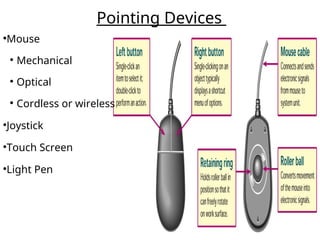
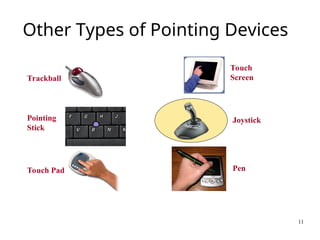
Other Types ofPointing Devices
Joystick
Touch Pad
Touch
Screen
Trackball
Pointing
Stick
Pen
11.
12
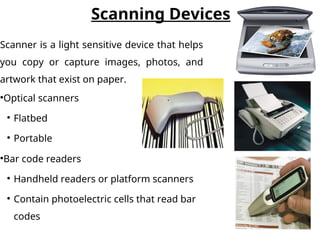
Scanning Devices
●
Optical scanners
●
Flatbed
●
Portable
●
Barcode readers
●
Handheld readers or platform scanners
●
Contain photoelectric cells that read bar
codes
Scanner is a light sensitive device that helps
you copy or capture images, photos, and
artwork that exist on paper.
12.
13
Audio Input
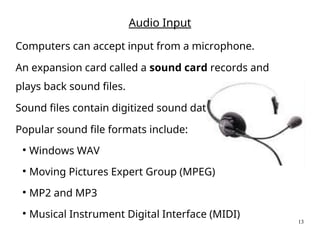
Computers canaccept input from a microphone.
An expansion card called a sound card records and
plays back sound files.
Sound files contain digitized sound data.
Popular sound file formats include:
●
Windows WAV
●
Moving Pictures Expert Group (MPEG)
●
MP2 and MP3
●
Musical Instrument Digital Interface (MIDI)
13.
14
Digital Cameras
The image’slight falls on a charge-coupled device (CCD) which
transforms the light’s patterns into pixels (individual dots).
Images are stored in the camera using flash memory. The most
popular types are CompactFlash and SmartMedia.
Photo-editing programs enable the user to edit the images.
14.
15
Digital Video
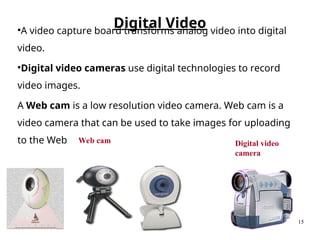
Web camDigital video
camera
●
A video capture board transforms analog video into digital
video.
●
Digital video cameras use digital technologies to record
video images.
A Web cam is a low resolution video camera. Web cam is a
video camera that can be used to take images for uploading
to the Web
15.
16
Stylus is aninput device
consisting of a thin
stick that uses
pressure to enter
information or to click
and point .
Styluses are used with:
•PDAs
•Tablet PCs
•Graphics tablets
Stylu
s
18
Output
Processed data orinformation
Types of output
●
Text
●
Graphics
●
Audio & video
Output devices are peripheral devices that enable us to
view or hear the computer’s processed data.
Visual output – Text, graphics, and video
Audio output – Sounds, music, and synthesized speech
18.
19
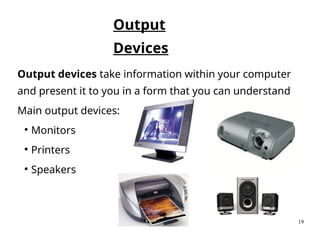
Output devices takeinformation within your computer
and present it to you in a form that you can understand
Main output devices:
●
Monitors
●
Printers
●
Speakers
Output
Devices
19.
20
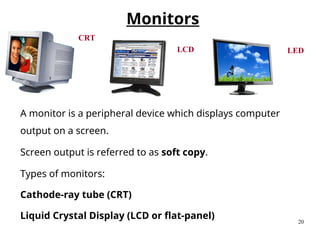
A monitor isa peripheral device which displays computer
output on a screen.
Screen output is referred to as soft copy.
Types of monitors:
Cathode-ray tube (CRT)
Liquid Crystal Display (LCD or flat-panel)
CRT
LCD
Monitors
LED
20.
21
Monitor
Specifications
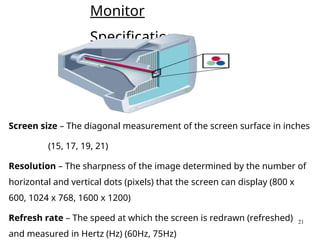
Screen size –The diagonal measurement of the screen surface in inches
(15, 17, 19, 21)
Resolution – The sharpness of the image determined by the number of
horizontal and vertical dots (pixels) that the screen can display (800 x
600, 1024 x 768, 1600 x 1200)
Refresh rate – The speed at which the screen is redrawn (refreshed)
and measured in Hertz (Hz) (60Hz, 75Hz)
24
●
Resemble televisions
●
Use picturetube technology
●
Less expensive than a LCD
monitor
●
Take up more disk space and
use more energy than LCD
monitors
Cathode-ray tube (CRT)
24.
25
Flat Panel DisplayDevices
Devices with flat-panel displays
Tablet PCs
PDAs
Cellular phones
Desktop computers
What does Flat-Panel mean?
It refers to a class of video devices
that have a:-
reduced volume,
reduced weight and
reduced power requirements
compared to a standard CRT
27
Liquid Crystal Display(LCD)
Cells sandwiched between two transparent layers form images
Used for notebook computers, PDAs, cellular phones, and personal
computers
More expensive than a CRT monitor
Take up less disk space and use less energy than CRT monitors
Types of LCD monitors:
●
Passive-matrix LCD
●
Active-matrix LCD
●
Gas plasma display
●
Field emission display
27.
28
Printers
A printer isa peripheral device that
produces a physical copy or hard
copy of the computer’s output.
Translates information that has been processed by the
system unit.
Output referred to as hard copy
Features
●
Resolution
●
Color capability
●
Speed
●
Memory
●
Ink-jet printer
●
Laser printer
●
Personal laser printers
●
Shared laser printers
●
Thermal printer
●
Other printers
●
Dot-matrix
●
Plotters
●
Photo printers
28.
29
Inkjet printer, alsocalled a
bubble-jet, makes characters by
inserting dots of ink onto paper
Letter-quality printouts
Cost of printer is inexpensive but
ink is costly
Laser printer works like a copier
Quality determined by dots per inch
(dpi) produced
Color printers available
Expensive initial costs but cheaper to
operate per page
Types of Printers
Inkjet Laser
29.
30
A plotter isa printer that uses a pen that moves over a large
revolving sheet of paper.
It is used in engineering, drafting, map making, and
seismology.
Plotter
30.
31
Audio Output: SoundCards and Speakers
Audio output is the ability of the computer to output sound.
Two components are needed:
Sound card – Plays contents of digitized recordings
Speakers – Attach to sound card
A speaker is a device that produces computer output as sound.
Speakers are common devices in computer systems Examples include:
Built-in speaker
Two-device set speakers
Surround sound speakers
Editor's Notes
#6 Features
Numeric key pad – used to enter numbers and arithmetic symbols
Toggle keys
Cap Locks
Combination keys – perform an action when used with other keys
CTRL key
#8 Direct entry creates machine-readable data that can go directly to the CPU.
Pointing devices mouse, joystick, touch screen, light pen and stylus
Mouse
Mechanical – traditional type
Optical – has no moving parts
Emits and senses light to detect mouse movement
Can be used on any surface
Cordless – battery powered
Uses radio waves or infrared light waves
Joystick – input for computer games
Touch Screen – a kind of monitor with a clear plastic outer layer
Easy to use
Commonly used at restaurants, ATMs, and information centers
Light pen – a light sensitive pen-like device
#12 Scanners move across text and images
Devices convert scanned data into a form the system unit can process
Types
Optical – known as a scanner
Recognizes light, dark, and colored areas that make up individual letters or images
Types
Flatbed
Portable
Bar Code Readers
You see these devices at the grocery store
Wand scanner or platform scanner
Reads bar codes or vertical zebra striped marks printed on product containers
Products have a UPC (Universal Product Code)
#17 Graphics tablets record sketches and tracings of maps and other drawings
Used by artist, mapmakers, and engineers
Digital notepads record handwritten notes and drawings
Similar to table PCs except that they typically use regular notepads and pens
Notepad is positioned on top of an electronic pad or tablet
Notes can later be processed, edited, and used with a word processing program
#18 Converts machine-readable information into people-readable form
Four most common output devices used with microcomputers – text, graphics, audio, and video
Monitors are commonly called display screens