Search Strategies and
Refinement Techniques in
Online Database
Dr. Irfan ul Haq
Introduction
 Due to information overload on Web a user sometimes may not be able to
retrieve the required information he is looking for.
 Therefore, good search results are not only based on the well organized
information, but also on the use of right search formulation.
 To get the required information, a proper strategy to be followed is vital aspect
to obtain the best search results.
Dr. Irfan ul Haq
 Thus Search Strategy simply combines the key concepts of your search question
in order to retrieve accurate results.
 It allow us to find materials we want amongst huge number of online resource
available.
 Search strategy is the systematic tactics to be followed in finding the relevant
information with high precision and low recall.
Introduction
Dr. Irfan ul Haq
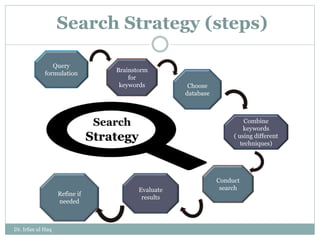
Search Strategy (steps)
Query
formulation
Brainstorm
for
keywords Choose
database
Combine
keywords
( using different
techniques)
Conduct
search
Evaluate
results
Refine if
needed
Search
Strategy
Dr. Irfan ul Haq
Query formulation
 Be clear about the topic/area.
 Write down exactly what you are interested in
Example:
Does soft drink consumption increase the risk of obesity in children?
Dr. Irfan ul Haq
Brainstorm for keyword
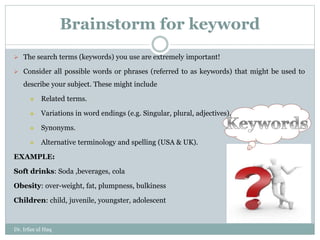
 The search terms (keywords) you use are extremely important!
 Consider all possible words or phrases (referred to as keywords) that might be used to
describe your subject. These might include
 Related terms.
 Variations in word endings (e.g. Singular, plural, adjectives).
 Synonyms.
 Alternative terminology and spelling (USA & UK).
EXAMPLE:
Soft drinks: Soda ,beverages, cola
Obesity: over-weight, fat, plumpness, bulkiness
Children: child, juvenile, youngster, adolescent
Dr. Irfan ul Haq
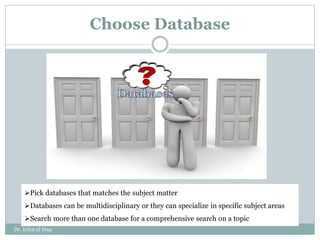
Choose Database
Pick databases that matches the subject matter
Databases can be multidisciplinary or they can specialize in specific subject areas
Search more than one database for a comprehensive search on a topic
Dr. Irfan ul Haq
Combine Keywords
In order to retrieve relevant information you need to be able to link
concepts/keywords together . Following are some of the techniques through which
we could combine keywords for retrieving efficient search results:
 Boolean Operators
 Nesting
 Truncation
 Proximity searching
Dr. Irfan ul Haq
Boolean Operators
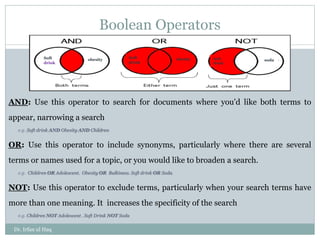
AND: Use this operator to search for documents where you'd like both terms to
appear, narrowing a search
e.g. Soft drink AND Obesity AND Children
OR: Use this operator to include synonyms, particularly where there are several
terms or names used for a topic, or you would like to broaden a search.
e.g. Children OR Adolescent. Obesity OR Bulkiness. Soft drink OR Soda.
NOT: Use this operator to exclude terms, particularly when your search terms have
more than one meaning. It increases the specificity of the search
e.g. Children NOT Adolescent . Soft Drink NOT Soda
Soft
drink
Soft
drink
soda
Soft
drink
obesity obesity
Dr. Irfan ul Haq
Nesting
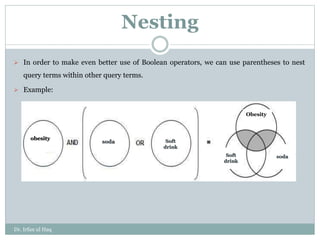
 In order to make even better use of Boolean operators, we can use parentheses to nest
query terms within other query terms.
 Example:
obesity
soda Soft
drink
Obesity
soda
Soft
drink
Dr. Irfan ul Haq
Truncation
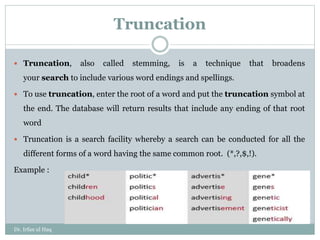
 Truncation, also called stemming, is a technique that broadens
your search to include various word endings and spellings.
 To use truncation, enter the root of a word and put the truncation symbol at
the end. The database will return results that include any ending of that root
word
 Truncation is a search facility whereby a search can be conducted for all the
different forms of a word having the same common root. (*,?,$,!).
Example :
Dr. Irfan ul Haq
Proximity searching
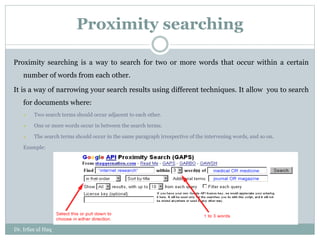
Proximity searching is a way to search for two or more words that occur within a certain
number of words from each other.
It is a way of narrowing your search results using different techniques. It allow you to search
for documents where:
 Two search terms should occur adjacent to each other.
 One or more words occur in between the search terms.
 The search terms should occur in the same paragraph irrespective of the intervening words, and so on.
Example:
Dr. Irfan ul Haq
Refine Searches
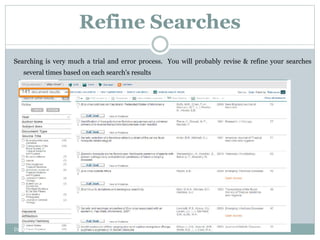
Searching is very much a trial and error process. You will probably revise & refine your searches
several times based on each search's results
Dr. Irfan ul Haq
Field Specific Search
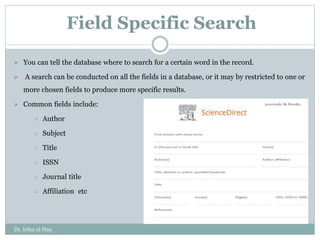
 You can tell the database where to search for a certain word in the record.
 A search can be conducted on all the fields in a database, or it may by restricted to one or
more chosen fields to produce more specific results.
 Common fields include:
 Author
 Subject
 Title
 ISSN
 Journal title
 Affiliation etc
Dr. Irfan ul Haq
Limiters
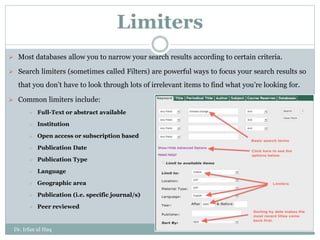
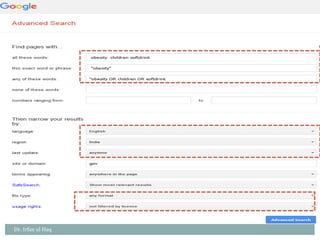
 Most databases allow you to narrow your search results according to certain criteria.
 Search limiters (sometimes called Filters) are powerful ways to focus your search results so
that you don’t have to look through lots of irrelevant items to find what you’re looking for.
 Common limiters include:
 Full-Text or abstract available
 Institution
 Open access or subscription based
 Publication Date
 Publication Type
 Language
 Geographic area
 Publication (i.e. specific journal/s)
 Peer reviewed
Dr. Irfan ul Haq
Dr. Irfan ul Haq

Search Steragies and Refinement techniques.pptx

  • 1.
    Search Strategies and RefinementTechniques in Online Database Dr. Irfan ul Haq
  • 2.
    Introduction  Due toinformation overload on Web a user sometimes may not be able to retrieve the required information he is looking for.  Therefore, good search results are not only based on the well organized information, but also on the use of right search formulation.  To get the required information, a proper strategy to be followed is vital aspect to obtain the best search results. Dr. Irfan ul Haq
  • 3.
     Thus SearchStrategy simply combines the key concepts of your search question in order to retrieve accurate results.  It allow us to find materials we want amongst huge number of online resource available.  Search strategy is the systematic tactics to be followed in finding the relevant information with high precision and low recall. Introduction Dr. Irfan ul Haq
  • 4.
    Search Strategy (steps) Query formulation Brainstorm for keywordsChoose database Combine keywords ( using different techniques) Conduct search Evaluate results Refine if needed Search Strategy Dr. Irfan ul Haq
  • 5.
    Query formulation  Beclear about the topic/area.  Write down exactly what you are interested in Example: Does soft drink consumption increase the risk of obesity in children? Dr. Irfan ul Haq
  • 6.
    Brainstorm for keyword The search terms (keywords) you use are extremely important!  Consider all possible words or phrases (referred to as keywords) that might be used to describe your subject. These might include  Related terms.  Variations in word endings (e.g. Singular, plural, adjectives).  Synonyms.  Alternative terminology and spelling (USA & UK). EXAMPLE: Soft drinks: Soda ,beverages, cola Obesity: over-weight, fat, plumpness, bulkiness Children: child, juvenile, youngster, adolescent Dr. Irfan ul Haq
  • 7.
    Choose Database Pick databasesthat matches the subject matter Databases can be multidisciplinary or they can specialize in specific subject areas Search more than one database for a comprehensive search on a topic Dr. Irfan ul Haq
  • 8.
    Combine Keywords In orderto retrieve relevant information you need to be able to link concepts/keywords together . Following are some of the techniques through which we could combine keywords for retrieving efficient search results:  Boolean Operators  Nesting  Truncation  Proximity searching Dr. Irfan ul Haq
  • 9.
    Boolean Operators AND: Usethis operator to search for documents where you'd like both terms to appear, narrowing a search e.g. Soft drink AND Obesity AND Children OR: Use this operator to include synonyms, particularly where there are several terms or names used for a topic, or you would like to broaden a search. e.g. Children OR Adolescent. Obesity OR Bulkiness. Soft drink OR Soda. NOT: Use this operator to exclude terms, particularly when your search terms have more than one meaning. It increases the specificity of the search e.g. Children NOT Adolescent . Soft Drink NOT Soda Soft drink Soft drink soda Soft drink obesity obesity Dr. Irfan ul Haq
  • 10.
    Nesting  In orderto make even better use of Boolean operators, we can use parentheses to nest query terms within other query terms.  Example: obesity soda Soft drink Obesity soda Soft drink Dr. Irfan ul Haq
  • 11.
    Truncation  Truncation, alsocalled stemming, is a technique that broadens your search to include various word endings and spellings.  To use truncation, enter the root of a word and put the truncation symbol at the end. The database will return results that include any ending of that root word  Truncation is a search facility whereby a search can be conducted for all the different forms of a word having the same common root. (*,?,$,!). Example : Dr. Irfan ul Haq
  • 12.
    Proximity searching Proximity searchingis a way to search for two or more words that occur within a certain number of words from each other. It is a way of narrowing your search results using different techniques. It allow you to search for documents where:  Two search terms should occur adjacent to each other.  One or more words occur in between the search terms.  The search terms should occur in the same paragraph irrespective of the intervening words, and so on. Example: Dr. Irfan ul Haq
  • 13.
    Refine Searches Searching isvery much a trial and error process. You will probably revise & refine your searches several times based on each search's results Dr. Irfan ul Haq
  • 14.
    Field Specific Search You can tell the database where to search for a certain word in the record.  A search can be conducted on all the fields in a database, or it may by restricted to one or more chosen fields to produce more specific results.  Common fields include:  Author  Subject  Title  ISSN  Journal title  Affiliation etc Dr. Irfan ul Haq
  • 15.
    Limiters  Most databasesallow you to narrow your search results according to certain criteria.  Search limiters (sometimes called Filters) are powerful ways to focus your search results so that you don’t have to look through lots of irrelevant items to find what you’re looking for.  Common limiters include:  Full-Text or abstract available  Institution  Open access or subscription based  Publication Date  Publication Type  Language  Geographic area  Publication (i.e. specific journal/s)  Peer reviewed Dr. Irfan ul Haq
  • 16.