
OSPF Summarization
www.netprotocolxpert.in
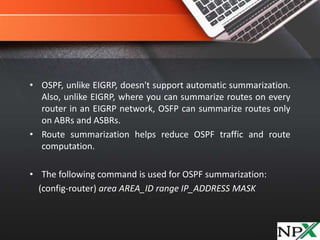
• OSPF, unlike EIGRP, doesn't support automatic summarization.
Also, unlike EIGRP, where you can summarize routes on every
router in an EIGRP network, OSFP can summarize routes only
on ABRs and ASBRs.
• Route summarization helps reduce OSPF traffic and route
computation.
• The following command is used for OSPF summarization:
(config-router) area AREA_ID range IP_ADDRESS MASK
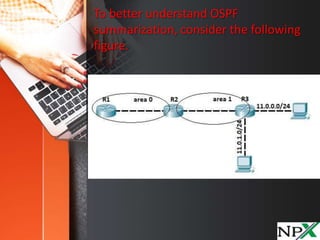
To better understand OSPF
summarization, consider the following
figure.
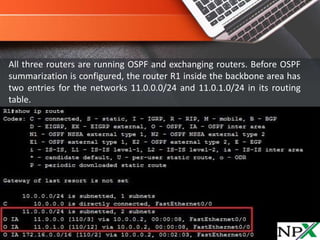
All three routers are running OSPF and exchanging routers. Before OSPF
summarization is configured, the router R1 inside the backbone area has
two entries for the networks 11.0.0.0/24 and 11.0.1.0/24 in its routing
table.
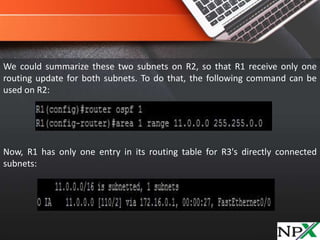
We could summarize these two subnets on R2, so that R1 receive only one
routing update for both subnets. To do that, the following command can be
used on R2:
Now, R1 has only one entry in its routing table for R3's directly connected
subnets:
NOTE – be careful with summarization. In this case, router R1 thinks
that R2 has routes for all subnets in the range 11.0.0.0 –
11.0.255.255. When summarizing, try to be as specific as possible.

OSPF Summarization

  • 1.
  • 2.
    • OSPF, unlikeEIGRP, doesn't support automatic summarization. Also, unlike EIGRP, where you can summarize routes on every router in an EIGRP network, OSFP can summarize routes only on ABRs and ASBRs. • Route summarization helps reduce OSPF traffic and route computation. • The following command is used for OSPF summarization: (config-router) area AREA_ID range IP_ADDRESS MASK
  • 3.
    To better understandOSPF summarization, consider the following figure.
  • 4.
    All three routersare running OSPF and exchanging routers. Before OSPF summarization is configured, the router R1 inside the backbone area has two entries for the networks 11.0.0.0/24 and 11.0.1.0/24 in its routing table.
  • 5.
    We could summarizethese two subnets on R2, so that R1 receive only one routing update for both subnets. To do that, the following command can be used on R2: Now, R1 has only one entry in its routing table for R3's directly connected subnets:
  • 6.
    NOTE – becareful with summarization. In this case, router R1 thinks that R2 has routes for all subnets in the range 11.0.0.0 – 11.0.255.255. When summarizing, try to be as specific as possible.