Redistribution into OSPF
www.netprotocolxpert.in
There are similarities and differences when compared to EIGRP redistribution.
OSPF does have default metrics but in EIGRP must set them. Both of them mark routes
as being External. When make redistribution into OSPF external routes can be of two
types: E1 and E2.
OSPF uses LSAs to represent external routes and apply a different logic to calculate
routes to external subnets..
we have two types of external routes: E1 and E2. Those marked E2 will be
redistributed with Default Metric unchanged an will ignore internal OSPF cost (except
when there is a need to break ties for best route). For those marked with E1, OSPF
will take Default Metric and will add to it internal cost to reach ASBR.
Default Metric for routes taken from BGP is 1, for routes taken from another OSPF
process will use the source route’s metric, and for all other sources will use default
metric equal to 20.
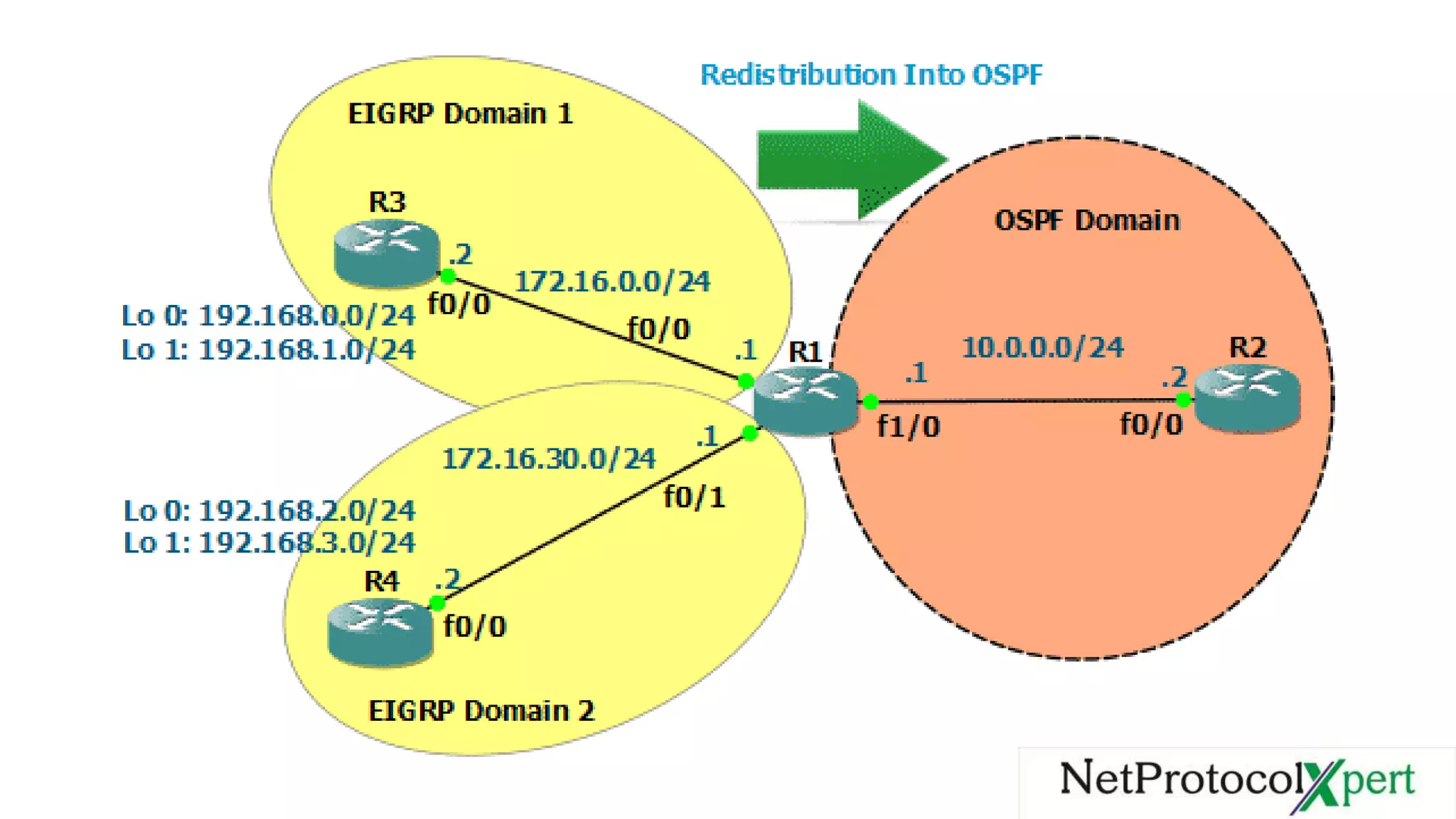
In the topology we have two EIGPR domains and one OSPF domain. we will make
redistribution of routes from EIGRP domain 1 as E1 routes and from EIGRP domain 2
as E2.
To each EIGRP domain we attached two loopback interfaces, so after we configure
redistribution on R2 we should have external routes to them.
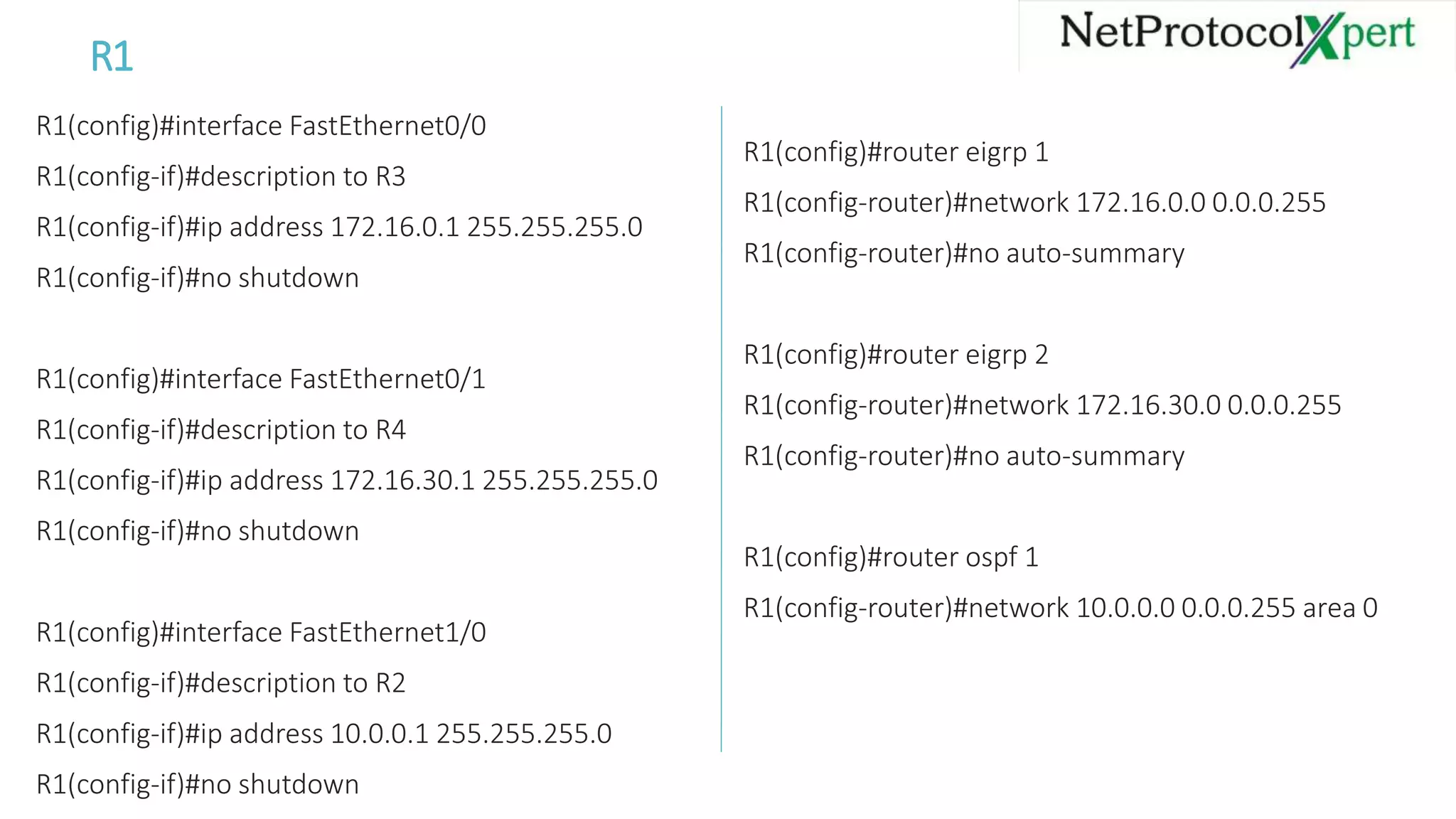
R1
R1(config)#interface FastEthernet0/0
R1(config-if)#description to R3
R1(config-if)#ip address 172.16.0.1 255.255.255.0
R1(config-if)#no shutdown
R1(config)#interface FastEthernet0/1
R1(config-if)#description to R4
R1(config-if)#ip address 172.16.30.1 255.255.255.0
R1(config-if)#no shutdown
R1(config)#interface FastEthernet1/0
R1(config-if)#description to R2
R1(config-if)#ip address 10.0.0.1 255.255.255.0
R1(config-if)#no shutdown
R1(config)#router eigrp 1
R1(config-router)#network 172.16.0.0 0.0.0.255
R1(config-router)#no auto-summary
R1(config)#router eigrp 2
R1(config-router)#network 172.16.30.0 0.0.0.255
R1(config-router)#no auto-summary
R1(config)#router ospf 1
R1(config-router)#network 10.0.0.0 0.0.0.255 area 0
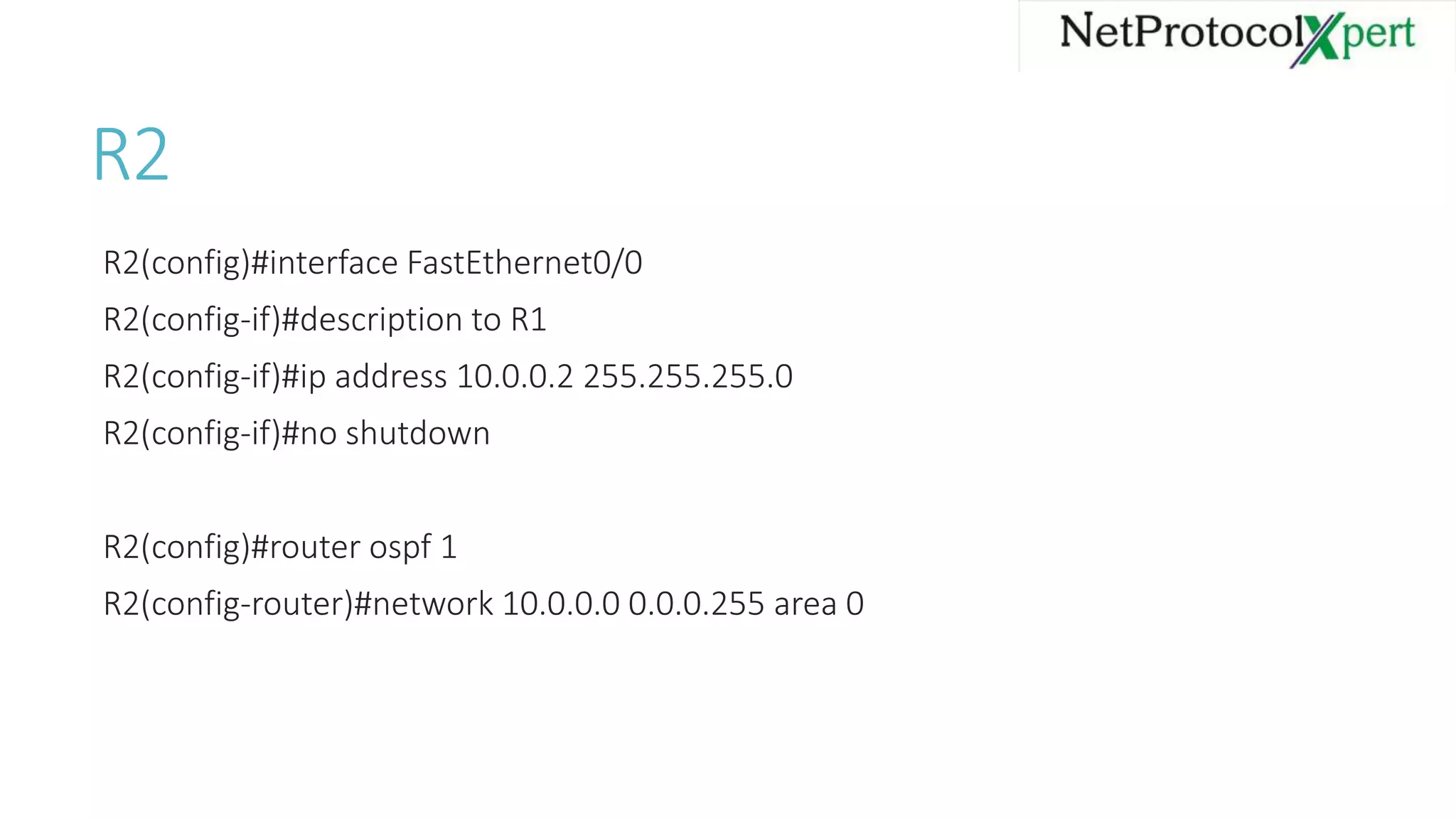
R2
R2(config)#interface FastEthernet0/0
R2(config-if)#description to R1
R2(config-if)#ip address 10.0.0.2 255.255.255.0
R2(config-if)#no shutdown
R2(config)#router ospf 1
R2(config-router)#network 10.0.0.0 0.0.0.255 area 0
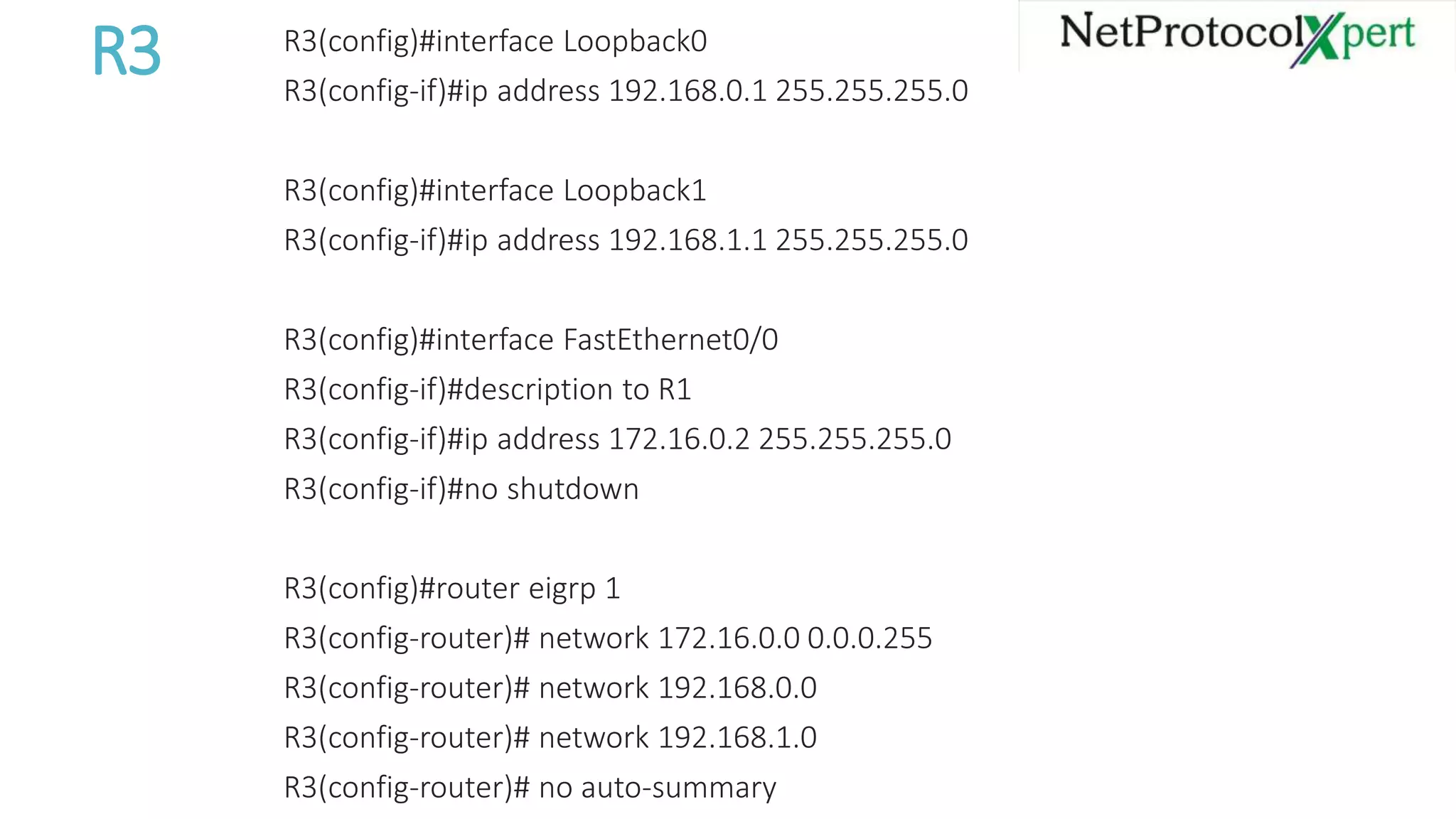
R3 R3(config)#interface Loopback0
R3(config-if)#ip address 192.168.0.1 255.255.255.0
R3(config)#interface Loopback1
R3(config-if)#ip address 192.168.1.1 255.255.255.0
R3(config)#interface FastEthernet0/0
R3(config-if)#description to R1
R3(config-if)#ip address 172.16.0.2 255.255.255.0
R3(config-if)#no shutdown
R3(config)#router eigrp 1
R3(config-router)# network 172.16.0.0 0.0.0.255
R3(config-router)# network 192.168.0.0
R3(config-router)# network 192.168.1.0
R3(config-router)# no auto-summary
R4 R4(config)#interface Loopback0
R4(config-if)#ip address 192.168.2.1 255.255.255.0
R4(config)#interface Loopback1
R4(config-if)#ip address 192.168.3.1 255.255.255.0
R4(config)#interface FastEthernet0/0
R4(config-if)#ip address 172.16.30.2 255.255.255.0
R4(config-if)#no shutdown
R4(config)#router eigrp 2
R4(config-router)#network 172.16.0.0
R4(config-router)#network 192.168.2.0
R4(config-router)#network 192.168.3.0
R4(config-router)#no auto-summary
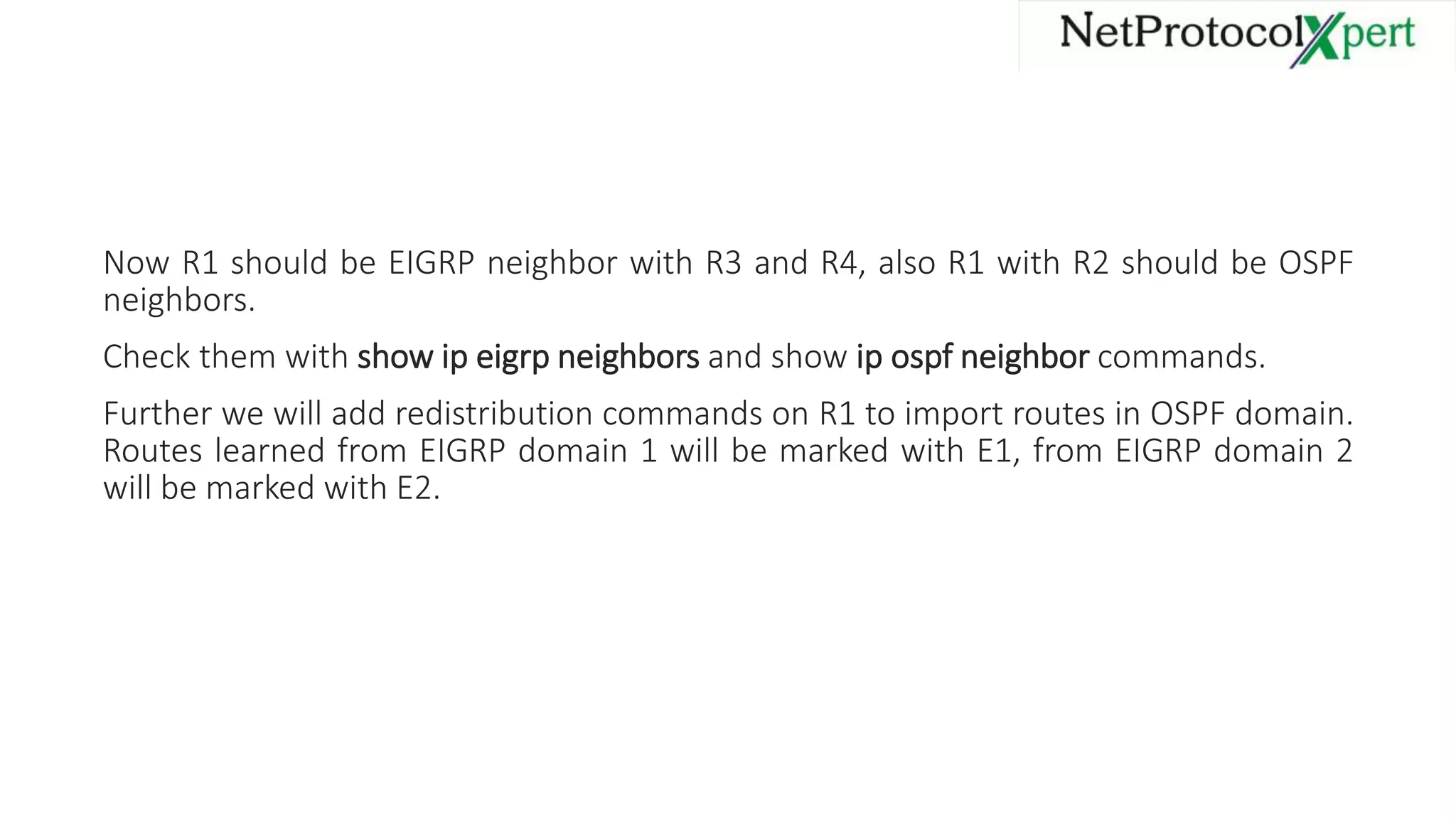
Now R1 should be EIGRP neighbor with R3 and R4, also R1 with R2 should be OSPF
neighbors.
Check them with show ip eigrp neighbors and show ip ospf neighbor commands.
Further we will add redistribution commands on R1 to import routes in OSPF domain.
Routes learned from EIGRP domain 1 will be marked with E1, from EIGRP domain 2
will be marked with E2.
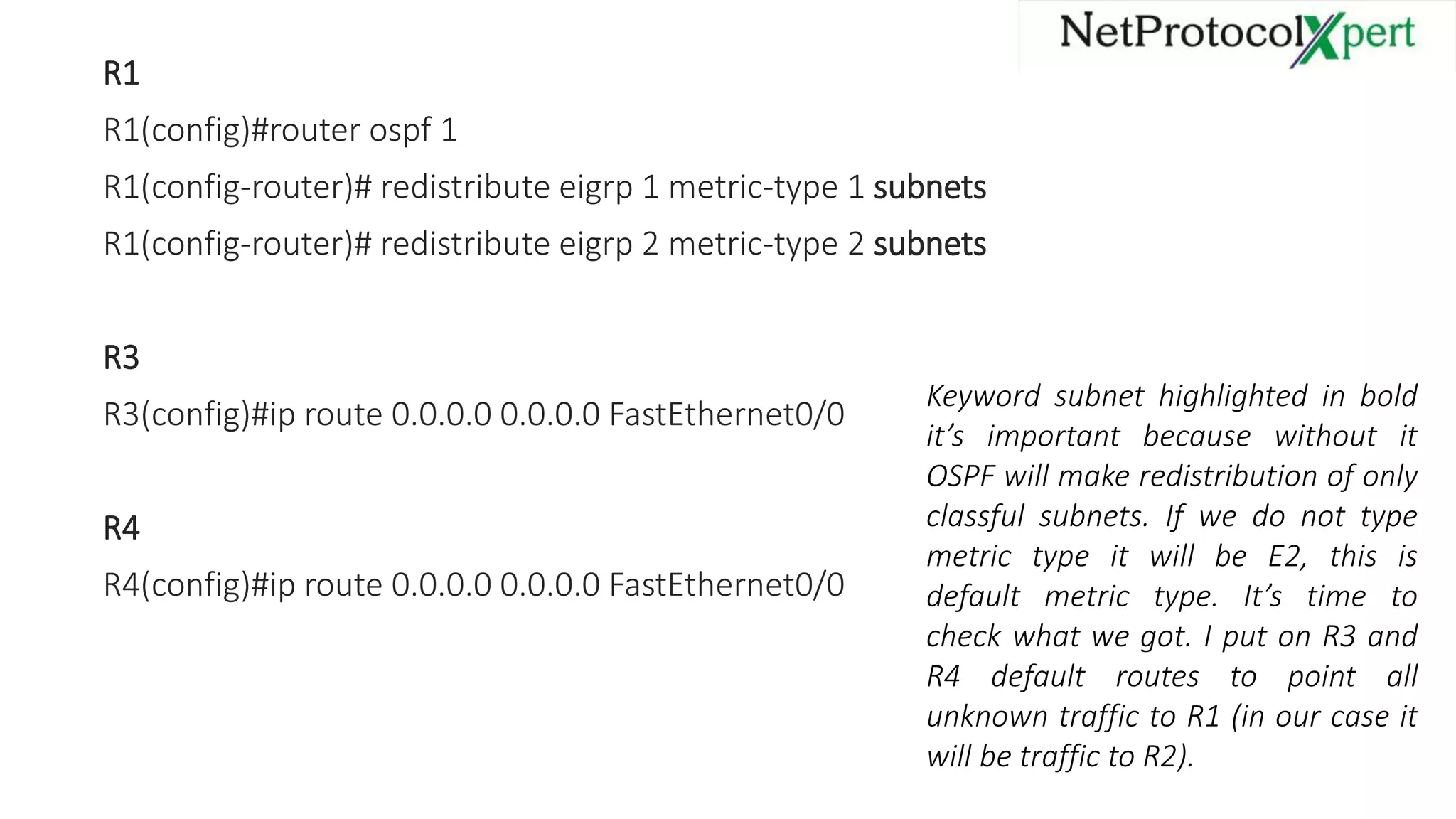
R1
R1(config)#router ospf 1
R1(config-router)# redistribute eigrp 1 metric-type 1 subnets
R1(config-router)# redistribute eigrp 2 metric-type 2 subnets
R3
R3(config)#ip route 0.0.0.0 0.0.0.0 FastEthernet0/0
R4
R4(config)#ip route 0.0.0.0 0.0.0.0 FastEthernet0/0
Keyword subnet highlighted in bold
it’s important because without it
OSPF will make redistribution of only
classful subnets. If we do not type
metric type it will be E2, this is
default metric type. It’s time to
check what we got. I put on R3 and
R4 default routes to point all
unknown traffic to R1 (in our case it
will be traffic to R2).
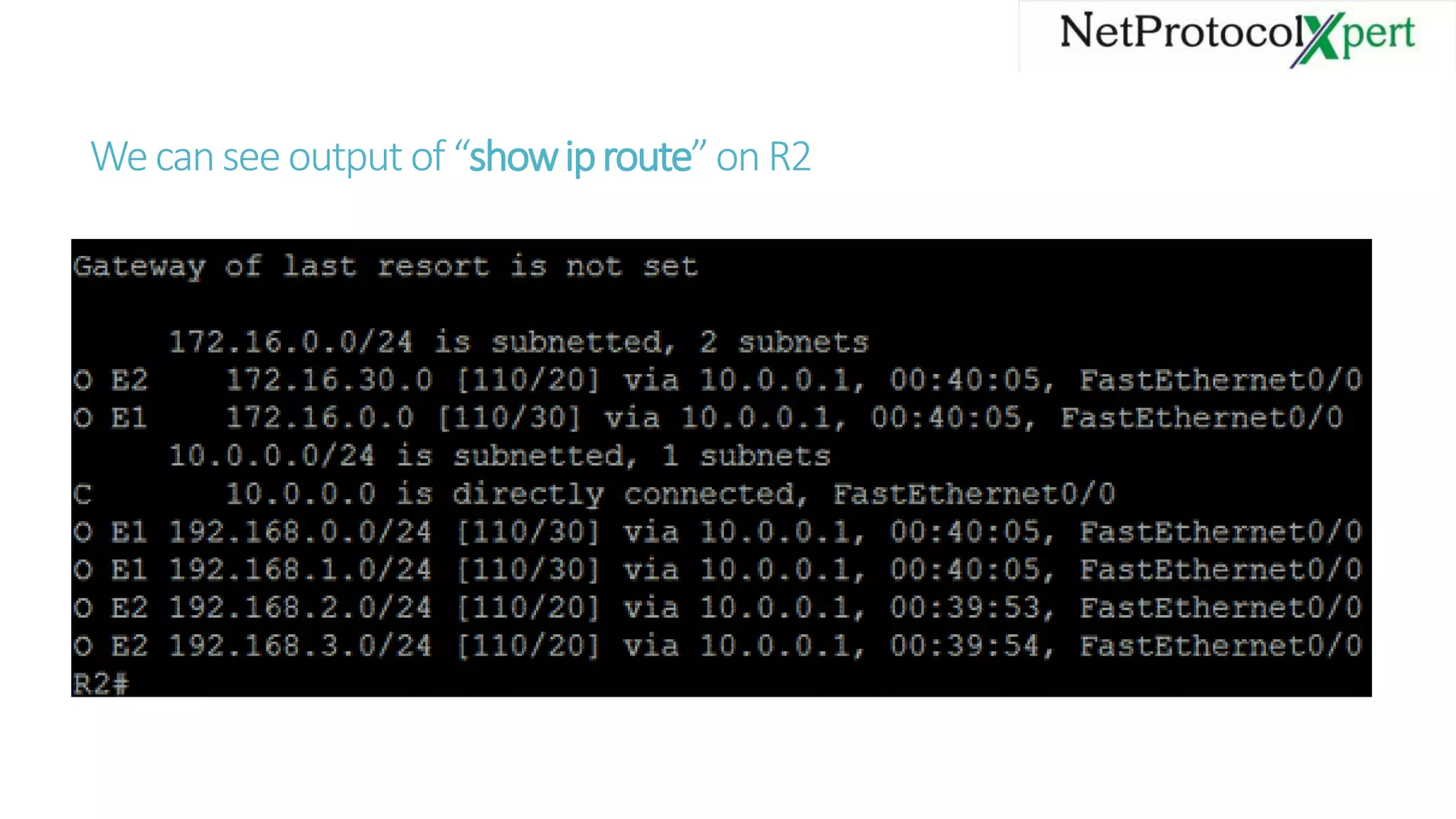
Wecanseeoutput of“showiproute”onR2
As we can see in the previous slide picture redistribution has worked, Routes
redistributed from first EIGRP domain are marked as E1 and have cost of 30 which is
the sum of the default metric (20) and 10 Mb/s link cost (10) that connects R1 with
R2.
Routes learned from second EIGRP domain are marked with E2 and have cost of 20
(default metric).
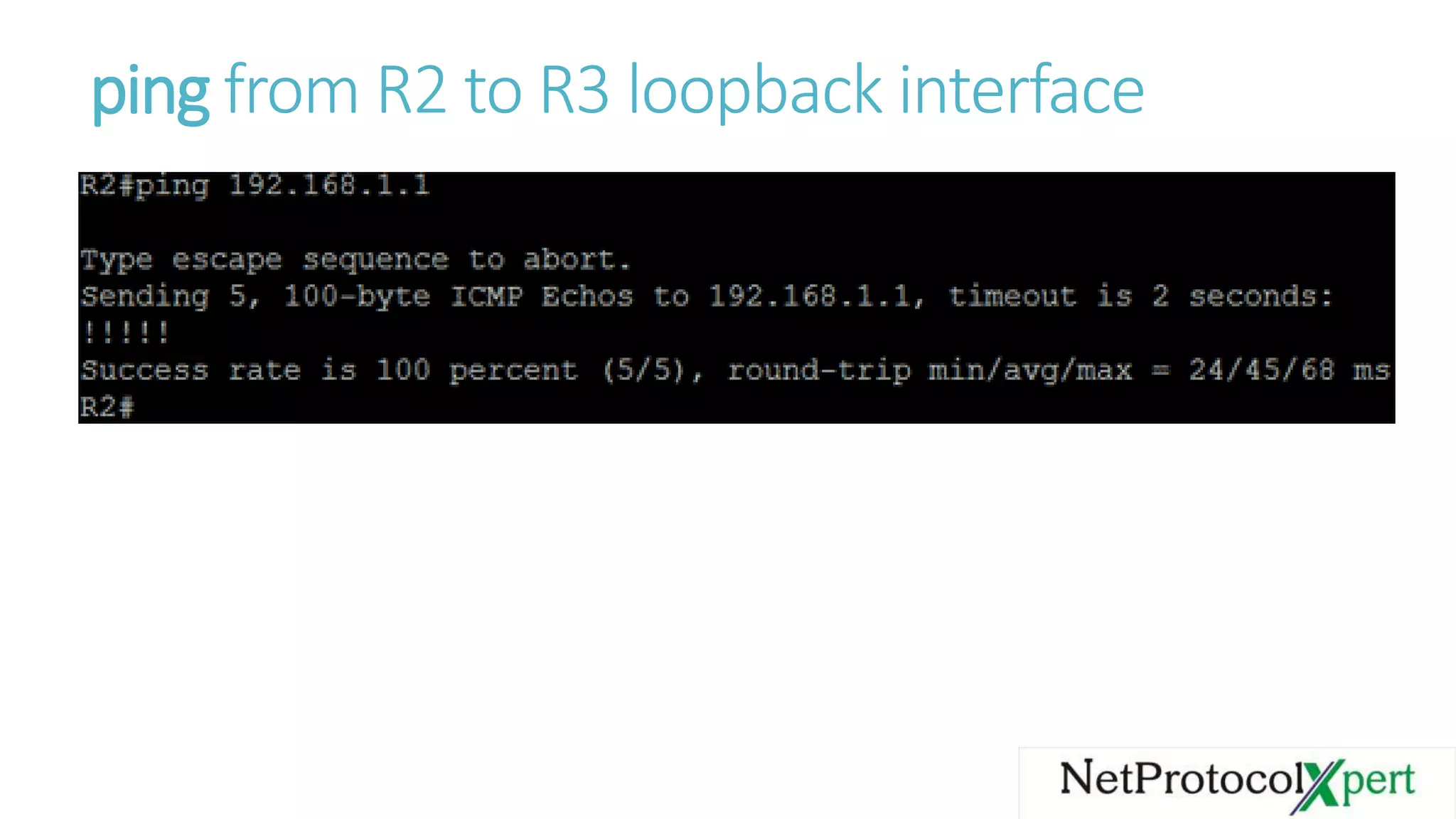
ping from R2 to R3 loopback interface
Follow us
@https://www.facebook.com/Net
ProtocolXpert/
https://www.linkedin.com/com
pany/netprotocol-xpert
https://plus.google.com/u/0/+
NetProtocolXpert_NPX/posts
https://www.instagram.com/n
etprotocol_xpert/
https://twitter.com/NPX_cis
co
https://branded.me/netp
rotocolxpert

Redistribution into OSPF

  • 1.
  • 2.
    There are similaritiesand differences when compared to EIGRP redistribution. OSPF does have default metrics but in EIGRP must set them. Both of them mark routes as being External. When make redistribution into OSPF external routes can be of two types: E1 and E2. OSPF uses LSAs to represent external routes and apply a different logic to calculate routes to external subnets..
  • 4.
    we have twotypes of external routes: E1 and E2. Those marked E2 will be redistributed with Default Metric unchanged an will ignore internal OSPF cost (except when there is a need to break ties for best route). For those marked with E1, OSPF will take Default Metric and will add to it internal cost to reach ASBR. Default Metric for routes taken from BGP is 1, for routes taken from another OSPF process will use the source route’s metric, and for all other sources will use default metric equal to 20. In the topology we have two EIGPR domains and one OSPF domain. we will make redistribution of routes from EIGRP domain 1 as E1 routes and from EIGRP domain 2 as E2. To each EIGRP domain we attached two loopback interfaces, so after we configure redistribution on R2 we should have external routes to them.
  • 5.
    R1 R1(config)#interface FastEthernet0/0 R1(config-if)#description toR3 R1(config-if)#ip address 172.16.0.1 255.255.255.0 R1(config-if)#no shutdown R1(config)#interface FastEthernet0/1 R1(config-if)#description to R4 R1(config-if)#ip address 172.16.30.1 255.255.255.0 R1(config-if)#no shutdown R1(config)#interface FastEthernet1/0 R1(config-if)#description to R2 R1(config-if)#ip address 10.0.0.1 255.255.255.0 R1(config-if)#no shutdown R1(config)#router eigrp 1 R1(config-router)#network 172.16.0.0 0.0.0.255 R1(config-router)#no auto-summary R1(config)#router eigrp 2 R1(config-router)#network 172.16.30.0 0.0.0.255 R1(config-router)#no auto-summary R1(config)#router ospf 1 R1(config-router)#network 10.0.0.0 0.0.0.255 area 0
  • 6.
    R2 R2(config)#interface FastEthernet0/0 R2(config-if)#description toR1 R2(config-if)#ip address 10.0.0.2 255.255.255.0 R2(config-if)#no shutdown R2(config)#router ospf 1 R2(config-router)#network 10.0.0.0 0.0.0.255 area 0
  • 7.
    R3 R3(config)#interface Loopback0 R3(config-if)#ipaddress 192.168.0.1 255.255.255.0 R3(config)#interface Loopback1 R3(config-if)#ip address 192.168.1.1 255.255.255.0 R3(config)#interface FastEthernet0/0 R3(config-if)#description to R1 R3(config-if)#ip address 172.16.0.2 255.255.255.0 R3(config-if)#no shutdown R3(config)#router eigrp 1 R3(config-router)# network 172.16.0.0 0.0.0.255 R3(config-router)# network 192.168.0.0 R3(config-router)# network 192.168.1.0 R3(config-router)# no auto-summary
  • 8.
    R4 R4(config)#interface Loopback0 R4(config-if)#ipaddress 192.168.2.1 255.255.255.0 R4(config)#interface Loopback1 R4(config-if)#ip address 192.168.3.1 255.255.255.0 R4(config)#interface FastEthernet0/0 R4(config-if)#ip address 172.16.30.2 255.255.255.0 R4(config-if)#no shutdown R4(config)#router eigrp 2 R4(config-router)#network 172.16.0.0 R4(config-router)#network 192.168.2.0 R4(config-router)#network 192.168.3.0 R4(config-router)#no auto-summary
  • 9.
    Now R1 shouldbe EIGRP neighbor with R3 and R4, also R1 with R2 should be OSPF neighbors. Check them with show ip eigrp neighbors and show ip ospf neighbor commands. Further we will add redistribution commands on R1 to import routes in OSPF domain. Routes learned from EIGRP domain 1 will be marked with E1, from EIGRP domain 2 will be marked with E2.
  • 10.
    R1 R1(config)#router ospf 1 R1(config-router)#redistribute eigrp 1 metric-type 1 subnets R1(config-router)# redistribute eigrp 2 metric-type 2 subnets R3 R3(config)#ip route 0.0.0.0 0.0.0.0 FastEthernet0/0 R4 R4(config)#ip route 0.0.0.0 0.0.0.0 FastEthernet0/0 Keyword subnet highlighted in bold it’s important because without it OSPF will make redistribution of only classful subnets. If we do not type metric type it will be E2, this is default metric type. It’s time to check what we got. I put on R3 and R4 default routes to point all unknown traffic to R1 (in our case it will be traffic to R2).
  • 11.
  • 12.
    As we cansee in the previous slide picture redistribution has worked, Routes redistributed from first EIGRP domain are marked as E1 and have cost of 30 which is the sum of the default metric (20) and 10 Mb/s link cost (10) that connects R1 with R2. Routes learned from second EIGRP domain are marked with E2 and have cost of 20 (default metric).
  • 13.
    ping from R2to R3 loopback interface
  • 14.