Introduction to Security

Security and Encryption

HCC Handouts

1
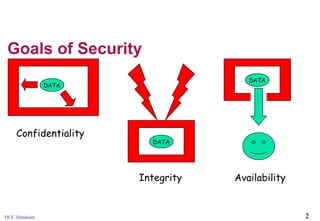
Goals of Security
DATA

DATA

Confidentiality

DATA

Integrity

HCC Handouts

Availability

2
The Merchant Pays







HCC Handouts

Many security procedures that credit card companies rely
on are not applicable in online environment
As a result, credit card companies have shifted most of
the risks associated with e-commerce credit card
transactions to merchant
Percentage of Internet transactions charged back to
online merchants much higher than for traditional retailers
(3-10% compared to ½-1%)
To protect selves, merchants can:
 Refuse to process overseas purchases
 Insist that credit card and shipping address match
 Require users to input 3-digit security code printed on
back of card
 Use anti-fraud software

3
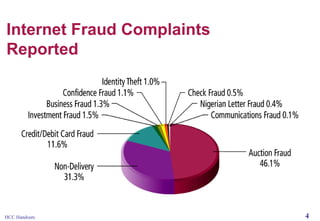
Internet Fraud Complaints
Reported

HCC Handouts

4
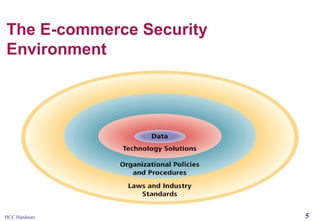
The E-commerce Security
Environment

HCC Handouts

5
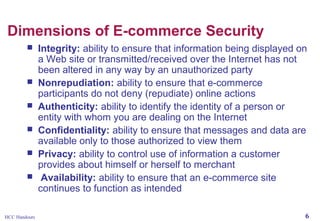
Dimensions of E-commerce Security








HCC Handouts

Integrity: ability to ensure that information being displayed on
a Web site or transmitted/received over the Internet has not
been altered in any way by an unauthorized party
Nonrepudiation: ability to ensure that e-commerce
participants do not deny (repudiate) online actions
Authenticity: ability to identify the identity of a person or
entity with whom you are dealing on the Internet
Confidentiality: ability to ensure that messages and data are
available only to those authorized to view them
Privacy: ability to control use of information a customer
provides about himself or herself to merchant
Availability: ability to ensure that an e-commerce site
continues to function as intended
6
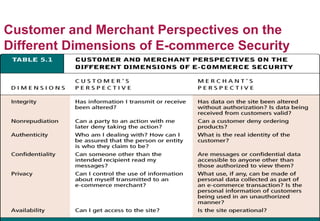
Customer and Merchant Perspectives on the
Different Dimensions of E-commerce Security

HCC Handouts

7
The Tension Between Security and
Other Values




HCC Handouts

Security vs. ease of use: the more security
measures that are added, the more difficult a site
is to use, and the slower it becomes
Security vs. desire of individuals to act
anonymously

8
Security Threats in the E-commerce
Environment




HCC Handouts

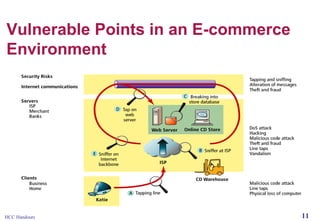
Three key points of vulnerability:
 Client
 Server
 Communications channel
Most common threats:
 Malicious code
 Hacking and cybervandalism
 Credit card fraud/theft
 Spoofing
 Denial of service attacks
 Sniffing
 Insider jobs

9
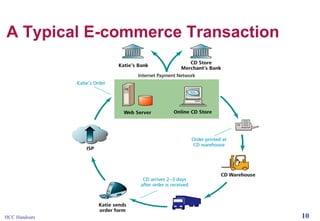
A Typical E-commerce Transaction

HCC Handouts

10
Vulnerable Points in an E-commerce
Environment

HCC Handouts

11
Malicious Code






Viruses: computer program that as ability to replicate and
spread to other files; most also deliver a “payload” of
some sort (may be destructive or benign); include macro
viruses, file-infecting viruses and script viruses
Worms: designed to spread from computer to computer
Trojan horse: appears to be benign, but then does
something other than expected
Bad applets (malicious mobile code): malicious Java
applets or ActiveX controls that may be downloaded onto
client and activated merely by surfing to a Web site

HCC Handouts

12
Hacking and Cybervandalism





Hacker: Individual who intends to gain unauthorized access to
a computer systems
Cracker: Used to denote hacker with criminal intent (two
terms often used interchangeably)
Cybervandalism: Intentionally disrupting, defacing or
destroying a Web site
Types of hackers include:
 White hats – Members of “tiger teams” used by corporate
security departments to test their own security measures
 Black hats – Act with the intention of causing harm
 Grey hats – Believe they are pursuing some greater good
by breaking in and revealing system flaws

HCC Handouts

13
Credit Card Fraud





HCC Handouts

Fear that credit card information will be stolen
deters online purchases
Hackers target credit card files and other
customer information files on merchant servers;
use stolen data to establish credit under false
identity
One solution: New identity verification
mechanisms

14
Spoofing, DoS and dDoS Attacks,
Sniffing, Insider Jobs








HCC Handouts

Spoofing: Misrepresenting oneself by using fake e-mail
addresses or masquerading as someone else
Denial of service (DoS) attack: Hackers flood Web site
with useless traffic to inundate and overwhelm network
Distributed denial of service (dDoS) attack: hackers use
numerous computers to attack target network from
numerous launch points
Sniffing: type of eavesdropping program that monitors
information traveling over a network; enables hackers to
steal proprietary information from anywhere on a network
Insider jobs:single largest financial threat
15
Technology Solutions





HCC Handouts

Protecting Internet communications
(encryption)
Securing channels of communication (SSL, SHTTP, VPNs)
Protecting networks (firewalls)
Protecting servers and clients

16
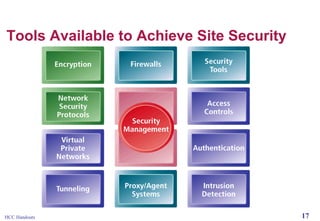
Tools Available to Achieve Site Security

HCC Handouts

17
Protecting Internet
Communications: Encryption







HCC Handouts

Encryption: The process of transforming plain text or data into cipher
text that cannot be read by anyone other than the sender and receiver
Purpose:
 Secure stored information
 Secure information transmission
Provides:
 Message integrity
 Nonrepudiation
 Authentication
 Confidentiality
Types
 Symmetric key encryption
 Public key encryption
18
Symmetric Key Encryption





HCC Handouts

Also known as secret key encryption
Both the sender and receiver use the same digital
key to encrypt and decrypt message
Requires a different set of keys for each
transaction
Data Encryption Standard (DES): Most widely
used symmetric key encryption today; uses 56-bit
encryption key; other types use 128-bit keys up
through 2048 bits

19
Public Key Encryption







HCC Handouts

Public key cryptography solves symmetric key encryption
problem of having to exchange secret key
Uses two mathematically related digital keys – public key
(widely disseminated) and private key (kept secret by
owner)
Both keys are used to encrypt and decrypt message
Once key is used to encrypt message, same key cannot
be used to decrypt message
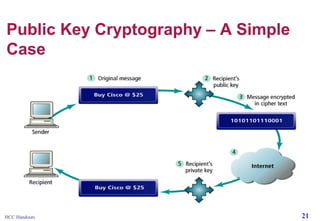
For example, sender uses recipient’s public key to encrypt
message; recipient uses his/her private key to decrypt it

20
Public Key Cryptography – A Simple
Case

HCC Handouts

21
Public Key Encryption using Digital
Signatures and Hash Digests




HCC Handouts

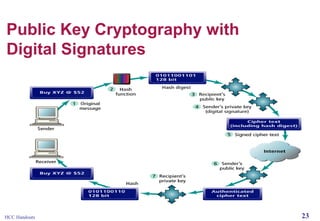
Application of hash function (mathematical
algorithm) by sender prior to encryption produces
hash digest that recipient can use to verify
integrity of data
Double encryption with sender’s private key
(digital signature) helps ensure authenticity and
nonrepudiation

22
Public Key Cryptography with
Digital Signatures

HCC Handouts

23
Digital Envelopes




HCC Handouts

Addresses weaknesses of public key encryption
(computationally slow, decreases transmission
speed, increases processing time) and symmetric
key encryption (faster, but more secure)
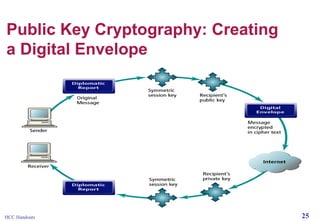
Uses symmetric key encryption to encrypt
document but public key encryption to encrypt
and send symmetric key

24
Public Key Cryptography: Creating
a Digital Envelope

HCC Handouts

25
Digital Certificates and Public Key
Infrastructure (PKI)




HCC Handouts

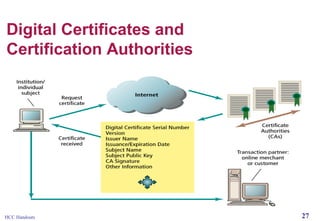
Digital certificate: Digital document that includes:
 Name of subject or company
 Subject’s public key
 Digital certificate serial number
 Expiration date
 Issuance date
 Digital signature of certification authority (trusted third
party (institution) that issues certificate
 Other identifying information
Public Key Infrastructure (PKI): refers to the CAs and
digital certificate procedures that are accepted by all
parties
26
Digital Certificates and
Certification Authorities

HCC Handouts

27
Limits to Encryption Solutions






PKI applies mainly to protecting messages in transit
PKI is not effective against insiders
Protection of private keys by individuals may be
haphazard
No guarantee that verifying computer of merchant is
secure
CAs are unregulated, self-selecting organizations

HCC Handouts

28
Insight on Technology: Advances in Quantum
Cryptography May Lead to the Unbreakable Key





HCC Handouts

Existing encryption systems are subject to failure as
computers become more powerful
Scientists at Northwestern University have developed a
high-speed quantum cryptography method
Uses lasers and optical technology and a form of secret
(symmetric) key encryption
Message is encoded using granularity of light (quantum
noise); pattern is revealed only through use of secret key

29
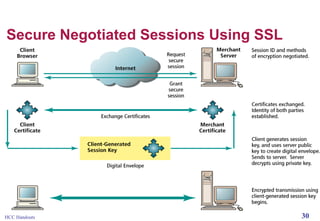
Secure Negotiated Sessions Using SSL

HCC Handouts

30
Securing Channels of Communication






HCC Handouts

Secure Sockets Layer (SSL): Most common form of
securing channels of communication; used to establish a
secure negotiated session (client-server session in which
URL of requested document, along with contents, is
encrypted)
S-HTTP: Alternative method; provides a secure messageoriented communications protocol designed for use in
conjunction with HTTP
Virtual Private Networks (VPNs): Allow remote users to
securely access internal networks via the Internet, using
Point-to-Point Tunneling Protocol (PPTP)

31
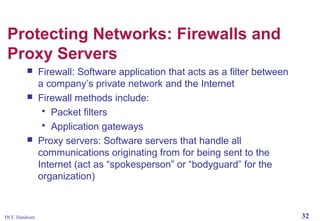
Protecting Networks: Firewalls and
Proxy Servers





HCC Handouts

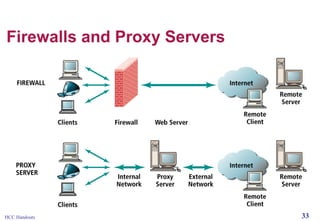
Firewall: Software application that acts as a filter between
a company’s private network and the Internet
Firewall methods include:
 Packet filters
 Application gateways
Proxy servers: Software servers that handle all
communications originating from for being sent to the
Internet (act as “spokesperson” or “bodyguard” for the
organization)

32
Firewalls and Proxy Servers

HCC Handouts

33
Protecting Servers and Clients



HCC Handouts

Operating system controls: Authentication and
access control mechanisms
Anti-virus software: Easiest and least expensive
way to prevent threats to system integrity

34
Transactions

1.

2.

3.

HCC Handouts

Sensitive information has to be protected through at least
three transactions:
credit card details supplied by the customer, either to the
merchant or payment gateway. Handled by the server's
SSL and the merchant/server's digital certificates.
credit card details passed to the bank for processing.
Handled by the complex security measures of the
payment gateway.
order and customer details supplied to the merchant,
either directly or from the payment gateway/credit card
processing company. Handled by SSL, server security,
digital certificates (and payment gateway sometimes).

35
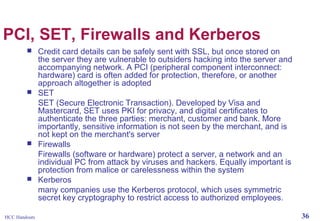
PCI, SET, Firewalls and Kerberos








HCC Handouts

Credit card details can be safely sent with SSL, but once stored on
the server they are vulnerable to outsiders hacking into the server and
accompanying network. A PCI (peripheral component interconnect:
hardware) card is often added for protection, therefore, or another
approach altogether is adopted
SET
SET (Secure Electronic Transaction). Developed by Visa and
Mastercard, SET uses PKI for privacy, and digital certificates to
authenticate the three parties: merchant, customer and bank. More
importantly, sensitive information is not seen by the merchant, and is
not kept on the merchant's server
Firewalls
Firewalls (software or hardware) protect a server, a network and an
individual PC from attack by viruses and hackers. Equally important is
protection from malice or carelessness within the system
Kerberos
many companies use the Kerberos protocol, which uses symmetric
secret key cryptography to restrict access to authorized employees.
36
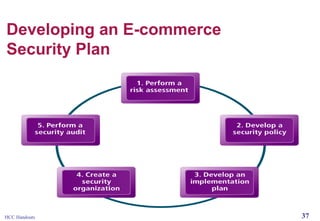
Developing an E-commerce
Security Plan

HCC Handouts

37


https encrypts everything you do so that no one can read what you type but the recipient.
The problem with encrypting data is that you cant just encrypt it and say only yahoo can read it. Both you and yahoo
have to have a secret key so that yahoo can decrypt what you sent and encrypt private stuff for you to read.
This is accomplised by an encryption scheme known as public key. Yahoo puts out a public key so that every one can
encrypt stuff that only yahoo can read its like a one way key: you can package stuff up and send it to yahoo so that they
can read it with theire private key but some one with a public key cant see what you encrypted.
So you package up a key for yahoo to use to talk to you and you are all set.
WHY ALL internet communication isn't done like this is because of what is known as the man in the middle attack, and
its solution.
It's quite simply to pretend to be yahoo.com if you know what you doing. so I pretend to be yahoo and all traffic you
think is going to yahoo comes to me. you ask me for my public key I respond back with an fake public private key pair
that I made then I ask yahoo for there public key and every thing you to I do I just watch for anything interesting like
Credit cards etc, an you are non the wiser.
We solved this problem by using what is called a certificate authority. A CA is some one who you pay to vouch for you;
Verisign and GoDaddy are the biggest. So everytime you make a https connection to amazon you go to a CA and they
comeback with amazons public key. And every thing is hunky doory. With the exception that this slowed you down
considerable yahoo.com has to pay a CA bill every month, and joesmoh.com has to go through a lot of rigormarol to set
all this up.
And finally I will answer your question:
So the reason is it would make every thing slow more expensive and more complicated to use exclusively https.
Plus tying to get information from internet traffic once it is out of your local network is like trying to car jack someone
on free way going 500 miles an hour.
enough security for you typical fried chicken recipe.

HCC Handouts

38

Online security & encryption

  • 1.
    Introduction to Security Securityand Encryption HCC Handouts 1
  • 2.
  • 3.
    The Merchant Pays     HCCHandouts Many security procedures that credit card companies rely on are not applicable in online environment As a result, credit card companies have shifted most of the risks associated with e-commerce credit card transactions to merchant Percentage of Internet transactions charged back to online merchants much higher than for traditional retailers (3-10% compared to ½-1%) To protect selves, merchants can:  Refuse to process overseas purchases  Insist that credit card and shipping address match  Require users to input 3-digit security code printed on back of card  Use anti-fraud software 3
  • 4.
  • 5.
  • 6.
    Dimensions of E-commerceSecurity       HCC Handouts Integrity: ability to ensure that information being displayed on a Web site or transmitted/received over the Internet has not been altered in any way by an unauthorized party Nonrepudiation: ability to ensure that e-commerce participants do not deny (repudiate) online actions Authenticity: ability to identify the identity of a person or entity with whom you are dealing on the Internet Confidentiality: ability to ensure that messages and data are available only to those authorized to view them Privacy: ability to control use of information a customer provides about himself or herself to merchant Availability: ability to ensure that an e-commerce site continues to function as intended 6
  • 7.
    Customer and MerchantPerspectives on the Different Dimensions of E-commerce Security HCC Handouts 7
  • 8.
    The Tension BetweenSecurity and Other Values   HCC Handouts Security vs. ease of use: the more security measures that are added, the more difficult a site is to use, and the slower it becomes Security vs. desire of individuals to act anonymously 8
  • 9.
    Security Threats inthe E-commerce Environment   HCC Handouts Three key points of vulnerability:  Client  Server  Communications channel Most common threats:  Malicious code  Hacking and cybervandalism  Credit card fraud/theft  Spoofing  Denial of service attacks  Sniffing  Insider jobs 9
  • 10.
    A Typical E-commerceTransaction HCC Handouts 10
  • 11.
    Vulnerable Points inan E-commerce Environment HCC Handouts 11
  • 12.
    Malicious Code     Viruses: computerprogram that as ability to replicate and spread to other files; most also deliver a “payload” of some sort (may be destructive or benign); include macro viruses, file-infecting viruses and script viruses Worms: designed to spread from computer to computer Trojan horse: appears to be benign, but then does something other than expected Bad applets (malicious mobile code): malicious Java applets or ActiveX controls that may be downloaded onto client and activated merely by surfing to a Web site HCC Handouts 12
  • 13.
    Hacking and Cybervandalism     Hacker:Individual who intends to gain unauthorized access to a computer systems Cracker: Used to denote hacker with criminal intent (two terms often used interchangeably) Cybervandalism: Intentionally disrupting, defacing or destroying a Web site Types of hackers include:  White hats – Members of “tiger teams” used by corporate security departments to test their own security measures  Black hats – Act with the intention of causing harm  Grey hats – Believe they are pursuing some greater good by breaking in and revealing system flaws HCC Handouts 13
  • 14.
    Credit Card Fraud    HCCHandouts Fear that credit card information will be stolen deters online purchases Hackers target credit card files and other customer information files on merchant servers; use stolen data to establish credit under false identity One solution: New identity verification mechanisms 14
  • 15.
    Spoofing, DoS anddDoS Attacks, Sniffing, Insider Jobs      HCC Handouts Spoofing: Misrepresenting oneself by using fake e-mail addresses or masquerading as someone else Denial of service (DoS) attack: Hackers flood Web site with useless traffic to inundate and overwhelm network Distributed denial of service (dDoS) attack: hackers use numerous computers to attack target network from numerous launch points Sniffing: type of eavesdropping program that monitors information traveling over a network; enables hackers to steal proprietary information from anywhere on a network Insider jobs:single largest financial threat 15
  • 16.
    Technology Solutions     HCC Handouts ProtectingInternet communications (encryption) Securing channels of communication (SSL, SHTTP, VPNs) Protecting networks (firewalls) Protecting servers and clients 16
  • 17.
    Tools Available toAchieve Site Security HCC Handouts 17
  • 18.
    Protecting Internet Communications: Encryption     HCCHandouts Encryption: The process of transforming plain text or data into cipher text that cannot be read by anyone other than the sender and receiver Purpose:  Secure stored information  Secure information transmission Provides:  Message integrity  Nonrepudiation  Authentication  Confidentiality Types  Symmetric key encryption  Public key encryption 18
  • 19.
    Symmetric Key Encryption     HCCHandouts Also known as secret key encryption Both the sender and receiver use the same digital key to encrypt and decrypt message Requires a different set of keys for each transaction Data Encryption Standard (DES): Most widely used symmetric key encryption today; uses 56-bit encryption key; other types use 128-bit keys up through 2048 bits 19
  • 20.
    Public Key Encryption      HCCHandouts Public key cryptography solves symmetric key encryption problem of having to exchange secret key Uses two mathematically related digital keys – public key (widely disseminated) and private key (kept secret by owner) Both keys are used to encrypt and decrypt message Once key is used to encrypt message, same key cannot be used to decrypt message For example, sender uses recipient’s public key to encrypt message; recipient uses his/her private key to decrypt it 20
  • 21.
    Public Key Cryptography– A Simple Case HCC Handouts 21
  • 22.
    Public Key Encryptionusing Digital Signatures and Hash Digests   HCC Handouts Application of hash function (mathematical algorithm) by sender prior to encryption produces hash digest that recipient can use to verify integrity of data Double encryption with sender’s private key (digital signature) helps ensure authenticity and nonrepudiation 22
  • 23.
    Public Key Cryptographywith Digital Signatures HCC Handouts 23
  • 24.
    Digital Envelopes   HCC Handouts Addressesweaknesses of public key encryption (computationally slow, decreases transmission speed, increases processing time) and symmetric key encryption (faster, but more secure) Uses symmetric key encryption to encrypt document but public key encryption to encrypt and send symmetric key 24
  • 25.
    Public Key Cryptography:Creating a Digital Envelope HCC Handouts 25
  • 26.
    Digital Certificates andPublic Key Infrastructure (PKI)   HCC Handouts Digital certificate: Digital document that includes:  Name of subject or company  Subject’s public key  Digital certificate serial number  Expiration date  Issuance date  Digital signature of certification authority (trusted third party (institution) that issues certificate  Other identifying information Public Key Infrastructure (PKI): refers to the CAs and digital certificate procedures that are accepted by all parties 26
  • 27.
    Digital Certificates and CertificationAuthorities HCC Handouts 27
  • 28.
    Limits to EncryptionSolutions      PKI applies mainly to protecting messages in transit PKI is not effective against insiders Protection of private keys by individuals may be haphazard No guarantee that verifying computer of merchant is secure CAs are unregulated, self-selecting organizations HCC Handouts 28
  • 29.
    Insight on Technology:Advances in Quantum Cryptography May Lead to the Unbreakable Key     HCC Handouts Existing encryption systems are subject to failure as computers become more powerful Scientists at Northwestern University have developed a high-speed quantum cryptography method Uses lasers and optical technology and a form of secret (symmetric) key encryption Message is encoded using granularity of light (quantum noise); pattern is revealed only through use of secret key 29
  • 30.
    Secure Negotiated SessionsUsing SSL HCC Handouts 30
  • 31.
    Securing Channels ofCommunication    HCC Handouts Secure Sockets Layer (SSL): Most common form of securing channels of communication; used to establish a secure negotiated session (client-server session in which URL of requested document, along with contents, is encrypted) S-HTTP: Alternative method; provides a secure messageoriented communications protocol designed for use in conjunction with HTTP Virtual Private Networks (VPNs): Allow remote users to securely access internal networks via the Internet, using Point-to-Point Tunneling Protocol (PPTP) 31
  • 32.
    Protecting Networks: Firewallsand Proxy Servers    HCC Handouts Firewall: Software application that acts as a filter between a company’s private network and the Internet Firewall methods include:  Packet filters  Application gateways Proxy servers: Software servers that handle all communications originating from for being sent to the Internet (act as “spokesperson” or “bodyguard” for the organization) 32
  • 33.
    Firewalls and ProxyServers HCC Handouts 33
  • 34.
    Protecting Servers andClients   HCC Handouts Operating system controls: Authentication and access control mechanisms Anti-virus software: Easiest and least expensive way to prevent threats to system integrity 34
  • 35.
    Transactions 1. 2. 3. HCC Handouts Sensitive informationhas to be protected through at least three transactions: credit card details supplied by the customer, either to the merchant or payment gateway. Handled by the server's SSL and the merchant/server's digital certificates. credit card details passed to the bank for processing. Handled by the complex security measures of the payment gateway. order and customer details supplied to the merchant, either directly or from the payment gateway/credit card processing company. Handled by SSL, server security, digital certificates (and payment gateway sometimes). 35
  • 36.
    PCI, SET, Firewallsand Kerberos     HCC Handouts Credit card details can be safely sent with SSL, but once stored on the server they are vulnerable to outsiders hacking into the server and accompanying network. A PCI (peripheral component interconnect: hardware) card is often added for protection, therefore, or another approach altogether is adopted SET SET (Secure Electronic Transaction). Developed by Visa and Mastercard, SET uses PKI for privacy, and digital certificates to authenticate the three parties: merchant, customer and bank. More importantly, sensitive information is not seen by the merchant, and is not kept on the merchant's server Firewalls Firewalls (software or hardware) protect a server, a network and an individual PC from attack by viruses and hackers. Equally important is protection from malice or carelessness within the system Kerberos many companies use the Kerberos protocol, which uses symmetric secret key cryptography to restrict access to authorized employees. 36
  • 37.
  • 38.
     https encrypts everythingyou do so that no one can read what you type but the recipient. The problem with encrypting data is that you cant just encrypt it and say only yahoo can read it. Both you and yahoo have to have a secret key so that yahoo can decrypt what you sent and encrypt private stuff for you to read. This is accomplised by an encryption scheme known as public key. Yahoo puts out a public key so that every one can encrypt stuff that only yahoo can read its like a one way key: you can package stuff up and send it to yahoo so that they can read it with theire private key but some one with a public key cant see what you encrypted. So you package up a key for yahoo to use to talk to you and you are all set. WHY ALL internet communication isn't done like this is because of what is known as the man in the middle attack, and its solution. It's quite simply to pretend to be yahoo.com if you know what you doing. so I pretend to be yahoo and all traffic you think is going to yahoo comes to me. you ask me for my public key I respond back with an fake public private key pair that I made then I ask yahoo for there public key and every thing you to I do I just watch for anything interesting like Credit cards etc, an you are non the wiser. We solved this problem by using what is called a certificate authority. A CA is some one who you pay to vouch for you; Verisign and GoDaddy are the biggest. So everytime you make a https connection to amazon you go to a CA and they comeback with amazons public key. And every thing is hunky doory. With the exception that this slowed you down considerable yahoo.com has to pay a CA bill every month, and joesmoh.com has to go through a lot of rigormarol to set all this up. And finally I will answer your question: So the reason is it would make every thing slow more expensive and more complicated to use exclusively https. Plus tying to get information from internet traffic once it is out of your local network is like trying to car jack someone on free way going 500 miles an hour. enough security for you typical fried chicken recipe. HCC Handouts 38