Chapter 10:
Electronic Commerce Security
Electronic Commerce,
Seventh Annual
Edition
2
Objectives
In this chapter, you will learn about:
• Online security issues
• Security for client computers
• Security for the communication channels
between computers
• Security for server computers
• Organizations that promote computer,
network, and Internet security
3
Online Security Issues Overview
• Computer security
– The protection of assets from unauthorized
access, use, alteration, or destruction
• Physical security
– Includes tangible protection devices
• Logical security
– Protection of assets using nonphysical means
• Threat
– Any act or object that poses a danger to computer
assets
4
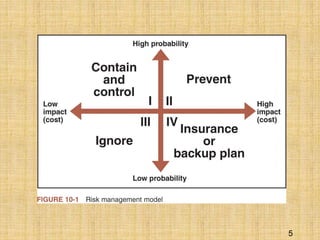
Managing Risk
• Countermeasure
– General name for a procedure that recognizes,
reduces, or eliminates a threat
• Eavesdropper
– Person or device that can listen in on and copy
Internet transmissions
• Crackers or hackers
– Write programs or manipulate technologies to
obtain unauthorized access to computers and
networks
5
6
Computer Security Classifications
• Secrecy
– Protecting against unauthorized data disclosure
and ensuring the authenticity of a data source
• Integrity
– Refers to preventing unauthorized data
modification
• Necessity
– Refers to preventing data delays or denials
7
Security Policy and Integrated
Security
• A security policy is a written statement
describing:
– Which assets to protect and why they are being
protected
– Who is responsible for that protection
– Which behaviors are acceptable and which are not
• First step in creating a security policy
– Determine which assets to protect from which
threats
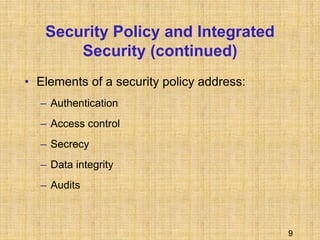
8
9
Security Policy and Integrated
Security (continued)
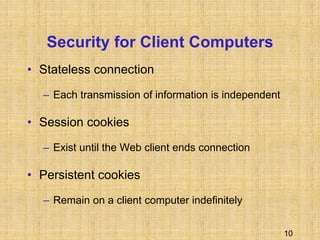
• Elements of a security policy address:
– Authentication
– Access control
– Secrecy
– Data integrity
– Audits
10
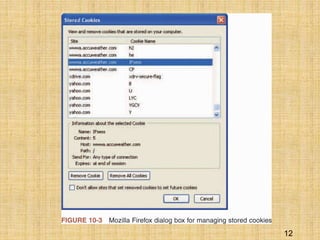
Security for Client Computers
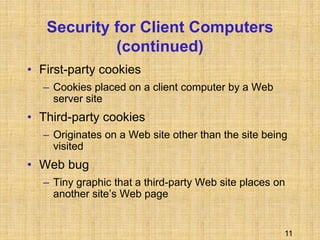
• Stateless connection
– Each transmission of information is independent
• Session cookies
– Exist until the Web client ends connection
• Persistent cookies
– Remain on a client computer indefinitely
11
Security for Client Computers
(continued)
• First-party cookies
– Cookies placed on a client computer by a Web
server site
• Third-party cookies
– Originates on a Web site other than the site being
visited
• Web bug
– Tiny graphic that a third-party Web site places on
another site’s Web page
12
13
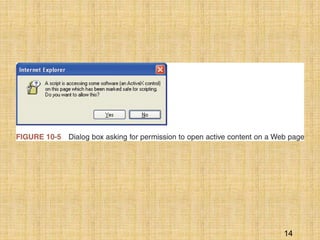
Active Content
• Active content refers to programs embedded
transparently in Web pages that cause an
action to occur
• Scripting languages
– Provide scripts, or commands, that are executed
• Applet
– Small application program
14
15
Active Content (continued)
• Trojan horse
– Program hidden inside another program or Web
page that masks its true purpose
• Zombie
– Program that secretly takes over another
computer to launch attacks on other computers
– Attacks can be very difficult to trace to their
creators
16
Java Applets
• Java
– Programming language developed by Sun
Microsystems
• Java sandbox
– Confines Java applet actions to a set of rules
defined by the security model
• Untrusted Java applets
– Applets not established as secure
17
JavaScript
• Scripting language developed by Netscape to
enable Web page designers to build active
content
• Can be used for attacks by:
– Executing code that destroys a client’s hard disk
– Discloses e-mail stored in client mailboxes
– Sends sensitive information to an attacker’s Web
server
18
ActiveX Controls
• An ActiveX control is an object containing programs
and properties that Web designers place on Web
pages
• ActiveX components can be constructed using
different languages programs but the most common
are C++ and Visual Basic
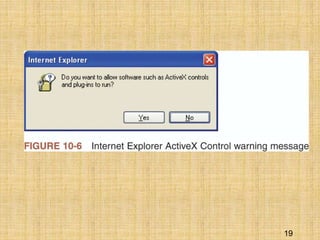
• The actions of ActiveX controls cannot be halted
once they begin execution
19
20
Viruses, Worms, and Antivirus
Software
• Virus
– Software that attaches itself to another program
– Can cause damage when the host program is
activated
• Macro virus
– Type of virus coded as a small program (macro) and
is embedded in a file
• Antivirus software
– Detects viruses and worms
21
Digital Certificates
• A digital certificate is a program embedded in
a Web page that verifies that the sender or
Web site is who or what it claims to be
• A certificate is signed code or messages that
provide proof that the holder is the person
identified by the certificate
• Certification authority (CA) issues digital
certificates
22
23
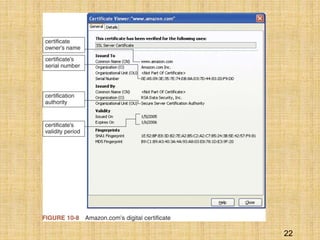
Digital Certificates (continued)
• Main elements:
– Certificate owner’s identifying information
– Certificate owner’s public key
– Dates between which the certificate is valid
– Serial number of the certificate
– Name of the certificate issuer
– Digital signature of the certificate issuer
24
Steganography
• Describes the process of hiding information
within another piece of information
• Provides a way of hiding an encrypted file
within another file
• Messages hidden using steganography are
difficult to detect
25
Communication Channel Security
• Secrecy is the prevention of unauthorized
information disclosure
• Privacy is the protection of individual rights to
nondisclosure
• Sniffer programs
– Provide the means to record information passing
through a computer or router that is handling
Internet traffic
26
Integrity Threats
• Integrity threats exist when an unauthorized
party can alter a message stream of information
• Cybervandalism
– Electronic defacing of an existing Web site’s page
• Masquerading or spoofing
– Pretending to be someone you are not
• Domain name servers (DNSs)
– Computers on the Internet that maintain directories
that link domain names to IP addresses
27
Necessity Threats
• Purpose is to disrupt or deny normal
computer processing
• DoS attacks
– Remove information altogether
– Delete information from a transmission or file
28
Threats to Wireless Networks
• Wardrivers
– Attackers drive around using their wireless-
equipped laptop computers to search for
accessible networks
• Warchalking
– When wardrivers find an open network they
sometimes place a chalk mark on the building
29
Encryption Solutions
• Encryption
– Using a mathematically based program and a
secret key to produce a string of characters that is
unintelligible
• Cryptography
– Science that studies encryption
30
Encryption Algorithms
• An encryption algorithm is the logic behind
encryption programs
• Encryption program
– Program that transforms normal text into cipher
text
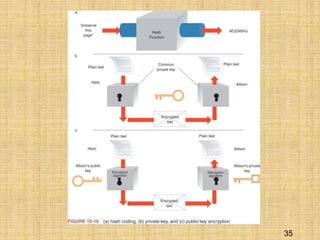
• Hash coding
– Process that uses a hash algorithm to calculate a
number from a message of any length
31
Asymmetric Encryption
• Asymmetric encryption encodes messages by
using two mathematically related numeric
keys
• Public key
– Freely distributed to the public at large
• Private key
– Belongs to the key owner, who keeps the key
secret
32
Asymmetric Encryption
(continued)
• Pretty Good Privacy (PGP)
– One of the most popular technologies used to
implement public-key encryption
– Set of software tools that can use several different
encryption algorithms to perform public-key
encryption
– Can be used to encrypt e-mail messages
33
Symmetric Encryption
• Symmetric encryption encodes a message with
one of several available algorithms that use a
single numeric key
• Data Encryption Standard (DES)
– Set of encryption algorithms adopted by the U.S.
government for encrypting sensitive information
• Triple Data Encryption Standard
– Offers good protection
– Cannot be cracked even with today’s supercomputers
34
Comparing Asymmetric and
Symmetric Encryption Systems
• Public-key (asymmetric) systems
– Provide several advantages over private-key
(symmetric) encryption methods
• Secure Sockets Layer (SSL)
– Provides secure information transfer through the
Internet
– Secures connections between two computers
• S-HTTP
– Sends individual messages securely
35
36
Ensuring Transaction Integrity
with Hash Functions
• Integrity violation
– Occurs whenever a message is altered while in
transit between the sender and receiver
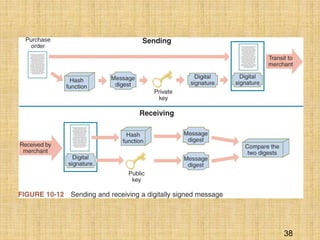
• Hash algorithms are one-way functions
– There is no way to transform the hash value back
to the original message
• Message digest
– Small integer number that summarizes the
encrypted information
37
Ensuring Transaction Integrity with
Digital Signatures
• Hash algorithms are not a complete solution
– Anyone could:
• Intercept a purchase order
• Alter the shipping address and quantity ordered
• Re-create the message digest
• Send the message and new message digest on to the
merchant
• Digital signature
– An encrypted message digest
38
39
Security for Server Computers
• Web server
– Can compromise secrecy if it allows automatic
directory listings
– Can compromise security by requiring users to
enter a username and password
• Dictionary attack programs
– Cycle through an electronic dictionary, trying every
word in the book as a password
40
Other Programming Threats
• Buffer
– An area of memory set aside to hold data read
from a file or database
• Buffer overrun
– Occurs because the program contains an error or
bug that causes the overflow
• Mail bomb
– Occurs when hundreds or even thousands of
people each send a message to a particular
address
41
Firewalls
• Software or hardware and software
combination installed on a network to control
packet traffic
• Provides a defense between the network to
be protected and the Internet, or other
network that could pose a threat
42
Firewalls (continued)
• Characteristics
– All traffic from inside to outside and from outside to
inside the network must pass through the firewall
– Only authorized traffic is allowed to pass
– Firewall itself is immune to penetration
• Trusted networks are inside the firewall
• Untrusted networks are outside the firewall
43
Firewalls (continued)
• Packet-filter firewalls
– Examine data flowing back and forth between a
trusted network and the Internet
• Gateway servers
– Firewalls that filter traffic based on the application
requested
• Proxy server firewalls
– Firewalls that communicate with the Internet on
the private network’s behalf
44
Organizations that Promote
Computer Security
• CERT
– Responds to thousands of security incidents each
year
– Helps Internet users and companies become more
knowledgeable about security risks
– Posts alerts to inform the Internet community
about security events
45
Other Organizations
• SANS Institute
– A cooperative research and educational
organization
• SANS Internet Storm Center
– Web site that provides current information on the
location and intensity of computer attacks
• Microsoft Security Research Group
– Privately sponsored site that offers free
information about computer security issues
46
Computer Forensics and Ethical
Hacking
• Computer forensics experts
– Hired to probe PCs and locate information that
can be used in legal proceedings
• Computer forensics
– The collection, preservation, and analysis of
computer-related evidence
47
Summary
• Assets that companies must protect include:
– Client computers
– Computer communication channels
– Web servers
• Communication channels, in general, and the
Internet, in particular, are especially
vulnerable to attacks
• Encryption
– Provides secrecy
48
Summary (continued)
• Web servers are susceptible to security
threats
• Programs that run on servers might:
– Damage databases
– Abnormally terminate server software
– Make subtle changes in proprietary information
• Security organizations include CERT and
SANS
THANK YOU
49

E-COMMERCE SECURITY (2).ppt

  • 1.
    Chapter 10: Electronic CommerceSecurity Electronic Commerce, Seventh Annual Edition
  • 2.
    2 Objectives In this chapter,you will learn about: • Online security issues • Security for client computers • Security for the communication channels between computers • Security for server computers • Organizations that promote computer, network, and Internet security
  • 3.
    3 Online Security IssuesOverview • Computer security – The protection of assets from unauthorized access, use, alteration, or destruction • Physical security – Includes tangible protection devices • Logical security – Protection of assets using nonphysical means • Threat – Any act or object that poses a danger to computer assets
  • 4.
    4 Managing Risk • Countermeasure –General name for a procedure that recognizes, reduces, or eliminates a threat • Eavesdropper – Person or device that can listen in on and copy Internet transmissions • Crackers or hackers – Write programs or manipulate technologies to obtain unauthorized access to computers and networks
  • 5.
  • 6.
    6 Computer Security Classifications •Secrecy – Protecting against unauthorized data disclosure and ensuring the authenticity of a data source • Integrity – Refers to preventing unauthorized data modification • Necessity – Refers to preventing data delays or denials
  • 7.
    7 Security Policy andIntegrated Security • A security policy is a written statement describing: – Which assets to protect and why they are being protected – Who is responsible for that protection – Which behaviors are acceptable and which are not • First step in creating a security policy – Determine which assets to protect from which threats
  • 8.
  • 9.
    9 Security Policy andIntegrated Security (continued) • Elements of a security policy address: – Authentication – Access control – Secrecy – Data integrity – Audits
  • 10.
    10 Security for ClientComputers • Stateless connection – Each transmission of information is independent • Session cookies – Exist until the Web client ends connection • Persistent cookies – Remain on a client computer indefinitely
  • 11.
    11 Security for ClientComputers (continued) • First-party cookies – Cookies placed on a client computer by a Web server site • Third-party cookies – Originates on a Web site other than the site being visited • Web bug – Tiny graphic that a third-party Web site places on another site’s Web page
  • 12.
  • 13.
    13 Active Content • Activecontent refers to programs embedded transparently in Web pages that cause an action to occur • Scripting languages – Provide scripts, or commands, that are executed • Applet – Small application program
  • 14.
  • 15.
    15 Active Content (continued) •Trojan horse – Program hidden inside another program or Web page that masks its true purpose • Zombie – Program that secretly takes over another computer to launch attacks on other computers – Attacks can be very difficult to trace to their creators
  • 16.
    16 Java Applets • Java –Programming language developed by Sun Microsystems • Java sandbox – Confines Java applet actions to a set of rules defined by the security model • Untrusted Java applets – Applets not established as secure
  • 17.
    17 JavaScript • Scripting languagedeveloped by Netscape to enable Web page designers to build active content • Can be used for attacks by: – Executing code that destroys a client’s hard disk – Discloses e-mail stored in client mailboxes – Sends sensitive information to an attacker’s Web server
  • 18.
    18 ActiveX Controls • AnActiveX control is an object containing programs and properties that Web designers place on Web pages • ActiveX components can be constructed using different languages programs but the most common are C++ and Visual Basic • The actions of ActiveX controls cannot be halted once they begin execution
  • 19.
  • 20.
    20 Viruses, Worms, andAntivirus Software • Virus – Software that attaches itself to another program – Can cause damage when the host program is activated • Macro virus – Type of virus coded as a small program (macro) and is embedded in a file • Antivirus software – Detects viruses and worms
  • 21.
    21 Digital Certificates • Adigital certificate is a program embedded in a Web page that verifies that the sender or Web site is who or what it claims to be • A certificate is signed code or messages that provide proof that the holder is the person identified by the certificate • Certification authority (CA) issues digital certificates
  • 22.
  • 23.
    23 Digital Certificates (continued) •Main elements: – Certificate owner’s identifying information – Certificate owner’s public key – Dates between which the certificate is valid – Serial number of the certificate – Name of the certificate issuer – Digital signature of the certificate issuer
  • 24.
    24 Steganography • Describes theprocess of hiding information within another piece of information • Provides a way of hiding an encrypted file within another file • Messages hidden using steganography are difficult to detect
  • 25.
    25 Communication Channel Security •Secrecy is the prevention of unauthorized information disclosure • Privacy is the protection of individual rights to nondisclosure • Sniffer programs – Provide the means to record information passing through a computer or router that is handling Internet traffic
  • 26.
    26 Integrity Threats • Integritythreats exist when an unauthorized party can alter a message stream of information • Cybervandalism – Electronic defacing of an existing Web site’s page • Masquerading or spoofing – Pretending to be someone you are not • Domain name servers (DNSs) – Computers on the Internet that maintain directories that link domain names to IP addresses
  • 27.
    27 Necessity Threats • Purposeis to disrupt or deny normal computer processing • DoS attacks – Remove information altogether – Delete information from a transmission or file
  • 28.
    28 Threats to WirelessNetworks • Wardrivers – Attackers drive around using their wireless- equipped laptop computers to search for accessible networks • Warchalking – When wardrivers find an open network they sometimes place a chalk mark on the building
  • 29.
    29 Encryption Solutions • Encryption –Using a mathematically based program and a secret key to produce a string of characters that is unintelligible • Cryptography – Science that studies encryption
  • 30.
    30 Encryption Algorithms • Anencryption algorithm is the logic behind encryption programs • Encryption program – Program that transforms normal text into cipher text • Hash coding – Process that uses a hash algorithm to calculate a number from a message of any length
  • 31.
    31 Asymmetric Encryption • Asymmetricencryption encodes messages by using two mathematically related numeric keys • Public key – Freely distributed to the public at large • Private key – Belongs to the key owner, who keeps the key secret
  • 32.
    32 Asymmetric Encryption (continued) • PrettyGood Privacy (PGP) – One of the most popular technologies used to implement public-key encryption – Set of software tools that can use several different encryption algorithms to perform public-key encryption – Can be used to encrypt e-mail messages
  • 33.
    33 Symmetric Encryption • Symmetricencryption encodes a message with one of several available algorithms that use a single numeric key • Data Encryption Standard (DES) – Set of encryption algorithms adopted by the U.S. government for encrypting sensitive information • Triple Data Encryption Standard – Offers good protection – Cannot be cracked even with today’s supercomputers
  • 34.
    34 Comparing Asymmetric and SymmetricEncryption Systems • Public-key (asymmetric) systems – Provide several advantages over private-key (symmetric) encryption methods • Secure Sockets Layer (SSL) – Provides secure information transfer through the Internet – Secures connections between two computers • S-HTTP – Sends individual messages securely
  • 35.
  • 36.
    36 Ensuring Transaction Integrity withHash Functions • Integrity violation – Occurs whenever a message is altered while in transit between the sender and receiver • Hash algorithms are one-way functions – There is no way to transform the hash value back to the original message • Message digest – Small integer number that summarizes the encrypted information
  • 37.
    37 Ensuring Transaction Integritywith Digital Signatures • Hash algorithms are not a complete solution – Anyone could: • Intercept a purchase order • Alter the shipping address and quantity ordered • Re-create the message digest • Send the message and new message digest on to the merchant • Digital signature – An encrypted message digest
  • 38.
  • 39.
    39 Security for ServerComputers • Web server – Can compromise secrecy if it allows automatic directory listings – Can compromise security by requiring users to enter a username and password • Dictionary attack programs – Cycle through an electronic dictionary, trying every word in the book as a password
  • 40.
    40 Other Programming Threats •Buffer – An area of memory set aside to hold data read from a file or database • Buffer overrun – Occurs because the program contains an error or bug that causes the overflow • Mail bomb – Occurs when hundreds or even thousands of people each send a message to a particular address
  • 41.
    41 Firewalls • Software orhardware and software combination installed on a network to control packet traffic • Provides a defense between the network to be protected and the Internet, or other network that could pose a threat
  • 42.
    42 Firewalls (continued) • Characteristics –All traffic from inside to outside and from outside to inside the network must pass through the firewall – Only authorized traffic is allowed to pass – Firewall itself is immune to penetration • Trusted networks are inside the firewall • Untrusted networks are outside the firewall
  • 43.
    43 Firewalls (continued) • Packet-filterfirewalls – Examine data flowing back and forth between a trusted network and the Internet • Gateway servers – Firewalls that filter traffic based on the application requested • Proxy server firewalls – Firewalls that communicate with the Internet on the private network’s behalf
  • 44.
    44 Organizations that Promote ComputerSecurity • CERT – Responds to thousands of security incidents each year – Helps Internet users and companies become more knowledgeable about security risks – Posts alerts to inform the Internet community about security events
  • 45.
    45 Other Organizations • SANSInstitute – A cooperative research and educational organization • SANS Internet Storm Center – Web site that provides current information on the location and intensity of computer attacks • Microsoft Security Research Group – Privately sponsored site that offers free information about computer security issues
  • 46.
    46 Computer Forensics andEthical Hacking • Computer forensics experts – Hired to probe PCs and locate information that can be used in legal proceedings • Computer forensics – The collection, preservation, and analysis of computer-related evidence
  • 47.
    47 Summary • Assets thatcompanies must protect include: – Client computers – Computer communication channels – Web servers • Communication channels, in general, and the Internet, in particular, are especially vulnerable to attacks • Encryption – Provides secrecy
  • 48.
    48 Summary (continued) • Webservers are susceptible to security threats • Programs that run on servers might: – Damage databases – Abnormally terminate server software – Make subtle changes in proprietary information • Security organizations include CERT and SANS
  • 49.