Email Security
1
Introduction
 Electronic mail or, simply Email is the most widely
used and regarded network services
 Currently message contents are not safe-
 May be inspected either in transit
 Or by suitably privileged users on destination
system
2
Basic steps in E-mailing
SMTP
To:
bob@someschoo
l.com
From:
alice@somedom
ain.com
Sender mail
server
Receiver mail
server
From:
alice@some
domain.co
m
3
Email Security
 techniques for protecting email accounts,
content, and communication against
unauthorized access, loss or compromise.
 involves encrypting, the content of email
messages to protect potentially sensitive
information from being read by anyone other than
intended recipients.
4
Common email threats
 Malware – short term for “malicious software”.
 Spam – Unsolicited commercial e-mail.
 Phishing – Somehow related to spam.
 Social engineering - A common social engineering
attack is e-mail spoofing.
 Many more..
5
How email security works:
USER A USER B
Public Key
Private Key
6
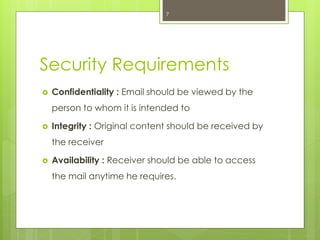
Security Requirements
 Confidentiality : Email should be viewed by the
person to whom it is intended to
 Integrity : Original content should be received by
the receiver
 Availability : Receiver should be able to access
the mail anytime he requires.
7
Secure transmission of Emails
 Pretty Good Privacy(PGP)
o Secure/Multipurpose Internet Mail
Extensions (S/MIME)
8
Pretty Good Privacy(PGP)
 Developed by Phil Zimmermann, back in 1991.
 A number of reasons can be cited for its
popularity-
 Available free worldwide
 Based on secure algorithm
 Wide range of applicability
9
Operational description
The mathematics behind PGP can get pretty
complex steps:
 Authentication
 Confidentiality
 Compression
 Email Compatibility
 Segmentation
10
Authentication
Confidentiality
11
Practically, both the Authentication and Confidentiality services
are provided in parallel.
Compression
12
 By default PGP compresses after signing and before
encrypting.
 Uses ZIP compression algorithm
Message
Locks with session
key
Compress the
message
Encrypts with
public key
Email Compatibility
 PGP will have binary data to send(encoded message)
 Converts the raw 8-bit binary stream to a stream of printable
ASCII characters for sending
 Uses radix-64 algorithm for conversion
Segmentation/Reassembly
 Email protocols even restricted to maximum length.
 PGP automatically divides the message that is too large into
segments that are small enough to send via e-mail
 Divide and conquer
 Reassembly at the receiver end is required before
verifying signature and decryption
13
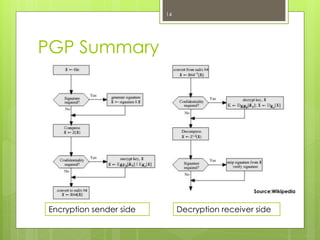
PGP Summary
Encryption sender side Decryption receiver side
Source:Wikipedia
14
Secure transmission of Emails
o Pretty Good Privacy(PGP)
 Secure/Multipurpose Internet Mail
Extensions (S/MIME)
15
Secure/Multipurpose Internet
Mail Extension (S/MIME)
 Originally developed by RSA Data Security
 Security enhancement to the MIME data sent
through email
 MIME replaced the restricted SMTP protocol, as
SMTP was not able to exchange the multimedia
files.
 Supported by major email programs like Outlook,
Netscape
16
S/MIME Functions
 Enveloped data: encrypted content &
associated keys
 Signed data: the content plus signature are then
encoded using base64 encoding
 Clear-signed data: only the digital signature is
encoded using base64
 Signed and enveloped data: signed-only and
encrypted-only entities may be nested
17
S/MIME: Signed mail
18
Create a message digest to be used in forming a digital signature. Encrypt message
digest to form digital signature.
S/MIME: Encrypted Mail
19
• Encrypt session key for transmission with message.
• Encrypt message for transmission with one-time session key.
Conclusion
20
Email security is becoming more important with time.
Companies are using it for exchanging important information.
It is important to protect this information. If hackers get
access to this information, then they can sell it to your competitors.
Thus, your competitors will get an unfair advantage. It is important
to ensure that your emails are encrypted. You can use email
encryption software for encrypting your emails. This will ensure that
only your recipient can access your emails.
References
 E-mail Security: An Overview of Threats and
Safeguards (ahima.org)
 https://en.wikipedia.org/w/index.php?title=Pretty_
Good_Privacy&oldid=1028032091
 http://netaccess.on.ca/~rbarclay/bg2pgp.txt
 S/MIME Functionality and Messages
(brainkart.com)
 rfc5751 (ietf.org)
21
Thank You!
22

Email security presentation

  • 1.
  • 2.
    Introduction  Electronic mailor, simply Email is the most widely used and regarded network services  Currently message contents are not safe-  May be inspected either in transit  Or by suitably privileged users on destination system 2
  • 3.
    Basic steps inE-mailing SMTP To: bob@someschoo l.com From: alice@somedom ain.com Sender mail server Receiver mail server From: alice@some domain.co m 3
  • 4.
    Email Security  techniquesfor protecting email accounts, content, and communication against unauthorized access, loss or compromise.  involves encrypting, the content of email messages to protect potentially sensitive information from being read by anyone other than intended recipients. 4
  • 5.
    Common email threats Malware – short term for “malicious software”.  Spam – Unsolicited commercial e-mail.  Phishing – Somehow related to spam.  Social engineering - A common social engineering attack is e-mail spoofing.  Many more.. 5
  • 6.
    How email securityworks: USER A USER B Public Key Private Key 6
  • 7.
    Security Requirements  Confidentiality: Email should be viewed by the person to whom it is intended to  Integrity : Original content should be received by the receiver  Availability : Receiver should be able to access the mail anytime he requires. 7
  • 8.
    Secure transmission ofEmails  Pretty Good Privacy(PGP) o Secure/Multipurpose Internet Mail Extensions (S/MIME) 8
  • 9.
    Pretty Good Privacy(PGP) Developed by Phil Zimmermann, back in 1991.  A number of reasons can be cited for its popularity-  Available free worldwide  Based on secure algorithm  Wide range of applicability 9
  • 10.
    Operational description The mathematicsbehind PGP can get pretty complex steps:  Authentication  Confidentiality  Compression  Email Compatibility  Segmentation 10
  • 11.
    Authentication Confidentiality 11 Practically, both theAuthentication and Confidentiality services are provided in parallel.
  • 12.
    Compression 12  By defaultPGP compresses after signing and before encrypting.  Uses ZIP compression algorithm Message Locks with session key Compress the message Encrypts with public key Email Compatibility  PGP will have binary data to send(encoded message)  Converts the raw 8-bit binary stream to a stream of printable ASCII characters for sending  Uses radix-64 algorithm for conversion
  • 13.
    Segmentation/Reassembly  Email protocolseven restricted to maximum length.  PGP automatically divides the message that is too large into segments that are small enough to send via e-mail  Divide and conquer  Reassembly at the receiver end is required before verifying signature and decryption 13
  • 14.
    PGP Summary Encryption senderside Decryption receiver side Source:Wikipedia 14
  • 15.
    Secure transmission ofEmails o Pretty Good Privacy(PGP)  Secure/Multipurpose Internet Mail Extensions (S/MIME) 15
  • 16.
    Secure/Multipurpose Internet Mail Extension(S/MIME)  Originally developed by RSA Data Security  Security enhancement to the MIME data sent through email  MIME replaced the restricted SMTP protocol, as SMTP was not able to exchange the multimedia files.  Supported by major email programs like Outlook, Netscape 16
  • 17.
    S/MIME Functions  Envelopeddata: encrypted content & associated keys  Signed data: the content plus signature are then encoded using base64 encoding  Clear-signed data: only the digital signature is encoded using base64  Signed and enveloped data: signed-only and encrypted-only entities may be nested 17
  • 18.
    S/MIME: Signed mail 18 Createa message digest to be used in forming a digital signature. Encrypt message digest to form digital signature.
  • 19.
    S/MIME: Encrypted Mail 19 •Encrypt session key for transmission with message. • Encrypt message for transmission with one-time session key.
  • 20.
    Conclusion 20 Email security isbecoming more important with time. Companies are using it for exchanging important information. It is important to protect this information. If hackers get access to this information, then they can sell it to your competitors. Thus, your competitors will get an unfair advantage. It is important to ensure that your emails are encrypted. You can use email encryption software for encrypting your emails. This will ensure that only your recipient can access your emails.
  • 21.
    References  E-mail Security:An Overview of Threats and Safeguards (ahima.org)  https://en.wikipedia.org/w/index.php?title=Pretty_ Good_Privacy&oldid=1028032091  http://netaccess.on.ca/~rbarclay/bg2pgp.txt  S/MIME Functionality and Messages (brainkart.com)  rfc5751 (ietf.org) 21
  • 22.