Chapter 5
E-commerce Security
Learner Activities
 Read on /watch
 cyberwar: MAD2.0
 Watch the movie:
 we are legion
 Research on the iphone app called :
 spyphone
The E-commerce Security
Environment
 Overall size and losses of cybercrime unclear
 Reporting issues
 Computer Crime and Security Survey 2022
 95 percent of cybersecurity breaches are caused by human error.
 68 percent of business leaders feel their cybersecurity risks are increasing.
 On average, only five percent of companies’ folders are properly
protected.
 Approximately 70 percent of breaches in 2021 were financially motivated,
while less than five percent were motivated by espionage.
 How do companies protect itself from this hostile environment?
Slide 5-3
Cyberwar: MAD 2.0
 What is the difference between
hacking and cyberwar?
 Why has cyberwar become more
potentially devastating in the
past decade?
 Why has Google been the target
of so many cyberattacks?
 Is it possible to find a political
solution to MAD 2.0?
Slide
5-4
Myths of information security
 Protection against hackers
 Mainstream Websites Are Safe to Visit-scam sites?
 Segregation of external threats
 Antivirus and Cyber-Security Software is Good Enough
 Complex Passwords Cannot Be Cracked-programs for
hacking
 My Data Isn’t Worth Anything-social media adverts
and marketing? Data can be materialized for crime,
such as theft, impersonation, and physical harm. If it’s
valuable for some, it’s valuable for many.
 Scams and Phishing Are Glaringly Obvious-social
media trust issues
Slide
5-5
Security issues
 From the user’s perspective:
 Is the Web server owned and operated by a legitimate
company?
 Does the Web page and form contain some malicious or
dangerous code or content?
 Will the Web server distribute unauthorized information
the user provides to some other party?
Slide
5-6
Factors influencing E-
commerce Security?
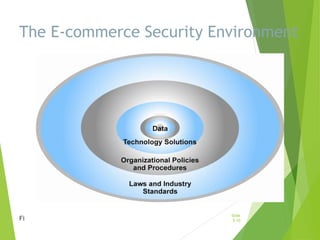
 To achieve highest degree of security
 New technologies
 Organizational policies and procedures
 Industry standards and government laws
 Other factors
 Time value of money
 Cost of security vs. potential loss
 Security often breaks at weakest link
Slide
5-7
Security issues cont’
 From the company’s perspective:
 Will the user not attempt to break into the Web server or
alter the pages and content at the site?
 Will the user will try to disrupt the server so that it isn’t
available to others?
Slide
5-8
Security issues cont’
 From both parties’ perspectives:
 Is the network connection free from eavesdropping by a
third party “listening” on the line?
 Has the information sent back and forth between the
server and the user’s browser been altered
Slide
5-9
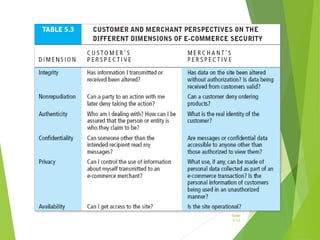
The E-commerce Security Environment
Fi
Slide
5-10
Security requirements
 Authentication
 The process by which one entity verifies that another entity is who they
claim to be
 Authorization
 The process that ensures that a person has the right to access certain
resources
 Auditing
 The process of collecting information about attempts to access particular
resources, use particular privileges, or perform other security actions
 Confidentiality
 Keeping private or sensitive information from being disclosed to
unauthorized individuals, entities, or processes
 Integrity
 As applied to data, the ability to protect data from being altered or
destroyed in an unauthorized or accidental manner
 Non-repudiation
 The ability to limit parties from refuting that a legitimate transaction took
place, usually by means of a signature Slide
5-11
Slide
5-12
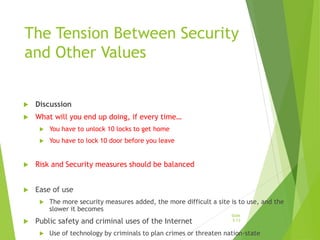
The Tension Between Security
and Other Values
 Discussion
 What will you end up doing, if every time…
 You have to unlock 10 locks to get home
 You have to lock 10 door before you leave
 Risk and Security measures should be balanced
 Ease of use
 The more security measures added, the more difficult a site is to use, and the
slower it becomes
 Public safety and criminal uses of the Internet
 Use of technology by criminals to plan crimes or threaten nation-state
Slide
5-13
A simple case
 When you take a vacation, you supervisor asks you to
provide your password ..
 Should you comply?
 Can you refuse?
 On what basis?
Slide
5-14
Security Threats in the
E-commerce Environment
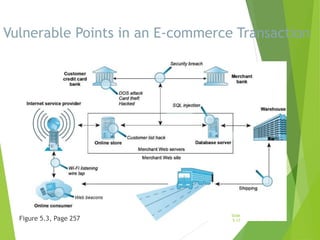
Three key points of vulnerability
in e-commerce environment:
1. Client
2. Server
3. Communications pipeline (Internet
communications channels)
Slide
5-15
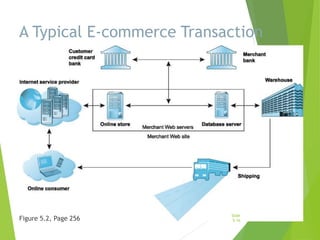
A Typical E-commerce Transaction
Figure 5.2, Page 256
Slide
5-16
Vulnerable Points in an E-commerce Transaction
Figure 5.3, Page 257
Slide
5-17
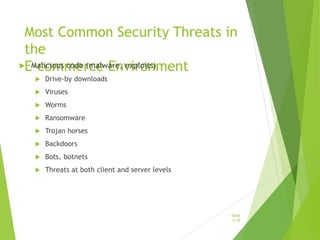
Most Common Security Threats in
the
E-commerce Environment
 Malicious code (malware, exploits)
 Drive-by downloads
 Viruses
 Worms
 Ransomware
 Trojan horses
 Backdoors
 Bots, botnets
 Threats at both client and server levels
Slide
5-18
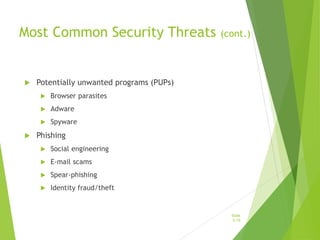
Most Common Security Threats (cont.)
 Potentially unwanted programs (PUPs)
 Browser parasites
 Adware
 Spyware
 Phishing
 Social engineering
 E-mail scams
 Spear-phishing
 Identity fraud/theft
Slide
5-19
Most Common Security Threats (cont.)
 Hacking
 Hackers vs. crackers
 Types of hackers: White, black, grey hats
 Hacktivism
 Cybervandalism:
 Disrupting, defacing, destroying Web site
 Data breach
 Losing control over corporate information to outsiders
Slide
5-20
We Are Legion
What organization and technical
failures led to the data breach on the
PlayStation Network?
Are there any positive social benefits
of hacktivism?
Have you or anyone you know
experienced data breaches or
cybervandalism?
Slide
5-21
Most Common Security Threats (cont.)
 Credit card fraud/theft
 Spoofing and pharming
 Spam (junk) Web sites (link farms)
 Identity fraud/theft
 Denial of service (DoS) attack
 Hackers flood site with useless traffic to
overwhelm network
 Distributed denial of service (DDoS)
attack
Slide
5-22
Most Common Security Threats (cont.)
 Sniffing
 Eavesdropping program that monitors information
traveling over a network
 Insider attacks
 Poorly designed server and client
software
 Social network security issues
 Mobile platform security issues
 Vishing, smishing, madware
 Cloud security issues
Slide
5-23
Think Your Smartphone Is Secure?
 What types of threats do smartphones
face?
 Are there any particular vulnerabilities to
this type of device?
 What did Nicolas Seriot’s “Spyphone”
prove?
 Are apps more or less likely to be subject
to threats than traditional PC software
programs?
Slide
5-24
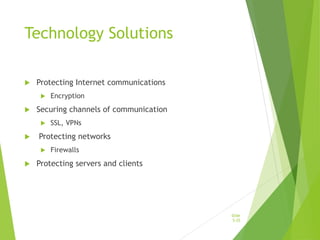
Technology Solutions
 Protecting Internet communications
 Encryption
 Securing channels of communication
 SSL, VPNs
 Protecting networks
 Firewalls
 Protecting servers and clients
Slide
5-25
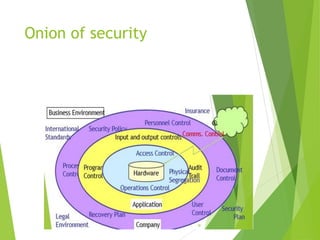
Onion of security
Slide
5-26
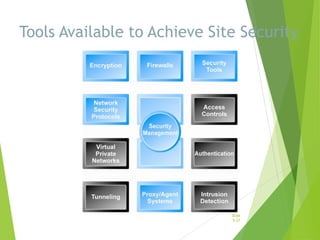
Tools Available to Achieve Site Security
Slide
5-27
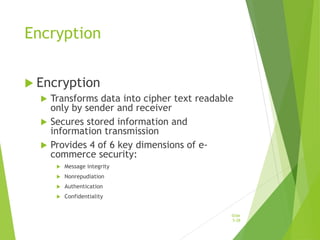
Encryption
 Encryption
 Transforms data into cipher text readable
only by sender and receiver
 Secures stored information and
information transmission
 Provides 4 of 6 key dimensions of e-
commerce security:
 Message integrity
 Nonrepudiation
 Authentication
 Confidentiality
Slide
5-28
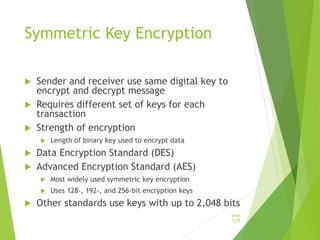
Symmetric Key Encryption
 Sender and receiver use same digital key to
encrypt and decrypt message
 Requires different set of keys for each
transaction
 Strength of encryption
 Length of binary key used to encrypt data
 Data Encryption Standard (DES)
 Advanced Encryption Standard (AES)
 Most widely used symmetric key encryption
 Uses 128-, 192-, and 256-bit encryption keys
 Other standards use keys with up to 2,048 bits
Slide
5-29
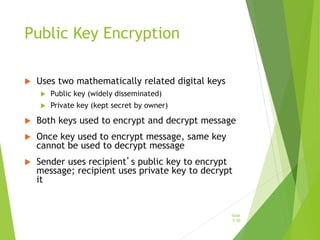
Public Key Encryption
 Uses two mathematically related digital keys
 Public key (widely disseminated)
 Private key (kept secret by owner)
 Both keys used to encrypt and decrypt message
 Once key used to encrypt message, same key
cannot be used to decrypt message
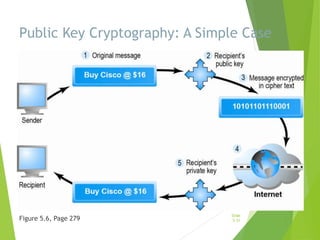
 Sender uses recipient’s public key to encrypt
message; recipient uses private key to decrypt
it
Slide
5-30
Public Key Cryptography: A Simple Case
Figure 5.6, Page 279
Slide
5-31
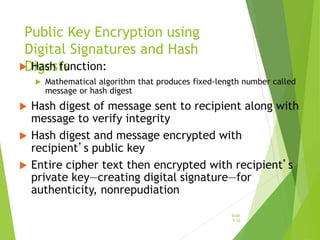
Public Key Encryption using
Digital Signatures and Hash
Digests
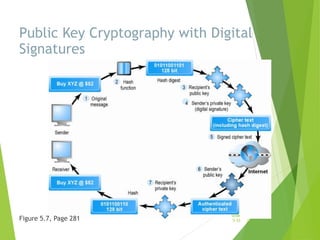
 Hash function:
 Mathematical algorithm that produces fixed-length number called
message or hash digest
 Hash digest of message sent to recipient along with
message to verify integrity
 Hash digest and message encrypted with
recipient’s public key
 Entire cipher text then encrypted with recipient’s
private key—creating digital signature—for
authenticity, nonrepudiation
Slide
5-32
Public Key Cryptography with Digital
Signatures
Figure 5.7, Page 281
Slide
5-33
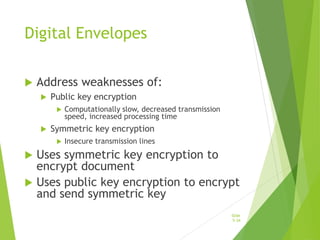
Digital Envelopes
 Address weaknesses of:
 Public key encryption
 Computationally slow, decreased transmission
speed, increased processing time
 Symmetric key encryption
 Insecure transmission lines
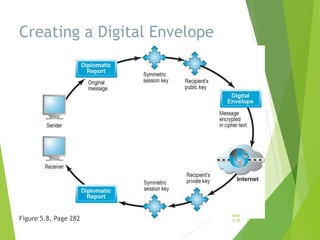
 Uses symmetric key encryption to
encrypt document
 Uses public key encryption to encrypt
and send symmetric key
Slide
5-34
Creating a Digital Envelope
Figure 5.8, Page 282
Slide
5-35
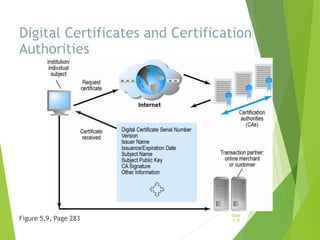
Digital Certificates and
Public Key Infrastructure (PKI)
 Digital certificate includes:
 Name of subject/company
 Subject’s public key
 Digital certificate serial number
 Expiration date, issuance date
 Digital signature of CA
 Public Key Infrastructure (PKI):
 CAs and digital certificate procedures
 PGP
Slide
5-36
Digital Certificates and Certification
Authorities
Figure 5.9, Page 283
Slide
5-37
Limits to Encryption Solutions
 Doesn’t protect storage of private key
 PKI not effective against insiders, employees
 Protection of private keys by individuals may be haphazard
 No guarantee that verifying computer of merchant is
secure
 CAs are unregulated, self-selecting organizations
Slide
5-38
Securing Channels of
Communication
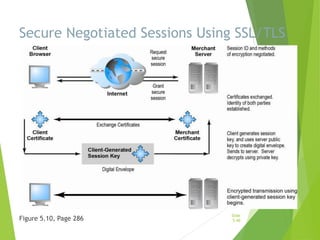
 Secure Sockets Layer (SSL)/Transport Layer Security
(TLS)
 Establishes secure, negotiated client–server session
 Virtual Private Network (VPN)
 Allows remote users to securely access internal network
via the Internet
 Wireless (Wi-Fi) networks
 WPA2
Slide
5-39
Secure Negotiated Sessions Using SSL/TLS
Figure 5.10, Page 286
Slide
5-40
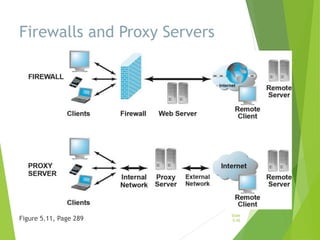
Protecting Networks
 Firewall
 Hardware or software
 Uses security policy to filter packets
 Two main methods:
 Packet filters
 Application gateways
 Proxy servers (proxies)
 Software servers that handle all
communications from or sent to the Internet
 Intrusion detection systems
 Intrusion prevention systems
Slide
5-41
Firewalls and Proxy Servers
Figure 5.11, Page 289
Slide
5-42
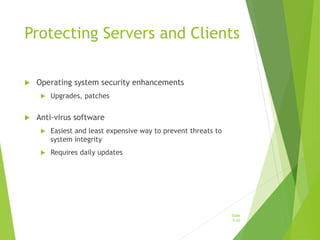
Protecting Servers and Clients
 Operating system security enhancements
 Upgrades, patches
 Anti-virus software
 Easiest and least expensive way to prevent threats to
system integrity
 Requires daily updates
Slide
5-43
Management Policies, Business
Procedures, and Public Laws
 Worldwide, companies spend more than $65 billion on security hardware,
software, services
 Managing risk includes:
 Technology
 Effective management policies
 Public laws and active enforcement
Slide
5-44
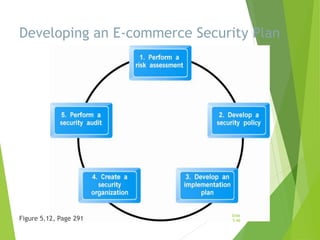
A Security Plan: Management
Policies
 Risk assessment
 Security policy
 Implementation plan
 Security organization
 Access controls
 Authentication procedures, including
biometrics
 Authorization policies, authorization
management systems
 Security audit
Slide
5-45
Developing an E-commerce Security Plan
Figure 5.12, Page 291
Slide
5-46
The Role of Laws and Public
Policy
 Laws that give authorities tools for identifying,
tracing, prosecuting cybercriminals:
 National Information Infrastructure Protection Act of 1996
 USA Patriot Act
 Homeland Security Act
 Private and private-public cooperation
 CERT Coordination Center
 US-CERT
 Government policies and controls on encryption
software
 OECD, G7/G8, Council of Europe, Wassener Arrangement
Slide
5-47
Security policy and integrated security
 A security policy is a written statement describing:
• Which assets to protect and why they are being
protected
• Who is responsible for that protection
• Which behaviors are acceptable and which are not
 First step in creating a security policy
• Determine which assets to protect from which
threats Slide
5-48
Cont’
 Elements of a security policy address:
 Authentication
 Access control
 Secrecy
 Data integrity
 Audits
Slide
5-49
Security policy continued
 The security policy may cover issues like:
 What service types (e.g., web, FTP, SMTP) users may have
access to?
 What classes of information exist within the organization
and which should be encrypted before being transmitted?
 What client data does the organization hold. How sensitive
is it? How is it to be protected?
 What class of employees may have remote access to the
corporate network?
 Roles and responsibilities of managers and employees in
implementing the security policy.
 How security breaches are to be responded to?
Slide
5-50
Security policy cont’
 The security policy should also consider physical aspects
of network security. For example,
 Who has access to the corporate server?
 Is it in a locked environment or kept in an open office?
 What is the procedure for determining who should be
given access? The security policy regulates the activities
of employees just as much as it defines how IT
infrastructure will be configured. The policy should
include details on how it is to be enforced
 How individual responsibilities are determined?
Slide
5-51
Cont’
 For it to be effective, the policy needs regular testing
and review to judge the security measures.
 The review process needs to take into account any
changes in technology or business practices
which may have an influence upon security.
 Lastly, the policy itself needs to be regarded as a
living document which will be updated at set intervals
to reflect the evolving ways in which the
business, customers and technology interact.
Slide
5-52
Security standards
 There are various standards pertaining to the security
aspects of enterprises. Some of them are
ISO 17799 (Information technology – Code of practice
for information security management).
(ISO/IEC 2000).
SSE-CMM (Systems security engineering – Capability
maturity model).
(SSE-CMM 2003).
COBIT (Control objectives for information and related
technology).
(COBIT 2000).
Slide
5-53
Organisations that promote Computer
security
 CERT
 Responds to thousands of security incidents each year
 Helps Internet users and companies become more
knowledgeable about security risks
 Posts alerts to inform the Internet community about
security events
Slide
5-54
Other organisations
 SANS Institute
 A cooperative research and educational organization
 SANS Internet Storm Center
 Web site that provides current information on the location
and intensity of computer attacks
 Microsoft Security Research Group
 Privately sponsored site that offers free information about
computer security issues
Slide
5-55
Homework
 Read on
 Firewall
 Digital signatures
 Digital certificates
Slide
5-56

E-commerce security.ppt

  • 1.
  • 2.
    Learner Activities  Readon /watch  cyberwar: MAD2.0  Watch the movie:  we are legion  Research on the iphone app called :  spyphone
  • 3.
    The E-commerce Security Environment Overall size and losses of cybercrime unclear  Reporting issues  Computer Crime and Security Survey 2022  95 percent of cybersecurity breaches are caused by human error.  68 percent of business leaders feel their cybersecurity risks are increasing.  On average, only five percent of companies’ folders are properly protected.  Approximately 70 percent of breaches in 2021 were financially motivated, while less than five percent were motivated by espionage.  How do companies protect itself from this hostile environment? Slide 5-3
  • 4.
    Cyberwar: MAD 2.0 What is the difference between hacking and cyberwar?  Why has cyberwar become more potentially devastating in the past decade?  Why has Google been the target of so many cyberattacks?  Is it possible to find a political solution to MAD 2.0? Slide 5-4
  • 5.
    Myths of informationsecurity  Protection against hackers  Mainstream Websites Are Safe to Visit-scam sites?  Segregation of external threats  Antivirus and Cyber-Security Software is Good Enough  Complex Passwords Cannot Be Cracked-programs for hacking  My Data Isn’t Worth Anything-social media adverts and marketing? Data can be materialized for crime, such as theft, impersonation, and physical harm. If it’s valuable for some, it’s valuable for many.  Scams and Phishing Are Glaringly Obvious-social media trust issues Slide 5-5
  • 6.
    Security issues  Fromthe user’s perspective:  Is the Web server owned and operated by a legitimate company?  Does the Web page and form contain some malicious or dangerous code or content?  Will the Web server distribute unauthorized information the user provides to some other party? Slide 5-6
  • 7.
    Factors influencing E- commerceSecurity?  To achieve highest degree of security  New technologies  Organizational policies and procedures  Industry standards and government laws  Other factors  Time value of money  Cost of security vs. potential loss  Security often breaks at weakest link Slide 5-7
  • 8.
    Security issues cont’ From the company’s perspective:  Will the user not attempt to break into the Web server or alter the pages and content at the site?  Will the user will try to disrupt the server so that it isn’t available to others? Slide 5-8
  • 9.
    Security issues cont’ From both parties’ perspectives:  Is the network connection free from eavesdropping by a third party “listening” on the line?  Has the information sent back and forth between the server and the user’s browser been altered Slide 5-9
  • 10.
    The E-commerce SecurityEnvironment Fi Slide 5-10
  • 11.
    Security requirements  Authentication The process by which one entity verifies that another entity is who they claim to be  Authorization  The process that ensures that a person has the right to access certain resources  Auditing  The process of collecting information about attempts to access particular resources, use particular privileges, or perform other security actions  Confidentiality  Keeping private or sensitive information from being disclosed to unauthorized individuals, entities, or processes  Integrity  As applied to data, the ability to protect data from being altered or destroyed in an unauthorized or accidental manner  Non-repudiation  The ability to limit parties from refuting that a legitimate transaction took place, usually by means of a signature Slide 5-11
  • 12.
  • 13.
    The Tension BetweenSecurity and Other Values  Discussion  What will you end up doing, if every time…  You have to unlock 10 locks to get home  You have to lock 10 door before you leave  Risk and Security measures should be balanced  Ease of use  The more security measures added, the more difficult a site is to use, and the slower it becomes  Public safety and criminal uses of the Internet  Use of technology by criminals to plan crimes or threaten nation-state Slide 5-13
  • 14.
    A simple case When you take a vacation, you supervisor asks you to provide your password ..  Should you comply?  Can you refuse?  On what basis? Slide 5-14
  • 15.
    Security Threats inthe E-commerce Environment Three key points of vulnerability in e-commerce environment: 1. Client 2. Server 3. Communications pipeline (Internet communications channels) Slide 5-15
  • 16.
    A Typical E-commerceTransaction Figure 5.2, Page 256 Slide 5-16
  • 17.
    Vulnerable Points inan E-commerce Transaction Figure 5.3, Page 257 Slide 5-17
  • 18.
    Most Common SecurityThreats in the E-commerce Environment  Malicious code (malware, exploits)  Drive-by downloads  Viruses  Worms  Ransomware  Trojan horses  Backdoors  Bots, botnets  Threats at both client and server levels Slide 5-18
  • 19.
    Most Common SecurityThreats (cont.)  Potentially unwanted programs (PUPs)  Browser parasites  Adware  Spyware  Phishing  Social engineering  E-mail scams  Spear-phishing  Identity fraud/theft Slide 5-19
  • 20.
    Most Common SecurityThreats (cont.)  Hacking  Hackers vs. crackers  Types of hackers: White, black, grey hats  Hacktivism  Cybervandalism:  Disrupting, defacing, destroying Web site  Data breach  Losing control over corporate information to outsiders Slide 5-20
  • 21.
    We Are Legion Whatorganization and technical failures led to the data breach on the PlayStation Network? Are there any positive social benefits of hacktivism? Have you or anyone you know experienced data breaches or cybervandalism? Slide 5-21
  • 22.
    Most Common SecurityThreats (cont.)  Credit card fraud/theft  Spoofing and pharming  Spam (junk) Web sites (link farms)  Identity fraud/theft  Denial of service (DoS) attack  Hackers flood site with useless traffic to overwhelm network  Distributed denial of service (DDoS) attack Slide 5-22
  • 23.
    Most Common SecurityThreats (cont.)  Sniffing  Eavesdropping program that monitors information traveling over a network  Insider attacks  Poorly designed server and client software  Social network security issues  Mobile platform security issues  Vishing, smishing, madware  Cloud security issues Slide 5-23
  • 24.
    Think Your SmartphoneIs Secure?  What types of threats do smartphones face?  Are there any particular vulnerabilities to this type of device?  What did Nicolas Seriot’s “Spyphone” prove?  Are apps more or less likely to be subject to threats than traditional PC software programs? Slide 5-24
  • 25.
    Technology Solutions  ProtectingInternet communications  Encryption  Securing channels of communication  SSL, VPNs  Protecting networks  Firewalls  Protecting servers and clients Slide 5-25
  • 26.
  • 27.
    Tools Available toAchieve Site Security Slide 5-27
  • 28.
    Encryption  Encryption  Transformsdata into cipher text readable only by sender and receiver  Secures stored information and information transmission  Provides 4 of 6 key dimensions of e- commerce security:  Message integrity  Nonrepudiation  Authentication  Confidentiality Slide 5-28
  • 29.
    Symmetric Key Encryption Sender and receiver use same digital key to encrypt and decrypt message  Requires different set of keys for each transaction  Strength of encryption  Length of binary key used to encrypt data  Data Encryption Standard (DES)  Advanced Encryption Standard (AES)  Most widely used symmetric key encryption  Uses 128-, 192-, and 256-bit encryption keys  Other standards use keys with up to 2,048 bits Slide 5-29
  • 30.
    Public Key Encryption Uses two mathematically related digital keys  Public key (widely disseminated)  Private key (kept secret by owner)  Both keys used to encrypt and decrypt message  Once key used to encrypt message, same key cannot be used to decrypt message  Sender uses recipient’s public key to encrypt message; recipient uses private key to decrypt it Slide 5-30
  • 31.
    Public Key Cryptography:A Simple Case Figure 5.6, Page 279 Slide 5-31
  • 32.
    Public Key Encryptionusing Digital Signatures and Hash Digests  Hash function:  Mathematical algorithm that produces fixed-length number called message or hash digest  Hash digest of message sent to recipient along with message to verify integrity  Hash digest and message encrypted with recipient’s public key  Entire cipher text then encrypted with recipient’s private key—creating digital signature—for authenticity, nonrepudiation Slide 5-32
  • 33.
    Public Key Cryptographywith Digital Signatures Figure 5.7, Page 281 Slide 5-33
  • 34.
    Digital Envelopes  Addressweaknesses of:  Public key encryption  Computationally slow, decreased transmission speed, increased processing time  Symmetric key encryption  Insecure transmission lines  Uses symmetric key encryption to encrypt document  Uses public key encryption to encrypt and send symmetric key Slide 5-34
  • 35.
    Creating a DigitalEnvelope Figure 5.8, Page 282 Slide 5-35
  • 36.
    Digital Certificates and PublicKey Infrastructure (PKI)  Digital certificate includes:  Name of subject/company  Subject’s public key  Digital certificate serial number  Expiration date, issuance date  Digital signature of CA  Public Key Infrastructure (PKI):  CAs and digital certificate procedures  PGP Slide 5-36
  • 37.
    Digital Certificates andCertification Authorities Figure 5.9, Page 283 Slide 5-37
  • 38.
    Limits to EncryptionSolutions  Doesn’t protect storage of private key  PKI not effective against insiders, employees  Protection of private keys by individuals may be haphazard  No guarantee that verifying computer of merchant is secure  CAs are unregulated, self-selecting organizations Slide 5-38
  • 39.
    Securing Channels of Communication Secure Sockets Layer (SSL)/Transport Layer Security (TLS)  Establishes secure, negotiated client–server session  Virtual Private Network (VPN)  Allows remote users to securely access internal network via the Internet  Wireless (Wi-Fi) networks  WPA2 Slide 5-39
  • 40.
    Secure Negotiated SessionsUsing SSL/TLS Figure 5.10, Page 286 Slide 5-40
  • 41.
    Protecting Networks  Firewall Hardware or software  Uses security policy to filter packets  Two main methods:  Packet filters  Application gateways  Proxy servers (proxies)  Software servers that handle all communications from or sent to the Internet  Intrusion detection systems  Intrusion prevention systems Slide 5-41
  • 42.
    Firewalls and ProxyServers Figure 5.11, Page 289 Slide 5-42
  • 43.
    Protecting Servers andClients  Operating system security enhancements  Upgrades, patches  Anti-virus software  Easiest and least expensive way to prevent threats to system integrity  Requires daily updates Slide 5-43
  • 44.
    Management Policies, Business Procedures,and Public Laws  Worldwide, companies spend more than $65 billion on security hardware, software, services  Managing risk includes:  Technology  Effective management policies  Public laws and active enforcement Slide 5-44
  • 45.
    A Security Plan:Management Policies  Risk assessment  Security policy  Implementation plan  Security organization  Access controls  Authentication procedures, including biometrics  Authorization policies, authorization management systems  Security audit Slide 5-45
  • 46.
    Developing an E-commerceSecurity Plan Figure 5.12, Page 291 Slide 5-46
  • 47.
    The Role ofLaws and Public Policy  Laws that give authorities tools for identifying, tracing, prosecuting cybercriminals:  National Information Infrastructure Protection Act of 1996  USA Patriot Act  Homeland Security Act  Private and private-public cooperation  CERT Coordination Center  US-CERT  Government policies and controls on encryption software  OECD, G7/G8, Council of Europe, Wassener Arrangement Slide 5-47
  • 48.
    Security policy andintegrated security  A security policy is a written statement describing: • Which assets to protect and why they are being protected • Who is responsible for that protection • Which behaviors are acceptable and which are not  First step in creating a security policy • Determine which assets to protect from which threats Slide 5-48
  • 49.
    Cont’  Elements ofa security policy address:  Authentication  Access control  Secrecy  Data integrity  Audits Slide 5-49
  • 50.
    Security policy continued The security policy may cover issues like:  What service types (e.g., web, FTP, SMTP) users may have access to?  What classes of information exist within the organization and which should be encrypted before being transmitted?  What client data does the organization hold. How sensitive is it? How is it to be protected?  What class of employees may have remote access to the corporate network?  Roles and responsibilities of managers and employees in implementing the security policy.  How security breaches are to be responded to? Slide 5-50
  • 51.
    Security policy cont’ The security policy should also consider physical aspects of network security. For example,  Who has access to the corporate server?  Is it in a locked environment or kept in an open office?  What is the procedure for determining who should be given access? The security policy regulates the activities of employees just as much as it defines how IT infrastructure will be configured. The policy should include details on how it is to be enforced  How individual responsibilities are determined? Slide 5-51
  • 52.
    Cont’  For itto be effective, the policy needs regular testing and review to judge the security measures.  The review process needs to take into account any changes in technology or business practices which may have an influence upon security.  Lastly, the policy itself needs to be regarded as a living document which will be updated at set intervals to reflect the evolving ways in which the business, customers and technology interact. Slide 5-52
  • 53.
    Security standards  Thereare various standards pertaining to the security aspects of enterprises. Some of them are ISO 17799 (Information technology – Code of practice for information security management). (ISO/IEC 2000). SSE-CMM (Systems security engineering – Capability maturity model). (SSE-CMM 2003). COBIT (Control objectives for information and related technology). (COBIT 2000). Slide 5-53
  • 54.
    Organisations that promoteComputer security  CERT  Responds to thousands of security incidents each year  Helps Internet users and companies become more knowledgeable about security risks  Posts alerts to inform the Internet community about security events Slide 5-54
  • 55.
    Other organisations  SANSInstitute  A cooperative research and educational organization  SANS Internet Storm Center  Web site that provides current information on the location and intensity of computer attacks  Microsoft Security Research Group  Privately sponsored site that offers free information about computer security issues Slide 5-55
  • 56.
    Homework  Read on Firewall  Digital signatures  Digital certificates Slide 5-56