Computers: Tools for an Information Age (An Overview)
Objectives Describe the fundamental characteristics of computers Describe the benefits of computers  Distinguish data from information Identify the basic components of a computer system: input, processing, output, and storage List some common input, output, and storage media  Describe the significance of networking Explain the significance of the Internet Explain the various classifications of computers
What Is Computer Literacy? Awareness : of the importance, versatility, and pervasiveness of computers in our society Knowledge : Learning what computers are and how they work – learning the  jargon Interaction : Learning how to use computers
The Need for Computer Fluency What is computer fluency? Knowledge possessed by people who are able to navigate the digital world successfully; includes computer literacy,  plus  knowledge of underlying concepts & principles Points to Ponder… How can you become computer fluent? Why are computer-fluent people better at gauging the true level of risk of a virus?
Benefits of Computers Productivity Workers use computers to do their jobs faster and better Many processes can be more efficiently controlled by computers Decision Making Helps decision makers sort out financial, geographical, and logistical factors Cost Reduction Helps hold down costs of labor, energy and paperwork
Why is a Computer Powerful? Speed of light... Reliability low failure rate = consistency Accuracy GIGO  (garbage in = garbage out) Storage quick, efficient Communications – Sharing input, process, output, and storage
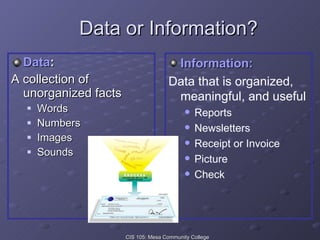
Data or Information? Data : A collection of unorganized facts Words Numbers Images Sounds Information: Data that is organized, meaningful, and useful Reports Newsletters Receipt or Invoice Picture Check
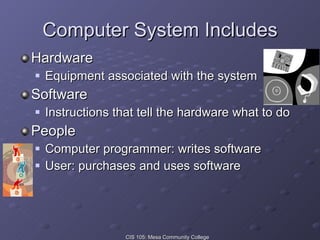
Computer System Includes Hardware Equipment associated with the system Software Instructions that tell the hardware what to do People Computer programmer: writes software User: purchases and uses software
Definition of a computer A machine that accepts  data  (input) and processes it into useful  information  (output). A computer system requires four main aspects of data handling: Input Processing Output Storage
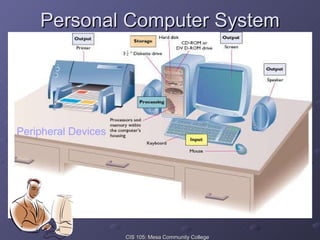
Personal Computer System Peripheral Devices
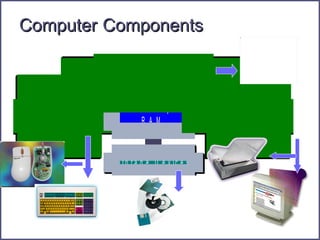
Computer   Components
The Processor Center of activity in the computer Consists of electronic circuits  Interprets and executes program instructions Communicates with input, output, and storage devices Actually transforms data into information
Memory Random access memory (RAM) is a temporary storage area for data to be processed. Storage measurement basics:  KB = 1,000 memory locations MB = One million memory locations GB = One billion memory locations Memory locations usually store one character or byte per location. Example: 64 MB RAM holds 64 million bytes (characters )  before it becomes full. 512 64 256 128
Primary Storage Used to temporarily hold data (volatile) After it is retrieved from input device and before it is processed After it is processed and before it is released to output device Data in memory lost if power is lost or program closed
Software System Software User Interface  -a graphical user interface (GUI). Uses pictures/icons to give commands. Operating System Controls the operations of the computer. Translates hardware and software. Utility Programs Specific tasks Application Software Packaged   Meets needs of many users Custom Unique requirements Shareware   Distributed free for a trial period Freeware/Public Domain No cost Freeware is copywrited Public Domain has no copywrite restrictions. Software Development Programmers Systems Analysts
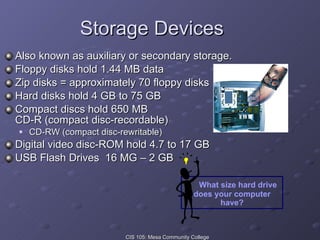
Storage Devices Also known as auxiliary or secondary storage.  Floppy disks hold 1.44 MB data Zip disks = approximately 70 floppy disks Hard disks hold 4 GB to 75 GB Compact discs hold 650 MB CD-R (compact disc-recordable) CD-RW (compact disc-rewritable) Digital video disc-ROM hold 4.7 to 17 GB USB Flash Drives  16 MG – 2 GB What size hard drive does your computer have?
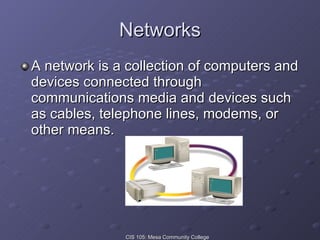
Networks A network is a collection of computers and devices connected through communications media and devices such as cables, telephone lines, modems, or other means.
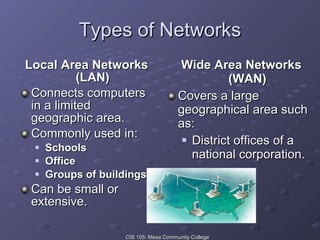
Types of Networks Local Area Networks (LAN) Connects computers in a limited geographic area. Commonly used in: Schools Office Groups of buildings Can be small or extensive. Wide Area Networks (WAN) Covers a large geographical area such as: District offices of a national corporation.
The Internet The largest and most far-reaching network Connects users worldwide Not actually a network, but a collection of thousands of networks Began as a means for Department of Defense and its research institutions to share information Information was text-only Commands to navigate were obscure Now, much more visually based Use browser to explore the Internet World Wide Web
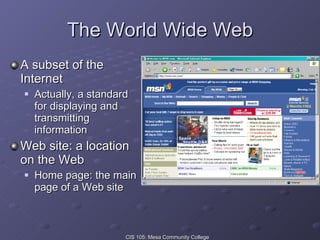
The World Wide Web A subset of the Internet Actually, a standard for displaying and transmitting information Web site: a location on the Web Home page: the main page of a Web site
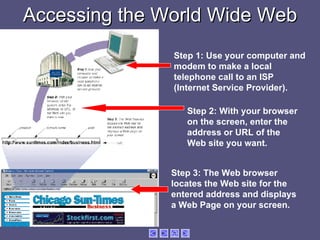
Accessing the World Wide Web Step 1: Use your computer and modem to make a local telephone call to an ISP (Internet Service Provider). Step 2: With your browser on the screen, enter the address or URL of the Web site you want. Step 3: The Web browser locates the Web site for the entered address and displays a Web Page on your screen.
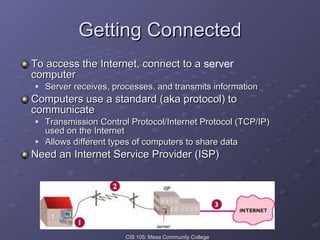
Getting Connected To access the Internet, connect to a  server  computer Server receives, processes, and transmits information Computers use a standard (aka protocol) to communicate Transmission Control Protocol/Internet Protocol (TCP/IP) used on the Internet Allows different types of computers to share data Need an Internet Service Provider (ISP)
Internet Service Providers The owner of a server computer Charges a fee for access to the Internet Fee can provide unlimited access or be based on usage Provides the user a means to connect to the server Once connected, you can connect to the Internet and all other server computers
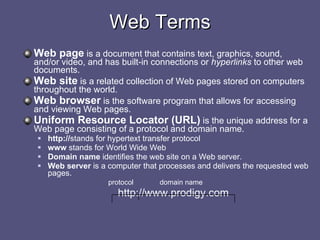
Web page  is a document that contains text, graphics, sound, and/or video, and has built-in connections or  hyperlinks  to other web documents. Web site  is a related collection of Web pages stored on computers throughout the world. Web browser  is the software program that allows for accessing and viewing Web pages. Uniform Resource Locator (URL)  is the unique address for a Web page consisting of a protocol and domain name. http:// stands for hypertext transfer protocol www  stands for World Wide Web Domain name  identifies the web site on a Web server. Web server  is a computer that processes and delivers the requested web pages.   protocol   domain name http://www.prodigy.com Web Terms
Electronic Mail E-mail Transmission of messages via a computer network. Electronic mail software enables you to create, send, receive, forward, etc. email message.  For example:  Outlook E-mail address is a combination of a username and domain name.  For example:  [email_address] For free email accounts try  www.hotmail.com For more information on the Web and email,  go to  www.learnthenet.com
If Asked, Can You… Describe the fundamental characteristics of computers Describe the benefits of computers  Distinguish data from information Identify the basic components of a computer system: input, processing, output, and storage List some common input, output, and storage media  Describe the significance of networking Explain the significance of the Internet Explain the various classifications of computers
Questions? ? ? ? ? ?
Browser Central Processing Unit Computer Literacy Data Vs. Information Hardware Home Page Input Internet ISP Memory Modem Output Peripheral Equipment Primary And Secondary Storage Software TCP/IP Web Site WWW Terms to Know: Computer Overview
Sources Capron; Computers: Tools for An Information Age, 8 th  Ed. 2003 Pfaffenberger; Computers in Your Future 2003 Microsoft Clipart   Webopedia
If Asked, Can You… Describe the fundamental characteristics of computers Describe the benefits & challenges of computers  Identify the basic components of a computer system: input, processing, output, and storage List some common input, output, and storage media  Describe the significance of networking Explain the significance of the Internet Explain the various classifications of computers

One Computers Overview

  • 1.
    Computers: Tools foran Information Age (An Overview)
  • 2.
    Objectives Describe thefundamental characteristics of computers Describe the benefits of computers Distinguish data from information Identify the basic components of a computer system: input, processing, output, and storage List some common input, output, and storage media Describe the significance of networking Explain the significance of the Internet Explain the various classifications of computers
  • 3.
    What Is ComputerLiteracy? Awareness : of the importance, versatility, and pervasiveness of computers in our society Knowledge : Learning what computers are and how they work – learning the jargon Interaction : Learning how to use computers
  • 4.
    The Need forComputer Fluency What is computer fluency? Knowledge possessed by people who are able to navigate the digital world successfully; includes computer literacy, plus knowledge of underlying concepts & principles Points to Ponder… How can you become computer fluent? Why are computer-fluent people better at gauging the true level of risk of a virus?
  • 5.
    Benefits of ComputersProductivity Workers use computers to do their jobs faster and better Many processes can be more efficiently controlled by computers Decision Making Helps decision makers sort out financial, geographical, and logistical factors Cost Reduction Helps hold down costs of labor, energy and paperwork
  • 6.
    Why is aComputer Powerful? Speed of light... Reliability low failure rate = consistency Accuracy GIGO (garbage in = garbage out) Storage quick, efficient Communications – Sharing input, process, output, and storage
  • 7.
    Data or Information?Data : A collection of unorganized facts Words Numbers Images Sounds Information: Data that is organized, meaningful, and useful Reports Newsletters Receipt or Invoice Picture Check
  • 8.
    Computer System IncludesHardware Equipment associated with the system Software Instructions that tell the hardware what to do People Computer programmer: writes software User: purchases and uses software
  • 9.
    Definition of acomputer A machine that accepts data (input) and processes it into useful information (output). A computer system requires four main aspects of data handling: Input Processing Output Storage
  • 10.
    Personal Computer SystemPeripheral Devices
  • 11.
    Computer Components
  • 12.
    The Processor Centerof activity in the computer Consists of electronic circuits Interprets and executes program instructions Communicates with input, output, and storage devices Actually transforms data into information
  • 13.
    Memory Random accessmemory (RAM) is a temporary storage area for data to be processed. Storage measurement basics: KB = 1,000 memory locations MB = One million memory locations GB = One billion memory locations Memory locations usually store one character or byte per location. Example: 64 MB RAM holds 64 million bytes (characters ) before it becomes full. 512 64 256 128
  • 14.
    Primary Storage Usedto temporarily hold data (volatile) After it is retrieved from input device and before it is processed After it is processed and before it is released to output device Data in memory lost if power is lost or program closed
  • 15.
    Software System SoftwareUser Interface -a graphical user interface (GUI). Uses pictures/icons to give commands. Operating System Controls the operations of the computer. Translates hardware and software. Utility Programs Specific tasks Application Software Packaged Meets needs of many users Custom Unique requirements Shareware Distributed free for a trial period Freeware/Public Domain No cost Freeware is copywrited Public Domain has no copywrite restrictions. Software Development Programmers Systems Analysts
  • 16.
    Storage Devices Alsoknown as auxiliary or secondary storage. Floppy disks hold 1.44 MB data Zip disks = approximately 70 floppy disks Hard disks hold 4 GB to 75 GB Compact discs hold 650 MB CD-R (compact disc-recordable) CD-RW (compact disc-rewritable) Digital video disc-ROM hold 4.7 to 17 GB USB Flash Drives 16 MG – 2 GB What size hard drive does your computer have?
  • 17.
    Networks A networkis a collection of computers and devices connected through communications media and devices such as cables, telephone lines, modems, or other means.
  • 18.
    Types of NetworksLocal Area Networks (LAN) Connects computers in a limited geographic area. Commonly used in: Schools Office Groups of buildings Can be small or extensive. Wide Area Networks (WAN) Covers a large geographical area such as: District offices of a national corporation.
  • 19.
    The Internet Thelargest and most far-reaching network Connects users worldwide Not actually a network, but a collection of thousands of networks Began as a means for Department of Defense and its research institutions to share information Information was text-only Commands to navigate were obscure Now, much more visually based Use browser to explore the Internet World Wide Web
  • 20.
    The World WideWeb A subset of the Internet Actually, a standard for displaying and transmitting information Web site: a location on the Web Home page: the main page of a Web site
  • 21.
    Accessing the WorldWide Web Step 1: Use your computer and modem to make a local telephone call to an ISP (Internet Service Provider). Step 2: With your browser on the screen, enter the address or URL of the Web site you want. Step 3: The Web browser locates the Web site for the entered address and displays a Web Page on your screen.
  • 22.
    Getting Connected Toaccess the Internet, connect to a server computer Server receives, processes, and transmits information Computers use a standard (aka protocol) to communicate Transmission Control Protocol/Internet Protocol (TCP/IP) used on the Internet Allows different types of computers to share data Need an Internet Service Provider (ISP)
  • 23.
    Internet Service ProvidersThe owner of a server computer Charges a fee for access to the Internet Fee can provide unlimited access or be based on usage Provides the user a means to connect to the server Once connected, you can connect to the Internet and all other server computers
  • 24.
    Web page is a document that contains text, graphics, sound, and/or video, and has built-in connections or hyperlinks to other web documents. Web site is a related collection of Web pages stored on computers throughout the world. Web browser is the software program that allows for accessing and viewing Web pages. Uniform Resource Locator (URL) is the unique address for a Web page consisting of a protocol and domain name. http:// stands for hypertext transfer protocol www stands for World Wide Web Domain name identifies the web site on a Web server. Web server is a computer that processes and delivers the requested web pages. protocol domain name http://www.prodigy.com Web Terms
  • 25.
    Electronic Mail E-mailTransmission of messages via a computer network. Electronic mail software enables you to create, send, receive, forward, etc. email message. For example: Outlook E-mail address is a combination of a username and domain name. For example: [email_address] For free email accounts try www.hotmail.com For more information on the Web and email, go to www.learnthenet.com
  • 26.
    If Asked, CanYou… Describe the fundamental characteristics of computers Describe the benefits of computers Distinguish data from information Identify the basic components of a computer system: input, processing, output, and storage List some common input, output, and storage media Describe the significance of networking Explain the significance of the Internet Explain the various classifications of computers
  • 27.
  • 28.
    Browser Central ProcessingUnit Computer Literacy Data Vs. Information Hardware Home Page Input Internet ISP Memory Modem Output Peripheral Equipment Primary And Secondary Storage Software TCP/IP Web Site WWW Terms to Know: Computer Overview
  • 29.
    Sources Capron; Computers:Tools for An Information Age, 8 th Ed. 2003 Pfaffenberger; Computers in Your Future 2003 Microsoft Clipart Webopedia
  • 30.
    If Asked, CanYou… Describe the fundamental characteristics of computers Describe the benefits & challenges of computers Identify the basic components of a computer system: input, processing, output, and storage List some common input, output, and storage media Describe the significance of networking Explain the significance of the Internet Explain the various classifications of computers