Storage and Multimedia Chapter 6 B.M.H
Index Magnetic Tape Storage Optical Disk Storage Multimedia
Secondary Storage Magnetic storage Disk storage Floppy disk Hard disk Tape storage Optical storage CD DVD
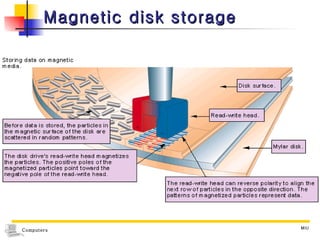
Magnetic disk storage
Magnetic Tape Storage Plastic tape with a magnetic coating  Looks like the tape used in music cassettes Magnetic media Data is stored as extremely small magnetic spots
Magnetic Tape Storage Form ½-inch-wide tape wound on a reel ¼-inch-wide in data cartridges and cassettes Tapes like ordinary music cassettes
 
Magnetic Tape Storage Capacity Expressed in terms of  density : which is the number of  characters per inch (cpi)  or  bytes per inch (bpi)   that can be stored on the tape
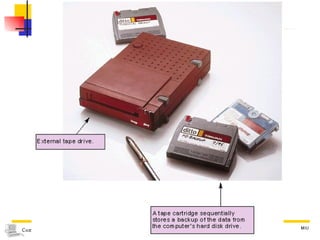
Magnetic Tape Storage The primary role of tape, today An inexpensive backup medium Because disks are the superior storage medium Quite reliable within as sealed module Can be accessed directly, in contrast to sequential data on tape
Backup Systems The causes of loss of data on a hard disk Physical damage  from fire and natural disasters Electromechanical failures Errors introduced by users Errors introduced by software     Backup is vital
Backup System A way of storing data in more than one place to protect it from damage and errors The primary storage for backup Magnetic tape
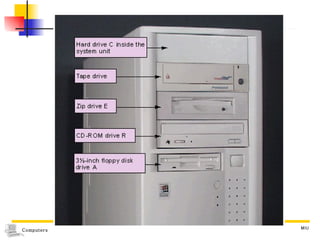
Backup System Tape backup system Copying all data from hard disk to a single tape in minutes Can be scheduled to take place when you do not use the computer Tape cartridges with more than 10GB  available at reasonable cost CD-R, and CD RW media for backup Limited to storing less than 1GB of data
 
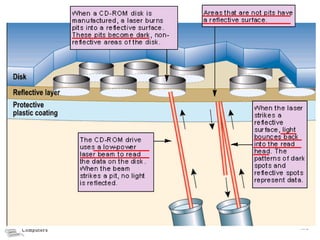
Optical disk storage Stores data as microscopic light and dark spots on the disk surface The dark spots  Called pits Represent as the 1s The lighter, non-pitted surface areas  Called lands Represent as the 0s
Optical disk storage Technology : A laser hits a layer of metallic material spread over the surface of a disk To write data Heat from the laser produces tiny spots, or pits, on the disk surface To read data The laser scans the disk, and a lens picks up light reflections from the spots
 
Optical disk storage Advantage Inexpensive and  compact storage  with greater capacity Less affected to environmental damage  than magnetic media
Optical storage technology Category : According to its read/write capability Read-only  media WORM  media MO  media
Optical storage technology Read-only  media Recorded by the manufacturer Can be read from by the user but not written to by the user Used to supply software not for user’s files
Optical storage technology WORM  media : Write-Once, Read-Many  May be written to once Once filled, it becomes a read-only medium Nonerasaible  Used for secure storage of original versions of valuable documents or data
Optical storage technology MO  media : Magneto-Optical Hybrid type of disk : Combines the best features of magnetic and optical disk technologies Has the high-volume capacity of an optical disk Can be written over like a magnetic disk
Optical disk storage Types CD:  C ompact  D isks DVD :  D igital  V ersatile  D isks
Compact disks Technology  An optical technology that uses the same media used for audio CDs Computer CD drives  Can play audio CDs, with the proper software
Compact disks Types ; according to the ability to read and write CD- ROM CD- R CD- RW
Compact disks CD- ROM : Compact Disk Read-Only Memory Storage : up to 700 megabytes per disk Format : identical to that of audio CD The primary medium for SW distribution CD-ROM drive Capable only of reading data from CDs
Compact disks CD- R  : Compact Disk-Recordable Permits writing just once on optical disk Requires a CD-R drive, special CD-R disks and the CD-R software Once written on, it can be read also by CD-ROM drive, not only CD-R
Compact disks CD- RW  : Compact Disk-ReWritable Allow to erase and record over data multiple times Requires a CD-RW drive, special CD-RW disks and the CD-RW software Most of today’s optical drives now read CD-RW disks
Digital Versatile Disk Originally  D igital  Video   D isk Technology  A variation of CD technology that was designed to provide enough storage capacity for a full-length movie Uses a laser with a shorter wavelength permitting it to read more densely packed spots thus increasing the disk capacity
DVD Types DVD- ROM DVD- RAM DVD+ RW
DVD-ROM Capacity Single-sided : up to 4.7-gigabyte Double-layered DVD : about 8.5-GB Double-sided : to 17-GB    Diskette (*450) << CD-ROM (*7) < DVD-ROM
DVD-ROM Used for holding movies Exquisite sound, full-length movies Suited for distributing large multimedia applications Games, encyclopedias, maps, and telephone number databases Require a DVD drive Also can read data from CD-ROM, CD-R and CD-RW
DVD-RAM Writable  version of DVD Stores 5.2-GB on a double-sided disk Readable only by DVD-RAM drives
DVD+RW Technology very similar to CD-RWs DVD-RAM and DVD+RW technologies are not compatible Disks created by a DVD-RAM drive cannot be used in a DVD+RW drive, and vice versa
Multimedia
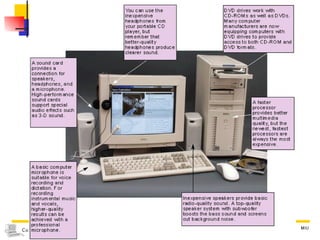
Multimedia Requires  sound  and  graphics  capability Equipment CD-ROM or DVD-ROM drive Sound card  or sound chip Speakers Headphones Microphone Graphics card Speedy processor chip
Multimedia Equipment  CD-ROM or DVD-ROM drive To access audio and software CD/DVD-ROMs Multimedia elements had better be stored on a CD-ROM /DVD-ROM than on a hard disk For the amounts of the multimedia data  are huge Insert only when user want to access them The higher the drive speed,  the faster the transfer of data and  the smoother the video showing on the screen
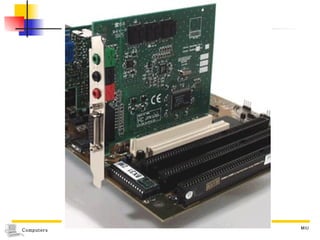
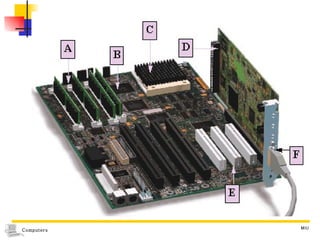
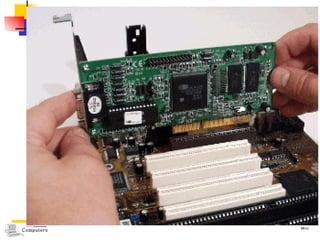
Multimedia Equipment Sound card Gives a computer the capability to record and play sound files Contains connectors to attach speakers, headphones and a microphone High-performance sound card include circuitry for special audio effects such as 3-D sound
Multimedia Equipment The quality of speakers and headphones Affect the quality of the sound that user hears
Multimedia Equipment Speaker Inexpensive one Provide basic radio-quality sound Top-quality Boosts the bass sound and screens out background noise
Multimedia Equipment Headphone Inexpensive one Can be used from a portable CD player Better-quality Produce clearer sound
Multimedia Equipment Microphone  Basic  Suitable for voice recording and dictation Professional For recording instrumental music and vocals
Multimedia Equipment Graphics card Takes signals from the processor and uses them to “paint” an image on the screen Provides a connection for the monitor’s data cable “ accelerated” graphics cards  equipped with circuitry that optimizes to display videos
Multimedia Equipment Processor  should quickly handle the huge amount of digital data for multimedia The faster the processor, the more data it can process each second ; the better multimedia quality smooth video sequences  a sound track perfectly coordinated with the action Processor chips  with Intel’s MMX or AMD’s 3DNow!  Enhance a computer’s multimedia performance


Computers13 Ch6

  • 1.
    Storage and MultimediaChapter 6 B.M.H
  • 2.
    Index Magnetic TapeStorage Optical Disk Storage Multimedia
  • 3.
    Secondary Storage Magneticstorage Disk storage Floppy disk Hard disk Tape storage Optical storage CD DVD
  • 4.
  • 5.
    Magnetic Tape StoragePlastic tape with a magnetic coating Looks like the tape used in music cassettes Magnetic media Data is stored as extremely small magnetic spots
  • 6.
    Magnetic Tape StorageForm ½-inch-wide tape wound on a reel ¼-inch-wide in data cartridges and cassettes Tapes like ordinary music cassettes
  • 7.
  • 8.
    Magnetic Tape StorageCapacity Expressed in terms of density : which is the number of characters per inch (cpi) or bytes per inch (bpi) that can be stored on the tape
  • 9.
    Magnetic Tape StorageThe primary role of tape, today An inexpensive backup medium Because disks are the superior storage medium Quite reliable within as sealed module Can be accessed directly, in contrast to sequential data on tape
  • 10.
    Backup Systems Thecauses of loss of data on a hard disk Physical damage from fire and natural disasters Electromechanical failures Errors introduced by users Errors introduced by software  Backup is vital
  • 11.
    Backup System Away of storing data in more than one place to protect it from damage and errors The primary storage for backup Magnetic tape
  • 12.
    Backup System Tapebackup system Copying all data from hard disk to a single tape in minutes Can be scheduled to take place when you do not use the computer Tape cartridges with more than 10GB available at reasonable cost CD-R, and CD RW media for backup Limited to storing less than 1GB of data
  • 13.
  • 14.
    Optical disk storageStores data as microscopic light and dark spots on the disk surface The dark spots Called pits Represent as the 1s The lighter, non-pitted surface areas Called lands Represent as the 0s
  • 15.
    Optical disk storageTechnology : A laser hits a layer of metallic material spread over the surface of a disk To write data Heat from the laser produces tiny spots, or pits, on the disk surface To read data The laser scans the disk, and a lens picks up light reflections from the spots
  • 16.
  • 17.
    Optical disk storageAdvantage Inexpensive and compact storage with greater capacity Less affected to environmental damage than magnetic media
  • 18.
    Optical storage technologyCategory : According to its read/write capability Read-only media WORM media MO media
  • 19.
    Optical storage technologyRead-only media Recorded by the manufacturer Can be read from by the user but not written to by the user Used to supply software not for user’s files
  • 20.
    Optical storage technologyWORM media : Write-Once, Read-Many May be written to once Once filled, it becomes a read-only medium Nonerasaible Used for secure storage of original versions of valuable documents or data
  • 21.
    Optical storage technologyMO media : Magneto-Optical Hybrid type of disk : Combines the best features of magnetic and optical disk technologies Has the high-volume capacity of an optical disk Can be written over like a magnetic disk
  • 22.
    Optical disk storageTypes CD: C ompact D isks DVD : D igital V ersatile D isks
  • 23.
    Compact disks Technology An optical technology that uses the same media used for audio CDs Computer CD drives Can play audio CDs, with the proper software
  • 24.
    Compact disks Types; according to the ability to read and write CD- ROM CD- R CD- RW
  • 25.
    Compact disks CD-ROM : Compact Disk Read-Only Memory Storage : up to 700 megabytes per disk Format : identical to that of audio CD The primary medium for SW distribution CD-ROM drive Capable only of reading data from CDs
  • 26.
    Compact disks CD-R : Compact Disk-Recordable Permits writing just once on optical disk Requires a CD-R drive, special CD-R disks and the CD-R software Once written on, it can be read also by CD-ROM drive, not only CD-R
  • 27.
    Compact disks CD-RW : Compact Disk-ReWritable Allow to erase and record over data multiple times Requires a CD-RW drive, special CD-RW disks and the CD-RW software Most of today’s optical drives now read CD-RW disks
  • 28.
    Digital Versatile DiskOriginally D igital Video D isk Technology A variation of CD technology that was designed to provide enough storage capacity for a full-length movie Uses a laser with a shorter wavelength permitting it to read more densely packed spots thus increasing the disk capacity
  • 29.
    DVD Types DVD-ROM DVD- RAM DVD+ RW
  • 30.
    DVD-ROM Capacity Single-sided: up to 4.7-gigabyte Double-layered DVD : about 8.5-GB Double-sided : to 17-GB  Diskette (*450) << CD-ROM (*7) < DVD-ROM
  • 31.
    DVD-ROM Used forholding movies Exquisite sound, full-length movies Suited for distributing large multimedia applications Games, encyclopedias, maps, and telephone number databases Require a DVD drive Also can read data from CD-ROM, CD-R and CD-RW
  • 32.
    DVD-RAM Writable version of DVD Stores 5.2-GB on a double-sided disk Readable only by DVD-RAM drives
  • 33.
    DVD+RW Technology verysimilar to CD-RWs DVD-RAM and DVD+RW technologies are not compatible Disks created by a DVD-RAM drive cannot be used in a DVD+RW drive, and vice versa
  • 34.
  • 35.
    Multimedia Requires sound and graphics capability Equipment CD-ROM or DVD-ROM drive Sound card or sound chip Speakers Headphones Microphone Graphics card Speedy processor chip
  • 36.
    Multimedia Equipment CD-ROM or DVD-ROM drive To access audio and software CD/DVD-ROMs Multimedia elements had better be stored on a CD-ROM /DVD-ROM than on a hard disk For the amounts of the multimedia data are huge Insert only when user want to access them The higher the drive speed, the faster the transfer of data and the smoother the video showing on the screen
  • 37.
    Multimedia Equipment Soundcard Gives a computer the capability to record and play sound files Contains connectors to attach speakers, headphones and a microphone High-performance sound card include circuitry for special audio effects such as 3-D sound
  • 38.
    Multimedia Equipment Thequality of speakers and headphones Affect the quality of the sound that user hears
  • 39.
    Multimedia Equipment SpeakerInexpensive one Provide basic radio-quality sound Top-quality Boosts the bass sound and screens out background noise
  • 40.
    Multimedia Equipment HeadphoneInexpensive one Can be used from a portable CD player Better-quality Produce clearer sound
  • 41.
    Multimedia Equipment Microphone Basic Suitable for voice recording and dictation Professional For recording instrumental music and vocals
  • 42.
    Multimedia Equipment Graphicscard Takes signals from the processor and uses them to “paint” an image on the screen Provides a connection for the monitor’s data cable “ accelerated” graphics cards equipped with circuitry that optimizes to display videos
  • 43.
    Multimedia Equipment Processor should quickly handle the huge amount of digital data for multimedia The faster the processor, the more data it can process each second ; the better multimedia quality smooth video sequences a sound track perfectly coordinated with the action Processor chips with Intel’s MMX or AMD’s 3DNow! Enhance a computer’s multimedia performance
  • 44.
  • 45.
  • 46.
  • 47.
  • 48.
  • 49.